
How Does BrowserLeaks Test Your Browser? 11 Checks and the Full Order
Open the BrowserLeaks homepage and the tests line up in a long column: IP, Canvas, WebGL, fonts, TLS. Some people click through every item, spend over an hour, close the page, and still cannot remember which test flagged what. Others run just the IP page and call it done, leaving the script parameters on every page untouched.
Neither approach produces a reliable conclusion. The problem is the order: readings that should cross-check each other never line up, so after testing you still cannot tell whether the environment actually has an issue.
This guide maps out 11 commonly used BrowserLeaks checks in three groups — network exit, page reading, and transport claims, covering what each group measures and then giving one complete order from exit to handshake. Every page runs straight in the browser.
Site Structure: One Test Per Page, Grouped Three Ways
BrowserLeaks gives each test dimension its own page, with the homepage as the entry point. For fingerprint browser users, the daily routine covers the 11 core tests; extended items such as content filtering, CSS media queries, and extension detection can be added as needed. The legacy Flash and Java plugin tests are no longer maintained, so ignore them.
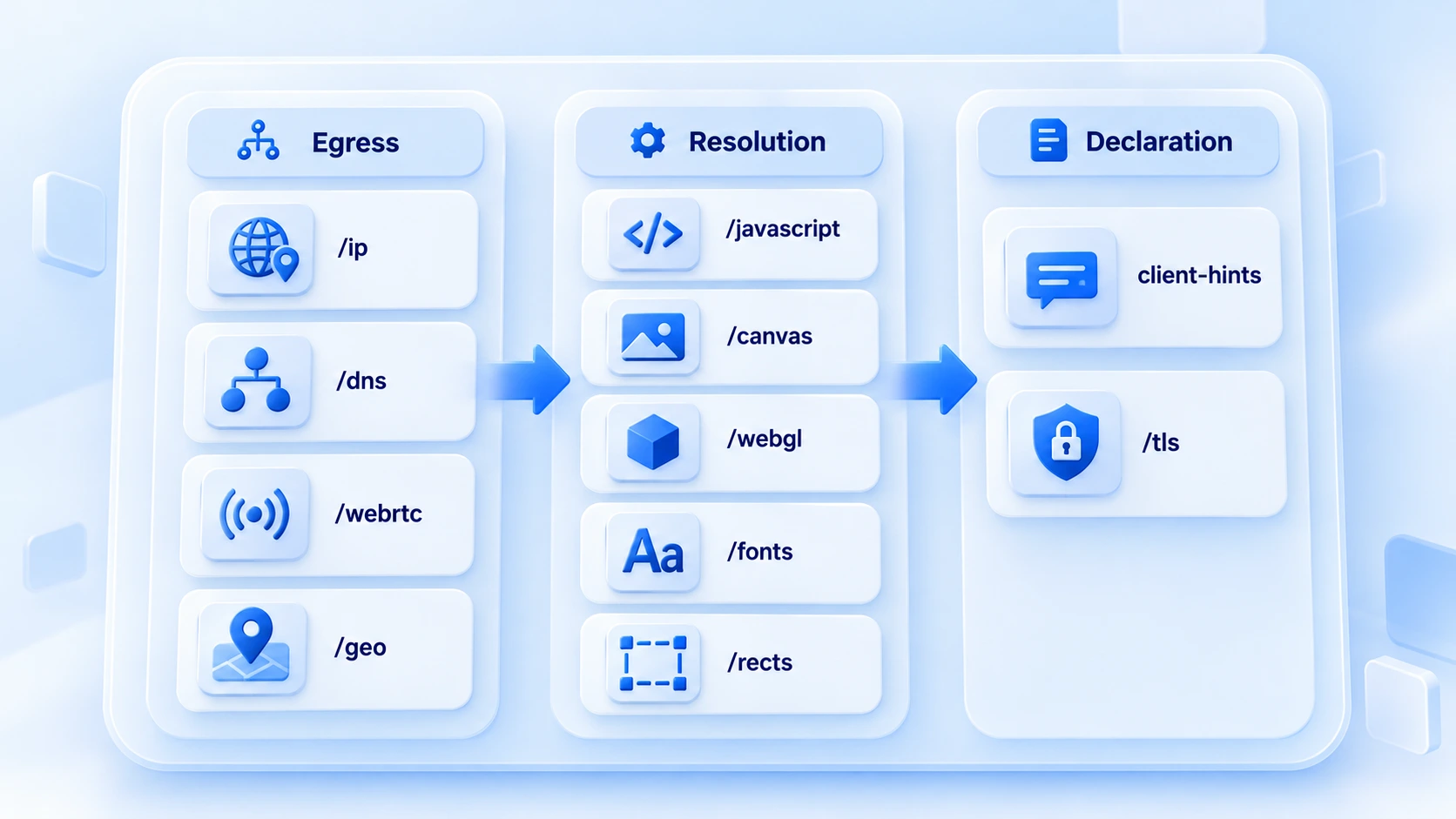
The 11 tests fall into three groups by where the reading comes from: group one checks where requests leave from, group two checks what page scripts can read, and group three checks what the connection handshake declares. Here is the overview table:
| Test | What it measures | What to compare across accounts |
|---|---|---|
| IP Address (/ip) | Exit IP and geolocation | Matches proxy configuration |
| DNS Leak Test (/dns) | Domain resolution path | Resolution bypasses the proxy |
| WebRTC Leak Test (/webrtc) | Addresses exposed via WebRTC | Real IP does not leak out |
| Geolocation API (/geo) | Browser geolocation reading | Consistent with IP region |
| JavaScript (/javascript) | Script engine and baseline environment | Readings match mainstream versions |
| Canvas Fingerprint (/canvas) | Canvas image hash | Stable across repeated runs |
| WebGL Report (/webgl) | GPU vendor and renderer model | Matches the configured device profile |
| Font Fingerprinting (/fonts) | Font list and rendered sizes | Count range and languages consistent |
| ClientRects (/rects) | Precision of element position readings | Same readings in the same environment |
| Client-Hints Test (/client-hints) | Brand and platform in request headers | Agrees with the script readings |
| TLS Client Test (/tls) | Encryption traits at handshake | Fits the claimed kernel version |
What Each Group Covers
The first group is the exit group, and four tests answer one question: do requests really leave through the proxy? /ip shows the IP and its location; /dns shows whether domain resolution bypasses the proxy and goes out locally. /webrtc shows whether the browser leaks a real address through the WebRTC channel, and /geo shows the geolocation reading. If the exit group finds a leak, hold off on the rest and fix the proxy and environment settings first.
Not sure which WebRTC mode to pick? Fingerprint browser WebRTC settings covers the use cases for each of the three modes. For the full decision process on resolution paths, see the DNS leak detection guide.
The second group is the reading group, five tests covering the environment parameters that page scripts can access. /javascript reports the script engine and baseline readings. /canvas, /webgl, /fonts, and /rects are the fingerprint sources for image rendering, GPU, fonts, and element positions. This group checks two things: whether the readings match the device profile, and whether they stay stable across repeated runs in the same environment.
For rendering logic and how to read the hash, the Canvas fingerprint guide goes into more detail.
The third group is the claims group, two tests for cross-validation. The client-hints page shows the browser brand and platform declared in the request headers, to check they match what the page scripts read. /tls shows the encryption traits at handshake, to check they fit the claimed kernel version. Both need readings from the first two groups as reference and reveal nothing on their own, which is why they come last.
The Order: Three Rounds
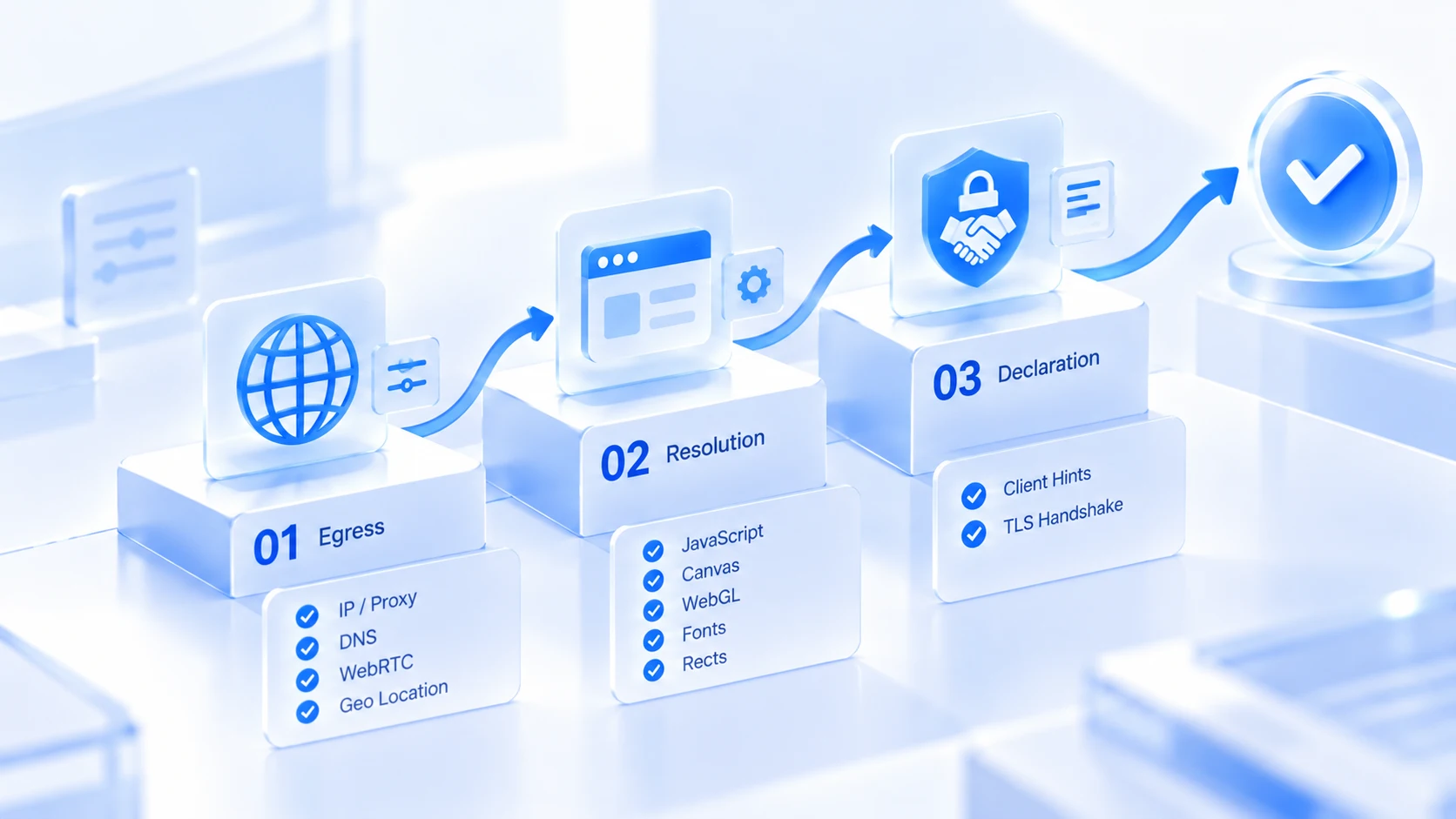
The order follows dependencies: exit first, then reading, then claims.
1. Round one: check the exit: Run /ip, /dns, /webrtc, and /geo. If the proxy is not working or there is a leak, stop and fix the network first. Fingerprint tests are pointless until then.
2. Round two: check the readings: Run /javascript, /canvas, /webgl, /fonts, and /rects. Compare each item against the device profile and against itself across runs, and note any outliers.
3. Round three: check the claims: Run /client-hints and /tls. Use the readings from the first two rounds as reference, and confirm that declarations, scripts, and handshake all agree.
How deep each round goes depends on how much the environment matters. For an everyday new environment, run round one plus /canvas and /webgl, and you are done in a few minutes. Before a key account goes live, run all 11 and record the readings with the date in the environment file, so any later configuration change has a paper trail.
The three detection sites can divide the work the same way: Whoer gives one overall score, good for a daily quick check; Browserscan provides a parameter snapshot, handy for routine audits; BrowserLeaks dedicates a page per test, good for drilling into a specific problem. When a score looks off, walking the three-round order pins down the page that is wrong. If the overall score is low but you cannot tell where the points went, first check the scoring breakdown in the Whoer detection guide, then come back and rerun the relevant round. It beats retesting blind.
Mapping to MostMate's Environment Setup
Test readings ultimately land in environment configuration. MostMate free anti detect browser for pc is a fingerprint browser where environments are created per account with isolated data, and most of the 11 readings trace back to a field in the creation form.
The four exit tests map to the proxy settings and the WebRTC mode. Proxies are maintained in a separate list and then assigned to individual environments. WebRTC offers real, disabled, or custom.
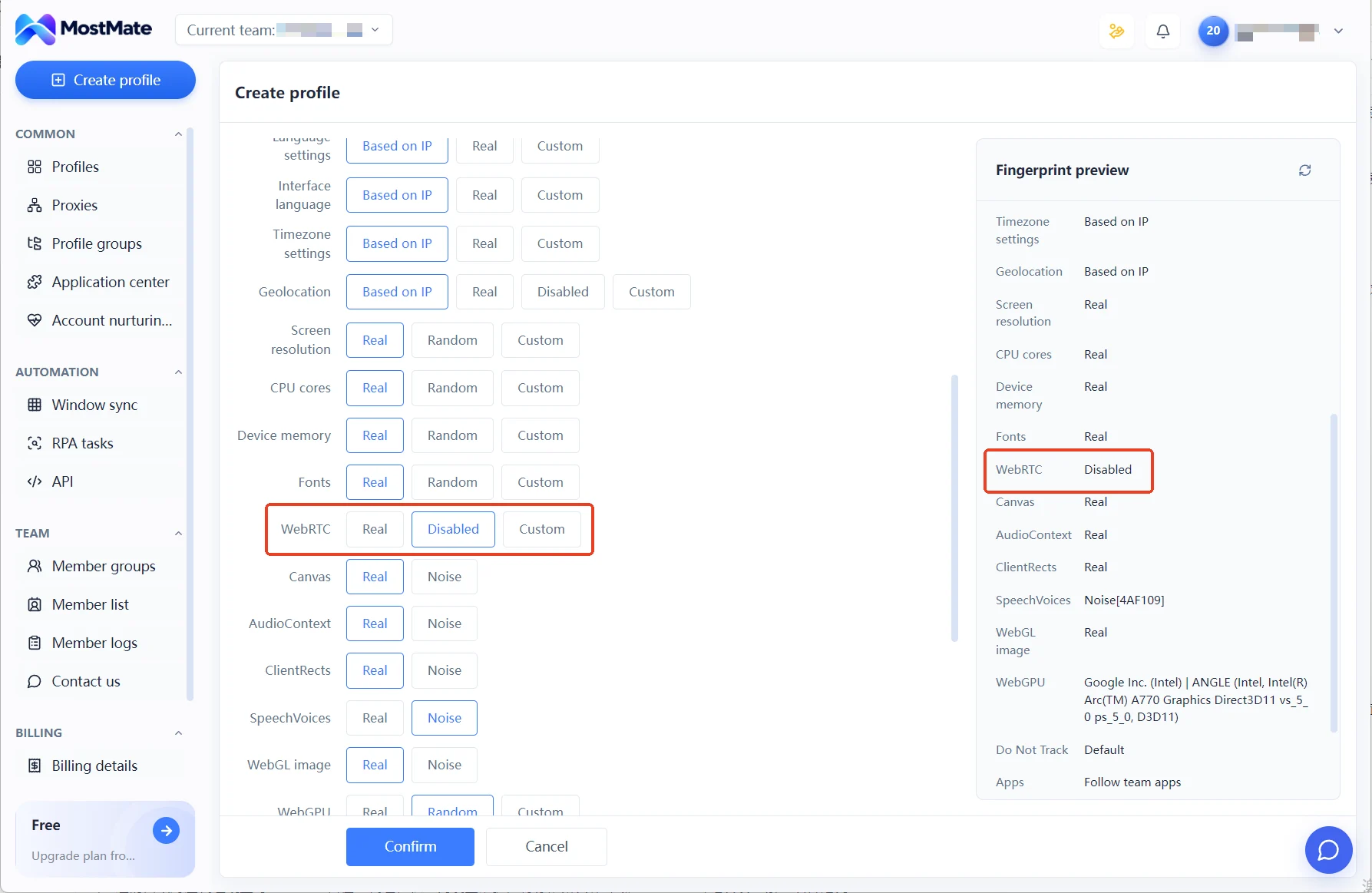
The five reading tests map to the parameters in the fingerprint settings. Language, timezone, and geolocation are generated with "Based on IP" by default. Screen, core count, memory, and the rest take real values or a preset level. The claims group maps to the operating system and browser version pickers. The UA is generated from the selection and can be edited afterward. To check that the two declarations share the same source, just go back to the client-hints page.
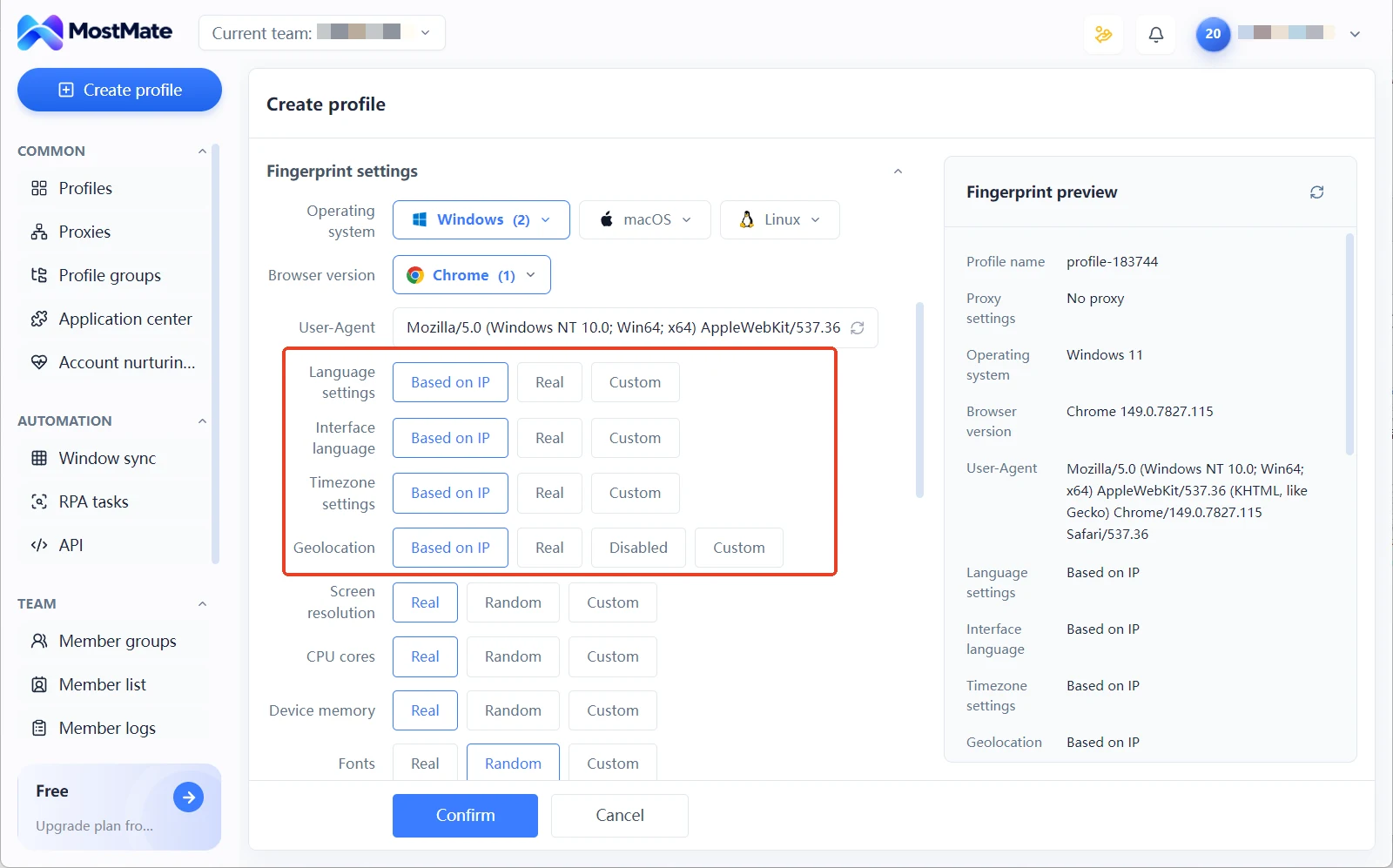
The fingerprint preview panel lists the value of every parameter while you build the environment, so obvious contradictions get fixed on the spot instead of waiting for a test page to surface them. This is what a dedicated MostMate fingerprint browser anti-detect setup adds over a plain browser with a proxy: the parameters the reading group audits are pinned at creation time.
For the full creation workflow, read the MostMate product overview first. Testing and configuration align the signals at the environment layer; whether accounts get linked by a platform also depends on that platform's rules and your usage behavior.
FAQ
Does BrowserLeaks require registration, and is there a fee?
No registration needed. Test pages run automatically on open, and the core tests are free. BrowserLeaks makes money by selling data APIs, so everyday users can simply run the tests. The same free-first logic applies when picking a tool, the best free anti detect browser 2026 list compares which options stay usable at zero cost.
Do all 11 tests need to run every time?
Not day to day. Round one plus two or three reading tests covers most risks in a few minutes. Run all 11 before a key environment goes live, or whenever readings do not agree with each other.
Two runs on the same environment give different results. Is that normal?
Check it test by test. Canvas hashes, font lists, and exit IPs should be stable; different readings on repeated runs point to a configuration problem. A few dynamic display items wobble slightly, and that is not an anomaly.
BrowserLeaks or Whoer?
They do not conflict. Whoer gives an overall score, good for a daily quick check; BrowserLeaks dedicates a page per test, good for pinpointing specific issues. For how to read the two together, the Whoer detection guide has a comparison.
Closing Thoughts
The 11 core BrowserLeaks tests are, at heart, a layered check of your environment. The exit group confirms where requests leave, the reading group confirms what scripts see, and the claims group confirms that the handshake and the readings come from the same source. Each round has a clear target to verify.
Walk the three rounds before any new environment goes live, and file the readings. To build these checks into your daily workflow, download MostMate, set up the environment, check the fingerprint preview first, then go through the test pages one by one.

MOSTMATE
Secure Multi-Account Management, Made Simple
Start with your first account and use MostMate to build safer, smarter, and more efficient multi-account operations.
- Independent profiles. Consistent identities.
- AI Automation · Account Health · Team Operations



