
Prepare together
Create or import multiple profiles without starting the same preparation process for every account.
BULK PROFILE MANAGEMENT
Manage browser profiles in batches, with clear boundaries between accounts. MostMate brings preparation, daily operations and organization into one workspace.
Independent environments. Clear selections. More organized work.
See the workflowTry changing the selection. A batch action should apply only to the environments you intend to work with.
Create or import multiple profiles without starting the same preparation process for every account.
A shared workspace does not mean shared browser storage. Each profile keeps its own environment.
Organize profiles by project and check your selection before applying a batch operation.
Three practical ways to spend less time managing environments and more time on the work inside them.
01PREPARE
Use bulk creation and import to prepare browser profiles for stores, brands or client projects. Give each environment a clear identity before daily operations begin.
Available import fields and formats follow the template in your current client.
02OPERATE
Select the profiles needed for a task, then use supported batch launch or close actions. Keep the scope clear when moving between projects.
Opening profiles does not guarantee permanent login or complete tasks inside websites.
03ORGANIZE
Group environments by store, brand or client. Combine clear profile organization with the available team assignment and permission controls.
Team controls and capacity depend on your current version and plan.
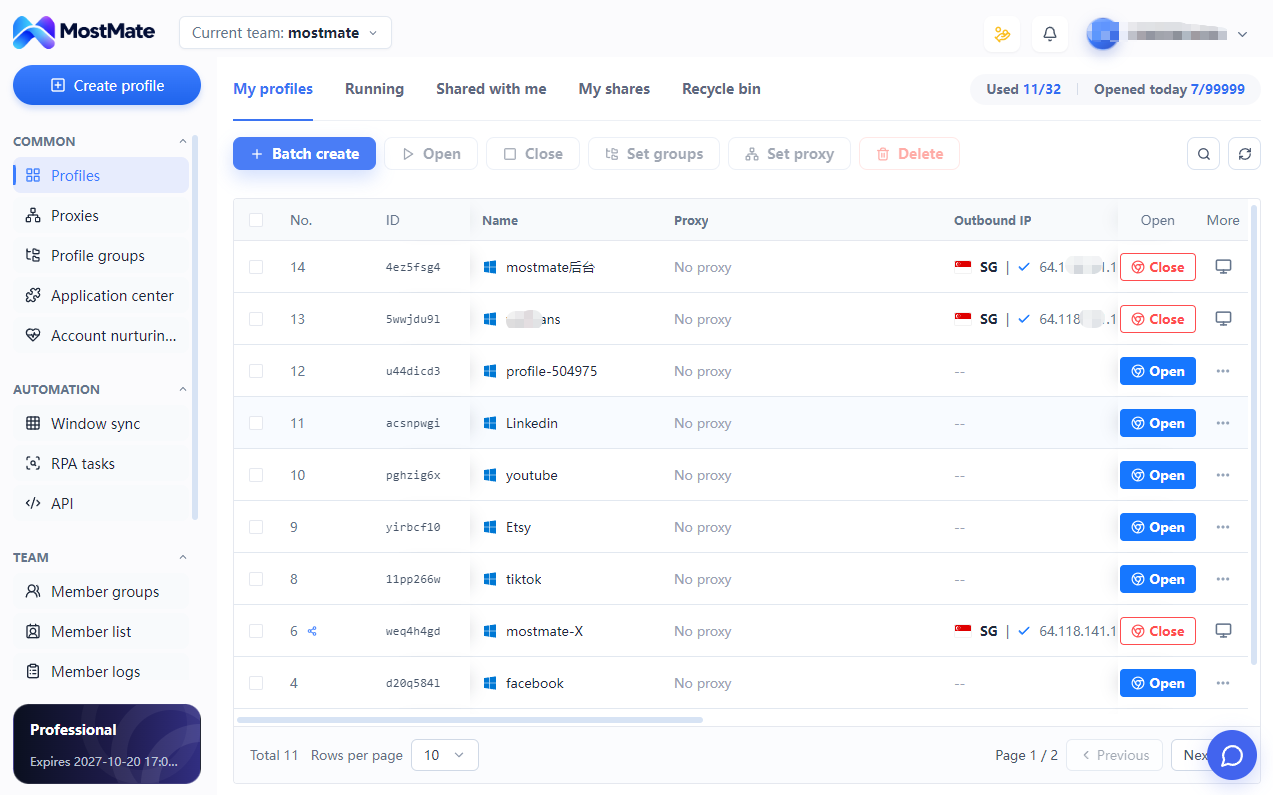
A practical operating routine, from preparing environments to checking the result.
Create or import profiles and review the account and network details.
Find the project or group and confirm which environments should be included.
Use the batch operation supported by your client for the selected profiles.
Check the resulting profile state and any client messages before continuing.
MostMate describes bulk creation, import, launch, close and grouping of browser profiles. Check your current client for the supported actions, import template and any plan restrictions.
Batch management applies an operation to several profiles. It does not mean that those profiles share browser storage or login sessions. Isolation helps separate environments, but does not guarantee that a platform cannot associate accounts through other signals.
Practical capacity depends on your device, the websites running, the workload and applicable product limits. Start with a manageable batch and observe resource use. There is no single performance figure that fits every setup.
No. Bulk profile management handles environments, such as opening or grouping them. Window Sync coordinates actions across windows, while RPA runs defined workflows. Choose the capability that matches the task.
Review the affected profile, any client message and its network configuration. Confirm the selection and what has already completed before repeating an action. Available diagnostics depend on the operation and client version.
MOSTMATE
Bring routine profile operations together. Keep account environments distinct and daily work easier to manage.
Loading messages…
You are viewing a previous conversation.
Enter to send · Shift + Enter for a new line
