ONE WORKSPACE. CLEARER WORK.

Manage more accounts. Spend less time searching

Bring store, social and client accounts into a clear profile list. Organize by project, open the environment you need and keep everyday work moving.

Built around browser profiles. Designed for everyday operations.

Explore the workflow
MostMate
Your account workspace
ProfileProjectAction
Store workspaceProfile 001CommerceOpen
Brand workspaceProfile 002SocialOpen
Client workspaceProfile 003ClientsOpen
An organized list. A clear next step.

From scattered accounts to a repeatable routine

Keep the account, its browser setup and the next action together. Spend less time looking for the right place to work.

01Organize

Find the right account before you start

Use clear profile names and groups to organize accounts by brand, store or client. Keep related environments together instead of relying on a collection of open tabs.

A practical naming pattern: client · platform · purpose.
02Open

Return to the environment for that account

Open the corresponding profile from your list. Its browser configuration and stored session data stay with that profile, so you can work in the right context.

Websites can expire sessions or request verification. A saved profile does not guarantee permanent login.

03Batch

Handle routine profile operations together

Create, open, close and group profiles in batches. Select the environments for the task, check your selection and apply the supported operation from one place.

Batch profile management is different from synchronizing clicks inside websites or running an RPA workflow.

04Collaborate

Give each teammate a clear workspace

Assign environments to the people responsible for them and manage the available permissions. Keep client work organized as responsibilities change.

Available controls and team capacity depend on your product version and plan.

A real workspace, built for real account operations

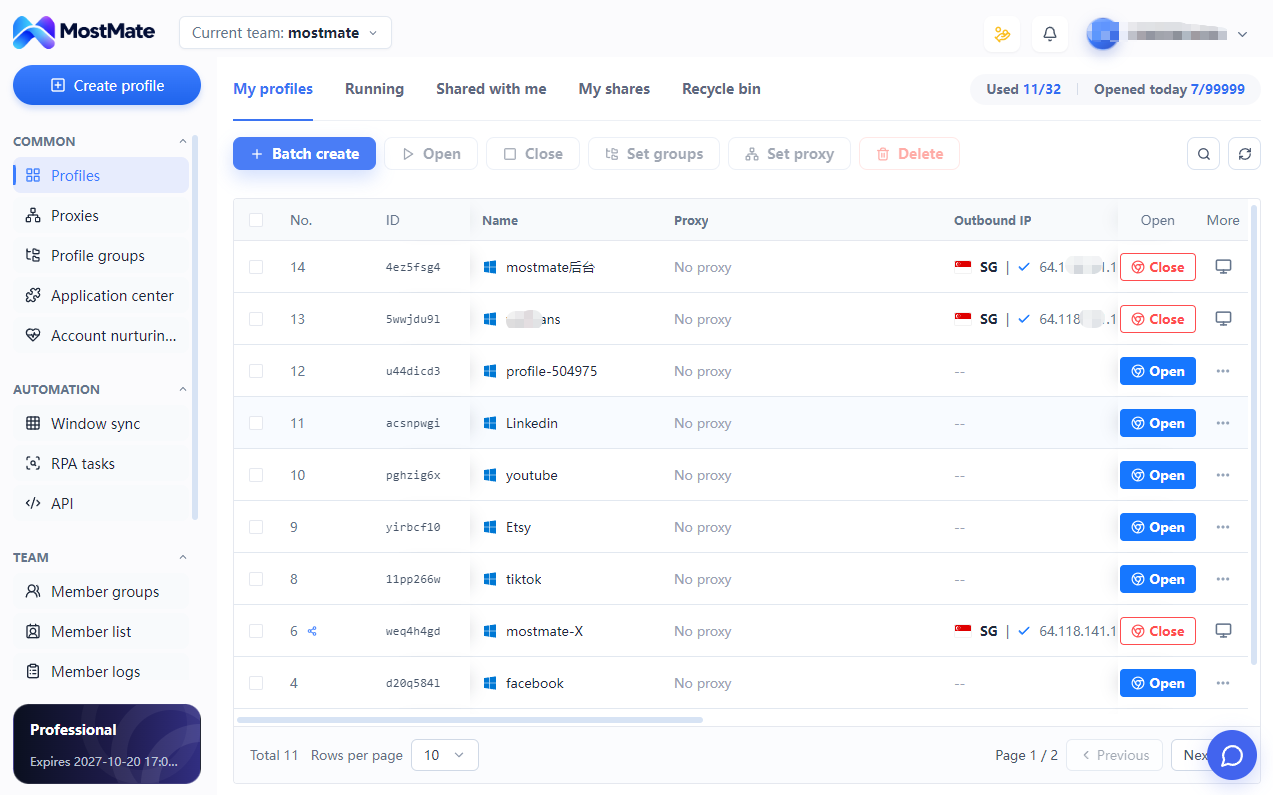
The MostMate environment list brings profile names, groups, proxy settings and opening actions into one view. Review the context before starting work.

Download MostMate
MostMate desktop environment list with profile names, groups and profile opening controls

Build a routine your team can repeat

  1. 01

    Create the profile

    Create an environment for the account and give it a recognizable name.

  2. 02

    Organize the context

    Choose a group and configure the browser and proxy settings needed for the task.

  3. 03

    Start or assign the work

    Open the environment yourself or assign it to the appropriate team member.

One way to organize different kinds of work

Keep each store, brand or client recognizable, while adapting the workflow to the platform you use.

Before you organize your accounts

Is this a social media publishing tool?

MostMate organizes browser environments for your accounts. You use the websites inside those environments. Do not assume it schedules posts, combines inboxes or replaces the platforms themselves.

How should I organize multiple accounts?

Use recognizable profile names and group related work by client, brand or project. Decide which environment belongs to each account before starting a task, and keep the naming pattern consistent across your team.

Does opening a saved profile always keep me logged in?

A profile retains its stored browser data, but the website controls its login sessions. Sessions may expire, and websites may ask you to sign in or complete verification again.

How is batch management different from RPA?

Batch management applies supported operations to selected browser profiles. RPA executes a defined workflow. Window synchronization mirrors supported actions between windows. Choose the tool that matches the task.

Can I use MostMate with a team?

You can assign environments and manage the permissions available in MostMate. Confirm the member allowance and supported controls for your current plan and version before setting up the team.

MOSTMATE

Make the next account easier to find

Start with a clearly named profile. Build an organized workspace as your operations grow.