
Multiple windows in one profile
Shared profile data
Opening another normal window in the same browser profile usually keeps the same cookies and login state. A second window is not a new account environment.
MOSTMATE · Anti-Detect Browser
Built on Chromium. Configure fingerprints, isolate cookies and sessions, and manage proxies in one client. Give every account a clear, independent environment—with less mix-up and more control.
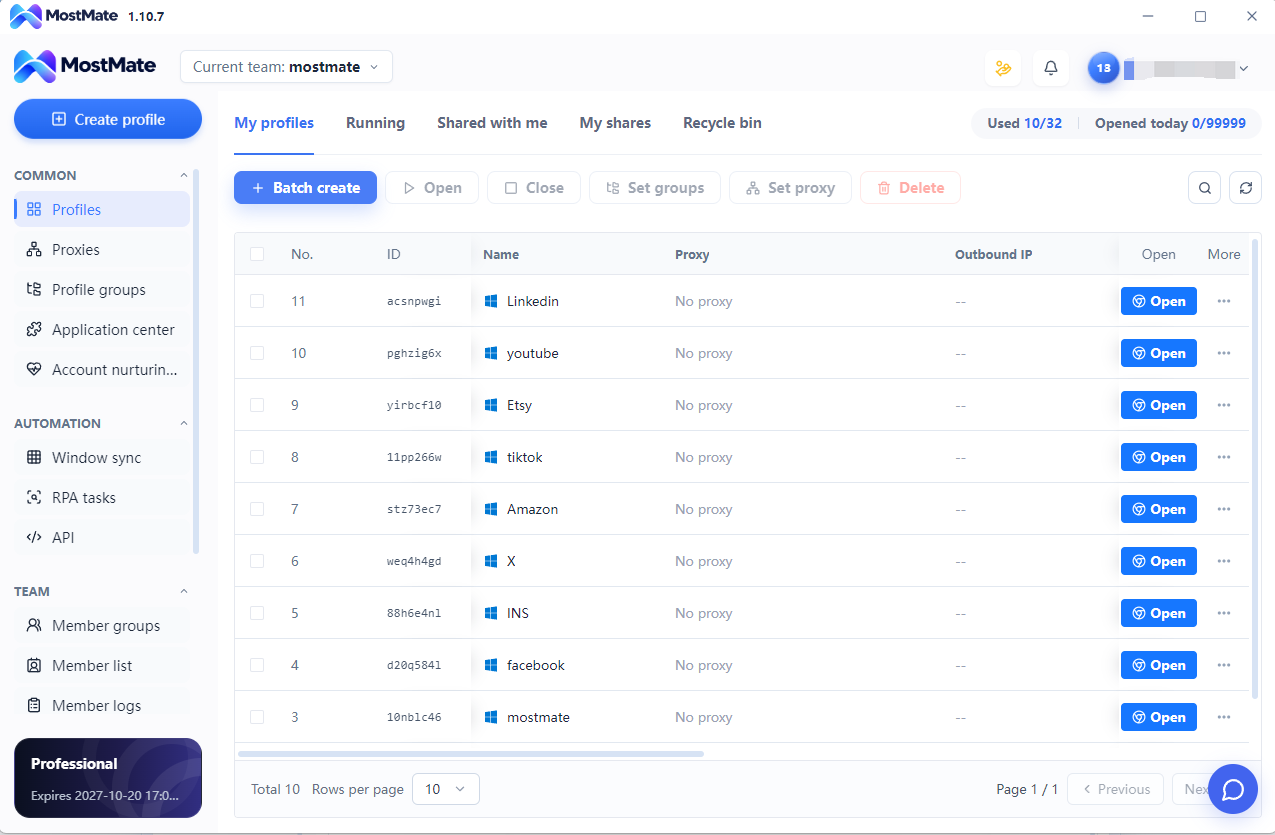
An anti-detect browser is a browser designed for secure multi-account management. Through independent browser environments, fingerprint configuration and data isolation, it creates separate workspaces for different accounts. Browser fingerprints, cookies, login sessions and proxy settings are managed separately to reduce environment mix-ups and account-linking risks.
MostMate brings these capabilities together in one client, helping users manage multiple accounts more safely and efficiently across e-commerce, social media marketing, advertising and other business workflows.
MostMate Anti-Detect Browser for Multiple Accounts combines isolated profiles with day-to-day account operations.
A browser fingerprint combines observable characteristics, rather than a single device number. Websites can compare browser and system information, display settings and rendering behavior to recognize an environment.
Opening another normal window in the same browser profile usually keeps the same cookies and login state. A second window is not a new account environment.
MostMate gives each profile its own fingerprint configuration, cookies, login sessions and proxy settings. Match each account to its dedicated environment to reduce shared-session mix-ups and unintended reuse of browser data.
Chrome also supports separate user profiles. MostMate adds a dedicated workspace for managing many profiles together with fingerprint, proxy and operational settings.
A fingerprint browser emphasizes managing the browser and device signals that websites can observe. Anti-detect browser commonly describes a broader workflow combining those settings with profile isolation and proxy management; the terms often overlap. MostMate is an anti-fingerprint browser for multiple profiles, bringing consistent fingerprint settings, separate sessions and bulk account operations into one workspace.
Configure browser fingerprint characteristics for each profile, including supported browser and system settings, rather than relying on another window in the same environment.
Keep cookies, login sessions and local site data within their corresponding profiles. Each account returns to its own saved browser state.
Associate proxy settings with the appropriate profile to manage its network connection. A proxy changes the network path; it does not replace fingerprint configuration or cookie isolation.
Keep related fingerprint settings coherent within a profile and reuse that environment for the same account. Review browser, device and regional signals together when settings change.
Separate account data. Keep fingerprint settings coherent. Manage every environment from one workspace.
A reliable environment starts with coherent signals—not random values. Check browser, device and regional settings together.
The declared browser version and operating system should fit the selected environment.
Graphics information and rendering settings should describe a coherent device context.
Language, timezone and network location should make sense for the intended workflow.
Keep the saved session associated with its profile and review changes deliberately.
MostMate provides Chromium-based profiles on Windows and macOS desktops. Review the browser version, User-Agent and OS together to keep each environment consistent. MostMate is not a mobile browser for Android or iOS.
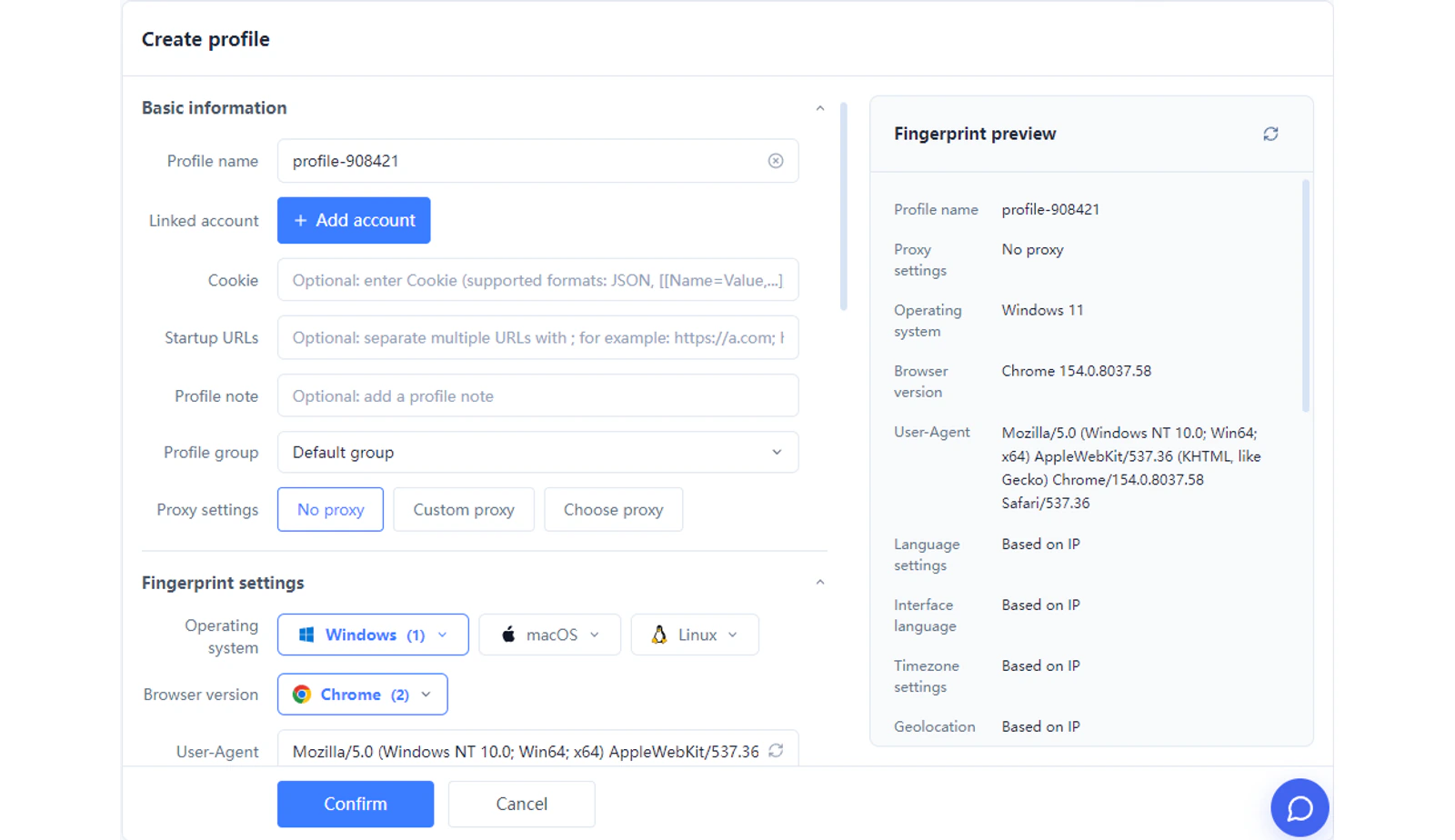
Explore the signals that shape a browser fingerprint. Available settings depend on your client version.
User-Agent communicates browser and system information. Read it alongside the version and OS shown in the profile settings.
Canvas lets a page draw text and graphics. Differences in rendering can contribute to a fingerprint when combined with other observations.
WebGL supports graphics rendering. Available graphics information and rendered output can reflect the browser, graphics stack and device context.
Available fonts and text measurements can contribute to observable differences between browser environments.
Language and timezone influence regional behavior. Review them alongside network settings rather than assuming that any mismatch proves a problem.
Cookies and local storage save site state. Separating this data helps keep sessions organized; it is a different task from configuring browser fingerprints.
Group, find and launch profiles from one workspace. Keep each account connected to its own fingerprint and session.
Run repeatable tasks in selected profiles with RPA and Local API. Review permissions before execution.
Give each teammate access to the right profiles, with clear ownership and permissions.
Independent account environments for e-commerce, social media, advertising and affiliate marketing.
Managing client and brand accounts in shared sessions can lead to the wrong login being used. Separate profiles keep social media sessions organized, while team permissions help colleagues work in the appropriate account.
An anti-detect browser for Amazon sellers helps keep authorized store logins in separate browser environments. Group profiles by store and reuse their saved sessions for daily operations, while following marketplace account policies.
Use MostMate as a fingerprint browser for Facebook Ads to organize authorized advertising accounts. Account Health brings available ad account, Business Manager and Page status together after login, helping teams identify items that need review.
Affiliate teams often switch between partner accounts and campaign projects. Separate profiles keep those sessions distinct, while RPA and team permissions support repeatable work across the marketing accounts you are authorized to manage.
Facebook account management · Affiliate marketing · Amazon seller account management
Create a dedicated profile for each account and give it a clear name and group.
Review fingerprint parameters, regional settings and proxy configuration together.
Launch the profile and use its separate cookies and saved session for the corresponding account.
Independent fingerprints. Separate sessions. Clear proxy settings. One client to configure, reuse and scale your account environments.
An anti-detect browser is a browser designed for secure multi-account management. Through independent browser environments, fingerprint configuration and data isolation, it creates separate workspaces for different accounts. Browser fingerprints, cookies, login sessions and proxy settings are managed separately to reduce environment mix-ups and account-linking risks.
A browser fingerprint combines observable characteristics, rather than a single device number. Websites can compare browser and system information, display settings and rendering behavior to recognize an environment.
Chrome also supports separate user profiles. MostMate adds a dedicated workspace for managing many profiles together with fingerprint, proxy and operational settings.
Yes. Create a profile for each account workflow you are authorized to manage, then organize its data and settings independently. Account ownership and platform rules still apply to those accounts.
Profile isolation means managing browsing data separately across profiles. A login saved in one profile does not become the login state of another. Websites still apply their own storage and session rules within each profile.
They are observations derived from graphics APIs, such as rendered images and available graphics information. A website may combine them with other signals; neither is a universal device identifier by itself.
A reliable environment starts with coherent signals—not random values. Check browser, device and regional settings together.
A proxy is not required just to create separate profiles. The current setup screen offers no-proxy, custom-proxy and saved-proxy options. Choose the supported network configuration appropriate for your workflow; different profiles do not automatically mean different public IP addresses.
No browser can guarantee account standing. MostMate helps separate browser data and organize environments, while platforms also consider account activity, verification and policy compliance. It does not override platform decisions.
Run repeatable tasks in selected profiles with RPA and Local API. Review permissions before execution.
Independent account environments for e-commerce, social media, advertising and affiliate marketing.
Register or download MostMate, create a profile, review its environment and network settings, then launch the workspace. The setup guide and pricing page explain the current product options.
In MostMate, add or import your proxy in Proxy Management. When creating a profile, choose the saved proxy, or use the custom-proxy option with your provider’s connection details. Check the Exit IP in the profile list and review language and timezone after changing the proxy. Existing profiles can be assigned a proxy using Set Proxy. MostMate setup guide
The answer depends on your jurisdiction and how the software is used. Browser profile isolation does not authorize access to someone else’s accounts or data. Follow applicable laws and platform terms, and seek qualified local advice if your intended use is uncertain.
Start with MostMate Anti-Detect Browser to configure independent fingerprints, isolate account sessions and organize your multi-account work.
PricingLoading messages…
You are viewing a previous conversation.
Enter to send · Shift + Enter for a new line
