MOSTMATE · X (TWITTER) ANTI-DETECT BROWSER
Anti-Detect Browser for X (Twitter) — Secure Multi-Account Management

Secure X (Twitter) brand accounts with MostMate. Isolate fingerprints, cookies and sessions to reduce account-linking risks.

X Multi-Account SecurityIsolated Browser ProfilesReduced Environment Overlap
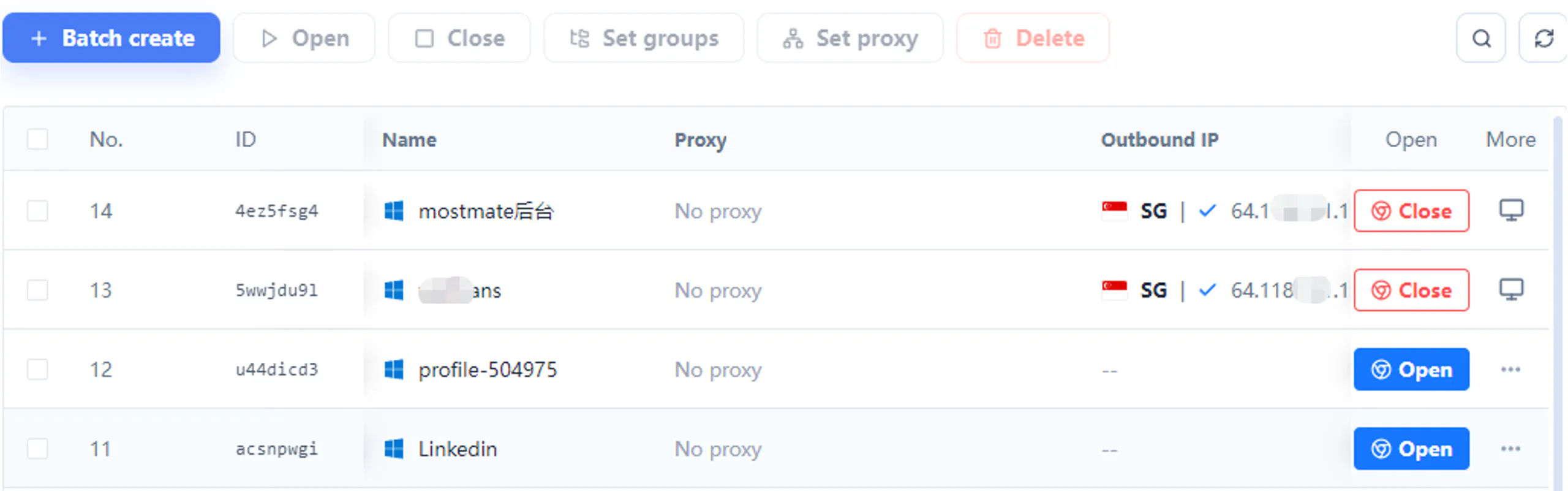
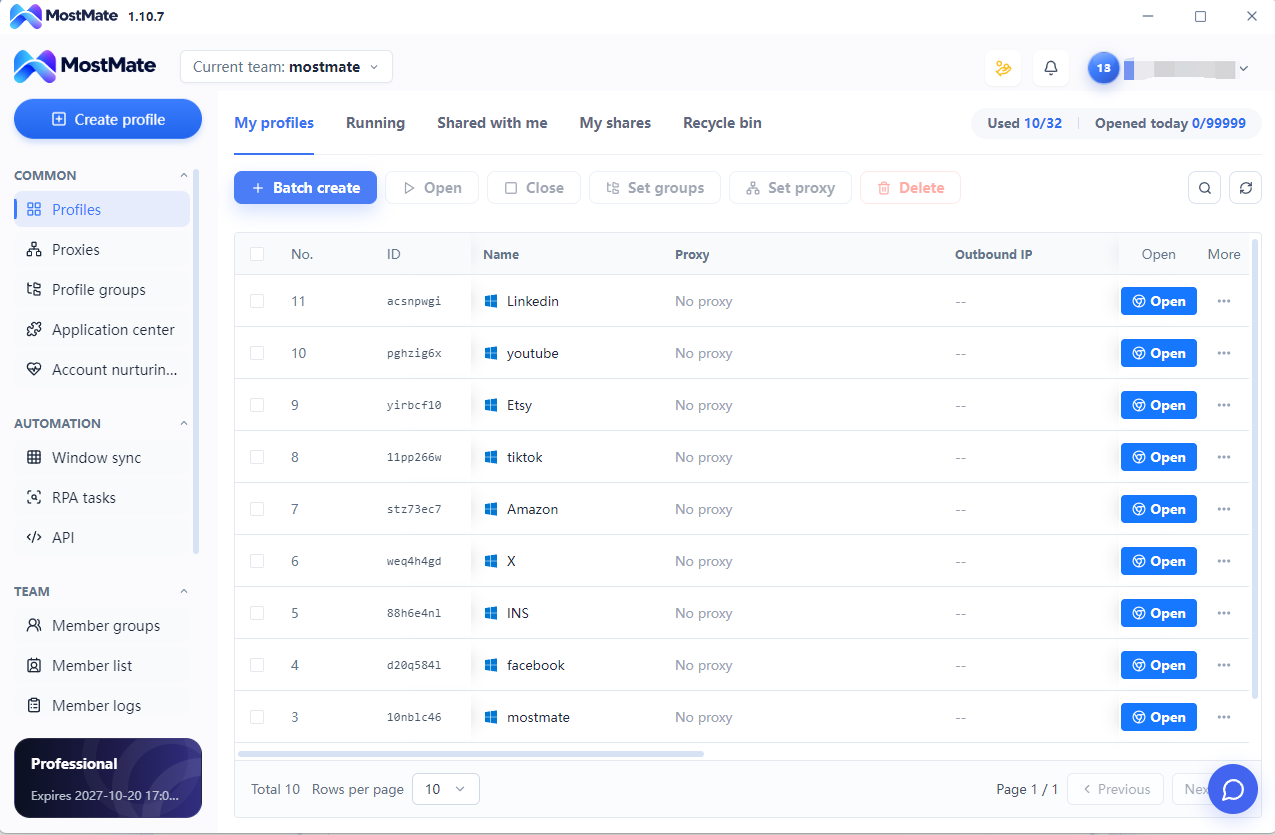
MostMate profile list with groups, proxy assignment and batch controls

X ACCOUNT SECURITY CHALLENGES

X Account Suspensions, Linking Concerns, and Multi-Account Challenges

Locked or suspended X accounts, repeated verification, and shared browser environments can interrupt daily work. MostMate separates browser workspaces to reduce mixed sessions and account-switching mistakes.

01

Why Are Several X Accounts Suspended in Succession?

Suspensions may involve account activity, verification, platform rules, or other security factors. MostMate keeps workspaces in separate profiles to reduce session mix-ups and management errors; it cannot guarantee protection from restrictions.

Independent Profiles and Session Management
02

Can X Accounts on One Computer Be Linked?

Sharing one browser profile can mix cookies, sessions, and browsing data. MostMate gives each workflow an isolated environment to manage that data separately, without guaranteeing that X cannot identify account relationships.

Environment Isolation, Fingerprints and Cookies

03

How Can You Avoid Posting from the Wrong X Account?

Switching between brand, creator, and community accounts can cause login confusion and mistakes. Clear profile names and separate sessions in MostMate help you enter the right workspace.

Profile Names, Separate Sessions and Central Management

04

How Do You Organize X Content and Community Workspaces?

Brands, content projects, and communities need clearly separated browser workspaces. MostMate brings profile management together to reduce confusion between projects.

Profile Groups, Batch Operations and Team Access

MOSTMATE FOR X WORKFLOWS

How MostMate Helps Organize Separate X Browser Environments

Independent profiles, fingerprint settings, cookies, and session management give every X account workflow a clearly organized browser environment.

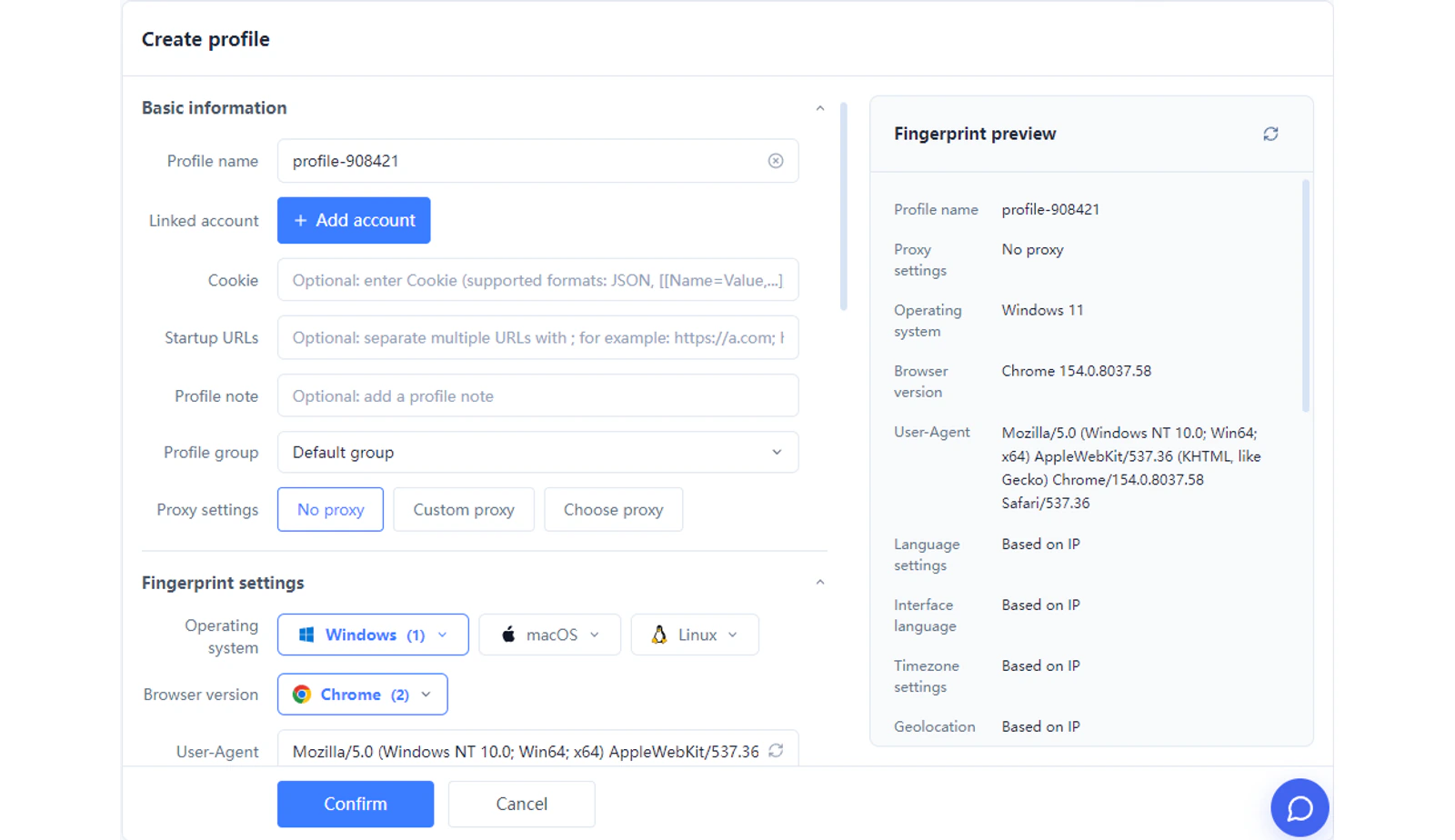
MostMate profile configuration with fingerprint preview and sharing settings
01

A Separate Browser Environment for Each X Workflow

Create independent profiles for different account workflows, each with its own cookies, sessions, and browsing data.

02

Flexible Fingerprint Settings per Profile

Manage supported browser fingerprint settings independently and maintain the configuration each profile needs.

03

Manage Proxy and Environment Settings Together

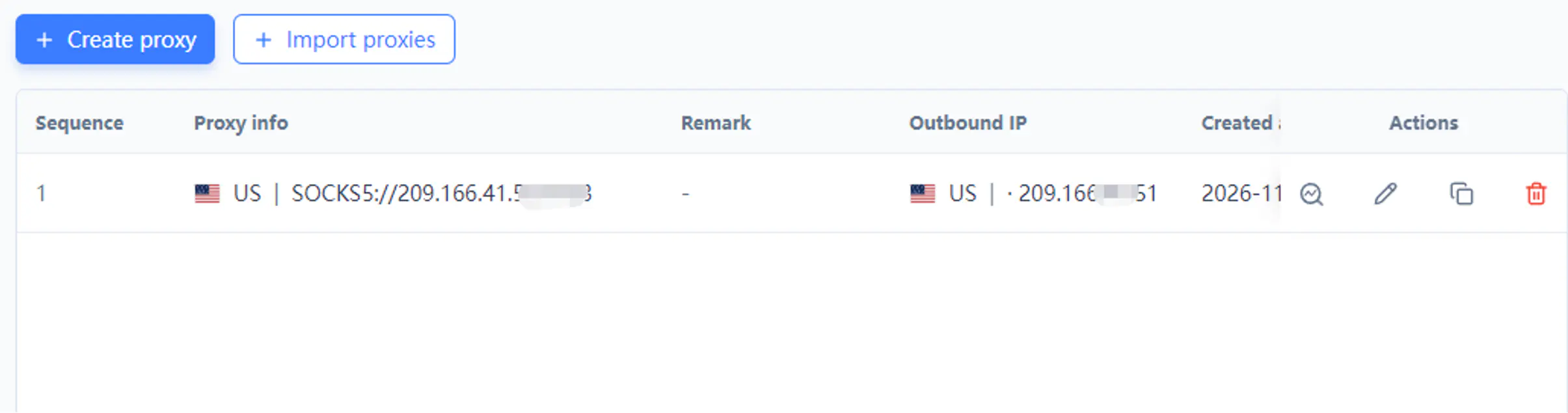
Manage proxy settings for each profile according to your business needs, keeping network and browser configuration together.

04

Bring Your X Workspaces into One Place

Create, name, find, and launch profiles in MostMate to reduce the effort of switching between accounts.

INSIDE THE MOSTMATE CLIENT

Manage Multiple X Browser Workflows More Efficiently

01 / MostMate

Separate Environments, Separate Account Sessions

Save cookies and login sessions in independent profiles for each X workflow to keep account workspace data separate.

MostMate profile list with groups, proxy assignment and batch controls

02 / MostMate

Flexible Fingerprint and Proxy Configuration

View and maintain each profile’s fingerprint and proxy settings from one place for clearer browser environment management.

MostMate profile configuration with fingerprint preview and sharing settings

03 / MostMate

Manage Profiles Together, Reduce Repetitive Work

A unified profile workspace helps content marketers, brand teams, and community managers find and switch to the browser environment they need.

MostMate profile list with groups, proxy assignment and batch controls

X USE CASES

Built for X Content Marketing, Brand Accounts, Communities, and Agencies

Organize browser workspaces around the brands, audiences, and client projects you manage on X.

X Content Marketing

Keep Every X Content Account Clearly Organized

Create separate browser profiles for brands, content projects, and authorized X account workflows, reducing repeated switching and session confusion.

Brands and Creators

Separate Workspaces for Brands and Creator Projects

Organize browser environments for brand accounts, creator projects, and daily content tasks so operators can enter the right workspace.

X Community Management

Keep Community and Project Work from Getting Mixed Up

Manage profiles for different community projects and brand conversations to keep your team’s workspaces clear and organized.

X Marketing Agencies

One Workspace to Organize Multiple Client Projects

Give each client project its own browser environment. Use profile groups, batch controls, and available team permissions to simplify everyday management.

QUICK START

Set Up an Independent X Browser Workspace in Three Steps

  1. MostMate profile configuration with fingerprint preview and sharing settings
    01

    Create a Profile

    Create an independent browser environment for the corresponding X workflow.

    How It Works
  2. MostMate proxy management with create and import controls
    02

    Configure the Environment

    Manage fingerprint and proxy settings according to your needs.

    How It Works
  3. MostMate profile list with groups, proxy assignment and batch controls
    03

    Launch Your Workflow

    Open the matching browser profile and start your authorized X operations.

    How It Works

X ACCOUNT SECURITY

X Account Security Starts with Organized Browser Workflows

X account restrictions can involve platform rules, account activity, verification, and other security factors. MostMate focuses on browser environment management, separating profiles, cookies, and sessions to reduce workspace overlap and operating errors.

Independent Profiles

Keep browser sessions and local data separate for each X workspace.

Clear Configuration

Maintain the browser environment and settings for each workflow.

Responsible Operations

Follow X’s rules and use its official process to address account restrictions.

MostMate cannot guarantee that accounts will never be suspended or that X cannot identify relationships between accounts.

Set Up Your X Workspace

WHY MOSTMATE

Why Choose MostMate to Manage Multiple X Accounts?

Bring independent X browser environments and everyday management into one client. Feature availability depends on your plan.

Pricing

Independent browser environments.

Flexible fingerprint configuration.

Cookie and session isolation.

Centralized management of multiple profiles.

Batch profile creation and management.

Team access, RPA tasks, and API tools where available.

X (TWITTER) FAQ

X Account Security and Multi-Account Management FAQ

Direct answers about X account restrictions, separate browser environments, and content, brand, and community workflows.

Why Have Several of My X (Twitter) Accounts Been Suspended?

The account notices are the starting point; sharing a computer alone does not establish the cause. X may act on rule violations, suspicious activity, or account security concerns.

MostMate separates cookies and sessions in independent profiles to reduce workspace mix-ups. It cannot diagnose or reverse X’s suspension decisions.

Can X Accounts Logged In on One Computer Be Linked?

They may be; separate browser environments are not a guarantee that accounts cannot be linked. Account relationships are not determined by local browser data alone.

MostMate keeps each profile’s cookies, sessions, fingerprint settings, and proxy configuration separate. This addresses shared-environment overlap, not every signal X may use.

How Can I Manage 10 X Accounts on One Computer?

Create a separate MostMate profile for each authorized X account, name it by brand or project, and configure its fingerprint and proxy settings. Launch the matching profile when you need that account.

Separate sessions reduce repeated sign-outs and workspace confusion. You need a plan with enough profile capacity; X account permissions and restrictions still apply.

Can MostMate Prevent X Account Suspensions?

No browser can guarantee that an X account will never be suspended. X’s decisions also depend on account activity, security, and its rules.

MostMate helps with the browser environment: independent profiles, separate cookies and sessions, and per-profile settings reduce data overlap and wrong-account operations. It does not bypass restrictions.

How Does MostMate Reduce Environment Overlap and Linking Risks for X Accounts?

MostMate stores browser data separately for each X profile and lets you maintain its fingerprint and proxy settings independently. Brand, creator, and community sessions no longer share the same local storage.

This reduces risks caused by sharing one browser environment. It cannot guarantee that X will never identify relationships through other account or activity signals.

Why Does X Keep Asking Me to Complete Security Verification?

X may request verification when it detects suspicious activity or needs to confirm account ownership. The prompt shown in your account determines the required steps.

MostMate preserves each workspace’s cookies and sessions separately, helping you return to the intended environment. It cannot remove verification requirements or complete identity checks for you.

How Is MostMate Different from a Regular Browser for Multiple X Accounts?

Regular browsers can offer separate profiles too. As an anti-detect browser for Twitter, MostMate adds a workspace for managing profile fingerprints, proxies, groups, batch actions, and available team access together.

For X brands and client projects, this reduces repetitive configuration and switching. MostMate is a browser management tool, not an X account provider or a guarantee against restrictions.

Can MostMate Configure Separate Proxies for Different X Workspaces?

Yes. Assign a supported proxy to each MostMate profile and manage it alongside that workspace’s fingerprint settings. This keeps network configuration matched to the correct X project.

You must provide a working proxy suitable for your needs. Separate proxies do not by themselves guarantee account security or prevent X from linking accounts.

Can MostMate Restore an X Account That Has Already Been Suspended?

No. MostMate cannot restore a suspended X account. Follow X’s account access or appeal process; recovery decisions belong to X.

MostMate can organize browser environments for accounts you are authorized to use, with separate cookies, sessions, and profile settings. That does not remove an existing suspension or replace an appeal.

Is MostMate Suitable for X Content Marketing Across Multiple Accounts?

Yes. Give each authorized brand or content project its own profile and group related workspaces together. Separate sessions and clear names help operators open the intended account before posting.

MostMate manages browser environments; it does not create content or guarantee reach and engagement. Content decisions and X permissions remain part of your workflow.

Can MostMate Support X Brand Accounts and Community Operations?

Yes. Organize profiles around brand conversations, creator projects, and the accounts used to manage communities. Separate browser sessions make project switching and handovers clearer.

MostMate does not grant X community roles or publishing permissions. Those must already be available to the account; team features also depend on your MostMate plan.

Why Should X Marketing Teams Choose MostMate?

MostMate combines independent account environments, client profile groups, batch operations, and available team access. RPA and API tools can help streamline supported recurring browser tasks.

Your team can spend less time organizing environments for X content and community work. These tools do not grant X API access, replace account permissions, or guarantee campaign results.

MOSTMATE RESOURCES

Build Your X Workspace with MostMate

MOSTMATE

Give Every X Workflow Its Own Browser Environment

Bring content accounts, brands, and community projects together in MostMate, with separate sessions and clearly organized workspaces.