
What Is Canvas Fingerprinting? How Sites Identify Your Device Through Browser Drawing
The short version: a Canvas fingerprint comes from a real drawing operation, and the graphics card, the system, the fonts, and the browser engine decide the result together; a single value cannot pin down an identity, yet inside cross-checks it gives away what an environment truly is. Managing it comes down to two rules: keep readings stable within one environment, and keep environments clearly apart. The rest of this article follows that order: principle, influencing factors, limits of identification, testing, and MostMate's two modes.
The same website opens on two devices, the page draws one identical image, and the pixels still do not match. That is not a rendering bug: the device leaves its own trace at the drawing step. The site collects that trace and turns it into a value, and that value is the Canvas fingerprint, one of the most distinguishing parameters in browser fingerprinting. MostMate is an anti-detect browser, and Canvas is one of the baseline parameters in its fingerprint settings; this article walks the parameter through from generation to configuration.
How a Site Uses Canvas to Draw a "Signature" of Your Device
A Canvas fingerprint comes from a real drawing operation: the site has the browser render specified content, then reads the result back and turns it into a characteristic value. The drawing runs on the Canvas interface that browsers provide; web games, charts, and image editors all rely on the same 2D canvas capability. The interface details are in MDN's Canvas API documentation. The whole process stays invisible to the user. It breaks down into three steps:
- Draw: the page script paints a fixed piece of content onto the canvas, usually a few lines of text plus geometric shapes and gradient blocks.
- Read: the script exports the canvas as a string or a pixel array through interfaces such as toDataURL() or getImageData().
- Compare: the exported result is hashed and checked against previous records for this environment or the expected values of other signals.

Why Two Devices Never Draw the Same Picture
The drawing result is decided by the entire rendering chain, and if a single link differs, the pixels differ too. Send identical instructions to two devices: the operating system first decides which fonts to use and how to smooth text edges, the browser engine then executes the drawing, and the graphics card and driver produce the final output. Four links, each in charge of one segment:
- GPU and drivers. The same drawing instructions computed on different cards and driver versions yield slightly different pixels; that is the main source of the variation.
- Operating system and text rendering. Windows, macOS, and Linux render text and anti-aliasing in their own ways, so the same line of text does not get equally smooth edges.
- Font environment. Text on the canvas is rendered with locally installed fonts, and which fonts in which versions all feed into the result. We took apart how font lists get tested in how font fingerprinting is measured; the two share the same source.
- Browser engine and version. Chromium, Firefox, and WebKit each implement drawing a little differently, and major version updates bring further detail changes with them.
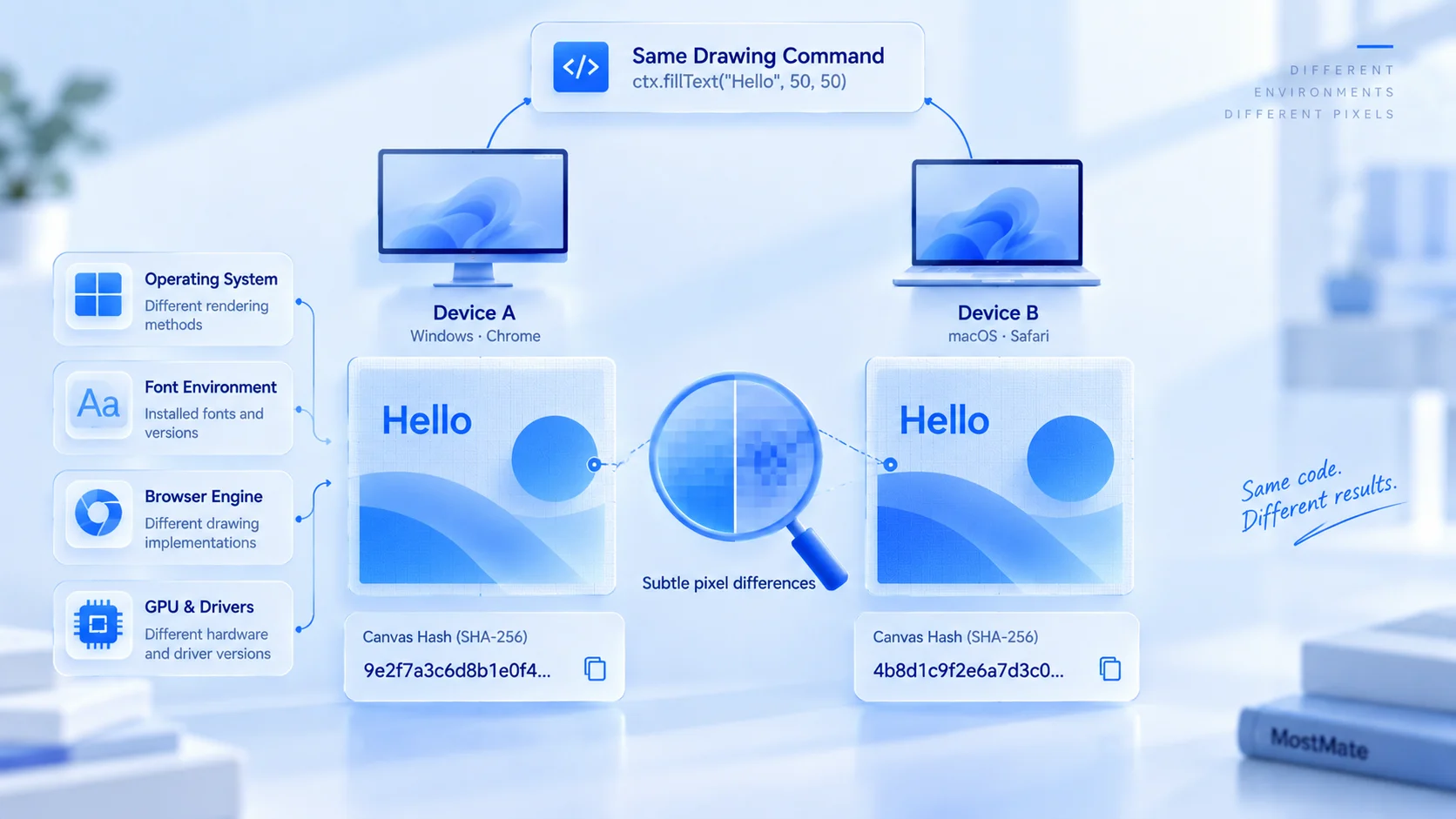
Together, the four links determine how much Canvas can distinguish: each difference is tiny on its own, but once compressed into a hash, two devices stand a good chance of disagreeing. Behind one small image, the rendering chain of an entire device appears on stage all at once.
How Far Canvas Fingerprinting Can Actually Go
Canvas is a device characteristic with high distinguishing power, but on its own it cannot establish an identity. Its limits come in three forms, worth stating up front.
First, an identical hash does not point back to an identical device: two devices whose rendering chains happen to match can land on the same value, and mainstream configurations already repeat in huge numbers.
Second, sites never judge on Canvas alone: the reading is cross-checked against the UA, the screen, the fonts, and the language, and within that parameter group it serves as the hard evidence that cannot self-report and can only be measured live.
Third, Canvas and cookies are not the same mechanism: cookies live locally and can be cleared or refused, while Canvas is computed on the spot at every visit, and cleared cookies leave it untouched.
Put the three limits together and one judgment follows: Canvas does not decide an account's fate, but if a whole batch of environments reports the exact same hash, the cross-check amounts to those environments raising their own hands.
Three Steps to Check Your Environment's Canvas Fingerprint
Testing Canvas takes no extra tooling: one detection page plus two repeat runs are enough. Work in this order:
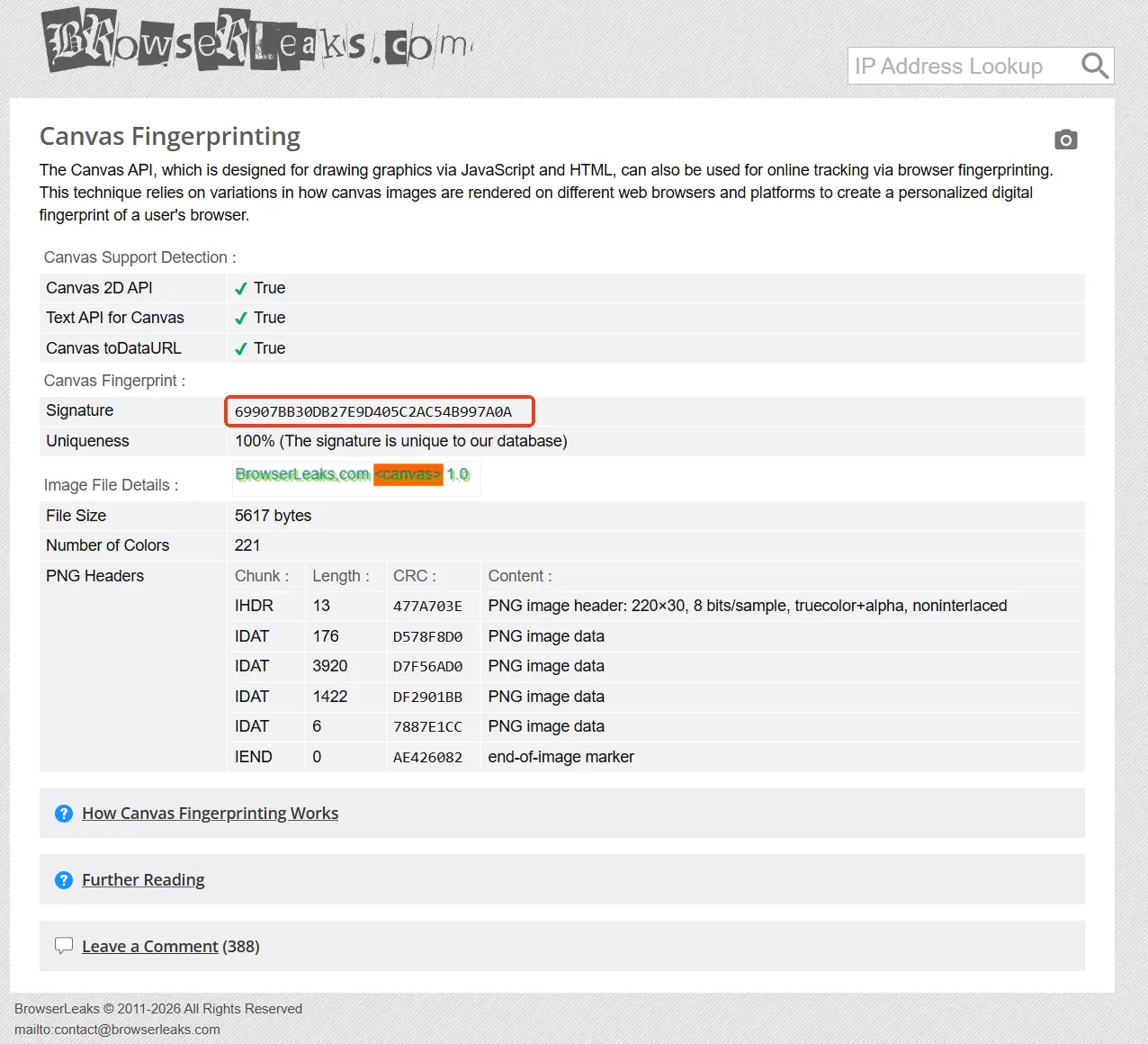
- Record the current reading. Open the BrowserLeaks Canvas test page inside the environment; the page shows the current hash and an image preview. Write both down.
- Retest inside the same environment. Close the page and reopen it, or come back a day or two later: the hash of one environment should stay put. If two runs disagree, extra processing is stepping into the reading.
- Compare across environments. Run the same test in a second environment; the two hashes should visibly differ. The wider the gap, the cleaner the separation.
Judge readings by whether they stay stable and whether they differ, not by specific numbers. Hashes from different test sites may not line up: each site draws its own graphics, exports in its own way, and hashes in its own way. Comparing across sites means nothing; before-and-after comparisons inside one tool are what count.
Real or Noise: Choosing Between the Two Canvas Modes in MostMate
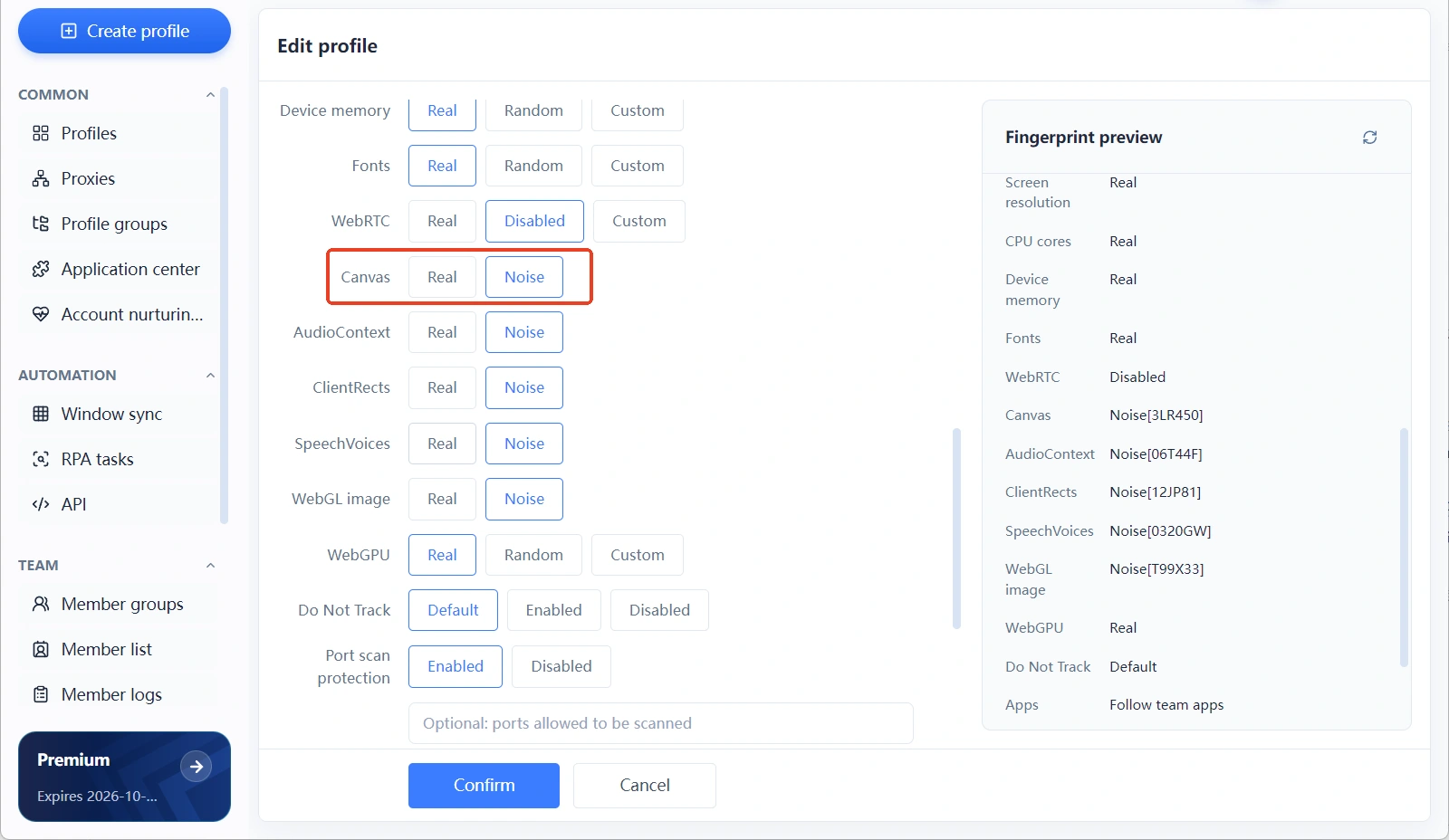
MostMate's fingerprint settings fold Canvas into two modes, Real and Noise, with Real as the default. For the full product picture, see what MostMate is; on the site's manual fingerprint settings checklist, Canvas sits alongside audio, WebGL, and other parameters, and it is configured in the same fingerprint block when you create an environment. The two modes side by side:
| Dimension | Real | Noise |
|---|---|---|
| Reading source | Rendered live on the host, same as by hand | Noise layered over the real render |
| Detection profile | Reflects the host's true rendering chain | Detached from the host, a value of its own |
| Best fit | Persona matching the host system's region | Bulk environments that need clear separation |
| Watch out | Several environments share the same reading | Keep the noise within reasonable bounds |
Real mode fits setups where the host machine's "base" is clean: an English-language Windows serving a US persona renders for real, the reading matches a manually opened browser, and no assembly marks are left behind. The limit is just as clear: if several environments on one machine all use Real, their Canvas reading is the same value, and the environments do not differ.
Noise mode fills exactly that gap: it layers noise onto the environment's Canvas reading, detaches it from the host's real render, and makes environments built in bulk differ from one another. The premise is controlled noise: after the noise is added, the reading must still fall within the normal range of a real device, otherwise the "difference" itself becomes a conspicuous anomaly. Two readings that disagree within the same environment are also an anomaly marker; the risk is argued in full in why fingerprint randomization is unsafe.
Canvas also needs to be checked alongside its related parameters. Canvas rendering depends on the operating system, the fonts, and the graphics card, so those parameters should point to one and the same device picture: pick a macOS persona, and audio and the WebGL image must be confirmed against reasonable macOS ranges as well; watching Canvas alone easily misses mismatches inside the group. The mode logic for audio is covered in how to configure the AudioContext fingerprint, and the same thinking carries over.
After configuration comes one round of verification: confirm the Canvas mode in the fingerprint settings; the Canvas field in the fingerprint preview panel on the right will show a code such as Noise[3LR450]. That code identifies this noise configuration, is unique to each environment, and is not the hash a test page computes, so never match the code against a hash. Check the actual reading by opening the environment and visiting a test page, then comparing it against expectations; from then on, retest after every proxy change or fingerprint adjustment before putting the environment to work.
Frequently Asked Questions
Is a Canvas fingerprint the same thing as a browser fingerprint?
No. A browser fingerprint is a whole made up of dozens of parameters, and Canvas is just one rendering-type characteristic among them, in the same class as WebGL and the font list. The whole is the sum of its parts; Canvas scoring high on its own does not make the entire fingerprint rare.
Does disabling Canvas prevent identification?
Not recommended. Large parts of the web depend on Canvas, and disabling it disrupts normal use; virtually every mainstream browser supports Canvas, so "not supported" itself becomes a rare trait and easier to pick out. The sensible approach is to control where the reading comes from and whether it stays consistent, not to switch the interface off.
Does a Canvas fingerprint change with browser updates?
Yes, but at a rhythm with nothing in common with randomization. Rendering changes from major browser updates reach every user at the same time, and platforms know that rhythm. A real environment's Canvas value changing a few times a year is normal; frequent, patternless change is the anomaly.
Can an anti-detect browser give every environment a different Canvas?
Yes, and Noise mode exists for exactly that task: it layers noise onto the Canvas reading so that bulk-built environments pull apart. The premise is reasonable noise amplitude, with readings still inside the normal range of the system in question.
Conclusion
At its core, a Canvas fingerprint is a device's rendering chain making a concentrated appearance on a single canvas: on its own it cannot establish an identity, yet it is the parameter that cannot self-report and can only be measured live. For management, hold on to two things: readings that survive retesting inside one environment, hashes that keep environments clearly apart, and related parameters that point to one and the same device picture. To run an environment setup from scratch, you can download MostMate, verify each environment's Canvas reading after setup, and only then put it to work.

MOSTMATE
Secure Multi-Account Management, Made Simple
Start with your first account and use MostMate to build safer, smarter, and more efficient multi-account operations.
- Independent profiles. Consistent identities.
- AI Automation · Account Health · Team Operations



