
Should Fingerprint Parameters Be Random? Why More Randomness Backfires
"I set every environment to random parameters, thinking that was the safest choice. The account did not survive more than a few days." Anyone running multiple accounts has heard a version of this. The intuition is easy: if the parameters change every time, the platform should not be able to recognize you. In practice the result is usually the opposite. The more random, the faster an account runs into trouble.
The direction was wrong from the very start. A platform never asks whether you changed. It asks whether you look like a real device. The strongest trait of a real device is stability.
Conclusion first: parameters do not need to be randomized on purpose. Whether an environment holds up comes down to three things: whether each parameter is real, whether dozens of parameters can explain each other, and whether one account's parameters survive an audit over time. Randomization touches the first and damages the other two. Below, what "isolated" and "random" each govern, a walk through the fingerprint parameters, and where randomization breaks.
Is an Isolated Environment the Same Thing as Random Parameters?
Start with the most common misunderstanding. When people are new to this, they often think: if every environment is isolated, the parameters obviously have to be random, otherwise the environments would be identical, right?
Isolation governs boundaries. Two environments share no login state and no site data, and activity in environment A never lands on environment B. Isolation technology handles that, and it has nothing to do with which values the parameters take. Randomization governs values. It decides what kind of device each environment reads as.
The split comes down to one line: Different accounts need a boundary between them, and a single account needs continuity inside it. Boundaries come from isolation, continuity comes from stability. Randomization applies a boundary requirement to continuity, and wipes out everything inside an account that should have stayed put.
What Fingerprint Parameters Exist, and How Does a Site Read Them?
A browser exposes well over twenty fingerprint parameters that people discuss. You do not need to memorize them. Sort them by how a site obtains them and two groups fall out. The first group is what the browser reports on its own, readable the moment a site sends a request:
| Parameter | What it is | What the site does with it |
|---|---|---|
| User-Agent | Brand, version and OS in one string | Picks the installer and the page layout |
| Screen resolution | Pixel size and color depth of the display | Guesses device class, fits the page layout |
| Time zone and language | System time offset and display language | Infers the region, adjusts pricing and copy |
| Font list | Which fonts are installed on the system | Font sets differ by OS, a platform clue |
| Hardware info | CPU cores, device memory | Estimates performance tier, checks the claim |
The second group is what a site measures on the spot rather than asking for. Canvas and WebGL are the clearest cases: the site has the browser draw an image and render a 3D scene, different graphics cards and drivers produce slightly different output, and the site uses that output to check the identity the browser claimed.
So a site has to take self-reported parameters at face value. Measured results are produced live: they cannot be edited, only faked. That is where randomization goes wrong.
Why Do Random Parameters Cause Problems So Easily?
Randomization extensions touch exactly those two groups, and each group has its own way of falling apart.
Self-reported parameters first. Pull a User-Agent, a resolution and a font list each at random, and the result often cannot be assembled into a machine that exists. A Windows font list sits next to a macOS self-description. The screen resolution lands on a phone size while the claimed identity is still a desktop. Risk models have seen enormous numbers of real device records, and a combination this incoherent stands out at a glance.
There is a subtler one too. To save effort, a randomization extension rewrites the same parameter to one popular value for every user. Once enough people run it, a batch of entirely unrelated accounts travels the web under one shared trait value. The platform does not need to identify them one by one. Recognizing that value is enough.
Measured parameters next. A noise-injecting extension returns a slightly different result on every read of Canvas and similar surfaces: the same image draws one value today and another tomorrow. A real device never behaves this way. On one computer the reading stays fixed through normal use, and two readings that disagree are an anomaly by themselves.
Platforms have also seen how real devices change pace. A major browser upgrade, an operating system reinstall: a handful of times a year, and the whole web moves together. Random change has no such rhythm. It can happen on every visit. You are the only one changing.
Randomization changes parameter values. It cannot change whether you look like a real device.
Reading a Fingerprint: Why Is the Score Not Enough?
Many people get their confidence in randomization from scoring tools: change the parameters, run a test, see 90 or 100, and go live. There is a gap people walk straight into here. A scoring tool measures single items. A platform looks at relationships.
A high single-item score only says that item is in good shape: the IP is clean, the value is not rare, nothing leaks obviously. When a platform judges association, though, it asks whether dozens of items can explain each other. What the operating system says does not match what the graphics card says. What the language says does not match what the IP says. Any single mismatch is enough for a second look.
This mutual confirmation of parameters is a relational judgment, and a scoring tool cannot test it. The danger of a perfect environment sits right there: every item is beautiful, and the pieces still add up to a device that does not exist.
A score cannot prove cross-consistency. It only buys false reassurance.
So order matters more than score when you check an environment, and there are three layers: first, whether dozens of parameters placed together can explain each other; then, item by item, whether the value read matches the value set; last, a retest a few days later, to see whether two readings agree. Three steps cover it:
- Run the consistency test first. Tools like CreepJS hunt for parameters that fight each other: what the UA says, what the graphics card says, what the fonts say, laid out side by side.
- Then check for single-item leaks. BrowserLeaks lists every reported value by category, so you can confirm each one against the device settings.
- Last, look at history. Retest the same environment a few days later. The two readings should match. If they do not, noise is being read.

How Does MostMate Handle the Choice Between Real and Random?
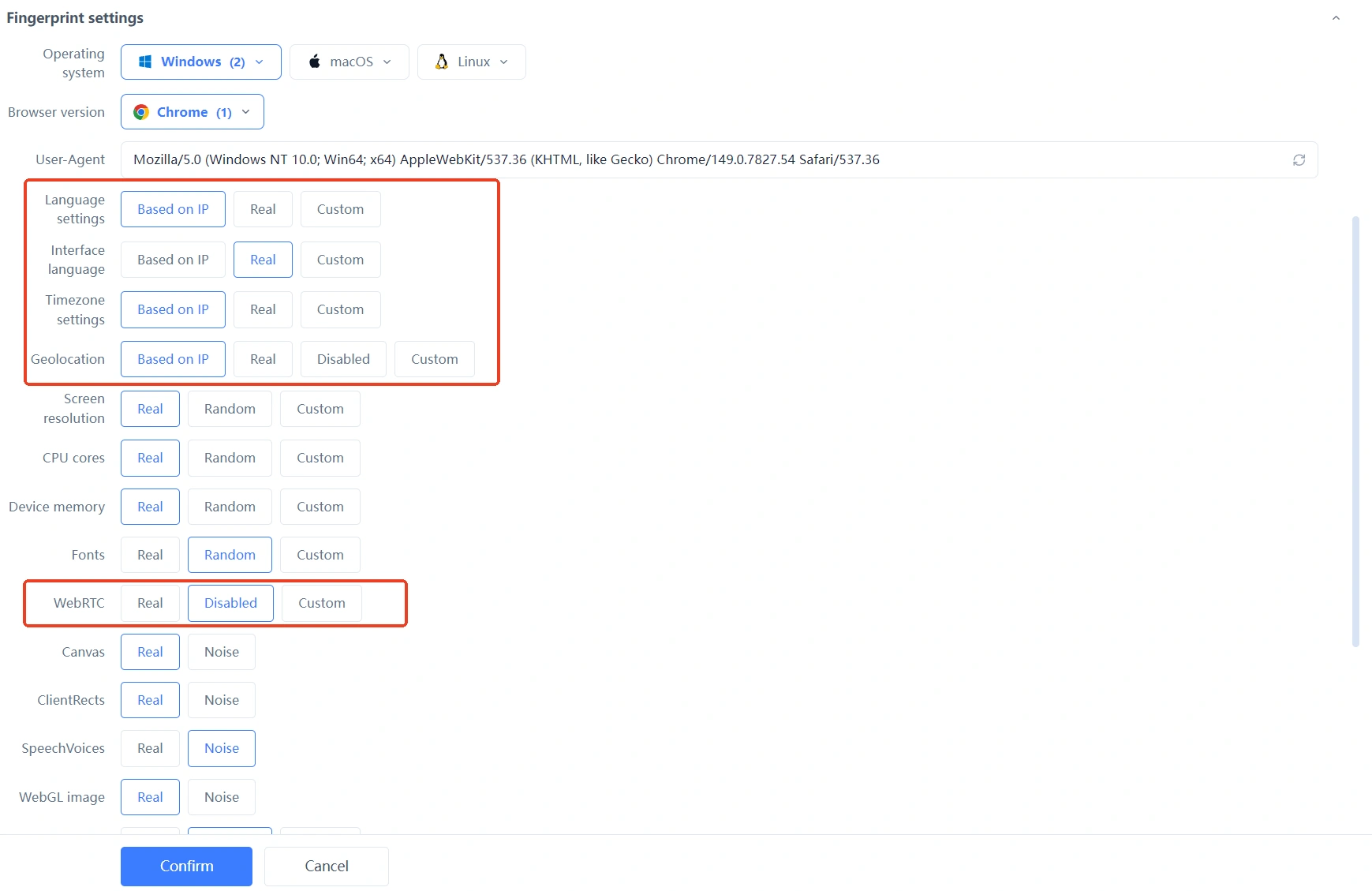
With the principles out of the way, back to the opening question: which values should parameters take? **MostMate is an anti-detect browser that builds real, consistent and stable values into its defaults.** Parameter modes come in three tiers, Real, Random and Custom, and the default lands on Real. Screen resolution, CPU cores and device memory take the actual traits of the current device. Canvas and WebGL follow the real output, with nothing assembled on top and no noise added. The site's setup preview describes this as the system automatically building a reasonable, realistic and logically consistent browser environment, and "logically consistent" points exactly at the mutual confirmation above.
Region-related items such as time zone and language hang on "Based on IP" by default: wherever the exit is set, they follow it there, so you never end up with a line in one region and a clock in another. Why the principles of real and consistent are defined this way is laid out in the four MostMate design principles.
Once an environment is built, the boundary is drawn too. The site calls an environment a Profile, and each Profile stores its own set of parameters, so two Profiles created on the same computer read as separate fingerprints that never mix. How to fill in the form from top to bottom is covered in order in the four steps from setup preview to your first environment; when you finish, walk the site's comparison of manual fingerprint settings and the recommended configuration and confirm the tier of every item.
What this tool manages inside multi-account work is set out in full on the product page.
When Is It Fine to Change Fingerprint Parameters?
Parameter values are not frozen forever. Change needs a reason.
A major browser upgrade is normal change and needs nothing. Every user catches up within the same week or two, platforms have seen that rhythm, and an environment that follows real devices will not go wrong.
Changing hardware or changing lines moves the whole set. New parameters form one coherent group, region-related items align with the new line, and the job is done while the account is calm, in one pass. A single-point jump is what causes trouble. A full replacement does not.
When an account has just shown an anomaly or its numbers are swinging, stop. Any parameter adjustment amplifies the risk. If you are unsure, retest first: once the contradictory items are zero and two readings agree, carry on.
FAQ
Are random parameters completely off the table?
They remain available. What they cannot be is an account's default strategy. MostMate keeps a Random tier in its parameter modes, which suits testing and debugging where no long-term identity is needed. For accounts you plan to run long term, the Real default holds up better.
Does changing only the User-Agent work?
No. User-Agent is one item out of more than twenty, and every other parameter stays as it was, so the device profile has not changed at all. It also has a fixed relationship with measured items like the graphics card and fonts, so a single edit puts parameters out of sync with each other. Move the whole set together. A single-point change is the worst option.
Does using a real fingerprint guarantee I never trigger a platform's risk control?
That reading is wrong. A real fingerprint covers one layer, whether the device reads as real. Platform risk control also looks at behavior, IP quality and the pace of operations, all outside the fingerprint. A real fingerprint gets the device layer right. It does not insure the account. With the device layer solid, the account still leans on operating habits to hold up.
Does MostMate's consistency check stand in for a platform's risk control?
No. These are two different things. MostMate's consistency check helps you assemble, at creation time, an environment whose parameters agree with each other and align with the IP. It does not touch any platform's detection rules. How a platform judges is the platform's business. What you can do is get your own environment into the shape of a real device.
Can accounts warmed up with a randomization extension still be salvaged?
Yes, but do not rush. Turn randomization off first, pin one set of real parameters, align the region-related items with the new line, then leave it alone for a while. Adjusting often is riskier than holding the current state.
Closing
Randomization chases a fresh value every time. Platforms recognize what stays steady. The right way to manage parameters is to let boundaries belong to environment isolation and continuity belong to parameter stability. Each job goes where it belongs.
If you are still torn between the two approaches, download MostMate and build two environments to configure along with this article: keep one on the Real default, switch the other to Random, then test each twice a few days apart with a detection tool. Whichever set of readings survives the audit is obvious.

MOSTMATE
Secure Multi-Account Management, Made Simple
Start with your first account and use MostMate to build safer, smarter, and more efficient multi-account operations.
- Independent profiles. Consistent identities.
- AI Automation · Account Health · Team Operations



