Why Your Accounts Keep Getting Linked: The 5-Environment Architecture for Solo Exporters
Your LinkedIn main account just closed a new client. WhatsApp still holds twenty-plus inquiries in play. Two Amazon stores sit open in the background, and PayPal is holding funds waiting to be withdrawn. Every one of these accounts is logged into the same computer. Then one night, one of them pops a verification prompt — and by the next day, the others are getting locked out one after another, and a whole business line goes dark. If you run a one-person trading business — what Chinese exporters call a "SOHO" — you'll almost certainly hit this scene once your account count reaches ten or twenty.
I used to audit account environments in risk control. My job was to line up every account under one owner and compare their device, network, and profile data to figure out which signals tied them into a group. I've watched the linking mechanism play out too many times, and I know how to break it: the answer isn't hiding your accounts — it's splitting your business by function, with one isolated environment per line of business.
You only need one computer to fix this, provided you install an antidetect browser with session isolation, and put your five business functions — prospecting, communication, storefronts, payments, and backup — into separate, non-overlapping environments. Add more environments as the business grows. Below, I'll walk through the mechanism, the architecture, the setup steps, the costs, and the payments side.
Why accounts on the same computer all fall together
Platforms don't decide two accounts are connected based on a single signal. They score how much multi-dimensional data overlaps. Amazon's official knowledge base lists the dimensions it checks under its multi-account policy: IP address, device information, bank account, credit card, signup email, phone number, and business license — any single overlap pushes the linking score up (source: Amazon's official multi-account policy explained). The rules also state that once unapproved multi-accounts are flagged, every connected account can be suspended or banned. That's the institutional root of collective punishment.
Most people's first instinct is "I'll just log in from another computer." Switching devices cuts off only one type of signal — the rest will still tie you back together. Three common escape routes for the signals: home and office share one broadband line, so the login IP is still the same; your DNS settings leak your real network location; and your browser's WebRTC exposes your local network adapter. Each one is a small technical detail, and each one is a frequent point of failure.
For a solo exporter, the cost of collective punishment goes far beyond the accounts themselves. Industry observation puts a one-person operation at 5–30 accounts, with each account backing one business line: if the main prospecting account dies, client development stops; if the payments account dies, cash flow stops. Accounts here are production assets — mixing them on one machine is like betting several business lines on a single table.
When people say "environment isolation," what exactly gets isolated?
Break an environment down and it's really four layers stacked together.
| Layer | What it holds | How platforms use it to link accounts |
|---|---|---|
| Device fingerprint layer | UA, Canvas, WebGL, fonts, timezone, resolution | Draws the "ID photo" of "this computer" |
| Network layer | Exit IP — the address your traffic appears to come from — and its location | Judges "which country you're browsing from" |
| Data layer | Cookies, local storage, login sessions | Records "which accounts this computer has logged into" |
| Identity layer | Registration details, phone number, payout account, license | Points straight at "who's behind the account" |
The first three layers are technical, and a tool can handle them for you: an antidetect browser gives each environment its own fingerprint and data set, then binds each one to an independent exit IP. The fourth layer, identity, is paperwork — registration details, payout accounts, and phone numbers can only be prepared by you, complete and non-overlapping.
Put another way: once you've done everything possible at the environment level, no tool can make your identity layer independent for you. This is the consensus the industry keeps repeating. The tool covers "this computer looks new"; your paperwork covers "this person is a different person." Missing either layer, the linking score still climbs.
You can self-check with EFF's Cover Your Tracks (coveryourtracks.eff.org), which measures how unique your current browser's fingerprint is. If it rates your fingerprint "highly unique," a regular browser has almost no isolation capability, and the risk of mixing accounts is right in front of you.
The 5-environment architecture for a solo exporter: what each one handles
For a one-person company, splitting environments by business function is steadier than splitting them by platform. Functional boundaries are clean: every action on one business line lives inside one environment, problems stay contained, and device changes or handovers follow a clear playbook.
| Environment | Accounts it holds | IP and profile requirements |
|---|---|---|
| Prospecting | LinkedIn main account, Facebook pages | Static residential IP matching your target market; separate email and phone number |
| Communication | WhatsApp Business | Fixed exit IP with no frequent switching; bound to your everyday device |
| Storefront | Amazon, TikTok Shop, independent-site dashboards | One IP per store; IP location matches the registration details |
| Payments | PayPal, WorldFirst and other payout dashboards | Kept apart from storefront environments; separate banking details |
| Backup | New-account incubation, emergency fallback | Independent IP, carrying none of your existing business |
Why keep prospecting and communication apart? LinkedIn's commercial actions (sending connection requests, outreach messages) and WhatsApp's two-way conversation rhythm behave completely differently. The former is sensitive to frequency; the latter is sensitive to environment stability. Mixing them skews each account's behavioral profile.
Facebook page accounts are also picky about environment history, and running ads versus running a page each stresses the environment differently — ads look at past ad history, pages look at login continuity. When choosing a tool, check capabilities against your scenario: the antidetect browser for Facebook page, for instance, lists the environment requirements for page operations and ad campaigns separately. Working through that checklist saves you detours.
Storefronts get their own environment because policy demands it: Amazon allows multiple accounts only with written approval and fully independent details per account. The backup environment takes new accounts and emergencies, so "testing" never touches existing assets. Leaving buffer slots for new accounts in an account matrix has been repeatedly validated in going-global teams' retrospectives.
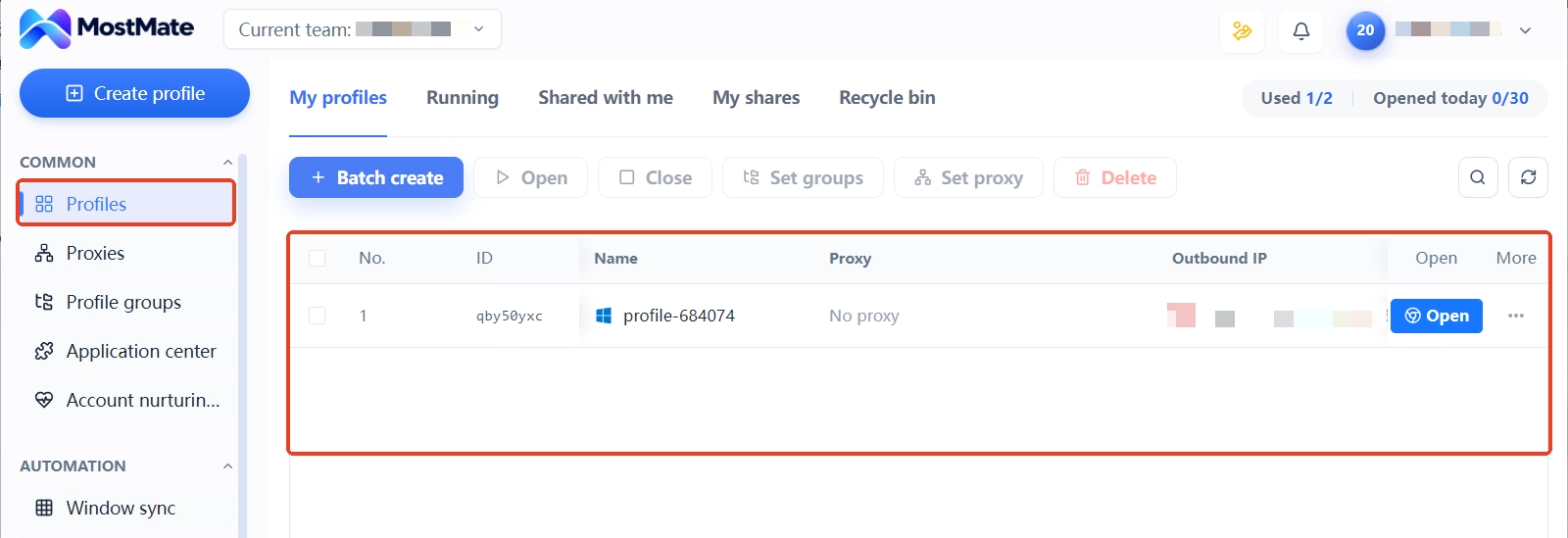
In the early days, you can merge prospecting and communication into one environment and run on three. Once you pass 10 accounts, or one business line starts taking on team collaboration, split into the full five. The trigger isn't a number — it's whether the platform could plausibly see a connection between accounts in two environments.
Hands-on setup: a five-step checklist — one account, one environment, one IP
With the architecture set, roll it out in five steps. This sequence comes from practical solo-exporter network setups: the first two steps secure resources, the last three do configuration, and you can finish everything within a week.
- Split your business lines. Sort your accounts into the five environments and list which accounts sit where, and which market each serves. Separate the operations, marketing, and finance lines first, and keep finance on its own — that's the prerequisite for the payments environment later.
- Choose your IP type. Long-term accounts use static residential IPs — never datacenter IPs for account nurturing. You can check any IP's type instantly at ipinfo.io: if the type field says hosting, it's a datacenter range. On price, static residential IPs currently run about $4–7 per IP per month at market rates; five environments, five IPs, roughly $25–30 a month.
- Create environments and name them. In the antidetect browser, build a separate environment per account and name it on a "platform-site-country-number" rule, like linkedin-us-01. Messy naming is the number-one obstacle when tracing an incident — set the rule early and you'll thank yourself.
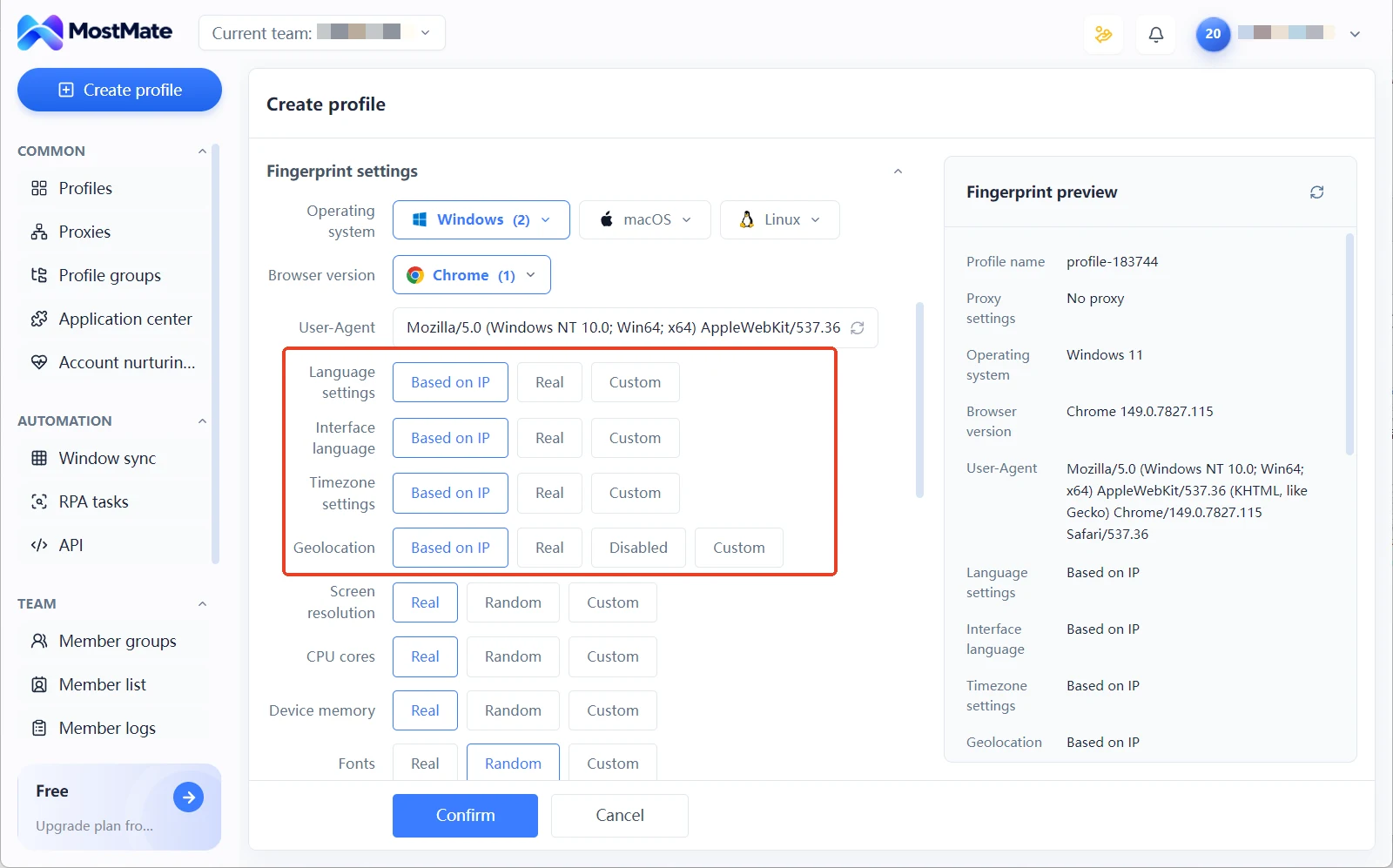
- Verify fingerprint consistency. Inside each environment, at least two of timezone, language, and geolocation must match the IP's country; turn on WebRTC leak protection so your real network adapter stays hidden. Random parameters aren't plausible parameters — "looks like a real device" matters more than "every value is different."
- Build an account asset ledger. One spreadsheet, five columns: environment name, platform account, bound IP, payout account, notes. Even a one-person company needs a ledger, because it governs not just today but every future change — new computer, new accounts, handover when you hire.
Step five is the one people skip, and the price only shows up when you're tracing an incident. For ledger and access-log practices you can copy directly, multi-account security management lays out a ready-made workflow that a one-person company can follow as-is.
Running multiple stores on one computer: three options compared
If you want multiple stores on one computer, three roads are open to you: buy more computers, run virtual machines, or use an antidetect browser. Their isolation depth and cost structures are completely different — here's the comparison:
| Dimension | Multiple computers | Virtual machines | Antidetect browser |
|---|---|---|---|
| Cost per environment | Full machine purchase, several hundred dollars one-off | Hardware amortization plus software licenses | Subscription plus IP fees |
| Memory usage | A whole machine each | 4–8GB per environment | About 100–200MB |
| Isolation level | Hardware | Operating system | Fingerprint plus network |
| Startup speed | Boot-up | Minutes | Seconds |
| Practical scale | Single digits | Single digits to 10 | 20–100 and up |
For a SOHO operation the conclusion is fairly clear: at the 5–30 account scale, virtual machines start to struggle (20 environments means 80GB-plus of memory), and multiple computers lose on cost and upkeep. The antidetect browser is the right fit for this range. Note that Chrome's multi-profile feature is not an isolation solution — it only separates logins, while fingerprints and IP are fully shared.
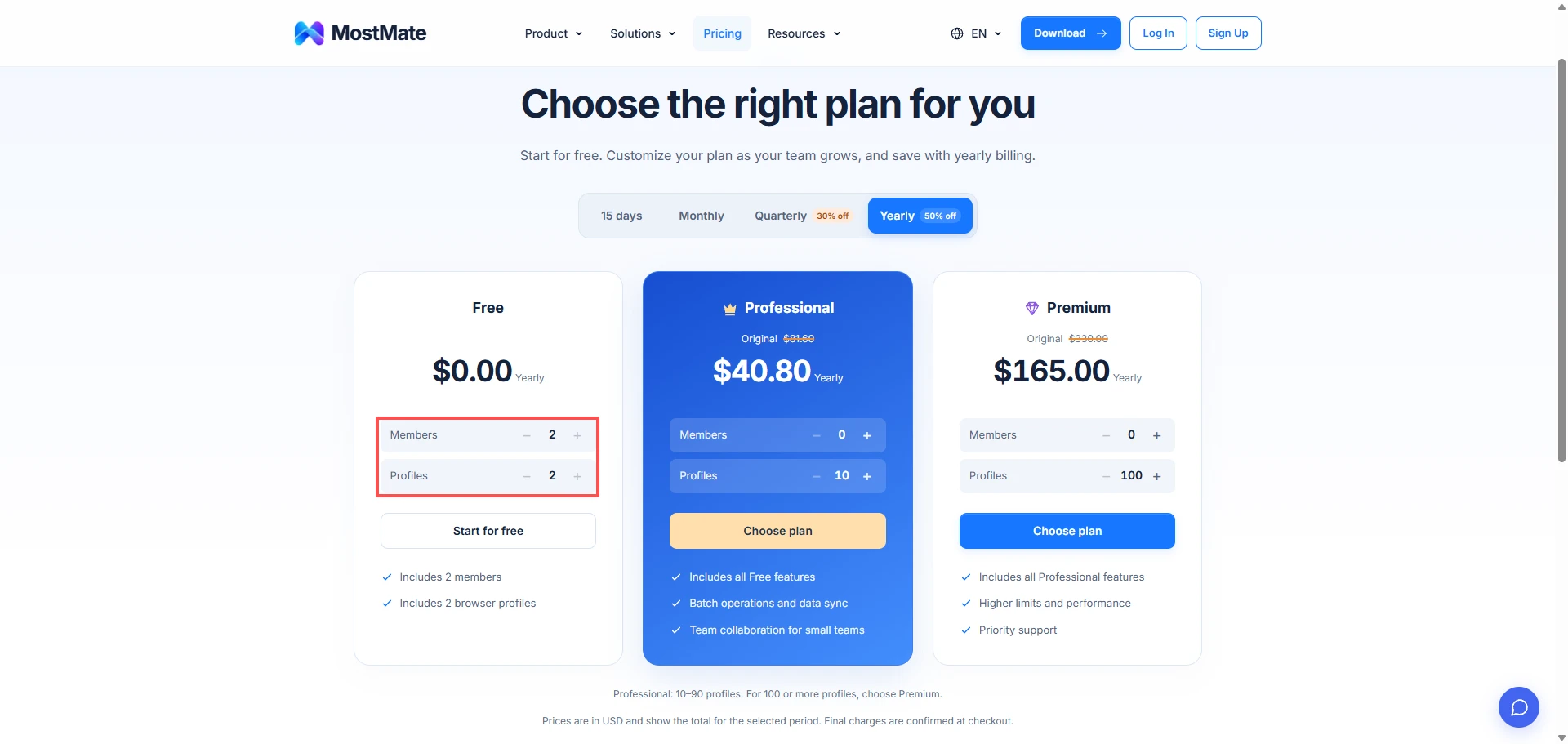
Don't let the cost scare you off. Free plans have become nearly standard in this industry — most antidetect browsers offer a free quota of environments, and keeping a starter-stage monthly budget under $30 is a workable path. Take MostMate's antidetect browser: get one environment's configuration stable on the free tier first, then scale as your accounts grow, with the actual limits per the pricing page. That rhythm is easy on a one-person company's budget and nerves.
Three steps to get one environment stable in MostMate
Configuration comes down to three steps, each with a clear entry in the dashboard. Run them in order and an environment is ready for use within five minutes:
- Create the environment. Pick a platform template, and the system generates a full set of fingerprint parameters — UA, Canvas, WebGL, timezone — automatically, with no hand-tuning item by item.
- Bind the proxy. Enter your static residential IP's protocol, address, and port in the proxy settings. From then on, this environment reaches the internet only through that exit.
- Lock the parameters and log in. The fingerprint generated at creation stays identical every time you open the environment, and cookies and login sessions stay inside it — the second launch picks up right where the last one left off.
Fingerprints and cookies never crossing between environments is the default behavior — that's exactly the working form of "the tool handles it" from the first three layers of the model above. Once configuration is done, open ipinfo.io inside the environment to confirm the exit IP matches your plan before logging into any real account.
Why the payments environment must stand alone: PayPal's 180-day freeze
In the four-layer model, the payout account belongs to the identity layer — that's the technical reason it must stand alone: environment isolation fixes login problems, but it can't fix profile overlaps like "two stores bound to the same payout card."
Amazon officially lists payout accounts as a linking dimension — one payout card bound to two stores is a high-risk signal. PayPal's risk logic is similar: third-party research shows a substantial share of its freezes stem from device or network environment leaks, and a freeze can last up to 180 days.
PayPal's account rules are worth memorizing too: one identity generally maps to one personal account plus one business account. Opening multiple same-type accounts under one identity violates the rules; the compliant multi-account route is a separate business account per legal entity (subject to PayPal's official user agreement).
For a one-person company's daily routine, that's three disciplines: one payout account per person, no sharing for convenience; keep the payout dashboard's login environment separate from storefront environments — no casually opening PayPal in a storefront window; and keep your registration name, bank account, and tax information consistent, because inconsistent details sharply raise the odds of manual review.
The hands-on side of receiving and withdrawing funds is broken down step by step in the cross-border payout binding guide. To say it once more: isolate at the environment layer, stay independent at the identity layer — only when both are in place is your payments line truly its own setup.
For accounts already restricted, the right move is to appeal first and evaluate later, not to register new accounts immediately. With payment providers, an account's value lies in stability — transaction ratios, dispute rates, and login behavior decide its lifespan, and rebuilding an account costs far more than nursing the old one back to health.
After the environments are built: cold start and four daily rules
Environments are one-time engineering; discipline is a daily job. Finishing the setup doesn't mean you can go full throttle — four rules decide how long this architecture holds up. (A "cold start" means letting a brand-new account sit quietly at first, so it can build a normal behavioral baseline before doing anything commercial.)
- One environment, one account. Never log a second account into any environment. One overlap login, and the data layer crosses streams once.
- Keep the IP fixed, no frequent switching. Platforms read IP jumps as a stolen-account signal and trigger extra verification. If you truly must change, pick a new range in the same country from the same carrier.
- Cold-start new accounts before going public. New accounts in the backup environment spend their first week or two on browsing and light interaction only. On platforms like LinkedIn, don't blast connection requests right after signup (practitioner research puts the window at 1–2 weeks). For a day-by-day schedule, the account warm-up checklist can be followed as-is.
- Log every change. Environment parameter tweaks, account migrations, device swaps — update the ledger the same day. A ledger is cheap insurance, and incident tracing depends entirely on it.
The value of this architecture isn't any single day's output — it's day 300: the prospecting main account still alive, the client relationships in the communication environment intact, the storefront weight untouched, the payment pipeline never broken. For a one-person company, business continuity is the competitive advantage itself.
Conclusion
The multi-account trap for a solo exporter isn't solved by buying more devices or cycling IPs — it's solved by splitting the business into five environments by function: prospecting, communication, storefronts, payments, backup, with one account, one environment, one IP, and independent identity details throughout. On the mechanism side, platforms score connections from multiple overlapping signals; strip the signal layers apart and the chain of collective punishment breaks. If you're ready to gather your scattered accounts into one architecture, the MostMate product page covers the full capabilities — environment creation, proxy binding, parameter locking — and three steps get one environment stable, starting from the free tier.
FAQ
Why was I still flagged as linked after switching computers?
Switching devices cuts off only the device fingerprint signal. A shared broadband line keeps the IP overlapping, DNS settings can leak your real network location, and WebRTC can expose your local network adapter. Isolating exit IP, fingerprint, and data layers at the same time is what counts as complete environment isolation.
Will logging into multiple PayPal accounts on one computer get them linked?
Yes, it's high-risk. PayPal judges connections from device fingerprints, IP, login behavior, and banking details, and multiple accounts on one machine can hit fingerprint overlap even across browsers. The correct approach: one independent environment, one independent IP, and one set of banking details per account.
How many environments does a one-person export business need?
Merge prospecting and communication into one, plus storefront and payments — three to start. Past 10 accounts, or once team collaboration begins, split into the full five: prospecting, communication, storefront, payments, backup.
Antidetect browser or virtual machine — which one?
At 5–30 accounts, choose the antidetect browser: memory usage two orders of magnitude lower, isolation covering fingerprint and network layers, second-level startup. Virtual machines suit cases needing OS-level isolation, like running desktop software; beyond 20 environments, their memory and upkeep costs stop being sustainable.
Can multiple independent sites share one PayPal account?
They can, provided each site uses a different settlement email and each site's orders and login IP stay consistent. The steadier path is one payout account per site, or separate business accounts per legal entity. What shared-account savings buy you is nothing next to one 180-day funds freeze.
Once the environment is ready, can a new account start adding clients the same day?
No. A new environment solves "no reused old signals," but the account itself still needs a behavioral baseline. Spend the first few days on browsing and light interaction, and open up outreach and marketing gradually at the platform's pace — outbound activity during the cold-start window is a top trigger for bans during review periods.

MOSTMATE
Secure Multi-Account Management, Made Simple
Start with your first account and use MostMate to build safer, smarter, and more efficient multi-account operations.
- Independent profiles. Consistent identities.
- AI Automation · Account Health · Team Operations