
MostMate vs Incogniton: How to Pick the Right Free Plan, Starting with Team Seats
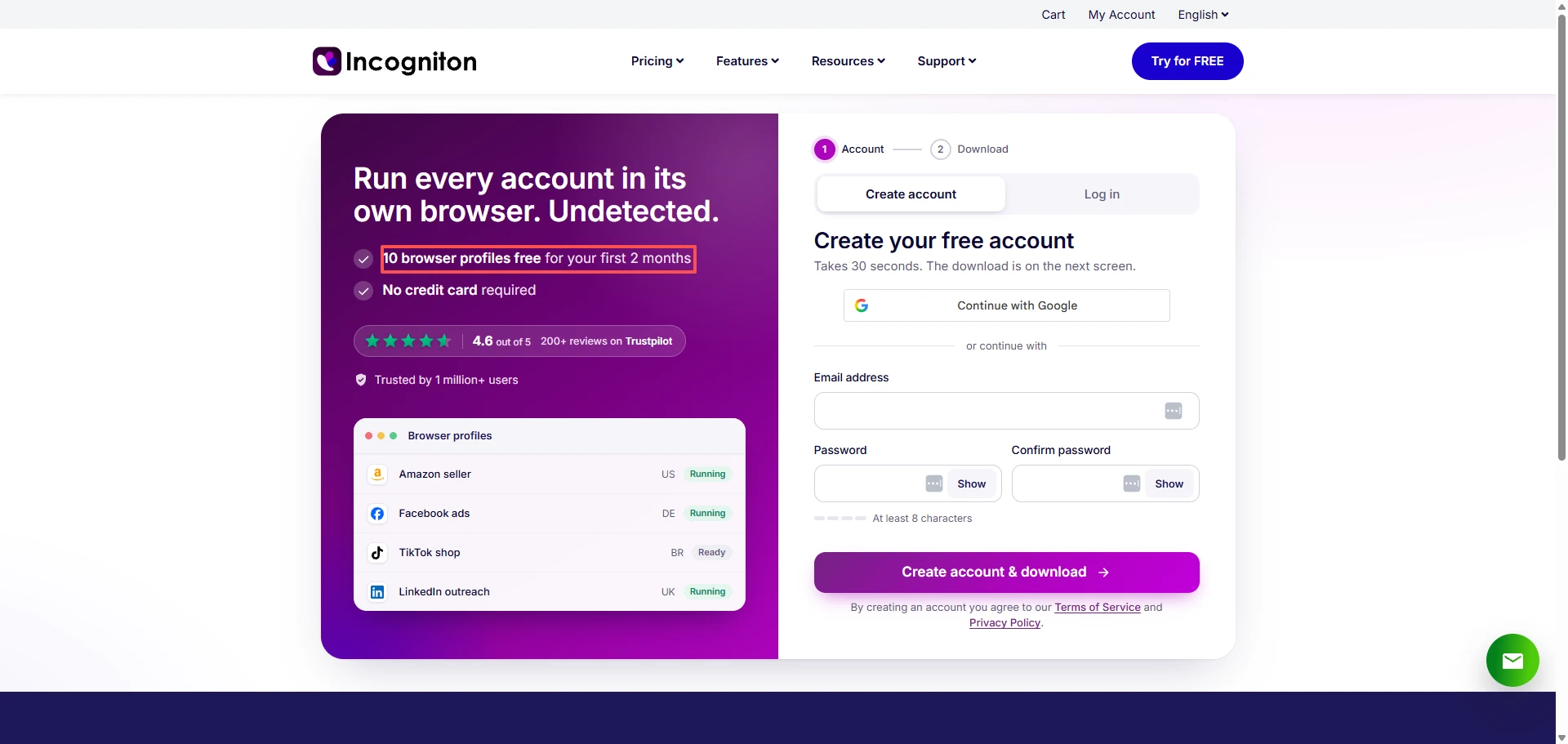
Picture a two-person social media studio that starts out on Incogniton's free plan. On signup day it shows 10 browser profiles — more than enough for two people to share. Two months later the cap quietly drops to 3, one account gets locked out for going over the limit, and when they try to bring a third coworker into the dashboard, they discover team management sits on the paid-feature list. You didn't pick the wrong tool; you just didn't read the free plan's fine print.
The traps in choosing a free plan hide in the details: which features are locked, how your allowance changes after a few months, whether a second person can even join. Those details decide whether your business gets forced to move house once the trial period is over.
What Are MostMate and Incogniton?
Both products belong to the same category of antidetect browser tools — browsers built to keep multiple accounts from being linked to each other — but their positioning and form differ quite a bit.
What Is MostMate?
MostMate's free antidetect browser organizes your work around "environments." Think of an environment as a self-contained container: it bundles its own device fingerprint (the fake device identity a platform sees), a proxy (the middleman server that decides your IP address), cookies, and login sessions, so one account lives in one environment.
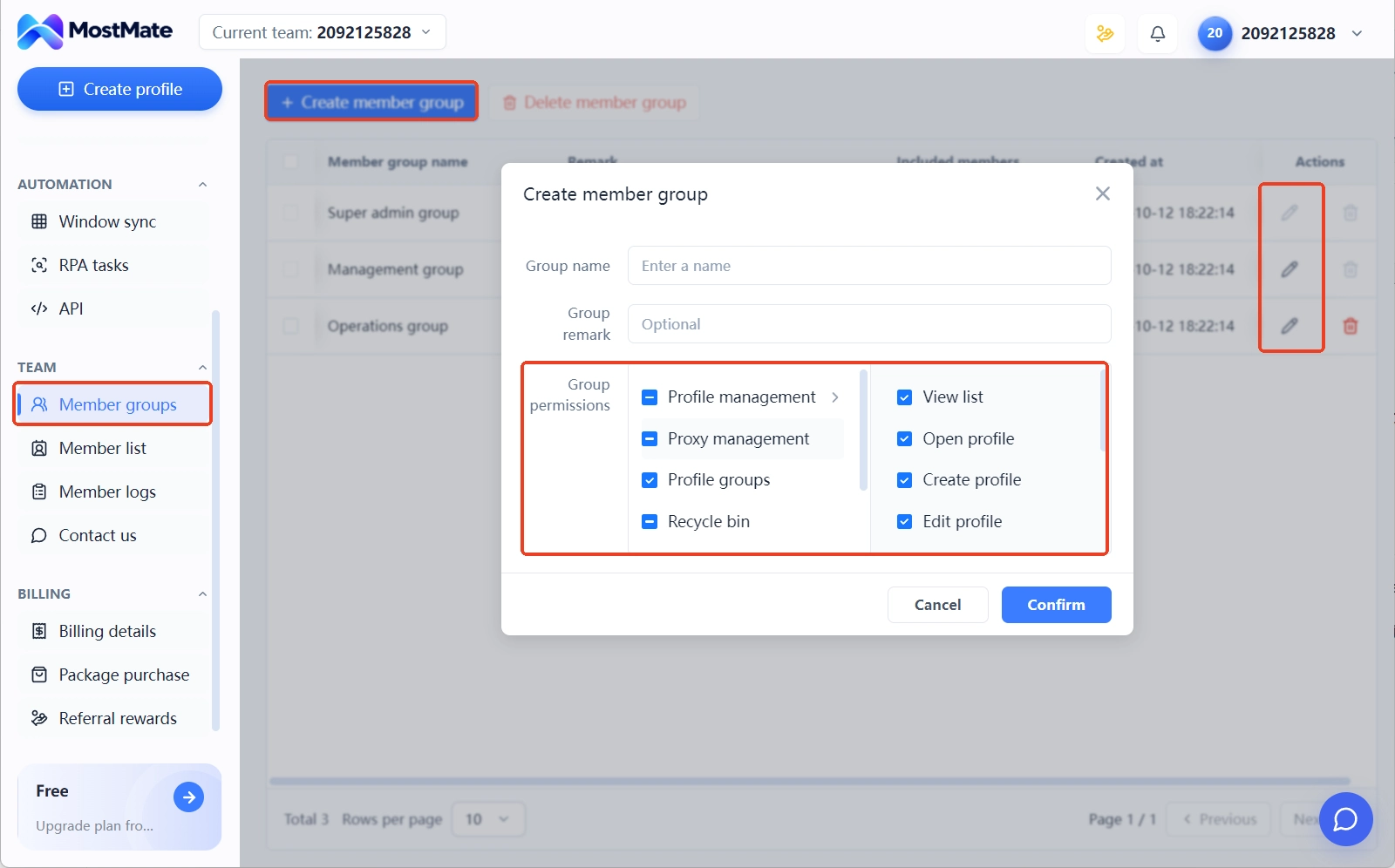
Team collaboration is a built-in capability rather than an add-on: member seats, permission assignment, and environment sharing all work on the free plan, with paid tiers unlocking more environments and bulk actions. The officially published capability list also includes an RPA workflow library (grouped by platform, tasks bound to environments) and an account warming plan (a 30-day, five-stage schedule that warns you "not today" if you run ahead of it). Because multi-account isolation and team collaboration live in the same dashboard, you don't have to migrate between tools as you scale; the product details are on the antidetect browser built for multi-accounting page.
What Is Incogniton?
Incogniton antidetect browser or the Incogniton fingerprint browser it's a desktop tool with clients for Windows and macOS that isolates work in units called "browser profiles." Each profile holds its own fingerprint, cookies, and local storage, and you can attach either a free built-in proxy or an external one. The paid feature list includes Cookie Collector (which auto-generates cookies for new profiles), a Synchronizer (which copies one profile's actions to many), team management seats, plus REST API and Selenium automation, and there's a separate cloud phone product line as well.
MostMate vs Incogniton Free Plans: Five Numbers Compared
Here's the verdict and the core judgment of this whole article: if you're a single light user, Incogniton's free version works; once two or more people need to collaborate, MostMate's free version is the better fit.
| Dimension | Incogniton Starter (free) | MostMate Free |
|---|---|---|
| Environments (at signup) | 10 profiles | 2 environments |
| Environments (long term) | 3 | 2 |
| Member seats | Not supported | 2 members |
| Locked features | Team management, Cookie Collector, Synchronizer, REST API/Selenium, profile transfer, deleted-profile recovery | Bulk actions, data sync, and more sit in paid tiers |
| Expiry risk | Cap automatically drops after two months | Environments and seats stay fixed long term, no shrinkage |
- On environment count, Incogniton gives you more up front but ends up one fewer than MostMate in the long run; that early generosity is paid for with a two-month window.
- The seat gap is even more direct: MostMate's free plan works out of the box with 2 members included, while Incogniton doesn't include 3 seats until the Professional tier (150 profiles).
- Each company locks half its capabilities behind payment: Incogniton locks collaboration and automation, MostMate locks bulk actions and data sync.
- The expiry-risk difference is plain to see: MostMate's environment and seat counts never change, while Incogniton has a clear shrinkage timeline — factor month-three capacity into your planning before you even register.
What Free Plans Are Really Competing On: Four Metrics
Free antidetect browser plans actually come in four flavors: some are free forever but with very few environments, some give you a lot early and then downgrade automatically, some wipe your data after a few idle days, and some are just short trials. The phrase "10 free environments" means something completely different in each of these, yet vendor pages usually show only the signup-day number.
So when you size up any fingerprint browser's free plan, measure its real value with four metrics:
- Two numbers for environment count: how many on signup day, how many left after three months — the difference is your shrinkage margin.
- Seat count listed separately: no matter how large the environment allowance, if teammates can't join, it's still a single-user tool.
- Which features are locked: collaboration, API, bulk actions, cookie tools — whichever gets locked decides whether your workflow can keep running.
- What happens to data at expiry: whether over-limit environments get archived or deleted after a downgrade directly affects your account data's safety.
All four can be verified on official pricing pages and in the original terms. If you want hands-on comparison data for the mainstream tools as a reference, read it alongside the Best Anti Detect Browsers.
Incogniton's Free Plan Rules: 10 Profiles for Two Months, Then Why Only 3
Reading Incogniton's free Starter package rules, the key is to separate "signup day" from "month three," because they're two completely different allowances.
For the first two months after signup, you get:
- A quota of 10 browser profiles, enough to batch-import your existing accounts and try things out
- A free built-in proxy covering a dozen-plus countries and regions, fine for connectivity tests and temporary access
- Email signup only — no credit card required at any point
From month three onward, the allowance looks like this:
- The profile cap drops from 10 to 3; anything over the limit is locked until you delete old ones to create new
- Team management is unavailable — coworkers can't enter the dashboard, so permission assignment is out of the question
- REST API and Selenium automation are unavailable; scripted bulk operations require a paid tier
- Efficiency tools like Cookie Collector, the Synchronizer, and profile transfer are likewise paid-only
- Deleted profiles cannot be recovered; the free plan has no such data protection
Put the two lists together and Incogniton's free plan is an entry point that lets a single user trial things thoroughly, not a tier that can carry a team's business long term. Once the grace period ends, what remains on the free plan is 3 profiles and single-person operation.
Enough for One Person? Three Cases Where Starter Makes Sense
Running a light one-person operation, Incogniton Starter is enough. Three long-term profiles map to three core accounts, the free built-in proxy handles connectivity tests, and several third-party reviews file it under the "freelancers / light users" category.
Here are the three cases where staying makes sense:
- Your total account count is 3 or fewer and won't grow soon;
- You do all the operating yourself;
- You don't need automation scripts.
If even one of the three doesn't hold, it's time to look at paid tiers or a different option — especially the moment "a second person needs dashboard access," which the free version cannot satisfy.
What MostMate's Free Plan Gives You: Why 2 Member Seats Are the Key Difference
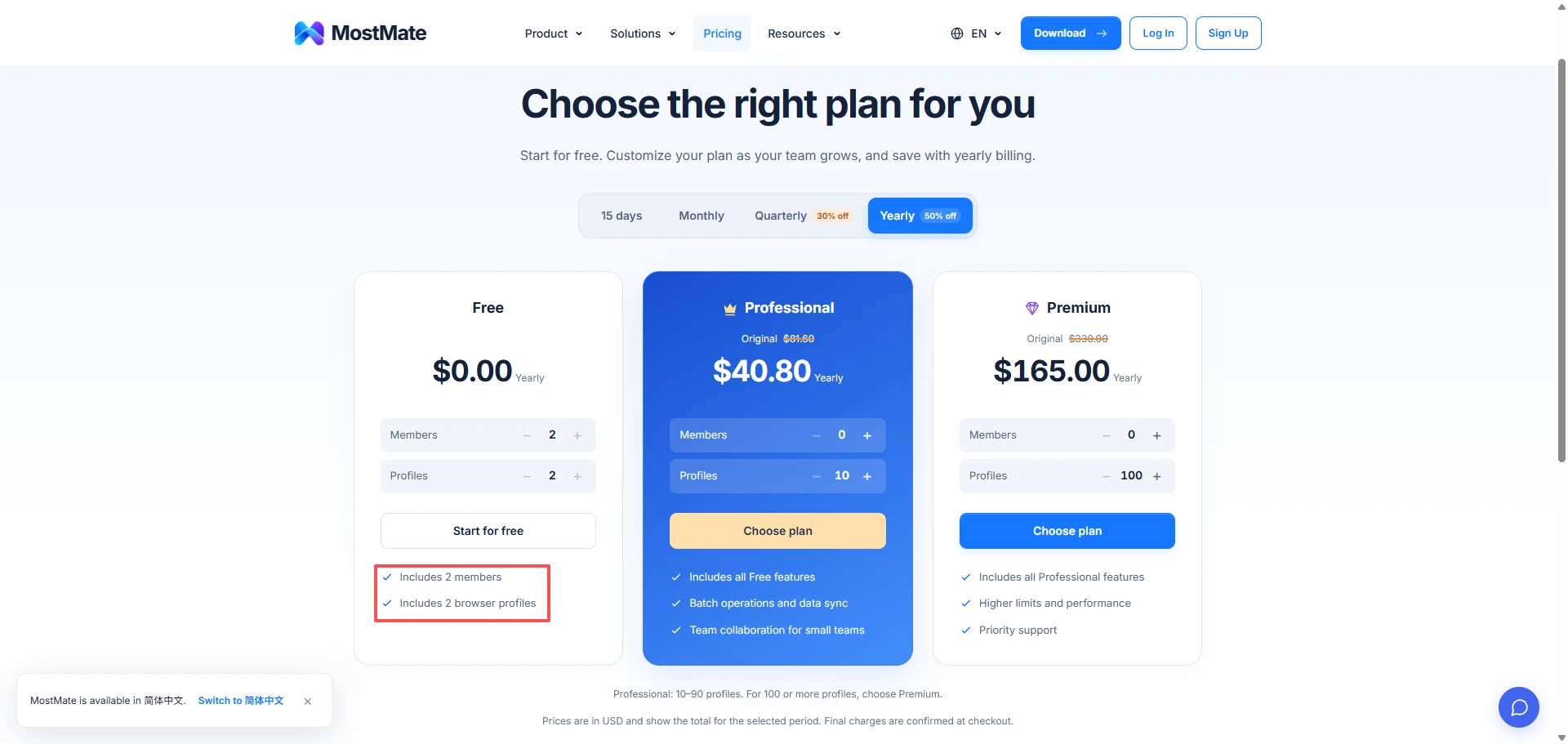
MostMate's free plan is listed at $0 on its official pricing page, including 2 members and 2 browser environments, with rules that don't change over time. Compared with Incogniton: Incogniton gives one person 3 profiles, while MostMate gives two people 2 environments — the former has no collaboration from day one, the latter has it working from day one.
A two- or three-person studio missing one environment can cope by merging secondary accounts; coworkers being unable to enter the dashboard has no money-saving workaround at all — you either buy seats or share one account's password, and the latter is a clear risk in multi-account work. You can verify the full boundary of what the free plan does and doesn't include on the MostMate fingerprint browser product page.
Why Seats Are Scarcer Than Environments
Most tools' free plans are willing to hand out a few extra environments but not willing to open up member seats, and behind that lies a cost difference between two kinds of resources.
An environment is a piece of isolated local or cloud data, so the marginal cost of one more is tiny. A seat, though, carries an entire stack of permission systems, operation audit logs, and cloud syncing — the vendor has to keep maintaining multi-user infrastructure for free users. That's why whether a free plan dares to include seats is a straightforward signal of whether a vendor treats collaboration as a base capability or a paid add-on. For a two- or three-person team, this signal matters more than the environment number.
Choosing a Free Plan by Team Size: Three Answers for 1 Person, 2 to 3 People, and 5+
The same free plan gives completely different answers depending on team size.
1 person: Incogniton Starter works — 3 long-term profiles, free proxy, single-operator, a zero-cost start with no fatal flaw; MostMate's free plan is equally viable, with the spare seat kept as backup so you won't need to switch tools when you add someone.
2 to 3 people: seats matter more than environment counts, because the core question at this size is "who operates which accounts." Incogniton's free version supports no members, so it's out immediately; MostMate's free plan covers 2 people, and a third needs an upgrade. If your studio does social media management built around a Facebook matrix, see the Facebook multi-account operations solution for how to pair people with environments — the approach is universal.
5 or more: free plans generally aren't enough; compare paid tiers' per-seat and per-environment prices directly and treat free plans as trial channels only.
Moving from Incogniton to MostMate: Five Steps to Migrate Without Pitfalls
If you're weighing Incogniton alternatives, migration cost is a line item you must calculate. Because Incogniton's free version has no profile-transfer feature between users — official transfer is a paid capability — free users face a manual rebuild path, with no automatic data carryover. Here are the five steps:
- Inventory the old environments: in Incogniton, record each profile's fingerprint parameters (UA, time zone, language, resolution), proxy addresses, and account lists, and screenshot everything for the archive.
- Rebuild the environments: create matching environments in MostMate and fill in the recorded fingerprint parameters, staying as close to the originals as possible — platforms remember an account's old fingerprint, and parameter drift triggers verification.
- Reattach the original proxies: keep the same proxy provider and enter the original address and port; keeping the exit IP unchanged is the key to stability during migration.
- Restore login sessions: Incogniton's free version has no cookie export, so take the re-login path — after binding each new environment to its original proxy, log in to each account once; the login itself also initializes the new environment.
- Verify small, then scale: migrate 1 to 2 core accounts first and watch them for a few days; once there are no unusual verification prompts, move the rest. After accounts re-login in the new environment, follow the 7-day guide account warming checklist to reduce the risk of being flagged or suspended.
When to Upgrade to Paid: Both Tiers and Team Seat Costs Compared
Once you hit problems like environment caps (the long-term limit falling short for two straight weeks), needing a second collaborator, or needing automation (API or scripted bulk operations), it's time to price both products. How much does a fingerprint browser team plan cost? Here's what each company says (verified on official sites, November 2026):
| Tier | Incogniton (current official price, billed on a 6-month cycle) | MostMate (current official price) |
|---|---|---|
| Entry paid | Starter Plus $13.99, 10 profiles | Pro annual $40.80, 10–90 environments |
| Mid | Entrepreneur $20.99, 50 profiles, includes API | Advanced annual $165.00, 100+ environments |
| Team | Professional $55.99, 150 profiles, includes 3 member seats | Team collaboration from the Pro tier |
| Scale | Custom from $104.99, 500+ profiles, 10+ seats | Advanced tier and up for larger quotas |
Note that Incogniton quotes are billed in 6-month cycles, so your monthly cost has to absorb those 6 months up front; the $19.99, $29.99, and $79.99 figures circulating in communities are old prices — the official current prices are what count. MostMate's pricing page varies with the billing cycle: monthly at full price, quarterly at 70%, annual at 50%, with the actual amount shown at checkout. Calculate per-seat and per-environment prices separately and then add them up; judging by bundle price alone leads to mistakes.
MostMate vs Incogniton: Which Should You Choose?
- If you run 3 or fewer accounts entirely by yourself, Incogniton Starter's free plan is enough — no need to agonize.
- If you're two or more people who need to divide work, pick the plan whose free tier already includes seats; MostMate's free 2 members plus 2 environments is the direct answer for this scenario.
- If you need automation (API, scripts, bulk operations), both require paid tiers — Incogniton opens up from the Entrepreneur tier, MostMate per the Pro tier's feature list, as needed. At dozens of environments with a multi-person team, free plans are trials only; negotiate annual pricing on per-seat and per-environment prices directly.
The order of judgment matters too: decide headcount first, then environment count, then check locked features. Get the order backwards and you'll overpay for environments you'll never use, or sacrifice collaboration to save environments.
Wrapping Up: Check the Rules, Then Sign Up
Judge a free plan's real capacity by "how much is left after three months," and check shrinkage and idle-account rules on official pages before registering. For light single-person work, Incogniton Starter still holds up; for collaboration of two or more, first check whether the free plan includes seats — that decides whether your business can grow cheaply.
You can verify today: register one account on each free plan, create 1 environment and add 1 member on each, and run a week of real work. Whose free rules fit your team will show up in the logs and collaboration records. The registration entry is at MostMate Antidetect Browser Official, and Incogniton's free Starter can be activated directly on its official pricing page.
FAQ
How many profiles does Incogniton's free version actually include?
10 for the first two months after signup, then it automatically drops to 3. This is the explicit rule on the official pricing page; third-party articles saying "10 free" describe only the first two months' trial numbers.
Can you add team members on Incogniton's free version?
No. Team management (adding members, assigning role permissions) is on the paid feature list in the official FAQ; collaborating on the free plan requires upgrading to a seat-including package.
How many members can MostMate's free version add?
2 members. The official pricing page states the free plan includes 2 members and 2 browser environments, with no paywall on collaboration.
Which free fingerprint browser is best, and how do you judge quickly?
Check four metrics: the initial and long-term environment counts, member seat count, the list of locked features, and the data-handling rules at expiry. All four are on official pricing pages and in the terms — verify before you register.
How much do fingerprint browser team seats cost?
Go by current official prices: Incogniton's 3 seats come with the Professional tier ($55.99 per month, billed on a 6-month cycle); MostMate's free plan already includes 2 seats, with more seats in the Pro and Advanced tiers.
Will running multiple accounts on a free fingerprint browser get you banned?
The tool's job is to lower the probability of accounts being linked — it doesn't promise ban-proofing. Ban risk comes mainly from behavior patterns, proxy quality, and platform terms; free plans usually don't allow automation, which actually removes one high-frequency risk source. Check your target platform's account rules before scaling up.

MOSTMATE
Secure Multi-Account Management, Made Simple
Start with your first account and use MostMate to build safer, smarter, and more efficient multi-account operations.
- Independent profiles. Consistent identities.
- AI Automation · Account Health · Team Operations



