
Why New Accounts Get Banned in the First Week: A Day-by-Day Warming Checklist
You register a fresh WhatsApp number, send outreach messages to 30 clients the same day, see a verification prompt the next morning, and by day four the login screen says the number has been disabled — with every unanswered inquiry still sitting inside. Openings like this are all too common in cross-border business: the account itself is fine; what went wrong are the moves made in the first few days after registration.
I used to review tickets for banned accounts, going through several every week to figure out which actions, in which setups and at which point in time, tend to trigger manual review. After moving into product content, I turned the patterns that kept showing up in those cases into this day-by-day checklist, covering Facebook, TikTok and WhatsApp.
Here's the short version: days 1-7 after registration are the platform's observation period, and during this stretch the scale of what you do matters more than how many things you do. Below I break it down day by day, then give you a cross-platform comparison table and a troubleshooting method. Or, if you'd rather skip the manual work, you can follow the daily plan inside MostMate's fingerprint browser — its account warming manager walks you through each day's tasks so the risk of a ban drops on its own.
Why New Accounts Get Banned in the First Week
When risk-control systems judge an account, the question they ask is "does anything look unusual compared with this account's own past behavior?" An aged account has history, so one odd action just costs a few points. A new account has no history at all — every single action after registration is laying down its baseline. If adding friends or mass messaging happens before that baseline settles, the system has no choice but to treat it as suspicious.
New accounts also get no goodwill buffer: the exact same action that would at most throttle a six-month-old account sends a three-day-old account straight into the manual review queue. That's why people keep saying "I did nothing out of the ordinary, yet only my new account got banned."
Four triggers come up again and again during the first week, ranked by how often they appear:
- Reaching outward on day one: adding people, mass messaging, posting, dropping contact details.
- Completing the profile in one go. Real people leave gaps — when the avatar, bio, location and job title all land within a few minutes, it looks like batch registration.
- Jumping between login environments. Home network on registration day, a datacenter node the next day, another country on day three — to the platform, that's three different people taking turns on one account.
- Posting links in the first three days: a URL in the bio or external links in posts carry heavy marketing signals.
Take Facebook: ad and business-page accounts face much stricter environment-history requirements than personal ones, and the prep work for running ads is covered in our Facebook multi-account guide.
How Long Does the Observation Period Actually Last: 7, 14 or 30 Days?
Different articles throw out different numbers. Platforms have never published official figures — every range comes from operators pooling their own test results, and it shifts with account sources and regions. Rather than memorizing one number, keep three milestones in mind:
- Day 3: the high-risk window. Outward-facing actions are dramatically more likely to trigger a review here.
- Day 7: the baseline observation period. Browsing, engagement and your first piece of content should all wait until after this stretch, then roll out step by step.
- Day 14: the gate for commercial moves. Ads, bulk adding, links in your bio — leave them all until after this point.
If you've gone seven straight days with no verification popup, your posts get some initial reach, and adding people draws no warnings, trust is building normally. If even one of those is missing, stay where you are in the plan — don't move forward.
What to Do on Days 1-3 of a New Account
Day 1: Look, Don't Touch
Once registration is done, upload an avatar, set a nickname, scroll the feed for 15-20 minutes and log out. The only real to-do for the day: turn on two-factor authentication and link a backup email. Friend requests, posts, profile edits — all of it can wait.
Day 2: Log In from the Same Environment
Sign in from the same device and network you registered on, browse for 20-30 minutes, and search for two or three topics you actually care about. Environment hopping is one of the biggest risks in these first three days, so it's better to do less than to switch nodes or devices.
Day 3: Start Filling In Your Profile
Add a bio and a location, one field at a time, and stop touching the avatar and cover photo. On TikTok, spend the day watching content in your niche all the way through so the recommendation system can label the account.
Days 4-7 of a New Account: Can You Add Friends and Post Yet?
The pace picks up noticeably here, but add one thing at a time.
Days 4-5: Add Real Contacts
Add 1-3 real people a day, starting with anyone you actually know in your contacts, and drop a like after each add. One WhatsApp detail worth knowing: save the number to your phone's address book right after adding them. The platform tells friends from strangers by your address book, and numbers you haven't saved are quick to be read as random adds.
Days 6-7: Post Your First Piece of Content
On day 6, post something everyday and link-free — no promotion. Keep your first TikTok video between 7 and 15 seconds and watch it for 24 hours. On day 7, look back over the week's logins and interactions; with no warnings, you're clear to scale up.
Here's a reference for daily caps. These numbers come from operator testing, and platforms adjust them dynamically:
| Platform | Adding/Following | Outbound messages | Common signs you've gone over |
|---|---|---|---|
| 10-15 people/day max | First-time messages to strangers: 5/day max | The send icon stays stuck on a single check mark | |
| Single-digit friend requests/day | DMs to strangers: 5/day max | A temporary restriction popup | |
| TikTok | 15 follows/day max | 10 comments/day max | Actions silently dropped, no feedback |
| 20 per hour max | 10 DMs/day max | A notice that actions are temporarily blocked |
How MostMate's Fingerprint Browser Warms Up Multiple Accounts in Bulk
Copy the checklist across several accounts and the hard part stops being discipline and becomes scheduling: every account sits at a different stage, each day's tasks differ, and most mistakes happen in the record-keeping. MostMate built this checklist straight into the product. The warming manager generates a 30-day plan per environment, with progress split into five stages: initialization (days 1-3), light activity (days 4-7), normal engagement (days 8-14), business transition (days 15-21) and steady operation (days 22-30), so you can work through warming in an orderly way, one day's plan at a time.
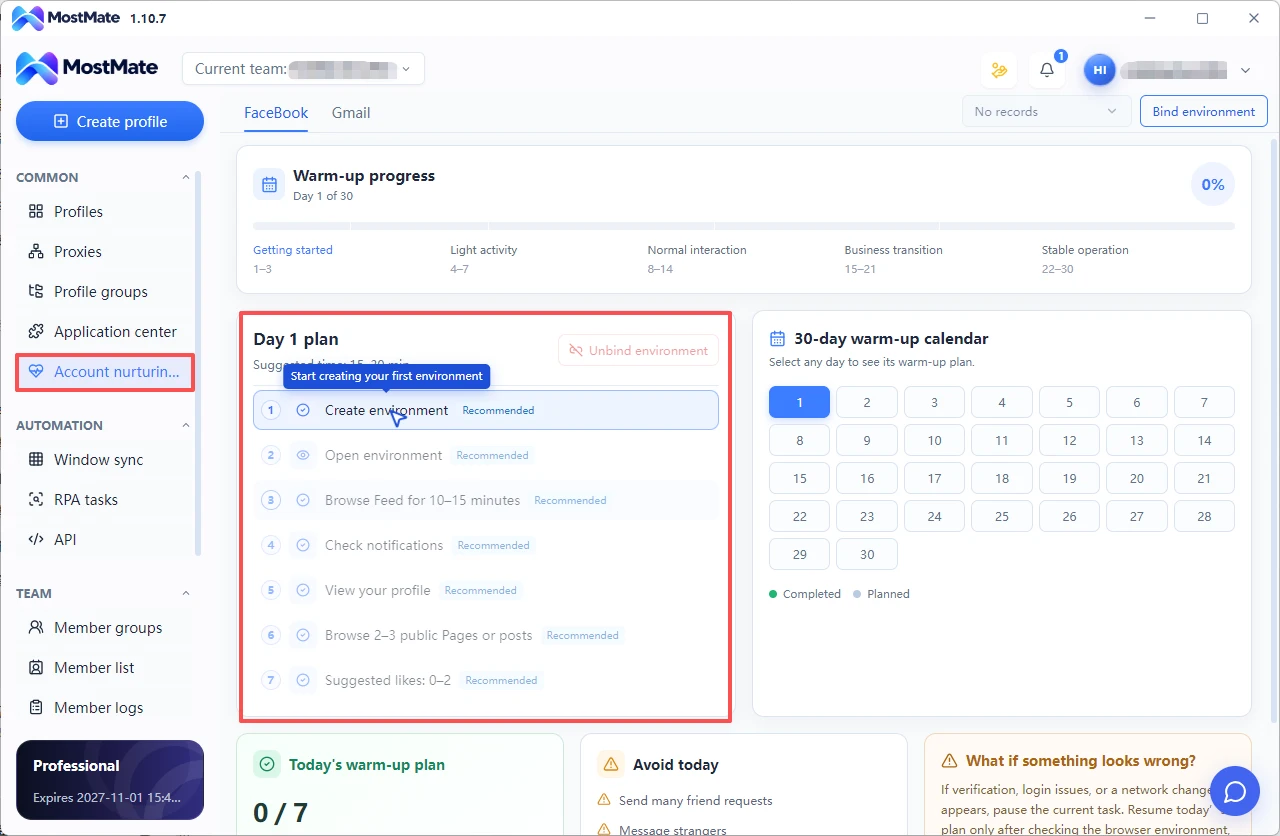
Open the page each day and the day's tasks are already listed. Take day 1 of a Facebook environment: create the environment, open it, browse the Feed for 10-15 minutes, check notifications, view your own profile, browse 2-3 public Pages, leave 1-2 likes — tick each item off as you go. The 30-day warm-up calendar next to it shows any day's plan with a click; in bulk mode every environment keeps its own plan, and progress never bleeds between them.
Two spots deserve a glance every day. "Not today" lists the actions to avoid that day — things like bulk friend requests or messaging strangers — which map exactly to the four triggers at the top of this article. And when a verification or login issue appears, the page tells you to pause the current task, confirm the browser environment, proxy and network are fine, then resume today's plan — the same order as the troubleshooting section below: check the environment first, the account second.
How Warming a New Account Differs on Facebook, TikTok and WhatsApp
Apply the three milestones to each platform and the actions and sensitivities diverge quite a bit:
| Platform | Observation period | Days 1-3 focus | Days 4-7 focus | Platform-specific triggers |
|---|---|---|---|---|
| From 7 days; commercial moves after 14 | Browsing plus 2FA | Add known contacts, join 1-2 groups | External links in your bio | |
| TikTok | 5-7 days | Watch your niche to get labeled | First short video | Posting a video on registration day |
| 0-15 days in three stages | Two-way chats, no group creation | Save contacts before adding | Creating groups, modified third-party clients | |
| 7-14 days | Browse and polish your profile | Light engagement, 1-2 everyday posts | Following then instantly unfollowing |

The differences come down to three things. WhatsApp trust is earned through two-way conversation: exchange plain-text messages with 3-4 contacts daily, with the occasional voice call over five minutes — far more effective than leaving the app idle. TikTok judges you on that first video; the cold-start pool is small, and low plays don't mean anything is wrong with the account. Facebook watches environment history the longest, so beyond warming, get your Page content and everyday engagement going early.
New Account Getting Zero Views or Throttled? Here's What to Do
Figure out which situation you're in before you act — never the other way around:
| Situation | Typical signals | What to do |
|---|---|---|
| Cold start | Some views, just small ones; recommendation traffic never zero | Keep posting on the same rhythm, leave settings alone |
| Real throttling | 3+ posts in a row with zero recommendation traffic, or a violation notice | Delete reposted and watermarked content, appeal in-app |
| Environment problem | Banned within 48 hours of registration, or verification pops up on every login | Check IP type and fingerprint consistency, submit verification materials as requested |
Pull the traffic-source breakdown for your last 3 posts in the creator dashboard. Only a long stretch of zero recommendation traffic counts as real throttling; the occasional trickle of recommendations is just a cold start. On recovery: a first throttling usually lifts in 3-5 days, repeated violations take 2-4 weeks — again operator-tested ranges, nothing platforms publish.
Verification popups during the warming window are common. For the face scan: good lighting, no hat or mask, no beauty filters — keep the features close to your avatar. For documents: all four corners visible, text readable. And if a verification code won't arrive, don't hammer the resend button; wait two hours and try again. Rapid requests trip the anti-spam mechanism.
Three things not to do: delete the account and re-register, wipe what you've already posted, or buy a third-party "unban" service. The first two throw away data you already have; the third usually ends with the money and the account both gone.
Warming Several New Accounts at Once: How to Avoid Linked Bans
Warming one account is a discipline problem; warming several adds an engineering one: isolation. Four essentials, none optional — check them one by one:
- One account, one environment: browser fingerprints, cookies and local storage never overlap.
- Fixed IP type and geography: each account stays on the same kind of exit from start to finish — registered in the US? Don't hop to Europe the next day.
- Stable fingerprint parameters: timezone, language and resolution must line up with where the IP is.
- Desynchronized behavior: stagger login hours, interaction rhythms and follow targets across accounts — everyone liking something in the same minute is the classic tell of an account farm.
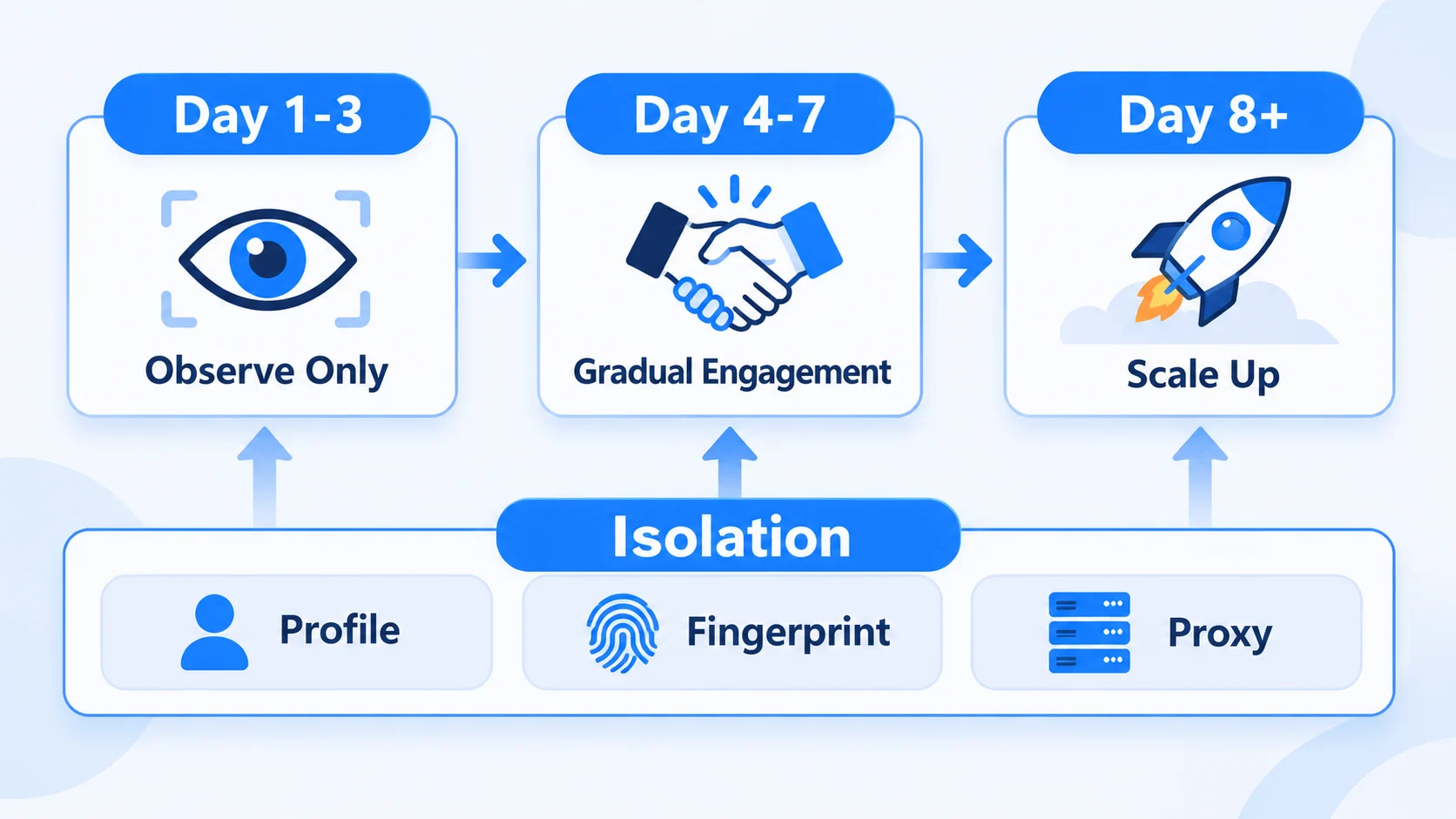
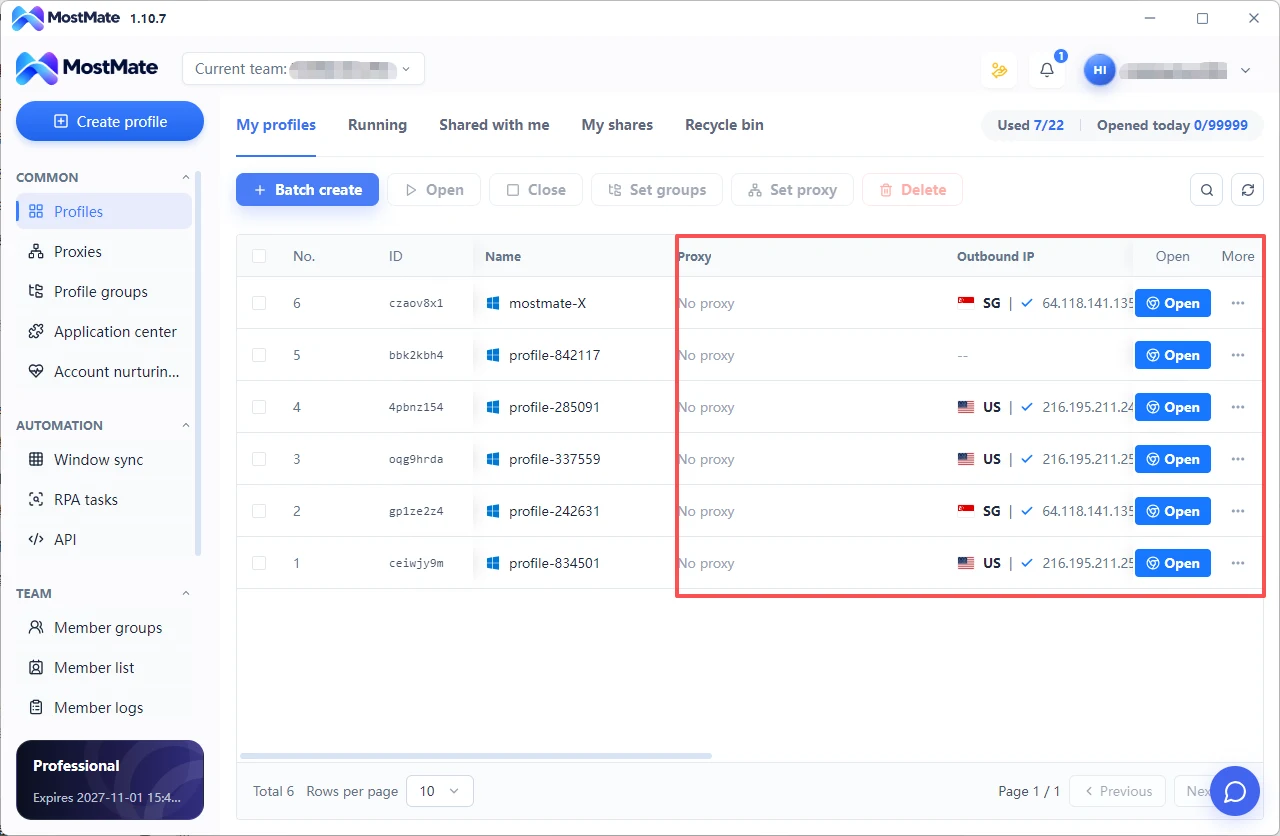
Keep those four variables straight by hand and something slips as soon as accounts pile up. MostMate turns bulk multi-account warming into environment defaults: fingerprint parameters are generated independently per environment, proxies are saved with the environment once bound, and members only use environments they're authorized for. Running it takes three steps: create an environment, bind a proxy, lock the parameters, then log in and start warming.
What to Do After the First 7 Days: Scaling Up
The observation period ending is not a pardon. Scale up in steps:
- WhatsApp: week 2, add 10-15 people a day; week 3, raise it to 15-20, keeping total outbound messages under 50 a day.
- TikTok: after warming, post one niche piece of content daily; only consider a bio link once the numbers hold steady.
- Facebook: build up your Page content and personal engagement first; promoted posts and other commercial moves wait two weeks.
Leave a 48-hour observation window after every step up, and drop back a level if a verification popup shows. Bought accounts deserve a separate note: buying skips the registration stage, but once the account moves into your environment it still has to pass the observation period, with the same checklist as above. For the handover checks, see how to safely onboard a purchased account.
Wrapping Up
Treat accounts as long-term assets and the observation period becomes your cheapest stage: the more restraint you show now, the more you can do later. If you're juggling several new accounts right now, MostMate locks in each account's warming parameters with isolated environments — try it today and set every warming environment up once, properly.
Frequently Asked Questions About Warming New Accounts
Why does a new facebook account get banned right after registration?
Three causes cover most cases: the registration IP or device recently banned another account, the profile details contradict each other, or the account reached outward on day one. Walk the days 1-3 checklist again, and submit real information for verification.
How long does warming a new account usually take?
Three milestones: day 3 is the danger window, day 7 the baseline observation period, day 14 the commercial gate. TikTok can be compressed to 5 days and WhatsApp planned around 15; the platform-by-platform breakdown is in section five.
How many days in can a new account post a video?
TikTok's first video goes out on days 5-7 and Facebook's first post on days 6-7 — but only after at least two full days of normal interaction.
How many people can a new whatsapp account add per day?
Field-tested numbers say 10-15 a day, spread across the day, saving each one to your contacts. Adding more than 50 people in the first hour gets you read as a bot.
Is zero views on a new account normal?
Low views on the first 3-10 posts are standard cold start — the system is still finding your audience. Only 3+ consecutive posts with zero recommendation traffic should be treated as throttling.
Do you need a fingerprint browser for warming?
One account is manageable by hand; from two accounts up, you need one environment per account. Use best anti detect browser in 2026 to avoid missing details like timezones during manual switching, and keep fingerprints, proxies and parameters locked so they never drift.

MOSTMATE
Secure Multi-Account Management, Made Simple
Start with your first account and use MostMate to build safer, smarter, and more efficient multi-account operations.
- Independent profiles. Consistent identities.
- AI Automation · Account Health · Team Operations



