
How to Safely Onboard Bought Accounts into Environments: From Verification to First Login
Before I moved into product content, I spent five years as an engineer in risk control, collecting device fingerprints, comparing environment parameters, and judging which login behaviors get flagged. In the account-loss cases I reviewed, most failures happened in the first days of onboarding, not months into operation. One team stands out: forty accounts from the same seller, fewer than fifteen still running a week later. The accounts were not the problem; the onboarding was. The seller's test sessions were still active, and the team changed nickname, avatar, and region on day one. The platform logged an unfamiliar device and a profile change at the same time.
Whether a bought account lasts is roughly half decided at onboarding. Below are four steps in order: verify the foundation, trace the leftovers, align the environment, and stabilize the first 72 hours. The usual carrier for these steps is a fingerprint browser that keeps accounts, proxies, and fingerprints in separate layers; once those three align inside one environment, every later step has something to stand on.
Why do bought accounts fail during onboarding?
Accounts that fail in this window almost always show three signals at once: credentials were never handed over, profile details were rewritten in one pass, and the environment does not match the registration region.
| Failure type | What the platform sees | What it costs later |
|---|---|---|
| Credentials never fully changed | The same account signs in from two regions alternately | The original owner can recover it at any time, so ownership stays unclear |
| Profile rewritten in one pass | Nickname, avatar, region, and password changed on the same day | Manual review, with features limited for days to weeks |
| Environment does not match registration | Login location jumps; system language and time zone do not fit | New-device logins get extra scrutiny and more frequent checks |
All three point to the same thing: the account's past and present do not line up. Nobody outside a platform can obtain its exact risk rules, so the workable path is to get your own half right and let the new environment continue the account's existing trajectory.
The logic is the same whether you run social accounts bought through facebook account purchases or buyer and seller accounts on ecommerce platforms. Only the signals platforms weight differ: social platforms watch login location and interaction patterns, marketplaces watch payout accounts and device consistency.
The three verification gates: what do you check before the final payment?
In the account trade, verification means one round of checks before the balance is paid. Clearing three gates before paying is the default practice on both sides, and the results become your baseline file for onboarding.
- Documents: check every item on the seller's credential list. Can the registered email and password sign in, can the bound phone receive codes, do name, region, and birth date match the list. One missing item means one fewer recovery path later.
- History: read the account notices after signing in. Any feature limits, any past violations, does the registration age match the seller's description. A three-year-old account and a one-week-old account need completely different pacing after onboarding.
- Ownership: did the verification methods transfer with the account. If the email password, backup email, and two-factor recovery codes are not in your hands, the original owner can take the account back at any moment. Verification is only complete at this gate: signing in does not count, being able to recover it does.
An account that fails verification is cheaper to return than to onboard. For one that clears all three gates, file the credential list in the company archive; it is the baseline for every later step and the one reference both sides can reconcile during a handover.
How do you trace the association leftovers a seller leaves behind?
Verification confirms the account is good; tracing confirms it is clean. Sellers ship accounts in batches, and leftovers are often shared between accounts, or between an account and the seller. Those leftovers are what links accounts together later.
- Session leftovers: the device session the seller used for test logins may still be active. Open the account security settings, sign out every other session, and keep only the one you are about to use.
- Binding leftovers: accounts from the same batch often share an email domain or phone range. Go through the binding details; where accounts share a mailbox, move each one onto your own email assets, one at a time, never as a batch.
- Content leftovers: friends, follows, and old posts may have nothing to do with what you plan to do. Do not rush to delete. Record first, clean up at a steady pace once onboarding is stable; a sudden mass unfollow or purge is itself an anomaly signal.
- Location leftovers: the account's registration region and usual login locations decide where the environment exit should sit, and that feeds straight into the next step.

One more step after tracing: write every finding into the handover sheet with the date found, the action taken, and the observation. The real problem in account onboarding is not that leftovers exist; it is that nobody knows which ones were handled and which were not.
How do you align the environment with the source account instead of making the account adapt to you?
Many people start with a deep clean: change the password, change the nickname, swap the avatar, clear the friend list, all in one sitting. The platform sees a different picture: an account that was active in one region suddenly changes language, time zone, device, and behavior pattern at the same time.
Alignment works the other way around, letting the environment adapt to the account:
| Environment parameter | What to align it with | Common mistake |
|---|---|---|
| System language and time zone | Registration details and login history | Keeping the office laptop's language and local time zone |
| Exit IP region | The city or area where the account was historically active | Using a datacenter IP disguised as a local residential IP |
| Browser fingerprint | One environment per account, bound the moment it is enabled | Several accounts sharing one environment |
| Account profile | Record first, adjust gradually day by day | Replacing everything on the first day |
This is the alignment logic used most often in facebook multi-account operations, and it applies to social platforms and marketplaces alike. Alignment has one purpose: make the account behave on its new carrier the way it behaved in its own history, and cut contradictory signals.
To be clear, this approach promises no particular outcome. Platform rules change constantly; what you control is your own side, keeping account identity, login environment, and operating pace from contradicting each other.
The 72-hour checklist after the first login
Once the environment is ready, the critical window opens. Follow this order for the first 72 hours:
- Change the credentials first, then act: after signing in inside the environment, replace the account password and the email password with your own, and rebind two-factor authentication. Do not reverse the order: sign in first, change credentials second. Only at that moment does the seller's entrance actually close.
- Read only, change nothing: spend the first day browsing. Open the home page, read messages, scroll the feed, and let the account run in read mode inside the new environment.
- Adjust the profile over several days: for avatar, nickname, and bio, change one item a day and watch between changes. Editing a profile is not forbidden; doing all of it in one sitting is.
- Log the state: record login times, platform notices, and any feature limits in the handover sheet, line by line.
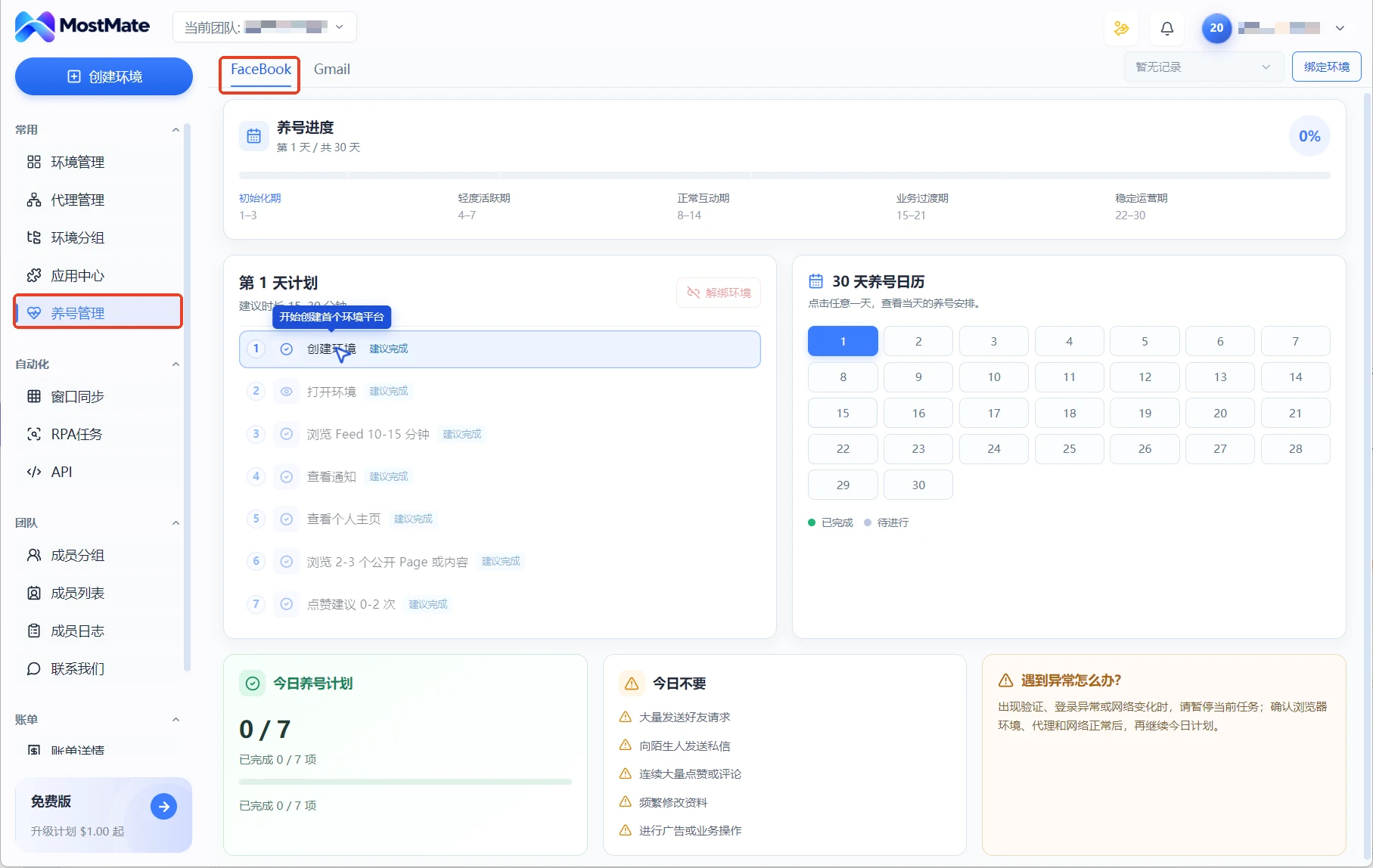
A checklist only works if it lands in a tool instead of someone's memory. MostMate fingerprint browser turns the thirty days after onboarding into a schedule: the warm-up page splits the cycle into initialization days 1-3, light activity days 4-7, normal interaction days 8-14, business transition days 15-21, and stable operation days 22-30, listing each day's actions and marking the ones to skip, so a team keeps the same rhythm when it hands environments over.
After onboarding, how do you warm up bought accounts?
Once the 72 hours pass smoothly, onboarding is done and asset management begins. How to warm up a bought account depends on the platform and the account's history; three baselines hold across cases: ramp volume from low to high and never run at full load during the onboarding week, run a monthly check against login records and anomaly notices, and hand environments over through authorization rather than shared passwords.
The test is not the number of days but what the account tells you. When verification prompts, rate limits, or feature limits appear, drop back to low load and climb again once things settle.
FAQ
Is buying accounts legal in the first place?
Platform terms differ. Most platforms do not allow account transfers, and social categories are the most sensitive. Whether to buy is a business decision; read the platform terms and weigh it yourself. This article covers risk control after onboarding, does not encourage buying, and promises no particular outcome.
How long does verification take?
Run the three gates on the day the account arrives, then keep a 3 to 7 day observation window. If no anomaly notices appear and features work normally, pay the balance or move to formal onboarding.
Is it normal to be asked for verification right after login?
It is common. Complete it with the verification method that came with the account; that is exactly what the ownership gate checks. If the method is not in your hands, the verification step had a gap, so close the handover before going further.
How soon can the account be used normally after onboarding?
Scale up gradually once the observation window ends and no anomaly notices appear. The signal is what the account tells you, not the number of days.
Do I have to use a fingerprint browser for onboarding?
Not strictly, but one dedicated environment per account is what makes this process repeatable. Signing several bought accounts into the same computer and the same browser lets cookies, cache, and device fingerprints contaminate each other, and the tracing and alignment work done earlier is wasted.
Conclusion
Whether a bought account lasts is half decided at onboarding: verification puts control of the account in your hands, tracing cuts the links behind cascading bans, alignment makes the account's behavior consistent, and the 72-hour checklist carries the transition. If you already hold a batch of accounts, run the three gates over them: return the failures, queue the passes. MostMate covers exactly this workflow with isolated environments, proxy configuration, and member authorization, one environment per account, handovers by authorization instead of passwords. Try it to manage multiple accounts.

MOSTMATE
Secure Multi-Account Management, Made Simple
Start with your first account and use MostMate to build safer, smarter, and more efficient multi-account operations.
- Independent profiles. Consistent identities.
- AI Automation · Account Health · Team Operations



