
Best Anti Detect Browser in 2026: Ranked by Use Case, Budget & Team Size
If you want the top anti detect browser without reading 3,000 words, the 2026 picks are Multilogin for enterprise teams, GoLogin for solo marketers, and AdsPower for automation-heavy operations. On a tight budget, MostMate covers 10 environments at $6.80/month. Full rankings, free-tier limits, and pricing are below.
I have spent seven years in the web scraping industry, building collection infrastructure and debugging fingerprint leaks across thousands of browser profiles. This review is based on the setups I actually run, not vendor brochures.
Disclosure: No link in this article is an affiliate or sponsored link; competitor links point to official sites so you can verify every claim yourself.
What Is an Anti Detect Browser and How Does It Work?
An anti detect browser is a browser built to manage browser fingerprints: the set of signals a website can read to identify and track your device. That includes canvas and WebGL rendering output, installed fonts, screen resolution, timezone, language, audio stack behavior, and dozens of smaller parameters.
Fingerprinting is not a niche technique. The AmIUnique research project measured more than 11,800 real-world browser fingerprints and found roughly 89% were unique, meaning no other visitor shared the same signal combination. EFF's Cover Your Tracks tool shows the same result today: most desktop browsers expose a fingerprint unique enough to track without cookies. Earlier, the 2014 ACM study "The Web Never Forgets" documented canvas fingerprinting scripts on more than 5% of the top 100,000 websites, and that share has only grown.
An anti detect browser works on three layers:
- Per-profile fingerprint spoofing. Every profile carries its own canvas noise, font list, timezone, language, and hardware parameters, and those values stay internally consistent across sessions.
- Storage isolation. Cookies, localStorage, and cache are sandboxed inside each profile, so a login in Profile A never leaks into Profile B.
- Proxy binding. Each profile routes traffic through its own IP address, so geolocation matches the fingerprint's timezone and locale.
When all three layers align, ten profiles look like ten ordinary computers to a website. When any layer misaligns, for example a Los Angeles fingerprint exiting through a Frankfurt datacenter IP, the mismatch itself becomes a detection signal. That is why the anti fingerprint browser multiple profiles setup binds one proxy per profile instead of sharing a single exit.
How We Tested and Ranked These Browsers
Every browser in this list went through the same five-part test on Windows 11 and macOS 14 during October and November 2026:
- Fingerprint consistency. Five profiles per browser, each run through EFF Cover Your Tracks, checked for stable spoofed values across restarts and for real parameters leaking through.
- Profile-versus-IP coherence. One proxy per profile, then a check that timezone, language, and geolocation matched. A browser that lets you set a timezone your IP contradicts is a liability.
- Automation support. Selenium and Puppeteer connections plus REST API access, because scrapers and ad-verification teams need profiles a script can drive.
- Team features. Seat management, role permissions, and whether one teammate can be blocked from opening another teammate's profiles.
- Real cost per profile. Entry paid plan divided by included profiles, instead of trusting marketing headlines.
Pricing was checked directly on vendor pricing pages in November 2026 and cross-referenced against the comparison table in Conbersa's anti detect browser guide.. No vendor paid for placement, and no ranking here is sponsored.
The Best Anti Detect Browsers by Use Case
There is no single winner. A solo media buyer running Facebook campaigns needs different things from a 20-person e-commerce team or a scraping engineer.
| Use case | Top pick | Also strong | Entry paid price |
|---|---|---|---|
| Affiliate marketing | GoLogin | Dolphin Anty, AdsPower | $9/mo (10 profiles) |
| E-commerce multi-store | MostMate | Incogniton, Multilogin | $6.80/mo (10 environments) |
| Ad agencies & verification | AdsPower | MoreLogin | from $9/mo |
| SEO & SERP analysis | Kameleo | Hidemium | $59/mo |
| Privacy-focused individuals | Tor Browser | Mullvad Browser | Free |
| Free tier to start | Incogniton | AdsPower, MostMate | Free (10 profiles) |
Best for Affiliate Marketing
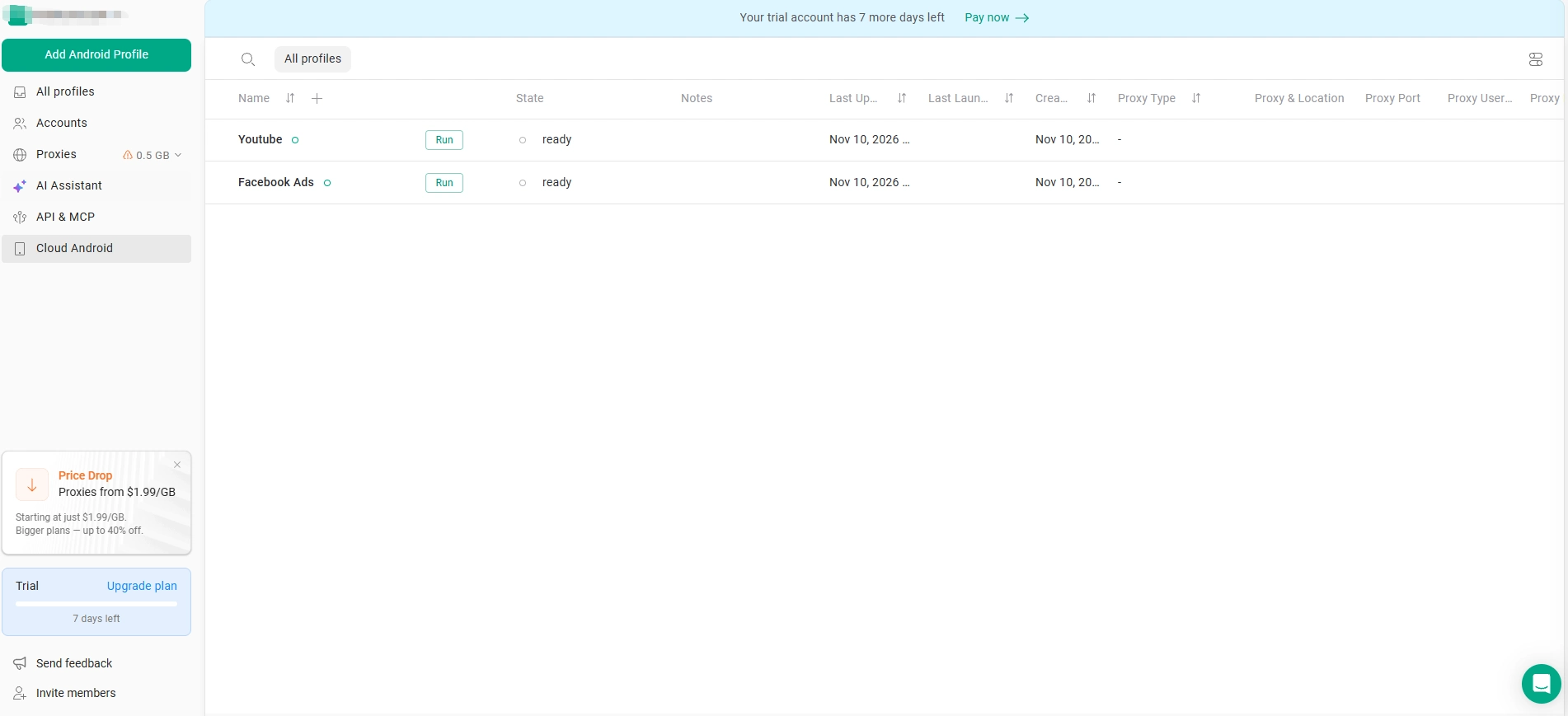
Best pick: GoLogin, $9/month for 10 profiles. The Orbita engine holds fingerprints stable across multi-week campaigns, profiles sync to the cloud so a dead laptop does not take your ad accounts with it, and Android emulation covers TikTok and Instagram flows.
- Why it wins: campaign-length stability, cloud sync, mobile emulation at a solo-friendly price.
- Scale option: Dolphin Anty at $89/month for 100 profiles, built for media buyers with campaign tags, account labels, and bulk actions.
- Skip it if: you replay the same click sequence across dozens of profiles daily. That workload belongs to AdsPower's RPA.
For Facebook ad accounts specifically, the best anti detect browser for facebook ads 2026 decision adds one requirement beyond fingerprint quality: one identity, one proxy, and one payment surface per ad account, never shared.
Best for E-commerce Multi-store
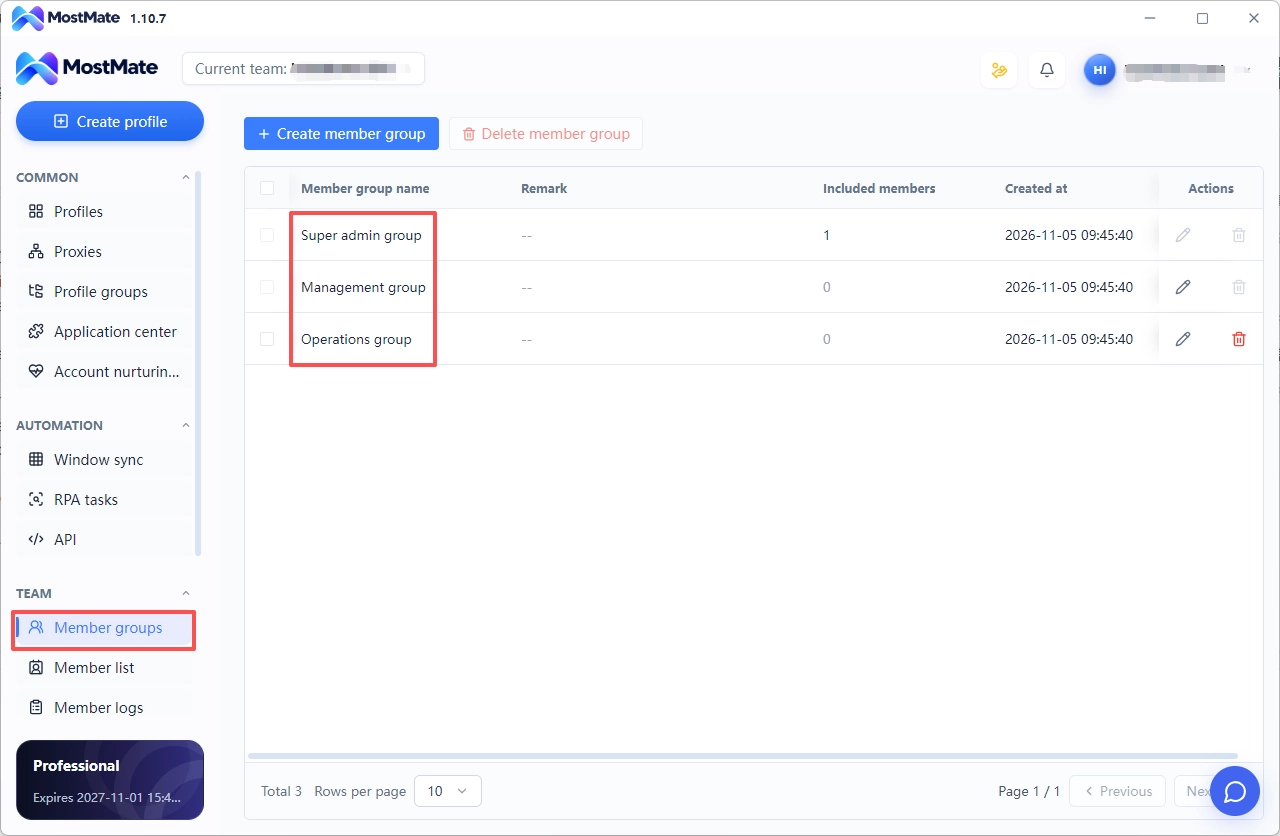
Best pick: MostMate, $6.80/month for 10 environments. This is our product, so weigh the disclosure: the fit is factual rather than promotional. Each store sits in its own environment with its own fingerprint and IP, and MostMate antidetect browser member permissions stop one store operator from opening another operator's environments.
- Why it wins: lowest cost per environment here ($0.68), team roles included, environment handover instead of password sharing.
- Also consider: Incogniton, 10 profiles free and $29.99/month for 100. Multilogin at $99/10 when fingerprint depth matters more than price.
- Skip it if: you need deep mobile emulation for app-only platforms. That is GoLogin or Kameleo territory.
The environment isolation discipline matters more than the tool: one store, one environment, one proxy, one payment card. The same logic keeps customer conversations attached to the company rather than to an employee's phone.
Best for Ad Agencies & Ad Verification
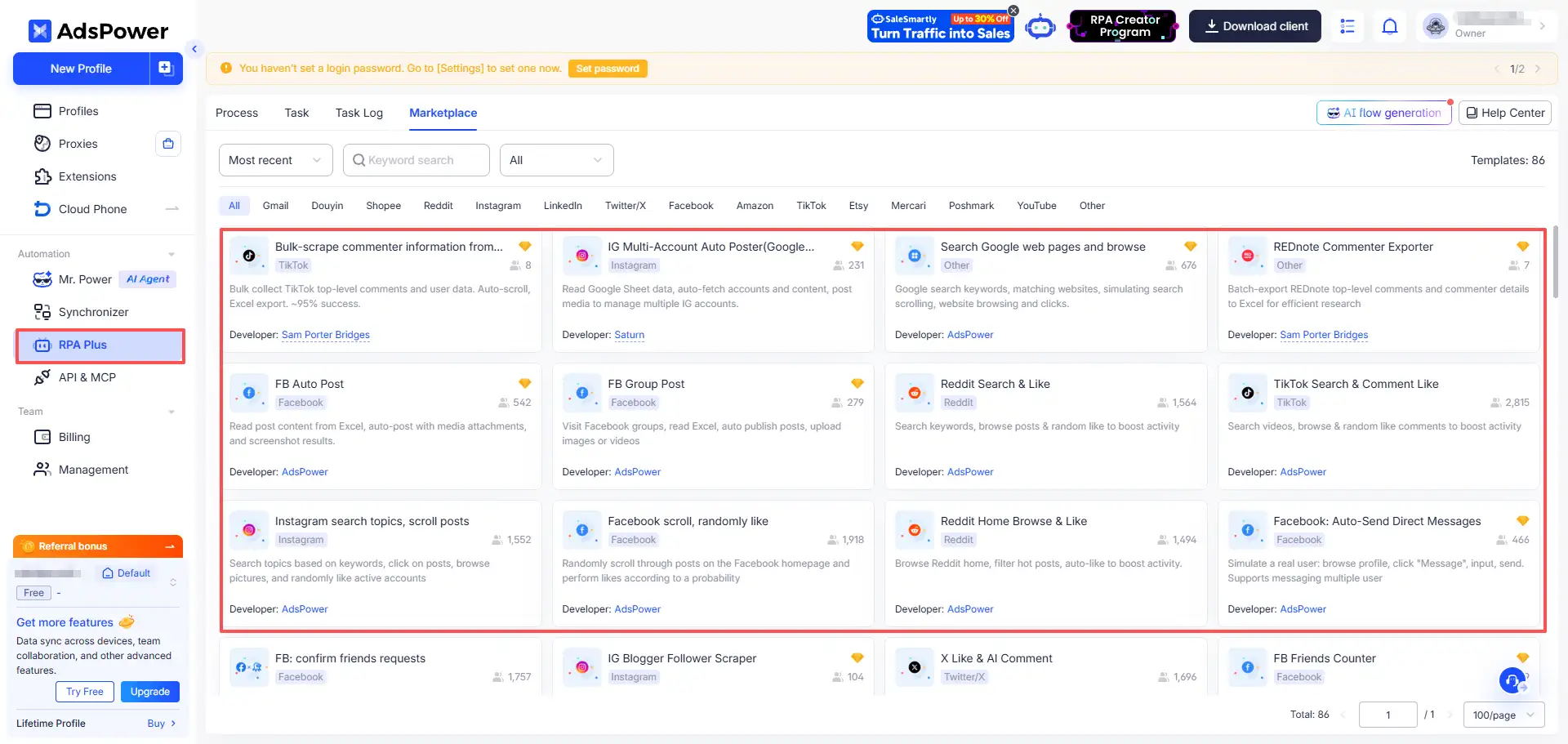
Best pick: AdsPower, from $9/month. Native RPA records a click sequence once and replays it across profiles, while Synchronizer mode drives many profiles through the same action.
- Why it wins: automation without external scripts, per-profile team access, the cheapest automation entry on this list.
- Budget alternative: MoreLogin at $9/month, with an API that plugs into common automation stacks.
- Skip it if: your work is manual account handling. You would be paying for automation you never touch.
Agency work on Meta adds one more requirement: separate Business Managers and payment surfaces per client, not just separate profiles. That is the core of the antidetect browser for facebook workflow.
Best for SEO & SERP Analysis
Best pick: Kameleo, $59/month. API-first by design: every profile action is scriptable, Chrome, Firefox, and Edge are emulated, and its mobile emulation is the closest thing on the market to real iOS and Android fingerprints.
- Why it wins: country-matched locale control, repeatable profiles per search engine, Selenium support.
- Lower entry: Hidemium covers the same workflow at a smaller price and publishes SEO-specific material.
- Skip it if: you need 50+ profiles. Per-profile cost stops making sense for SERP checks.
Search results personalize by location and device fingerprint. One Chrome profile gives you one biased view; rotating country-matched profiles shows closer to what local users actually see.
Best for Privacy-Focused Individuals
Buy nothing. Use Tor Browser or Mullvad Browser. Both are free, both are engineered for anti-tracking, and both are run by organizations whose incentives align with yours.
- What not to do: treat an anti detect browser as an anonymity tool. It is a multi-account work tool, never designed to defeat a global adversary.
- Daily privacy: a hardened Firefox profile with uBlock Origin plus a trusted VPN covers most of what commercial tools sell you.
- The limit: the W3C's TAG fingerprinting guidance explains why browsers cannot block fingerprinting outright without breaking site functionality. Anti detect browsers fill that gap deliberately.
Free Anti Detect Browsers: What the Free Tiers Actually Include
"Free" means different things across vendors, and the gaps matter more than the headline count. Vendor pages checked November 2026:
| Product | Free profiles | Included | Blocked on free |
|---|---|---|---|
| Incogniton | 10 | Core fingerprint controls, proxy support | Team seats, API, bulk import |
| AdsPower | 2 | Full fingerprint engine, extensions | Team seats, most automation |
| MostMate | 2 environments | Fingerprint isolation, proxy binding, member roles | Higher environment counts |
| Dolphin Anty | Limited free tier | Core fingerprint controls | Volume profiles, some team features |
The upgrade trigger is almost always the same: a second operator joins, or profile count passes the free ceiling. Both events demand team permissions and bulk management that free plans withhold, because those features are the real product. Budget roughly $7–$30/month once you cross that line, still cheaper than one banned ad account.
Anti Detect Browser Pricing Compared (2026)
Entry paid plans as of November 2026. Several vendors quote annual-billing rates; monthly billing usually costs more. Confirm current prices on vendor pages before buying, because this market reprices often.
| Product | Free tier | Entry paid | Profiles included | Standout |
|---|---|---|---|---|
| Multilogin | No | $99/mo | 10 | Deepest fingerprint engineering |
| Kameleo | No | $59/mo | 1 profile (solo plans), API-first | Mobile emulation, Selenium support |
| Undetectable | No | $39/mo | ~10 | Chromium-based, straightforward |
| GoLogin | Trial | $9/mo | 10 | Cloud sync, mobile emulation |
| Incogniton | 10 free | $29.99/mo | 100 | Generous free tier |
| Dolphin Anty | Limited | $89/mo | 100 | Media-buying workflow tools |
| AdsPower | 2 free | $9/mo | 2 | Native RPA automation |
| MoreLogin | Limited | $9/mo | 2 | API ecosystem |
| MostMate | 2 free | $6.80/mo | 10 | Environment isolation, member roles |
Cost per profile is where the rankings separate: MostMate $0.68, Dolphin $0.89 at 100 profiles, GoLogin $0.90, Multilogin $9.90. High per-profile prices are not automatically bad; Multilogin's rate buys fingerprint engineering that fewer leaks justify for risk-sensitive accounts. At 40 profiles for storefronts or SERP checks, per-profile cost becomes the deciding filter. The MostMate anti-detect browser official plan list is the one we can verify line by line; competitor rates were read from their own pricing pages in November 2026.
Which One Should You Pick?
Four recommendations, one per situation:
- Solo affiliate or media buyer: GoLogin at $9/month. Cloud sync and mobile emulation cover the failure modes that cost ad accounts.
- Agency or automation team: AdsPower. Native RPA and synchronizer mode pay for themselves within weeks of repetitive placement checks.
- Enterprise with risk-sensitive accounts: Multilogin at $99/month. Fingerprint depth justifies the premium when account loss is expensive.
- Budget e-commerce or small team: MostMate at $6.80/month for 10 environments, or Incogniton's 10 free profiles if the budget is zero.
An anti detect browser hardens the fingerprint layer and nothing else. The operations that keep accounts alive pair a good browser with matched proxies, separate content, and human-paced activity. Pick the tool that fits your team size and budget, then put the savings into the layers the browser cannot cover.
Anti Detect Browser vs VPN vs Proxy: Three Layers, Not Three Competitors
These tools solve different problems, and choosing one over the other is a framing mistake.
- Proxy: changes your IP at the application level. The site sees a new location; your browser stays identical.
- VPN: changes your IP for all system traffic and encrypts the tunnel. Your fingerprint does not change.
- Anti detect browser: changes the fingerprint layer, profile by profile. Your IP stays the same unless you bind a proxy.
A VPN alone cannot separate two accounts. Log into two Google accounts behind the same VPN exit and both sessions present the same fingerprint, which links them as effectively as a shared IP. Canvas fingerprinting, the technique MDN documents in its Canvas API reference, reads rendering differences a VPN never touches. EFF's analysis of fingerprinting under GDPR makes the same point from the compliance side.
The stack that works: one proxy per profile, bound inside the browser, with the proxy's location matching the profile's timezone and language. The FTC's Cross-Device Tracking report documents how trackers combine cross-device signals; the defensive logic is the same in reverse.
Can Anti Detect Browsers Be Detected? Limits You Should Know
Yes, detection remains possible. Three layers sit outside any browser's control:
- Behavioral signals. Typing cadence, mouse paths, session length, and navigation rhythm expose automation and shared operators. A New York fingerprint that types with robotic uniformity stands out no matter how clean the fingerprint is.
- Network topology mismatches. A residential-looking fingerprint exiting a datacenter IP contradicts itself: fingerprint says home user, IP says hosting provider. Platforms record both.
- Content clustering. Identical listings, creatives, or bio text across accounts get clustered regardless of fingerprints. The Web Never Forgets paper showed how persistent fingerprint tracking had become a decade ago; platforms have had ten more years to refine matching.
What it buys: a consistent fingerprint layer and storage isolation that stops accidental cross-login leaks. What it does not buy: protection from bad habits. Run five accounts with the same behavior and the same content, and no browser saves them.
Audit your own setup: run each profile through EFF Cover Your Tracks and AmIUnique, then check whether reported values match what your proxy's location implies.
Are Anti Detect Browsers Legal? Platform Rules in Plain English
In the United States, using one is legal. No federal statute prohibits managing your browser fingerprint, and the W3C's fingerprinting guidance treats the technology as a neutral trade-off. The FTC's Cross-Device Tracking report examined the tracking ecosystem from the consumer-protection side and imposed no prohibition on fingerprint management by users.
Privacy law adds context, not prohibition. California's CCPA gives consumers rights over data collected about them, which says nothing about a tool that changes what your own browser broadcasts.
Platform terms are where trouble starts. Meta, Amazon, TikTok, and Google all prohibit operating multiple accounts beyond their allowance or circumventing enforcement. Violating ToS carries account-level consequences: bans, withheld payouts, restricted marketplaces. Fraud and impersonation carry legal ones, because the browser is never the offense; the conduct is.
The practical rule: an anti detect browser is legal to buy. What you do inside it decides whether a platform may ban you, and whether your conduct crosses legal lines.
How to Choose an Anti Detect Browser: 6 Filters Before You Buy
Skip the feature grids and run your decision through these six filters in order:
- Count profiles now and in 12 months. Ten today with a scaling plan rules out entry plans capped at 2–5. Profile ceilings are the most common reason teams switch tools.
- Count your operators. Solo work needs no seat management. Two or more operators make role permissions non-negotiable; without them, anti fingerprint browser session isolation breaks the day one person can open every teammate's profiles.
- Decide your automation need. Scrapers and ad verification want Selenium, Puppeteer, and a REST API. Manual account work can skip this and save money on plans that strip automation out.
- Match the tool to your platforms. Media buyers need mobile emulation for TikTok and Instagram, storefront sellers need long-session stability, SERP teams need country-matched locale control.
- Check your operating systems. Most tools run on Windows and macOS; Linux and Android support is not universal. Verify before paying, not after.
- Budget for proxies, not just the browser. Residential proxies routinely cost more per month than the subscription. A $9 browser plan plus $50 of proxies is a $59 operation.
Run all six and one or two products remain. That shortlist is your real decision.
Final Verdict
Fingerprints are unique by default. AmIUnique found roughly 89% of the 11,800+ browsers it sampled were distinguishable, which is why per-profile isolation does real work: it removes the easiest linking signal and nothing more. Behavior, network coherence, and recycled content sit outside the browser, and no product in this list reaches them.
That makes the decision arithmetic, not loyalty. Count profiles, count operators, decide whether you need automation, then divide the entry price by included profiles. Buy for the layer you cannot build yourself. Then spend the difference on proxies that match each profile, copy that is not recycled across accounts, and activity that does not look like a batch job. That combination, not the browser alone, is what the setups that survived had in common.
FAQ
What is the best anti detect browser in 2026?
For enterprise teams, Multilogin. For solo marketers, GoLogin. For automation-heavy operations, AdsPower. For budget-conscious teams, MostMate at $6.80/month for 10 environments. The right pick depends on profile count, team size, and automation needs.
Are there free anti detect browsers?
Yes. Incogniton offers 10 free profiles, AdsPower offers 2, and MostMate offers 2 free environments. Free tiers include working fingerprint engines but withhold team seats, API access, and bulk management.
Do I need proxies with an anti detect browser?
Yes, for any multi-account work. Without a proxy, every profile shares your real IP, which links them regardless of fingerprints. Bind one residential or mobile proxy per profile, with the proxy's location matching the profile's timezone and language settings.
Can I use an anti detect browser on Android or mobile?
Desktop anti detect browsers run on Windows and macOS; most do not support Linux or Android natively. Tools like GoLogin and Kameleo emulate Android devices from desktop, which covers mobile-only platforms. True on-device mobile anti detect browsers are rare and should be tested before purchase.
Can an anti detect browser work with Safari?
Most anti detect browsers spoof Chromium fingerprints; Kameleo emulates Safari and iOS fingerprints from desktop, which is the closest available approach. No mainstream product runs a real modified Safari engine, so Safari-specific checks that inspect engine-level behavior remain a boundary.
Can anti detect browsers be detected by platforms?
Yes, in specific layers: behavioral patterns, network mismatches between fingerprint and IP, and content clustering across accounts. A consistent fingerprint removes the easiest linking signal but does not protect against operational mistakes. No tool prevents account bans outright.

MOSTMATE
Secure Multi-Account Management, Made Simple
Start with your first account and use MostMate to build safer, smarter, and more efficient multi-account operations.
- Independent profiles. Consistent identities.
- AI Automation · Account Health · Team Operations



