
What Is Environment Isolation: One Account, One Environment, One IP, Step by Step
"I registered and warmed up each account separately, yet the platform still treats them as one person." Most people running multiple accounts have hit this. Trouble seldom stops at one account. Whole batches get restricted together.
The problem usually starts after signup, at login and in daily use. Multiple accounts run inside one browser on one computer, sharing every visible and invisible trace. Same device parameters, the same cookies and storage records, the same exit IP. To the platform, these accounts look like one user behind one device.
MostMate is an anti-detect browser with environment isolation built into its core: every account gets its own browser environment. Data, identity parameters and network settings inside an environment never cross over. The category name covers exactly this: keeping multiple accounts independent of each other.
The short version first: environment isolation draws a boundary around each browser environment. It covers cookies, local storage and IndexedDB as login and site data, plus sessions, cache, fingerprint parameters and proxy configuration. In practice it comes down to one rule: one account, one environment, one IP. Below, what this boundary separates and why it sits there, then a five-step setup in MostMate and the three most common isolation gaps.
What Environment Isolation Is: One Sealed Browser Environment per Account
The definition fits in one sentence: give every account its own browser environment. Environments share no data with each other. A few extra windows do not count as isolation. Windows are only an interface; underneath, cookies, login states and device parameters still mix. Here is what gets separated.
In MostMate, every environment manages its own cookies, Local Storage, IndexedDB, sessions and cache. Fingerprint parameters and proxy settings are separated per environment as well. The MDN IndexedDB API documentation defines it as a high-capacity database built into the browser. Sites often keep offline data and account-related state there: high volume, long lived, one of the main carriers of "this account has used this device."
Cookies are the other line. How cookies work on MDN explains why "this account is still logged in" is mainly recorded there. Which browser holds which cookie, which cookie maps to which login state, all traceable. Once these two data types cross environments, login states can no longer be told apart.
Storage data decides "who is still logged in," fingerprint parameters decide "what device this is," and the proxy decides "where you go online." Only when each stays inside its own environment does the boundary hold. The real and consistent environment isolation section on the MostMate site lists exactly these items. They are the isolation scope that ships enabled by default.
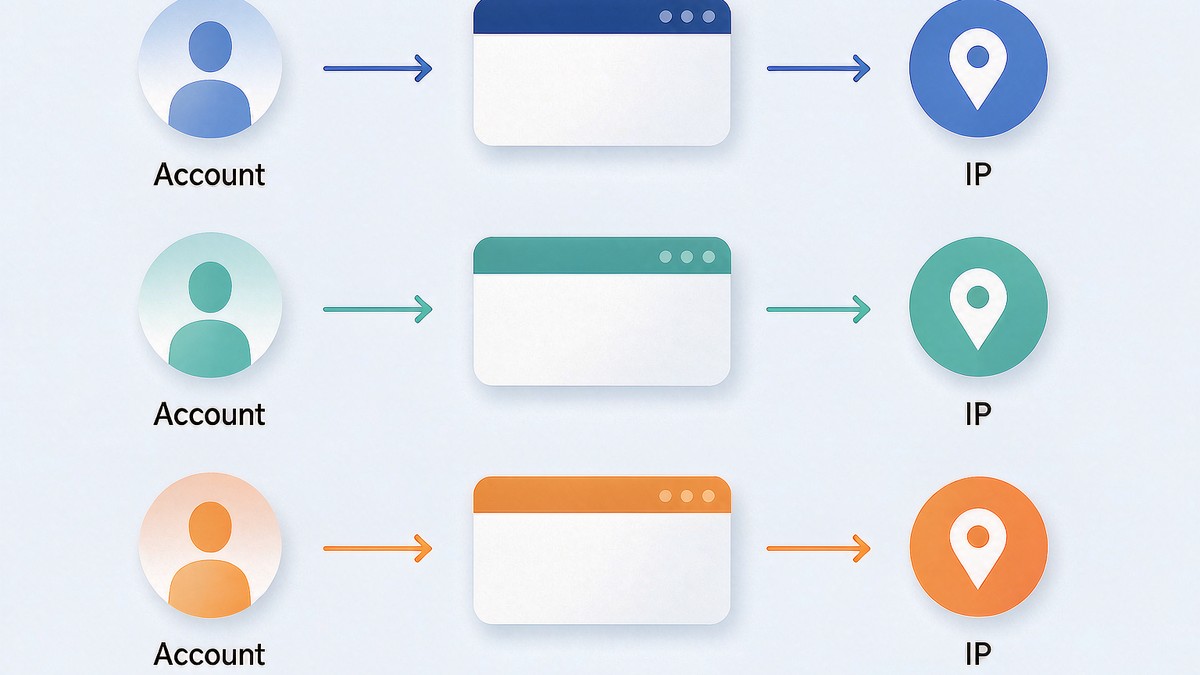
Why One Account Needs Its Own Environment: Sharing an Environment Means Sharing Identity Traces
When several accounts share one environment, the platform reads them as one device at the storage and hardware level. No advanced detection is needed. The environment leaves the evidence on its own.
Account A and account B take turns logging into the same environment. The first week looks fine. Cookies pile on cookies. Local storage holds records from two platforms. The fingerprint never changes. Over time, this environment's history carries the behavior trails of two accounts. On the platform side, they were always the same "device user."
That is the value of isolation: login states and behavior trails split at the environment layer. When one spot goes wrong, the other accounts stay out of it. One account owns one environment. Everything after builds on this.
Isolation does not wall each account into a separate world, though. Environments from the same line of business can sit in one environment group for centralized management. The boundary governs data and identity. Management efficiency stays outside its scope.
Why Every Environment Needs Its Own IP: Three Rules for the Network-Layer Identity
The IP is the environment's identity at the network layer, and one IP per account keeps that layer independent too. Put several environments on one line and the network layer overlaps. The platform sees the same exit address appearing across accounts. Three rules keep this identity standing.
- Dedicated, never shared: the IP an account logs in with is assigned to one environment. One line never serves several environments at once, and no rotating line gets stretched across accounts.
- Stable, rarely changed: a frequently changing IP is itself a risk signal. Once an account has settled on a line, keep it. If a change is unavoidable, do it once while the account is calm. Account warming in MostMate also lists "network changes" as a signal to pause that day's tasks. The product itself flags line stability as a rule.
- Region, matched: the exit region decides the timezone and language values. Point the exit at the market the account targets, and let "Based on IP" align language and timezone automatically.
'One IP' means one fixed, trusted exit per environment. No rare lines.
That is how the boundary is drawn.
What Isolation Looks Like in MostMate: One Row per Ownership Set
On the Environment Management page, one account, one environment, one IP takes the shape of an actual row in the list. Every row carries its own ID and name, followed by proxy, exit IP, bound account, group, notes and custom number. Which row uses which line, which account it belongs to, readable at a glance.
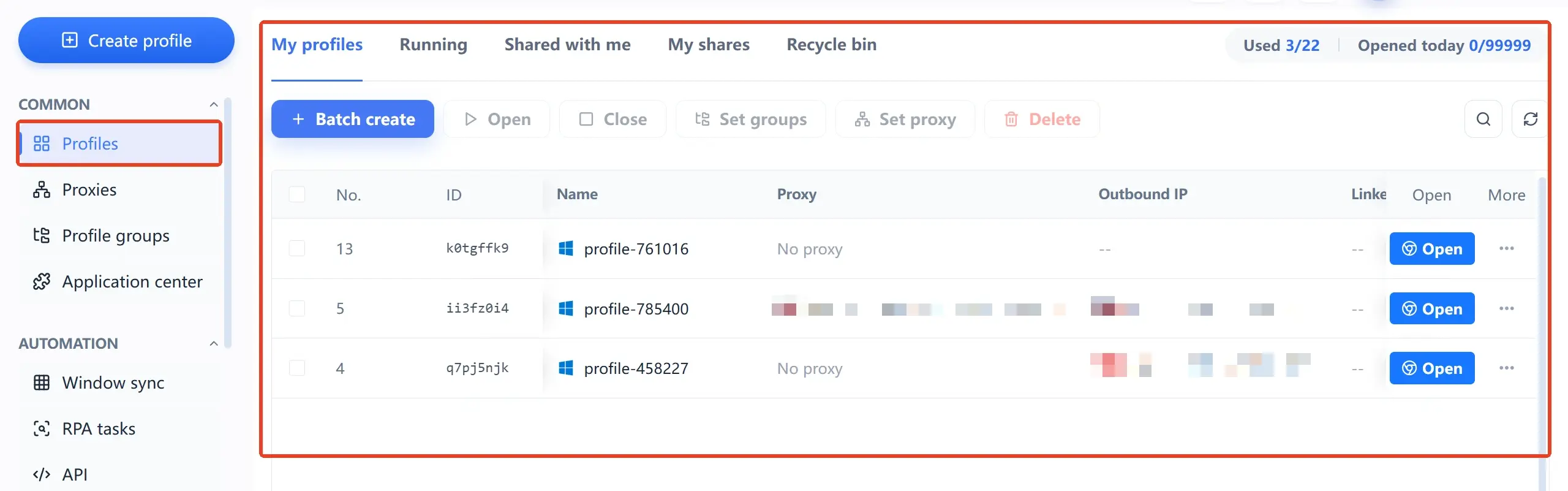
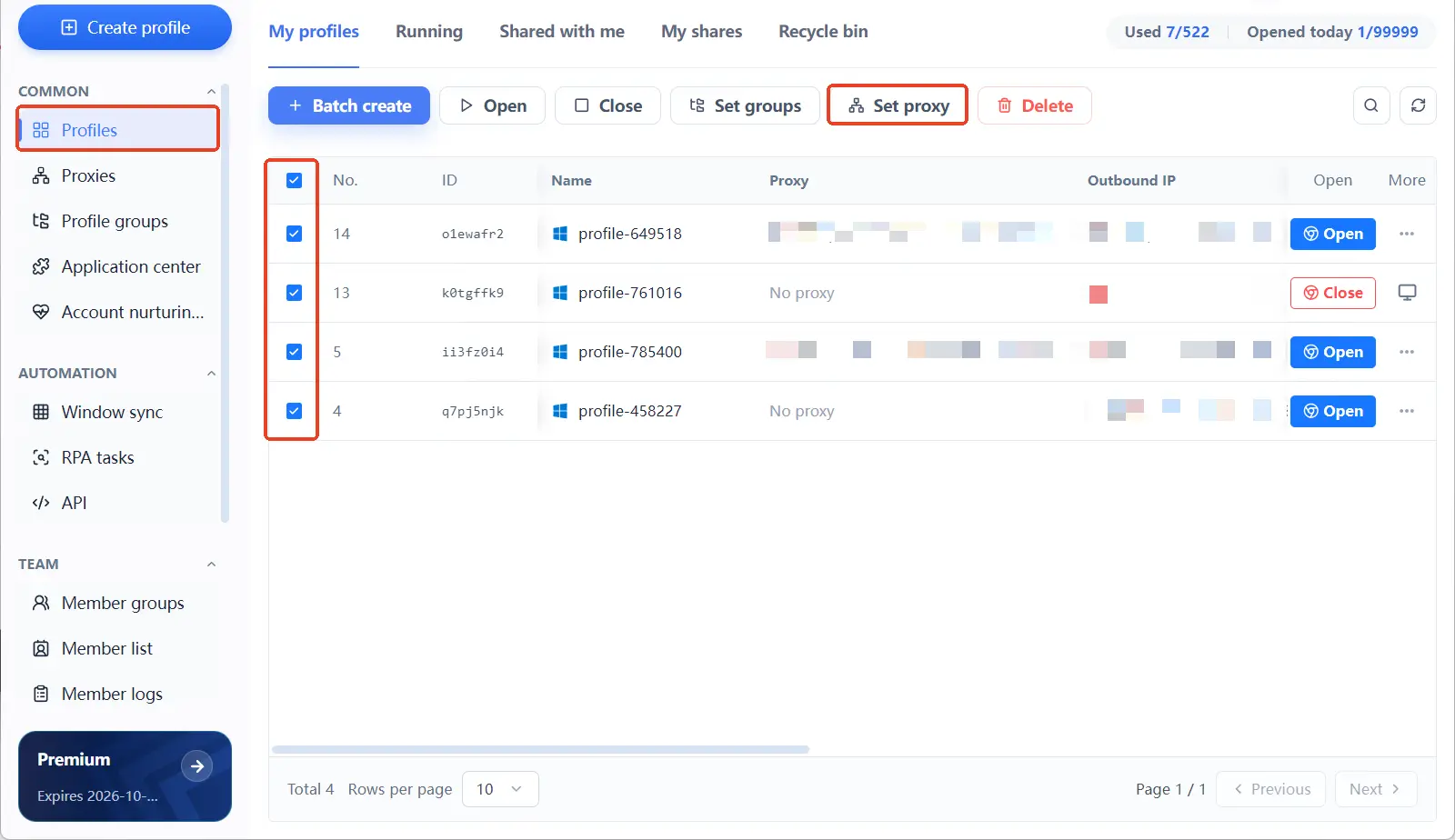
Proxies do not need to be filled in on the spot. Create or batch-import them in the separate Proxy Management list first, then assign them to specific environments. The Environment Management page also offers a "Set Proxy" batch action at the top. Keep maintenance and assignment apart. Line ownership stays tidy that way.
Once accounts pile up, sort environments into groups by business line and mark batches with custom numbers. Ownership stays traceable across dozens of environments. New to the tool? Start with the MostMate product overview to see where environments, fingerprints and proxies sit in the product, then come back for the setup steps.
Five Steps to One Account, One Environment, One IP
Five steps done, every account runs on a track that is independent from login to exit.
- Inventory accounts, reserve one environment per account. List the accounts you will run and match the environment count to the account count. Keep it one to one from day one; leave no "these two can share for now" gap.
- Prepare proxies, one line per environment. Create or import proxies under Proxy Management and match the count to your environments. Use dedicated fixed lines for account logins, and pick the region by the market each account targets.
- Fill ownership into the form when creating the environment. Environment name, bound account and proxy settings all get set in the creation form in one pass. From setup preview to your first environment in four steps walks through what each form section does and how to use the defaults.
- Leave language and timezone to "Based on IP". Language, interface language, timezone and geolocation follow the exit IP by default. Once the exit is set, these align on their own. No manual edits needed.
- Set the usage boundary and hold it. An account logs in only inside its own environment; cookies and login states never move across environments. For teams, use environment sharing allow and deny rules to control who can open which environment.
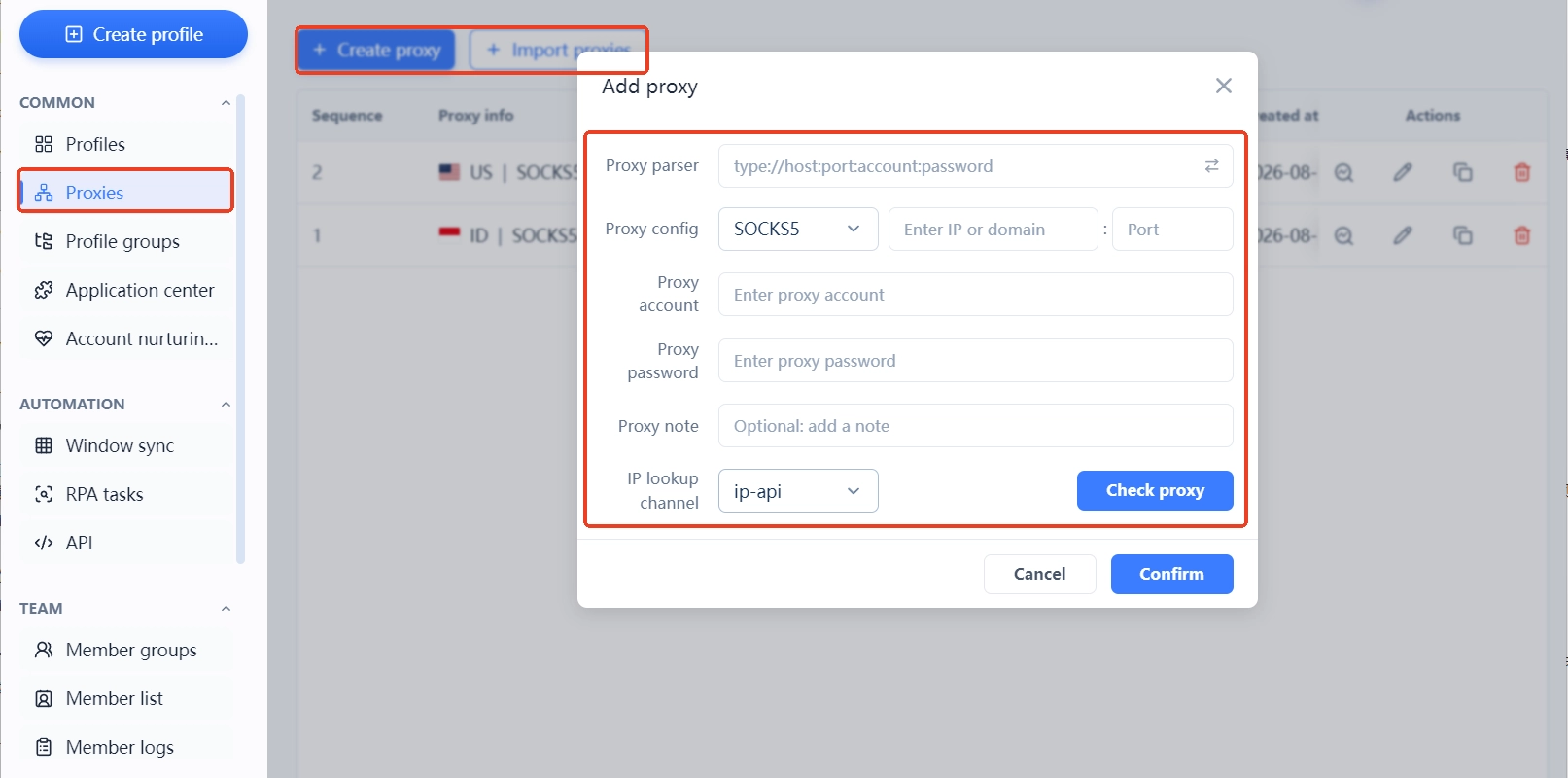
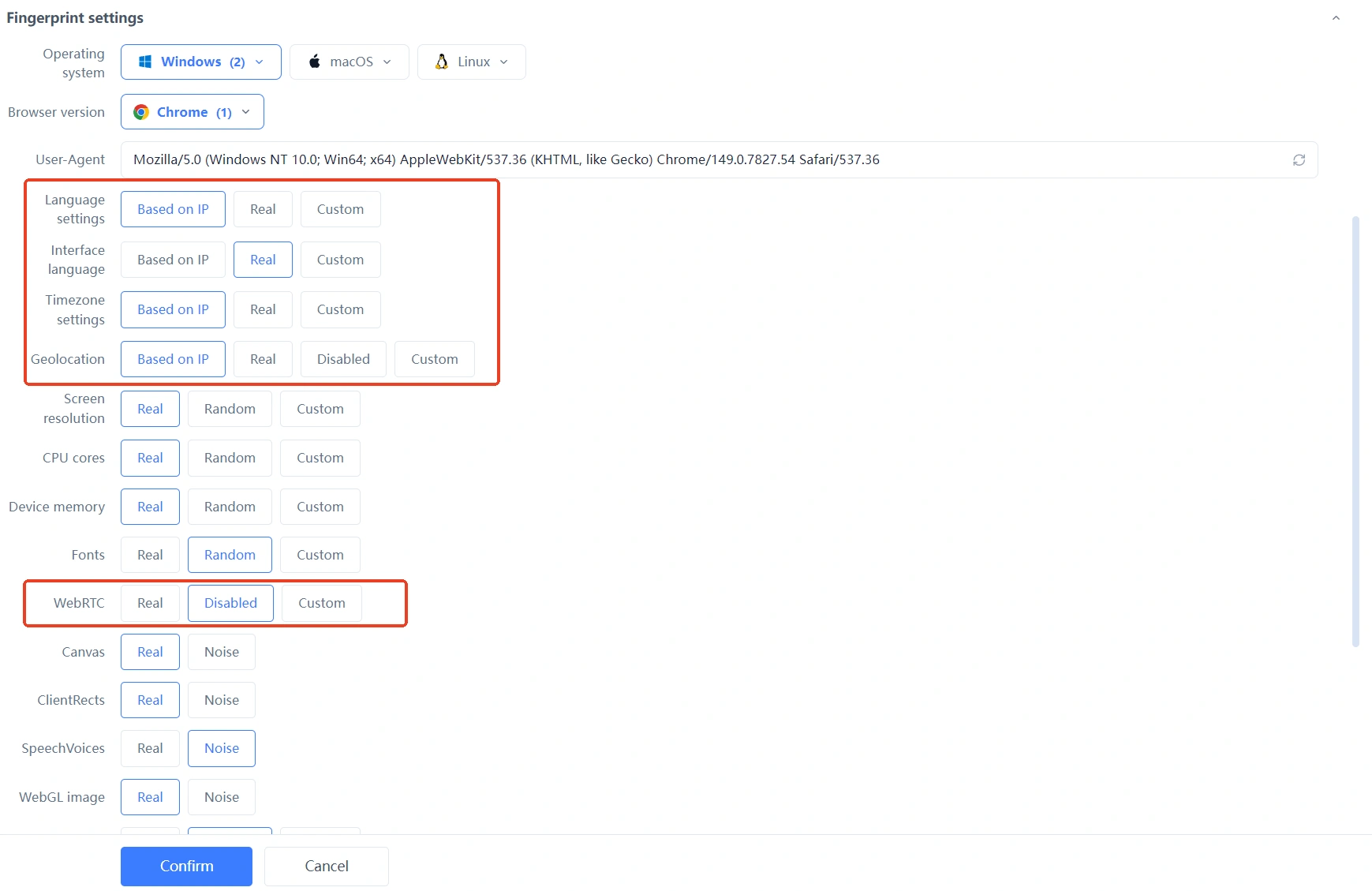
On the page, the five steps end up as row-by-row mappings in the Environment Management list. Account, environment and exit IP pair up; scan top to bottom when checking. Confirm no row is mixed up.

The Three Most Common Isolation Gaps
How tight your isolation is depends less on how finely you tune parameters and more on whether the boundary holds. Three gaps come up most. Each one traces back to taking shortcuts.
- Crossing environments: log account one into environment A today, then, for convenience, into environment B tomorrow. Login states start drifting. Two accounts in one environment tears the boundary down outright.
- Reusing one line: while creating a new environment, you grab a proxy another environment already uses. Several exits overlap instantly. Shared rotating lines keep that overlap moving between accounts.
- New exit, stale settings: the line moved to another region, but the environment's timezone and language still point at the old one. Network layer and device layer disagree; the combination makes no sense.
All three gaps share one root: shortcuts. Break the boundary once and the isolation you built starts over.
FAQ
Can two accounts share one environment?
No. A shared environment lets cookies, storage, device and network signals stain each other over time. The platform has every reason to read them as one device. Whatever the business, give each account its own environment.
How many environments can run on one IP?
One environment per IP is the safest setup. Several environments on one line overlap at the network layer. Shared rotating lines suit account logins even less; when the exit changes, timezone and language need to move with it.
Is environment isolation the same as fingerprint spoofing?
Different things, and you need both. Isolation governs the boundary between environments: no shared data or identity. Consistency governs whether signals inside a single environment explain each other. Isolation without consistency still leaves holes inside an environment.
Accounts already shared an environment. Is separating them now still worth it?
Yes, but do not rush it. Accounts carry login history in the old environment; sudden big parameter changes or a new line can trigger fresh verification. Align timezone and language in the new environment first, then migrate when it suits. Stay stable afterwards.
Closing
Environment isolation is about drawing boundaries: account, environment and IP each keep their own identity, none bleeding into another. One account, one environment, one IP is technically simple. It is a discipline you keep every day.
Just starting out? Get two environments for two accounts running smoothly before scaling. Already at scale? Put the mappings into the Environment Management list and a single scan confirms them.
MostMate builds this discipline into the product: Environment Management shows full ownership in one row, proxies are maintained separately and assigned per environment, language and timezone follow the exit by default. For the full design behind isolation and consistency, read the four design principles: independent, consistent, real, stable. Or download MostMate, create two environments, and walk through the five steps above.

MOSTMATE
Secure Multi-Account Management, Made Simple
Start with your first account and use MostMate to build safer, smarter, and more efficient multi-account operations.
- Independent profiles. Consistent identities.
- AI Automation · Account Health · Team Operations



