
SOCKS5 vs HTTP Proxy: Which Should You Use for Multi-Account?
Core takeaway: SOCKS5 and HTTP proxies both give your accounts a new exit, and the dividing line is how requests get handled. An HTTP proxy works at the application layer and actually reads them; SOCKS5 only opens a forwarding channel and never touches application data. For pure web-dashboard work either will do; for desktop clients and scripts, SOCKS5 comes first. Picking the protocol is only one step of selection. Inside an anti-detect browser there is still the full chain of entering, binding, verifying and troubleshooting a proxy, and this article walks through all of it.
Many people treat the two as different names for the same thing. Both get you online, both let accounts log in, so the choice seems to come down to price. Then a platform starts flagging network anomalies, or a batch of accounts drifts into review one after another, and only then does anyone look back at the proxy layer.
In fact the two protocols differ from where they sit. They process requests differently, and the paths for setup and troubleshooting differ too. This article first draws the protocol line, then pulls the differences into a single table, and finally lays out the full operating chain in MostMate plus how to troubleshoot the three most common failures.
The dividing line between the two protocols: who is processing your requests
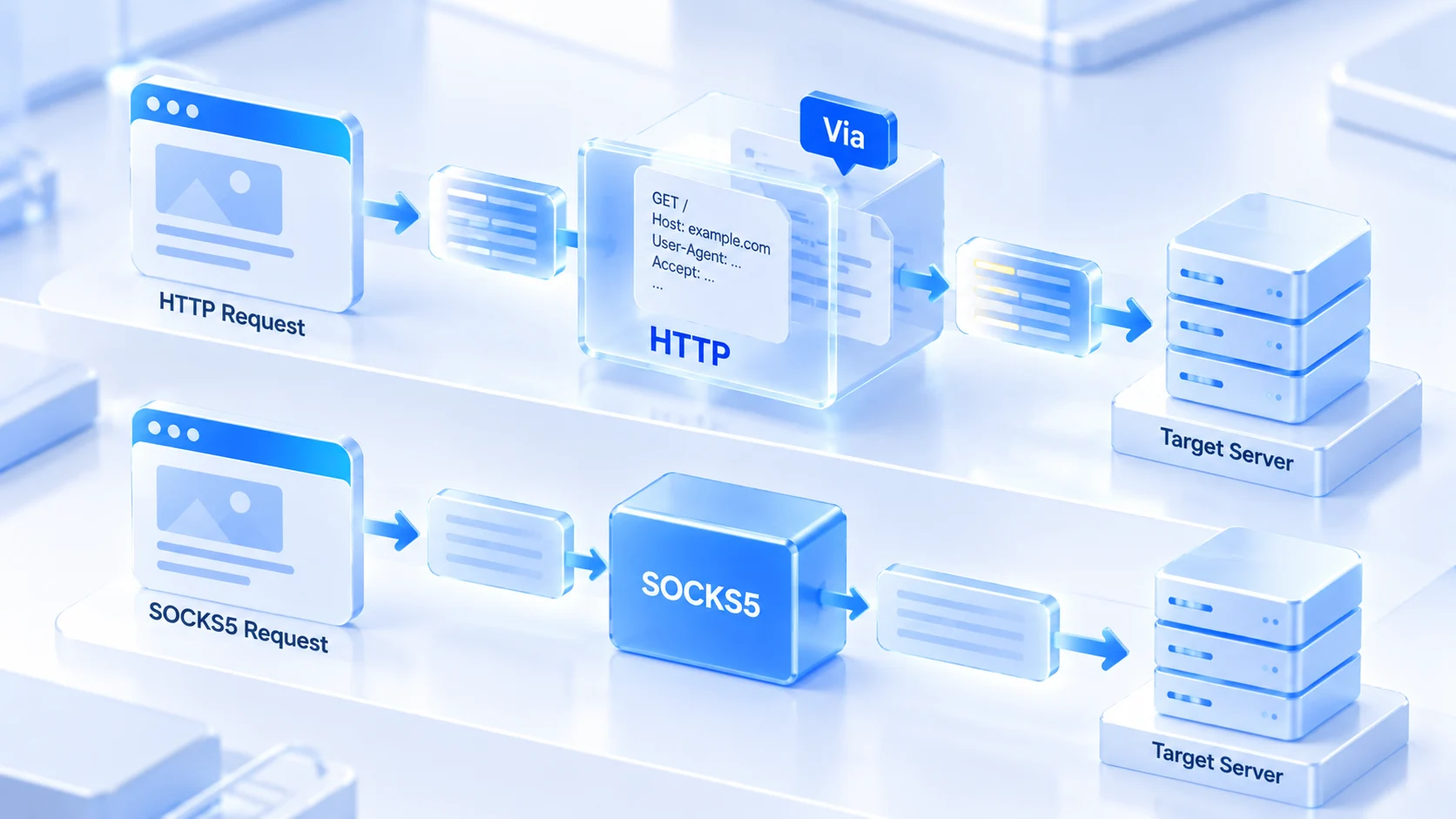
An HTTP proxy works at the application layer; SOCKS5 works one layer below it. Different position, different job. Whoever can read your requests is also in a position to alter them.
An HTTP proxy was designed for web traffic. It understands HTTP requests: which address you are visiting, which headers you send, which method you use. That ability to read cuts both ways. On the plus side, caching and filtering are both possible. On the minus side, it stands exactly where plaintext requests are visible.
MDN's notes on proxy servers and tunneling mention that some HTTP proxies add or rewrite marker fields such as Via and Forwarded while relaying; whether they do depends on each proxy's own implementation and configuration. Requests relayed through such a proxy may carry a "went through a proxy" mark, and the site side has a chance to notice, but this is not the fixed behavior of every HTTP proxy.
SOCKS5 takes a different approach. Defined in RFC 1928, it opens a forwarding channel and passes the data through unchanged. It does not parse what you send, so it adds nothing to your requests. The cost is just as clear. Caching, filtering, content-based routing: it can do none of them. A channel is a channel.
Applied to multi-account operations, this dividing line means the two protocols leave network traces of different shapes from the very start. Which one is better has no universal answer; it depends on what signals your platform watches and what traffic your business runs.
One table, the whole picture: from request handling to resolution location
Differences scattered across paragraphs are hard to compare, so pull them into a table first. Your selection should come from a dimension-by-dimension comparison of protocol capability, not from staring at a single row:
| Dimension | HTTP proxy | SOCKS5 |
|---|---|---|
| Working layer | Application layer, reads HTTP semantics | Session layer, just a forwarding channel |
| Request handling | Reads requests, can cache and filter | No content parsing, relays as-is |
| Header traces | Some implementations add or rewrite fields | Never touches application data |
| UDP support | Not supported | Supports UDP forwarding |
| DNS resolution location | Domain is usually handled at the proxy end | Depends on the client, either side possible |
| Typical use | Web dashboards, web scraping | Desktop clients, scripts, media traffic |
| Setup notes | Match type to the actual protocol | Mind the leak surface of DNS resolution |
The other rows read as written. The DNS row deserves a closer look. Behind an HTTP proxy, the browser usually hands the target domain straight to the proxy, so the lookup happens on the proxy side and no resolution request leaves your machine. SOCKS5 carries no such default arrangement; the resolution location depends on how the client passes the target address: some hand the domain to the proxy first, others resolve locally and then connect. With local resolution, domain queries leave your own network straight for the DNS servers, and what they contain has nothing to do with the proxy exit.
You never feel this gap in normal times. It only shows up when something breaks. If you suspect resolution is not following the proxy, run the flow in the DNS leak detection guide and see which network your lookups finally leave from. When the resolution location follows the exit, the domain trail your accounts leave stays consistent.
Multi-account scenarios: choosing along three lines
Back to selection itself. Most multi-account businesses have traffic that is not hard to classify. Sort yourself into one of three lines:
1. Pure web-dashboard operations: e-commerce seller backends, social media web versions, ad management pages. All of it is web traffic, and either protocol carries it. Here, picking the line with better route quality pays off more than agonizing over protocol type.
2. Desktop clients and scripts: clients like Telegram, scraping scripts, tools that talk to an API. That traffic does not necessarily follow HTTP semantics, so SOCKS5's generic relaying fits better. The two-layer exit relationship in client scenarios is broken down by entry point in the Telegram proxy setup article.
3. Real-time audio/video and UDP traffic: livestream interaction, voice calls. SOCKS5 supports UDP forwarding; the HTTP proxy has no such layer. There is only one choice: SOCKS5.
Beyond traffic type, one more thing should be settled at purchase time: authorization. Username-and-password authentication ties identity to the account, so switching devices means no proxy reconfiguration. An IP whitelist ties authorization to your machine's own exit; when your local line changes, you have to edit the list in the provider's dashboard. For a team sharing one batch of proxies, the maintenance that credentials save is substantial.
Right protocol, but association risk is not solved
One idea deserves to be taken apart on its own: SOCKS5 does not parse content, so running multi-account through it is stealthier and platforms cannot tell. The first half of that reasoning holds. The second half does not connect.
When a platform judges account association, it looks at the quality and history of the exit IP, the consistency of browser fingerprints, and the patterns of account behavior. Not one of those signals disappears because "headers are clean". Ten accounts on the same exit IP stay ten accounts on the same exit IP even after you switch to SOCKS5. SOCKS5 not parsing application-layer requests also does not mean the rest of the network path carries nothing identifiable; exit quality and traffic characteristics are equally within observation.
IP type and protocol are two independent dimensions. Exit quality depends on whether you bought residential or datacenter lines; the residential vs datacenter IP article breaks down that selection logic. Once the channel layer is done there is still verification; the two-layer proxy check gives the order for confirming exit connectivity and parameter consistency.
Setting up a proxy in MostMate: from entry to verification
A chosen proxy only means something once it lands in an environment. MostMate is an anti-detect browser; proxies and fingerprint parameters are stored per environment, so the exit each account gets never crosses lines. From buying one proxy to an environment actually using it, the chain has six steps.
Step 1: Check the proxy parameters your provider gives you. Before touching anything, gather the basics: protocol type, address, port, authentication method. Take the protocol from the provider's label; do not guess from the port. 1080 being common for SOCKS5 is an industry habit, not a rule. Fill in the wrong type and the check will never pass.
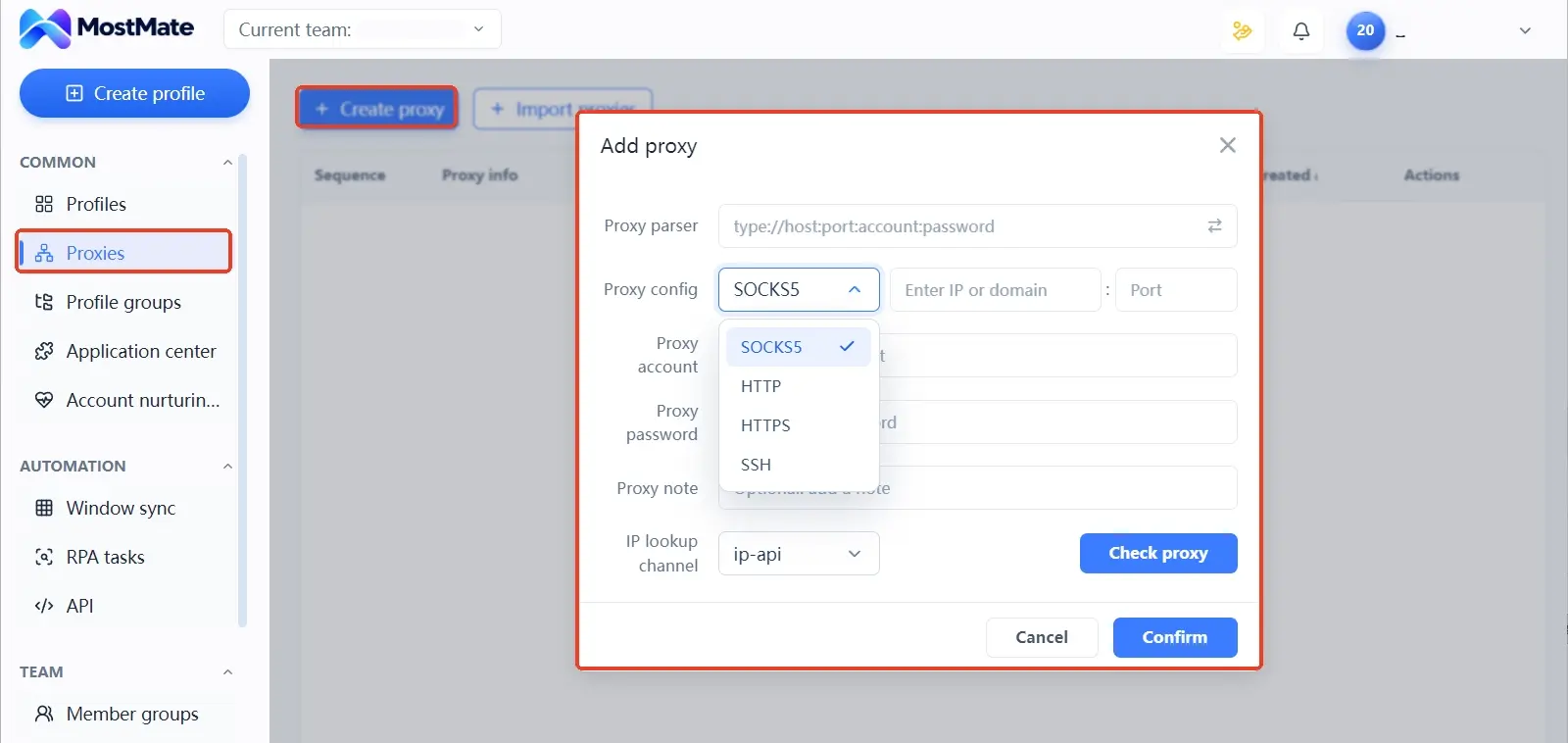
Step 2: Enter the proxy into the proxy list. MostMate keeps proxies in a dedicated menu, with entries for creating and importing proxies; the list records details, notes, exit IP and creation time row by row. While entering one, fill in the note as well: purpose, provider, or line number. Notes are for whoever takes over after you.
Step 3: Bind the proxy to an environment. Open the form for creating or editing an environment; the proxy setting offers three options: no proxy, custom proxy, or a proxy already on file. The type dropdown covers SOCKS5, HTTP, HTTPS and SSH. Match the actual protocol. When entering a custom proxy, follow the form's format hints; if the provider's prefix is socks5, pick SOCKS5.
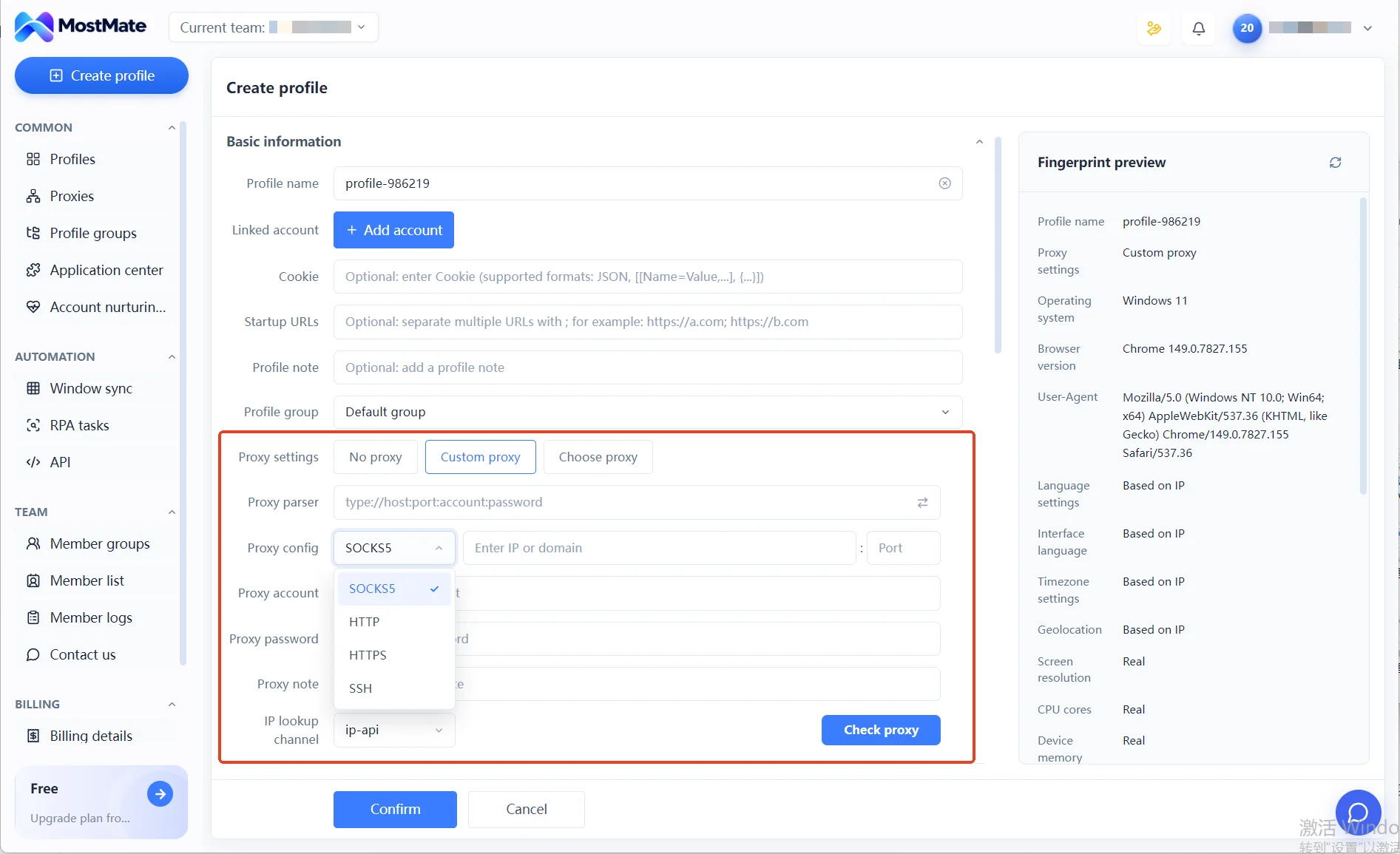
Step 4: Check the proxy connection. The form has a check button that tests connectivity, together with an IP lookup channel to confirm where the exit is registered. Passing the check is only the first gate. DNS, WebRTC and the like are outside the button's coverage; start the environment and verify them on external testing pages.
Step 5: Launch the environment and re-check the real exit. Only after the test passes should you open the environment, visit an IP check page and confirm the actual exit matches expectations, checking DNS and timezone too if needed. When results look wrong, record the symptom first, then change one setting at a time and retest. Change several at once and you cannot tell which one was the problem.
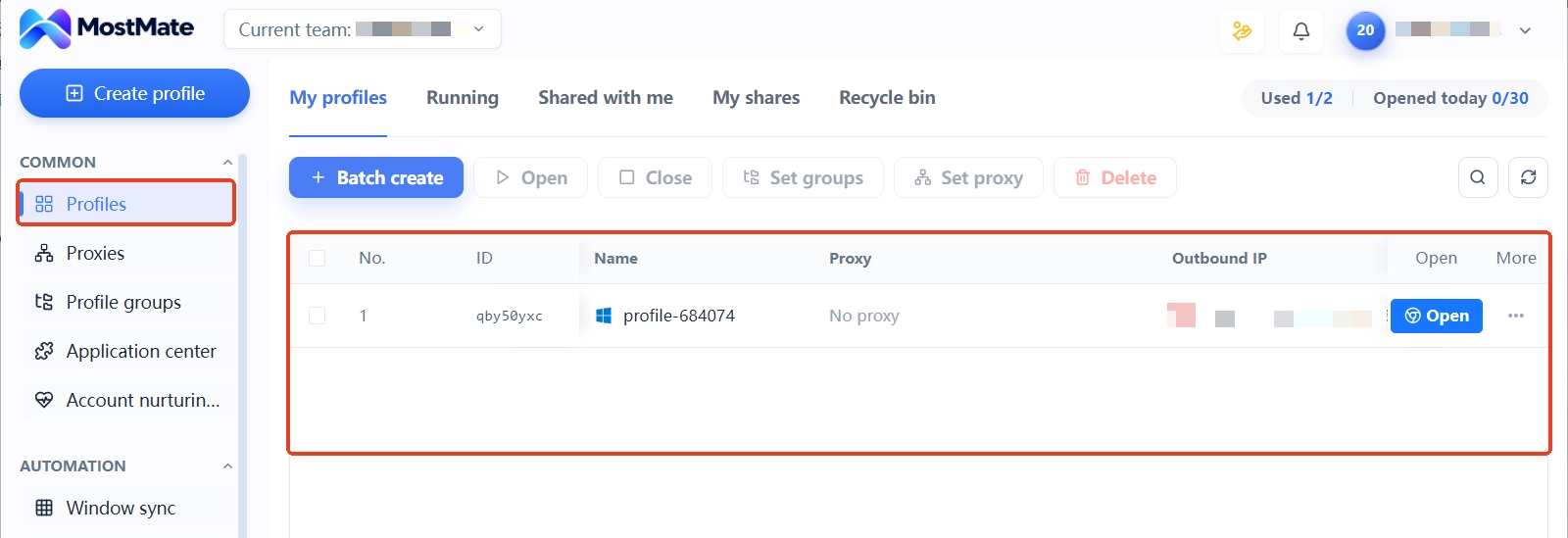
Step 6: Maintain the mapping between environments and lines. In the environment list, the proxy and exit IP columns are visible row by row, so who is on which line can be checked any time. After swapping a proxy, update the note to match. At handover, checking against these two columns prevents a proxy from being misassigned to another environment.
For screenshots of each module's interface and fields, the What is MostMate page goes through them one by one. A configured proxy is only one stretch of building an environment; check the full order against the new environment checklist.
Configured but not working: troubleshooting three symptoms
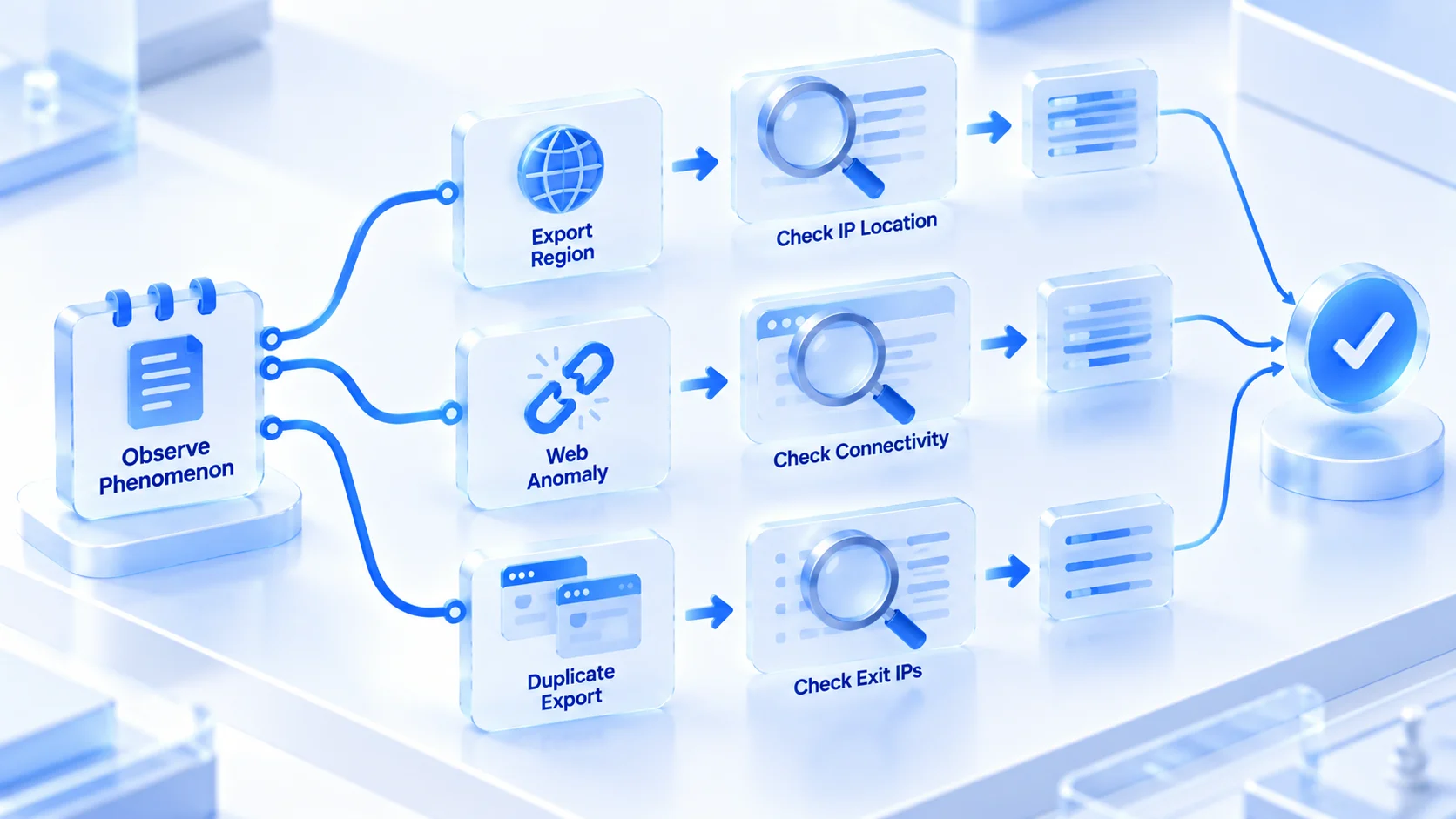
Once the setup chain is done, what remains is handling anomalies. Troubleshooting should work backward from the symptom to the cause, not start by refilling the whole configuration. Three types are the most common in multi-account work. Record the symptom first, then hunt the cause.
Symptom 1: check passes, exit region is wrong
The proxy connects, but the registered location is not what the provider claimed. Three possible causes: the line assigned differs from the order, IP geolocation databases are off, or the range you received is mislabeled. The check: run the test again through a third-party page instead of the IP lookup channel, and compare the two. Repeated mismatches mean go straight to the provider for a new line instead of fiddling with your own settings.
Symptom 2: tests pass, pages will not open
The button test is green, yet some sites fail to load inside the environment. This kind of gap usually sits in the exit itself: the target platform has blocked the range the line sits in, or the proxy bandwidth is unstable. The check: switch that environment to another line and retry, or temporarily switch protocol type to tell a channel problem from a recognized exit. When check pages are fine but the target platform misbehaves, most of the time the exit has been identified.
Symptom 3: two environments show the same exit IP
This happens most easily in large batches: the same proxy was picked twice at binding, or cloning an environment copied the configuration along. The check: go through the proxy and exit IP columns of the environment list row by row, and rebind immediately when you find sharing. Two accounts riding the same line long-term is the most direct association signal there is. These columns are worth checking on a schedule.
FAQ
Can SOCKS5 and HTTP proxies be mixed across environments?
Yes. Mixing as needed is normal practice. Each environment's proxy is independent; web-dashboard environments use one, client-and-script environments use the other, and neither affects the other. The premise is that the type inside each environment matches the actual protocol.
Where do HTTPS proxies fit in this framework?
They handle encrypted web pages by tunneling on top of the HTTP proxy, and for web traffic they are as usable as SOCKS5. The selection logic above applies to them as well. This piece saves its space for the biggest differences and does not repeat the rest.
Which is faster, SOCKS5 or HTTP proxy?
Speed mainly depends on line quality, distance and bandwidth; the processing overhead of the protocols themselves differs very little on current networks. At the same price point, a well-connected HTTP proxy is clearly faster than a poorly connected SOCKS5. Using protocol as a speed criterion easily points you the wrong way.
Do you still need an anti-detect browser with SOCKS5?
Yes, the two operate on different layers. A proxy only changes the network exit; browser fingerprints, cookies and local data are still decided by the browser. Multi-account wants exit and identity independent of each other, which is exactly what anti-detect browser environments handle; the capabilities of an anti-detect browser page explains it fully.
Closing
The dividing line between SOCKS5 and HTTP proxies sits in how requests are handled and where the resolution location is: one reads requests and may leave traces, the other only opens a channel and relays as-is. Web dashboards work with either; clients and scripts favor SOCKS5; settle authorization at purchase. After selection, enter the proxy into a unified list, bind it to the environment, verify before logging in, and when something breaks, work back from the symptom to the cause. Only then is the channel layer fully accounted for. To compare exits with your own hands, download the free version of MostMate, open two environments, bind a line to each, and one test will tell you.

MOSTMATE
Secure Multi-Account Management, Made Simple
Start with your first account and use MostMate to build safer, smarter, and more efficient multi-account operations.
- Independent profiles. Consistent identities.
- AI Automation · Account Health · Team Operations



