
Residential or Datacenter IP? Understand the Platform Logic First
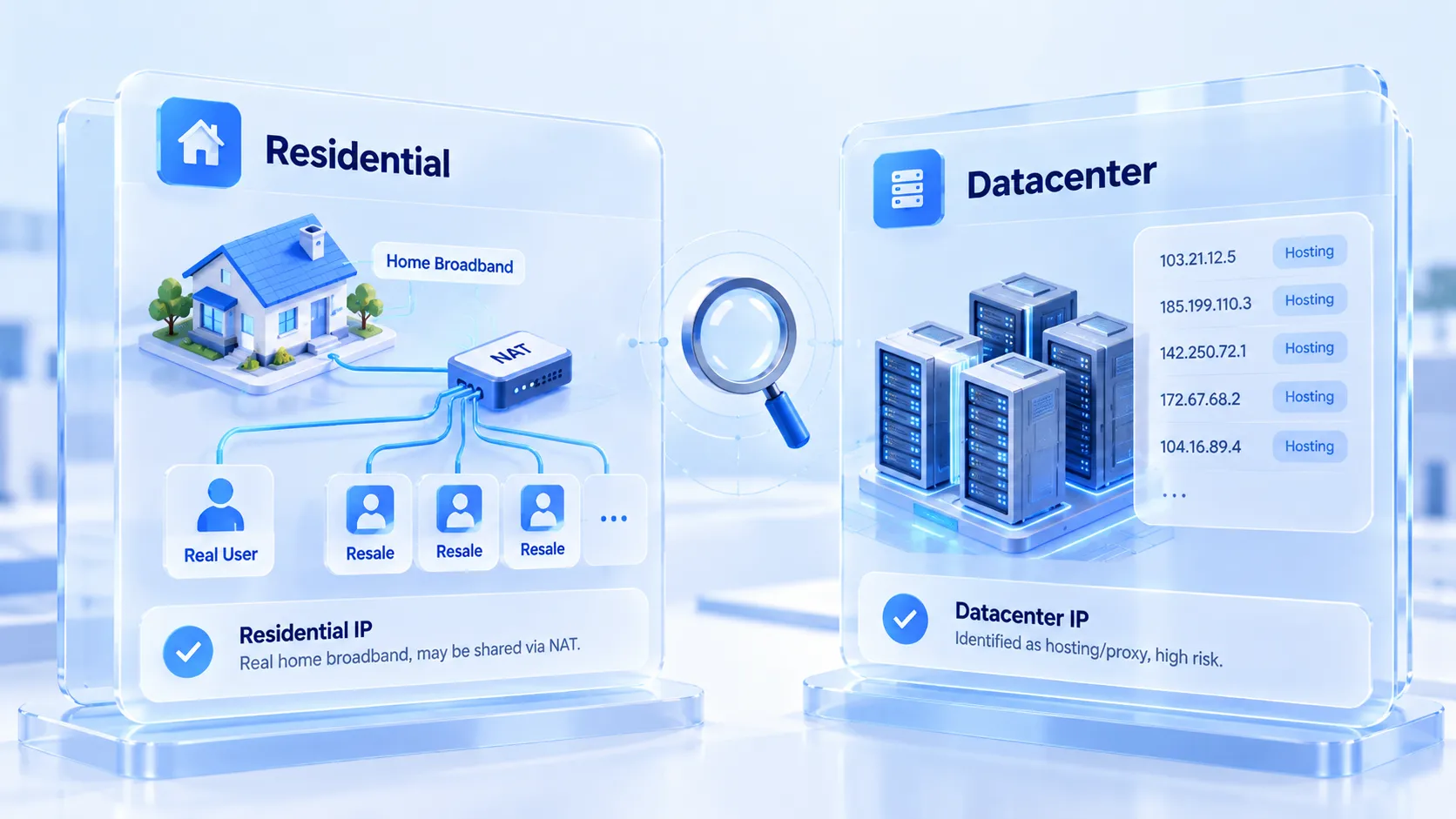
Core takeaway: the gap between residential IPs and datacenter IPs is not about speed. It comes down to how platform databases label where a range came from: datacenter ranges get widely marked as hosting and proxy, while residential ranges carry the secondhand risk that comes with NAT sharing.
Understand the logic first, then pick by business stage. That is how the budget lands where it matters. This article unfolds in five parts: origin, trust, cost, selection, and configuration. The most common pitfall when buying proxies starts at selection. Two vendors quote the same price, one range labeled residential and the other datacenter, both sales pages promising high anonymity and high speed. The wrong pick often shows up late. Days after a new account registers, verification prompts appear and likes get no reach; half a day of troubleshooting points back to the birthplace of the IP range.
MostMate is a fingerprint browser that gives every account its own isolated network environment, and each proxy inside an environment can be configured and verified one by one. This article breaks down the difference between the two IP types so you can ground the choice in specific fields.
Where the Difference Between the Two IP Types Comes From
Whether an IP range is residential or datacenter is decided by its registration records; a vendor's label is only a reference. Every IP range worldwide is registered with its autonomous system (ASN) and assignee. Datacenter IPs are carved out of ASN ranges registered by hosting providers, belonging to hosts like AWS, Alibaba Cloud, and Hetzner, and one glance at the record shows the datacenter origin. Residential IPs are assigned by carriers such as Comcast to home broadband users and sit in residential ASN ranges.
To check who a range belongs to, use Hurricane Electric's BGP toolkit. Type in an address and you see its ASN and registrant, with the origin written plainly. When platforms run risk checks, they read the same records. Datacenter ASN ranges are huge and cheap to lease, so they have long been the hardest-hit zone for bulk registration and scraping. Major platforms keep their own datacenter range lists. This is a structural origin problem. However cleanly an individual IP behaves, the range class does not change.
Trust Runs in Both Directions
Each IP type carries one layer of risk, and the directions are exactly opposite. The risk of a datacenter IP is public. Run it through an IP intelligence database and the hosting or proxy field is usually lit up. Test a Google datacenter address and ip-api's field lookup returns proxy and hosting both true at once. These labels are open to every platform. Once risk systems read them, the mild outcome is tighter limits on new accounts and the harsh one is being stopped right at registration. Intelligence services like IPinfo also maintain finer privacy-detection labels, and an address flagged once is very hard to wash clean again.
The risk of a residential IP hides in how it is shared. Behind a home broadband exit there is often a NAT network. On the same address sit real household users, and possibly dozens of accounts resold from the same proxy pool. A residential IP is secondhand. What previous users did with it decides the current risk status of that range. Residential ranges do not light up the hosting label, but they may carry a subtler baggage of history.
Neither risk is absolutely worse; selection means choosing the one you can actually investigate.
Cost Structure Decides How You Use Them
The two IP types are billed differently and suit different workload densities. Datacenter IPs are billed per IP or per port: one fixed monthly fee, traffic unmetered. For high-traffic jobs like scraping or monitoring, costs stay predictable. Residential IPs are almost always billed by traffic. The unit price is much higher, and video loading or file downloads burn through a plan quickly. The price gap has nothing to do with pricing strategy: residential bandwidth is resold out of real home networks, and the resource itself is expensive.
Billing shape directly shapes operating habits. Traffic-billed residential proxies make operators instinctively frugal with every action: fewer heavy pages open in the browser, fewer always-on tasks. Port-billed datacenter proxies fit work where traffic is not a concern. Before assigning a proxy to an account, think through the environment's daily traffic pattern, then decide which type the money should go to.

Choosing by Business Stage
What decides it: the account's stage and the cost it can absorb.
Line up the common cases by priority:
1. New account registration and warm-up: prefer residential IPs. Registration is where platform risk control is strictest, and the hosting label on datacenter ranges bites hardest at this step. Residential ranges may carry historical baggage, but at least they do not announce a proxy identity at the first gate.
2. Day-to-day upkeep of mature accounts: residential IPs or quality ISP proxies both work; the key question shifts from "switch or not" to "how stable", and a long-term fixed exit matters more than the type itself. Whether the exit IP should stay fixed or switch on demand can be settled by the timing standards in the fixed vs. dynamic IP selection guide.
3. Bulk tasks and automated runs: the value zone for datacenter IPs. These jobs mostly run on established accounts with a login state already in place; traffic is heavy and frequency high, and the controllable-cost advantage of datacenter ranges truly pays off here.
4. Temporary and one-off tasks: use whichever type is cheaper and discard it when the task ends; the account's long-term health does not depend on that IP's history.
The same batch of accounts often runs different IP types at different stages. One rule applies when switching: schedule range changes right after low-risk actions, away from the windows where the account is mid-operation on something highly sensitive.
Putting the Selection into Practice in MostMate
Once the selection is settled, the setup stage needs to verify three things: connectivity, ownership, and whether the environment keeps up. MostMate is a fingerprint browser that manages proxies and environments separately; how the modules divide the work is covered on the product page. Both selection and acceptance happen inside the interface.
Step one: enter the proxies in proxy management, noting the source on each entry. Beyond the common HTTP and SOCKS5, HTTPS and SSH are also supported. After entering them, run the built-in check-proxy function for a trial connection. The exit IP shows on the spot. The in-page IP lookup channel defaults to ip-api, so the region and carrier it returns can be compared directly against the vendor's sales page. Sold as residential and returned as datacenter: one record is enough to expose it. For the full path from entry to acceptance, the setup preview on the official site walks through it in four steps.
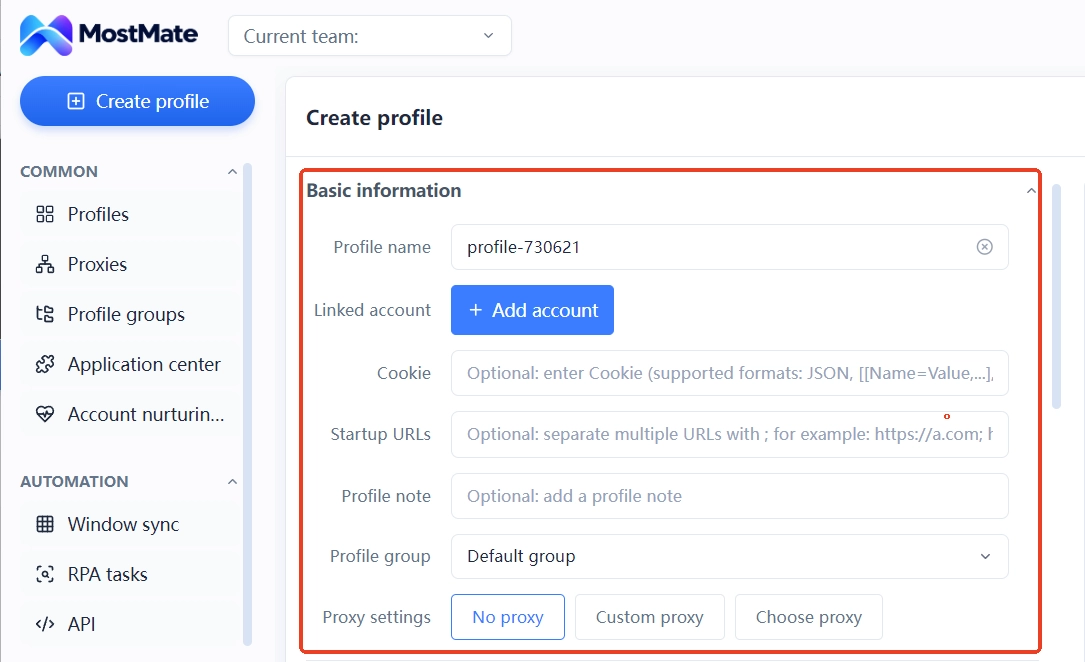
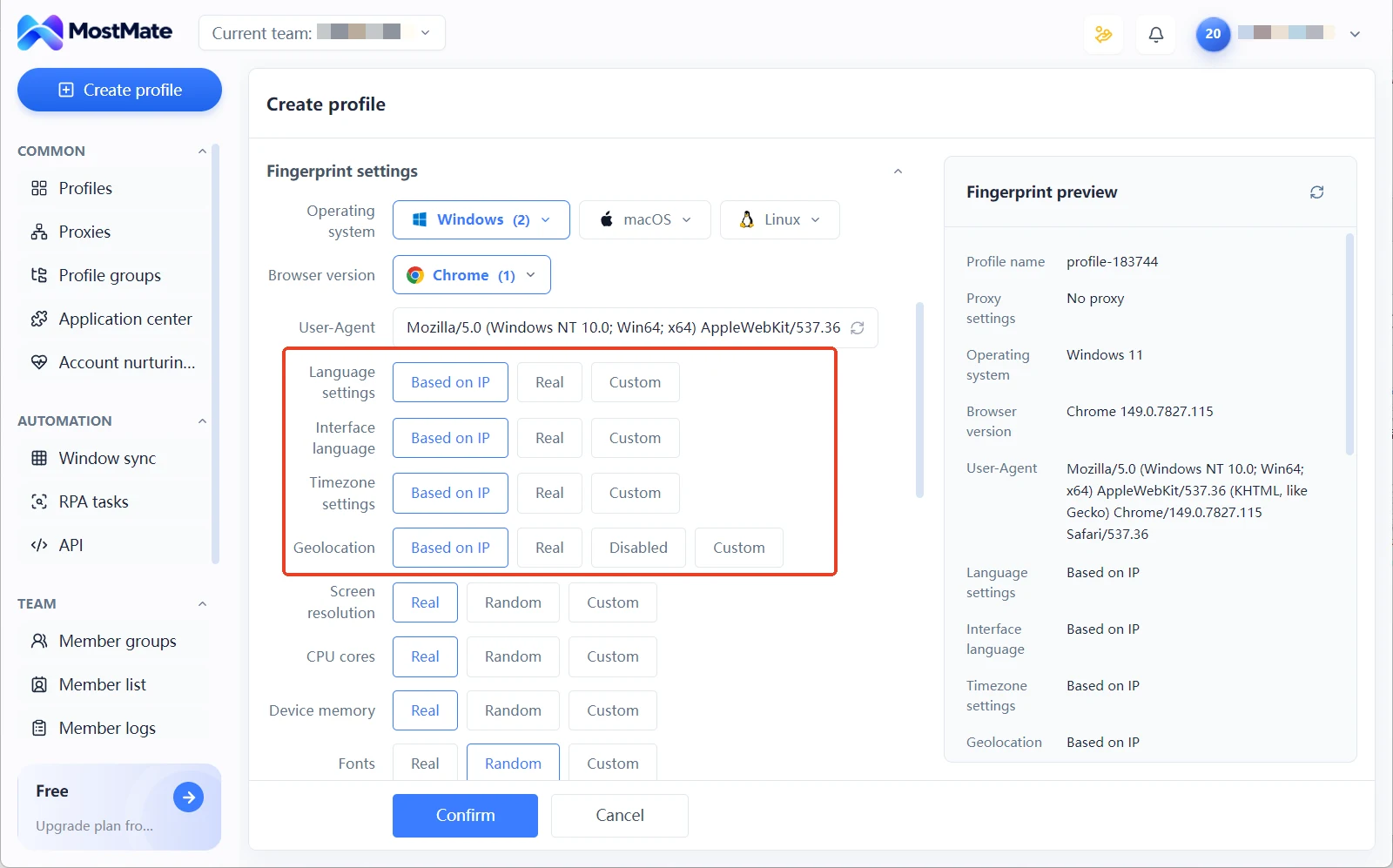
Step two: assign the proxy while creating the environment. The proxy settings in the environment form offer three options: no proxy, custom proxy, or pick from the proxy list. Select the entry that passed acceptance. Once assigned, the language, timezone, and location readings in the environment default to the exit IP. Change the ownership and the readings follow. No manual edits needed.
Step three: after running for a while, go back and review each proxy's retention status. Whether exit IPs drift and whether responses stay stable are all recorded in the proxy list. Investigate item by item once something looks off; for the layered acceptance of availability and logical consistency, see the two-layer proxy acceptance guide.
Frequently Asked Questions
Is a residential IP always safer than a datacenter IP?
Not necessarily. Residential ranges carry no hosting label, but their secondhand history cannot be looked up, and under NAT sharing everything previous users did is written onto that address. Datacenter IPs have a transparent origin, which actually makes their risks easier to predict. The basis for judging safety is the current risk status of the address; the type label is only a reference.
Can I run accounts on datacenter IPs the whole way?
Feasible for mature accounts with a stable login state, where bulk tasks dominate. Using datacenter ranges during new-account registration concentrates the risk on the hosting label, and platforms weight this field more heavily in registration and early-stage checks. A mixed setup is the balance point for most teams: residential for sensitive stages, datacenter for scale.
How do I check whether a range has been flagged by a platform?
Use an IP intelligence service to check its hosting and proxy fields, then verify the ownership records with an ASN lookup tool. When you need to clear the exit, the type, and the leak surface in one pass, follow the three-layer path in the IP leak self-check toolkit guide.
Why should a proxy be accepted before use?
A vendor's sales page and the actual ownership do not always match, and range drift or unstable routes often surface only after a few days. Run a trial connection to check the exit IP and ownership first, then assign it to a specific environment; that keeps problems from being carried into the account.
Closing Thoughts
Residential and datacenter IPs are not a good-versus-bad pairing; they are a structural difference in origin, billing, and risk. Prefer residential for registration and warm-up, hand bulk tasks to datacenter, and use acceptance checks to line up claimed ownership with real ownership. That is where the budget should go. The configuration steps need no extra tools: in MostMate, you can go from entering a proxy to assigning an environment in one pass, verifying the whole chain before the first account is ever registered.

MOSTMATE
Secure Multi-Account Management, Made Simple
Start with your first account and use MostMate to build safer, smarter, and more efficient multi-account operations.
- Independent profiles. Consistent identities.
- AI Automation · Account Health · Team Operations



