
Fixed IP or Dynamic IP for Fingerprint Browsers? Choose by Business Stage
Core takeaway: Fixed vs dynamic is not a matter of taste. Two inputs drive the decision: what stage your business is in, and the granularity and state of the IP you currently hold. Favor fixed addresses during account farming and ad campaigns; run bulk store-cluster operations through a separate dynamic pool. When you swap an IP matters more for account safety than the choice itself.
Two people manage a dozen accounts each, yet their setups are complete opposites. The first assigns a fixed IP to every account, convinced that paying more buys stability, and still receives platform verification requests in week three. The second rotates everything through a dynamic residential pool, and the accounts stay fine.
The difference is not who spends more; it is the business stage. The first person's accounts are already running stably, so the problem most likely sits with the state of that fixed IP itself. The second runs browsing-heavy work, where address changes pose no real pressure. Before choosing fixed or dynamic, separate these two questions, then talk configuration.
A Dynamic IP Is Not One Thing: Three Rotation Tiers
An IP address is the baseline identifier an environment exposes to the outside world, and platforms read it more closely than most people assume. When you buy dynamic IPs, ask one question first: how often does the address change. That answer decides whether it can serve accounts at all. For what an IP address does in a network, Kaspersky's definition page explains it plainly, so we will not repeat it here.
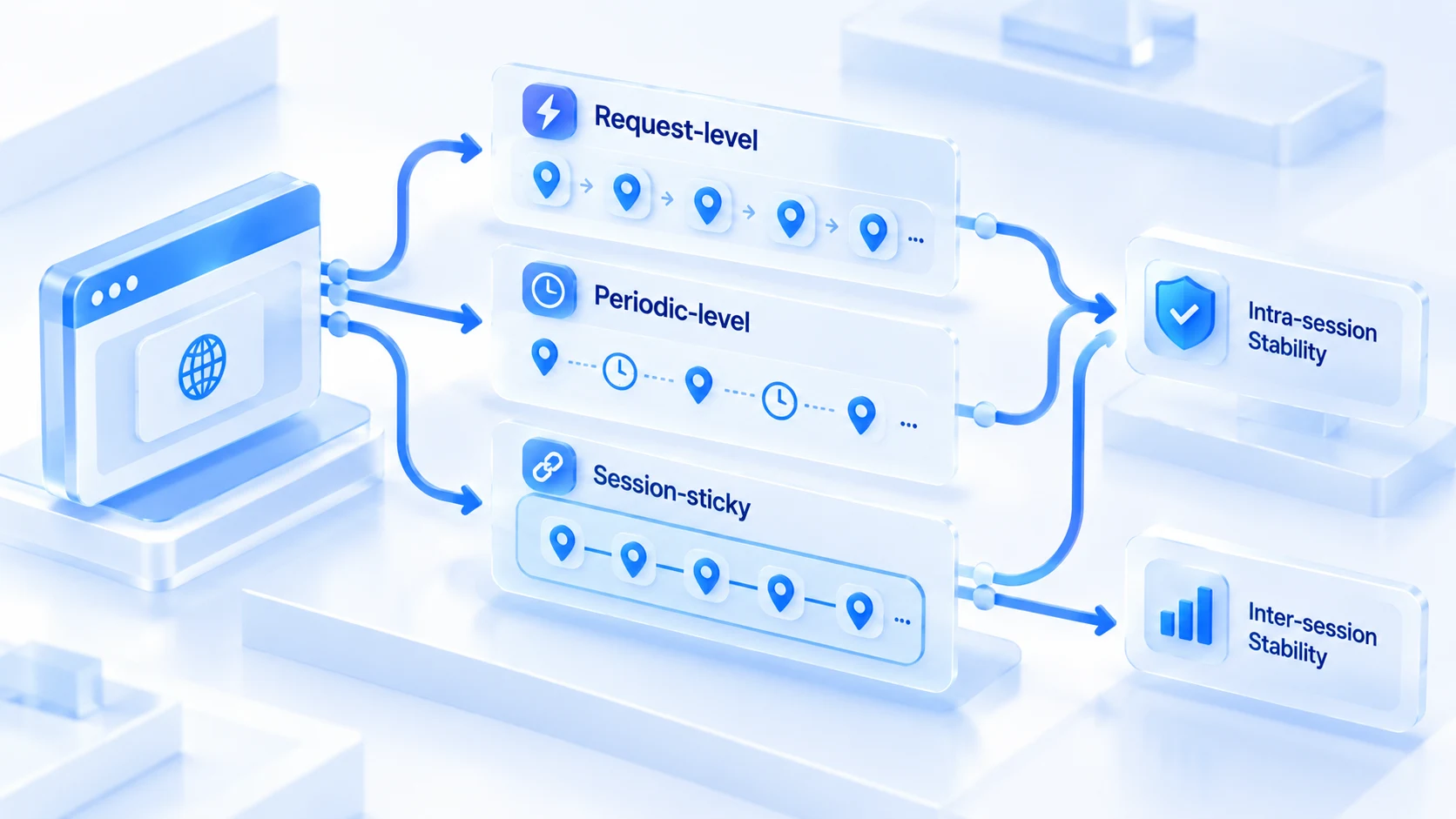
There are three common rotation tiers:
- Request-level rotation: the exit changes on every connection, so addresses keep jumping within a single session. Fine for scraping and bulk harvesting; no login scenario survives it.
- Scheduled rotation: the address changes every few minutes, hours, or days. Tiers at daily granularity or slower barely qualify as "controllable drift between sessions".
- Sticky sessions: the provider keeps the same exit for one session for a while, typically ten-plus minutes up to a day. Think of it as "pseudo-fixed" inside a dynamic pool.
In risk-control terms, this comes down to a two-layer question.
- Layer one: within a single login session, does the address jump?
- Layer two: between logins, how far does the address drift?
Request-level rotation fails layer one outright. Sticky sessions hold layer one but not layer two. Account logins need both layers stable. Granularity is the floor, not a bonus.
Fixed IPs Have a Life Cycle Too
Fixed solves "the address does not change"; it does not guarantee "the address stays healthy". As a fixed IP ages, three decay patterns show up most often:
- Blacklist accumulation: the activity records of previous users or others on the same range drag down the reputation of the entire block over time.
- Provider recycling and reassignment: when contracts expire or lines are adjusted, the address is taken back and handed to someone else, usually without the user knowing.
- Data-center migration: the provider moves racks or ranges, and the exit's registered location quietly changes.
Do not guess at decay. Verification requests suddenly spike, IP reputation tiers slide on checking sites, and readings across the same environment turn unstable. When the signals line up, act. Propping up an address the platform has already flagged drags the whole account down. The handling path is written step by step in the guide to investigating an IP ban.
A fixed address is an asset, not a permanent one. Review it monthly.
Farming, Ads, Store Clusters: Choose by Stage
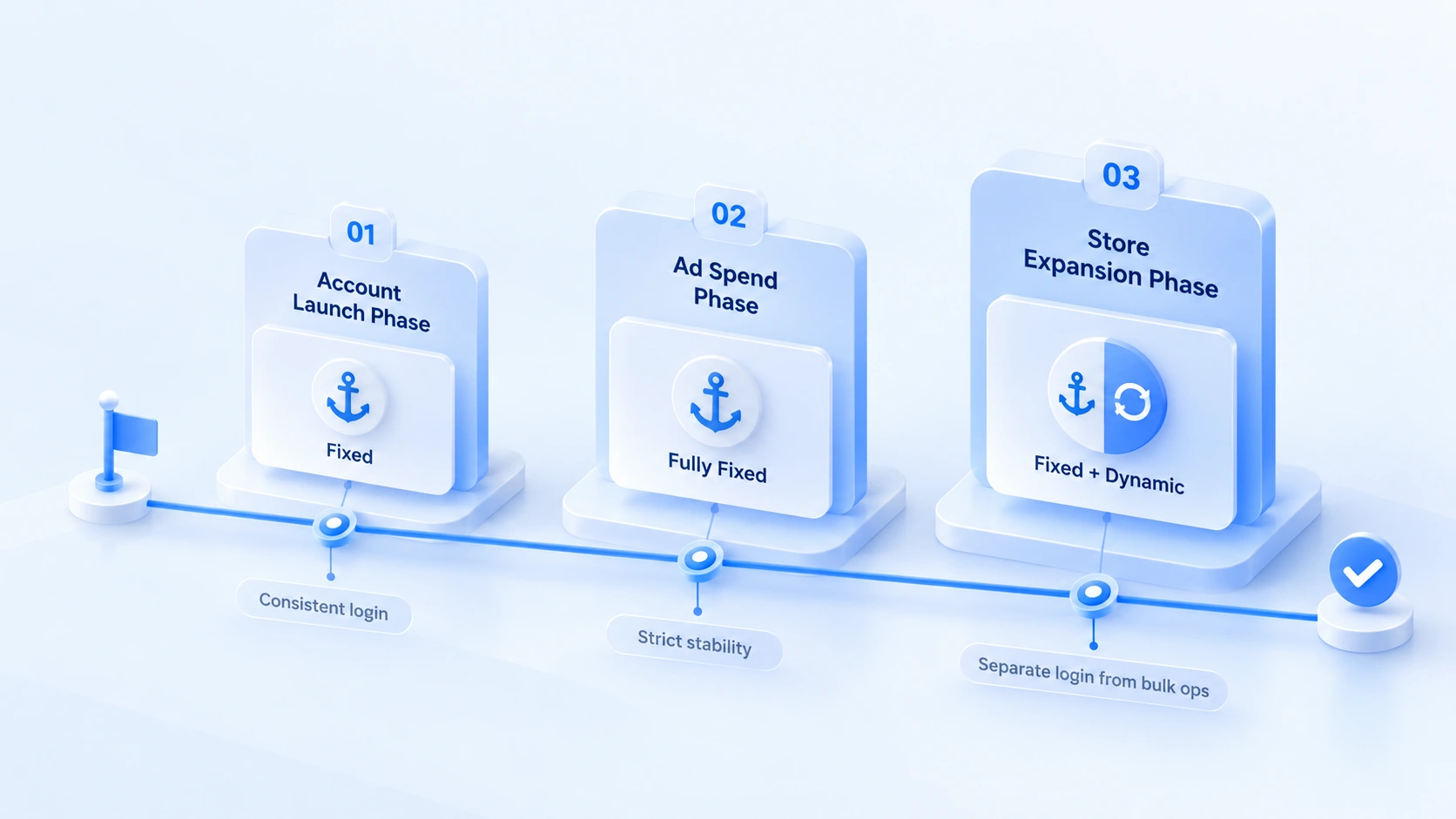
The three mainstream scenarios make different demands on addresses as they mature, and the same batch of accounts gets different answers in launch phase and maturity phase. Let the stage drive the choice, not the budget. The decision table:
| Business stage | Address stability required | Choice and key points |
|---|---|---|
| Farming · launch | One address from signup to first login | Fixed first: static node or ISP residential |
| Farming · growth | Behavior builds up; sudden changes hurt | Stay fixed; sticky sessions as fallback |
| Ads · campaign | Ad account audits are strictest | Fixed throughout; swap in quiet windows |
| Store cluster · expansion | Fixed for new stores; dynamic for bulk ops | Dynamic pool never touches logins |
The table keeps mentioning "static nodes"; they deserve a separate note. These are long-term addresses assigned from the data-center side. The address truly does not change, but the reputation foundation lags behind residential ISPs, so weigh which tier of account should carry one.
ISP proxies combine residential reputation with static addresses; the mechanics and trade-offs are broken down fully in the ISP proxy explainer. For how address ranges are graded and how registered location follows the network layer, Fortinet's glossary page covers the basics.
Discipline for Changing IPs
Three situations force a change: re-checks failing repeatedly, a provider notice of recycling, or a line that stays unstable. Beyond those, do not touch the address on a whim. Every change opens an observation window.
- Act during the account's low-activity hours, such as late night or a rest day, so the address does not jump while the account is active.
- Once the new address is in place, re-check first: do the exit IP, registered location, language, and timezone readings match it? The two-layer re-check procedure is in the proxy two-layer check guide. For reading reputation and readings, see the Whoer check guide.
- Keep activity frequency low for a day or two after the change; only browse and interact lightly. With no new verification requests, resume the normal rhythm.
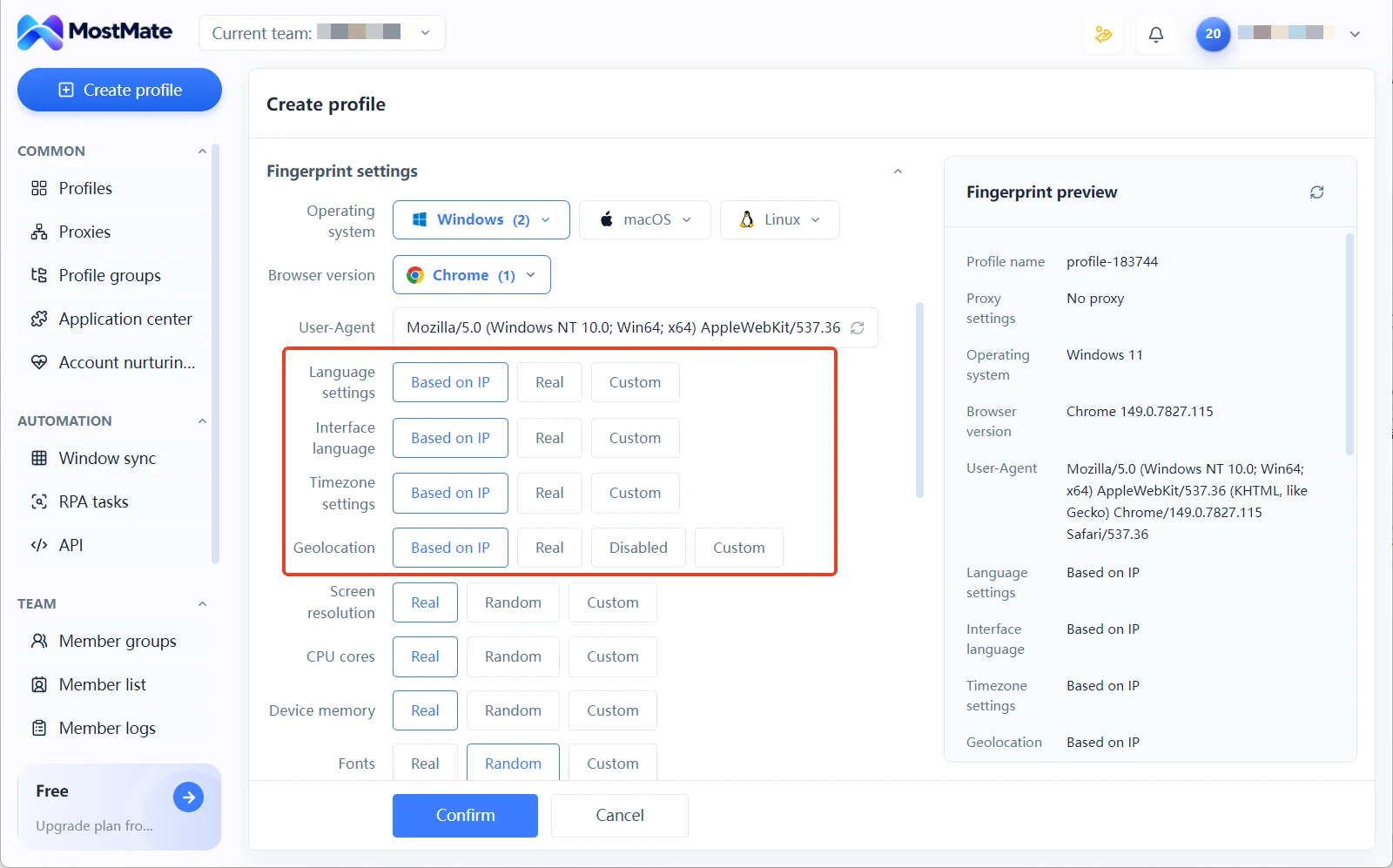
In the fingerprint parameters there is one labor-saving setting: set language, timezone, and geolocation to the "Based on IP" option, and when the address changes these readings follow automatically; no per-item manual edits, and no chance of one missed item creating a contradiction.
How This Maps to MostMate's Proxy Setup
MostMate is a fingerprint browser built for multi-account teams. Proxies are managed in a dedicated proxy list, supporting SOCKS5, HTTP, HTTPS, and SSH, created one by one or imported in bulk. Once set up, assign them to specific profiles through the proxy settings in the profile form. Three options: no proxy, custom proxy, or select a proxy. Every profile in the profile list shows its current proxy and exit IP, so you can see at a glance which address serves which account.
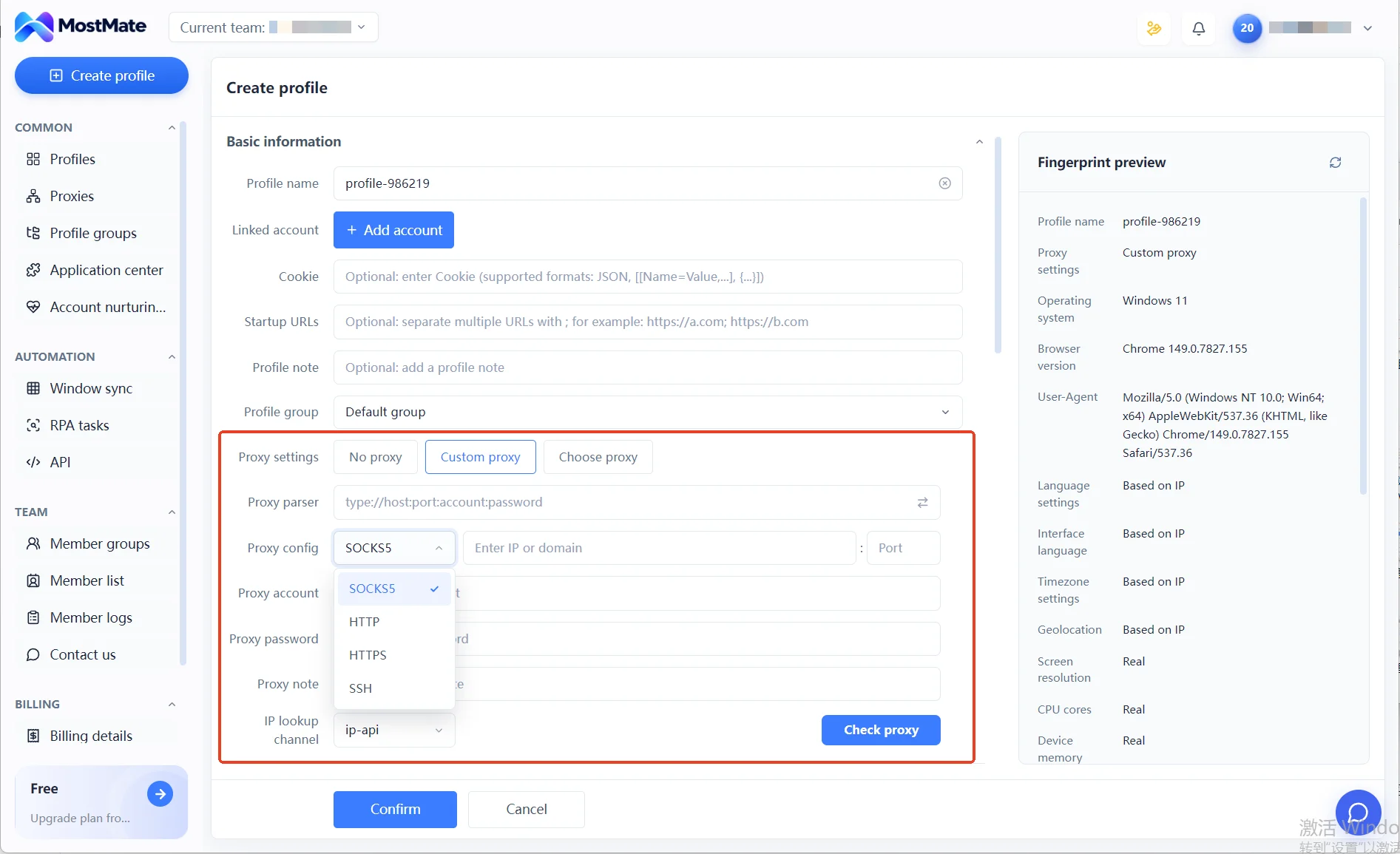
This structure fits the staged strategy well. During expansion, prepare a batch of fixed addresses in the proxy list before bulk-creating profiles and assign them one by one; keep a separate batch of dynamic proxies for scraping and price comparison, placed in a different group away from the login profiles.
When an address needs changing, replace the entry in the proxy list, and the fingerprint preview panel lists the full set of values as early as profile creation. Whether the readings line up, you can see on the spot. The product's complete setup flow is documented on the MostMate product page, with an illustrated version to follow along.
FAQ
Can fixed and dynamic IPs be mixed in a fingerprint browser?
Yes, but split them by business. Profiles used for login and daily operations run on fixed addresses; scraping and price-comparison bulk work goes through a separate dynamic pool. Keep the two profile groups apart, and never let the login addresses and scraping addresses of the same accounts cross.
Can sticky sessions replace a fixed IP long term?
As a short-term bridge, yes; long term, no. When a sticky session expires, the address drifts anyway. Account farming and ad campaigns cannot absorb that variable at critical moments, so in the end you still land on fixed addresses.
Are static nodes suitable for store accounts?
Depends on the type. Static data-center nodes keep the address unchanged but carry a weak reputation base, so they suit low-value test profiles. For real stores and ad accounts, ISP-grade static residential is the steadier choice; when choosing, judge address change and address type separately.
How long after changing a fixed IP until normal operations resume?
After the change, re-check that the exit readings match, then keep activity low for a day or two. With no new verification requests, resume the normal rhythm. Only when address, fingerprint, and behavior are all smooth is the change truly closed out.
Closing Thoughts
Fixed or dynamic, the answer is not in a price list; it is in the business stage and the IP's state. Granularity decides whether a dynamic IP is usable at all; the life cycle decides how long a fixed IP stays usable; the staged decision table is the starting point, and the verification signals from running it are the next revision.
Before launching a new business, use the decision table to set a first-round choice. Run it for two weeks, watch verification requests and readings, then decide whether to adjust. To fold this staged address strategy into daily work, download MostMate. The proxy list and profile groups keep login operations and bulk operations separate, and every step of an address change leaves readings you can check.

MOSTMATE
Secure Multi-Account Management, Made Simple
Start with your first account and use MostMate to build safer, smarter, and more efficient multi-account operations.
- Independent profiles. Consistent identities.
- AI Automation · Account Health · Team Operations



