
What Is an ISP Proxy? The Third Option Between Residential and Datacenter
Core takeaway: An ISP proxy is a static IP whose registration sits under a consumer broadband carrier while the IP itself is hosted in a datacenter. It carries the registered identity of a residential IP yet keeps datacenter speed and stability, and on most platforms the ASN check will not classify it as a server. The weakness lies on the other side: its geographic records often point to a carrier facility rather than a home address, and its IP ranges are more concentrated. It suits account operations that stay logged in long term on a fixed address, not tasks that need broad coverage or large-scale rotation.
A reader who runs multiple storefronts once asked: the same request for "one stable US IP" got three different answers from three proxy vendors. One said "an ISP proxy is just static residential," another said "two different products, double the price," and the third said "different names, same thing." What stalled him wasn't the price, it was the naming. Whether a platform treats an IP as a server depends on its registration records, not on the label on the shelf.
What Is an ISP Proxy: Registered to a Carrier, Hosted in a Datacenter
An ISP proxy is a static IP whose registration is filed under an internet service provider and which the proxy vendor in fact hosts in a datacenter.
Two layers with nothing to do with each other hide inside that sentence:
- Registration layer: these IPs carry WHOIS and ASN records under household broadband carriers like Comcast, AT&T, or Deutsche Telekom, not under hosts like Cloudflare or DigitalOcean;
- Hosting layer: the servers carrying the traffic sit in a datacenter, not behind anyone's home router;
- Usage layer: the IP belongs to you alone for the long run, and the address never changes.
It borrows a residential identity and lives in a datacenter building.
Naming hides another trap: most vendors sell "ISP proxy" and "static residential proxy" as two names for one product, while others run them as two pools at two price points. There is exactly one test: check the registration records, ignore the label on the product page.
One boundary worth noting: the proxy decides which line your traffic exits through, the fingerprint decides what kind of device the platform sees. In multi-account operations these are two independent layers; the full division of labor is covered on the What Is MostMate page, and this article deals only with the line layer.
The Real Differences Between Three Proxy Types: Trade-Offs on Five Dimensions
The usual story ranks the three from best to worst: residential the most genuine, ISP in the middle, datacenter the worst. In reality they are three tools built for different jobs, and none of them can replace the others.
1. Residential proxy
- Registration: home broadband carrier ranges
- Hosting location: real home devices
- Address behavior: mostly rotation
- Speed: fluctuates with the line
- Billing: by traffic
2. ISP proxy
- Registration: home broadband carrier ranges
- Hosting location: a datacenter controlled by the vendor
- Address behavior: static and exclusive
- Speed: close to datacenter, stable, little jitter
- Billing: monthly per IP, mostly unmetered
3. Datacenter proxy
- Registration: hosting or cloud providers
- Hosting location: datacenter
- Address behavior: static or rotating
- Speed: fastest
- Billing: monthly per IP, cheapest
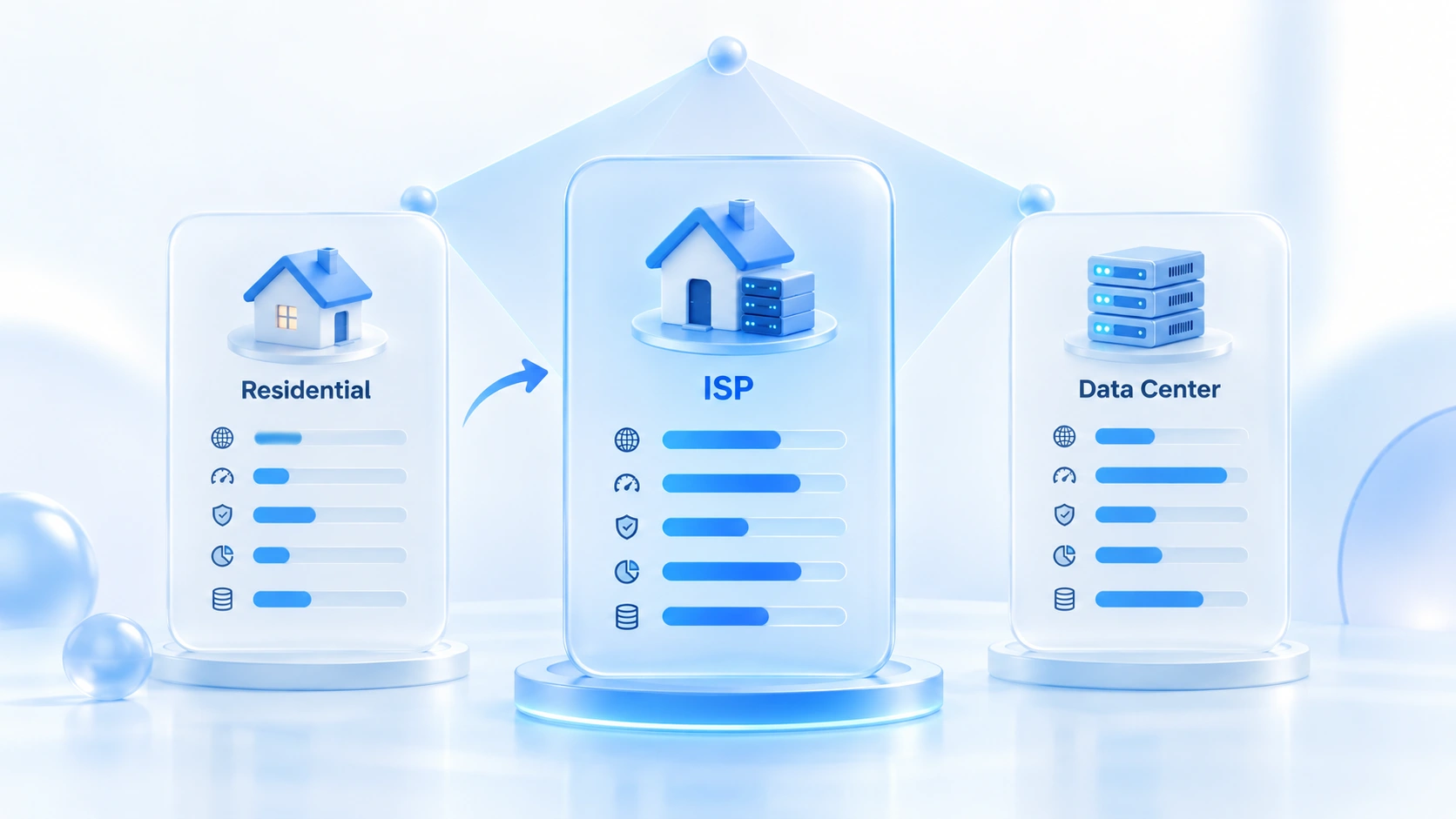
Placed side by side, the picture is simple: the only two things an ISP proxy really buys you are a registration identity that does not point to a datacenter, and an address that never moves. On pool size, geo precision, and behavioral spread, it loses to residential on all three counts.
Four Places Where Things Break
Treating it as "budget residential" is the most common misjudgment. It is more fragile than residential in four places, and none of them is written on the product page.
First, registered identity and geolocation do not always agree. Its geographic records often point to a carrier facility address rather than a residence. Some platforms read ASN type against geo precision: registered as residential broadband while the location looks nothing like a home — that is a contradiction. Platforms running basic ASN checks will let it pass; platforms running deeper validation will pick it out.
Second, concentrated IP ranges mean shared punishment. Pools are small, and one range is often sold in batches to different customers; the moment someone runs high-frequency scraping on it, the reputation of the whole range goes down too. Asking about the history of the range your IP sits in tells you more than asking about speed.
Third, suspiciously good speed is also a red flag. Home broadband fluctuates with the line and the time of day; an IP that claims a household origin yet runs at full speed around the clock with near-zero jitter does not fit the residential profile.
Fourth, behavior accumulates. The flip side of a static address is continuous trackability: the platform sees how many times the same IP shows up each day and whether the rhythm looks mechanical. If the identity looks real but the behavior does not look human, it will still get throttled for behavior.
Got an ISP Proxy? Verify It Yourself in Four Steps
A vendor's description is for reference only.
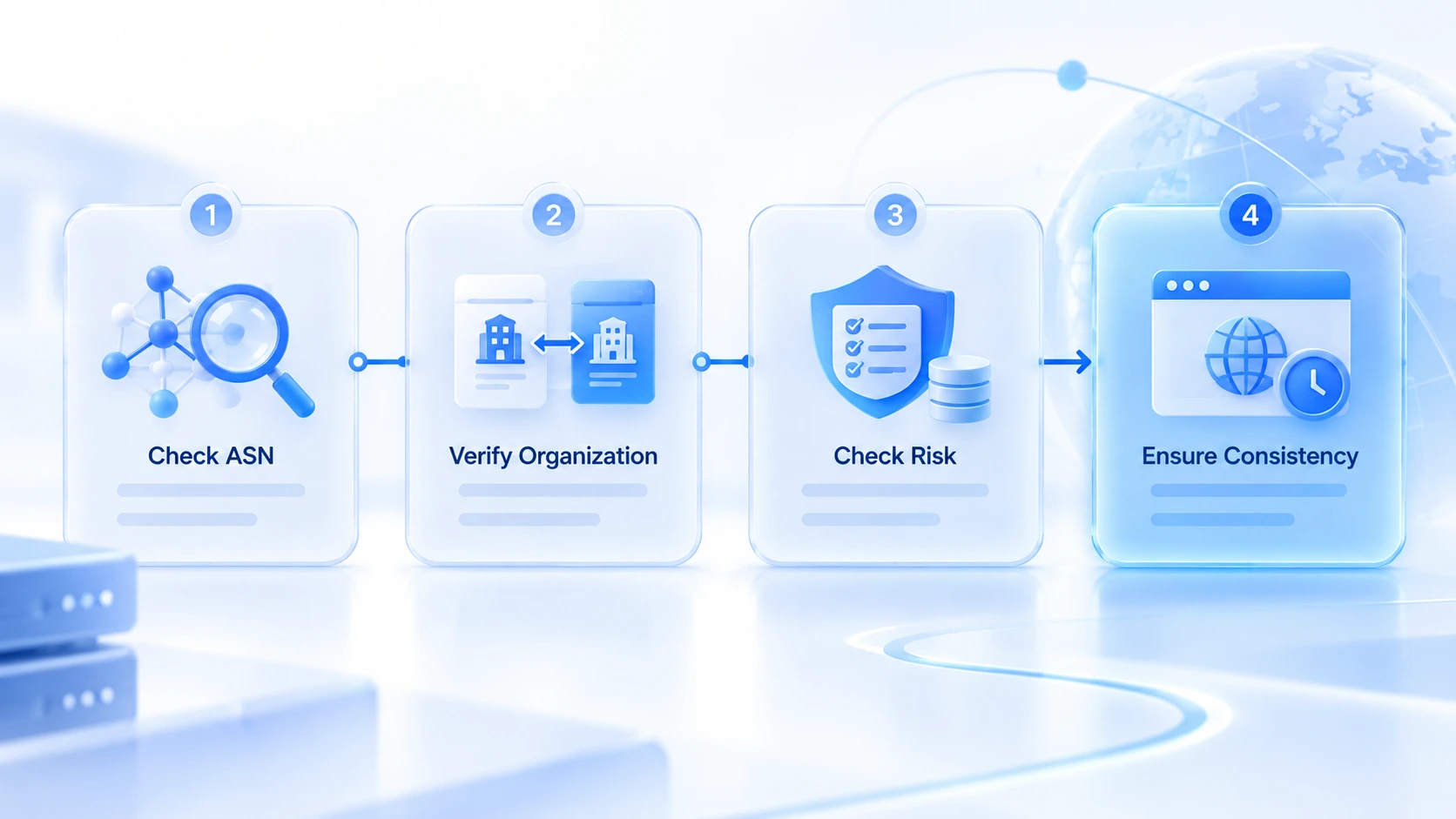
Step 1: Check the ASN type, not just the location. Use ipinfo to pull the ASN field — it carries a type, and isp and hosting point in two entirely different directions. For finer network attributes, switch to IP2Location, whose Usage Type separates fixed-line carriers (ISP), mobile carriers (MOB), and datacenters (DCH).
Step 2: Check whether the company name and the ASN are the same kind of entity. This is the step most often skipped. If the ASN says isp but the Org field names a VPS or hosting company, a datacenter still controls that range in practice.
Step 3: Check risk databases and blacklists. Services like IPQualityScore report proxy and VPN flags, abuse history, and a risk score. If the score is off or the IP sits on an abuse list, replace it right away — do not run it for a week and hope.
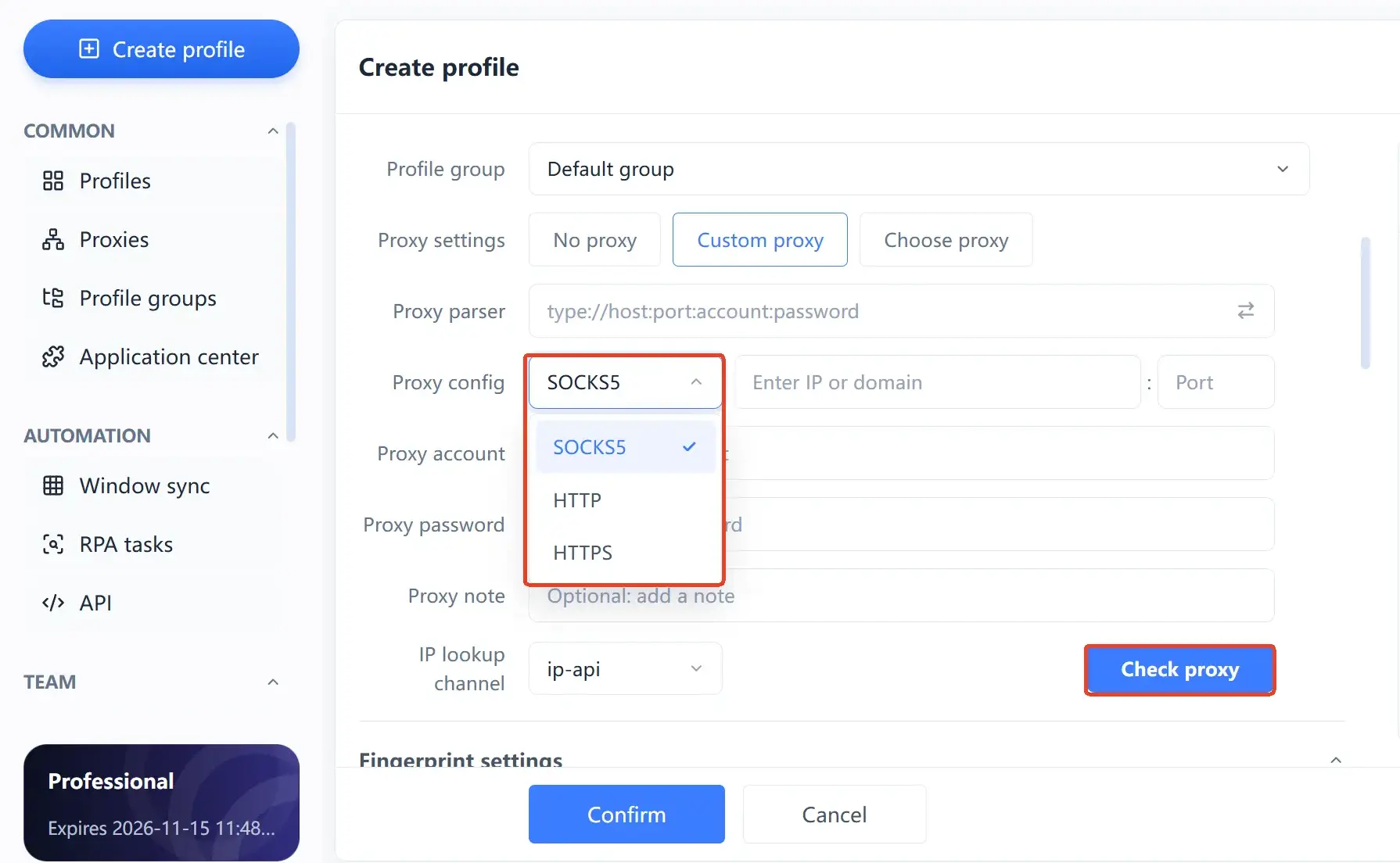
Step 4: Put it into an environment and check whether the signals agree. An ASN lookup only confirms that the identity is genuine, not that it matches the other signals in your environment. In MostMate, fill the proxy into the environment settings, run a test first to confirm connectivity and exit region, then check whether timezone, language, and geolocation follow the IP, and finish with the Iphey check to read the trust score.
When It's Enough, and When You Must Switch
It is a compromise option, not an upgrade, and the boundary is fairly sharp.
These are the scenarios where an ISP proxy fits:
- Accounts in the dozens or fewer, one dedicated IP per account, costs under control;
- Accounts that stay logged in long term — store backends, ad accounts, and main social profiles all want an address that never moves;
- Modest traffic but high stability demands — monthly per-IP billing beats pay-by-traffic;
- Target platforms that only run basic ASN checks — that is where it delivers the best value for money.
Switch to residential when you need city- or region-level localization, need to spread requests across a very large number of addresses, or need the IP itself to rotate on a schedule. For those three needs, static and concentrated are pure liabilities.
And one case neither type covers: platforms that grant exemptions for carrier-grade NAT (CGNAT). Mobile network IPs are naturally shared by huge numbers of users, and some platforms weight those addresses differently than ordinary broadband in their risk models.
One rule of discipline: moving from rotating residential to static ISP is not a parameter change and done — the login address collapsing from a batch to a single one is an environment change in itself. Migrate in batches, and hold off on sensitive operations for a while afterward.
Three Places to Plug It Into a Multi-Account Workflow
First, one IP binds to one environment only. This is the rule most often skipped. Two environments sharing one ISP proxy means two accounts sharing one address — the platform links the login records directly, and all your fingerprint isolation goes to waste.
Second, test once before binding and once after. MostMate's proxy settings support HTTP, HTTPS, and SOCKS5. After filling them in, run a test first and confirm connectivity, exit region, and latency before starting the environment. A passing test only proves the network works, not that this IP suits this account. If you are still deciding "whether to get a fingerprint browser for account operations at all," the Who Is MostMate For article lists criteria by account size and team structure — match yourself against it first.
Third, let the configuration follow the IP. Timezone, language, and geolocation in the environment can be generated automatically from the exit with "configure from IP," which produces fewer contradictions than manual entry. One reminder: this step only aligns the network layer with the environment layer; the fingerprint layer is a separate set of parameters. It is complete only when both layers line up — the environment isolation article explains the division in more detail.
FAQ
Are ISP proxies and static residential proxies the same thing?
At most vendors, yes — two names describing the same combination: datacenter hosting, carrier-registered identity, static exclusivity. Some vendors do sell them as two products. Judge by ASN type and who actually controls the range, not by the name.
Can platforms detect an ISP proxy?
It depends on how deep the platform checks. Platforms that only read the ASN type will generally let it through; platforms that cross-check registered identity against geo precision may notice that no real residence sits behind it. Request volume and frequency per IP are accumulating signals too — once behavior looks abnormal, even a genuine identity gets throttled.
Are ISP proxies cheaper than residential proxies?
Usually cheaper and easier to predict: monthly per-IP billing, mostly unmetered, while residential is billed by traffic and hard to budget at volume. The trade-off is a small pool, narrow coverage, and concentrated addresses.
How many accounts can one ISP proxy serve?
One IP per account, one environment. The whole value of an ISP proxy lies in a fixed, exclusive address; once several accounts share it, the platform links them at the address level. As your accounts grow, buy IPs by count — never cut the number of IPs to fit a budget.
Closing Thoughts
The value of an ISP proxy is buying a residential-like registration identity at close to datacenter prices. That positioning defines what it is good at: account operations that need a long-term fixed address without being spotted as a server at first glance. And what it is not good at: broad coverage, heavy rotation, and tasks that must fully match local residents still belong to residential proxies.
To save time choosing a proxy, decide in this order: first the nature of the task, then the proxy type, and compare prices last. You can install MostMate, build two environments on the free plan — one on residential, one on ISP — run a detection on each and compare; the difference is more direct than any explanation. When you are ready, download MostMate and start configuring.

MOSTMATE
Secure Multi-Account Management, Made Simple
Start with your first account and use MostMate to build safer, smarter, and more efficient multi-account operations.
- Independent profiles. Consistent identities.
- AI Automation · Account Health · Team Operations



