
What to Do When Your Proxy IP Gets Banned? Use MostMate to Separate the IP and Environment Layers
Core takeaway: when a platform bans your proxy IP, the problem is not necessarily the IP itself. Platforms usually read three groups of signals at once: the network exit, the browser environment and account behavior. Swapping the IP alone will not always bring the account back. Work out first whether the ban targets the exit, the environment or account linking, then decide what to change; that beats buying new proxies over and over.
Last month, a friend who runs cross-border e-commerce messaged me: "I've been through three proxies and my accounts still keep hitting captchas. Are the IPs the provider sold me bad?" I asked one question: after switching IPs, were you logging in from the same browser? He went quiet. Three IPs, one browser environment, one set of Cookies. The provider was never the problem.
Versions of this conversation turn up in operations groups almost every week. Many people assume a ban means a dirty IP, but platform risk systems are more complex than that. Below, I break the problem into three scenarios with a fix for each, and close with how the proxy and the browser environment divide the work.
Why Platforms Ban Proxy IPs
First, a premise that is easy to overlook: a proxy IP is not safe by default. A proxy only changes the network exit. The browser environment, the Cookies and the account behavior stay exactly as they were.
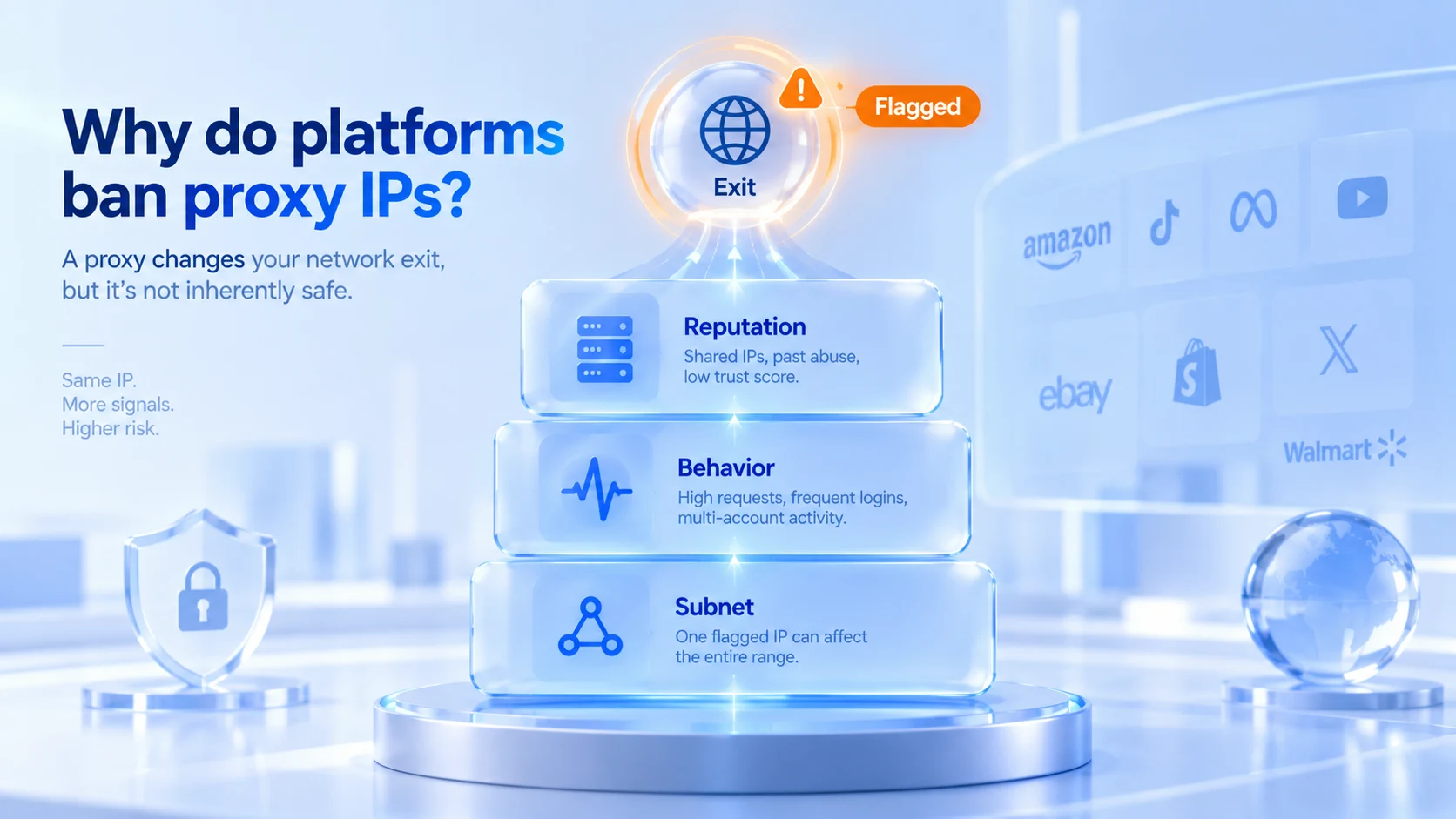
When a platform turns its attention to an IP, the reason usually falls into three groups. The first is poor exit reputation: datacenter IPs get rotated among large numbers of users, earlier holders left bad records, and the whole IP range gets scored down. The second is behavior: a burst of requests, high-frequency logins or many accounts operating in turn from one IP can drag the IP down with them. The third is range-level fallout: when accounts on the same ASN or a neighboring IP range run into trouble, risk systems sometimes extend the penalty to the entire range, even if your accounts did nothing wrong. Unfair, but it happens.
The common thread is clear: the IP is only one signal among several. The proxy type matters too; the differences and use cases of residential, datacenter and ISP proxies were compared in our ISP proxy explainer. To find the scenario that matches yours, read on.
Three Scenarios When a Platform Bans Your Proxy IP
Scenario one: the platform blacklists the IP exit.
The typical sign is that no browser gets through. From the same IP, whatever browser you open, you hit network restrictions or a verification wall. Switch to a phone hotspot and everything works. That means the platform is blocking the exit itself, and the browser environment has nothing to do with it. What to do:
- Verify with a phone hotspot first, to confirm that only the proxy network is affected.
- Check the exit's risk score with an IP lookup tool; Scamalytics gives one free fraud-score check.
- Ask your proxy provider for a new exit, and avoid IPs shared by many users.
- When you switch exits, do not jump regions: frequent region changes are themselves a new anomaly signal.
Scenario two: the IP changed, but the account is still restricted.
This is the scenario worth the most time. The IP is new, captchas keep coming, and sometimes logins are refused outright. Usually the exit is fine and the environment is not. The Cookies still carry the old session, and browser traits such as User-Agent, timezone, Canvas and WebGL match the records from the incident exactly. What the platform sees is the same browser environment with a different network exit.
Some platforms also compare the real address inferred through WebRTC. If the proxy is configured but WebRTC was never checked, you are handing over both exits; the check is covered in our WebRTC settings guide. In this scenario, changing the IP again is nearly useless; what needs work is the browser environment layer. Clear the old session data, check the environment parameters against pre-incident records, and if necessary run the account through security verification again. Changing only the IP without checking the environment is like replacing the door plate while every piece of furniture inside stays where it was.
Scenario three: the IP is fine, but multiple accounts get linked.
The most hidden scenario in multi-account operations. Every account has its own proxy, and isolation looks airtight on the surface, yet the accounts keep triggering verifications at the same time. The problem is a shared environment: several accounts running in one browser configuration share Cookies, local storage and fingerprint parameters to a large degree, and IP isolation cannot cover up repeated signals at the environment layer. The fix is to rebuild the mapping of one account, one environment, one proxy; what environment isolation actually isolates is explained in full in our environment isolation article.
First, Work Out Which Layer the Problem Is On
After a ban, do not rush to buy a new proxy. Work through the checks below in order:
- Try another network, such as a phone hotspot. If things recover, focus on the exit; if not, keep going.
- Are other accounts under the same IP misbehaving at the same time? If yes, range-level fallout is likely.
- Does the problem persist after changing the IP? If yes, stop changing IPs and turn to the Cookies and the browser fingerprint.
- Do multiple accounts share one browser environment? If yes, the problem is at the environment layer, and no proxy swap will cure it.
Run through the four questions and the issue usually lands on one of three things: the exit, the environment or linking. One of them will match. Many people get stuck at question three; when an IP swap does not help, they buy yet another proxy, and the accounts get worse with every swap.
What Not to Do
- Switching IPs too often. Every swap is logged as an exit change, and regions jumping back and forth add anomaly signals of their own.
- Logging different accounts into the same browser environment again and again. Mixed data at the environment layer is a direct source of linking, and harder to explain than a shared IP.
- Changing only the IP without checking the environment. IP isolation and environment isolation are different layers. Some people set every fingerprint parameter to a random value at once, and a random yet contradictory combination stands out even more; our article on why fingerprint randomization is unsafe analyzes this in detail.
- Operating heavily right after a ban. Consecutive logins, profile edits and repeated verifications in a short window push the risk score up further. Pause first, get the environment in order, then come back.
The checks and the no-go list are covered; the remaining question is how the two layers divide the work.
How the Proxy and the Browser Environment Divide the Work
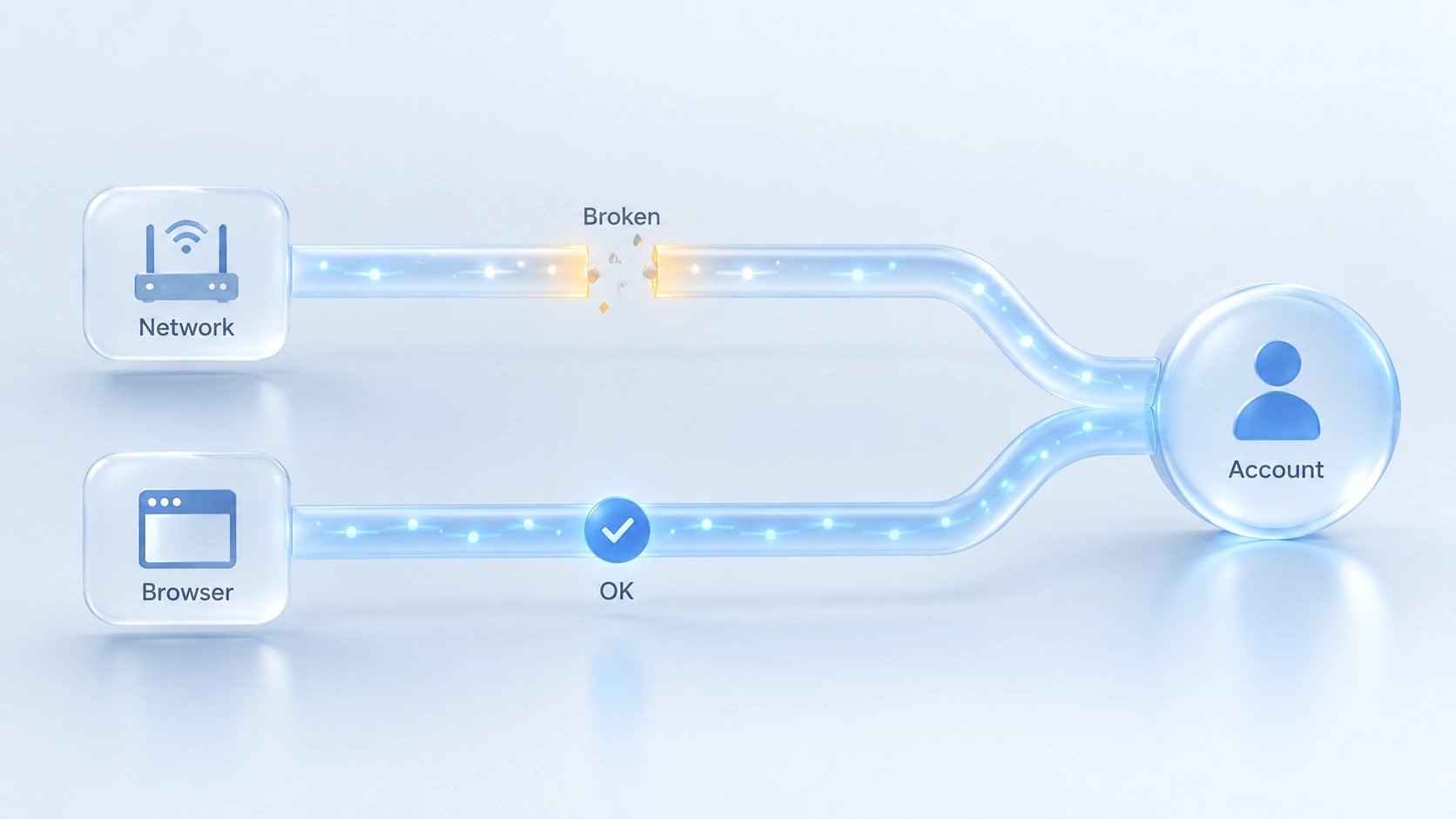
The proxy decides where you access from, the browser environment decides who you appear to be, and each layer has its own job. MostMate is an anti-detect browser whose site groups account signals into device, browser and network layers; the proxy is one item within the network layer, and environment isolation addresses the other two.
In MostMate, an anti-detect browser, proxies are managed centrally first and then assigned. Proxy management is a standalone menu: proxies are maintained in a separate list, with creation and bulk import supported, and then assigned to specific environments. Each proxy's purpose, ownership and status are on record, so during troubleshooting you no longer have to ask who is using which IP.
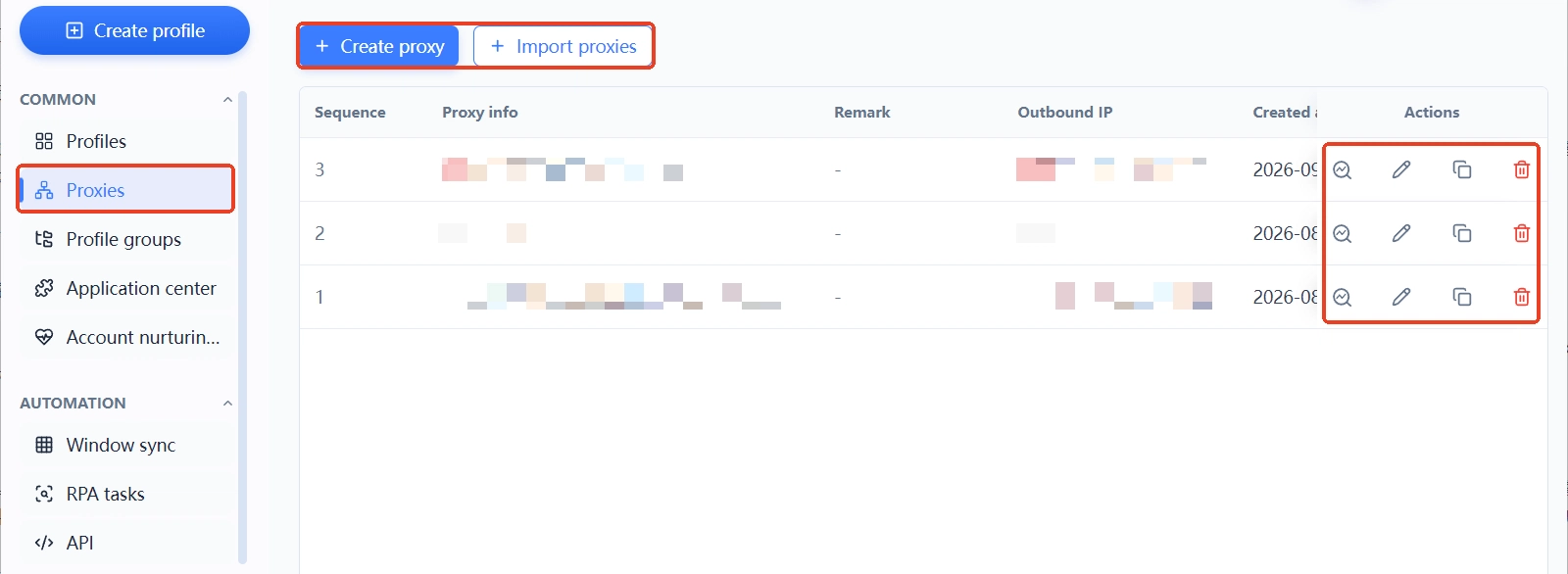
On the environment side: when you create an environment, the proxy setting in the form offers three options, no proxy, custom proxy, or pick from the proxy list. Language, interface language, timezone and geolocation default to the IP-based configuration; once the exit is set, these fields align automatically, so you avoid contradictory combinations such as a US IP paired with a Shanghai timezone. The site lists such contradictions as typical risk examples.
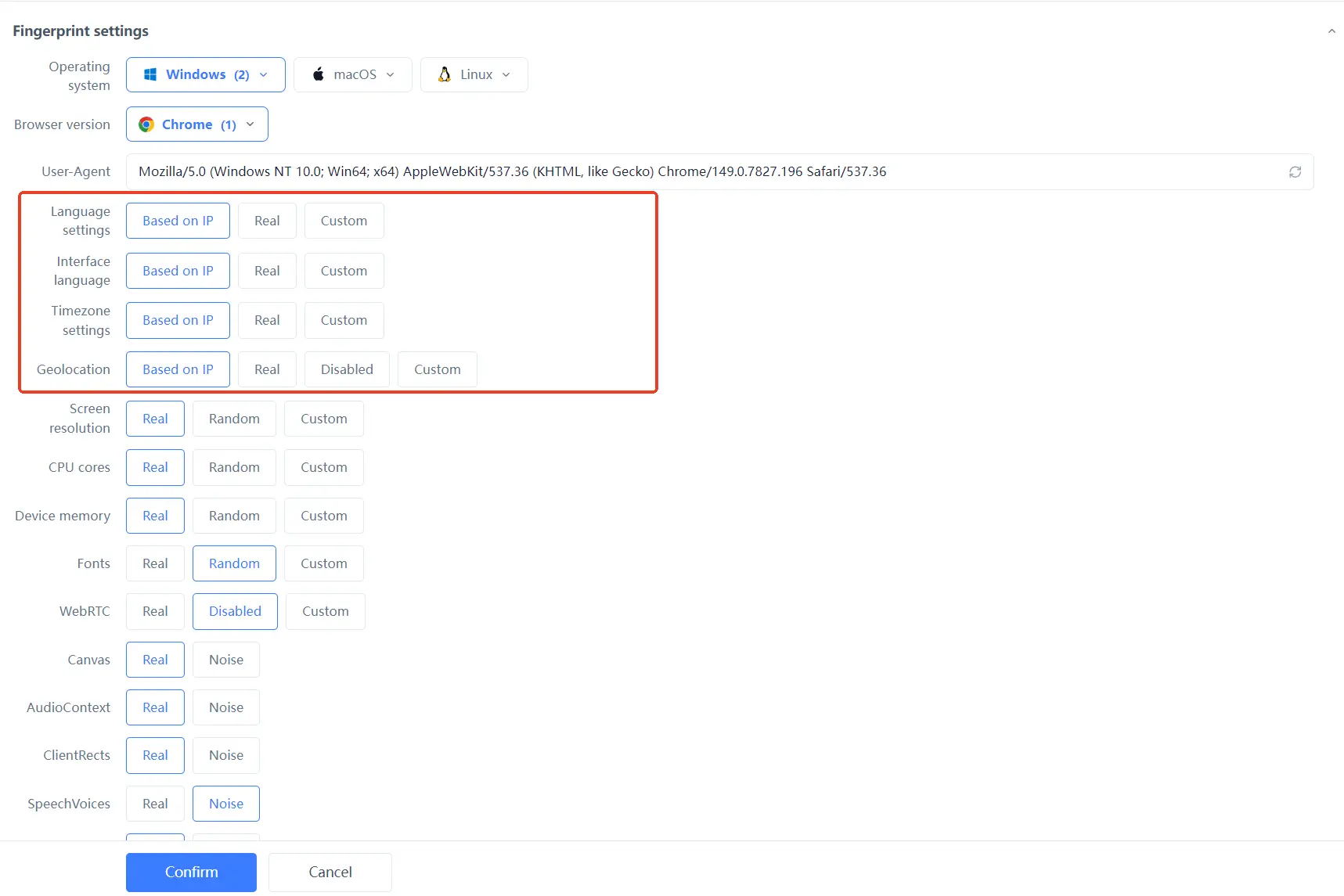
In the environment list, each row is the complete identity of one environment, with the proxy, exit IP, bound account, group and notes in the same row. In multi-account scenarios, one glance shows who shares an exit with whom.
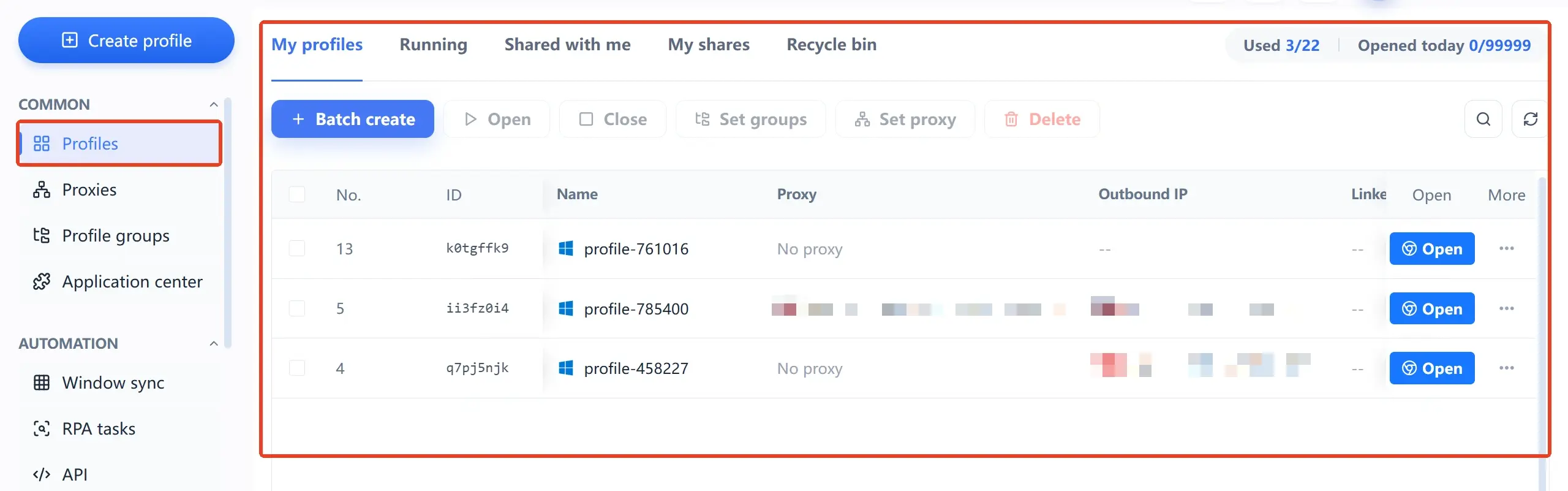
The limits deserve a clear statement too: environment isolation reduces mixed local data and duplicated parameters; it cannot guarantee that a platform cannot link accounts, nor can it make a blacklisted IP recover on its own. After a ban, appeal where an appeal is due and follow the platform's process; the tool's job is to keep the environment layer in good order. For the overall picture, the what-is-MostMate page walks through it along the beginner path.
Frequently Asked Questions
The IP changed but the account is still banned. Why?
Most likely the environment did not change. The Cookies, the browser fingerprint and the login behavior still match the ban-time records, so the platform still sees the same environment. Clean the session data and check the environment parameters before deciding whether to change the proxy.
Can a banned proxy IP still be used?
It depends. If the exit was blacklisted, that IP's record on that platform will not improve in the short term, and switching exits is easier. If it was behavior-triggered, it may recover after a period of inactivity at a lower frequency, but there is no guarantee.
Can one proxy IP be bound to multiple accounts?
Technically yes; in risk terms, not recommended. Accounts sharing one exit means trouble with any one of them can drag the others down. When conditions allow, one environment per proxy is the most stable setup.
Can an anti-detect browser solve IP bans?
Not directly. An anti-detect browser handles browser environment isolation; an IP ban is a network-layer problem, and the two layers have different jobs. A tidy environment reduces linking and false flags caused by duplicated environments, but a blacklisted IP will not unban itself.
Closing
A banned proxy IP is only the visible symptom; the exit, the environment and linking each call for their own handling. Next time a ban happens, run the four-question check first to locate the layer, then decide whether to touch the proxy or the environment; that beats blind IP swapping. To set the environment layer up properly, download MostMate and build out the proxy list and the environment mappings.

MOSTMATE
Secure Multi-Account Management, Made Simple
Start with your first account and use MostMate to build safer, smarter, and more efficient multi-account operations.
- Independent profiles. Consistent identities.
- AI Automation · Account Health · Team Operations



