
Multi-Account Association Risk Check: Auditing Four Layers from Account Data to Behavior
Core takeaway: platforms do not expose their association verdicts, so what multi-account operators can audit themselves is the configuration and records across four layers: account data, network exit, browser environment, and behavior. This framework answers three questions: what to check in each layer, which symptoms are only clues, and in what order to act once a problem is found. The platform's criteria are not public, so any claim to calculate an "association probability" has no basis; the judgment always belongs to the platform.
Start with the scenario. Two stores start demanding extra verification on the same day, and the operator's first reaction is often: have we been linked? Digging through records reveals that one store switched its proxy the day before, while the other changed login devices after a staff handover. Similar anomalies do not necessarily share one cause. Verification prompts, traffic changes, and login restrictions are only clues; the absence of any symptom does not mean the absence of risk. Placing them into a fixed check routine and verifying layer by layer is far more reliable than drawing conclusions from a single signal.
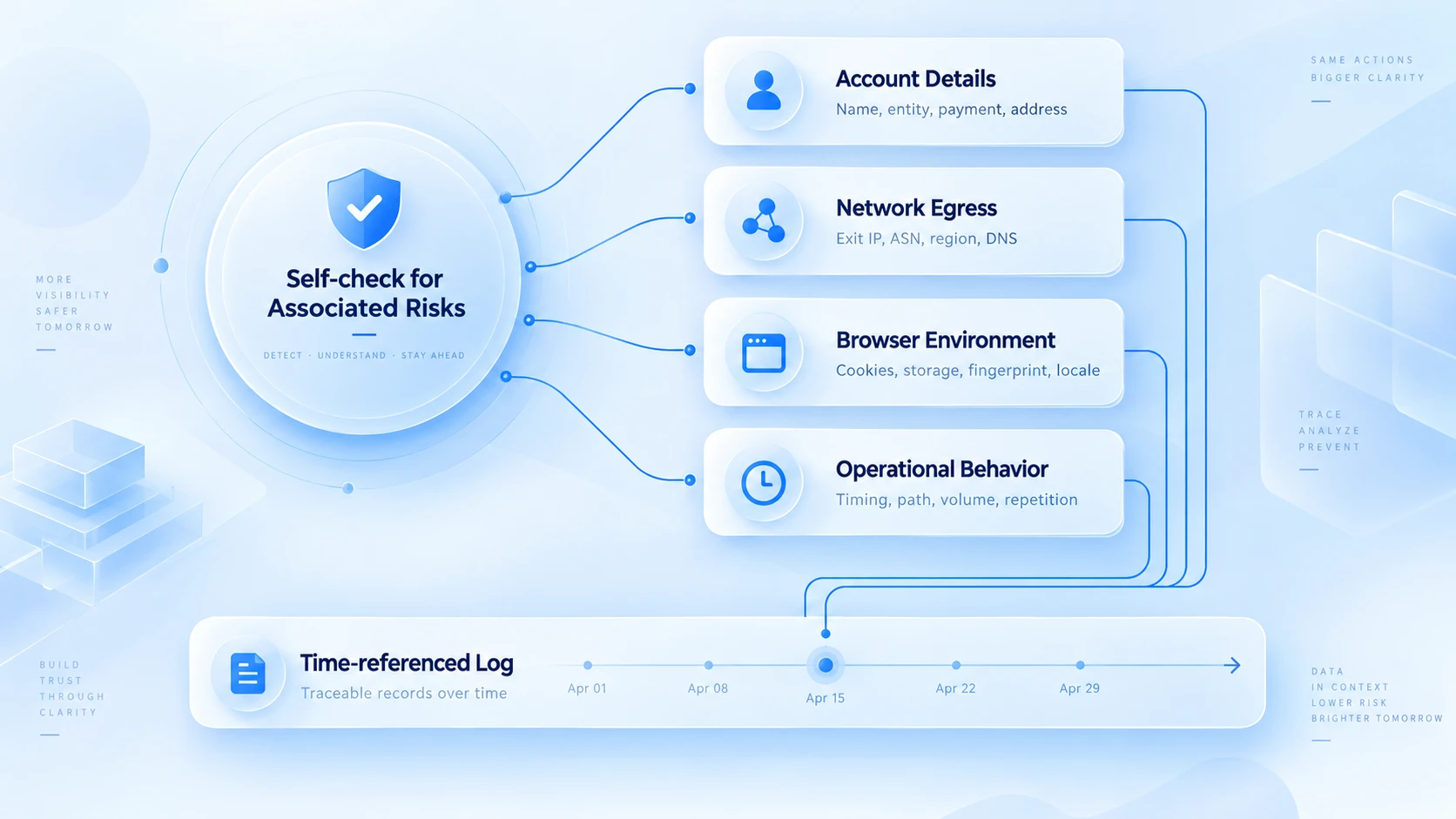
Layer 1: Account Data and Ownership
Consider a common scenario first. An account was registered by a former employee, with the verification phone and email under his name. Six months after he left, the platform requests verification and no one can receive the code, leaving the account stuck in between. Problems like this are almost invisible before trouble strikes, yet they are the most typical hidden risk for multi-account teams: the data itself is fine; the problem is that ownership has been severed.
So what this layer checks is ownership. Go through each account and confirm four things. Whether the registered entity and verification data are independent and complete; whether bound emails and phone numbers are shared across multiple accounts; who is responsible and how many handovers have occurred; whether internal authorization is a verbal agreement or on record. If one company manages multiple accounts, also check whether the platform's terms allow such an arrangement. The conditions differ from platform to platform.
When you find erroneous reuse, such as two accounts sharing the same phone number that is not linked to any card, fix it directly and log the change. When ownership is unclear, move the verification channels to current team members while everything is still calm. For building and maintaining the records, the article on multi-account security management covers the full process of grouping, logs, and handovers.
Layer 2: Network Connection and Exit Information
The network check compares two clocks: when the anomaly appeared, and when the network changed. A sample timeline:
- Wednesday afternoon, the Mexico store starts demanding verification.
- Two days back: Monday night, the proxy provider switched nodes.
- A week further back: another store's exit IP briefly went offline.
Side by side, the question changes: what happened after the switch?
Follow the timeline and verify three kinds of information. First, overlap: whether the verification appeared right after a proxy change or node switch. Second, the actual exit: whether the exit IP and ISP shown on the detection page match the provider's panel. Third, bypass: whether any account accidentally connected directly and bypassed the proxy entirely. The full exit-check routine is covered in the proxy maintenance article, so it is not repeated here.
The standard of judgment matters just as much. Multiple accounts sharing one exit only means the network is configured that way. Whether the platform treats them as one operator depends on the platform's own rules and cannot be verified from outside; conversely, giving each account a different exit is not proof of independence either. The real output of this layer is a comparison record of "when, which account, which exit, and what happened", and when an anomaly needs handling, that record decides where to look.
Layer 3: Browser Environment and Local Data
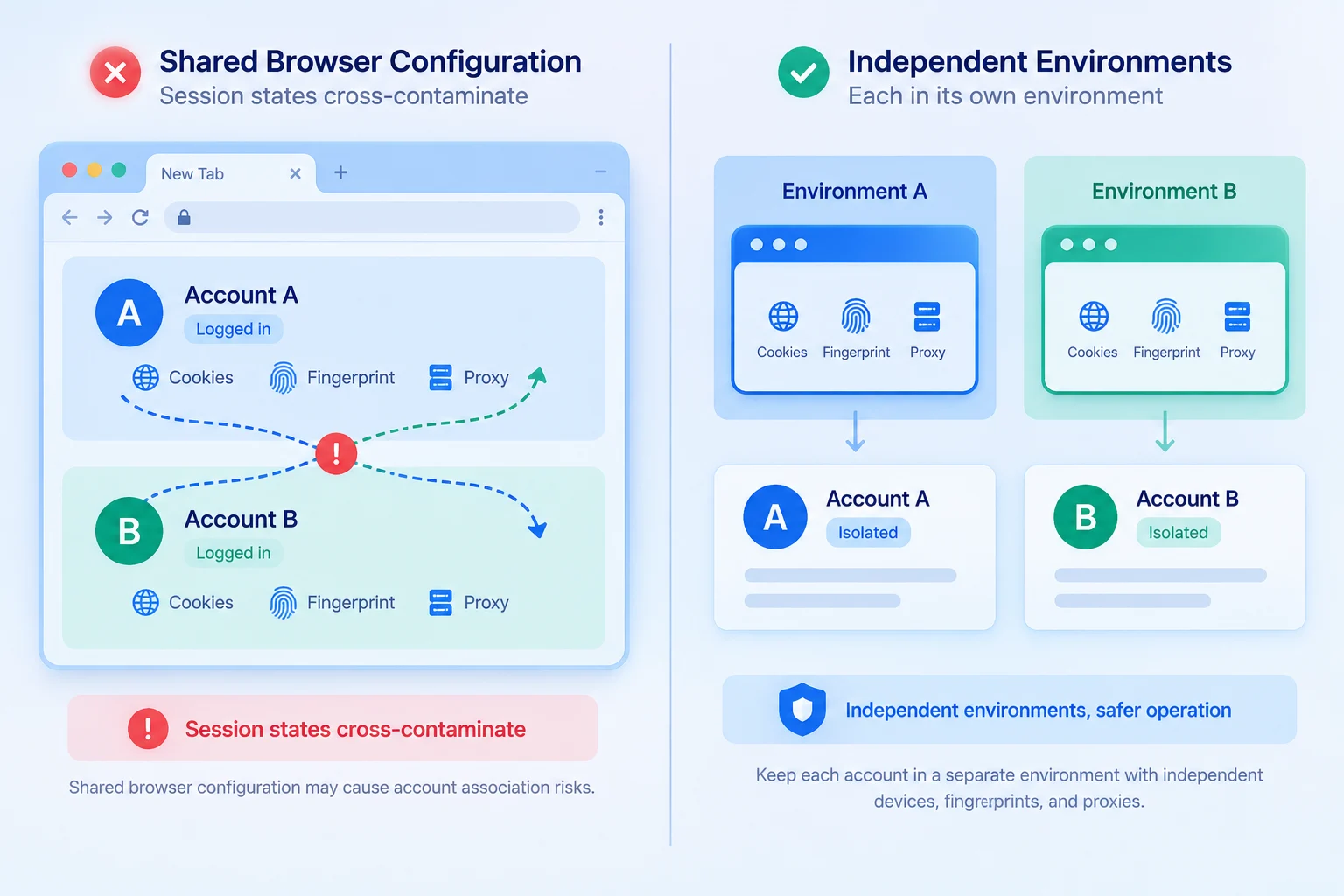
Multiple accounts logged in on the same computer does not necessarily mean their data has mixed. What truly needs verifying: did these accounts use the same browser profile, did login states get tangled together, and does the environment configuration match actual usage. The item-by-item comparison:
| Check target | What to verify | What to do |
|---|---|---|
| Cookies and login state | Accounts alternating in one browser profile | Check logs; rebuild a separate environment |
| Local storage and cache | Accounts sharing the same browser data | Sort environments by account to stop mixing |
| Language and time zone | Configuration matches device and scenario | Check the source; fix wrong settings |
| Browser and device info | Records match the devices actually used | Trace whether device changes caused the gap |
These items target different problems. Cookies and local storage concern login data management: when accounts alternate logins within one browser profile, cookies carry session state back to the same server. Local storage is also saved per site in the browser. After two accounts alternate logins, account A's session data shows up in account B's requests, which is mixing that really happens. Language, time zone, and device information must be checked against real usage; a difference alone proves nothing, only a configuration that contradicts the scenario is worth fixing. For the item-by-item method, see the checklist in the anti-association consistency guide.
For teams running multiple stores at once, MostMate creates an independent browser environment for each account, keeping login data and environment configurations separate. Data mixing between accounts drops accordingly, and environment change records can be checked when anomalies occur. An independent environment cannot replace platform policy checks, nor can it read the platform's internal association verdicts. Its scope is the browser environment layer.
Layer 4: Logins, Operations, and Business Behavior
An example shows how to check this layer. Suppose an account suddenly faces more verification; go through the records in order. The login logs show that two days before the verification began, the account moved from one member's device to another member. The operation logs show that the new member ran bulk listings after taking over. A comparison with platform rules shows several of the listed products fall into restricted categories. Three clues converge, and the cause is closer to "operations triggered a platform rule review", unrelated to network or fingerprint.
The example makes two points. First, verification-type anomalies require ruling out account security and operational factors first: shared credentials, bulk similar actions, and restricted content are more common triggers than "the same IP". The handling paths differ completely: security problems call for password changes and permission checks, while rule problems call for fixes per the notice. Second, attribution needs records. The original platform notice, member operation logs, and recent change records reviewed together are what narrow "suspected association" down to one concrete suspect. Blaming IP or fingerprint in general terms often misses the real cause and leaves no clear fix.
After Finding an Anomaly: What Order to Act In
Save the checks above as a checklist; follow it when trouble appears:
| Step | Action | Output |
|---|---|---|
| 1. Secure evidence | Save the notice; record when it occurred | Baseline |
| 2. Rebuild the timeline | Check proxy, device, and handover changes | Timeline record |
| 3. Run the four layers | Account data → Exit → Environment → Behavior | Layer results |
| 4. Sort the paths | Fix configs with logs; security; rule fixes | Handling record |
| 5. If appeal is needed | Use the channel and format in the notice | Appeal material |
Take a Brazil store hit by frequent Monday verification: the team does not touch the proxy or rebuild environments first, but works through the checklist. The timeline shows a node switch on Monday morning. The exit check shows the new node's region matches the store's market. The environment check confirms no data mixing. Finally, the operation records reveal a bulk price adjustment in the same period. The verification is more likely tied to the review triggered by bulk price changes than to any network change.
Without this checklist, the team would most likely swap proxies first and miss the business operations happening at the same time. The key is not to change a setting as fast as possible, but to find a well-evidenced suspicious change first, then narrow the cause step by step. If an appeal is later confirmed necessary, see the X account appeal guide for how to organize the situation, prepare records, and submit through the platform's channel. Appeal entries, requirements, and rules differ across platforms; always defer to each platform's official instructions.
After the four-layer check, the team should also record each account's browser environment, proxy configuration, and changes for later reference. MostMate helps teams manage independent browser environments and related configurations per account, reducing login data mixing and making environment changes easier to trace.
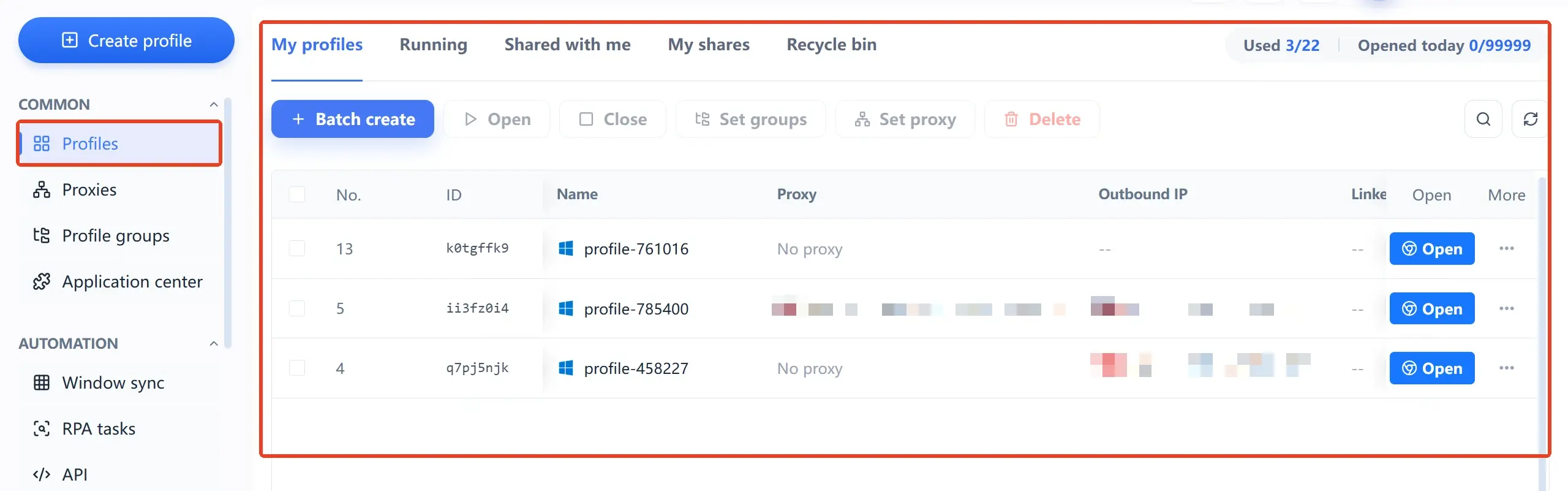
Note that browser environment management mainly helps a team organize and manage its own configurations. It cannot determine on its own whether a platform has flagged an account as associated, nor can it guarantee that an account will never face verification or restrictions. If a verification or restriction notice arrives, verify further against the platform's message, the account's operation records, and the relevant rules.
Frequently Asked Questions About Association Self-Checks
Do multiple accounts sharing one IP always get associated?
Not necessarily. Running multiple accounts behind one exit is just a network configuration state. Whether the platform acts on it depends on its own rules, which cannot be verified from outside. The distinction to make during a self-check: where the platform allows multiple accounts on an office network, keep records to rely on; where it is a configuration mistake, fix it and log the change.
Can changing proxy IPs solve account association?
It depends on the cause. If the anomaly comes from a misconfigured exit, such as node drift or accidental direct connection, moving to a stable exit does solve it. If the cause is reused data, behavior triggers, or policy violations, changing IPs will not help and only adds one more unrecorded environment change. Locate the cause with the four layers first, then decide whether to touch the network.
Can an anti-detect browser detect whether accounts are already associated?
No. The platform's association judgment, process and result, stays inside the platform; no external tool can read it. What an anti-detect browser can do is manage each account's browser environment independently, keeping configurations auditable and data unmixed, reducing the weaknesses open to challenge on your side.
After isolating browser environments, why can verification still appear?
Verification has triggers beyond the browser environment. Device changes, credential security issues, business operations touching rules, and platform risk-control adjustments can all cause it. Run the four layers in order, focusing on the three layers other than the third, especially any recent change in personnel, devices, or operating rhythm.
Closing
Back to the opening scenario: two stores demanded verification the same day, for different reasons. The value of an association risk self-check is replacing the unanswerable question "have we been linked" with configurations and records across four layers that can be verified one by one. MostMate keeps environments, proxies, and team operation records in one workspace, so this check always has evidence to stand on. To build this foundation for a multi-account business, start by downloading MostMate and migrate existing accounts into independent environments one by one.

MOSTMATE
Secure Multi-Account Management, Made Simple
Start with your first account and use MostMate to build safer, smarter, and more efficient multi-account operations.
- Independent profiles. Consistent identities.
- AI Automation · Account Health · Team Operations



