
Proxy Connected but the Environment Still Misbehaves? Exit IP Checks and Daily Proxy Maintenance
Core takeaway: a connected proxy only solves "can I get through"; a stable environment also requires the exit IP, DNS, WebRTC, time zone, and language signals to stay aligned over the long run, and that alignment comes from daily maintenance. All green on the provider's panel does not mean the exit region has not drifted, nor that resolution and real-time traffic still take the same path.
One team assigned a proxy to every environment. Logins were fine for the first few days; a week later, re-verifications started appearing, region notices stopped matching, and a couple of platforms asked for extra confirmation. The proxy dashboard showed not a single red line. So where was the problem? Most of the time, in the fact that "connected" and "stable" are two different things.
MostMate is an anti-detect browser that puts every account inside its own browser environment, and network configuration is part of that environment, so it falls under management too. This post covers the daily routine for environment networking: what to check, what anomalies look like, and what cadence to keep.
Why does the environment still misbehave when the proxy connects?
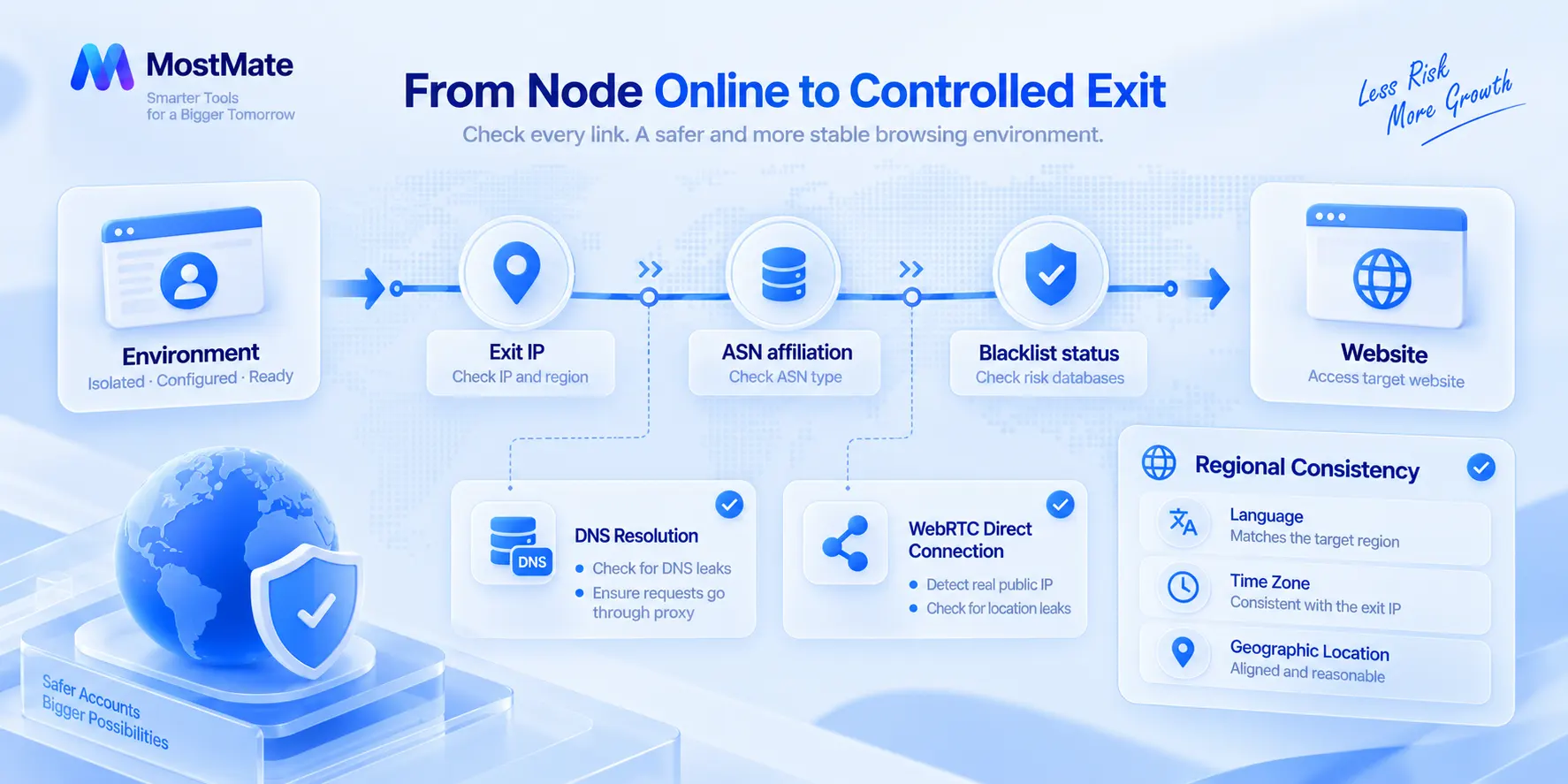
Websites judge an environment by a set of signals, and the exit is only one of them. The network information a browser exposes goes beyond the IP: the exit IP decides where traffic appears to come from, DNS decides the resolution path, WebRTC can open a direct connection, and time zone and language help locate you. A website cannot read your proxy dashboard; these signals are all it can read.
A connected proxy only guarantees a path. It cannot answer the rest.
IP changes deserve their own note. IPs changing is normal; real users switch networks too, and change by itself is not an anomaly. For long-running business environments, the danger is unpredictable change: login history develops gaps, and platform verification ramps up. Whether to switch, and when, should be decided by your maintenance cadence, not by a node dropping offline.
What does daily proxy maintenance cover?
The point of the daily routine is to upgrade "node online" into "exit under control". Four checks:
Check 1: whether the exit IP matches expectations. The region shown on the provider's panel and the actual exit do not always agree. Look at the actual exit first. Open the environment, visit an IP checking page, verify country, region, and ISP, then check which ASN the IP belongs to.
An ASN is a group of networks run under a single routing policy; each ASN controls a block of IP address space, and Cloudflare's explanation makes this easy to picture. A batch of environments sitting on datacenter ASNs long term sends a different signal from the same batch on residential ISPs. Whether the IP is on common blacklists gets checked in the same pass; for identification and handling, see the guide on proxy IP bans.
Check 2: the DNS resolution path. The proxy handles the traffic exit, DNS handles domain resolution; these are two separate legs. The moment resolution requests bypass the proxy and go out directly, a different set of network details gets exposed. The full procedure is in the DNS leak detection guide, so it will not be repeated here.
Check 3: WebRTC addresses. A browser's real-time communication capability can establish a direct connection without going through the proxy; the MDN documentation describes it as media and data exchange between browsers with no intermediary. The key checks are whether a real public IP shows up and whether any location outside the proxy appears; handling is covered in the WebRTC settings guide.
Check 4: geo consistency. The exit is in the United States while language, time zone, and geolocation do not match; such a combination is not automatically wrong, but you should be able to explain it. For aligning parameters one by one, the anti-association consistency guide includes a checklist.
Of the four, do the exit check after every node switch; spot-test DNS and WebRTC weekly; run the consistency review when environments are created or handed over. Fix the frequency, and nothing gets skipped.
What does an unstable proxy usually look like?
Anomalies rarely show up as proxy errors; platform behavior changes first. Compare against this:
| Symptom | Likely cause | Check first |
|---|---|---|
| Sudden re-verification demands | The exit IP changed | Exit region and ISP on the IP checking page |
| Platform shows the wrong region | Node drift or mixed pools | Provider label vs. actual exit |
| Logins failing repeatedly | IP quality drop or blacklisting | ASN ownership and blacklist status |
| Several environments share one exit | Binding misconfigured | The environment-to-proxy record |
For the first three, the proxy dashboard tells you nothing; you have to go inside the environment and look at the actual exit. The last one usually follows a bulk import, where rows got crossed during assignment. Troubleshoot in order: exit first, then resolution, then direct connections, then consistency, one layer at a time.
How does MostMate keep environment networking under control?
The core of environment network management is treating the proxy as an asset that gets registered and audited, not as an input field in an environment form. MostMate handles this in two layers.
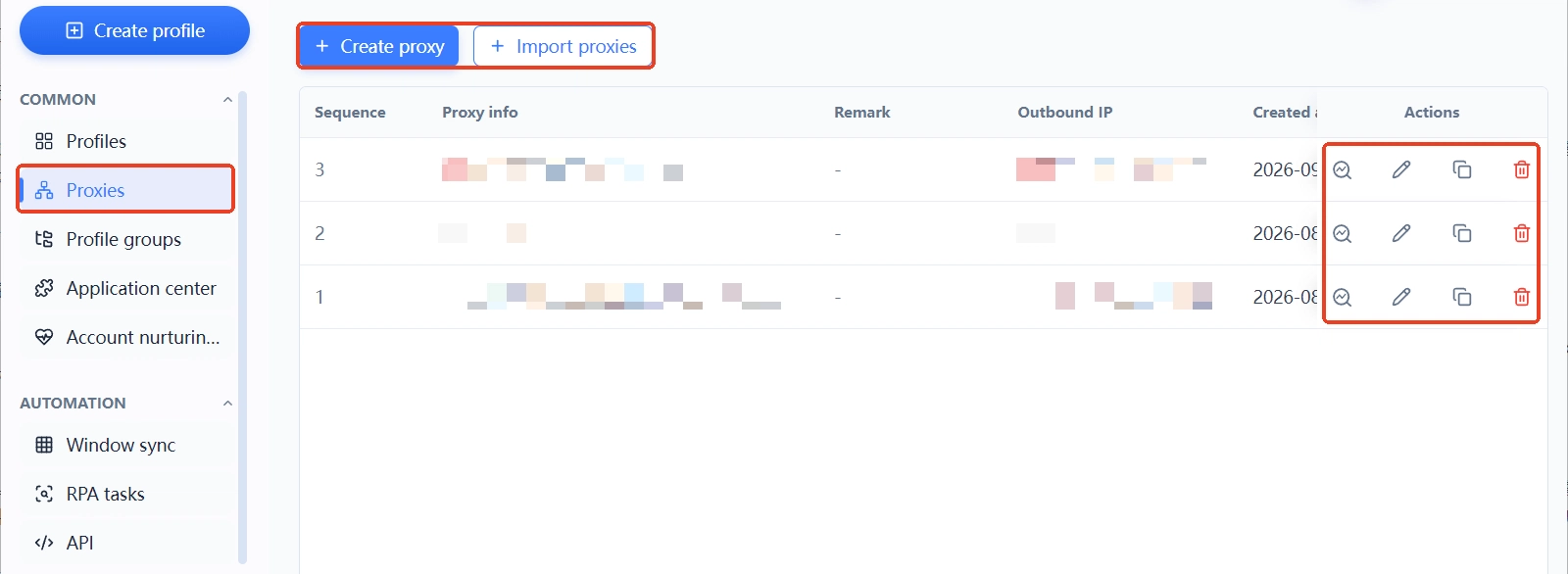
Layer 1 is proxy management: proxies are registered in a dedicated list with columns for proxy details, notes, exit IP, and creation time, and both manual creation and bulk import are supported. Register first, assign later. The exit IP column is the first stop of every daily check.
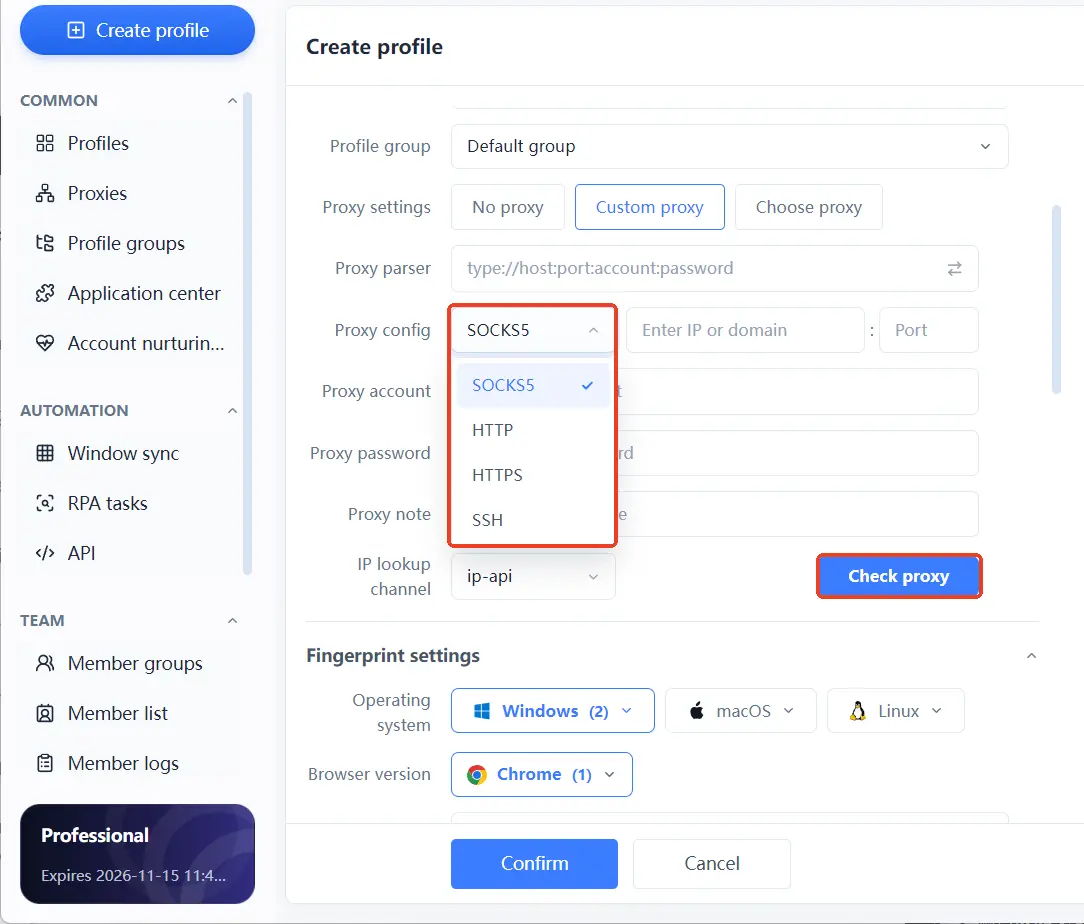
Layer 2 is assignment and linkage: in the new-environment form, proxy settings offer three options: no proxy, custom proxy, or pick from the list; each environment occupies one row, showing which proxy it uses, where its exit lands, which account it is bound to, which group it belongs to, and what the notes say, all at a glance.
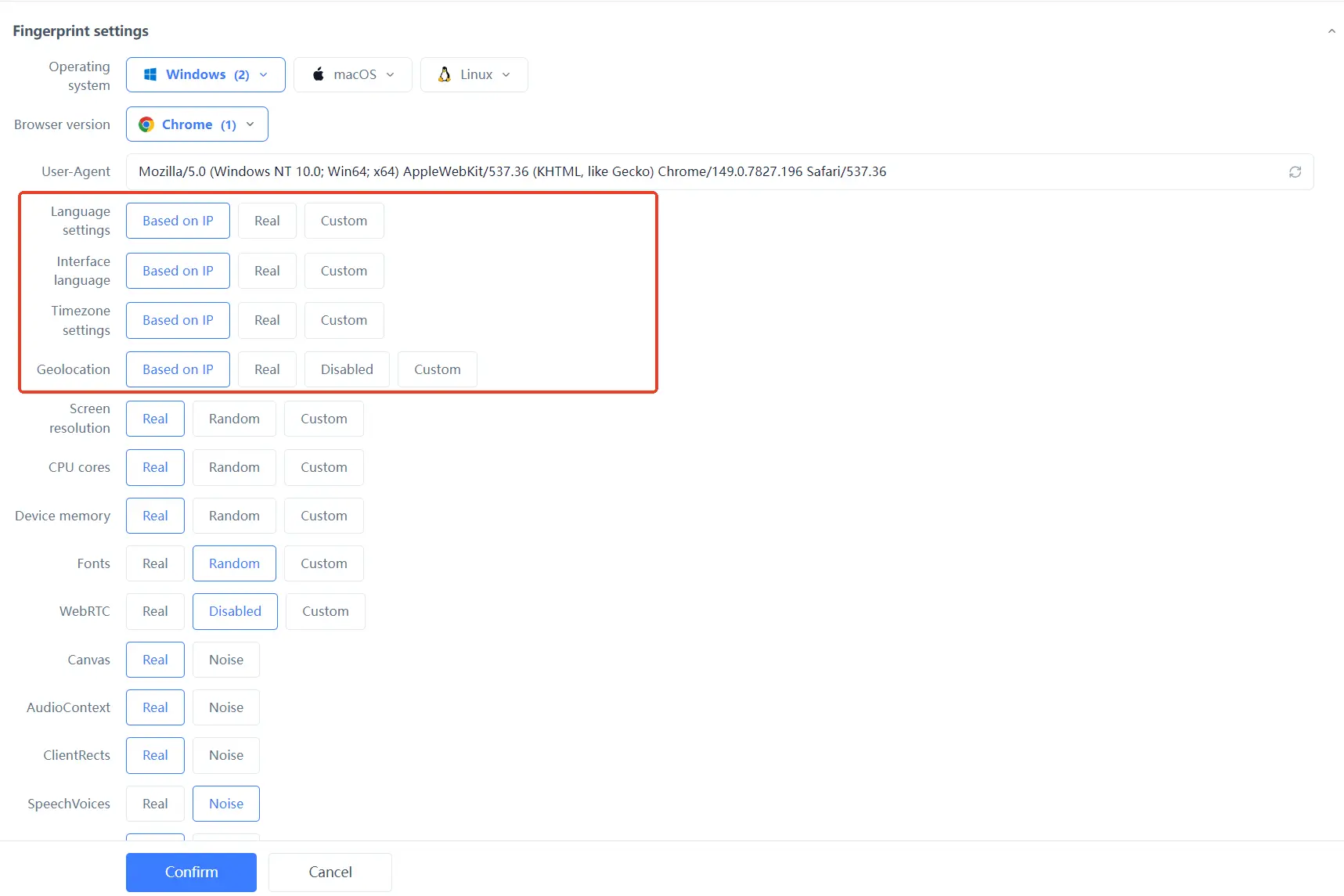
Once assignment is done, language, interface language, time zone, and geolocation all support "Based on IP" configuration: set the exit first, and these follow automatically. The official site includes a contrast example: Windows plus a US IP paired with the Asia/Shanghai time zone is a self-contradicting combination; parameters that follow the exit make the combination coherent.
When you open an environment, the launch process checks the IP and basic network information first, so a dead node or an odd region surfaces before you reach any business page.
The boundary deserves equal clarity. These features manage configuration and records; the proxy's own quality, its stability, its cleanliness, and the provider's pool are things no tool can substitute for.
Four common proxy maintenance mistakes
Four mistakes, all from real operations.
- Myth 1, a node being online means the network is fine: online only means reachable; exit drift, DNS bypass, and WebRTC direct connections are not covered by the word "online".
- Myth 2, the more often you change IPs, the safer you are: stability matters more than frequent change. Whether to switch is decided by your maintenance cadence, not by a single verification prompt.
- Myth 3, sharing one proxy across all accounts is simplest: once the exit is shared, the network boundary between environments disappears, and problems become hard to trace to a specific account.
- Myth 4, an anti-detect browser can fix network problems: it manages environment configuration and isolation; if the proxy quality is poor, no amount of tidy configuration makes up for it.
Frequently asked questions
The provider's listed region differs from the actual exit. Is that normal?
Trust the IP checking page inside the environment; the provider's panel only shows node labels. Drift is not rare with dynamic-pool proxies, and what matters is how often and how far: small changes within the same country are acceptable, but cross-border drift means it is time to switch nodes.
Will an IP address change affect my accounts?
Change by itself is not necessarily an anomaly; real users switch networks too. What long-running business environments fear is irregular change: once login history develops gaps, verification increases. Changing the IP is fine; schedule it inside a maintenance window and run a full exit check afterward.
How do I check whether a proxy IP is actually usable?
Open the environment, visit an IP checking page, and verify country, region, ISP, and time zone; then check whether the ASN ownership matches the provider's description, and if you can, look the IP up on common blacklists. After these four steps you know exactly what this IP is made of. This step cannot be skipped.
Can MostMate detect proxy issues automatically?
The launch process that opens an environment checks the IP and basic network information, so anomalies surface before you reach any business page. The exit IP column in the proxy management list supports quick daily checks. Periodic full testing, covering DNS, WebRTC, and the fingerprint, still requires opening the environment and visiting a checking page.
Final thoughts
A stable environment network comes not from one premium node but from the routine of exit checks, resolution spot tests, and consistency reviews. MostMate keeps proxy registration, assignment, and parameter linkage in one workspace; when checking costs less, it happens more often. For the full feature list, browse the MostMate website.
The next time a node is online but the environment acts up, walk through the four checks in the second section. To rebuild your environment standards, download MostMate and start from a proxy ledger.

MOSTMATE
Secure Multi-Account Management, Made Simple
Start with your first account and use MostMate to build safer, smarter, and more efficient multi-account operations.
- Independent profiles. Consistent identities.
- AI Automation · Account Health · Team Operations



