
How to Keep One Banned Account From Taking Down the Whole Group? A Multi-Account Ban Containment Guide
Core takeaway: when one account is banned, the real loss often lies not in the account itself but in the resources it shares: registration data, payment methods, proxy exits, device environments, behavior patterns. These shared items pass the penalty to accounts in the same group; that is multi-account ban contagion. Containment works from both ends: isolate the impact on the day of the ban, and group by resource boundaries daily so the chain is broken by design.
Start with a typical scenario. An operations team keeps twenty social media accounts in one group, sharing a residential proxy pool, one domain mailbox for registration and one set of identity details. One account gets banned for posting prohibited content; within three days the other accounts in the group trigger verification one after another, and within two weeks most of them are restricted. The team cannot work it out: every account logs in from a separate environment, so how does one failure take down so many? The problem lies outside the environment. Registration mailboxes, payment methods, identity data and the proxy pool are the transmission chain. Environment isolation keeps login data from crossing over; it does not reach these resources outside the environment.
How ban risk spreads to accounts in the same group
There are five paths; the more shared resources, the wider the spread.
| Shared resource | Spread path | Containment step |
|---|---|---|
| Registration data | Same email, phone, ID; matches go on review | One ID set per core account, never shared |
| Payment method | One card pays many; card may face re-checks | Separate payment for core and test accounts |
| Proxy exit | Shared line or pool; one flag taints all | No cross-group sharing; stop the hit line |
| Device environment | One device or profile, many account logins | One environment per account, never mixed |
| Behavior | One person runs many accounts in one rhythm | Stagger schedules, assign tasks by purpose |
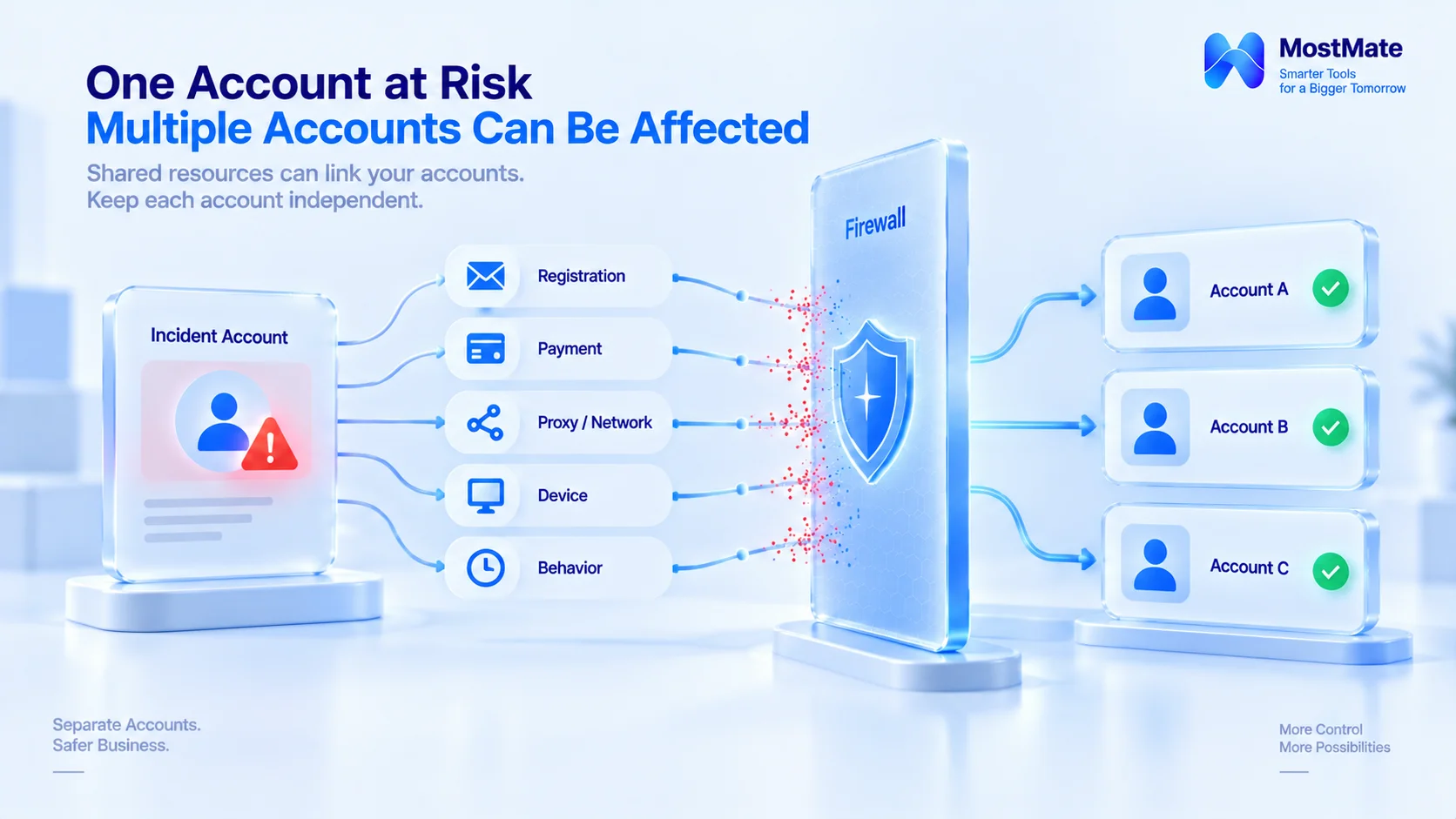
Keep the distinction clear. Environment isolation governs the boundary of browser data and configurations; registration data, payment methods and behavior rhythms sit outside the environment and are covered by management processes. Count both sides together and you have an account's complete resource inventory. To build that inventory day to day, the checklist in the multi-account association risk check can be used directly.
Three same-day steps to contain the damage
1. Isolate. First pull the affected account out of shared resources: suspend its dedicated proxy line, disable the environment without deleting it, and flag its registration entry as abnormal. Leave other accounts running as they are; do not batch-edit configs.
2. Verify the impact. Check recent login records and platform notices account by account to tell a single-point issue from chain-reaction signals. Only touch accounts that show signals; leave the rest alone.
3. Handle by procedure. Appeal through the platform's own process for the banned account, pulling materials from environment notes and records: registration date, usual login regions, history of activity. During the appeal, do not switch devices or networks to avoid new abnormal sessions. For organizing appeal materials, the framework in the X account appeal can be reused.
Never reverse the order. Configs before isolation make the anomaly real.
How to group daily so contagion is broken by design
Damage control is after the fact. Group by resource boundaries daily.
1. Group by resources, not by headcount. What defines a group is which resources its accounts share; the fewer the shares, the smaller the blast radius. One person managing three groups beats three groups sharing one set of resources.
2. One resource set per group, no cross-group sharing; core accounts get account-level resources. Give each group its own proxy pool, registration data and payment method, and keep the inventory aligned item by item. Any shared item is a transmission point for the next incident. Note: if several accounts in a group share one proxy line or one set of registration data, the group can still be dragged down together, so core accounts must have one line and one data set per account.
3. Keep the core group and the experiment group apart. Accounts for new business or new methods go into the experiment group; if they fail, the core group stays untouched. Experiment resources can be reused; core resources are never lent out.
4. Record every exit. When a member or project leaves, transfer the environments together with their resources and update the inventory the same day. An exit without records leaves behind accounts whose ownership nobody can explain.
These four points are practical team-management experience. For anything inside platform rules, the official documentation prevails; what grouping decides is how far an incident reaches when it happens.
Which parts can MostMate lock down, and which management actions can it not replace?
Of the five paths, device environments, proxy binding, environment notes, member permissions and handover logs can be pinned down in MostMate; registration data and payment methods are not managed for you, but you can log them in the environment notes. Using MostMate as an example, turning "one resource set per group" into practice takes three steps:
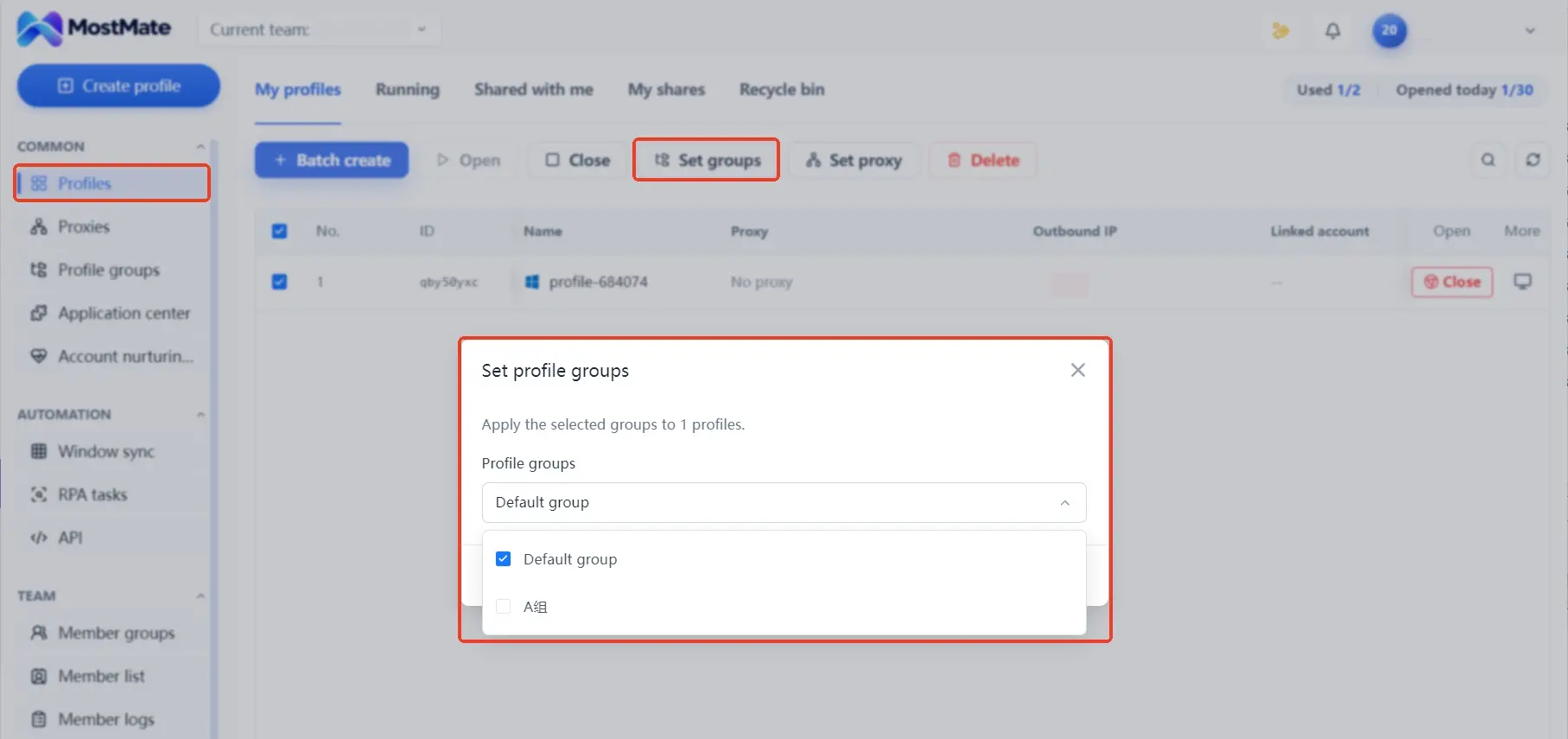
1. Create groups. In environment management, sort accounts into groups by purpose, and write the resource boundary straight into the group name, such as "Core - North America - Group A" or "Experiment - New Business". Once groups are set, which account belongs where has a clear answer that no one has to keep in their head.
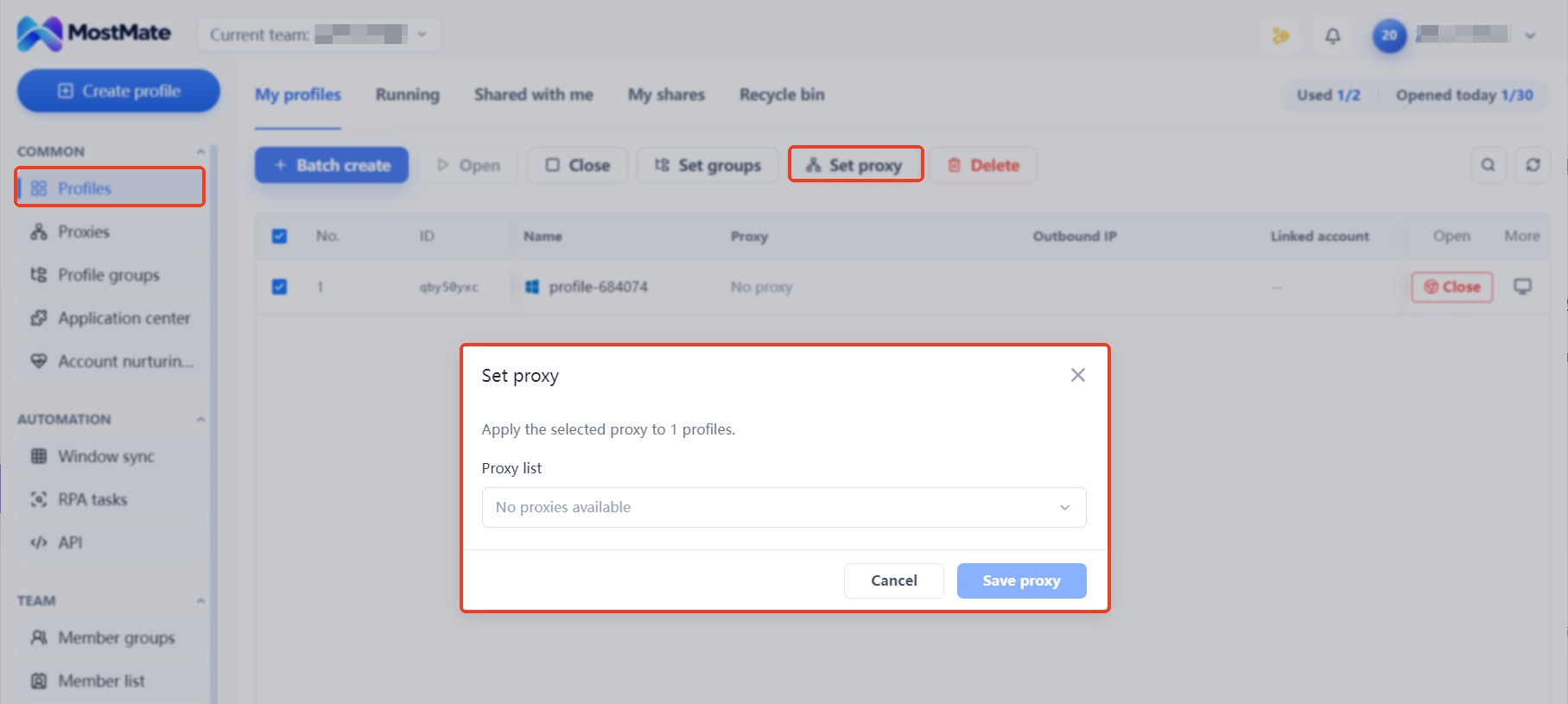
2. Bind proxies. Give each group its own proxy line and map accounts to environments one to one, so login data and configurations never cross over. When something happens, you disable just that one environment; the line and configs of other groups stay untouched, and the containment radius is exactly what this step draws.
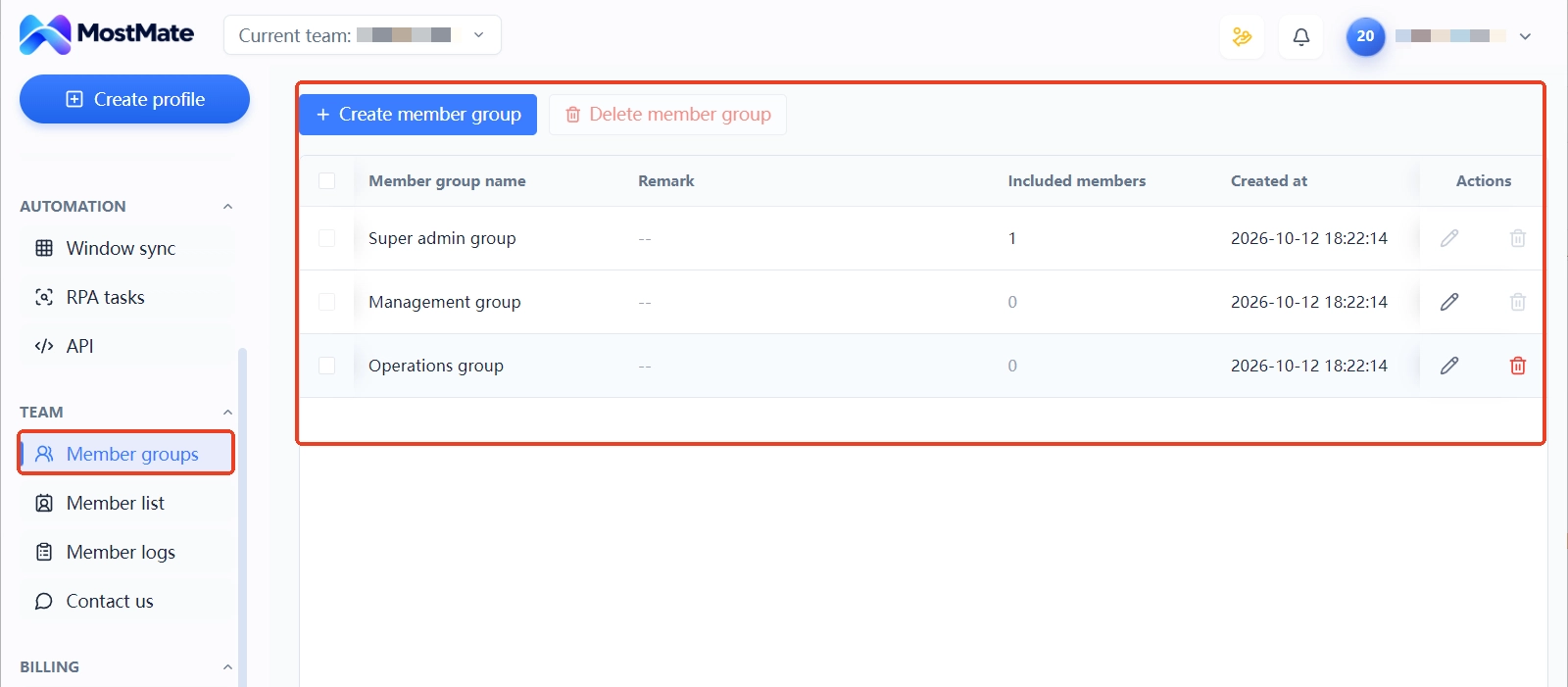
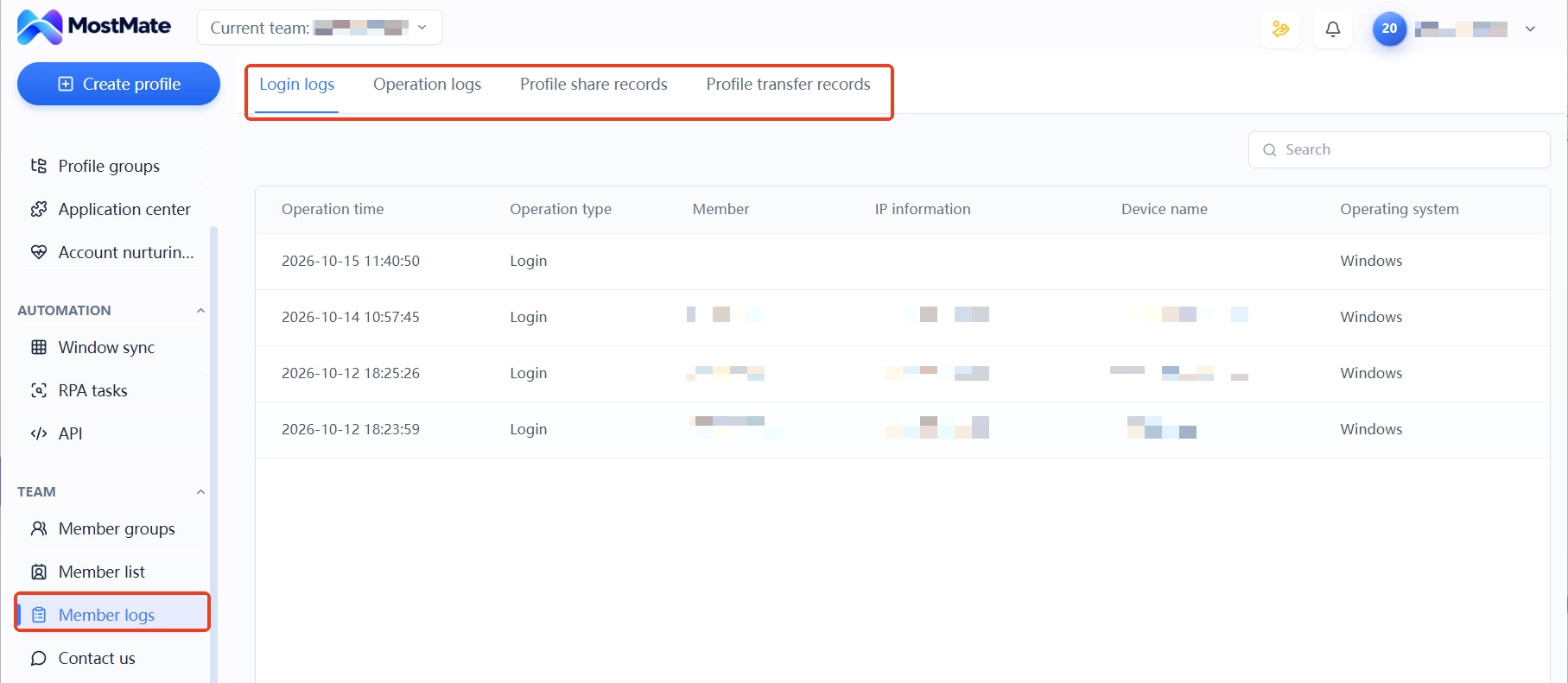
3. Add members and keep the trail. Member grouping and member logs record who owns which environments and where each environment was handed over, so exits follow the records instead of a pile of passwords. Staggered schedules and similar arrangements can also be assigned per member and land in the logs.
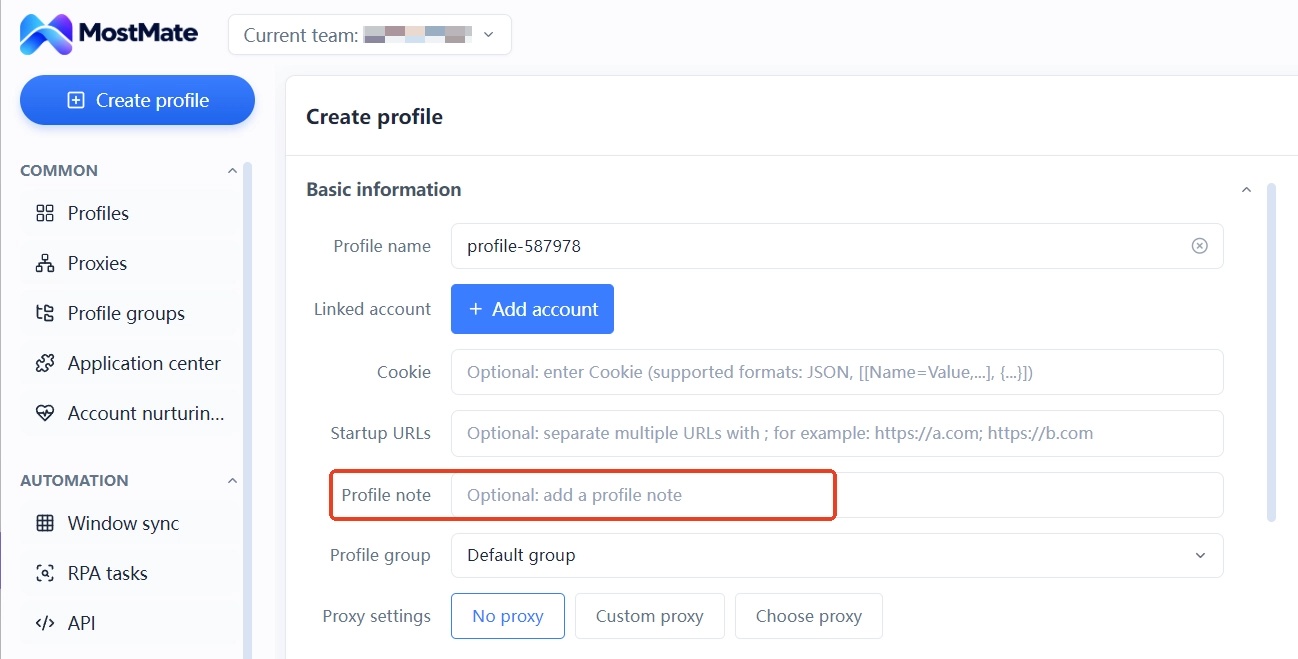
Ownership of registration data and payment methods is logged in the environment notes field: purpose, registration date and data ownership, item by item. The tool does not manage these for you, but it makes "which account uses which data set" verifiable, so you can assess the impact from the notes instead of digging through chats. One group sheet plus notes turns "who is grouped with whom and what each group uses" into a structure the whole team can read.
The boundary deserves stating here too. Grouping shrinks the resource transmission surface; if accounts still share registration data or payment methods, penalties can still travel those paths. The tool does not change platform rules and makes no promises about account outcomes. The full capability list of each module is in What is MostMate.
The three misjudgments most common in containment and grouping
Changing every config in the group to prevent contagion is the first common misjudgment. Batch edits are batch abnormal signals; the right move is to isolate first, verify one by one, and leave clean accounts alone.
Deleting the affected environments for a clean slate is the second misjudgment. The configs and notes inside are appeal evidence; deleting them destroys your own proof. Disable what should be disabled, archive what should be archived, and clean up only after the appeal ends.
Treating an IP change as cutting the chain is the third misjudgment. IP is only one of the five paths; whichever of registration email, phone number or payment method is shared, the penalty can travel along it. To cut the chain, go through the resource inventory item by item.
Multi-account ban contagion: frequently asked questions
One account got banned. What should the other accounts in the group do first?
Isolate the parts of shared resources bound to that account first, keep the other accounts as they are, then check login records and platform notices one by one. Do not touch accounts that show no signals.
Should the corresponding environment be deleted after a ban?
Not recommended.
The configs and records inside are appeal materials; disabling and archiving contain the damage, while deletion throws away the evidence.
Does changing the IP break the contagion?
No. IP is only one path; registration data and payment methods spread penalties just the same. To cut the chain, screen the resource inventory item by item; one new line is not the end of it.
Can environment grouping prevent contagion?
Grouping fixes resource boundaries and shrinks the transmission surface. If accounts still share registration data or payment methods, penalties can still spread; the tool does not change platform rules.
Can an anti-detect browser prevent multi-account ban contagion?
It cannot be guaranteed. It mainly pins down device environments, proxy binding and environment notes, with member logs for handover records; registration data, payment methods and behavior still depend on management processes. The tool does not change platform rules.
Closing thoughts
The core of ban containment is controlling how much is shared: isolate and verify on the day it happens, group by resource boundaries every day, and keep each account's resource list clean. How far an incident reaches is largely decided when the groups are drawn.
If your team is building a multi-account structure, drawing the resource boundaries first beats counting losses one by one after a ban. Download MostMate and set up environment groups, proxy binding and member permissions in one panel.

MOSTMATE
Secure Multi-Account Management, Made Simple
Start with your first account and use MostMate to build safer, smarter, and more efficient multi-account operations.
- Independent profiles. Consistent identities.
- AI Automation · Account Health · Team Operations



