
What Is Browser Voice Fingerprinting? How the SpeechSynthesis Voice List Exposes Your Environment
Key takeaway: a voice fingerprint reads which synthetic voices are installed on a device. It is a configuration list that travels with the operating system, and switching proxies or clearing cookies will not change it. When you audit signal consistency across multi-account setups, it is one of the easiest checks to miss after Canvas and AudioContext.
"My proxy is new, my cookies are cleared, so why does the environment still fail verification?" When you troubleshoot accounts, the answer often hides in device-level parameters. Voices are among the easiest to overlook. A website needs no microphone access and plays no sound. One API call is enough to fetch a list tied to your system configuration.
That list is decided by the operating system and its language packs, and it follows the device. Change the IP and it stays put. MostMate is an anti-detect browser built for exactly this problem: it gives every account its own isolated browser environment, and device-level parameters such as voices fall under that management.
What Is Voice Fingerprinting? How Does It Differ from Voiceprint Recognition?
Voice fingerprints read synthesis settings, not microphone voiceprints.
Start by separating three concepts. Speech synthesis is the browser's ability to turn text into speech, the system behind read-aloud features on web pages. The voice list is the set of voice options available to that feature in the current environment. Per the MDN documentation, calling getVoices() returns the list of voice objects available on the device. Voice fingerprinting means a website treats traits from that list as one more signal for telling environments apart. Each concept is a step more specific than the last.
The contrast with voiceprint recognition makes this clear. Voiceprints require recording, permission, and actual sound. Voice fingerprinting is silent from start to finish and needs no permission at all. What the website reads is a menu, not your voice. That is the whole difference, and it is also why this signal is so easy to ignore: no pop-up, no awareness, and the data is already gone.
How Does SpeechSynthesis Hand the Voice List to Websites?
The reading entry point is speechSynthesis.getVoices(). A single call returns the complete list.
Each voice object carries five fields, explained below:
| Field | Meaning | Typical values |
|---|---|---|
| name | Voice name | Microsoft David, Samantha |
| lang | Language tag | en-US, zh-CN |
| localService | On-device or cloud synthesis | true for local, false for network |
| default | Whether it is the default voice | At most one per language |
| voiceURI | Identifier of the voice service | May contain system-internal IDs |
The name is often just a person's name; voiceURI is where the underlying information lives. In Firefox on macOS, for example, values look like urn:moz-tts:osx: followed by a system-internal identifier. Private OS voice registration data handed over through a public interface, just like that.
One more detail affects what you get. In Chrome, Edge, and Firefox the first call often returns an empty array, and the list only fills in after the voiceschanged event fires. Loading timing is itself a signal. Some browsers fire immediately, some delay, and some never fire again once loaded. In the Web Speech API specification this interface is still a draft, so exact behavior follows each browser's implementation.
Which Four Types of Environment Traits Does the Voice List Expose?
A single voice name proves nothing. The composition of the list is what carries distinguishing power.
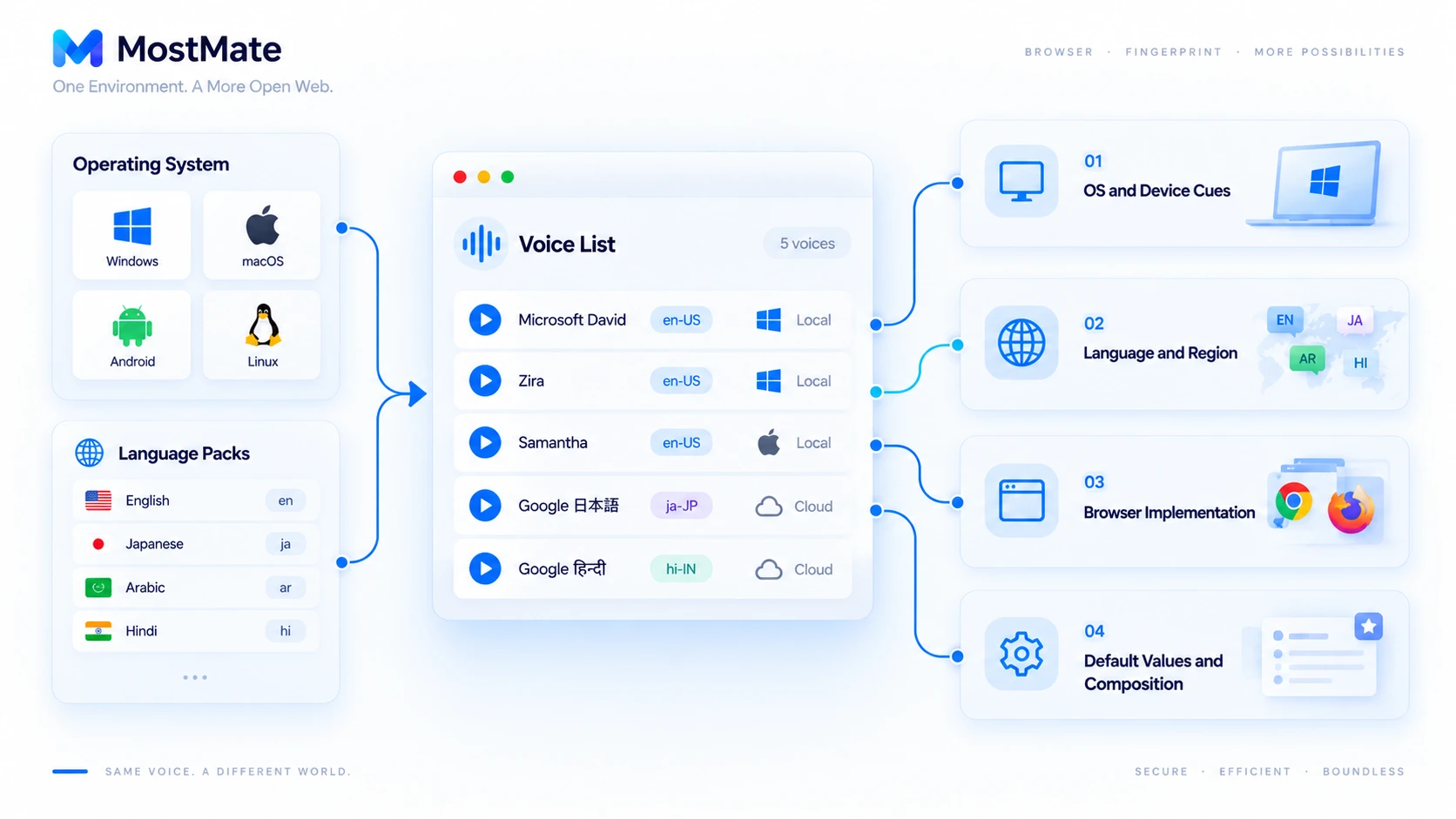
Type 1: operating system and device clues. Voices come from the system's speech service. On Windows you commonly see names like Microsoft David or Zira; on macOS, Samantha or Daniel. Android phones ship Google's voice set. A Linux desktop with no speech service installed often returns an empty list.
Type 2: language and region configuration. The mix of lang tags shows which language packs this machine has installed. A list carrying Japanese, Arabic, and Hindi voices tells the website about a multilingual background the user may not even remember.
Type 3: browser implementation differences. Chrome layers Google's cloud voices on top of the system's. The localService field separates on-device synthesis from network services. On the same machine, Chrome and Firefox can return lists built differently.
Type 4: defaults and the overall combination. Count, order, language tags, and the default voice together form an environment signal with high distinguishing power. One boundary to note: this is only one clue among many, and websites weigh multiple signals before drawing conclusions. A voice list cannot identify a specific person.
How Do Voice Fingerprints Compare with AudioContext and Canvas Fingerprints?
The three are often mentioned together, but they observe entirely different things. Here is the comparison:
| Detection method | What it observes | How it works |
|---|---|---|
| SpeechSynthesis voice fingerprint | Available voices and their fields | Reads a configuration list, fully silent |
| AudioContext fingerprint | Results of audio processing operations | Runs computations, compares outputs |
| Canvas fingerprint | Traits of graphics rendering output | Renders images, compares pixels |
| Font fingerprint | Installed fonts and their rendering | Probes font availability |
Voice list enumeration and audio rendering are two different paths: one reads a static list, the other computes a dynamic result. Do not conflate them. Our AudioContext fingerprint guide covers the second path. Font fingerprinting belongs to the static-list family alongside voice lists; both are direct readings of what a device has installed.
How Do I Check Which Voice Data My Browser Exposes?
All you need is developer tools. Five minutes gives you the same list any website can see.
- Open the Console in developer tools, type speechSynthesis.getVoices(), press Enter, and inspect the result.
- Expand the voice objects in the list and note the values of name, lang, localService, and voiceURI.
- Refresh the page and query again immediately, comparing against the first call to confirm the async loading behavior.
- Repeat the steps on another computer or operating system to see whether differences come from the system speech service or the browser implementation.
- Connect a proxy and check once more. The list usually stays the same, which confirms it is a device-level signal.
Two caveats when reading the results. An empty list does not mean no voice fingerprint; the emptiness is itself information. Linux without speech services and some automated environments often return empty arrays. A long list does not make you easier to identify either. What matters is whether the whole environment is consistent, not how many parameters you count.
How Does MostMate Manage the Voice Environment?
The voice list is a device-level parameter, and the anti-detect browser handles it by bringing it into the environment configuration rather than leaving it unmanaged.
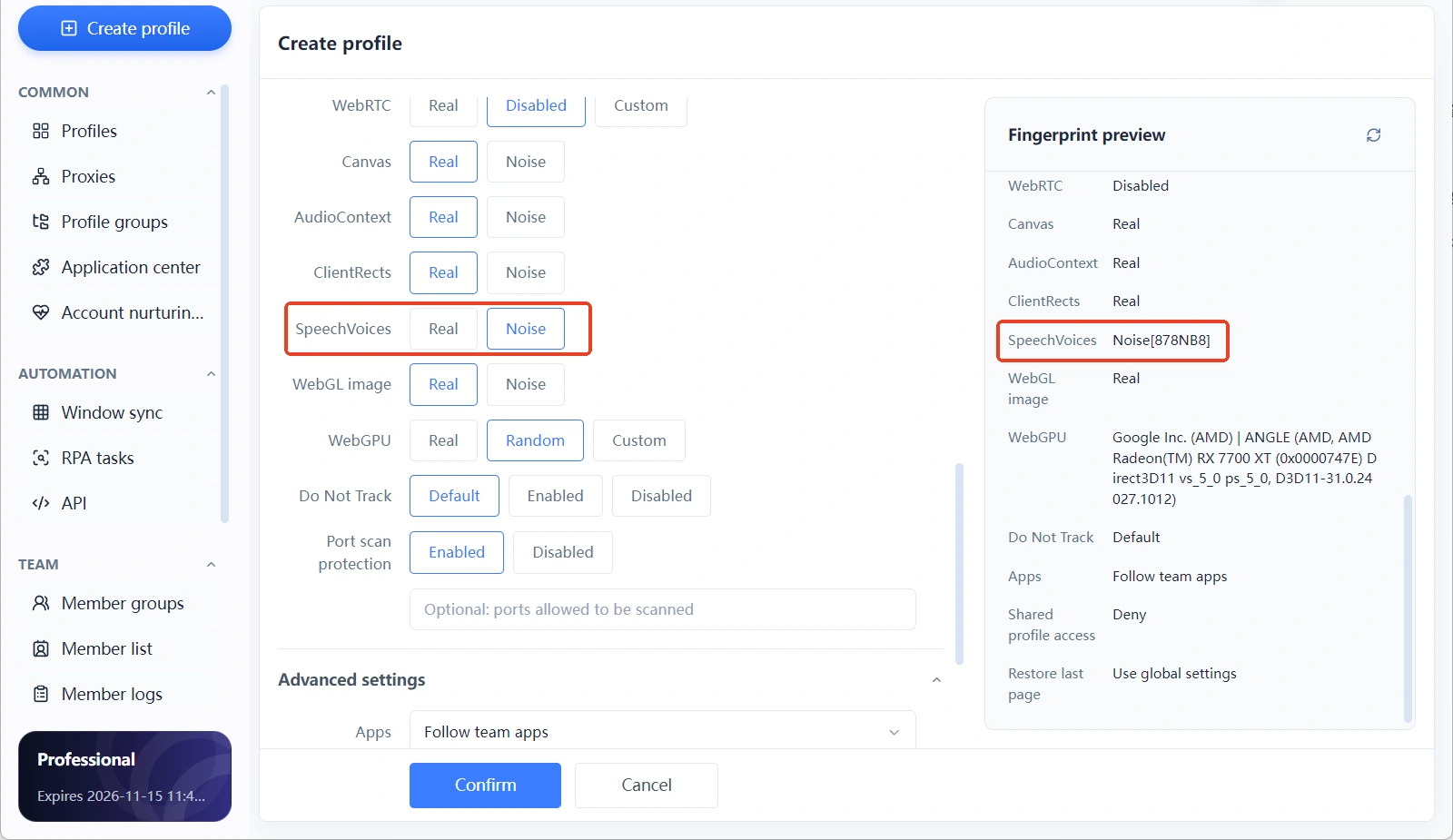
In MostMate, open "Fingerprint settings" when creating or editing an environment. SpeechVoices is a standalone parameter listed alongside Canvas, AudioContext, ClientRects, and WebGL images. It has two modes, Real and Noise; Noise is the noise mode.
After choosing Noise, the SpeechVoices row in the fingerprint preview panel on the right shows a value with a six-character code. Canvas and AudioContext each get their own codes, and they are not interchangeable. The code identifies the noise configuration; to see the hash actually exposed, open the environment and visit a detection page.
Voice parameters are not tuned in isolation. The environment's operating system, language, and time zone determine what the voice list should look like. A Windows environment presenting a set of macOS voices is an obvious contradiction. The sensible order is to fix the system and proxy first, then check device-level parameters such as voices. That beats trial and error item by item.
For item-by-item control, follow the manual fingerprint configuration checklist on the official site. To save time, wrap this set of parameters in the recommended configuration when creating an environment, then review individual items afterwards. One boundary to keep in mind: a fingerprint browser manages environment configuration. It cannot guarantee a website will fail to recognize the environment, nor that an account will never trigger platform verification. Accounts must still follow platform rules.
FAQ
Does Voice Fingerprinting Record My Voice?
No. The whole process never touches the microphone and plays no audio.
Why Do Two Computers Show Different Voice Lists?
Voices are decided by the operating system, language packs, and speech services. Windows and macOS ship different built-in voices, installed language packs differ, and the cloud voices browsers add differ too. The lists naturally fail to match.
The Voice List Is Empty. Does That Mean No Voice Fingerprint?
An empty list is itself a piece of information. Linux without speech services and some automated environments often return empty arrays. To a website, that reads as an anomaly. It is not invisibility.
Are Voice Fingerprints and AudioContext Fingerprints the Same Thing?
No. Voice fingerprinting reads a static configuration list; AudioContext computes a dynamic audio-processing result. The detection paths differ, so check them separately when auditing an environment.
Can MostMate Modify the SpeechSynthesis Voice List on Its Own?
In the product this corresponds to the SpeechVoices parameter under fingerprint settings, with Real and Noise modes. The exact granularity available follows the client interface. After configuring, open the environment and visit a detection page to verify the list actually exposed.
Conclusion
At its core, voice fingerprinting tells a website what is installed on this device. It records nothing and asks for no permission, yet it follows the operating system. Change the IP and it stays put. That is why so many common practices fall short: clearing cookies or switching proxies alone cannot align the environment. Device-level parameters have to be aligned too.
On the product side, MostMate places SpeechVoices in fingerprint settings alongside Canvas and AudioContext, with Real and Noise as the two modes. For the full picture of other features, browse the MostMate website yourself.
To see what your current environment exposes, follow the steps in section five to check the voice list, or download MostMate and build an environment to compare.

MOSTMATE
Secure Multi-Account Management, Made Simple
Start with your first account and use MostMate to build safer, smarter, and more efficient multi-account operations.
- Independent profiles. Consistent identities.
- AI Automation · Account Health · Team Operations



