
Why Chrome Profiles Are Not Enough for Multiple Accounts: The Isolation Limits
Core takeaway: Chrome profiles separate login state cleanly, but platforms look at the device, not the login. Every profile runs the same browser engine and reports the same fingerprint; proxies are browser-wide, so exit IPs cannot be split; and signing into the same Google account for sync links every profile in the cloud. Alt accounts for personal daily use are fine on profiles. Accounts that carry real business need their own fingerprint and exit.
Creating extra profiles from the avatar menu in the top-right corner of Chrome is the first step most people try for multiple accounts. Click Add, name the new profile, pick a color, done. Logins stay signed in across restarts, and nothing needs to be installed.
Then the trouble starts. Some platforms flag unusual activity, some accounts get restricted, yet the profiles themselves never interfere with each other. The problem is not sloppy profile setup. It is that a profile only isolates half of the picture: local data is genuinely separate, while the device and network signals platforms see were never split.
This article breaks the picture down layer by layer: what is separated, and what is not. It ends with a simple test for deciding when profiles are enough and when it is time to switch environments.
Profiles isolate data, not the device
Profile isolation happens at the local data layer. Google's own description of the feature is about keeping bookmarks, history, passwords and similar information apart. In practice, each profile has its own cookies and site data, browsing history, extensions and password vault. Two alt accounts signed into two profiles never overwrite each other's login state, and two accounts on the same platform can stay online at the same time.
This layer is real isolation. It also beats incognito windows, which keep no login state at all once closed, while profile data persists. For a side-by-side comparison of the boundaries, see the checklist in our article on incognito mode and account linking.
The limitation hides in the same sentence. Everything that is separated is user data on the disk; the browser program, the graphics card, the network adapter and the operating system never change. Every profile runs the same Chrome, reads the same hardware, and uses the same network route. You can create a hundred data directories and still have exactly one device identity.
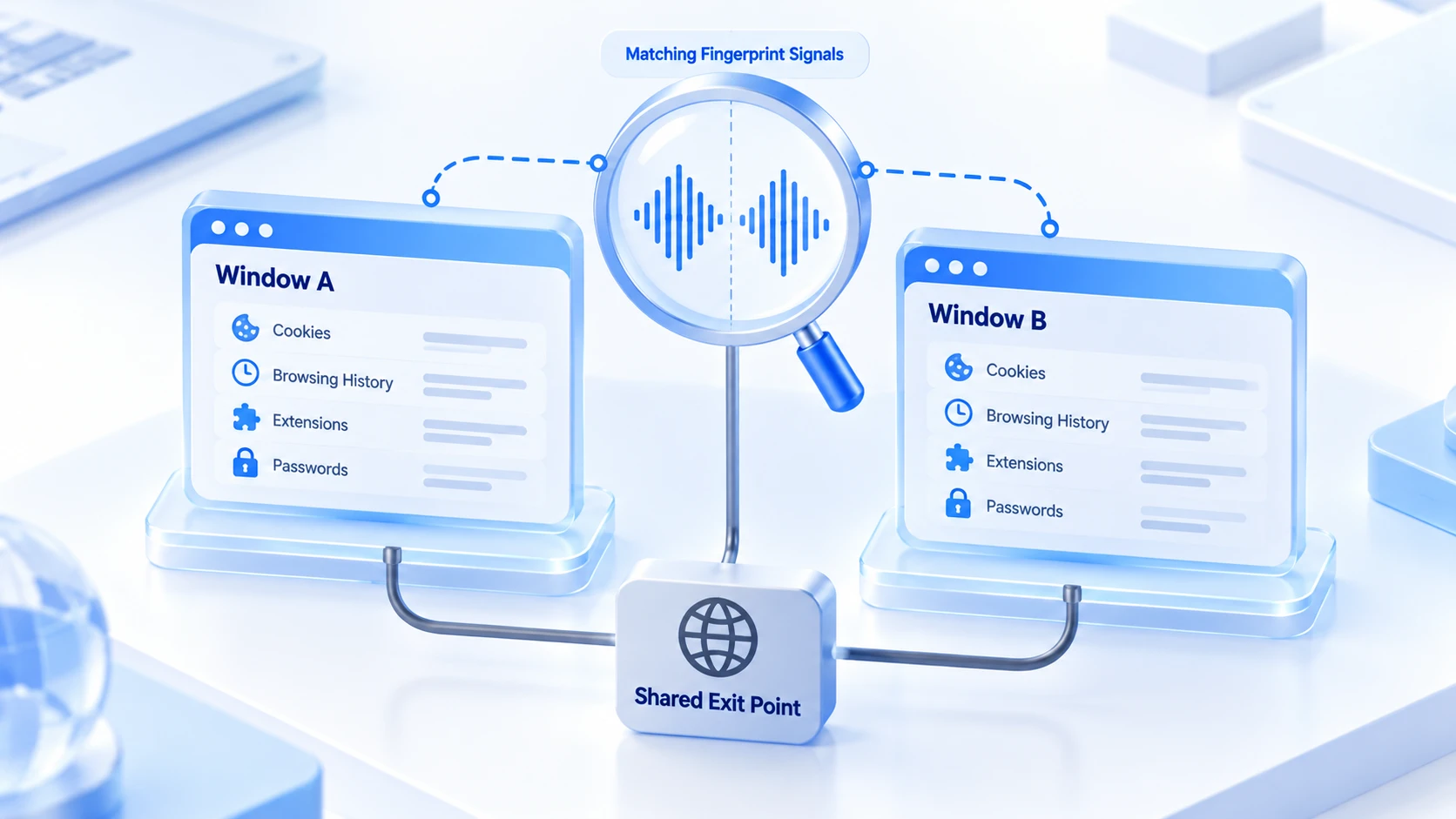
Every profile on one machine reports the same fingerprint
Platforms identify devices through browser fingerprints, a layer profiles cannot touch at all. The User-Agent comes from the browser program itself, so every profile reports the same version. Canvas and WebGL rendering results depend on the graphics card. Font lists, screen resolution, CPU core counts and memory tiers all describe the same machine.
In FingerprintJS's breakdown of browser fingerprinting techniques, these signals are precisely what make up a device identifier. Switching to a new data directory changes none of them.
You can verify this yourself. EFF's fingerprint self-test page runs right in the browser: test two profiles and compare the results side by side. The comparison is telling: browser and system info, fonts, canvas rendering and hardware parameters match almost item for item, and usually only cookies and local storage differ.
To a platform's risk system, ten profiles are one identity. That set of matching signals is enough to group them as one household. Cookie isolation only keeps accounts from overlapping on the local machine; the evidence for linking has never lived there. When you want to know which linking signals your alt account cluster still has, walk through environment, proxy and login history step by step with our multi-account association risk check.
The exit IP is browser-wide, not per-profile
The gap at the network layer is more obvious. Chrome has no per-profile proxy settings; proxy configuration follows the operating system. Change one route and every profile changes with it. There is no proper way inside the profile system to give two alt accounts different exits. Extensions or third-party tools bolted on for the job cannot sustain long-term operations in either stability or consistency. The local addresses leaked through WebRTC are identical too, since the same browser kernel handles real-time communication.
So the typical alt account cluster looks like this. A dozen profiles, each signed into its own account, each with spotless login state, all sharing one exit IP. In the platform's logs, those accounts take turns on the same line. Combined with the matching fingerprints from the previous section, the chain of evidence for linking is nearly complete. However well the data isolation works, it cannot patch the network identity layer. This is the most concrete boundary between profiles and fingerprint browser environments.
Google account sync: an often-missed linking entry point
When you create a profile, Chrome nudges you to sign into a Google account and turn on sync. Bookmarks, passwords, extensions and settings go into the account's cloud storage, retrievable on any device. For personal users, that is convenient. For alt accounts it is a different story. Several profiles signed into the same Google account funnel their data to the same cloud location, and the connection between accounts stretches from the local machine to the platform side. As long as sync stays on, the signal stays connected. However good the client-side isolation, it cannot block the cloud end.
The fix is simple. When creating an alt account profile, skip the Google sign-in and continue directly, or give each alt account its own separate Google account with sync kept to itself. With sync off, profile data stays independent and daily use is unaffected.
When profiles are enough, and when to switch environments
Let the weight of the account decide, not the age of the tool.
In these cases, keep using profiles:
- Personal everyday accounts: one for work, one for your private inbox. Mixing them up is the real annoyance.
- Backends on low-risk platforms, where accounts have no business ties and the platform runs no device-side checks.
- Temporary project stand-ins, used once and discarded, with no plan to nurture long term.
Move accounts into dedicated environments as soon as any of these applies:
- The account carries real business: a store, an ad account or a social media matrix, where one problem can cascade to the rest.
- The platform explicitly runs device-side checks, and multiple accounts on shared hardware are a risk by itself.
- The account count reaches double digits, window switching gets unwieldy, and the team needs to divide the work.
At that point the mindset shifts from 'open a few more windows' to 'give each alt account a complete identity'. MostMate is an anti-detect browser that packs browser data, fingerprint parameters and network exits into reusable environments, one for each alt account.
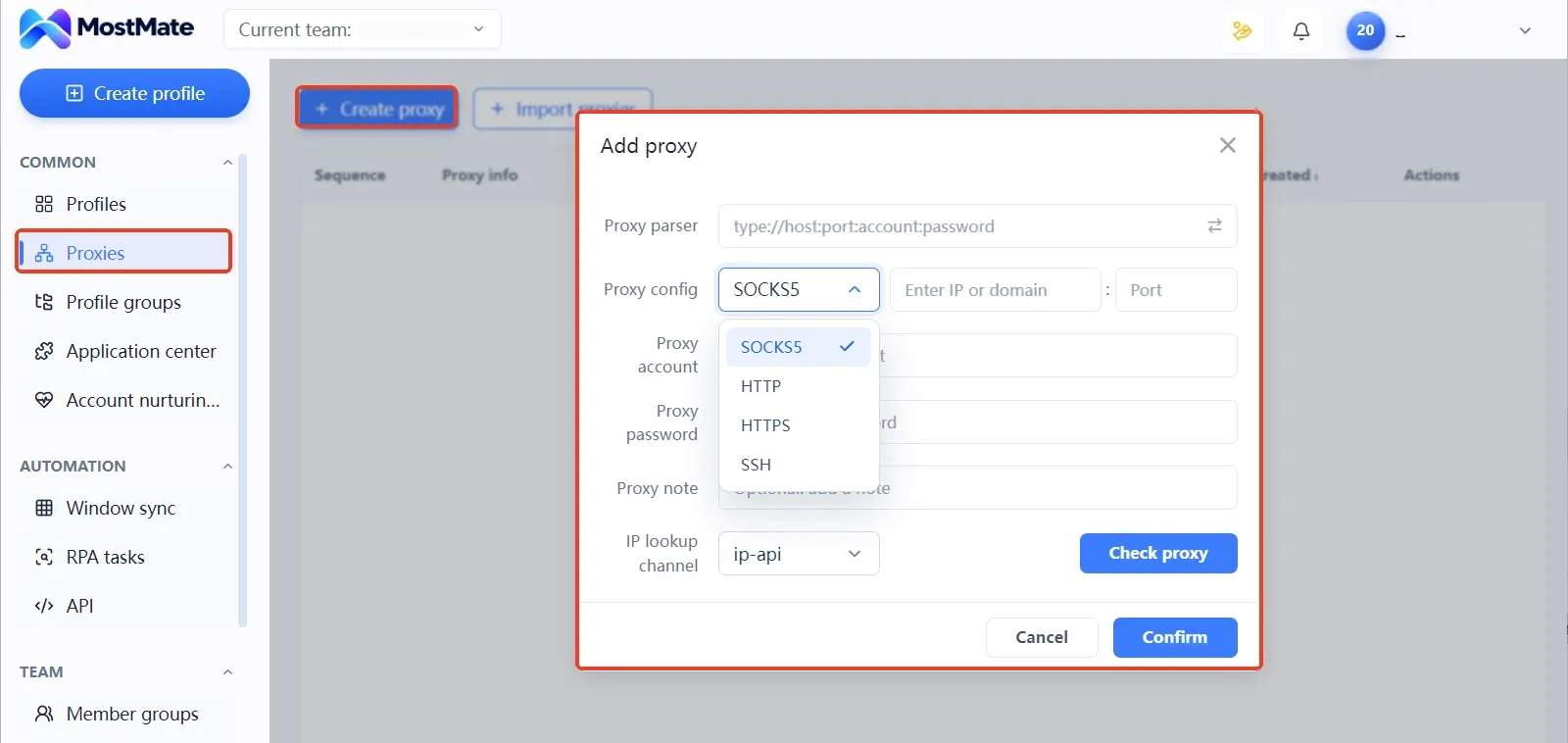
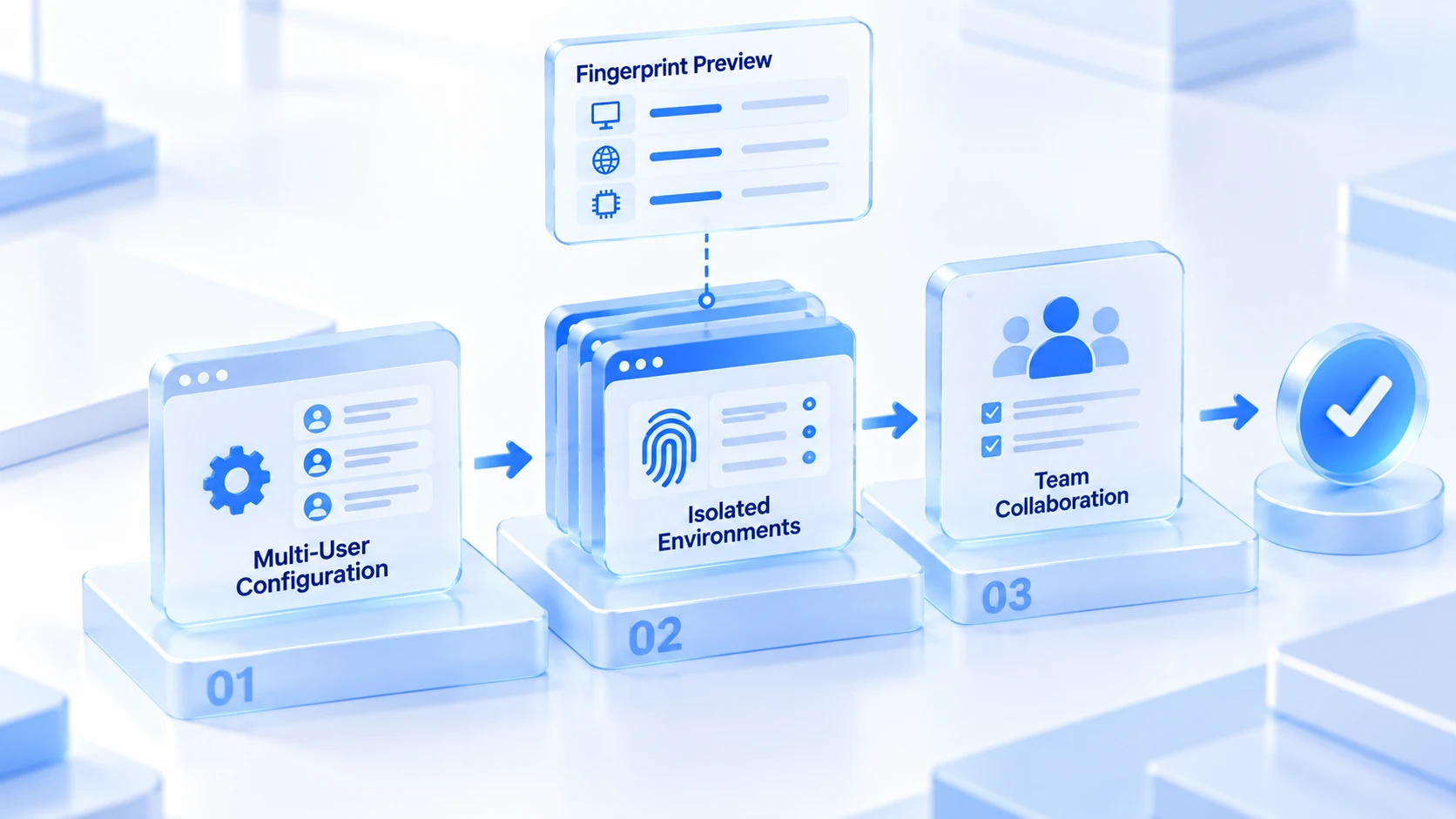
The environment form has three sections: basic information, fingerprint settings and advanced settings, with a fingerprint preview panel on the right listing current values in real time. Canvas, WebGL, font lists and WebRTC, the parameters profiles cannot change, each have their own configuration options here.
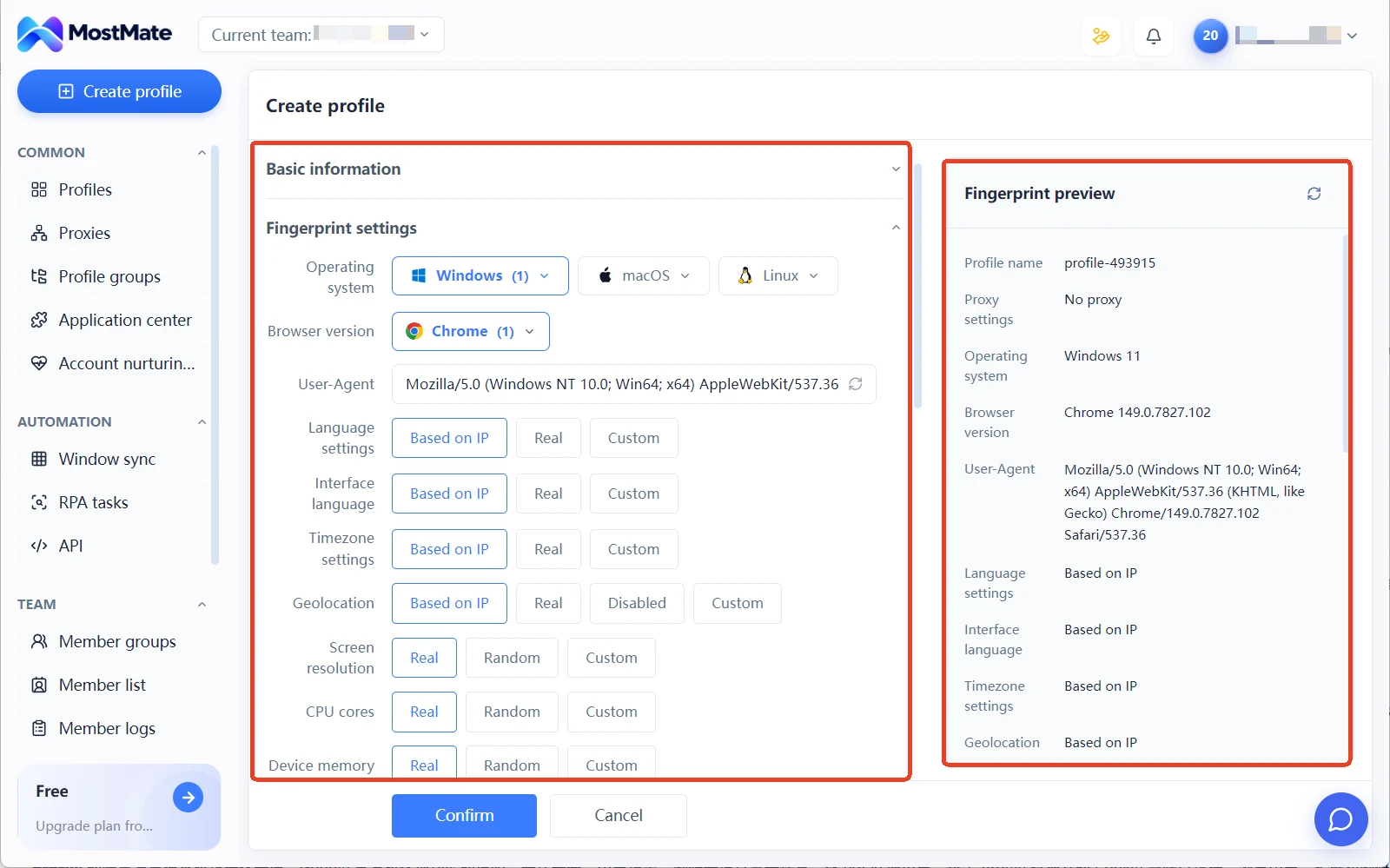
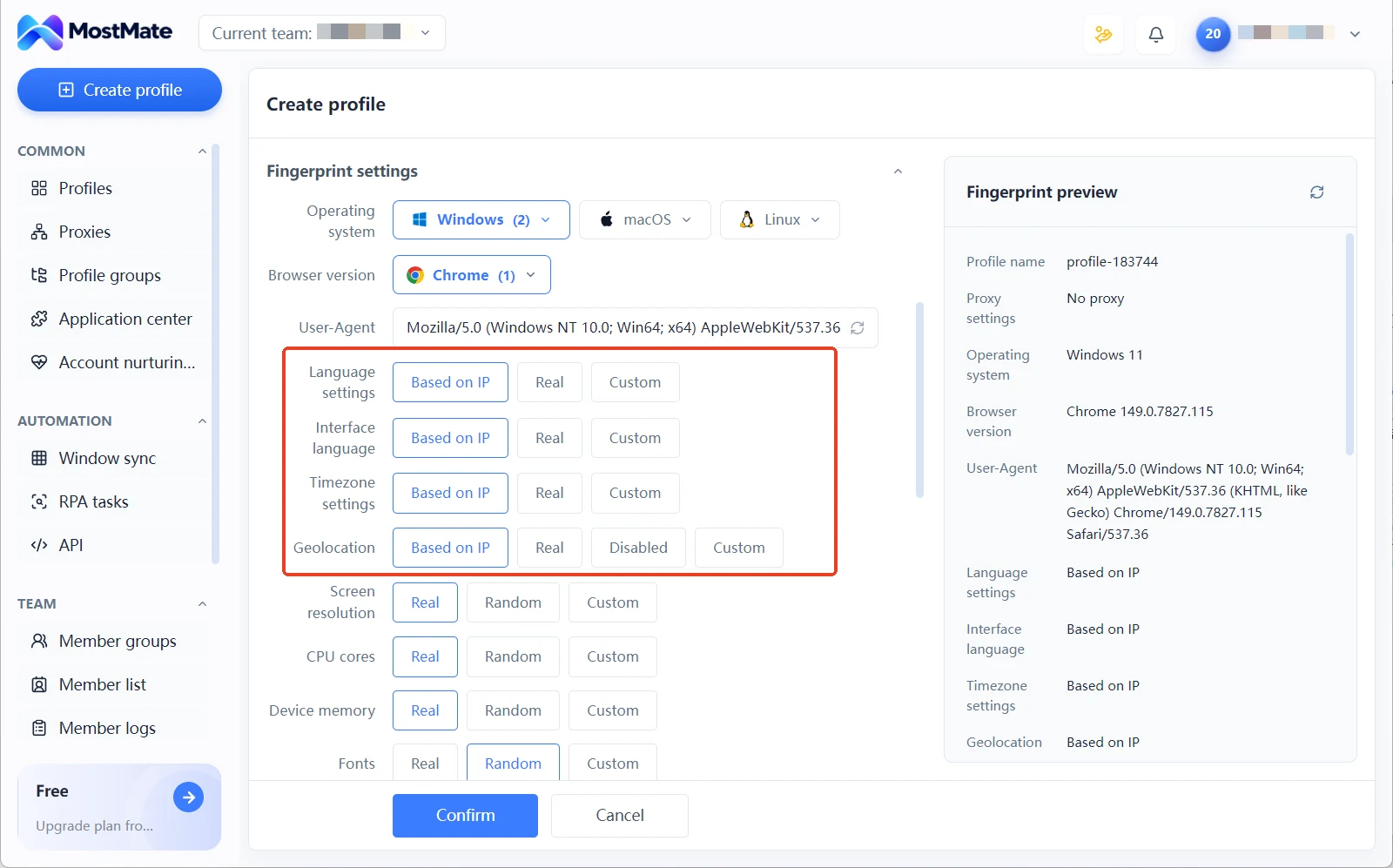
Proxies are also managed per environment. Proxies live in a dedicated proxy management list, and the environment form offers three choices: no proxy, a custom proxy, or a proxy from the list. Proxy types range from SOCKS5 to SSH, four in total. Language, timezone and geolocation each have an IP-based configuration option: set the proxy first and these align automatically with the exit region. Every row of the environment list shows the proxy, exit IP, bound accounts and group, so you can see at a glance which alt account runs on which line.
For what each module's interface and fields look like, the What is MostMate page has a full set of screenshots and explanations. For how isolation covers cookies, local storage, sessions, caches, fingerprint environments and proxy configuration, the article on environment isolation goes deeper. When you build your first environments, follow the new environment checklist from naming to proxy setup to parameter review.
Frequently asked questions
Do different Chrome profiles really have identical fingerprints?
Device and browser layer signals are essentially the same. Profiles on one machine share the browser program and hardware: Canvas, WebGL, fonts, screen parameters and User-Agent are all identical, and only local data such as cookies and history stays separate. Run both profiles through a testing site and the tiny margin of difference is plain to see.
Can I manually switch the system proxy for each profile?
No. The system proxy is global; switching it changes every profile at once. To keep two accounts online simultaneously you would have to flip settings back and forth, and one mistake leaves the exit inconsistent with the account's history. A fixed exit per account is exactly what environment-level proxies solve.
Is an alt account profile safe if I never sign into Google?
It only removes the sync layer. The fingerprint and exit IP layers are still shared, and platforms can still group accounts from the same machine. Skipping the Google sign-in is worth doing, but it addresses one layer, not all of them.
Incognito windows or profiles: which suits alt accounts better?
Neither changes the device identity. Incognito windows do not even keep login state, which suits one-off use. Profiles keep logins and suit accounts you hold long term. To the platform, though, both are just two ways of opening the same device: the difference is session retention, not linking risk.
Closing thoughts
Chrome's multi-user profiles separate local data very cleanly, while platforms judge linking by device and network, and the two do not live on the same layer. Whether profiles are enough depends on how much the account carries. Everyday personal accounts can stay on profiles forever; business accounts deserve a proper environment, at minimum one with its own fingerprint and exit. When it is time to switch, download MostMate, build two environments on the free plan, and run the comparison above yourself. The results speak more plainly than any explanation.

MOSTMATE
Secure Multi-Account Management, Made Simple
Start with your first account and use MostMate to build safer, smarter, and more efficient multi-account operations.
- Independent profiles. Consistent identities.
- AI Automation · Account Health · Team Operations



