
What to Do When CreepJS Reports a lie: Reading the Report and Troubleshooting the Environment
Core takeaway: When CreepJS reports a lie, it means inconsistencies have appeared between its detection paths. A lie does not point to a cause by itself. The cause is not always the same: environment parameters may be misaligned, page output may differ from the configuration, or the browser's implementation may be involved. This guide explains the cross-validation logic behind it, organizes troubleshooting into three directions and a four-step workflow, and helps you read the report and locate the source of the problem.
Most people who run workloads in an antidetect browser run into the same scene at some point: they open an environment, visit the official CreepJS deployment, and a list of lies sits at the bottom of the page. How to read that list, whether to worry, and where to start fixing: most articles online only explain how powerful the detector is and rarely cover what to do after you get the result. This article covers the second half. The logic of parameters corroborating each other was covered from a platform risk-control angle in why fingerprint parameters should not be randomized, so it will not be repeated here.
What Is CreepJS and Why Antidetect Browser Users Care
CreepJS is an open-source browser fingerprint testing page. It inspects the large set of features a browser exposes and pays special attention to whether some of them contradict each other. Unlike tools that score items one by one, its core method is cross-validation: it does not guess what your environment "should" be, it only checks whether you contradict yourself.
One example makes it clear. The environment claims to be a US Windows machine, yet Chinese fonts appear in the font list; the time zone says New York, but the language output does not match. Each item looks fine on its own, but together the books do not balance. CreepJS records each such mismatch as a lie and lists it in the report.
For antidetect browser users the reason to care is practical: platform risk control runs the same cross-checking, and a CreepJS report puts that inspection on the table. Understanding it means knowing in advance which parts of your environment cannot survive an audit. But set an expectation first. The number of lies is not a quality score for the environment; the reason is explained later.
Why CreepJS Reports lies
Its checking logic comes down to two lines. Once you understand them, the items in the report are easy to sort. Each line has its own job.
The first line is cross-context and multi-path verification. For the same fact it often takes values from several paths. The main thread and Web Worker are two independent execution environments, each with its own native objects. Outputs from the same browser should generally match its implementation logic, while outputs from different APIs are not necessarily identical. Beyond property declarations, observable behavior such as error messages and feature support can serve as another reference. The script puts the answers from all paths together and records a lie when they clearly disagree. Some lies relate to property overrides or implementation differences, but a single entry cannot establish the cause.
The second line is structural-level checking. Some lies relate to information such as function behavior and property characteristics, and results may reflect some implementation differences. For antidetect browser users, such entries are worth noting but do not require digging into the underlying JavaScript mechanics; that is for the product developer to handle. Its sensitivity to techniques like property overrides and function wrapping is covered in BrowserInsight's technical breakdown, which lays out the corresponding detection ideas, worth a read if you want to go deeper.

Together these two lines make one point: the value of a single parameter is not enough to judge a whole browser environment. An environment can easily look great on individual values yet fail the cross-check, and the reverse is just as possible.
How to Read the lie Report: Three Troubleshooting Directions
When you get the list of lies, do not rush to change parameters. Go through the APIs the report names one by one and sort the problems into three directions. These directions are a way of thinking, not a strict diagnostic standard; the same lie sometimes needs to be checked against more than one.
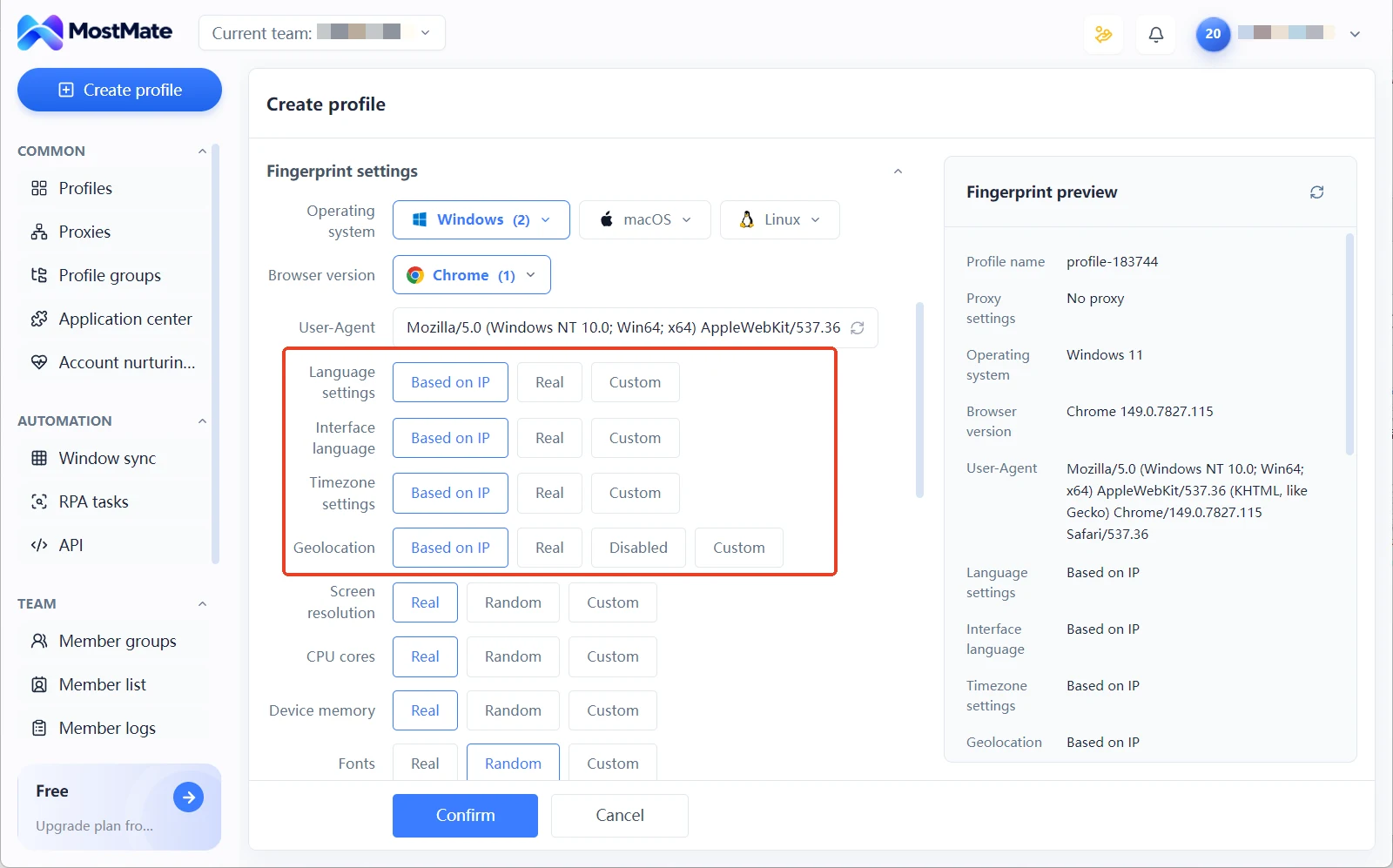
Direction one: do the environment parameters match expectations. For configuration items like language, time zone, and platform claims, a mismatch with your exit IP or target region is an environment setup issue. MostMate manages language, time zone, geolocation, and other parameters together in each environment's fingerprint settings. Every item supports IP-based configuration and modes such as real and custom, with proxy and fingerprint parameters stored per environment. Whichever item disagrees with the exit, go back to the environment configuration and check that setting. The layout and fields of each panel are covered in full on the What is MostMate page.
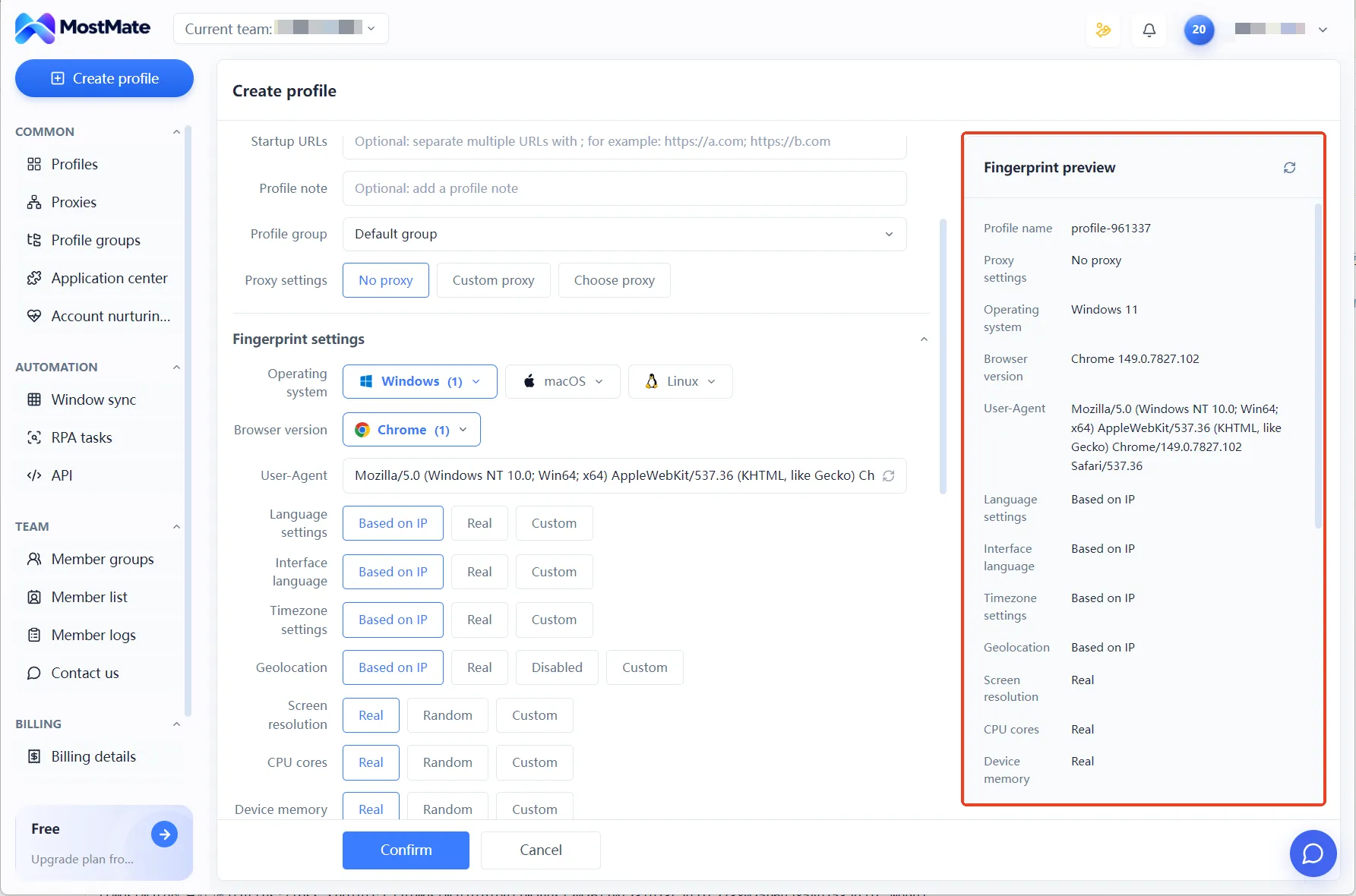
Direction two: does the browser's actual output match the configuration. Correct settings do not guarantee the page reads the same values. What you see in the configuration panel is what you set; what the testing page gets is what the browser actually outputs. The browser kernel sits between them. To check, compare the specific values in the test report against the values in the fingerprint preview panel item by item, and note any that differ.
Direction three: does the report involve browser implementation or the detection method itself. If lies cluster around function behavior and property characteristics, changing environment configuration usually will not help. Judge from the specific report whether a browser version or implementation is involved, and give feedback to product support if needed.

A Four-Step Workflow for Testing an Environment with CreepJS
Once the direction is set, the operation follows four steps. This is a general troubleshooting workflow and does not promise that every lie maps cleanly to a cause. The point is that every adjustment has a basis.
Step 1: record first, change nothing. Save the test time, browser version, environment configuration, and proxy status, and copy down the lie items in the report. Run it again at another time or on another network to confirm whether the problem repeats. A single test has an element of chance and is not enough for a conclusion.
Step 2: check the configuration against the actual output. After sorting by the three directions, start with region parameters in the environment configuration. Then compare the test report against the fingerprint preview panel item by item, separating "set it wrong" from "set it but not applied".
Step 3: change one thing at a time and retest immediately. Adjust several settings at once and even if the retest changes, you cannot tell which item did it. Change one, test one round. Keep both the before and after reports.
Step 4: record implementation-level issues and report them. If certain lies appear consistently across repeated tests and have nothing to do with the configuration, note the browser version and reproduction conditions and hand them to product support. When comparing reports, look at whether specific issues improved, not just the total count of lies.
The most valuable of these four steps are the first and the third. Records make problems traceable, and single-variable changes make conclusions believable. Skipping both and going straight to changing parameters is the most common detour in environment troubleshooting.
The Limits of CreepJS Detection
A clean report does not mean the account is in a vault. CreepJS measures at the JS layer inside the browser. TLS fingerprints, IP reputation, request rhythm, mouse trajectory: it touches none of these signals outside the browser. Real platform risk control weighs these signals together. So its proper role is one diagnostic reference, not a final verdict.
Its report works well alongside single-item testing tools. Leave the quality of individual parameters to BrowserLeaks detection, category by category. For account-level trust, see the overall impression given by the ipHey trust score. Each report covers its own slice; together they approach a full checkup of an environment.
One more operational reminder. Online testing pages collect the browser information you submit, so verify the site's origin before testing. Do not test an environment on testing sites of unknown origin. The official CreepJS deployment was linked at the start of this article; when visiting, check that the domain matches, and coming in from a bookmark is safer than clicking through search results. Keeping sensitive account information out of the environments used for testing is a habit worth keeping. Not because the testing process demands it.
Frequently Asked Questions
Can the lies in a CreepJS report be reduced to zero?
Zero is not a reasonable goal. Some lies relate to browser implementation and detection method, and most antidetect browsers will leave a few. Users cannot fix these entries; they depend on product updates. Only region-parameter mismatches are worth acting on: check with the four-step workflow, adjust one variable at a time, retest with records, and fix what can be fixed. When judging the effect of changes, look at whether specific entries disappeared, not the total.
Why does a scoring tool give a high score while CreepJS reports a pile of lies?
The two tools answer different questions. A scoring tool checks values item by item and gives a high score when each passes. CreepJS checks the relationships between features; a high score only proves each item is fine, not that dozens of items combine into one self-consistent device. An environment can easily ace every single item yet fail the cross-check. Only by reading the two reports together do you get a complete judgment.
The lie list shows time zone and language mismatches. What should I do?
First confirm the actual location of the exit IP, then check the value modes of language, time zone, and other parameters in the environment configuration. Region-related items can be handed to IP-based configuration; save and retest. Change one thing at a time. If the exit itself is mislocated, fix the line first. The order cannot be reversed, or you risk scrambling a configuration that was correct.
Conclusion
A CreepJS report is a diagnostic reference, not an account security score. It tells you where the environment shows inconsistencies under cross-validation. Whether the cause lies in configuration, output, or implementation needs to be checked entry by entry along the three directions in this article.
The suggested way to start is light. Pick one or two environments, run one round of the official test, archive the report, and go through the four-step workflow. Handle the entries you can explain on the spot, record the ones you cannot, and watch version updates. The entry points for environment configuration and proxy management are all inside MostMate; install the client from the MostMate download page and begin. Existing environments can be tested as they are.

MOSTMATE
Secure Multi-Account Management, Made Simple
Start with your first account and use MostMate to build safer, smarter, and more efficient multi-account operations.
- Independent profiles. Consistent identities.
- AI Automation · Account Health · Team Operations



