
The Environment Lifecycle of CPA Task Accounts: Four Stages from Offers to Payout
On payout day you open the dashboard, every conversion from the previous cycle has been zeroed out, and the account status reads Terminated. You send an appeal email and the reply is a single line: some conversions involve fraud, terminated accounts will not be paid. This is the most common ending for a CPA task account, and there is almost no way back. The risk rarely sits on a single day of running offers. It hides in the gaps between stage transitions. Signup and network approval, running offers, payout review, account retirement. Each stage is scrutinized differently, and the environment setup has to change with it.
MostMate is an antidetect browser that builds a separate profile per account, giving every task account its own environment so cookies, login records, and device characteristics never cross over. This article works through the four stages: what the affiliate network watches at each one, how far to take the environment setup, and which actions violate the terms. It ends with how to organize environments by stage in MostMate.
The Review Rhythm of Task Accounts and the Four Stages
CPA's payout logic means the scrutiny is far finer-grained than in ordinary promotion. As defined in Adsterra's CPA guide, advertisers pay only for conversions. A conversion can be a signup, an install, a lead, or a purchase. The affiliate network sits between advertiser and promoter, connecting the two sides, distributing tracking links, and reviewing traffic quality. Conversion payouts run from a dollar or two to tens of dollars, so there is real money in faking conversions. Network-side review therefore stays online all year.
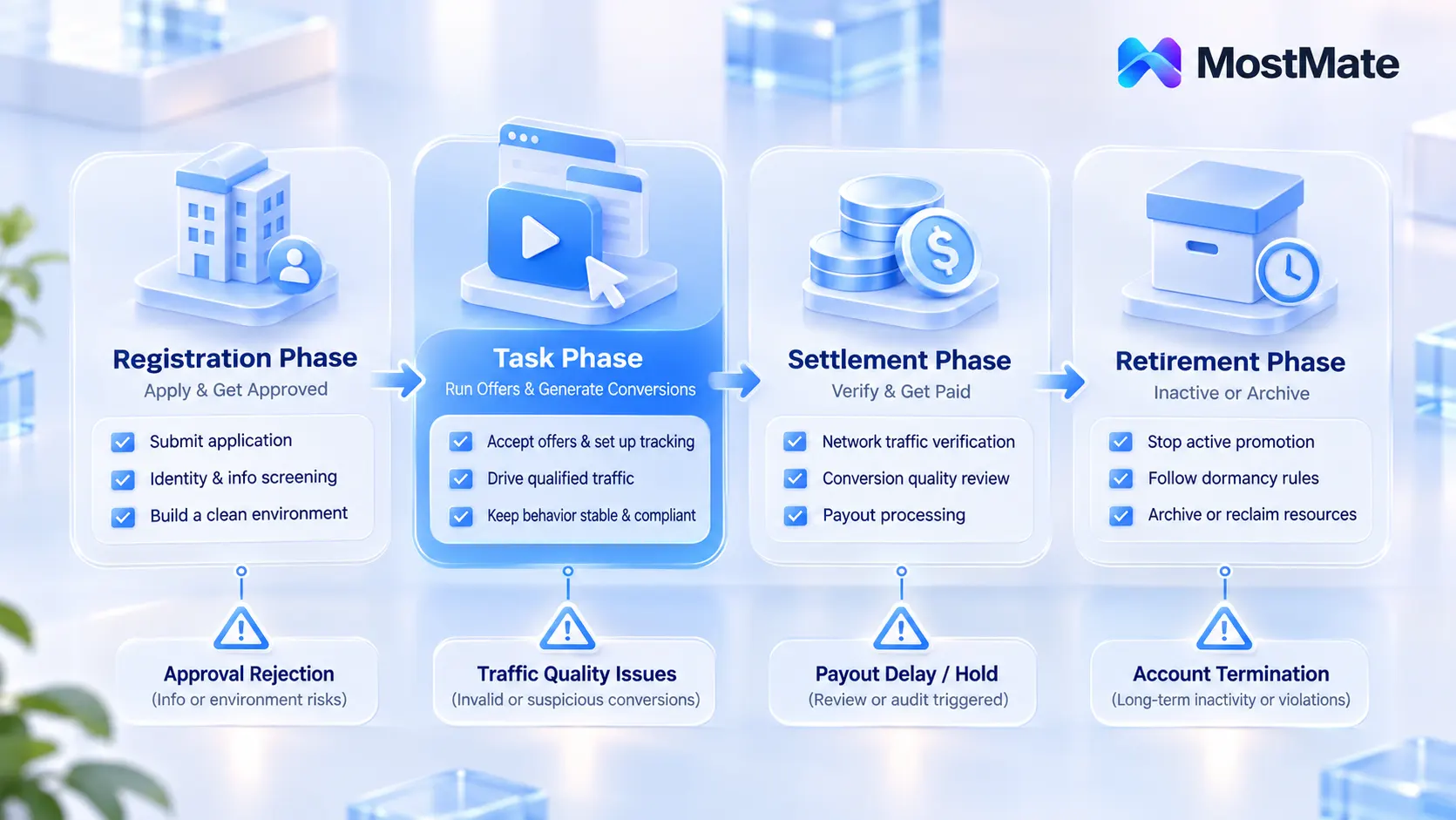
The intensity of review is not spread evenly. MaxBounty states in its official FAQ that the compliance team monitors traffic and leads around the clock, and that identity screening and fraud checks happen before you even join. Small issues earn a notice to fix them; major ones end the account outright. Adsterra likewise builds traffic verification before payout into its payment rhythm. Put these checkpoints on one line and the life of a task account splits into four stages:
- Signup stage: from submitting the network application to passing review. The environment has to be settled from day one.
- Task stage: taking offers, running traffic, generating conversions. Environment stability and compliant operations are the focus.
- Payout stage: the network verifies traffic, audits conversions, and releases payment. Historical records get combed through in bulk.
- Retirement stage: the account sits idle or gets abandoned, and the terms carry dedicated dormancy rules.
Same account, four stages, four different exams. Here they are in order.
Signup Stage: Preparing the Environment Before Network Approval
Network approval is stricter than many people expect. Per MaxBounty, identity screening, quality verification, and fraud checks all sit before you get in. The reviewer reads the application form, and also the browser environment that submitted it. Your IP region, system language, and timezone need to line up with the promotion channels and regions described in the form.
Before applying, get the environment right. Keep the proxy line consistent with your promotion region; if US traffic is your main game, submit the application from a matching region. Finish the environment configuration before applying and leave it untouched during review, since changing fingerprints midway only stretches the process. Complete the registration email, the application form, and the dashboard login inside the same environment, building a consistent initial profile.
For a full environment build from zero, the new environment setup checklist lists the parameters item by item; run through it before submitting. Task accounts never run short of chances to apply. What they lack is a first-try pass. Get rejected once, reapply with new fingerprints, and you hand later reviews even more to question.
Task Stage: Binding the Environment to Conversions While Running Offers
Passing review is only the start. The core problem of the task stage is the mismatch between attribution and review. Conversions are recorded through tracking links, but when a review traces back, the platform looks at the device and traffic characteristics behind the link. Across this period the environment carries two duties.
The first duty is stability: a task account locks in one environment from the very first offer it takes. Swapping device characteristics or exit IP midway looks, to a network, much like an account changing hands. Lending out or selling accounts is likewise explicitly banned in the terms. MaxBounty's clause 4.11 puts it plainly: without written approval, accounts may not be shared, lent, rented, sold, or transferred.
The second duty is compliant operation. The no-go zone listed in clause 4.10 covers malicious or fraudulent conversion generation, including producing conversions for yourself manually or through automation. In daily work, these are the lines not to cross:
- Clicking your own tracking links to complete signups or installs, whether by hand or by script.
- Completing the same kind of conversion repeatedly in one environment, at a rhythm too uniform to look human.
- Running traffic types the offer terms explicitly forbid, such as banned social traffic.
Teams taking tasks at volume usually give each task account an independent environment, then use window sync to check progress in one view. The article on safe multi-window operation covered the safety boundaries for batch scenarios. At the environment level, the approach overlaps with sybil screening for airdrop studios; the difference is who does the reviewing. Web3 projects check wallets and fund paths, affiliate networks check conversions and traffic sources. The article on airdrop sybil screening compared the two kinds of screening.
Payout Stage: Traffic Verification, Shaving, and Commission Forfeiture
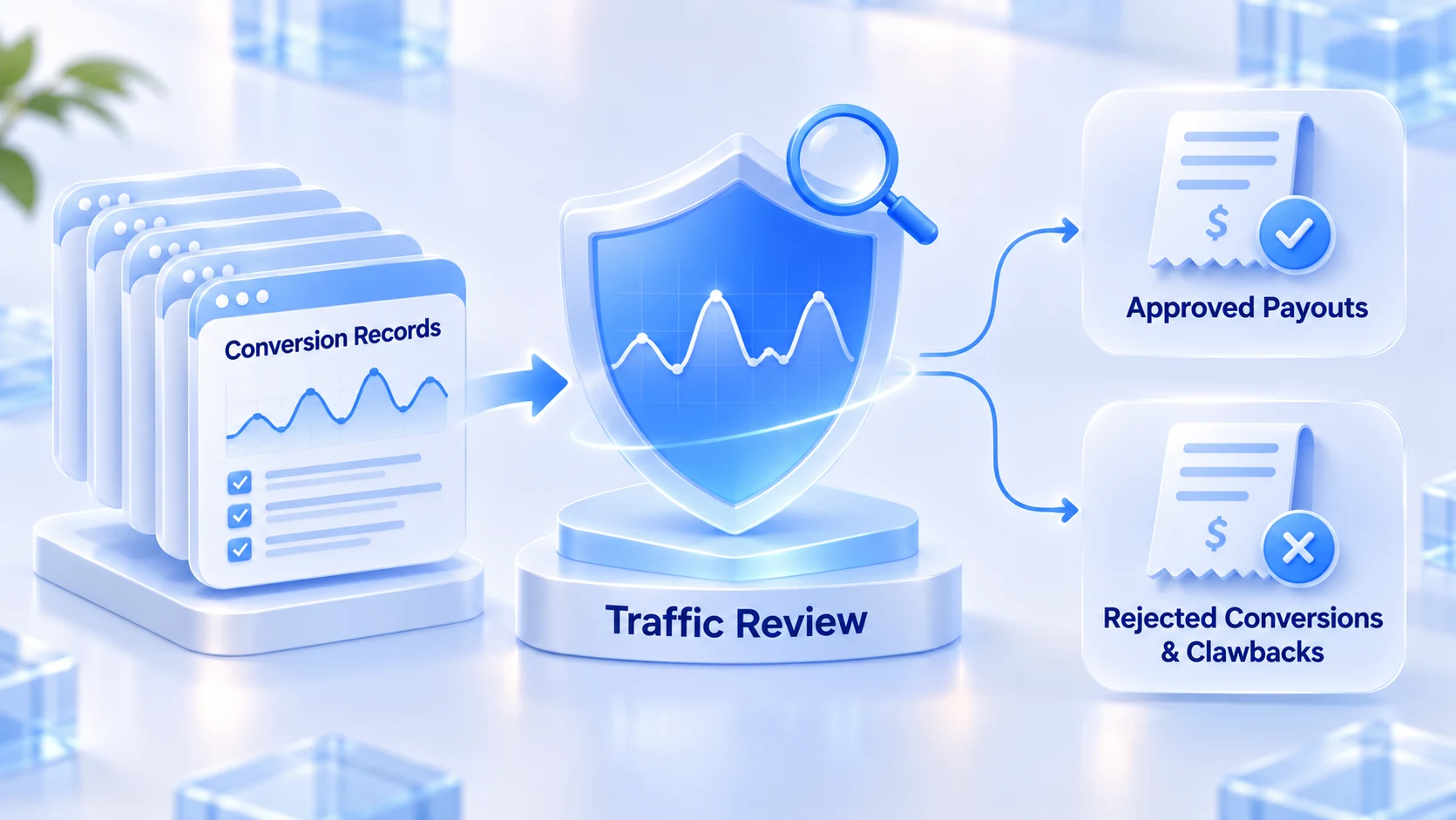
The payout stage is a different animal: this is when old records get combed the hardest. Adsterra settles every two weeks and verifies traffic before releasing funds. MaxBounty's compliance team watches traffic peaks and lead trends daily, and anomalies surface around settlement. Two things need untangling at this stage: which conversions get rejected, and which consequences cannot be undone.
Rejected conversions come in degrees. A single rejected conversion, shaving, or a chargeback (a refund after the sale that claws back the commission) is survivable loss, part of ordinary business variance. Account termination is another matter. MaxBounty's FAQ carries a line about terminated accounts, word for word: partial fraud does not mean partial payment, and no payments are made on terminated accounts. In other words, once compliance rules that fraud is established, every clean conversion from past cycles gets zeroed out as well.
The signals before termination are worth memorizing. The FAQ's line: small issues draw a fix-it notice first, large ones end the account directly. By the time the notice arrives, the problem is already on record, and carrying on as before only speeds up the ending. The first hour after an actual termination matters most; responding in the first 60 minutes after a ban orders the actions by loss-control priority. If conversion numbers don't add up and you suspect shaving, first work out whether the network or the advertiser is holding money back. The shaving and traffic review article splits the investigation into three tracks.
Retirement Stage: Dormancy Terms and Handling Old Environments
Stop running a task account and just leave it, and there are still consequences. MaxBounty's clause 4.13 states that six consecutive months without login moves the account to inactive. Nine months inactive, and the network may terminate the account and deduct the remaining balance. Commission that never reached the payout threshold can sink right there in the terms.
The first three stages can all be handled proactively; retirement is the one most often skipped. When you decide to wind down, work through both sides in order. On the account side, if the balance is near the payout threshold, withdraw once before stopping; for accounts being abandoned outright, confirm nothing is in transit and stop spending effort on them. On the environment side, move the matching environment from active into archive, keep it, don't delete it. Old environments hold the account's historical login data, which matters later for appeals or reconciliation.
For judging whether to reuse, clean up, or archive an old environment, the environment reuse and cleanup guide sets conditions for four scenarios; check against it before acting.
Organizing Environments by Stage in MostMate
Once task accounts reach any scale, managing the environments becomes a workload of its own.
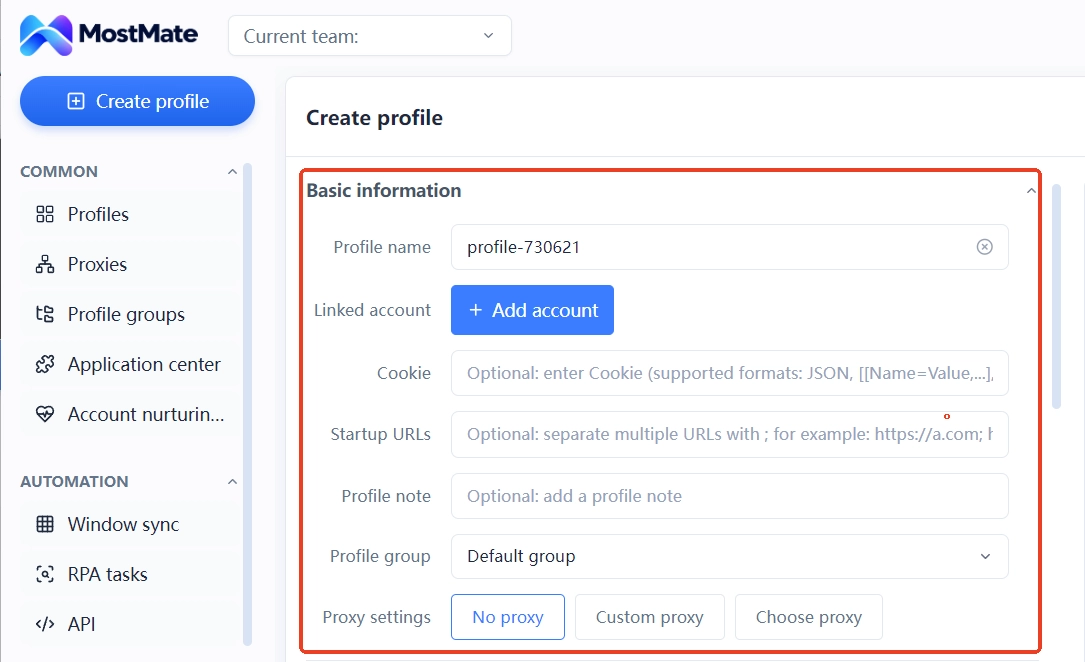
Organizing by stage is the least fussy way to split things. Build environment groups along the lifecycle stages: pending signup review, tasks in progress, payout watch, archived. Four groups matching four stages. A task account that passes review moves into the task group; a fix-it notice moves it into the payout watch group, so process status is readable at a glance. Naming follows the rule of network + offer type + purpose, for example "Network A - email submit - US region". The note field records the signup date, the bound proxy line, and the first payout date, so when old records come up, opening the notes lines up the timeline.
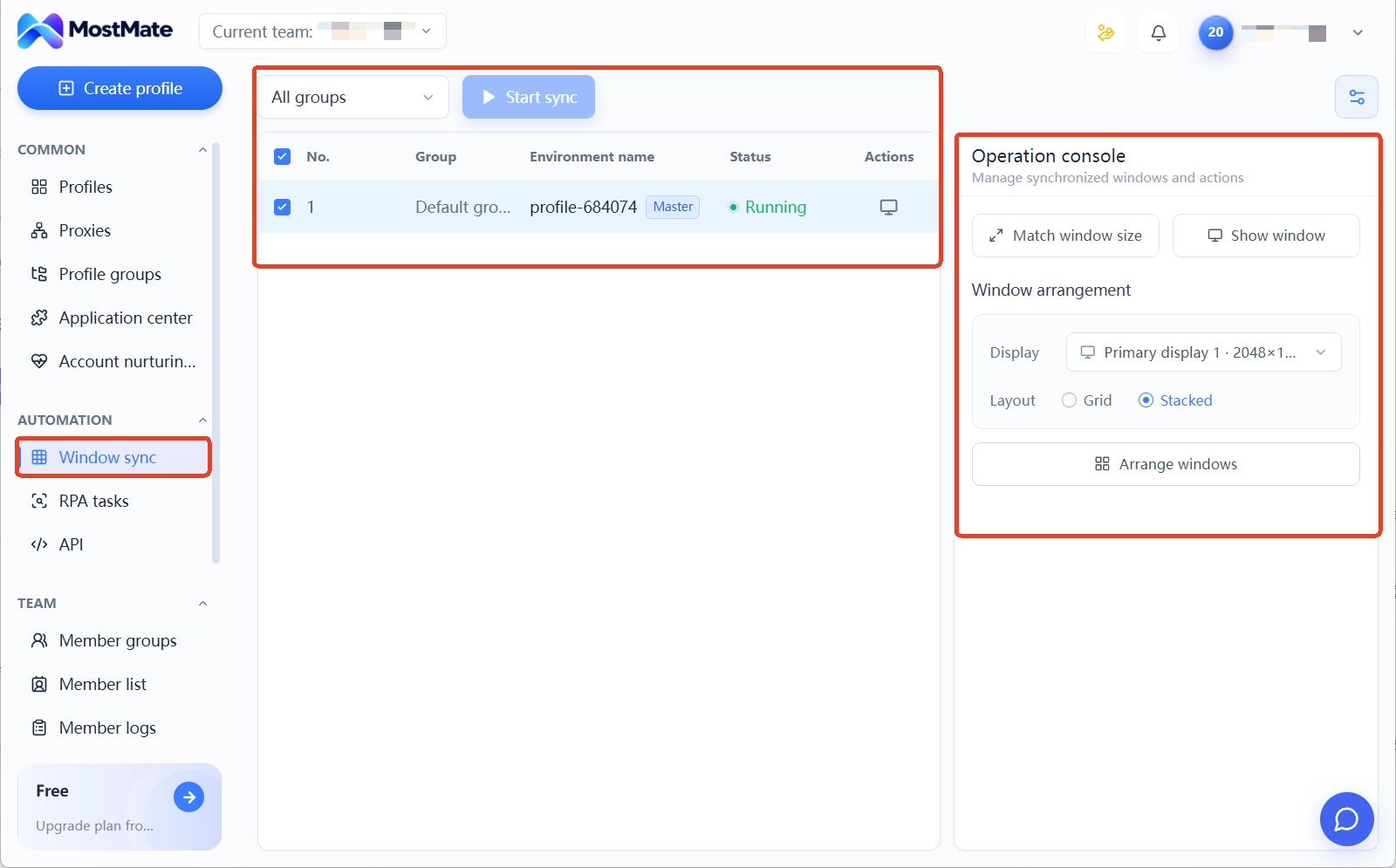
In batch scenarios, window sync lines up dozens of task environments at a uniform size and opens them in bulk, and the open-them-one-by-one routine disappears here.
With environments organized like this, the lifecycle finally has a ledger you can consult. Which account is at which stage, what is pending; the group names and notes are the answer.
Frequently Asked Questions
Do CPA task accounts really need an antidetect browser?
A single task account can run on an ordinary browser, but network review looks at the consistency of device characteristics, and an ordinary browser's fingerprint drifts easily after repeated updates. An antidetect browser pins the device characteristics down. Once you are past a handful of task accounts, environment isolation stops being optional and becomes a requirement.
What is the risk of running several task accounts bare on one machine?
Under one browser configuration, several task accounts share cookie storage and the device fingerprint, so one account's anomalous characteristics drag down the others in the same environment. With separate environments, each account gets its own fingerprint and storage, and any problem stays confined to a single environment.
Can you still appeal when commission is withheld or the account is terminated?
You can reply to the compliance email and explain the situation. But per the MaxBounty FAQ, balances on terminated accounts are not paid. The appeal room concentrates in genuine "wrongful termination" cases. The core of the evidence is the operation records you kept yourself, which is exactly what environment notes and a ledger are for.
How long can a task account sit idle before problems appear?
Using MaxBounty's terms as the reference: six months without login means inactive, and nine months can mean termination plus balance deduction. The exact numbers differ by network. Check the terms before winding down, and put withdrawal ahead of deactivation.
Conclusion
The hard part of risk management for CPA task accounts is that each stage demands something different. The signup stage needs a consistent profile; the task stage needs a stable environment plus compliant operations; the payout stage must survive a full review of old records; retirement means exiting on the terms. String the four stages together and that is the environment lifecycle.
If you manage task accounts in batches, regroup the environments along the four stages above; the multi-account security management landing page shows the overall approach. Download MostMate now and give every task account its own independently managed, stage-organized environment.

MOSTMATE
Secure Multi-Account Management, Made Simple
Start with your first account and use MostMate to build safer, smarter, and more efficient multi-account operations.
- Independent profiles. Consistent identities.
- AI Automation · Account Health · Team Operations



