
Why Are Affiliate Conversions Shaved? Traffic Review, Tracking and Troubleshooting
The bottom line: numbers fall out of line for three reasons, namely tracking failures, traffic quality and review rejections, and each calls for its own check and its own point of contact. In most cases the trail ends at lost attribution or traffic that failed review, not at someone quietly editing your reports.
An affiliate running CPA offers watches 40 conversions sit in their tracker dashboard. At settlement, only 31 remain. The first instinct is "I've been shaved," followed by the urge to switch networks.
The answer starts by reconciling three numbers: what your own tracker recorded, what the affiliate panel shows, and how many orders the advertiser confirmed. Where the mismatch appears tells a completely different story each time.
Which Kind of Shaving Are You Looking At
Report gaps come in four common shapes, each with its own cause and first move, and lumping them together only wastes time. Match your situation against the table below before doing anything else:
| What you see | Likely cause | First step |
|---|---|---|
| Fewer clicks than expected | Click filtering or different metrics | Check report dates and time zones |
| Clicks but no conversions | Lost attribution or delayed postbacks | Inspect tracking links and postbacks |
| Conversions but commission denied | Traffic quality or terms breach | Read the rejection reason and terms |
| Commission amount adjusted | Refunds, duplicates, post-review cuts | Compare date ranges and status details |
One case deserves a separate mention. The industry calls unexplained conversion deductions "shaving" and documented cuts "scrubbing"; the difference is whether a trail is left behind. A Partnerkin comparison draws this line clearly: a scrubbed lead comes with a rejection reason, a rate and an itemized record in the panel. You may disagree with the verdict, but at least the evidence is there. Conversions that vanish without explanation are the ones worth worrying about. When numbers drop, look for a rejection reason first.
That one glance is the first step in sizing up the problem.
What Traffic Review Actually Checks: Three Lines
Reviews by affiliate networks, advertisers and tracking systems converge on three lines: tracking and attribution, traffic quality, and account environment. Each line fails differently and calls for a different fix. Here they are one by one.
The tracking and attribution line breaks mostly over configuration. Missing parameters in tracking links, SubIDs that never get passed, delayed conversion postbacks, attribution windows that disagree with the advertiser's settings: any of these keeps a real conversion from being credited to you. Nothing here depends on traffic quality. Fixing the configuration fixes the problem.
The traffic quality line is where most rejections originate. IndoLeads lists the usual reasons conversions get rejected: invalid or low-quality leads, duplicate submissions, cancelled orders or refunds, traffic sources that breach program terms, and attribution snapped up by another channel. CPA offers get rejected harder than revenue-share ones. Leads are easier to fake than orders, so platforms screen them more strictly.
The account and environment line is the most overlooked. Several accounts sharing one browser profile let cookies and login states bleed into each other; one employee slips and runs traffic for business A inside environment B. Neither mistake triggers a review on its own. The moment something does go wrong, though, environment records that fail to line up make the investigation many times harder.
How to Work Through a Rejected Conversion
Investigate in a fixed order. Rule out technical faults first, then quality problems, and only then start suspecting the platform. Six steps:
- Confirm the reporting period and time zone across all three reports to rule out metric mismatches.
- Check that tracking links, SubIDs and click IDs pass through intact.
- Cross-check conversion events, order status, refunds and review status.
- Read every rejection reason and match it against traffic restrictions in the program terms.
- Group and compare by date, channel and source to locate where the gap concentrates.
- Keep your promotion records and evidence, then approach your affiliate manager with concrete cases.
The first three steps target technical faults. A broken postback or a dropped parameter is one support ticket away from fixed. The last three target quality review. When the rejection reason is spelled out, adjust your traffic sources per the terms. Only when the reason field is blank and the rate looks abnormal does doubting the platform enter the picture. Run the order backwards and you end up arguing about "shaving" over what was really a technical fault.
The relationship takes the damage too.
Running Multiple Accounts: What to Check at the Environment Layer
Environment-layer problems rarely cause rejections directly, but they strip your investigation of evidence. Keep this layer clean and the first three lines stay traceable. Managing multi-account environments is exactly what MostMate, an anti-detect browser, is built for.
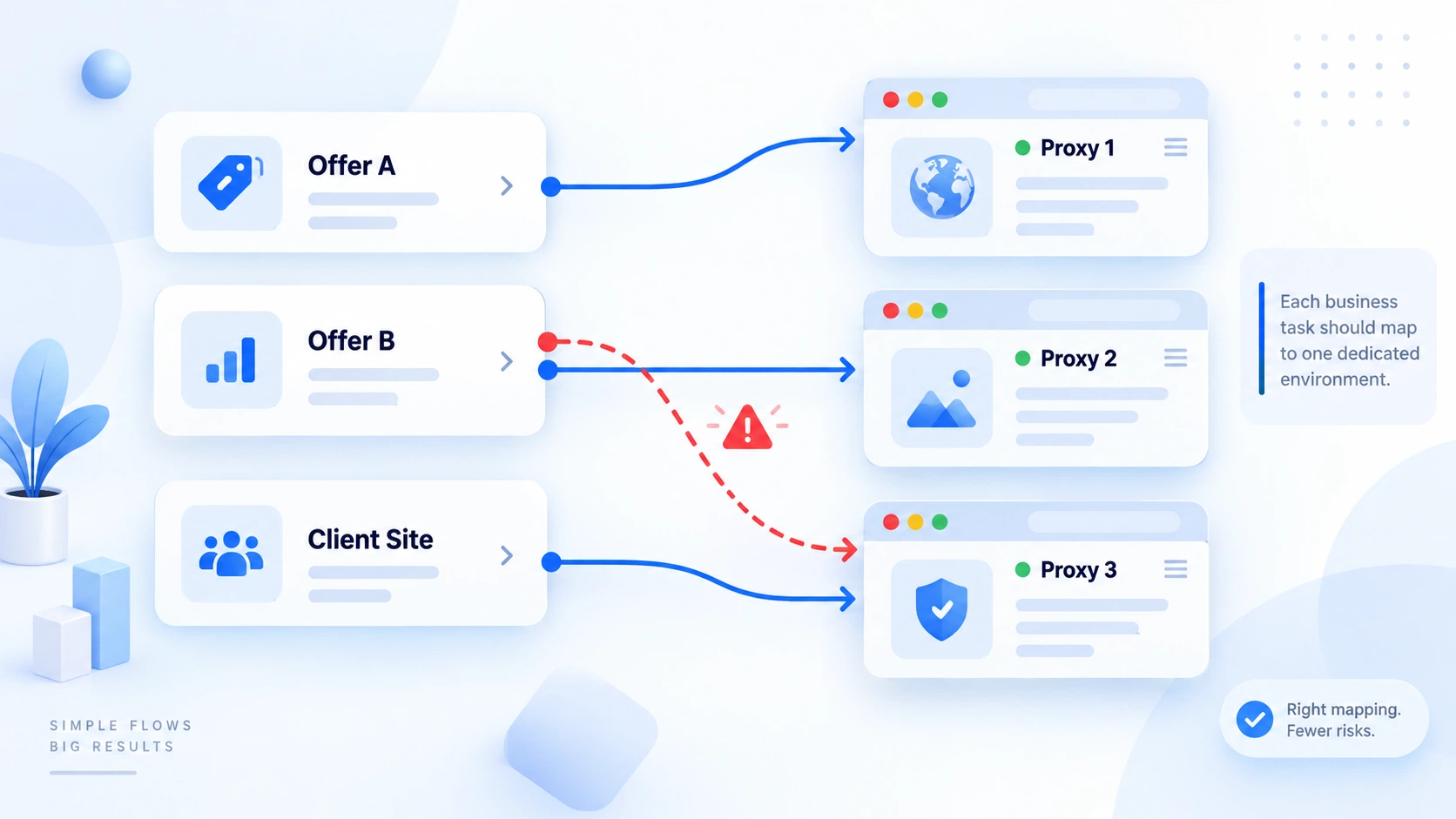
Start by checking whether accounts and environments correspond. One dedicated environment per business account, with names and notes stating the purpose. When the account column matches up, misuse jumps out at a glance. For how environment isolation works and where it stops, the article on environment isolation covers it in depth.
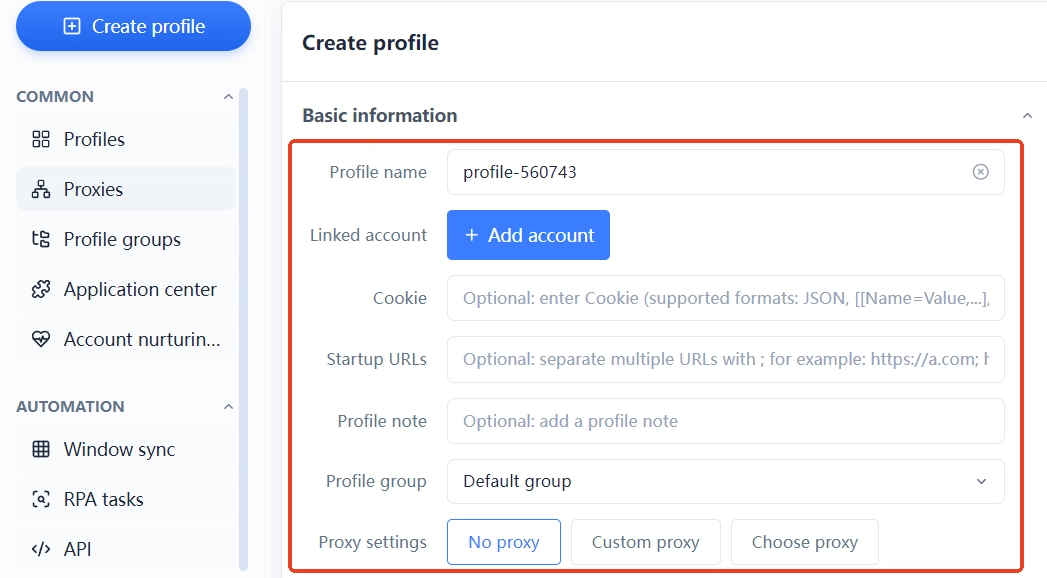
Next, check whether login states cross over. Inside MostMate, every environment keeps its own cookies and local storage, so business A's login never leaks into environment B. When several environments share one proxy, the proxy lives in a separate list. Which environment each proxy is assigned to stays on record, so any line that misbehaves is easy to trace.
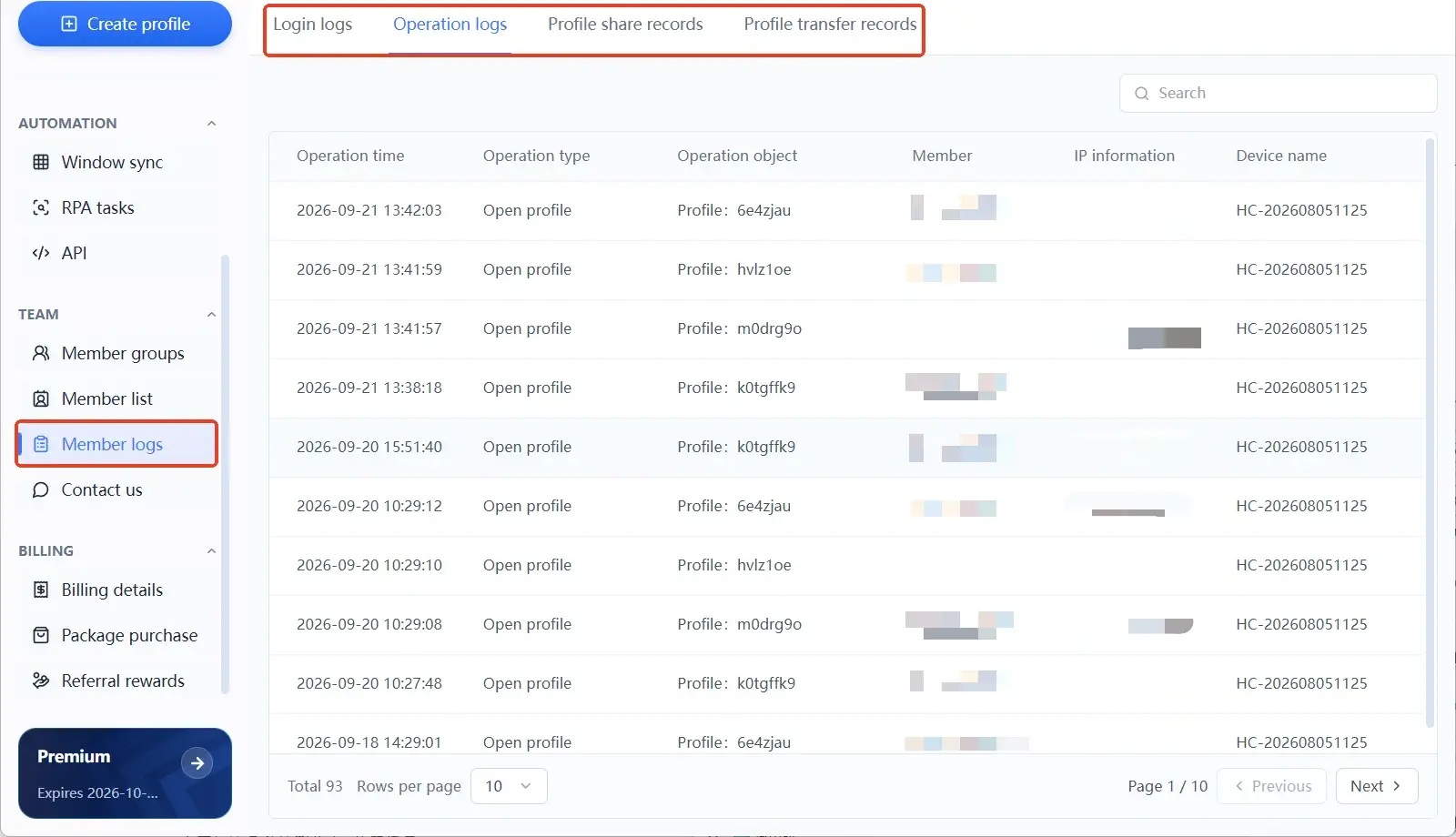
Finally, check that team actions leave a trail. When several people run affiliate campaigns, member logs record four kinds of events: logins, operations, environment sharing and transfers. Who touched which environment and when is all in the log. For a complete handover checklist when someone leaves, see the article on team security.
One boundary to make clear: environment isolation covers browser data only. It cannot repair a broken postback or overturn an advertiser's review verdict. What it solves is "being able to reconstruct what happened." Whether the traffic itself passes review still depends on the first three lines.
Turn Checking into a Routine
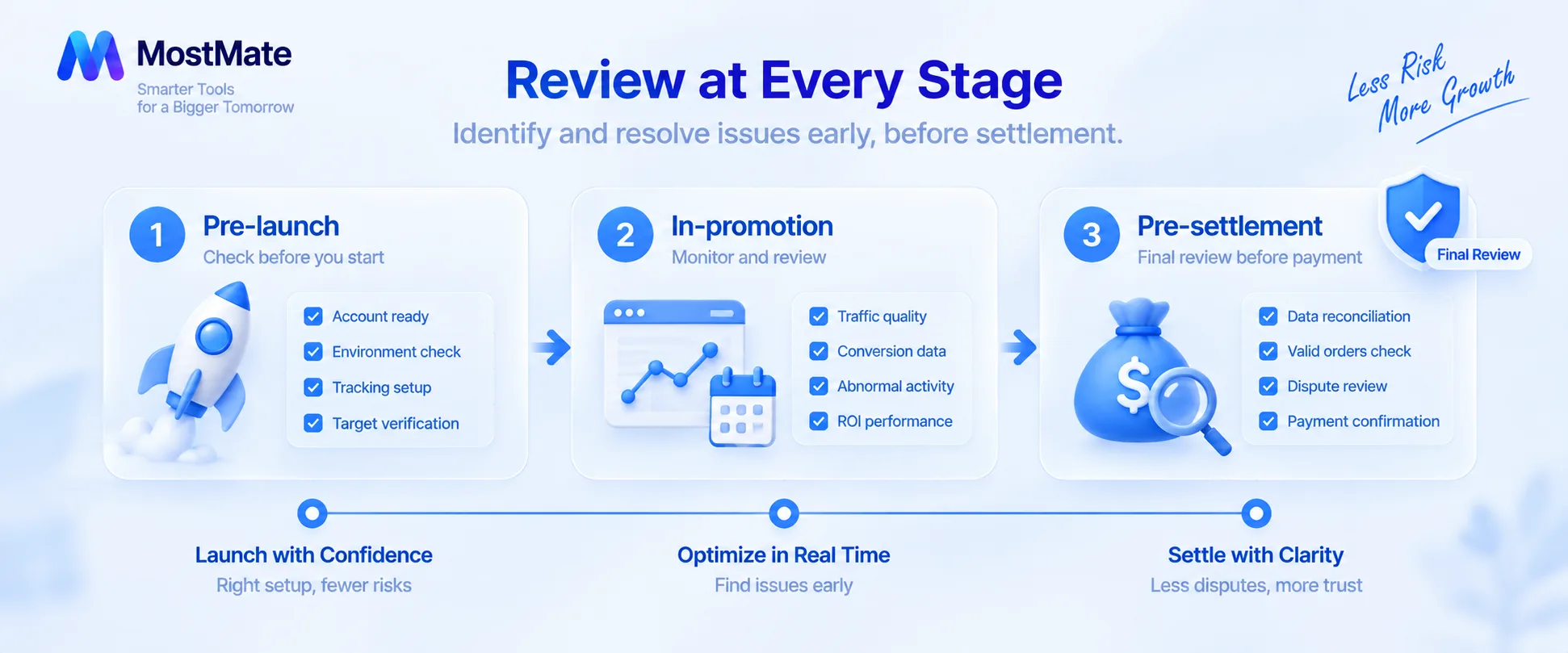
Don't wait for a rejected commission to start checking. Run one round before launch, one during promotion and one before settlement, and most disputes dissolve before settlement day. Each checkpoint has its own focus:
- Before launch: test tracking links and conversion events, and read every traffic restriction in the program terms.
- During promotion: reconcile clicks, conversions and channel data weekly, and log configuration changes.
- Before settlement: re-check pending orders and rejection reasons, and raise questions within the settlement window.
A solo affiliate with a handful of accounts can manage all three checkpoints with one spreadsheet. Once accounts multiply and the team splits up the work, the routine needs tooling underneath. For a unified view of environments, proxies and member permissions, see the MostMate website. And for how management changes as accounts grow from dozens to hundreds, the article on scaling walks through it.
FAQ
Why are there clicks but no conversion records?
Look at the attribution window and postback configuration first. A user clicked but never completed the target action, a delayed conversion postback, or attribution claimed by another channel: all of these separate clicks from conversions. Most of the time it's a configuration issue, not shaved traffic.
A conversion shows as successful. Why is the commission still rejected?
A recorded conversion only means the event was tracked. The advertiser still confirms the order, verifies payment and checks terms compliance. Refunds, duplicate submissions or sources breaching the terms will all get an already-recorded conversion rejected at review.
Will switching proxies or an anti-detect browser make shaving disappear?
Not automatically. Environment isolation addresses browser-data crossover across accounts; tracking faults need configuration fixes, and traffic quality problems need new sources. Identify which case you're in before deciding which layer to touch.
How do I keep multiple accounts from interfering with each other?
Pair every business account with its own dedicated environment, keep cookies, login states and proxies separate, and make environment names state ownership. In team settings, rely on member permissions and logs to keep an operation record so every environment change can be traced back.
Closing
Match your report gap against the four patterns, walk the three review lines one by one, keep the environment layer tidy, and most disputes resolve before settlement. If you're just starting out, begin by downloading MostMate and setting up your first dedicated environment, so the mapping between environments and accounts is in place from day one.

MOSTMATE
Secure Multi-Account Management, Made Simple
Start with your first account and use MostMate to build safer, smarter, and more efficient multi-account operations.
- Independent profiles. Consistent identities.
- AI Automation · Account Health · Team Operations



