
Managing 10, 50, and 100 Accounts: What Gets Hard at Each Stage, and How MostMate Helps You Scale
The core takeaway: every time your account count moves up a tier, the bottleneck changes. Under 10 accounts, what you manage is isolation: clean, independent environments, each with its own proxy. Around 50, it becomes status: what every environment is doing right now, visible at a glance. Past 100, it becomes people and process: hand repetitive work to RPA, wire systems together through the API, and let the team own their own groups. More accounts is not the hard part. The hard part is that the method from the previous stage never got upgraded.
The story is common: your accounts grow from 5 to 30, the tools and the routine stay the same, and the first thing to break is time. Opening every environment for a quick look quietly eats an hour or two a day. When the management style stays stuck at the old scale, breakdowns like this follow. This article walks through three size tiers: what stalls you at each one, which method absorbs the load, and when to move up. If you are still deciding whether you belong in multi-account operations, MostMate covered the "who you are" angle in who MostMate is for; this piece takes the "how many you have" axis, and the two read well together.
Every Tier You Climb Brings a Different Problem to Manage
The management problems that come with account scale are really the mismatch between information volume and staffing moving to a new spot. With few accounts, you can personally watch every environment and keep it all in your head. With more accounts, your head fills up and the information has to move into a tool. With many more, even "a person watching the tool" stops being enough, and process plus team have to take over.
The three tiers map to three core problems:
- 1-5 accounts: isolation. Whether every environment is clean, independent, and paired with the right proxy and fingerprint is the entire focus.
- 10-50 accounts: status. Once environments pile up, good isolation alone is useless: which ones are running, which are idle, which proxy just dropped, you cannot keep track.
- 50-100 accounts: coordination. There are more environments than one person can open, and repetitive actions, team roles, and system integration become the new bottleneck.
To tell which tier you are in, do not count accounts; look at what stalls you each day: worrying about account links means tier one, scrolling lists to find an environment means tier two, getting dragged down by repeated actions and role splits means tier three. The sections below go tier by tier.
1-5 Accounts: Lock Down Isolation and Proxies While Manual Work Still Covers It
At this tier the problem is not efficiency, it is boundaries. If isolation is shaky now, every later tier pays that debt back. At small scale, fully manual is fine, and it is exactly the time to build a solid base. The what is environment isolation article breaks down the theory; here are the three things that matter from a scale perspective:
- Give every environment one stable proxy. The most common mistake is "no proxy for now, I'll deal with it later": once an environment has run real work on a real IP, that history cannot be wiped. Set the proxy when you create the environment, and use the proxy test feature to confirm the exit IP before anything starts.
- Let fingerprints default to the IP. Language, time zone, and geolocation should follow the exit IP; that is what makes an environment's regional identity hold up.
- Set naming rules from the very first environment. Do not shrug this off: tier two's "see it all at a glance" rests on names and notes, and every shortcut taken here gets paid back with interest in tier two.
The free plan (2 environments, 2 members) is enough to get the whole routine running smoothly at this tier.
10-50 Accounts: The Bottleneck Shifts from "Every Environment" to "One Glance"
Past 10 accounts, what you lack is no longer isolation capability but status visibility: knowing what is happening across the board without opening a single environment. The classic moment: someone asks which of your 30 stores are active and which have not moved this week, and you scroll through the list with no answer.
MostMate's environment management builds "one row = one environment's full identity" into the list: proxy, exit IP, bound accounts, group, notes, and custom number all sit in a single row. With those fields in place, tier-two management comes down to three moves:
- Create environment groups along business lines. Stores by platform, accounts by project. Groups are the coarsest and most effective layer of structure, and every later bulk action and team permission is granted by group.
- Work notes and custom numbers into your operating rhythm. Put the account stage in the number (warming, active, retired) and the latest incident and fix in the notes. Anything not written into the tool exists only in your memory, and memory does not scale.
- Let bulk actions take over daily on/off work. The top of the list has open, close, set proxy, set group, and bulk assign. Thirty environments will need batch switching sooner or later; click once per action instead of thirty times.
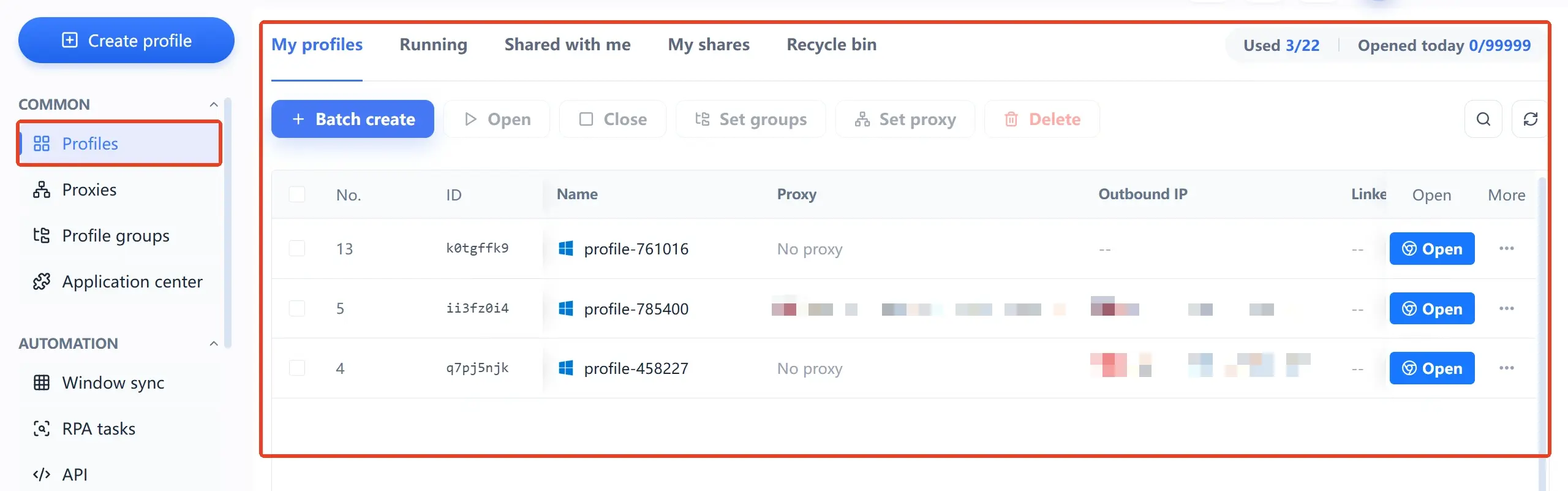
The list itself is your asset ledger: when something breaks, locate it by number and scope it by group, and troubleshooting turns from "digging through chat logs" into "taking a look." Stay on the 10-environment plan until you approach 10 accounts; around 50, most teams go straight to the 100-environment plan at $165 a year, which works out to about $0.13 per environment per month, so you never have to move house twice.
50-100 Accounts: Hand Repetition to Process, People Should Not Be the Bottleneck
Past 50, the "a person watches the environments" model itself hits its ceiling. What you manage now is three things: process, integration, and team. The what is MostMate page explains the three-entry framework as a whole; from a scale perspective each entry covers one stretch: window sync handles volume, running the same action across a batch of environments; the RPA template library (filter by platform, covering account warming actions on Facebook, TikTok, and more) carries fixed routines, and the task list traces every run back to the environment that executed it; the API switches on once you have a scheduling system or an admin backend, so environment status flows back on its own.
The team line turns from optional to mandatory at this tier, because the environment count now exceeds any single person's bandwidth. MostMate grants environment groups directly to members: they pick up environments by group and never see the parts they are not authorized for. Put these three mechanisms to work:
- Manage member identities and login verification separately. The super identity controls everything globally; a member identity only touches its authorized groups. With login verification on, a stolen account still cannot reach your environments.
- Member logs make every action traceable. Login logs, operation logs, environment sharing records, and environment transfer records are kept separately, so an incident can be pinned to a person, a time, an IP, and a device.
- Keep shared access tightened by default. The advanced settings at environment creation include an environment sharing access switch. Open it only when needed; do not flip everything on for convenience.
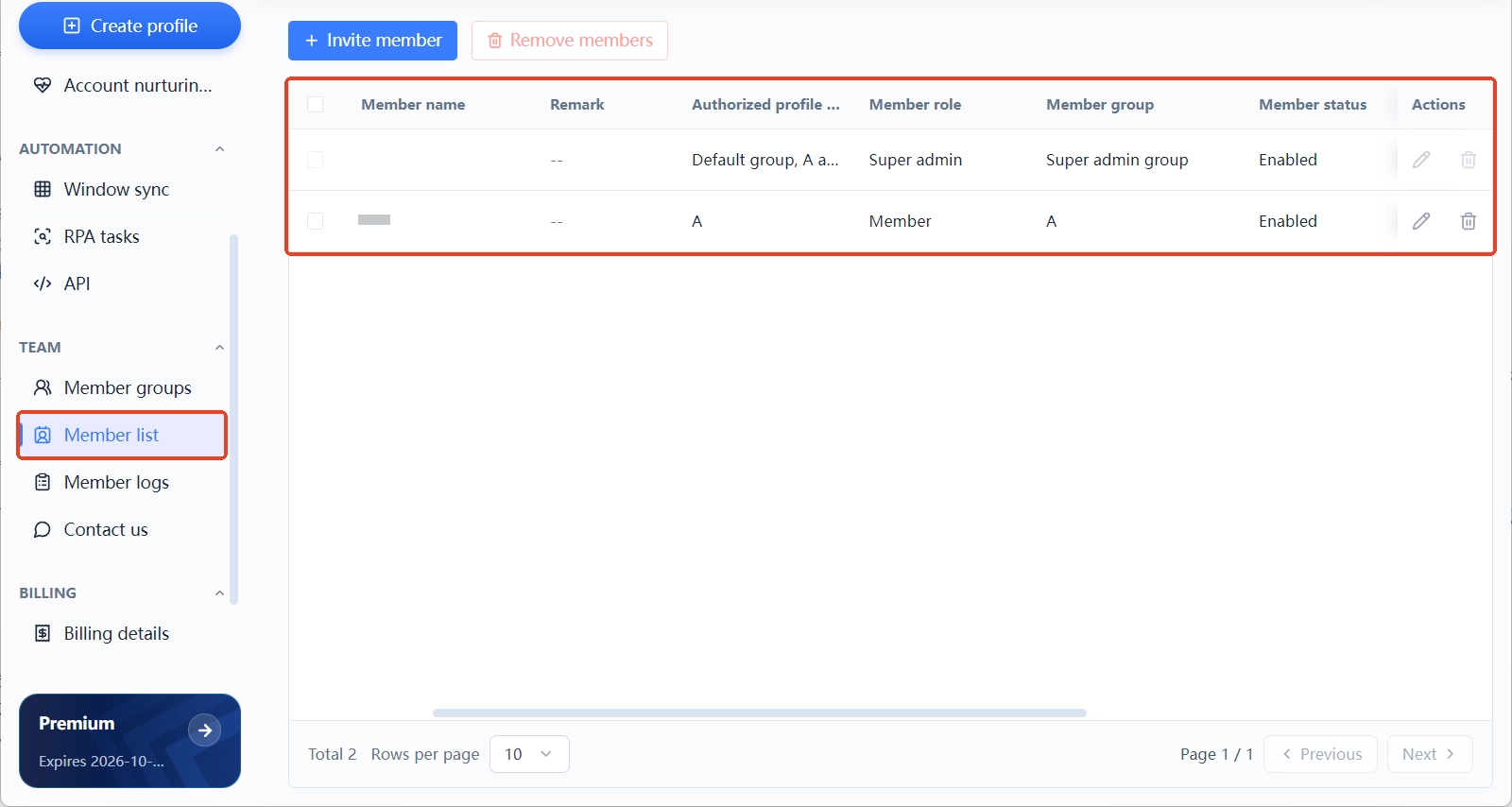
Credential management upgrades with the scale: every member signs in with their own account, because sharing one set of passwords is the most dangerous shortcut at this tier. One leaked password and every environment swings open at once. Password reuse has been an amplifier in multiple breach incidents; you can check whether a given set of credentials appears in known breach databases on the passwords page of Have I Been Pwned, and for the formal requirements on team identity management, see the authenticators and identity assurance section of the NIST digital identity guidelines. The tooling side has the boundary built in; do not dismantle it with a shared password.
Three Signals It Is Time to Move Up a Tier
You do not need to wait until the pain is unbearable. Three early signals exist, and any one of them means it is time to move:
- Finding an environment by scrolling takes longer than working in it. Status visibility has slipped; tier two's groups, notes, and numbers should go on now.
- You have done the same set of actions by hand for the third time this week. Check whether the template library has a match, and hand fixed routines to RPA.
- A member asks in the group chat who changed that environment. Authorization and logging are missing; the team mechanisms need filling in.
Each section above has the matching fix. Even if all three signals show up, do not switch everything on at once: roll them out in the order "groups first, then process, then team", and let each step settle before the next. This mirrors how MostMate itself layers from environment management to automation to team; the onboarding path is laid out in how to get started with MostMate.
Frequently Asked Questions
Do I really need an antidetect browser with fewer than 10 accounts?
Yes. Isolation is about safety, and it is cheapest to build early.
Can the free plan or the 10-environment plan carry 50 accounts?
No, and it would not be economical either. The free plan covers 2 environments, and the 10-environment plan will need upgrading well before 50 accounts. The 100-environment plan costs $165 a year, about $0.13 per environment per month, which is the right fit at this volume, and the per-environment price is lower too.
Do RPA and bulk actions overlap? Do I need both?
Bulk actions handle one-off tasks; RPA runs fixed routines. Bulk first.
What happens to environments when a team member leaves?
The environment transfer records in MostMate's member logs, combined with the environment sharing access switch, are built for this: revoke login verification and authorized groups first, then let the transfer records leave an audit trail, so environments stay with the team instead of the individual.
Final Thoughts
Scaling difficulty moves through three "problem swaps": tier one swaps in isolation discipline, tier two swaps in status visibility, and tier three swaps in process and team. Most management breakdowns trace back to a method left over from the previous tier. Use the signals to locate yourself, get your current tier solid, then climb. To try it at small scale first, download MostMate and start on the free plan; the full capability map is in the multi-account management overview, which pairs well with this piece.

MOSTMATE
Secure Multi-Account Management, Made Simple
Start with your first account and use MostMate to build safer, smarter, and more efficient multi-account operations.
- Independent profiles. Consistent identities.
- AI Automation · Account Health · Team Operations



