
More Than Isolation: How MostMate Manages Accounts, Environments, and Actions in One Place
Core takeaway: Environment isolation only solves the "don't link them" problem. Once you run dozens of accounts, the time actually goes elsewhere: finding environments, repeating the same moves, and collaborating across a team. MostMate puts all three into one client: at the environment level, lists, groups, and notes locate every account; at the action level, batch operations, window sync, and RPA fold repetitive moves into tools; at the collaboration level, group permissions and member logs draw clear boundaries. This article walks through that structure by asking one question: what are you actually managing every day?
Start with a familiar scenario: isolation is in good shape and every account has its own environment and proxy — yet thirty environments sit in a row and finding one takes half a minute of scrolling; giving a new account a proxy means clicking through forms one by one; three teammates share one set of environments and whatever changed lives only in someone's memory. Isolation is the baseline before work starts; management is the work itself.
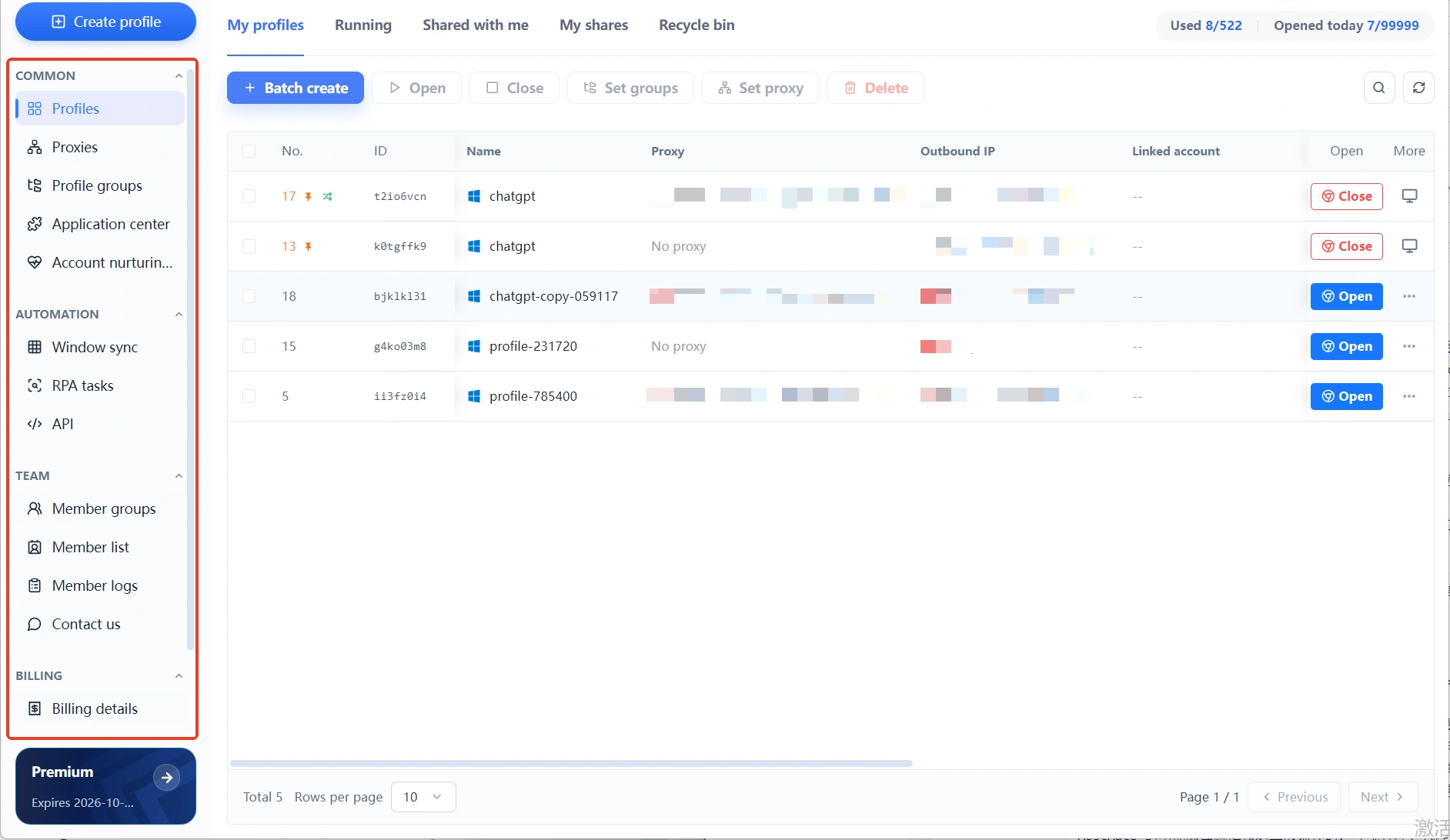
MostMate's client is built around exactly that daily routine. The left-hand menu falls into four groups — Everyday, Automation, Team, and Billing — matching the three things you manage: environments, actions, and people. The menu structure is itself a user manual; once you grasp the logic of the grouping, there is nothing to memorize.
The Three Things You Manage Every Day: Accounts, Environments, Actions
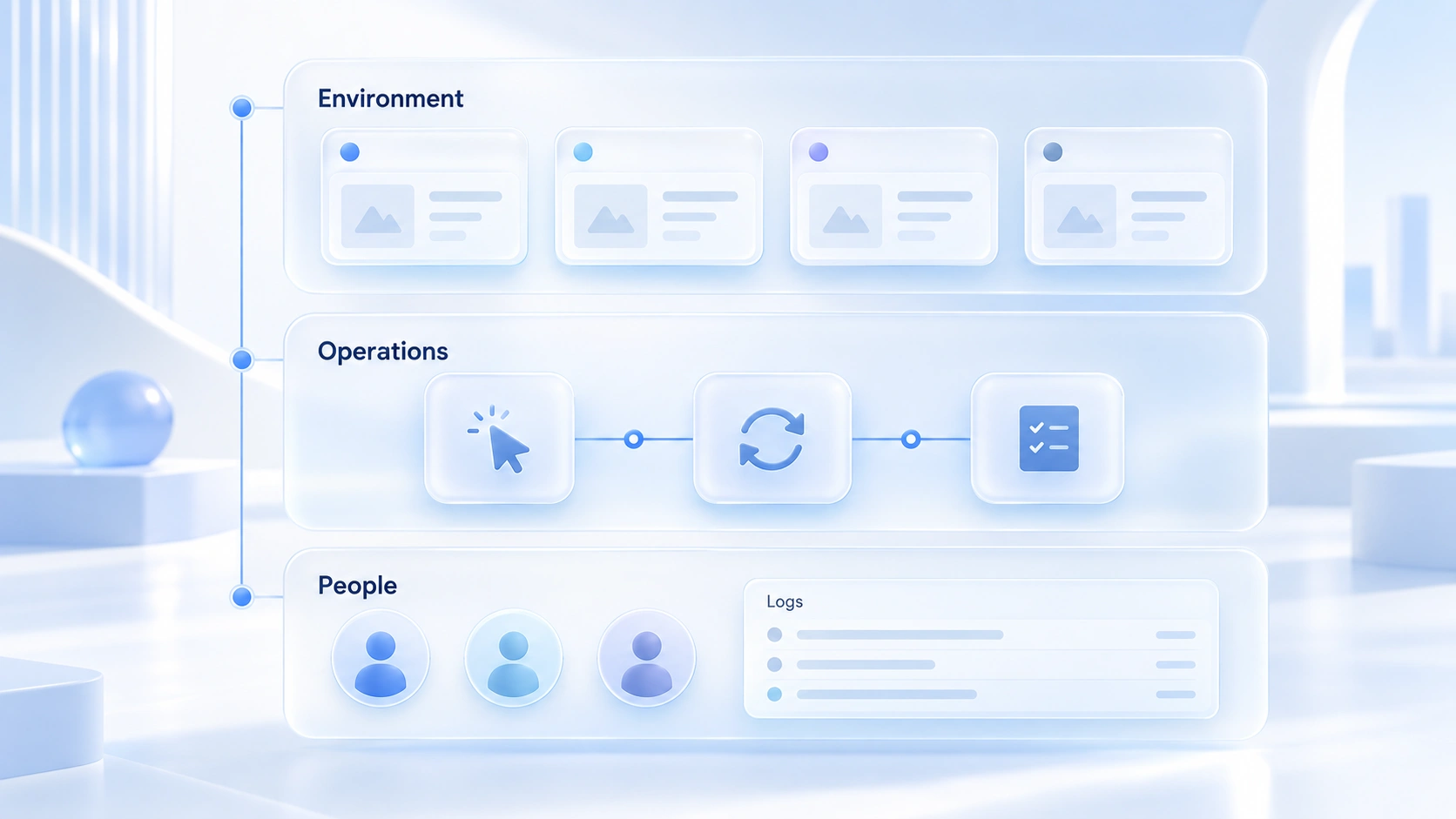
Many people read "multi-account management" as managing a list of accounts, but it really breaks into three layers. Environments are the carriers: behind every account sits a browser environment with its own fingerprint, cookies, proxy, and timezone. Actions are the daily grind: launching, assigning, grouping, batch toggles, synced clicks — these eat far more time than you would expect. People are the variable: as soon as accounts multiply, collaboration appears, and who may touch which environments and what they did needs structure, not goodwill.
MostMate's feature map spreads across these three layers: Environment Management, Proxy Management, and Environment Groups cover the carriers; Batch Operations, Window Sync, RPA, and the API cover the moves; Member Groups, the Member List, and Member Logs cover the people. Once you see the layering, you stop digging through menus — decide whether you are touching an environment, an action, or a person, and the entry point sits in that group. The underlying principles are explained in full on the What is MostMate page; this article sticks to the management moves themselves.
Environment Layer: One Row Is One Account's Complete Identity
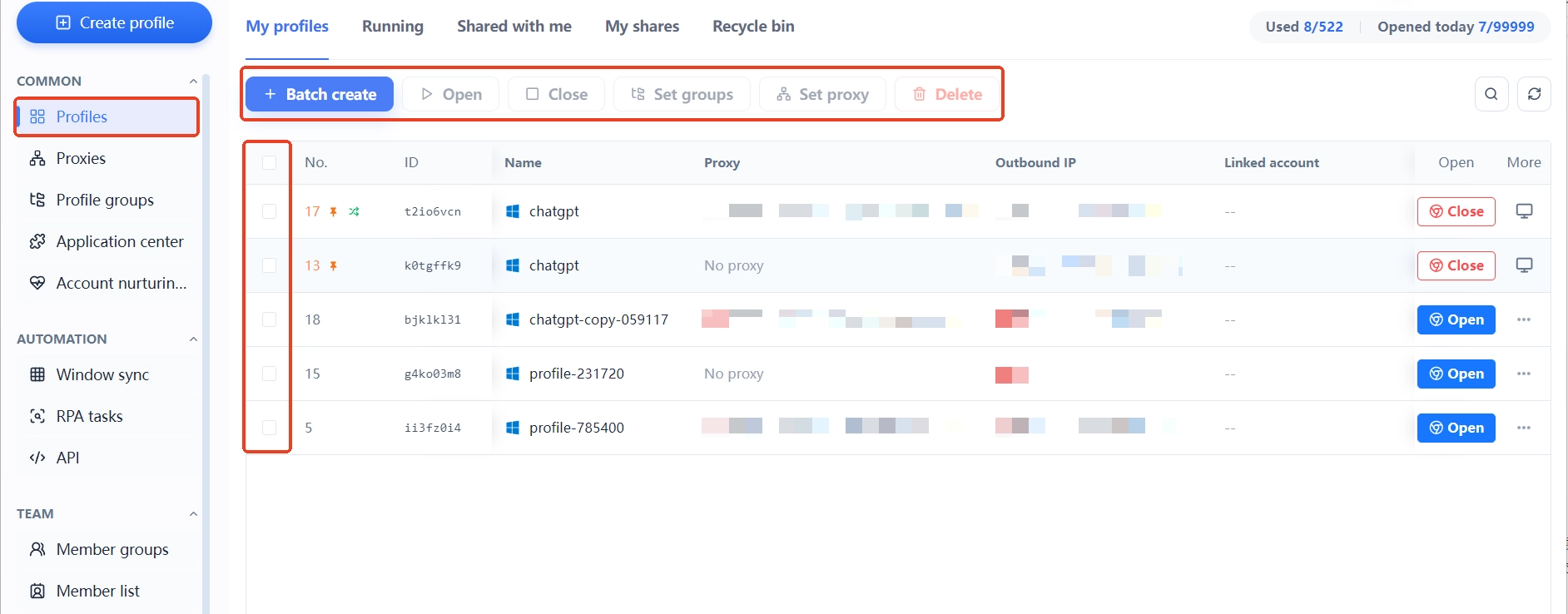
Open Environment Management and each row of the list shows: name, proxy, exit IP, bound accounts, group, notes, and a custom ID. This row layout is the starting point of the whole system — all the ownership information for an account is visible in a single row, without opening the details and checking item by item.
A few habits that make this layer work:
- Keep proxies in their own list first, then assign them to environments. Proxy Management is a separate menu that supports creating and batch-importing HTTP, HTTPS, and SOCKS5 proxies; once they are filled in, test connectivity and exit region first. Proxies never scatter across environment forms — when you swap one, you work from the list and nothing slips through.
- Group by business, not by date. Environment groups support notes and authorized members; splitting shops by platform and social accounts by product line beats sorting by creation date every time.
- Make notes and custom IDs say what things are for. A name like "FB-Main-US-0712" lets anyone take over and understand it on the spot, and the recycle bin still catches accidental deletes.
- Batch actions live at the top for good: new environment, open, close, set group, set proxy, one-click assignment — high-frequency moves you never click row by row.
For the isolation mechanics themselves (how fingerprints stay independent, how parameters line up), the articles How environment isolation works and Four design principles go into detail. The value of this management layer comes down to one thing: however good your isolation is, it is wasted if you cannot find the environment.
Action Layer: Folding Repetition into Tools
Once you pass ten accounts, manual clicking starts to cost more time than creating content. MostMate's Automation menu offers three tiers of tools, ordered by how repetitive the job is:
- Batch actions: when a set of environments needs the same group or the same proxies, the batch operations at the top of the list finish it in one pass.
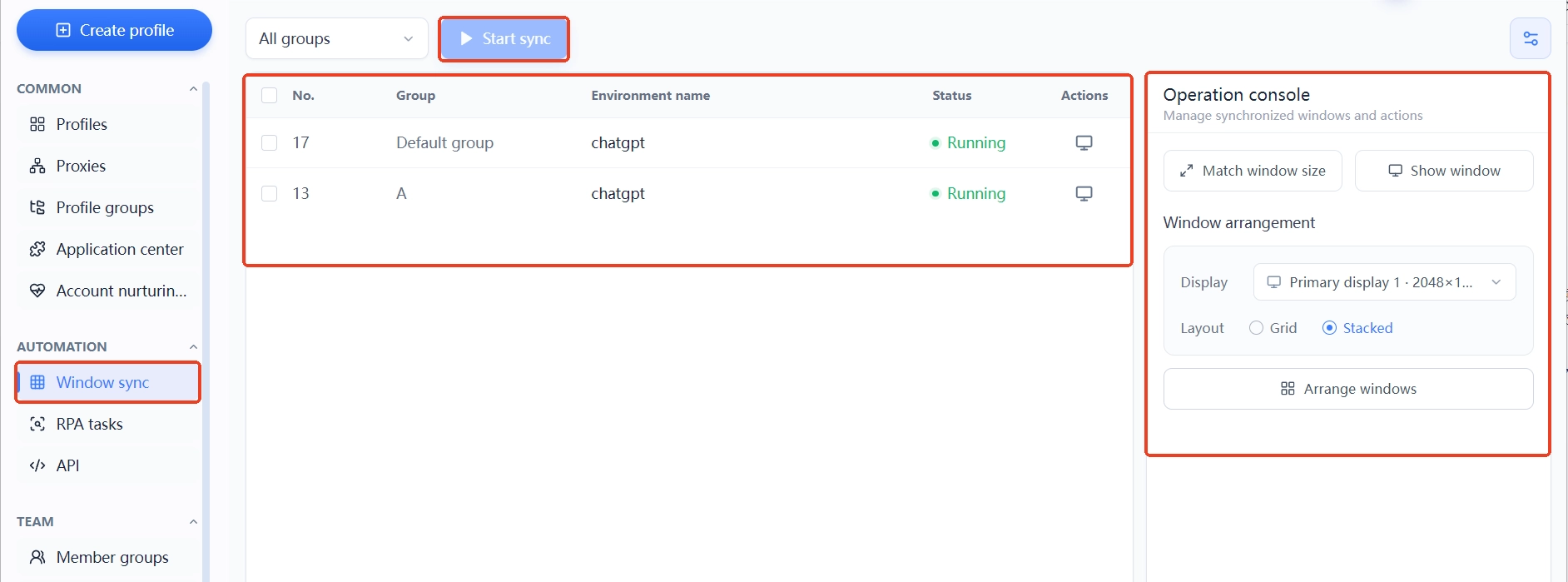
- Window sync: when several environments are open and need the same browsing steps, clicks and typing are mirrored across windows; the console gives you uniform size, fill the screen, and one-click arrangement, so tidy the windows first and then work. What gets synced is the action, not the identity — each environment's own parameters stay untouched.
- RPA tasks: hand fixed routines to the task library; templates are grouped by TikTok, Twitter/X, Instagram, Facebook, and YouTube and cover browsing, liking, commenting, publishing and the like; finished tasks can be traced by execution environment in the task list, so who ran what, where, is plain at a glance.
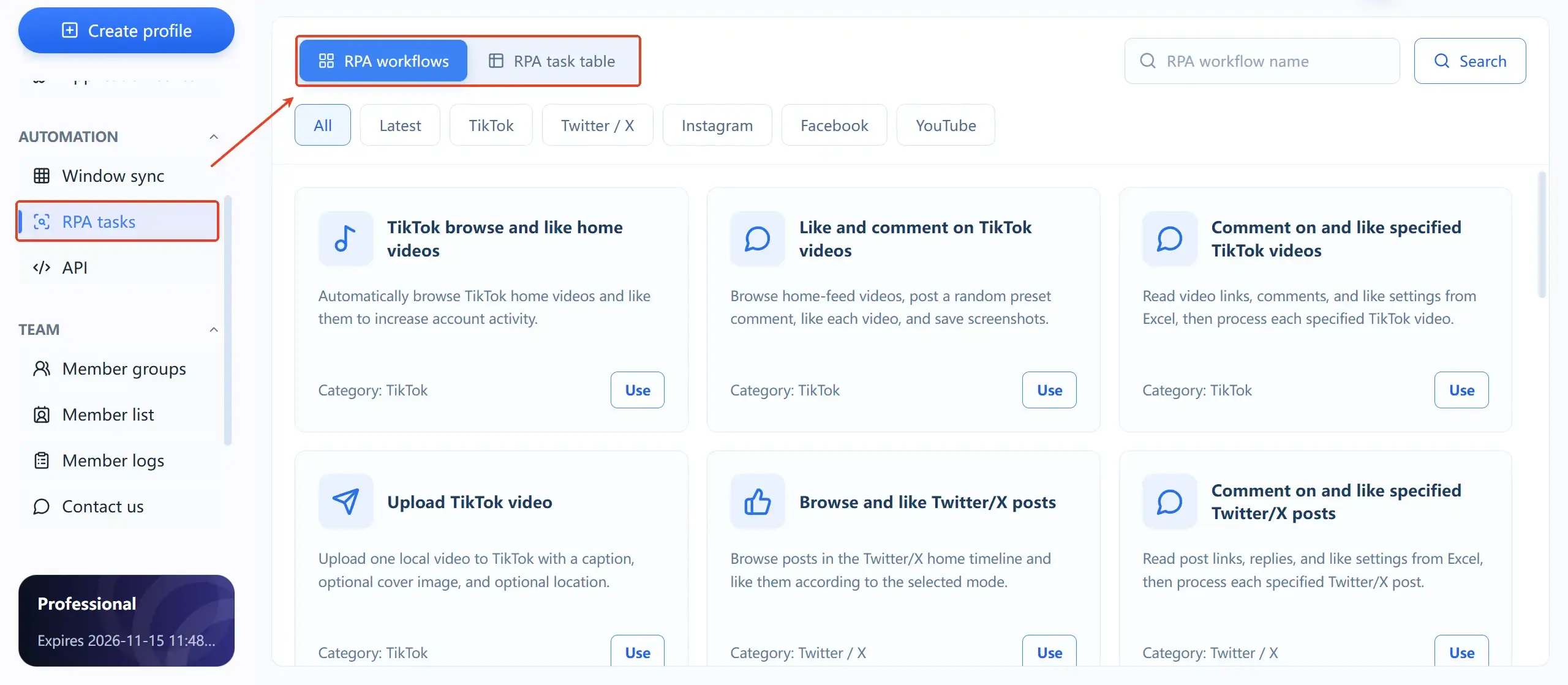
One level up sits the API: a local interface with a secret key; once security verification is switched on, every team member's requests have to pass validation. Business systems can connect to environments directly, and a local AI assistant plugs in the same way. The boundaries of the three tiers are clear: one-off identical moves go to sync, fixed routines go to RPA, and anything that must plug into your own system goes to the API. The details of choosing between them are covered separately; here we only build the map.
The first time you walk through this flow, just follow the order in Build your first environment from scratch; this article will not repeat the steps.
Collaboration Layer: Group Permissions and an Audit Trail
What breaks shared teams most often is not technology, it is boundaries. MostMate's approach is to wire environment groups straight into permissions: members are authorized by group and only see the environments assigned to them; member roles come in two tiers, super admin and member, with login verification and last login time shown in the list.
Member logs are the real safety net, split into four tabs: login logs, action logs, environment sharing records, and environment transfer records; every entry stores the time, the action type, the member, IP information, device name, and operating system. When something goes wrong, you follow the logs — no memory games, no guessing. Environments can be shared and transferred between members, and transferring environments on handover is far cleaner than handing over the login email.
Find a Feature by Task: A Capability Map
Finally, the whole article folds into one map. Come with a task; the matching entry points are below:
- To keep accounts unlinked: one account, one environment, one proxy — prepare the lines in Proxy Management first;
- To locate an environment: environment list plus groups plus notes, with naming conventions in place first;
- To cut out repetitive moves: one-off identical actions go to window sync, fixed routines go to RPA, system integration goes to the API;
- To hand over or co-manage: authorize members through environment groups, and move ownership through environment transfer records;
- To check who did what: filter member logs by time and member across the four tabs.
Beyond picking capabilities, if you are still weighing whether this kind of tool is worth it, Who is MostMate for sets out criteria by account scale. Management, at its core, is about gathering what is scattered across desktops, documents, and verbal agreements into structure; once the structure is built, growth stops being scary.
FAQ
Does MostMate manage accounts or browser environments?
The unit of management is the environment. Every account's fingerprint, cookies, proxy, and notes live on the environment; accounts attach to their environment through the "bound accounts" field, so finding the environment surfaces everything about the account.
Can the free plan use these management features?
The free plan includes 2 environments and 2 members, and the environment list, groups, proxy management, and team authorization are all within its scope. The features are complete in the free tier — the limit is quantity, not capability.
Window sync or RPA — which one?
It depends on how repetitive the job is. A few windows doing the same steps right now: window sync. A fixed routine you run every day: set it up as an RPA task. Connecting to your own business system: the API. They are not mutually exclusive — the same set of environments can use all three.
Can team members see all environments?
No. Members are authorized through environment groups and only reach what is assigned to them; logins, actions, sharing, and transfers are all logged, so changes in environment ownership can be traced.
Closing
Isolation decides whether accounts survive; management decides whether you can scale. MostMate folds environments, actions, and people into one client, and every menu outside Billing serves exactly those three things. Structure comes before scale — to put the management framework in place before your accounts multiply, you can download MostMate and start using groups and proxy management on the free plan.

MOSTMATE
Secure Multi-Account Management, Made Simple
Start with your first account and use MostMate to build safer, smarter, and more efficient multi-account operations.
- Independent profiles. Consistent identities.
- AI Automation · Account Health · Team Operations



