
Instagram New Account First Two Weeks Checklist: Action Volume and Pacing First
Core takeaway: Instagram gives new accounts roughly half the interaction headroom of aged ones. What you do in the first two weeks decides whether the account holds its ground. Week one locks down the environment, proxy, and profile; week two lets engagement climb step by step. Mass following and bulk DMs stay off the table the whole time. Pacing matters more than total volume. Twenty follows crammed into one hour are far more likely to trigger a limit than fifty spread across a day.
Instagram is one of the least trusting platforms for multi-account operators. In the first days after signup, its risk system scores every action on that device against half the usual limit, and fresh accounts in a matrix get the strictest treatment. MostMate is a tool built for exactly this: a fingerprint browser that gives every account its own isolated environment. This article covers what goes beyond the environment: what to do each day in the first two weeks, how much, and which actions to never touch.
Why the First Two Weeks Draw the Most Scrutiny
A new account's risk threshold is roughly half that of an aged one, and that is the underlying reason to move slowly in the first two weeks. Instagram has never published official limits, but years of community testing point the same way. For accounts under three months old, the safe follow range sits at 5 to 15 per hour and 20 to 50 per day. Accounts running for over a year can handle 15 to 20 per hour and 150 to 200 per day. At the same action volume, a new account is far more likely to trip a limit.
Two sources cross-check these ranges. One compiles daily and hourly limits per action for 2026 (unfollr.com), the other breaks them down by account age (socialstud.io). Both reach the same conclusion: the younger the account, the tighter the allowance, and any violation record tightens it further.
Speed patterns matter more than total volume. The risk system looks at how actions are distributed over time: thirty likes tapped three seconds apart are far more dangerous than thirty likes spread over thirty minutes. High-frequency activity at three or four in the morning also gets flagged more easily, because it does not match how a normal person uses the app. Device and IP signals feed into the score too. Registering new accounts repeatedly on one device, or an IP location that keeps jumping, pushes the threshold even lower.
This mechanism sets the order of the checklist: clean up the device and network signals first, then talk about volume.
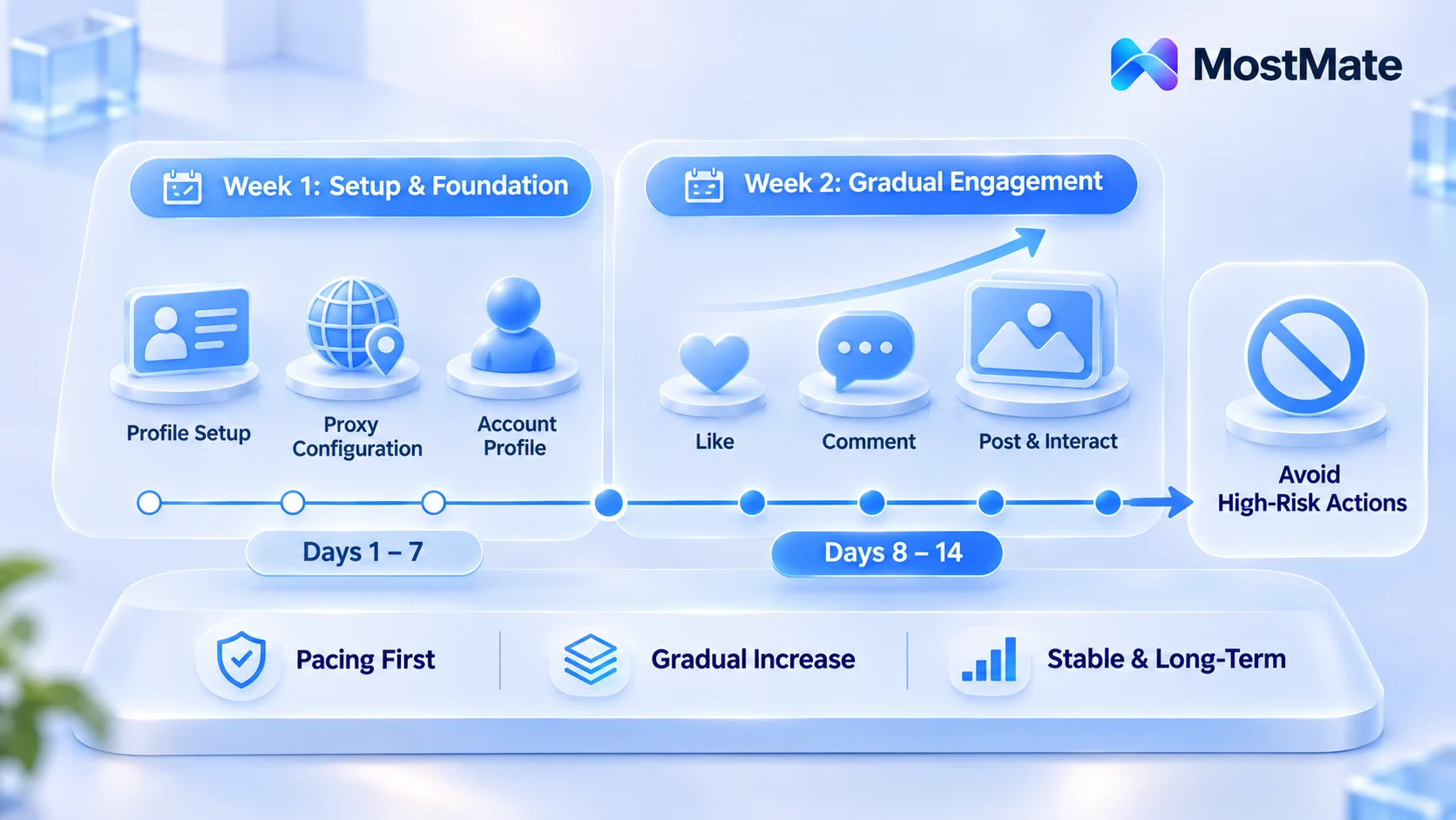
Week 1: Lock Down the Environment and Profile
The goal of week one is not growth. It is making the account look like a normal person using the app normally. The work comes down to three things.
1. Fix the environment, set it up once. Each account gets its own isolated environment, fingerprint parameters matched to the proxy's region, and the proxy never changes midway. An IP that jumps from the US to the UK and back is more damaging than any action overrun. Once the environment is built, run through the new environment setup checklist and verify proxy, fingerprint, and timezone item by item before logging in. For how to pick a proxy and what kind of IP quality puts an account at risk, the IP bans and proxy quality guide lays out the criteria.
2. Fill in the profile day by day, not all at once. On signup day, add only a profile photo and username. Add a bio the next day, then the remaining profile fields on days three or four. An account whose profile is complete in one sitting looks exactly like a batch-registered template account.
3. Browse, don't engage. For the first three to five days, scroll recommended content and popular posts in your target niche so the platform records normal browsing behavior. Liking and following on day one tells the system this account arrived with a mission.
By the end of week one, the account should have a stable environment, a few days of browsing history, and a completed profile.
Week 2: Ramp Up Engagement Step by Step
Week two is when engagement starts, with volume climbing day by day. Hold each level for one or two days and watch the response before moving up.
- Follows: start at 10 to 15 per day, at least a few minutes apart, and stay under 30 for the whole week. Keep targets in the same niche as your profile and browsing history; random following is itself an anomaly signal.
- Likes: 20 to 30 per day, tied to browsing. Like what you actually see instead of scrolling lists to tap in a row.
- Comments: keep it at zero for the first three days, then at most one or two a day, written as genuine reactions to specific content. Copy-pasted template comments get detected no matter how many you post.
- Posting: you can publish your first post or story in week two. Marketing content with links waits; not a single one goes out in the first two weeks.
Keep each day's total action budget within two to three hours and spend the rest of the time browsing as usual. When the budget runs out, stop. Do not probe the ceiling.
Actions to Avoid Entirely in the First Two Weeks
Some actions are not a volume question. For a new account, a single instance is enough to flag it.
- Follow then unfollow right away. This loop is a top enforcement target, detection in 2026 is much faster than it used to be, and one round on a new account can trigger an action block.
- Mass DMs. The threshold for a new account messaging non-followers is extremely low; a dozen or so messages can get it held, and DMs with links are the worst zone.
- Authorizing third-party apps. Any third-party tool that requires Instagram login wants your password or an authorization token. The risk for a new account is more than twice that of an aged one; do not connect a single one in the first two weeks.
- Duplicate comments and reposts. Post the same text in multiple places and the system treats it as spam outright.
- Batch registration on one device. Register multiple accounts on one device fingerprint and the whole device group gets downgraded.
Turning the Plan into Daily Tasks with MostMate
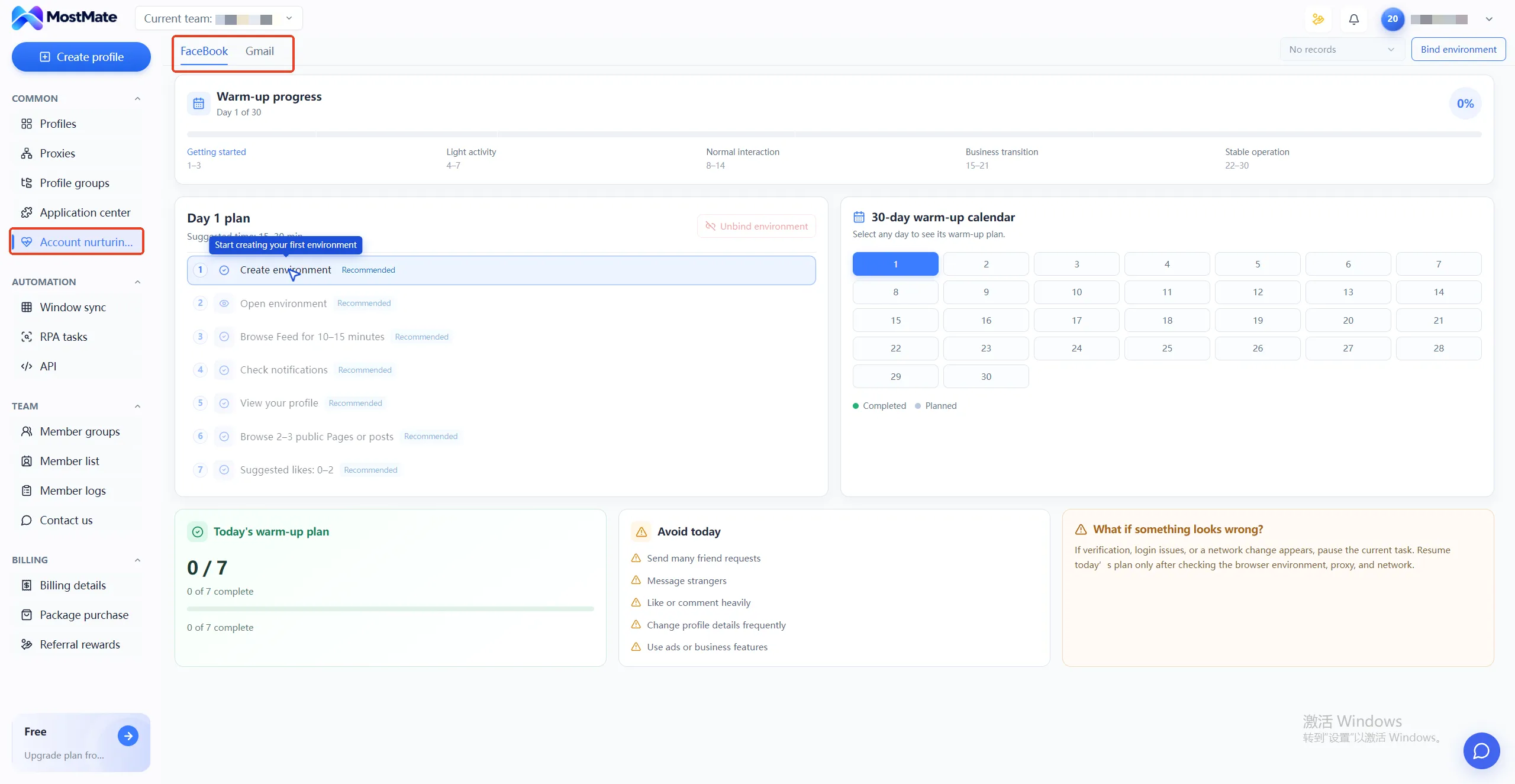
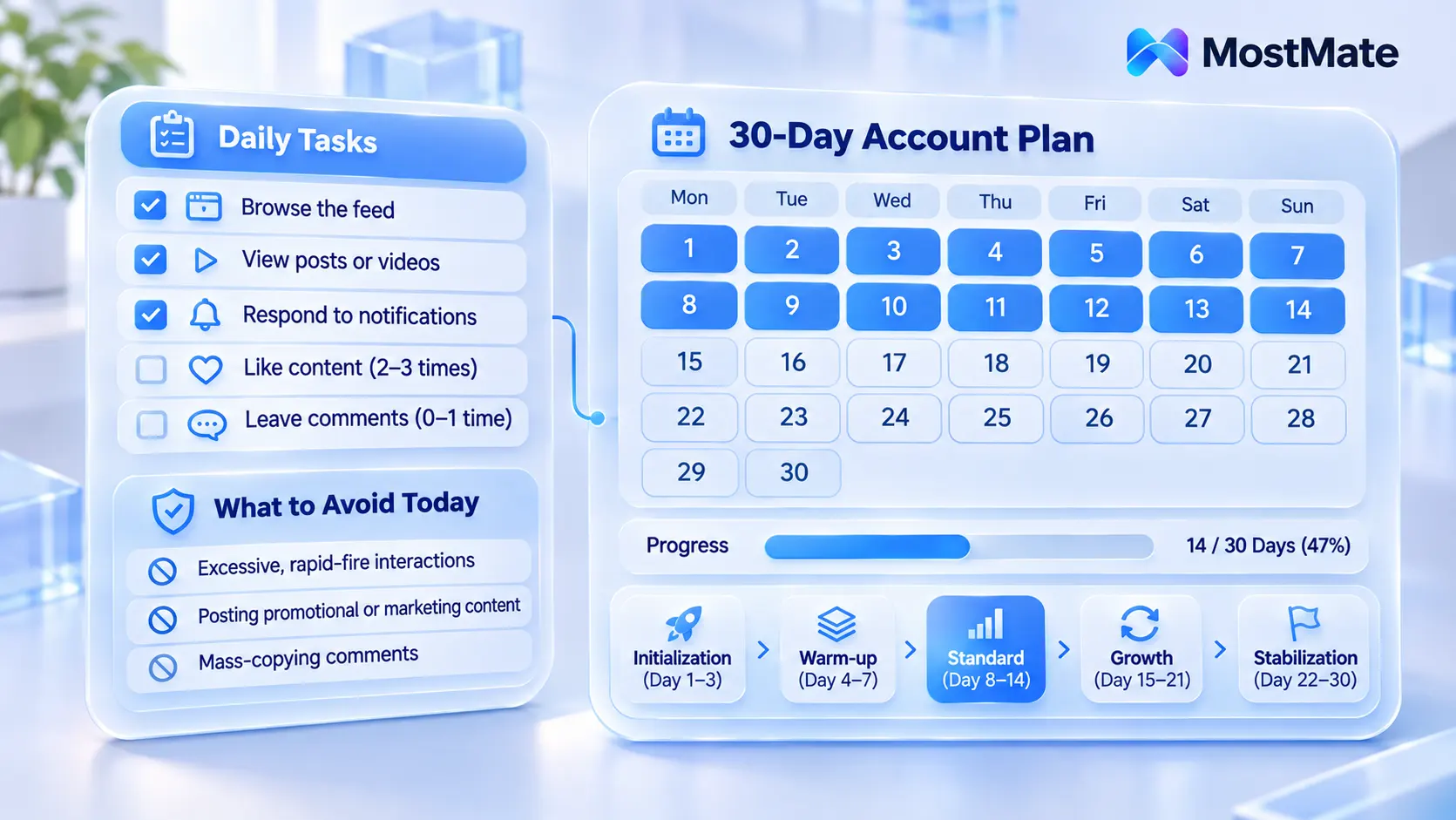
The hard part of a checklist is not understanding it, it is sticking to it. Running a dozen environments side by side, pacing from memory will slip sooner or later. Account warming management builds this process in as a native feature, with a five-phase rhythm covering thirty days. Initialization covers days 1 to 3, warm-up days 4 to 7, and normal engagement days 8 to 14, which maps exactly onto the first two weeks in this article.
Each day, open the environment and the day's tasks appear as a list: browse the feed, view posts or videos, reply to existing notifications, 2 to 3 suggested likes, 0 to 1 suggested comments. Tick each one off as you go. The page also shows a "don't do today" reminder listing three action types: continuous high-volume engagement, publishing marketing content, and bulk copy-paste comments. It follows the same logic as the forbidden-action list in this article. A 30-day calendar marks completion day by day, so you can see at a glance which environments kept pace and which fell behind.
Multi-account teams can also map environments to people with member groups, assigning permissions like environment management and proxy management per group. Who handles which accounts and what day they are on gains one more layer of enforcement. For the isolation principles on the environment side and how they pair with team roles, the environment isolation for multi-account separation guide goes deeper.
How to Slow Down When Limits Show Up
If likes start failing occasionally or the follow button keeps spinning during the ramp-up, the right response is to cut that day's volume in half and observe for a day, not to try again in a different time slot. Repeated retries stretch a 24 to 48 hour limit into something longer. When a verification popup appears on your network, confirm the proxy and browser are healthy first, then decide whether to continue the day's tasks. The full sequence is in the account warming troubleshooting guide.
If a limit has already landed and likes and comments are failing in batches, the focus shifts from prevention to recovery. The action block triggers and recovery pacing guide takes over at this stage.
FAQ
How many follows per day are safe for a new Instagram account?
For accounts under three months old, the community-observed safe range is 10 to 30 per day and no more than 15 per hour, spread across several sessions. These are not official figures; Instagram adjusts them based on account history. Staying at the bottom of the range long term is always the safer call.
Can I post content in the first two weeks?
Yes, but keep it low frequency. Put the second post after week one ends, favor an image post or story, and keep links out of the caption. Schedule anything with a promotional link only after your engagement rhythm has stabilized.
Does a new account need the same IP for the first two weeks?
Yes. A frequently changing IP location weighs more than action overrun, so once a proxy is chosen it stays for the entire warming period. The only reasonable reason to switch IPs in one environment is a proxy provider outage, and even then watch how the account reacts afterward.
Can an account recover after being limited?
A first action block usually lifts on its own within 24 to 48 hours. Stop all proactive engagement during that window and do not keep tapping retry. For specifics, see the action block guide.
Closing
Avoiding limits in the first two weeks is not about doing less. It is about doing things on schedule: lock down the environment and profile in week one, ramp engagement step by step in week two, and never touch the forbidden actions. Once a matrix grows, keeping pace in your head stops being realistic; handing the schedule to a system is what holds up. If an account does get banned, the multi-account ban containment guide covers damage control and isolation, but the cheaper option is always making sure the account never gets there.
Download MostMate now and run the week-one checklist with the two free environments to verify that your setup and warming rhythm hold steady.

MOSTMATE
Secure Multi-Account Management, Made Simple
Start with your first account and use MostMate to build safer, smarter, and more efficient multi-account operations.
- Independent profiles. Consistent identities.
- AI Automation · Account Health · Team Operations



