
Instagram Likes and Comments Restricted? How to Identify the Cause and Restore Engagement
In the morning you could like posts and reply to comments as usual. By the afternoon, likes stopped registering, comments refused to send, and the page only showed a notice that your action was restricted.
Strangely, your profile still loads, Reels still play, and DMs still arrive. It seems only the engagement features are affected. At this point some people tap the like button repeatedly, some delete and repost their comments, and others rush to switch devices or networks just to finish the day's engagement tasks.
A failed like or comment does not necessarily mean your account has been disabled. Temporary engagement restrictions, content-related issues, and app errors can look alike. Checking which features are affected and whether the platform has given a clear notice, before deciding what to do, helps narrow things down far better than endless retrying.
Why Does Instagram Restrict Likes and Comments?
Engagement restrictions rarely appear out of nowhere; in most cases you can trace a change in the task schedule before the problem started. Three common scenarios each point to a different direction when you review them, and none of them amounts to a final verdict on why the block happened.
Engagement Tasks Suddenly Intensified
An account that normally replies to a few comments a day suddenly likes and replies to dozens of posts for a campaign, and the restriction shows up around that day. When reviewing the tasks before the restriction, note whether likes and comments spiked that day, whether similar content was posted in batches, and whether other members or tools were involved. Recording these changes helps reconstruct a timeline, but it cannot by itself prove which action triggered the restriction.
Comment Tasks Used the Same Content
For efficiency, team members paste the same promotional reply under multiple posts, and a batch of nearly identical comments appears within a short time. Check two things during the review: whether the comments actually relate to the posts, and whether the task plan called for repeated posting. Repeated content can be a clue pointing to abnormal engagement, but it is not the action block itself, and rewriting comments does not guarantee the restriction will be lifted.
Account Authorization or Source of Activity Changed
A new third-party service was connected recently, or the account was just handed over to another member, so the source of activity changed and so did the behavior pattern. Focus your review on authorization records, activity times, and account security notices: check whether any unrecognized app holds permissions and whether any engagement was not initiated by you.
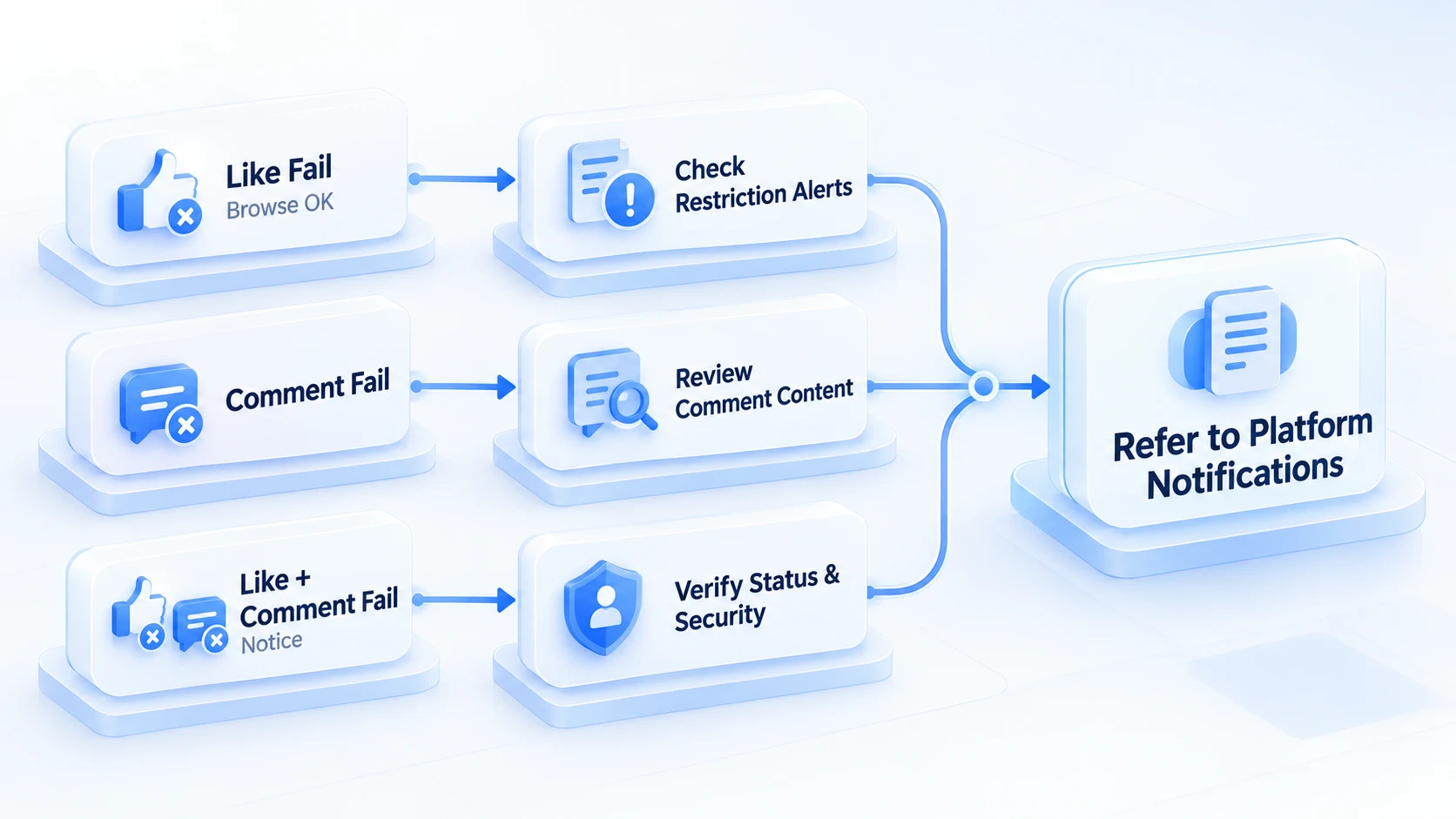
Likes and Comments Failing: Which Restriction Is It?
Check the scope of the restriction: features first, then notices.
| Account behavior | What to check first | Where to go next |
|---|---|---|
| Likes fail, browsing works | Whether a clear restriction notice appears | Pause repeated liking and record the notice |
| Comments fail, likes work | Whether only comments are limited | Check comment notices and avoid repeats |
| Both likes and comments fail | Whether an account-level notice exists | Check in-app notices and account status |
| Multiple issues plus unknown login alerts | Whether there is an account security issue | Check login activity and security notices |
For example, if likes fail but comments still work, the current issue has not affected both features at once. If neither likes nor comments go through and the app shows a clear action restriction notice, check your account status and platform notices next. How features behave only helps narrow the review; it cannot replace the restriction explanation the platform provides.
Instagram Action Block Lifted: What Should You Do?
When Instagram limits your likes or comments, confirm the scope of the restriction first, then decide whether to appeal. Some features being unavailable does not mean the whole account is disabled. If the platform shows a clear action restriction notice, follow it first instead of guessing when the restriction ends by trial and error.
You can troubleshoot through the following four steps.
- Save the restriction notice, and note when it appeared and which features are affected.
- Check the in-app account status, notifications, and login security information.
- Use the recovery or appeal entry the platform provides as indicated, and submit truthful information as required.
- If there is no clear restriction notice, then check the app version, content-related issues, and service errors.
During the review, two things are especially worth avoiding: one is to keep tapping like and resending comments after seeing the restriction notice, trying to confirm whether the feature is back; the other is to submit the same appeal over and over before verifying the account status, or to hand the account to a third-party service that claims to lift blocks for a fee.
When you notice the problem, save a screenshot of the notice and record when it appeared. If the platform offers a clear recovery or appeal entry, follow the page instructions. If there is no clear explanation, then check the app version, your network connection, and the relevant content. For restriction causes you cannot confirm on your own, defer to Instagram's account status, official notices, and the outcome the platform reports.
For Instagram accounts managed by several people, add one more step to the review. Confirm who carried out which engagement tasks, and when, before the issue occurred.
If team members separately handle likes, comments, and DMs, the error message alone can hardly reconstruct what happened before the issue. Record the time of the issue, the affected features, the member on duty at the time, and whether any third-party authorization or task schedule changed recently, then cross-check against Instagram's account status and security notices.
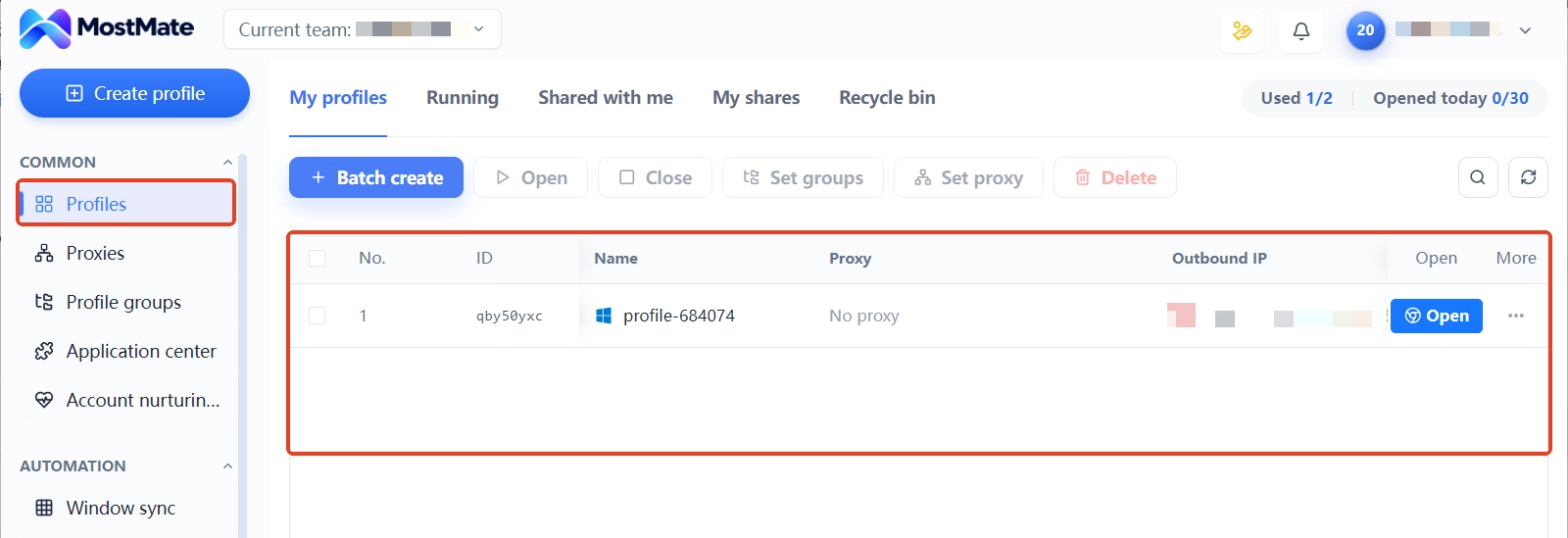
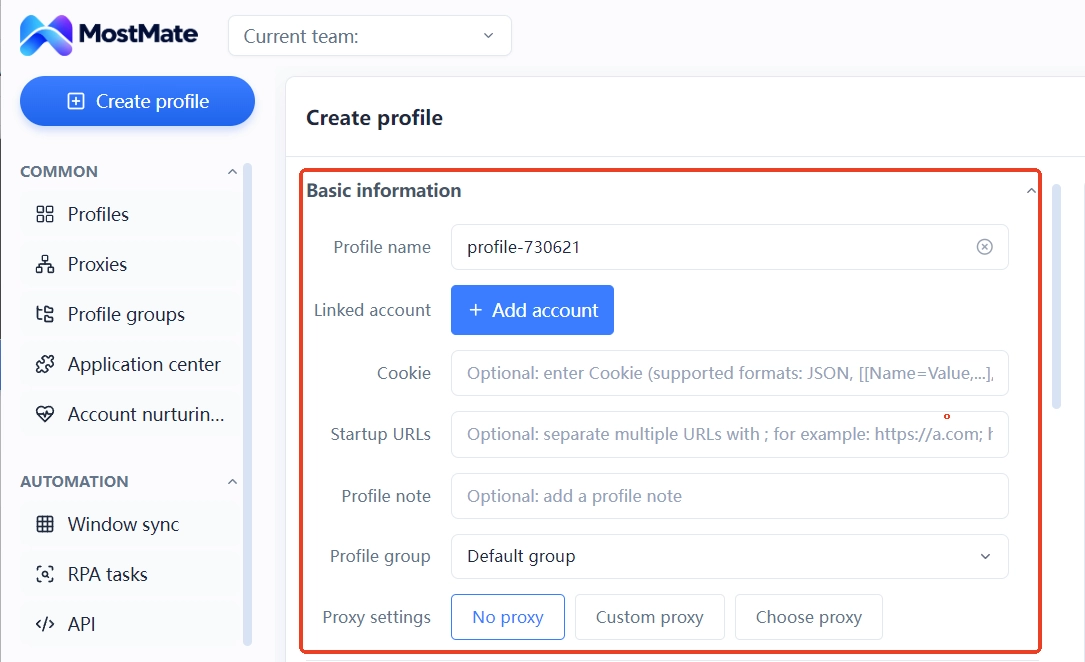
With MostMate, you can keep different accounts in separate browser environments and use environment names, notes, and member activity logs to organize account ownership and what happened. This is not about figuring out why Instagram restricted engagement; it is about finding the right account, the right owner, and the right records during the review, so team members avoid repeated attempts or missing information.
After the Restriction Is Lifted, How Should the Team Adjust Tasks?
Having engagement restored is not the same as going back to the old schedule. Work paused during the issue needs to be reassigned. Do not send everything in one burst.
- Reschedule the engagement tasks that were paused during the issue instead of sending them all at once.
- For tasks that produced repeated comments before, check whether the content truly responds to the post.
- If several people share one account, make clear who is responsible now and which tasks are paused or resumed.
- If a third-party service is in use, verify its authorization and source of activity before deciding whether to keep it.
For accounts managed by several people, handling an issue should not stay buried in chat history. The team needs to know which account had the problem, who follows up, which engagement tasks are paused, and who decides when to resume them.
With MostMate, you can separate accounts through independent browser environments, and note each account's purpose, owner, and the time of its most recent issue in the environment name or remarks. Combined with member permissions and activity logs, the team can verify related actions and handovers, so a new member does not rerun tasks that were already paused after taking over without knowing the earlier progress.
For example, if an account's likes and comments are restricted in the afternoon, the owner can pause the related engagement tasks for that account and record the time and progress. When someone else takes over, they check the existing records first and then decide the next step based on Instagram's notices, instead of trying likes again or resending comments.
Note that MostMate manages browser environments and team workflows. It cannot read Instagram's internal block decisions, nor can it replace platform appeals or guarantee that an account will be restored. Its value lies in making account ownership, activity records, and task handovers clearer. What the product does and does not manage can be checked against the feature list on the MostMate product page.
Frequently Asked Questions
How Long Does an Instagram Like and Comment Restriction Usually Last?
There is no fixed time. The pace of recovery depends on the type of restriction and how the platform handles it. You cannot infer from a failed like or an unsent comment whether it will last hours or days. Follow the notices shown in the app.
Instagram Browsing Works but Likes and Comments Don't. Is the Account Banned?
Not necessarily. Some features failing does not mean the account is disabled. What matters is whether there is an account-level restriction notice, whether other features work, and whether there are login anomalies.
My Instagram Comment Won't Send. Does Deleting and Resending Help?
If the comment already shows a restriction notice, deleting, editing, or resending repeatedly may not help. Save the original notice first. Confirm whether there is a clear comment restriction before deciding what to do next.
Can Switching IP or Devices Lift an Instagram Action Block?
There is no guarantee. Failed likes and comments may involve account status, engagement behavior, content restrictions, or app errors. Simply changing the network or device cannot confirm the cause, and it is not a condition for lifting the restriction.
After an Instagram Action Block Is Lifted, Can It Happen Again?
It could. Having engagement restored does not mean the platform will never restrict again. After recovery, scheduling engagement around team tasks is steadier than making up all the paused work in one go.
Confirm the Impact First, Then Talk About Recovery
When Instagram limits likes and comments, what matters more than rushing to finish the day's tasks is confirming what impact the account is under and which changes before the restriction are worth checking. For team-run accounts, pausing related tasks promptly, naming an owner, and recording the time of the issue reduce the confusion of many people retrying at once. As for when the action block will be lifted and whether an appeal is needed, still follow the notices and outcomes Instagram provides.
Conclusion
When Instagram likes and comments are restricted, solving the current issue is only the first step. If the team will keep managing multiple accounts, what deserves attention next is: who owns each account, what activity records exist when an issue occurs, and when the paused tasks will be rescheduled. With this information organized, the team will not need to dig through chat history next time, and repeated actions will be fewer.
If you run daily operations on multiple Instagram accounts, take a look at MostMate's product features: separate accounts through independent browser environments and organize your team's workflow with environment notes, member permissions, and activity logs. When you are ready to start, visit the MostMate website download page for product details and installation.
Note that browser environment management cannot directly remove an Instagram action block. Whether an account regains engagement still depends on the type of restriction and the platform's handling. MostMate is better suited to helping teams keep account management, issue records, and daily task handovers clear.

MOSTMATE
Secure Multi-Account Management, Made Simple
Start with your first account and use MostMate to build safer, smarter, and more efficient multi-account operations.
- Independent profiles. Consistent identities.
- AI Automation · Account Health · Team Operations



