
Why Do Accounts Get Banned Even with Perfect Fingerprint Settings? Beyond Device Fingerprints, How Risk Systems Read Behavioral Signals
Core takeaway: The parameter layer answers whether the device looks real; the behavior layer answers whether the operation looks human. Only together do they form a complete risk picture. Models read mouse paths, typing rhythm, session length, and more. Some of it improves with habit and scheduling; the rest only time can build. When parameter checks come up clean, it is time to look at the behavior layer.
Second week into account warming, the account got banned. You run it through fingerprint testing sites item by item: Canvas consistent, timezone aligned, resolution clean. Nothing wrong at the parameter level. Cases like this are common in multi-account operations. What trips people up is this: everything configurable has been configured, so what variable is left? The variable sits in the behavior layer, the record of how you operate the account. It does not follow browser configuration, and tweaking parameters will not change it.
MostMate gives each account its own environment, with fingerprint configurations and data kept separate, which solves the device layer. The behavior layer has no one-click switch; it is built through rhythm. This article explains which behavioral signals risk systems still read, how models use them, which behaviors can be trained and which cannot, and how to schedule that rhythm inside MostMate.
Beyond the parameter layer: what else risk systems read
Fingerprint parameters are fixed once configured; behavioral signals are a continuous stream covering the account's entire usage. The parameter layer is about what the environment looks like; how browser fingerprints work breaks down Canvas, WebGL, and other collection surfaces, and that is what testing sites measure. For how far your configuration needs to go, most indicators in the five signal zones of the Iphey trust score guide can serve as a reference.
The behavior layer is entirely different. The anti-fraud industry calls it behavioral biometrics. SEON's behavioral biometrics guide defines it as analyzing how a person types, moves the mouse, and navigates between pages, and building a real-time behavioral profile from that. This verification continues after passwords and device checks pass, throughout the whole session.
Sardine puts it more directly. Device intelligence is standard equipment, but IPs can be masked, fingerprints tampered with, and devices spoofed; the device layer alone is no longer enough, and behavioral signals fill the gap of "who is actually behind this device" (see Sardine's discussion of device and behavior signals). The two layers stack; neither replaces the other. Mismatched parameters trip the alarm immediately. With every parameter correct, the review is not over; it has simply moved to another layer.
The behavioral signal list: from mouse paths to session length
The behavioral signals models read fall into four groups, each tied to concrete actions. Check this list to see where your daily operations leave traces.
- Input behavior: typing rhythm, key intervals, whether forms are typed or pasted, whether autofill is used.
- Movement behavior: the curvature and acceleration of mouse paths, scroll speed, click frequency.
- Session behavior: session length, pages viewed, dwell time per page, whether the path taken is one a normal person would take.
- Rhythm behavior: active hours, intervals between actions, the wait from signup to the first action.
For account signups, Sardine also calls out two signals that are easy to overlook: pasting a card number in, and switching tabs midway through a form. Real people handling genuine business do both often; scripts rarely do, so these are evidence of "being human". Conversely, a mouse moving in a perfectly straight line from start to button, or dwell times exactly equal every time, are evidence of "being a script".
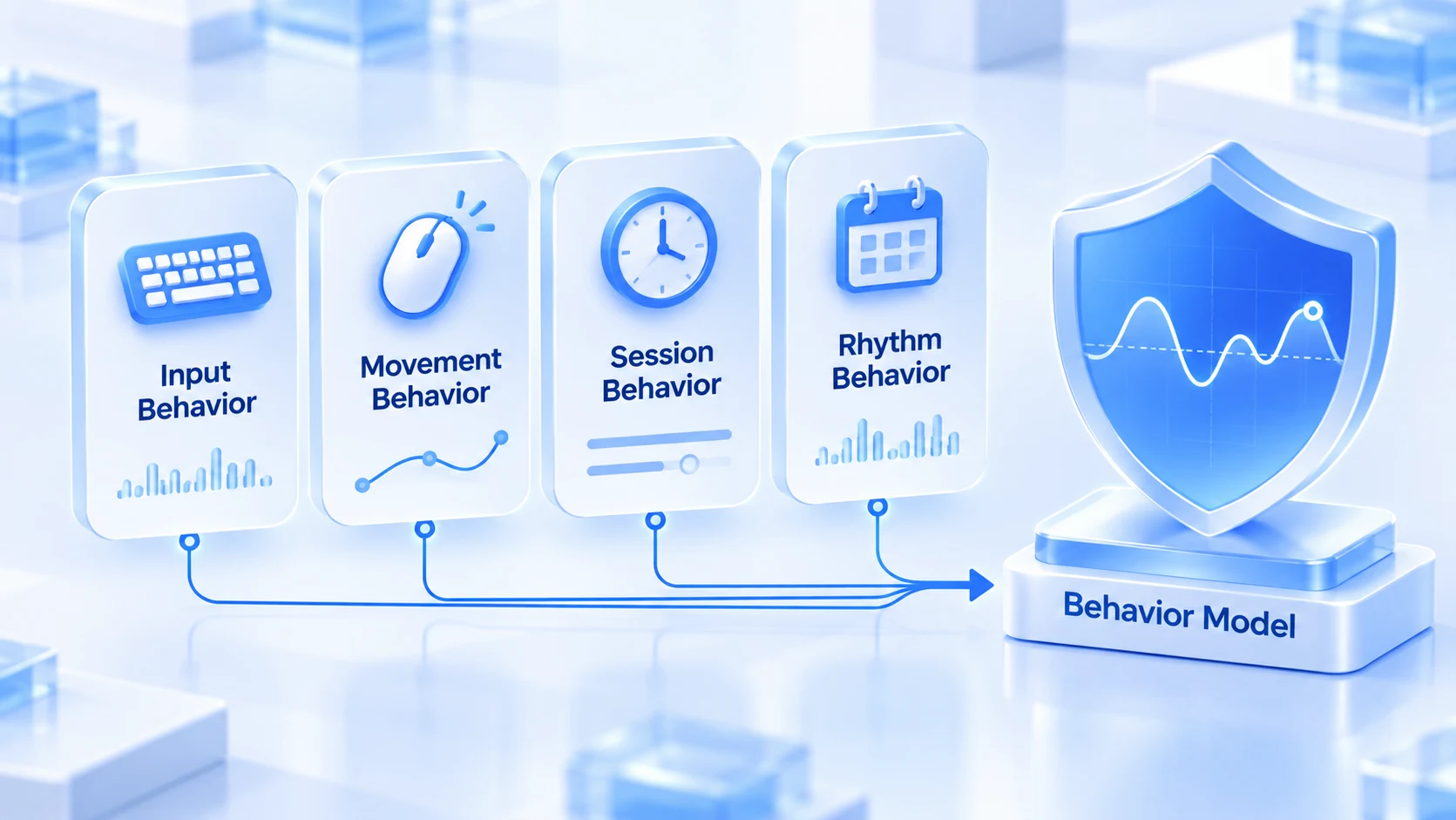
Each signal alone is weak. The model's job is to stack them into a score. That is why the behavior layer is hard to deal with: no single item can be fixed on its own; what needs to change is the whole set of operating habits.
How platforms model it: baselines, deviation, and collusion
The core move of a risk model is comparison: against the account's own history, against the distribution of similar users, and against its linked accounts. Each comparison has its own purpose.
- The individual baseline is the first comparison. The model first learns each account's normal rhythm. SEON notes that slight fluctuations in typing speed are treated as normal variation, and it is a sudden change in navigation patterns that triggers alerts. This means the steadier an account's operating style, the clearer the model's tolerance for it, and occasional anomalies are easier to read as fluctuations.
- The population baseline is the second comparison. How long a real person takes to complete a signup, browse, and purchase flow, and what the path looks like, the model holds statistical distributions from massive samples. Operating too fast, paths too smooth, mouse lines too straight: all fall outside the distribution. SEON has specifically flagged one case: a mouse traveling in a perfect straight line from pixel A to pixel B. It is one of the most classic giveaways in behavioral analysis.
- Collusion detection is the third comparison, and the one specific to multi-account scenarios. One device logging into multiple accounts, a burst of signups from one subnet, several accounts making similar moves in the same time window. Each looks normal alone; connected, it is a ring signature. Sardine's connection graph does exactly this, mapping shared devices, accounts, and payment tools into a network. Airdrops use this screening hardest; the logic of Sybil screening covers how projects use collusion signals to filter participants.
Many linked-account bans start not in the parameters but in collusion. It is damage to what you already have: once accounts are linked, it is very hard to undo (how to contain a ban's scope).
Which behaviors can be trained, and which cannot
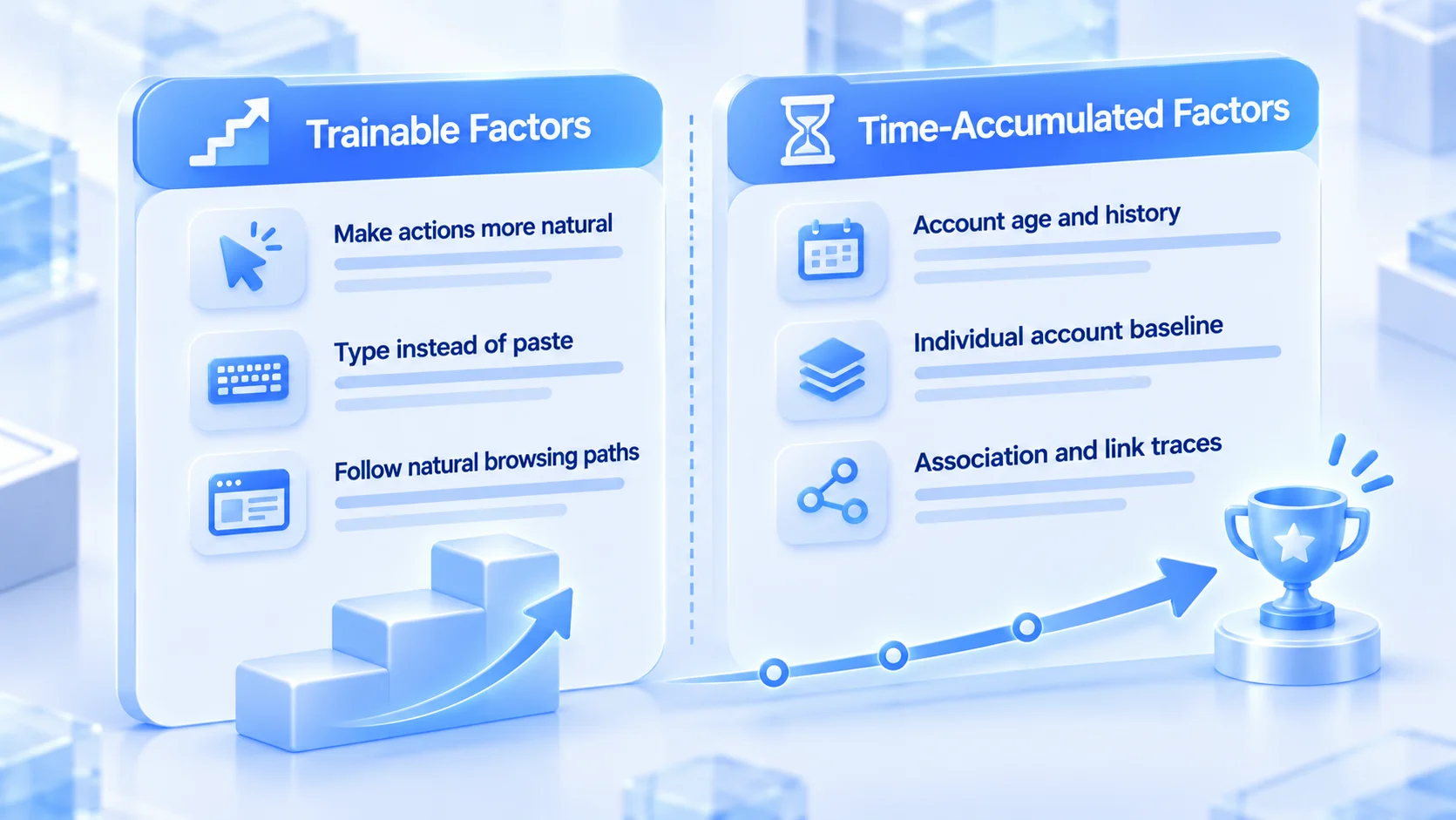
Split behavioral signals into a "trainable" column and a "hard to train" column, and warming effort belongs in the first. Recognizing what practice cannot fix actually saves effort.
The trainable part comes from habits and scheduling:
- Slow down: real people hesitate, look back, and mistype; don't space your actions in neat, even intervals.
- Type instead of paste: in signup and profile-editing flows, pasting is a high-risk input signal; type key information by hand.
- Natural paths: don't head straight for the same page on every login; browse other sections now and then.
- Match the hours: be active in the target market's timezone; don't let the account come online precisely at 3 a.m.
The hard-to-train part only comes with time:
- Long-term history: account age, the stability of past sessions, spending records. These are archives that cannot be filled back in.
- Individual baseline: the model's picture of "this account" takes time to accumulate. Being careful early in warming is feeding the model normal samples.
- Population collusion traces: once multiple accounts are connected in a connection graph, no later behavior untangles them easily. Isolation has to start on day one.
If an account is already restricted for behavioral anomalies, the first step in the first 60 minutes after a ban checklist is to tell whether the device signal or the behavioral signal triggered it. The responses are completely different.
Scheduling behavioral rhythm in MostMate
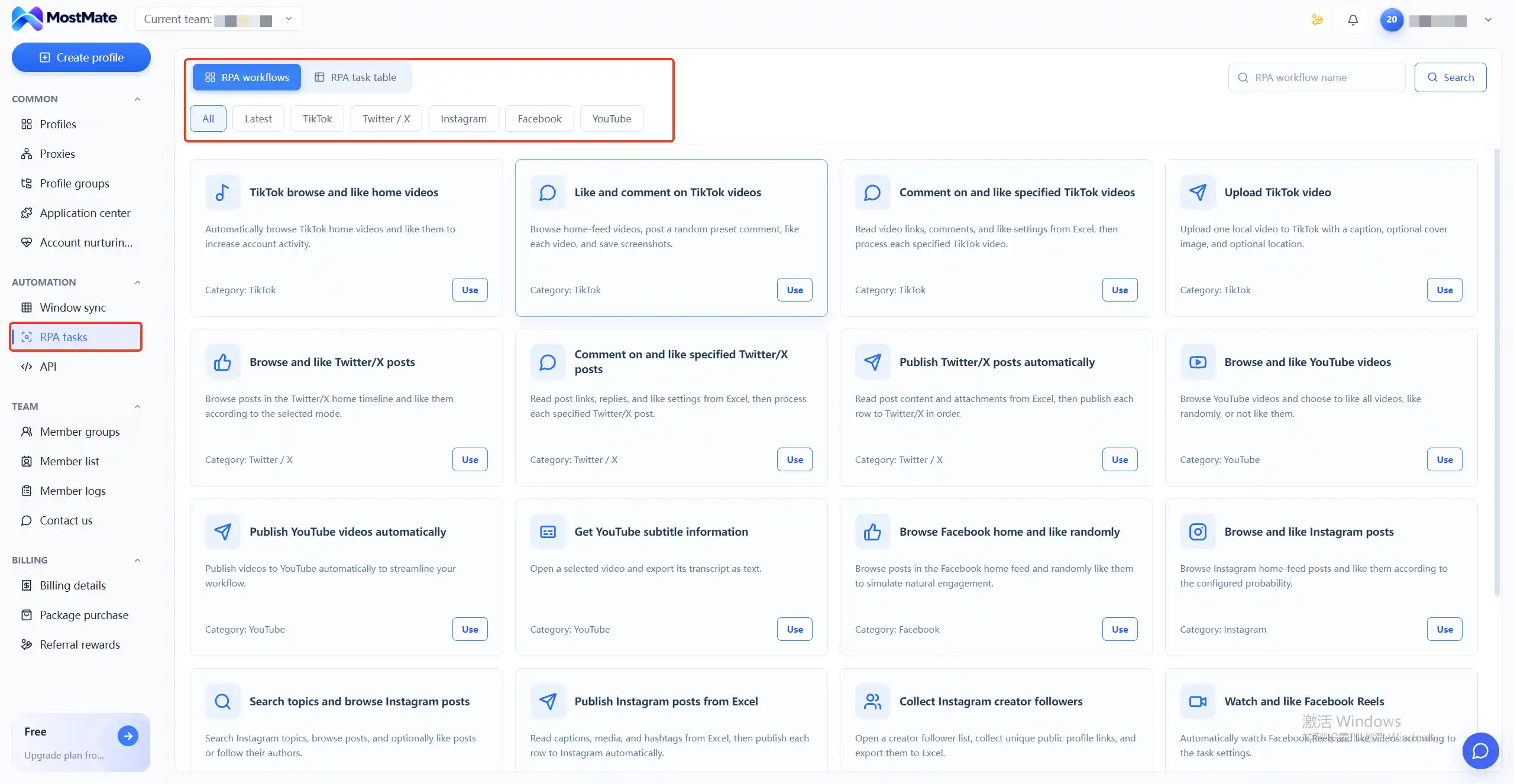
The hard part of the behavior layer is not knowing that warming is needed; it is that warming actions scatter across daily routines and never stick. Account Warming turns this into a task list. MostMate's warming progress page includes a 30-day warming plan: tasks listed item by item each day, actions like browsing feeds, visiting profiles, and searching keywords checked off one by one, with a 30-day calendar showing whether the rhythm has broken.
The task list maps to action variety; the calendar maps to rhythm continuity. The plan also includes a "not today" risk reminder list that draws the boundary for sensitive periods, for example keeping new accounts away from profile edits and payment binding in the first weeks. The exception handling guide covers the steps for when verifications or restrictions appear.
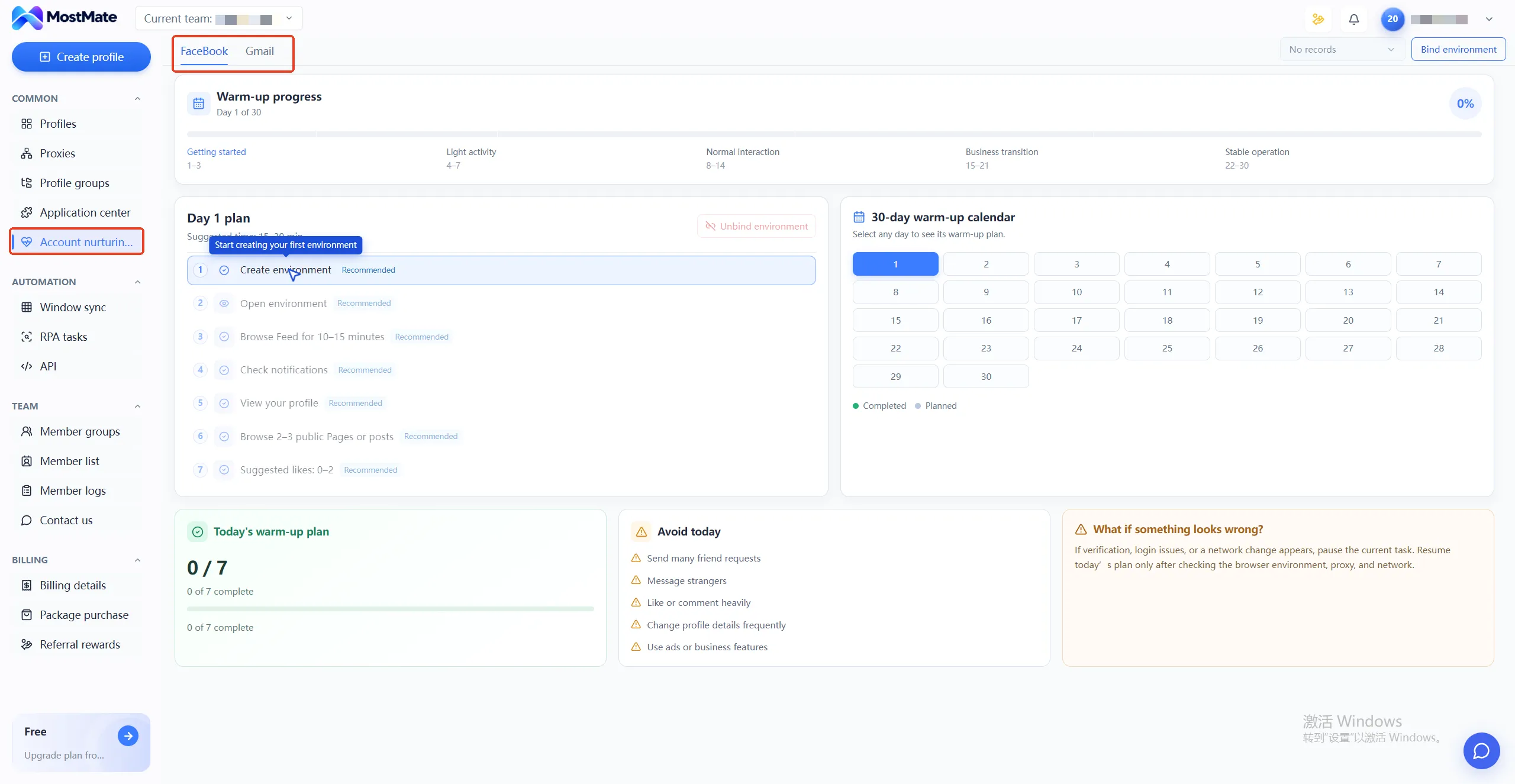
RPA handles volume in this system. MostMate's RPA templates can run automated browsing and likes on platforms like TikTok and Facebook, making up basic interaction volume. But RPA paths and intervals carry script signatures that behavioral models can read. Keep the division of labor clear: volume to automation, key actions to humans, and sensitive accounts mostly human-run.
When warming multiple accounts together, a fixed environment is the precondition. Accounts and environments paired one to one is how behavioral records accumulate on the same device profile. The multi-account security management landing page has the full method for organizing environments by business line.
FAQ
Why does an account still get banned when all parameters are correct?
The parameter layer and the behavior layer are two sets of signals. Passing parameters only means the device looks real; operating rhythm, paths, and collusion between accounts are separate judgment surfaces. If parameter checks show nothing, pull the behavioral records: action intervals, paths, and any collusion signatures.
Does switching to a new environment reset behavioral history?
No. The environment provides a clean device layer. The behavioral profile an account accumulates on the platform's side follows the account, not the environment. A new environment answers whether this device is trustworthy; behavioral trust can only be rebuilt by the account itself, which is why a transition period is needed after switching.
Can behavioral analysis detect RPA automation?
Possibly. Scripted operations carry signatures in paths and intervals that mature behavioral models can read. The safer division of labor: RPA covers basic interaction volume, humans handle signups, profile edits, payments, and other key actions, with sensitive accounts mostly human-run.
How long does warming take before the behavioral baseline is stable?
There is no fixed number of days. The 30-day plan is a rhythm framework; what actually teaches the model is variety and continuity of operations, not hitting some day count. The test is simple: when daily operations stop triggering frequent verifications, the baseline is stabilizing.
Closing
Risk systems weigh the device layer and the behavior layer roughly equally. Parameter configuration solves whether the device looks real, and environment tools can cover that part. Behavioral rhythm solves whether the operator looks human, and that part takes checklists and schedules to build. Managing the two layers separately also gives you a direction to investigate when a ban happens.
Hand the device to the environment, the behavior to the rhythm. Download MostMate, get the device layer isolation solid first, then use Account Warming to put the behavioral rhythm on a schedule.

MOSTMATE
Secure Multi-Account Management, Made Simple
Start with your first account and use MostMate to build safer, smarter, and more efficient multi-account operations.
- Independent profiles. Consistent identities.
- AI Automation · Account Health · Team Operations



