
What Is a Browser Fingerprint? The Ordinary Details That Add Up to You
Sites recognize you without a login and without placing anything on your machine. Every time a browser opens a page, it volunteers a set of information on its own.
Put together, that information is stable enough to survive a cleared browsing history. A site you have never visited can still tell it is the same device. That is a browser fingerprint.
MostMate is a fingerprint browser built for multi-account operations. It works the other side of the same problem: giving each account its own self-consistent browser identity on a single computer.
The rest of this article follows four questions. What a fingerprint is assembled from, which entry points sites use to collect it, whether turning off scripts lets you escape, and how to run the test yourself.
Individually, Nothing Is Rare. Together, They Identify You
Look at any single item on its own and it is far too ordinary to identify anyone. A 1366×768 screen is everywhere, Chrome user-agent strings are a dime a dozen, and hundreds of millions of people live in the same time zone.
What actually does the work is the intersection. Screen size is one filter, operating system another, graphics card model another, and the font list, time zone and language preferences each count as one more. Every layer you stack leaves fewer people behind. Stack seven or eight and often only one remains.
In 2010 the EFF ran a public experiment and collected roughly 470,000 browser records. 83.6% of them were already unique under this set of filters.
The researchers converted the result into an information measure: on average, each browser carried at least 18.1 bits of identifying power. Pick one at random and roughly one in 280,000 would collide with it. The full conclusions are in the EFF's public report. Those figures have been quoted many times since, and misread just as often.
It is easy to read that number as "everyone is walking around naked". A better use of it is as a reminder: the strength of a fingerprint comes not from how rare any single item is, but from how many items match at the same time. One unusually rare value actually makes a device stand out statistically.
One thing matters even more than the number of items: stability. A fingerprint is useful because it is still in the same place tomorrow and next month. A browser that ships a new set of parameters on every launch is volunteering a fresh set of distinguishing clues every day.
Three Studies, Three Numbers, and the Difference Is in the Sampling
Remembering a single number leads to the wrong conclusion. Similar studies have been run more than once, and under different conditions the results diverge sharply.
| Study | Sample size | Share of unique fingerprints | Where the sample came from |
|---|---|---|---|
| EFF, 2010 | ~470,000 records | 83.6% | visitors who came to run a test |
| INRIA, 2016 | ~119,000 records | 89.4% | visitors who came to run a test |
| French sites, 2018 | ~2.07 million records | 33.6% | ordinary visitors to news sites |
The first two rows come from sites dedicated to testing. People who seek out such a test already care more about privacy, and their devices and configurations are more uniform than the average internet user's.
The third row uses a different setting. The collection script ran on French news sites ranked in the top fifteen by traffic, and it captured ordinary visitors to two pages: weather and politics. It used the same dozen-odd attributes.
Same attributes, another group: uniqueness dropped from 90% to a third.
So uniqueness is not a fixed property of a device. It depends on three things holding at once: how many items are collected, from whom, and by what method. By 2021 researchers had expanded the attribute set from a dozen-odd to over two hundred and measured again. The unique share climbed back to 81%. The more items you collect, the more people separate out.
That French site study produced a more practical finding as well. Fingerprints that were not unique were described as "fragile".
A machine that overlaps with tens of thousands of others can fall into the unique bracket after a single configuration change. A browser update, one extra extension, one resolution tweak all count. "Matching someone else" is not proof of safety, only a sign you have not been separated out yet.
A Fingerprint Has Three Entry Points, and Only One Needs Scripts
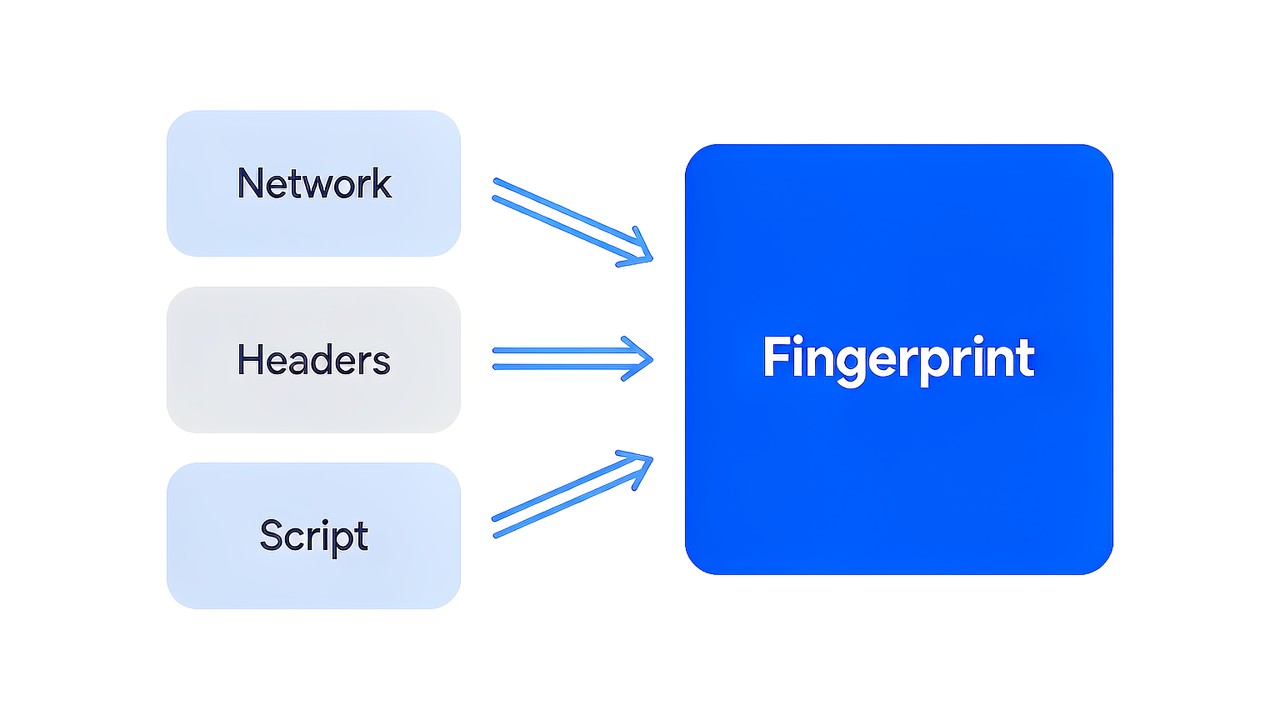
Asking what a site can actually see means looking at three layers. Of the three, only the bottom one depends on scripts; the other two are complete before any script runs. The site's own explanation of environment isolation splits things along the same three layers: device, browser and network.
Connection layer: the address is recorded before the request even leaves
Before a page opens, the browser has to shake hands with the server and then send the request. During that process the server already has your exit address and a set of negotiated parameters.
The negotiated parameters cover the encryption methods both sides support, the extensions they offer and their order of preference. What gets reported, and in what order, is determined by the browser version and the runtime environment. These values say nothing about page content and require no consent from you; they are a by-product of the communication itself.
The address plus this set of parameters is already enough for a coarse filter. Which carrier the connection belongs to, and roughly which version and which browser is on the other end, are usually discernible.
Request header layer: the browser reports a few items every time
Request headers are the notes the browser attaches to a request. A few of them are almost always present: which languages it accepts, which compression methods it supports, its own identity string, and which page it came from.
The language entry is set by the system and the browser, and it is more granular than most people assume. Chinese, for instance, is further split by script and region. Their defining trait is that they are quiet, stable and always present: they do not change with the site you visit or with clearing your history.
Page layer: scripts can read more than you think
Once the page has loaded, scripts can keep asking. Screen and window dimensions, time zone offset, CPU core count and memory tier are all within readable range. These interfaces are public in the browser, and the browser's interface documentation lists them in full detail for any site to call.
Ask what a browser fingerprint is and most people think first of canvas and fonts. Those two are indeed named most often, not because they are exotic but because they are the hardest to change.
Canvas and fonts: the two most frequently named
The canvas technique is blunt. The page draws a shape or a line of text somewhere you cannot see, then reads the finished image back pixel by pixel.
The same instructions produce pixels that are not quite identical across graphics cards, drivers and systems. The differences are too small for the eye to catch, yet stable enough to rely on. Change your wallpaper or your zoom level and they are still in the same place.
The font list takes a different route. The page does not ask what you have installed; instead it tries the names of a batch of common fonts one by one. It renders a line of text at a given size, and if the measured width does not match the expectation, that font is not on your machine. The more names it tries, the longer the record it gets.
Fonts that came along with the design software you installed all count here. That is why a font fingerprint often says more than screen size: it records what software you have installed and what you use this machine for.
Rendering differences: the category hidden in the pixels
Canvas is only one outlet for rendering differences. Audio processing chains, graphics APIs and video codecs each leave small variations tied to the hardware, and on one machine they interlock in a way that is hard to reproduce on another.
Values in this category share one trait: they are determined by hardware and drivers, and cannot be changed. Adjusting browser settings, clearing the cache, switching connections, none of it touches them.
More notable than the count is the stability. These values are stable enough to serve as a long-term device identifier, and precisely because they are stable, making one or two parameters rarer usually does not solve anything.
Does Turning Off JavaScript Solve It?
Turn the scripts off and the third entry point is indeed closed. The page cannot read the font list or obtain rendering output.
But the first two layers are unchanged. The request headers are all still there, the exit address is still recorded, and the connection-layer negotiation parameters are still present. Disabling scripts removes one layer, not all of them.
In that 2010 experiment, browsers with scripts disabled were grouped separately as a "relatively hard to fingerprint" sample. At the time the tactic genuinely worked.
But "relatively hard" and "actually hidden" are different things. Everyone around you has scripts on, and you happen to be in the small minority that has them off: that fact alone is a characteristic. A rare state does not make you disappear, it makes you easier to pick out.
The real problem is not here. The trouble a fingerprint causes comes mainly from linking a set of identities together, not from whether one parameter is concealed well enough. That also explains why making parameters more colourful and more rare usually does not help.
Switching Browsers on the Same Computer: What Changes and What Does Not
Many people assume that installing a few browsers means having a few identities. The actual change is smaller than expected. Judged by how they behave after a browser switch, these items fall into two groups.
- What changes: the user-agent string, graphics and canvas rendering output, the extension list, local storage and login state.
- What does not change: graphics card and driver model, physical screen parameters, CPU core count, memory tier, system time zone, system-level fonts.
The first group comes with the browser itself; reinstalling, updating or adding an extension reshuffles it. The second group comes from hardware and the system, and stays the same no matter how many browsers you install. Those are the thread that ties several "different-looking" machines together.
Three browsers open on one computer look closer to three ways of using the same device than to three devices.
A Three-Step Self-Test: How to Use This in Multi-Account Management
Public detection sites run without registration. Rather than take a conclusion on faith, it is worth seeing what your own machine is actually reporting. In multi-account work, the order of operations matters more than the readings themselves, and the guide to going from zero to your first profile walks through proxies, forms and checklists in sequence.
The test order can be set up like this:
- Start with which items the uniqueness comes from. When the run finishes, do not look at the total score, look at the "most unique items" it flags, which are usually the parts of you that are hardest to change.
- Then test two browsers on the same machine, once each, and circle the items that are identical in both runs. Those overlaps belong to the hardware and system layer, and no browser switch will shake them off.
- Finally, repeat the test with scripts disabled and see which values can still be read. What remains is the part obtainable without scripts.
Run all three steps and you usually land on the same conclusion. There are only a handful of genuinely hard-to-change items, but it is precisely they that hold your identity steady.

Follow that conclusion and the multi-account approach is not hard to derive. What you need is for each account's environment to stay consistent within its own set; the parameters do not need to be more exotic.
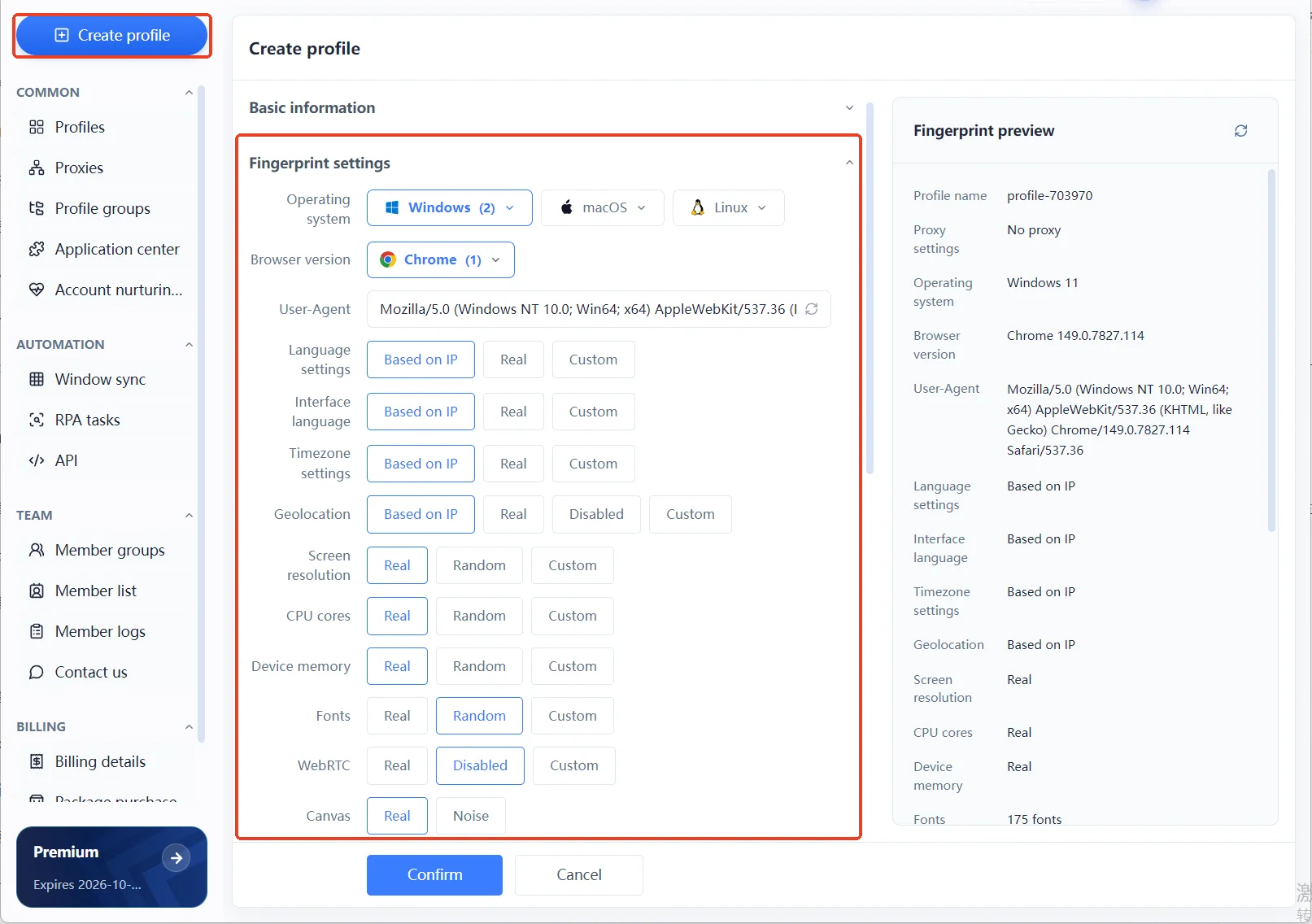
MostMate puts this at the profile creation step. Language, interface language, time zone and geolocation follow the exit by default. Hardware items such as screen, core count and memory offer only two tiers, real and random; to depart from the default you have to select it once by hand. This set of choices and the side-by-side comparison with configuring each item manually are both visible on the site.
The reasoning behind those trade-offs is covered in more detail in what each of the four design principles is blocking. Which principle answers which kind of failure, and which one to protect first when two of them conflict, are all in there.
If you would rather get hands-on, you can download MostMate and re-run the three steps above on your own environment once it is installed.
To first see how MostMate gathers these values into one environment-management system, start with the product overview.
Frequently Asked Questions
Will clearing cookies or using incognito change my fingerprint?
No. Cookies and local storage are notes the browser keeps on the site's behalf; delete them and they are gone. A fingerprint is different: it is read live from the device and browser, and nothing is stored on your machine. Incognito limits what is left behind locally; it does not change what the browser reports outward.
If I change my IP, do I become a different identity?
You have only changed the network layer. Language preference, fonts, graphics card and system time zone do not change with the IP. And if the new connection's region does not match your time zone and language, you have built a combination that does not add up.
Does an anti-fingerprinting extension help?
The common approaches are to add noise to some items or to normalise them to one popular value. Normalising does let you blend into the crowd, at the cost of everyone in that group sharing the same characteristics. Noise, meanwhile, can make the same environment report two different values on two runs, which is itself an anomaly. Neither approach reaches the hardware and system layer.
Do sites really compare fingerprints?
In anti-fraud and risk control it is standard practice, especially around login, registration and payment. Most sites treat it as one signal among several, read alongside account behaviour and device history, and rarely judge on a single item alone.
Will two computers of exactly the same model have the same fingerprint?
Not exactly the same. Machines of the same model diverge quickly on system version, fonts, drivers, time zone, language and installed extensions, and all of those differences land in the fingerprint. Mass-imaged clone machines come closest, but that is only a small slice of real-world cases.
With a fingerprint browser, am I untraceable?
No. A fingerprint browser works on the boundaries between environments, giving each account an independent and self-consistent browser identity. It does not change how a platform determines account ownership, and it promises no outcome. One more distinction matters here: fingerprint consistency is a self-check method, not a platform's detection rule. Treating the two as the same thing invites unrealistic expectations of the tool.

MOSTMATE
Secure Multi-Account Management, Made Simple
Start with your first account and use MostMate to build safer, smarter, and more efficient multi-account operations.
- Independent profiles. Consistent identities.
- AI Automation · Account Health · Team Operations



