
MostMate vs AdsPower: How Do Features and Prices Stack Up? Start With the Bill
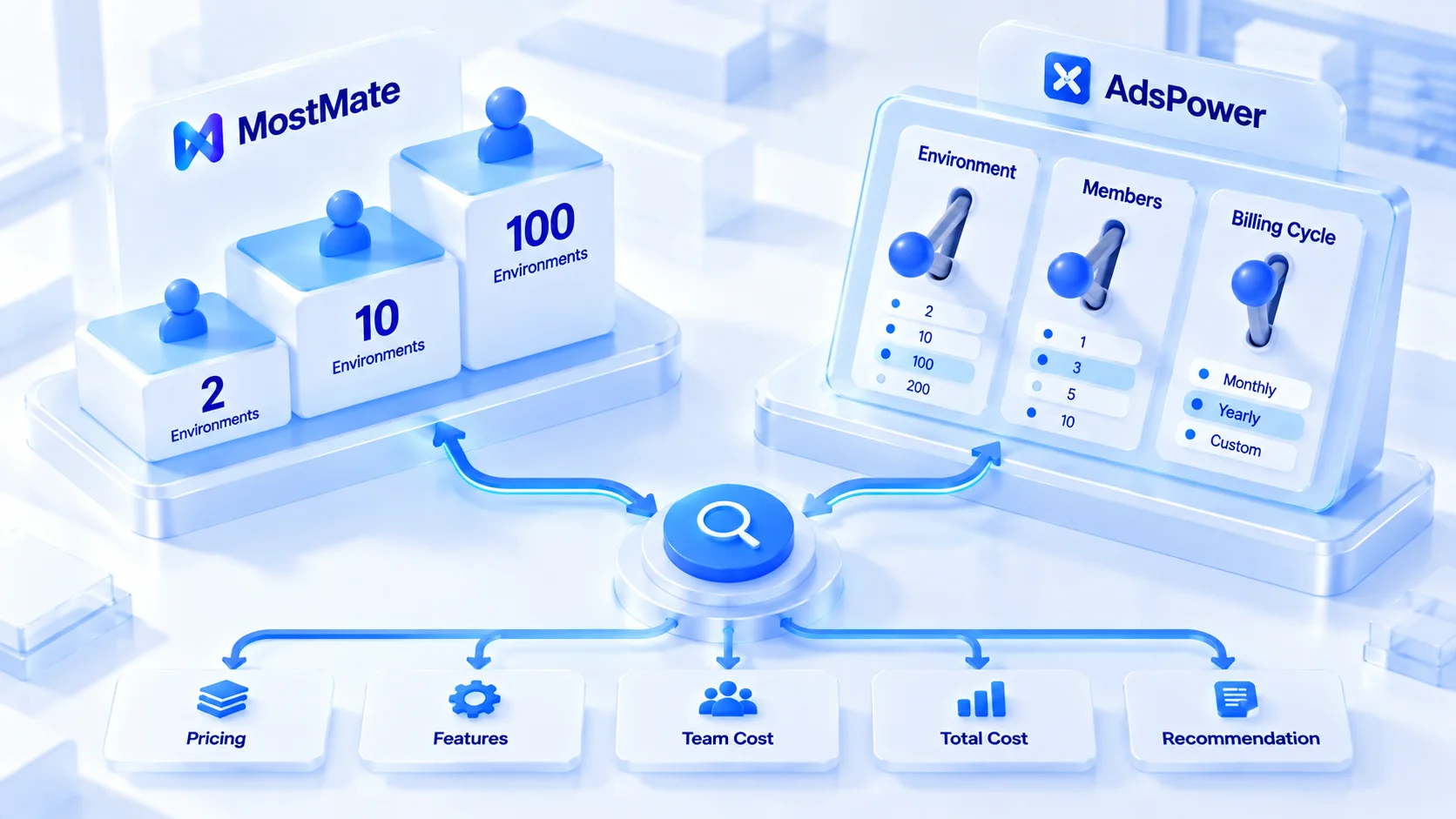
Core takeaway: the two tools' feature lists overlap heavily, and the real dividing line is the pricing structure. AdsPower assembles its bill from three dials: profile count, member count, and billing period, with member seats bought separately per person. MostMate prices by tier; the free tier includes 2 member seats, and anything beyond that is bought as an add-on.
That makes the order of evaluation matter. If you run 10 to 100 profiles and need multiple people working together, work out member costs before comparing features. For a solo user or a two-person team, either free tier is a valid starting point, and the focus shifts to automation paths.
Read enough comparison posts and the habit is to compare feature lists first, prices second, then stall at "they all look about the same." What gets missed is how each bill is actually assembled. Manage the same 20 accounts with three people, and the two tools can produce bills that differ by a wide margin.
This guide starts with the pricing logic, compares five core feature areas, breaks prices down tier by tier, and closes with fit recommendations. On one side is MostMate, an anti-detect browser built around simple tiers with account warming built in. On the other is AdsPower, a veteran in this category with a user base in the tens of millions. Features and prices reflect both vendors' official pages as of October 2026. In-product pricing always prevails.
Pricing Logic First: One Bills by Configuration, One by Tier
The bill structure decides how every price comparison adds up, so learn it first.
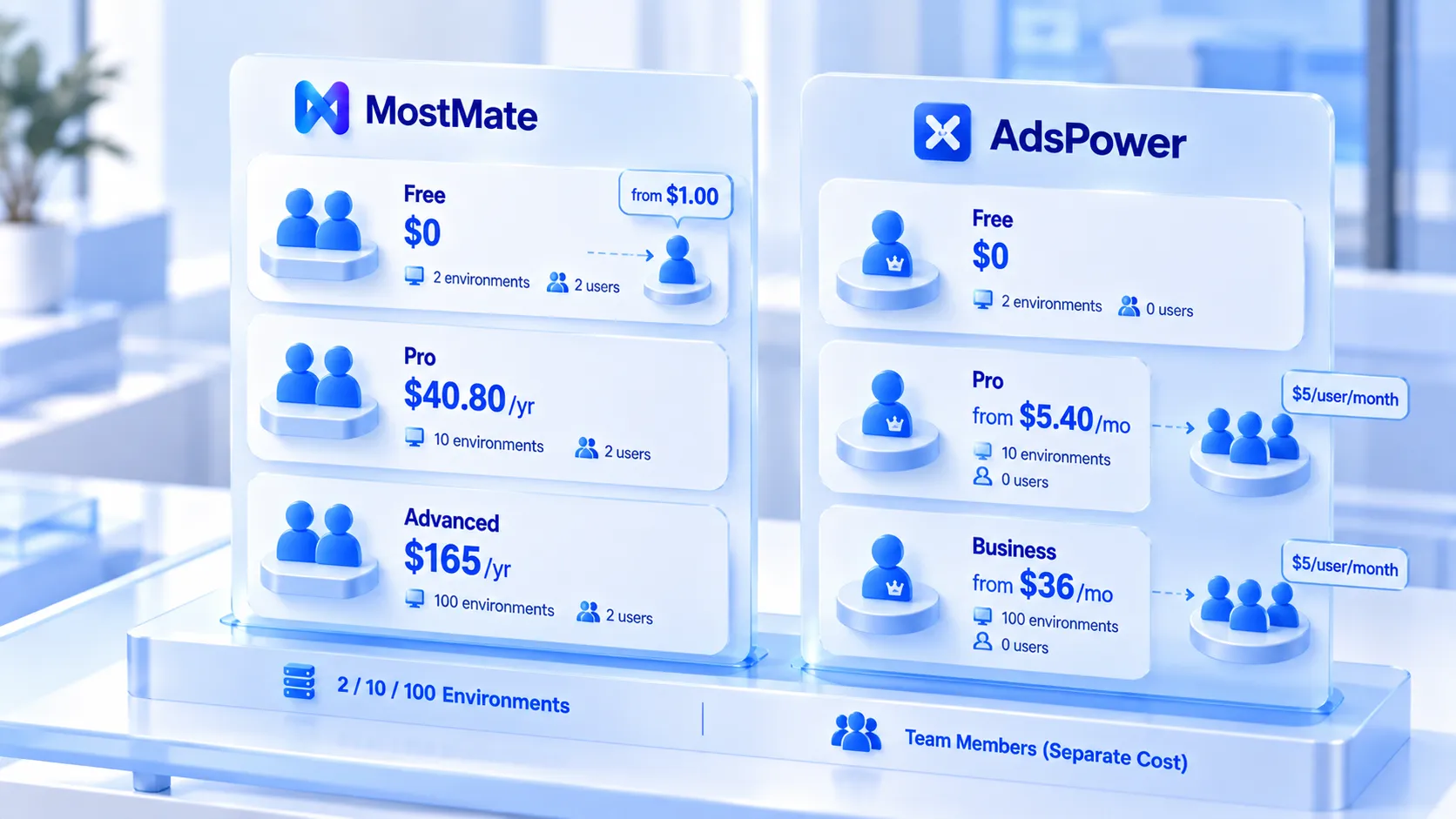
AdsPower's pricing page is a set of dials. Profiles climb in four steps from 10 to 100, member seats are sold separately, and monthly, quarterly, and annual periods stack on another multiplier. Pick the Pro plan and 10 profiles and 100 profiles are two different prices; add two members and another layer goes on. The bill follows the configuration. The free plan includes 2 browser profiles and 0 team member slots, with just 1 super admin. That's enough for one person; collaboration means moving to a paid plan.
MostMate's pricing page is three tiers you can take in at a glance. The free plan is free forever, with 2 profiles and 2 member seats (the main account counts), and members beyond the second are bought as add-ons at checkout. Pro starts at 10 profiles, at $40.80 a year or $6.80 per month. Advanced starts at 100 profiles, at $165 a year. Seat count and profile count can be adjusted before checkout, and the quote follows the configuration. Once adjusted upward, the number is a configuration price, no longer the tier's base price.
The differences between the two pricing structures show up mainly in how profiles scale and what members cost. Judge by your business size and budget cycle when choosing.
- Dial structure: profiles can be added step by step; if you need 10 more profiles, you pay for exactly 10 more. Teams whose profile needs swing a lot will find it a smooth fit.
- Tier structure: the starting decision is simple. How many people, how many profiles, and you can quote an annual budget straight off one tier.
One free-tier difference is easy to overlook. Both sides give you 2 profiles, but the member slots differ. MostMate's free plan carries 2 member seats; AdsPower's carries 0. Two partners testing the waters can split the work on MostMate's free tier alone. On AdsPower you either share one account or move up to a paid plan.
Feature Comparison: The Four Areas Teams Actually Use
Both feature lists run long, and an item-by-item comparison loses focus. Based on what most multi-account teams actually do, the comparison breaks into five areas.
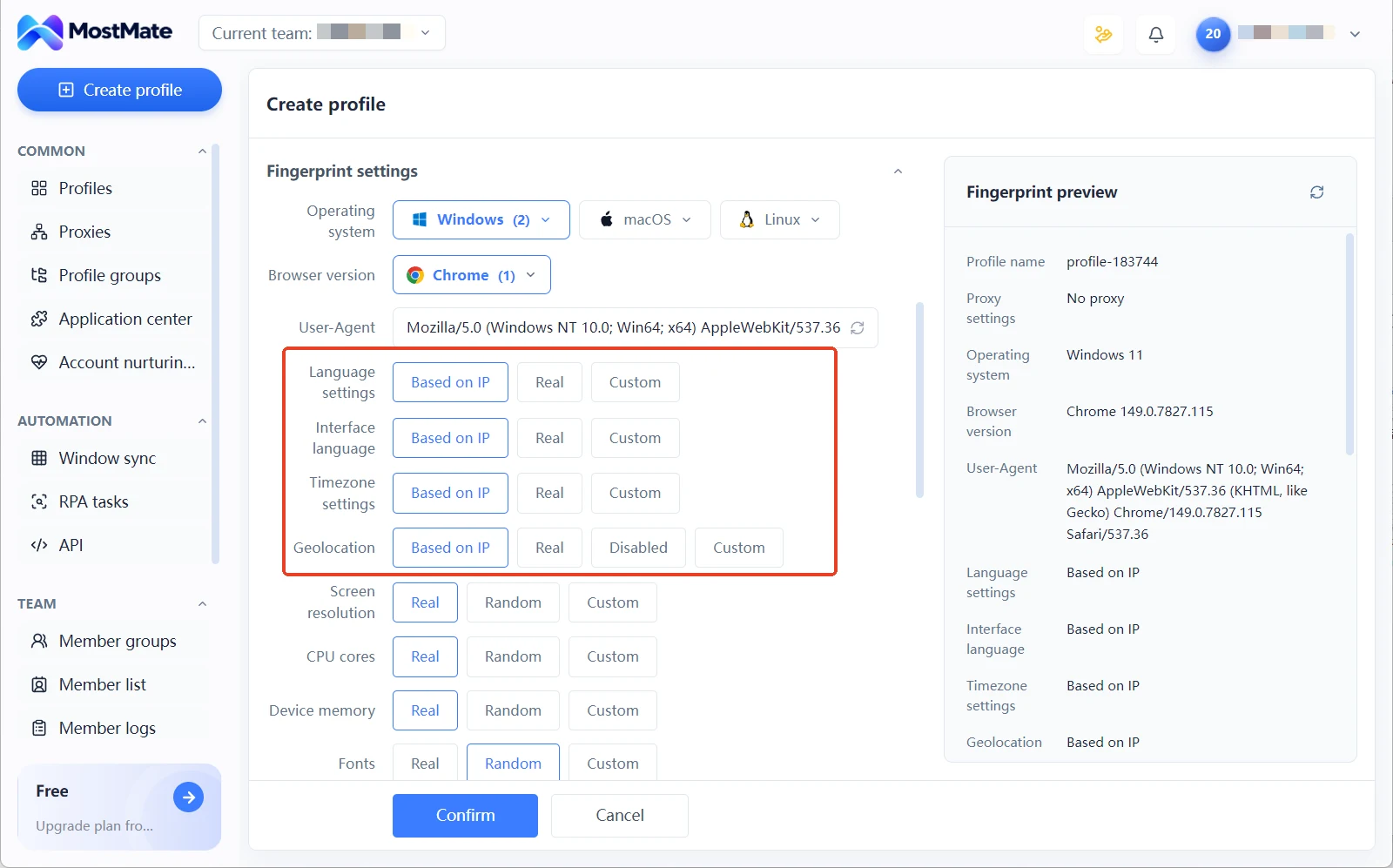
1. Profiles and fingerprint setup. MostMate wraps parameters into recommended profiles. Choose the operating system and browser version, and language, time zone, and geolocation are generated from the IP by default. A fingerprint preview panel shows the values in real time. Need finer control? Expand the advanced settings.
AdsPower goes the open-configuration route, with dual kernels covering Chrome and Firefox and more fingerprint parameters to customize. Bulk import is also there, up to 1000 profiles per batch. Teams used to tuning parameters by hand get more freedom in AdsPower. Teams that would rather not touch parameters get started faster on MostMate.
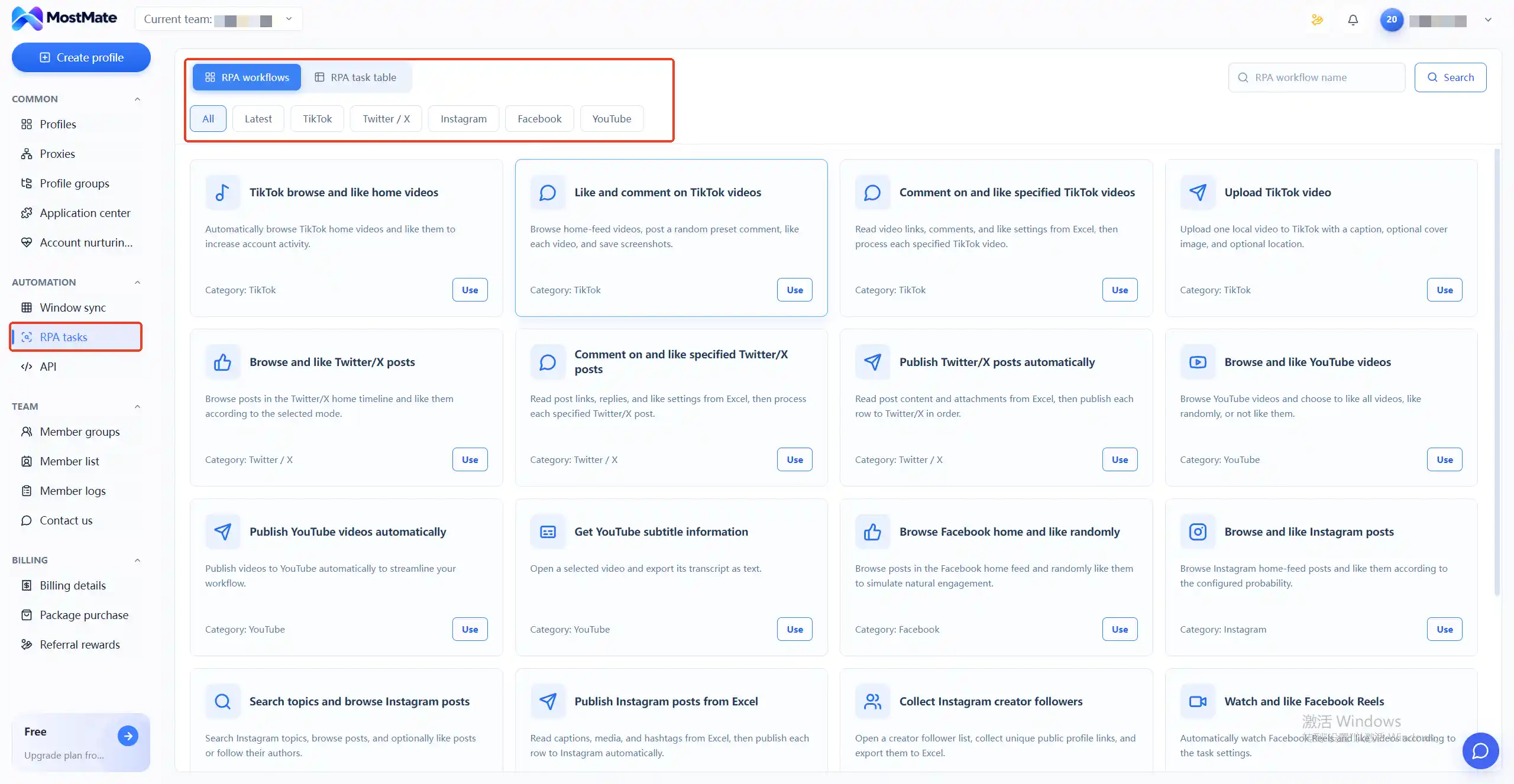
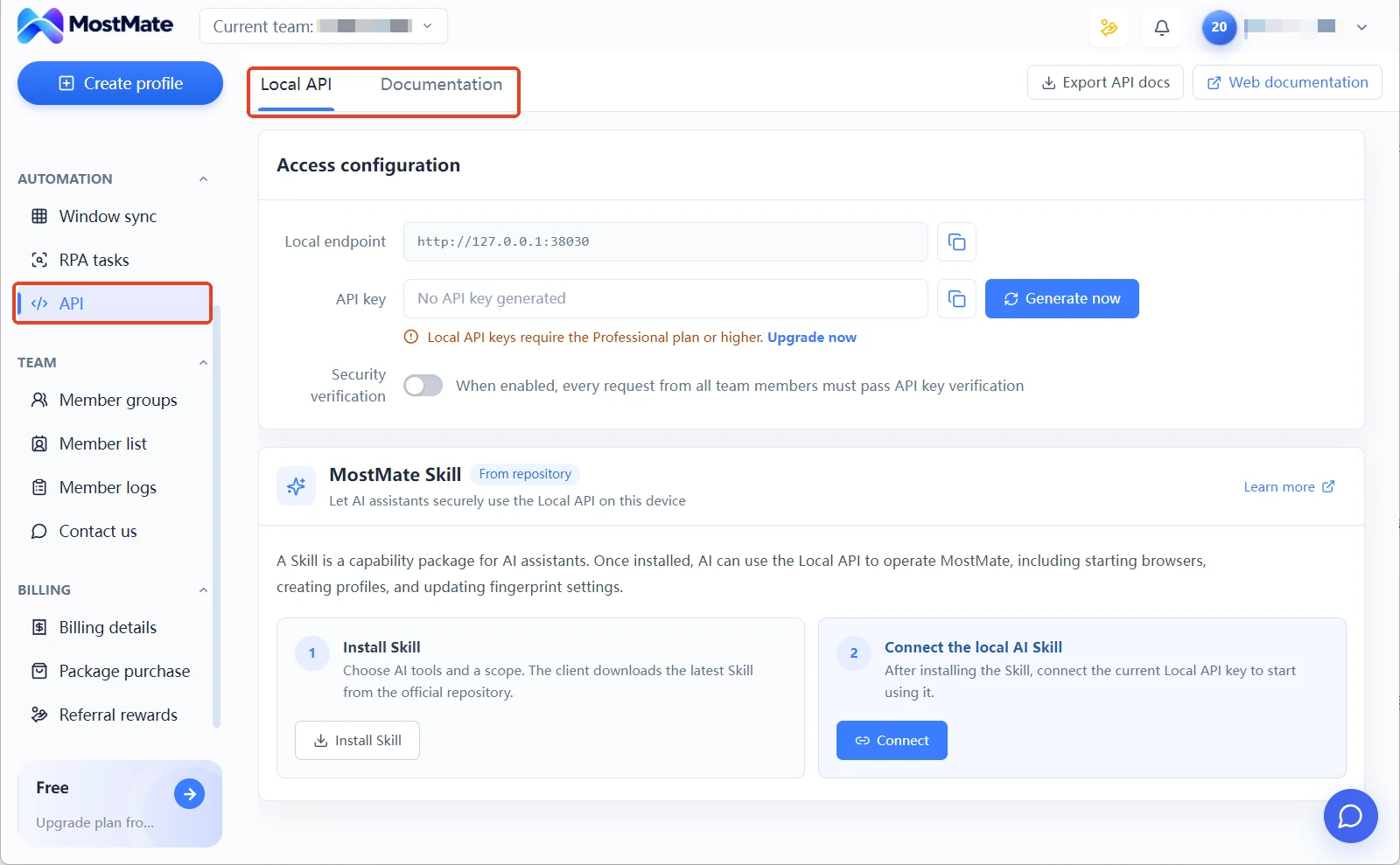
2. Automation and efficiency. Both offer window sync and RPA, on similar foundations. MostMate's RPA is template-driven. Its RPA marketplace is sorted by platform: TikTok browsing, liking, and commenting; X commenting and auto posting; Instagram search and multi-account posting; Facebook browsing and liking; YouTube viewing and publishing, and more. Common actions come as ready-made templates, some of which read Excel data for batch runs; click "Use" to attach one to a profile. For AI, MostMate has Skills: install a Skill on the API settings page, and AI can operate MostMate through the Local API, taking over actions like opening the browser, creating profiles, and updating proxy settings. The Local API is a local interface for your own scripts, available on Pro and above.
AdsPower's RPA and customizable flows are more mature, with more freedom to build. Its Local API is rate-limited by tier: 300 calls per minute on the free plan, 900 on Pro, and 1500 on Business. In 2026 it added AI Agent and MCP access, so the client can plug into developer tools like Claude Code. For a deeper automation comparison, the differences between window sync, RPA, and API breaks it down by usage.
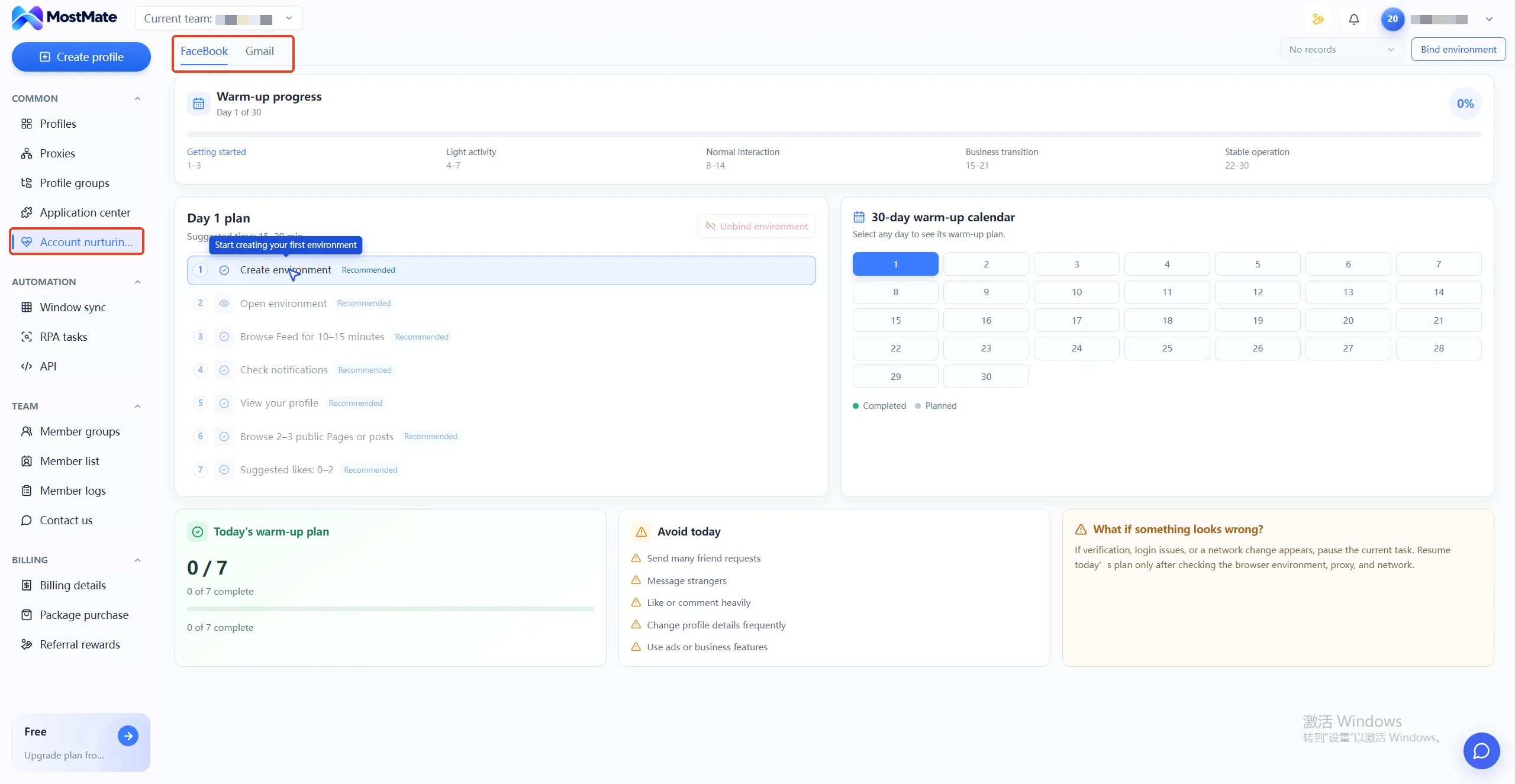
3. Account warming. This is MostMate's differentiator; AdsPower has no built-in module of the same kind. MostMate's warming progress page gives every account a 30-day warming plan with a daily task list: low-risk actions such as browsing the feed, viewing profiles, and searching keywords, ticked off one by one as done. How many tasks are completed today and which day of the 30 you're on can be read straight off the page. The page also keeps a standing "not today" list of actions that tend to trigger risk controls, such as repetitive posting, high-frequency liking and interaction, and frequent profile edits, with handling guidance if anything looks off. For teams that build accounts through warming, this difference is the most visible one. What to do when a plan runs into an anomaly is covered category by category in account warming plan troubleshooting.
4. Team collaboration. AdsPower members are paid seats at an extra $5 per person per month, with permission management and activity logs unlocked on paid plans. MostMate's free plan includes 2 member seats, with add-on purchases once you go beyond that. Groups, permission settings, profile sharing and transfer, and member logs are all existing features. The overall grouping framework is covered in the multi-account management overview. Only the price view here: for teams of three or more, member seats are the fastest-growing line on AdsPower's bill.
5. Security and compliance. AdsPower holds SOC 2 Type II and ISO 27001 certifications, which is a hard requirement when enterprise procurement goes through compliance review. MostMate's security story sits at the profile layer. Cookies, storage, sessions, fingerprints, and proxy settings are independent per profile, and profile data is stored encrypted. The two routes solve problems at different layers. Compliance review looks at certifications; day-to-day separation looks at isolation. Be clear about which layer is the hard requirement before you buy.
Price Comparison: From the Free Tier to the 100-Profile Tier
Put both tiers side by side and line them up by profile count.
1. MostMate: the free plan is $0, with 2 profiles and 2 members. Pro starts at 10 profiles, $40.80 a year or $6.80 per month. Advanced starts at 100 profiles, $165 a year. Prices follow the in-product price list.
2. AdsPower: the free plan is $0, with 2 profiles and 0 member seats. Pro with 10 profiles is $9 per month, or $5.40 per month on annual billing. The same tier raised to 100 profiles is $36 per month. Above that comes Business, from $61 per month for 200 profiles. Member seats add $5 per person per month on every tier, at the same rate throughout.
First line up the tier prices. At 10 profiles, MostMate is $40.80 a year; AdsPower works out to $64.80 a year. At 100 profiles the gap widens: MostMate is $165 a year, while AdsPower at $36 per month comes to $432 a year.
Member costs deserve their own calculation. A three-person team on the 10-profile tier buys 3 AdsPower seats at $5 per person per month, adding $180 a year. MostMate's free tier already includes 2 member seats, so one add-on seat covers it; upgrade plans start at $1.00, about $12 a year, subject to in-product pricing.
The tier prices already differ by a wide margin, and member fees differ by another order. The more people and profiles a team has, the wider the gap between the two bills.
Beyond the subscription bill, two more expenses belong in the total budget: proxies, which neither tool lets you skip, and learning costs, which the two spend differently.
Proxies: egress IPs are a shared expense, but the buying path differs. From 2026, AdsPower supports buying proxy IPs directly inside the client; MostMate requires your own third-party proxies, tested in the proxy list and then assigned to profiles. Choose by egress quality, not by "whose is cheaper"; the reasoning is in fixed vs. dynamic IP by stage.
Learning cost: AdsPower has more features and deeper menus, so new members take longer to get up to speed. MostMate's interface is compact and quick to learn, leaving less room to adjust when you need deep customization. This expense never hits the bill; it hits team ramp-up time.
Add both into the total budget to get close to a tool's real cost.
Who Should Pick Which
The decision narrows to three situations. Choosing by team size and budget structure is less regret-prone than choosing by feature list.
- More than two members, budgeting annually: MostMate's tier structure makes the math simple, member costs don't balloon as you hire, and with profiles between 10 and 100 you can usually order straight off a tier. First-time anti-detect browser users get recommended profiles plus a warming checklist that makes most parameter decisions for them, so the entry barrier is low.
- Volatile profile needs: adding and removing profiles monthly, or needing the Firefox kernel and deep RPA customization, points to AdsPower. The dial structure adds profiles on demand without a whole-tier upgrade.
- Enterprise compliance review: certifications are a hard gate, and AdsPower's SOC 2 and ISO certifications map directly to such requirements. MostMate currently has no public certification at that level, so list the compliance party's requirements and check them off before purchasing.
If you're still unsure, there's a low-cost way to try. Register on both free tiers, build two profiles on each, and run a week of real work. It costs nothing, and the felt difference beats any review post. The full capability boundary of MostMate's free tier is laid out in the free plan guide. For a side-by-side with another tool, MostMate vs. GoLogin offers a different reference point.
After Picking: Run the Verification Flow
Picking the tool is only the start; whether profiles are truly isolated has to be proven by readings. The verification steps in MostMate are short, and you can run them in one pass. When creating a profile, pick the operating system and browser version first, and the recommended profile generates the full parameter set. Test the proxy in its own list, assign it to the profile, and language, time zone, and geolocation align to the IP automatically.
Once built, open the fingerprint preview panel to check the values, then run a second pass through a detection site like Browserscan. If the egress IP matches every fingerprint value, the profile is ready for business use. If not, go back and fix the configuration. The product background for this flow is on the MostMate product page.
Frequently Asked Questions
How many people can use the AdsPower free plan?
The free plan includes 1 super admin and 0 team member seats, which in practice means single-account use. To collaborate, either share the admin account or move to a paid plan and buy member seats at $5 per person per month. MostMate's free plan includes 2 member seats with the main account counted, so two people can split the work directly, and a third only needs one add-on seat.
Which tool is cheaper?
At official prices as of October 2026, the 10-profile tier on annual billing costs MostMate $40.80 and AdsPower the equivalent of $64.80 a year. At 100 profiles, MostMate is $165 a year while AdsPower at $36 per month comes to $432 a year. The gap widens as the team adds people. AdsPower's member seats cost an extra $5 per person per month, while MostMate's free tier includes 2 member seats with add-ons beyond that. Final pricing follows each product's in-app price list.
Is it easy to migrate profiles from AdsPower to MostMate?
Migration comes down to three things: proxies, account credentials, and profile settings. Account cookies can be exported and imported, and proxies just get re-entered. Fingerprint parameters are a different story. They won't carry over as-is, and they don't need to. Regenerate a consistent set of profiles with MostMate's recommended settings, then run another round of detection readings to confirm isolation. That is more reliable than replicating every old setting.
Does MostMate have an enterprise plan?
The current lineup is three tiers: Free, Pro, and Advanced. The top tier starts at 100 profiles, and the page lists contact details for custom packages. For procurement that needs more than 5000 profiles or formal compliance certification, AdsPower's enterprise plan is the better match. For needs like these, get quotes from both sides before deciding.
Final Thoughts
For AdsPower versus MostMate, the verdict usually lands not on feature counts but on bill structure and how the team works together. The dial structure suits teams whose profile counts fluctuate; the tier structure suits teams that budget by year. Whether member seats are charged per person or added as slots is the first item a three-to-five-person team should calculate. Run each free tier through your daily workflow for a week first, then order by team size. Don't reverse the order. If you've settled on the tier route, you can download MostMate. After building your first two profiles, run them through the verification flow above. Once the readings are clean, start warming.

MOSTMATE
Secure Multi-Account Management, Made Simple
Start with your first account and use MostMate to build safer, smarter, and more efficient multi-account operations.
- Independent profiles. Consistent identities.
- AI Automation · Account Health · Team Operations



