
How to Isolate Environments for Multiple AliExpress Stores: Login Layer First, Then Identity Linkage
One team runs three stores on AliExpress. One network line, one computer, and the three store backends take turns logging in. One day, one store takes a violation, loses points, and enters the penalty process. The next day, the other two log in and see risk alerts in their backends as well.
The manager's first instinct is to check the proxy. The check shows that the three stores use different exit IPs. Different IPs alone do not mean every other association factor has been ruled out; likewise, a risk alert does not mean the other two stores have already been judged as associated, because it can point to several causes. Get the facts straight first.
The key to multi-store management is more than separating IPs. How documents are used, how operations are arranged, and how login environments are configured all need to be sorted out separately. This article covers four dimensions: verification documents, payment arrangements, selling behavior, and the network and browser environment. The first two are managed under platform rules, selling behavior depends on business discipline, and the browser and network layer is where a tool can directly help.
How penalties are judged and what association looks at: AliExpress keeps this updated in the official rules center. Onboarding qualifications and violation handling follow the current version. What to check first? Read on.
Risk alerts across multiple AliExpress stores: what to check first?
One store loses points and the others show alerts too. Check the backends first, then touch any configuration. Review the notices, violation records, and account status of the three stores separately, and confirm the specific issue behind each alert. Once you know where it points, decide what to change.
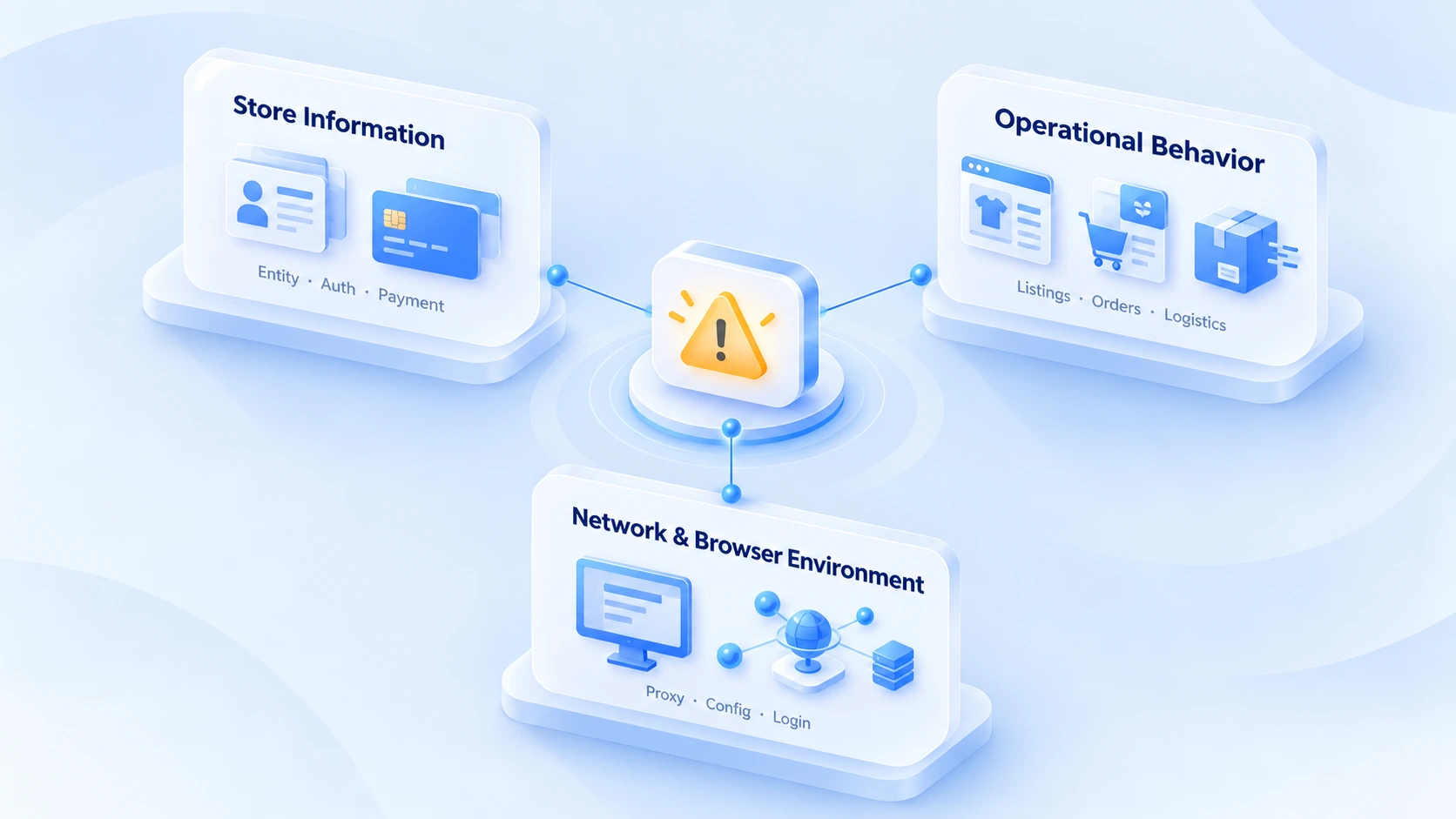
Work through three areas:
- Store documents: Verify the business entity, verification details, and payment arrangements against the current onboarding and operating requirements.
- Selling behavior: Check product listings, order fulfillment, logistics records, and after-sales handling for obvious anomalies.
- Network and browser environment: Review the proxies, environment configurations, and login records actually in use, and confirm nothing is shared or changed too often.
These three areas are screening dimensions for multi-store operations; they are not AliExpress's complete published association rules. For the specific cause and handling of any penalty, follow the store backend notices and the platform's current rules.
How to manage each of the four dimensions
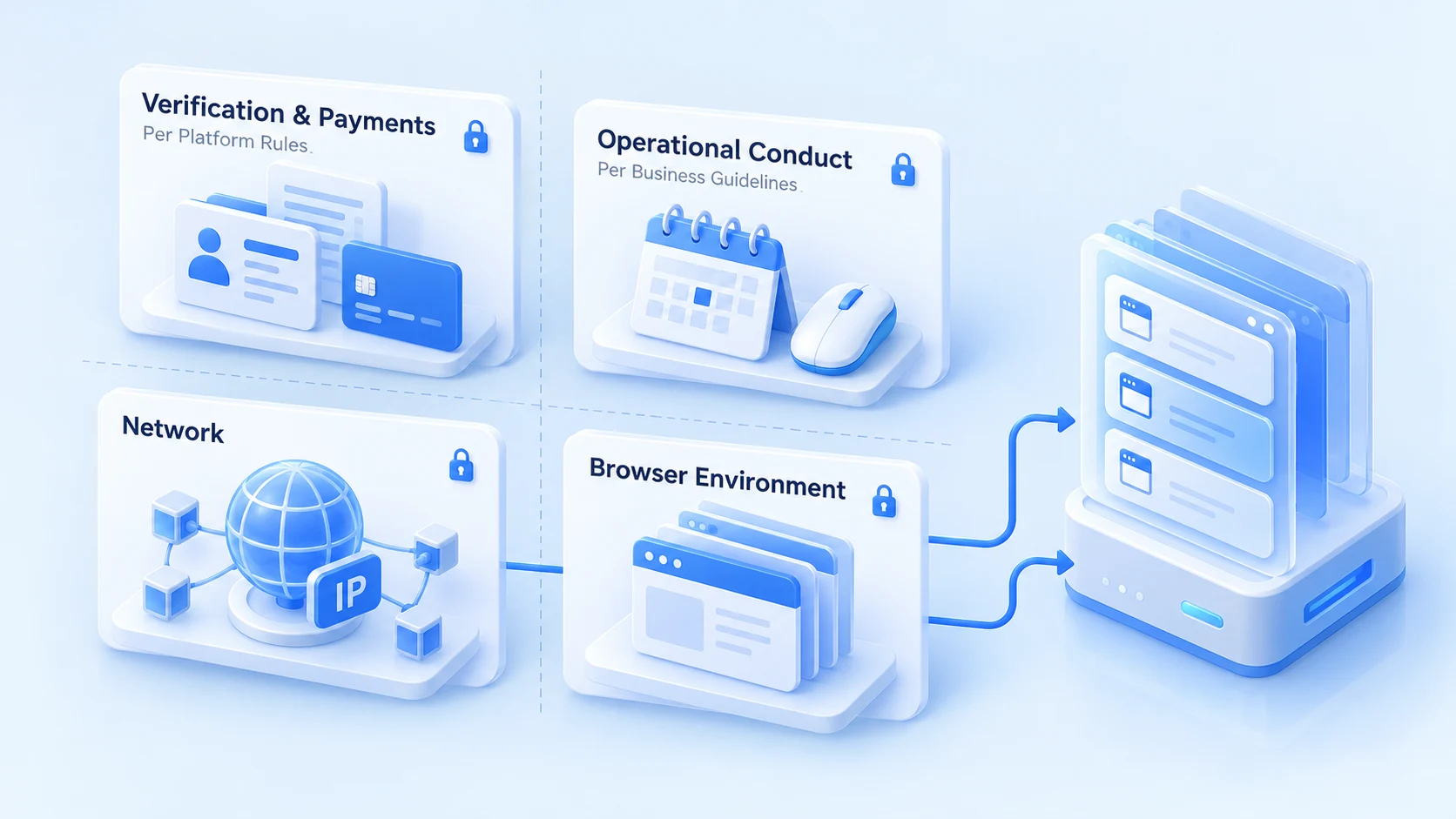
Where the alert points, that is where the management action lands. The four dimensions are not managed the same way: documents and payments follow platform rules, selling behavior relies on business discipline, and the network and browser layer gets direct help from tools.
Verification and payments: managed under platform rules
Identity and payment records tie stores together. Penalties follow the entity, not the login device. This layer is beyond a browser's reach.
AliExpress onboarding binds a store to a business entity. If multiple stores share the same business license, legal representative details, and corporate Alipay account, the platform sees several stores under one entity. However clean the browser environments are, they cannot change who owns the documents.
Payments are similar. When several stores bind the same payout account, the similarity in fund paths rises sharply, and whether such an account structure carries extra risk-control consequences is worth confirming with the platform before binding. To screen existing payout accounts for association signals, the five-step checklist in PayPal payout account association checks applies, and the same thinking works for the accounts bound to AliExpress.
The action at this layer lands in a ledger. Build the ledger first. For each store, record which set of entity documents, which payout account, and who is responsible, item by item. Entity information should not live only in someone's memory.
Selling behavior: managed under business discipline
AliExpress runs a cumulative points system for violations. Each violation is scored by severity, and when the total reaches a threshold, penalties escalate: listings removed, search demotion, then freezes and store closure. Threshold values and points-reset rules follow the current version in the rules center.
Dropshipping and no-stock models are where this layer goes wrong most often. Listing the same products across stores and copying supplier images and titles directly creates the classic pattern of duplicate listings. When fulfillment depends on one supplier shipping for all stores, logistics trajectories and shipping addresses overlap more, which can complicate reviews. Self-purchased orders and orders with abnormal logistics are easier to flag in batches, and once such orders pile up, the points follow.
The levers here are product selection and fulfillment. Avoid copying identical items from the same supplier, differentiate titles and main images, handle logistics and after-sales separately per store, and do not sync pricing and promotions exactly across stores. These actions need no extra tools; they need someone responsible for actually creating the differences.
Network and browser environment: where tools can directly help
The goal at the network layer is one fixed IP per store. Once you buy a proxy, test it first. Then verify the exit region, IP type, and stability. A regular VPN's dynamic exits make the login location jump around, and like a shared network line, it needs to be assessed by risk source.
A fixed IP plus a dedicated environment is the baseline at this layer.
How to configure multi-store environments: from proxy checks to daily records
To configure multi-store environments, first establish a clear mapping for each store: store name, person in charge, browser environment, and proxy configuration. After the proxy connects, verify the exit IP, region, and connection stability; do not assume the setup is fine just because the client says connected. Walk through the checks with the two-layer proxy IP check guide.
Go over the mapping between browser environments and stores as well: environment names, proxy settings, login status, and notes, item by item. For a first setup, build the basic process with how to do environment isolation. Before a new store goes live, run a pre-launch check with the 8 essentials for new environments.
In daily operations, keep records of important configuration changes, alerts, and how they were resolved. Run a multi-account association risk check at a fixed interval and cover all four dimensions. When a store shows an alert again, the backend notice plus these records will locate the problem far faster than digging through memory.
Managing AliExpress multi-store browser environments with MostMate
Once the store count grows, the hassle is not just the number of logins. Which environment belongs to which store, whether the proxy configuration is right, who handled the last incident: relying on human memory or scattered spreadsheets makes daily switching error-prone.
MostMate is an AI fingerprint browser built for multi-account scenarios. For teams managing several AliExpress stores, it works as a browser environment management tool that keeps each store's login environment separate and reduces confusion during frequent switching. Daily use comes down to four steps:
1. Create an environment per store: Set up an independent environment for each store with clear, consistent names such as AliExpress Store A and AliExpress Store B, so the person in charge recognizes the mapping at a glance before logging in.
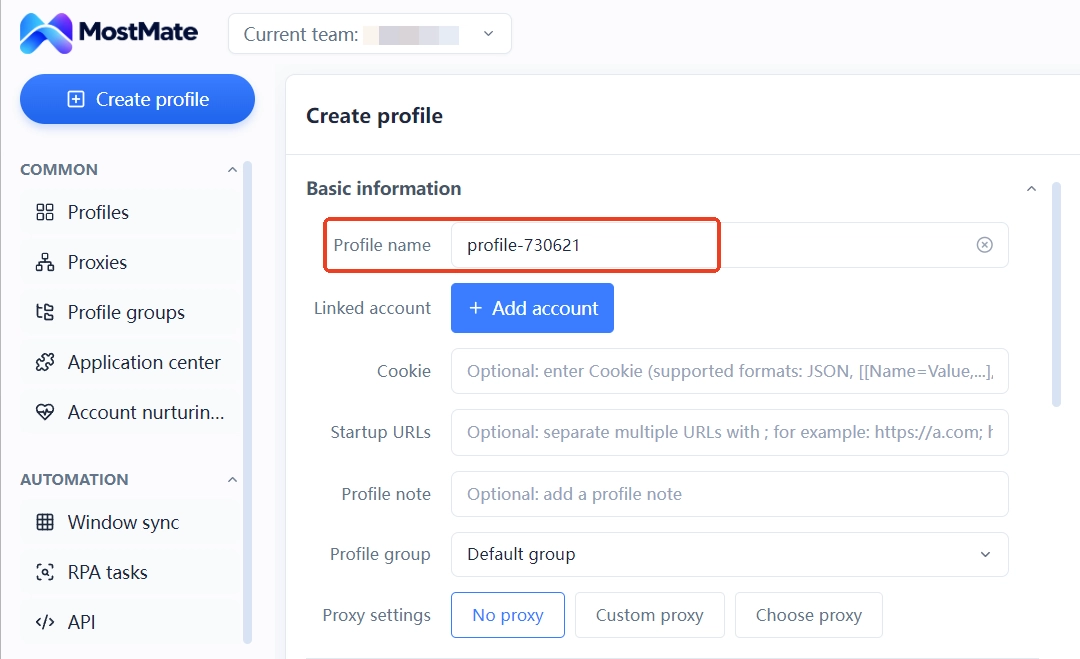
2. Verify the proxy configuration: Configure the proxy in the corresponding environment and check that connection status, exit IP, and region match expectations. A working connection is only half the job; the exit details have to match too.
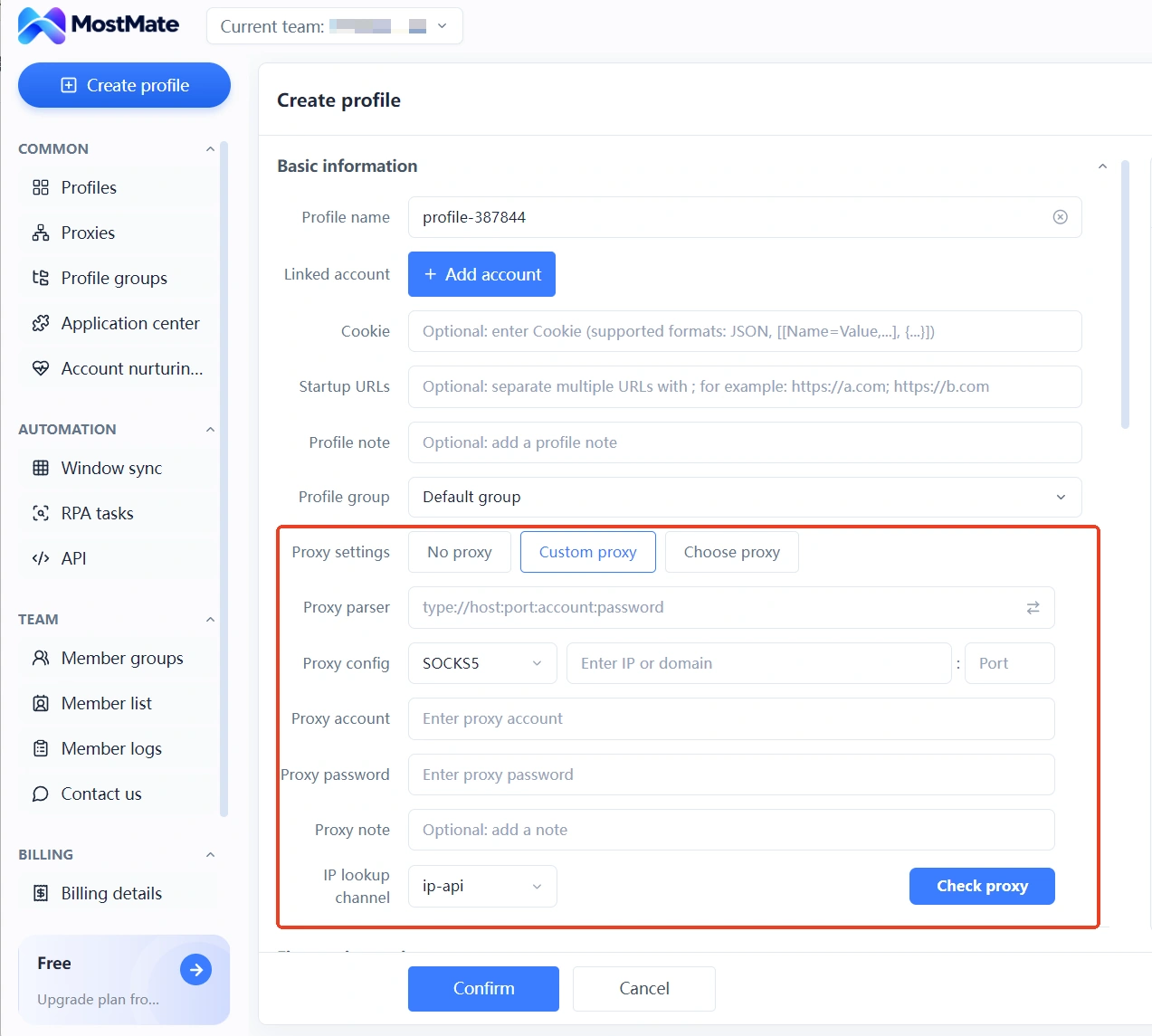
3. Keep store notes in order: Record the corresponding store, person in charge, configuration change dates, and pending items in the environment notes. Sensitive content such as verification documents and payment details should be stored per your team's data policies; full documents do not belong in the notes.
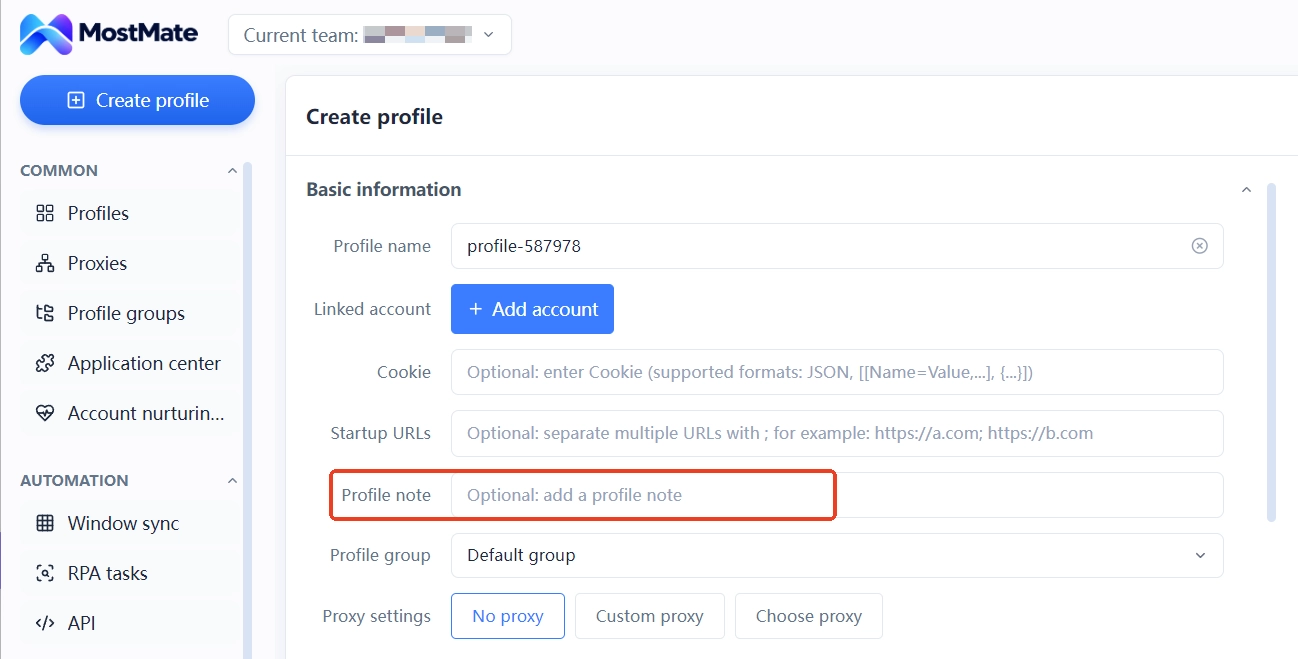
4. Build fixed usage and review habits: Confirm the mapping before every login. When something goes wrong, log the backend alert, the time it happened, and the action taken for later review.
In this workflow, MostMate covers the browser environment management part, helping the team maintain the mapping between environments and stores and lowering the odds of picking the wrong environment, mixing configurations, or missing a handover. Browser environment management is not store compliance management. The business entity and payment arrangements must follow AliExpress's current policies, and listing, fulfillment, and after-sales behavior depend on the operations team's discipline. A fingerprint browser cannot guarantee that stores will not be associated, and it cannot replace platform appeals or violation remediation.
The full introduction to environment management is on the MostMate product page. Based on your store count and existing proxy setup, start by building your own environment checklist.
FAQ
How many stores can one company open on AliExpress?
The policy changes with categories and performance reviews; the current wording on the onboarding page is the most reliable source. Being allowed multiple stores is one thing; how documents and payments are arranged between them is another. Plan the two separately.
Can a fingerprint browser guarantee AliExpress stores will not be linked?
No guarantee. It isolates device and network signals at the login layer. The linkage through verification documents, payment arrangements, and selling behavior has to be solved with document planning and operational differences. No tool can substitute for that part.
Two stores on one computer: does switching browser windows work?
Window switching does not isolate cookies or device fingerprints; to the platform, both windows are still the same machine. To isolate, use environments: one environment per store, each with its own proxy.
What association traps do dropshipping sellers hit most?
Identical images and titles across listings, one supplier shipping for multiple stores, and reused tracking numbers: these three account for most cases. Differentiating product selection and creative assets reduces risk far more than repeatedly swapping network setups.
The store has already lost points. What now?
First, find out in the backend why points were deducted and how many, then remediate accordingly to avoid a second deduction pushing the score to the next penalty threshold. If the store is already frozen, follow the timeline in the first hour after an account ban.
Closing thoughts
Different exit IPs across the three stores do not mean every other issue has been ruled out. When a risk alert shows up, resist the urge to swap proxies or rebuild environments right away. Confirm what the platform alert actually points to first, then check the store documents, operating records, and login configurations.
If your team switches between several AliExpress stores on a regular basis, you can download MostMate and use it to manage each store's browser environment separately, keeping environment names, proxy configurations, and daily notes in order. That way, whoever takes over a store or investigates a login issue does not have to rely on memory to work out which environment belongs to which store. As for verification documents, payment arrangements, and violation remediation, always follow AliExpress's rules and the actual notices from the platform.

MOSTMATE
Secure Multi-Account Management, Made Simple
Start with your first account and use MostMate to build safer, smarter, and more efficient multi-account operations.
- Independent profiles. Consistent identities.
- AI Automation · Account Health · Team Operations



