
Why PayPal Receiving Accounts Get Linked: Risk Triggers and Browser Environment Checks
PayPal receiving accounts can face limits, failed bank card binding, or suspected links between multiple accounts, and each calls for a different response. Account limits require checking official notices and the Resolution Center. Binding failures call for verifying bank account details, regional rules and past binding records. If you merely suspect that several accounts overlap, start by sorting out account profiles, transactions and login environment records instead of assuming the platform has already judged them linked.
For example, a cross-border seller about to withdraw funds sees PayPal flag account functions as limited. The first instinct may be switching networks or browsers. But such moves cannot replace account review, nor do they explain why the limit was applied. The more effective path is to confirm the on-page notice first, then check official requirements and records item by item.
MostMate is an antidetect browser for managing browser environments across business accounts. This article first sorts out common types of PayPal receiving issues and how to investigate them, then explains what browser environment management can solve, and where its limits are.
"Linked" May Mean Three Things: Match First, Then Check
The phrase "accounts got linked" spreads widely among sellers. Yet on its own it is not a diagnosis. The exact notice you see in the backend may correspond to three different situations.
- Account limit or review: You can log in, but receiving, withdrawal or some functions are paused, and the page asks for documents or verification.
- Payment tool binding failure: The bank card or bank account will not bind, with an error saying it is already linked to another PayPal account, or the name or region does not match.
- Multi-account association concern: No clear notice, only your own worry that several accounts share profiles, cards or login environments and might be limited together.
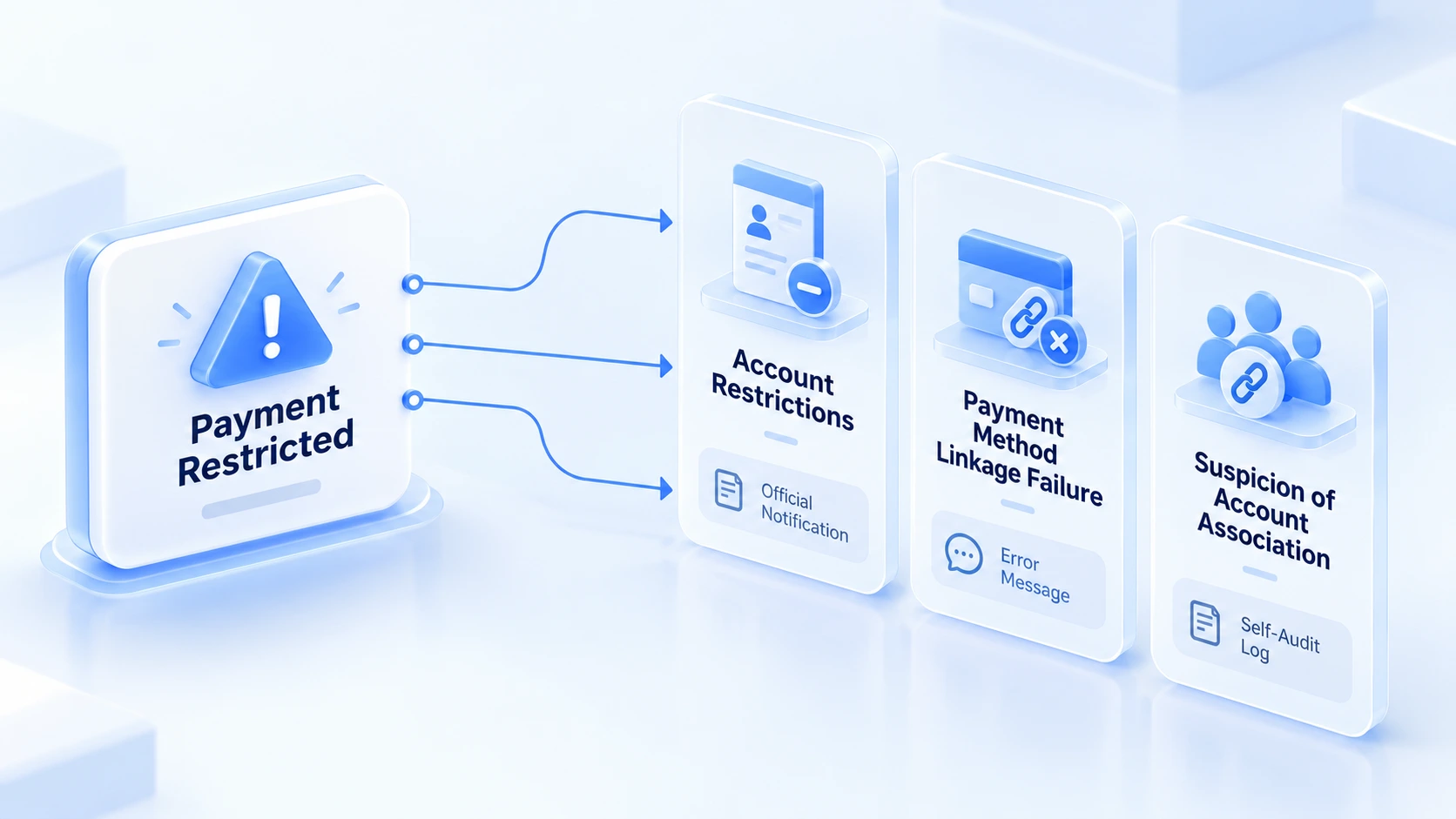
Wrong entry point, wasted effort. Appeal a binding failure as a suspension and support has nothing to act on. Hold back documents and the limit stays.
Common Causes of PayPal Account Limits
PayPal's US help pages address account limits directly: the reason is sent by email, and the specific requirements and steps appear in the Resolution Center and the notification entry at the top of the backend. Gathering the causes PayPal lists, nearly all fall into three types of signals.
Account Profile and Identity Verification
Name, address, contact details and business entity are the foundation of account review. Profiles must be truthful. Incomplete information, long-unverified status, or proof documents that mismatch registration details will leave the account stuck in review. Long-inactive accounts also get limited, and the official remedy is to log in and upload identity proof. The rule is to fill in truthfully: each business entity uses its own real information; profiles across accounts need not be identical, yet must not be deliberately falsified.
Receiving Business and Transaction Risk
Activities PayPal classifies as high risk include unusual volumes of buyer claims and chargebacks, selling brand-new product types, and abnormal sales spikes in a short time. These signals point at the business itself, not the number of accounts. One account may be limited over a high dispute rate while several others stay clean. Compare orders, refunds, buyer claims, chargebacks and sales changes before and after the anomaly, note when it happened, and whether new product types or business models appeared. Timing overlap only narrows the investigation; it cannot alone prove that a change caused the limit.
Login Environment and Account Use
New devices, new networks, new proxies, or handing an account to different members to log in, these changes deserve a place in your investigation record. Draw the boundary first. PayPal has not published its full risk logic, and among the official causes, no single IP, cookie or browser fingerprint is listed as a confirmed cause. The login environment is worth checking, but treat it separately from proven causes. Use it as one investigative lead, not as a verdict.
How to Investigate Receiving Issues: Five Steps in Order
Once the symptom matches, look at order. This step cannot be skipped. The five steps start from official information and move into your own documents and records.
1. Read the official notice first: Log in and check the email notice and the specific requirements in the Resolution Center to confirm which situation applies. If the Resolution Center shows no limit record, be alert: PayPal explains this may be a phishing email, which should be forwarded to PayPal and the password changed.
2. Verify account profile: Check whether the business entity, contact details, identity or business proof are complete, and whether the bank account name to be bound matches the account.
3. Check transaction records: Pull recent orders, refunds, disputes and sales changes onto a timeline. Money questions are answered by the ledger. Find the changes that line up with when the anomaly appeared.
4. Review login and configuration changes: Note recent device, network, proxy or operator changes as internal leads for investigation, without drawing conclusions.
5. Handle it as PayPal requires: Submit truthful documents, complete verification, or ask about the specific reason through official support. Support usually cannot lift a limit over the phone. Review takes time.
Review follows submission; timing varies. Match findings to the table.
| Symptom | Where to look first | What to verify | Where to handle it |
|---|---|---|---|
| Account functions limited | Account notices, Resolution Center | Identity or business proof, business info | Submit documents as the notice requires |
| Receiving tool binding failure | Binding error message | Bank account name, binding history | Adjust or switch cards per the error |
| Receiving drop or hold | Transaction records, dispute list | Recent orders, refunds, chargebacks | Settle disputes first, then check sales |
| Multi-account association concern | Each account's profiles and bindings | Registration, cards, login environment | Self-check, then ask via official channels |
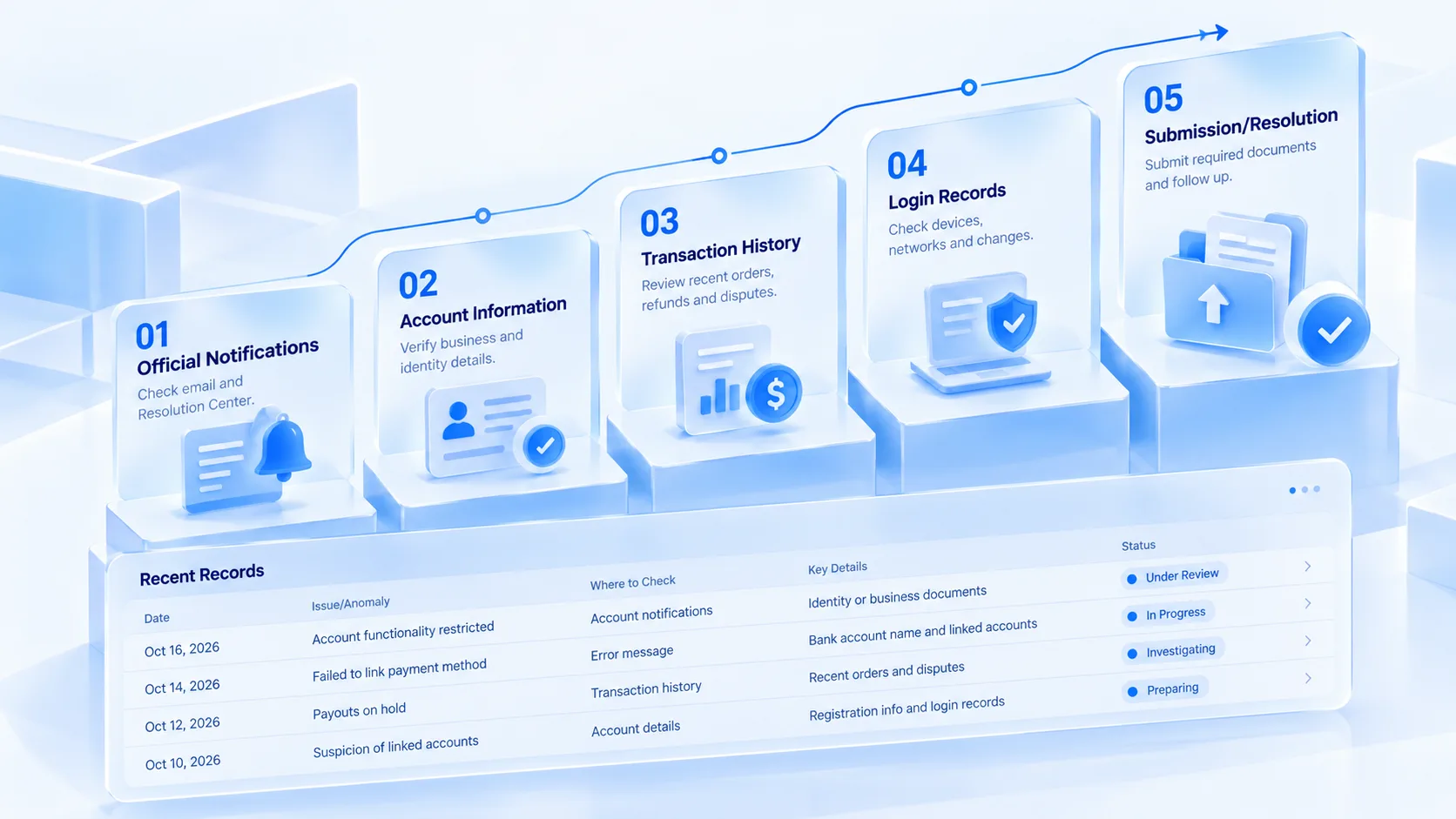
The value of investigation is swapping guesses for evidence. Switching networks or devices produces no information by itself. Notices, profiles and transaction records hold the most information. Record each item as you check it, note times where things overlap, and write down a line even when nothing overlaps; later appeals or reviews will use it.
Multiple Receiving Accounts: Managing Login Environments and Records
The first three steps investigate a single incident. For teams running several receiving accounts, the longer-term issue is daily management: who logs into which account from which environment, what changes occurred, and where to trace back when something happens. The login environment of a payment backend deserves the same standard of care as a store backend. Payment backends hold bank card details, transaction records and entity information, with an exposure no smaller than a store backend.
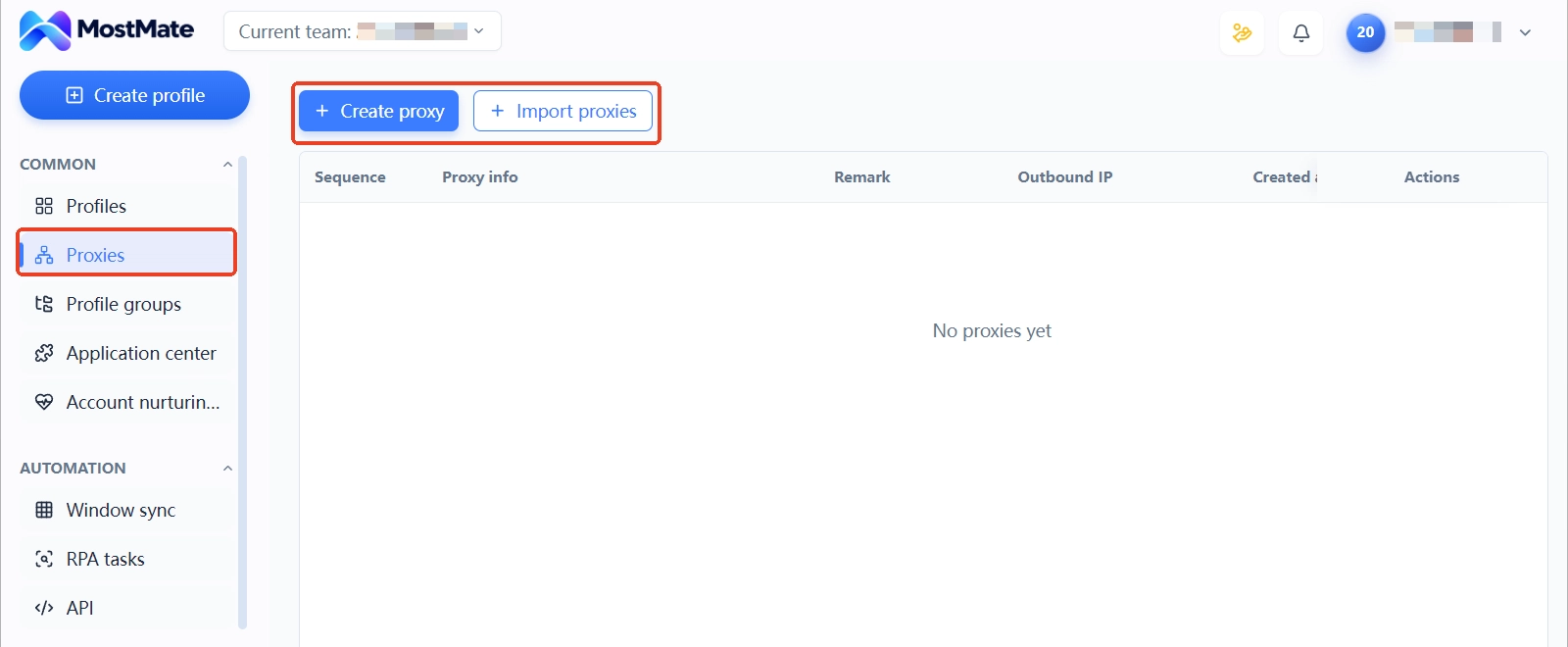
Environment ownership: Each receiving account maps to one fixed browser environment, with the bound account, proxy and purpose registered in the environment form. For multi-person operation, use environment groups to grant payment environments to the right members. Keep temporary devices away from accounts. You can follow the four steps in the official site setup guide: pick a platform, connect a proxy, create an environment, start managing.
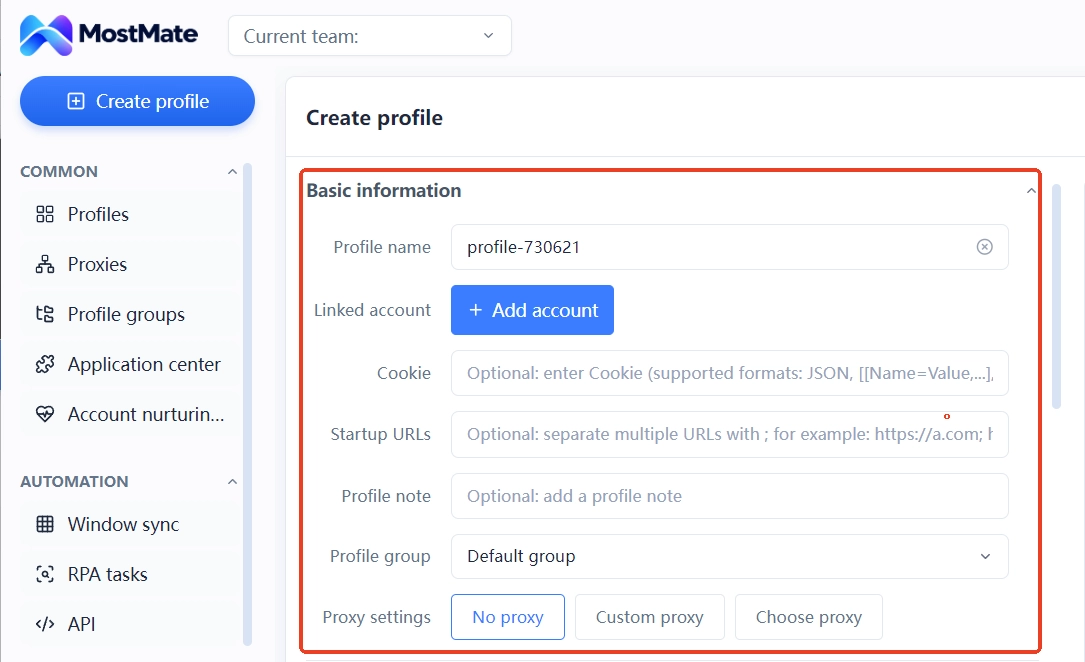
Configuration maintenance: Proxies are maintained centrally in proxy management, tested for connectivity once assigned to environments, with the exit IP column visible on the spot. Change records go into remarks: which day the proxy changed, which day the profile updated, one line each. The cost of reusing environments is broken down in how to weigh environment reuse: when login states and cookies mix, an anomaly can no longer be traced to a specific action.
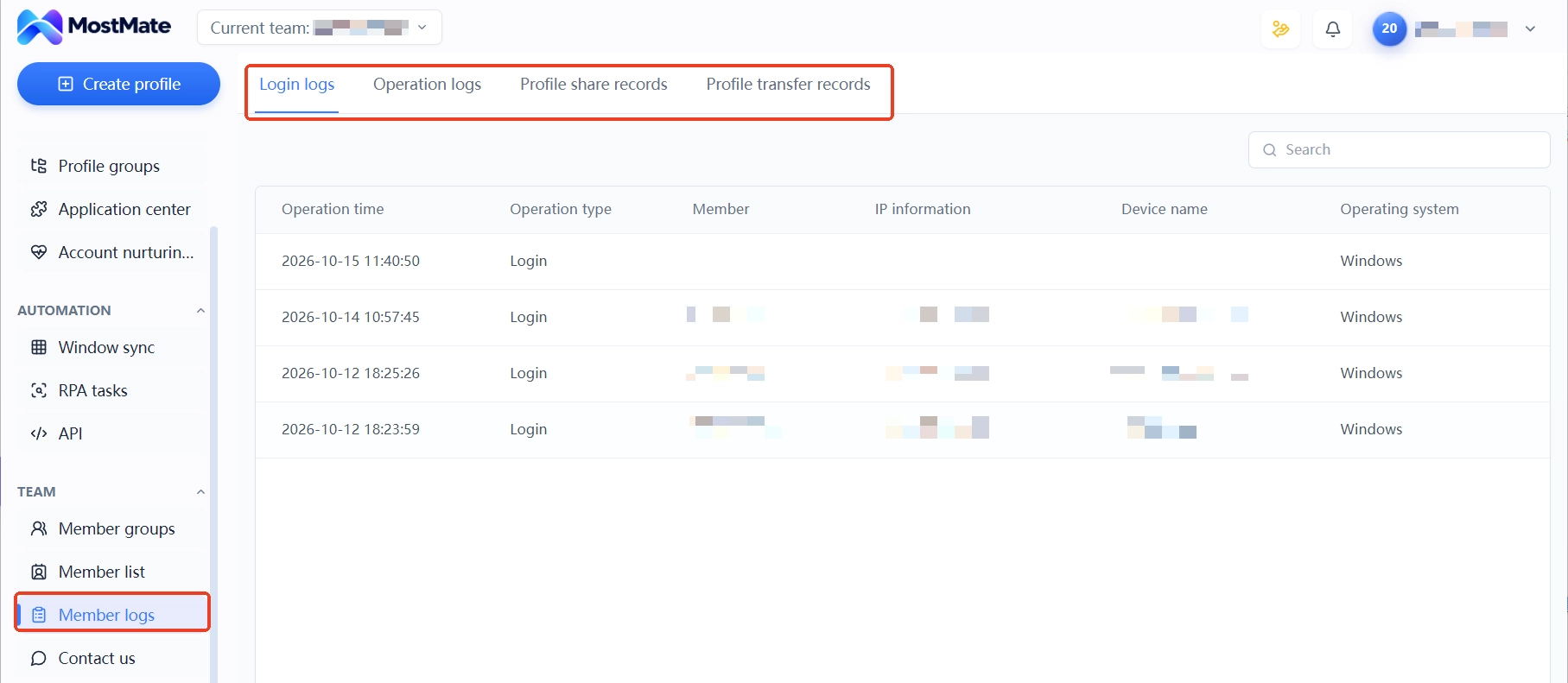
Team collaboration: Member logs contain login logs and operation logs, showing who logged in from which IP and when, retrievable later. These records are exactly the evidence needed in step 4 above. Maintain them in peacetime; draw on them in a crisis.
As for what the environment, proxy and fingerprint layers each govern, the What is MostMate page has a complete division-of-labor list; read through the boundaries of all layers before deciding how to place each account.
Can an Antidetect Browser Solve PayPal Account Linking?
Straight answer: management problems, not risk verdicts. Four points:
- Can do: put each receiving account in its own environment, with cookies, local storage, fingerprint parameters and proxy settings saved per environment, reducing mixed login states and data.
- Can do: provide a trail for tracing back. Environment remarks, member logs and exit IP records let you reconstruct which account did what in which environment.
- Cannot do: judge PayPal's internal risk reasons. How the platform judges association is not public, and no tool can give a reliable conclusion.
- Cannot do: change the outcome of an account limit. Once limited, the way out is submitting documents as required and going through review; switching environments or IPs will not change the review process.
One more reminder: association signals between accounts go beyond the login environment; registration profiles, bank cards, receiving tools and business behavior can all become cross-clues. The multi-account association self-check article lists the complete checklist to run through first. What environment management can control is the login environment segment of it.
FAQ
Is a limited PayPal receiving account always about multi-account linking?
Not necessarily. The causes PayPal lists include regulatory requirements, violations of the Acceptable Use Policy, unauthorized use, high-risk transaction activity and account inactivity; multi-account association is not a standalone item on the list. Read the notice in the Resolution Center first, then decide where to dig.
Can changing IP or browser environment lift PayPal restrictions?
No. Limits are lifted through official review, and submitting documents per the notice is the proper entry. The official cause list does not name the login environment as a confirmed cause, and switching environments cannot fix problems at the profile or transaction level.
How many PayPal accounts can one bank card bind to?
Binding limits for a bank card or bank account may depend on account region, account status and past binding records. If the page says the bank account is already linked to another PayPal account, check the official help pages for the corresponding region first, then proceed as instructed.
Closing
Most PayPal receiving account problems are lost at the investigation order: skipping the official notice and jumping straight to switching networks or devices spends attention where evidence is thinnest. Tell the three situations apart first, then check in the order of notices, profiles, transactions and login environment, leaving a record at each step, so conclusions rest on evidence.
What tools can lock into this workflow is the environment and records segment. MostMate gives each account an independent browser environment, with proxies, exit IPs, bound accounts and remarks all viewable in one list, and member logs completing the operation trail. At the stage of few accounts, start with two environments and one account per environment; download MostMate to sort accounts by environment, so that when an anomaly comes, you investigate on solid ground.

MOSTMATE
Secure Multi-Account Management, Made Simple
Start with your first account and use MostMate to build safer, smarter, and more efficient multi-account operations.
- Independent profiles. Consistent identities.
- AI Automation · Account Health · Team Operations



