
How to Prevent Shopify Multi-Store Association: Separate Store Profiles, Login Environments, and Payment Methods
A few weeks after your second Shopify store goes live, the first one gets asked for extra verification. Days later, the same request lands in the second store's inbox. The cause usually isn't either store on its own; it's what they share: one signup email, one computer used to run both dashboards, and one PayPal account handling payments for both.
Shopify officially supports running several stores under one account, and the store switcher in the admin was built for exactly that. The risk sits in the sharing: when one store triggers a policy violation or an unusual login, a review often extends to every other store on the same account or profile set.
This guide breaks the shared points down into three lines: store profiles, login environments, and payment chains. Each line comes with a checklist you can work through directly, and the closing section explains where MostMate fits into the workflow.
Key takeaway: Shopify's multi-store risk review doesn't target "running several stores" as such; it looks at what those stores share. One signup profile, one login device, one payout account — a problem on any single line can spill over to the others. The anti-association approach is to manage the three lines separately: a full set of profile details per store, one environment per store, and payment methods bound honestly to the real legal entity.
How Shopify Views Multiple Stores
Start by separating two things: multi-store is an official feature, while association is a risk-control concept. According to the official help documentation, one account can hold several stores, the store switcher jumps between them directly, and the organization feature groups multiple stores under one entity for unified management. Running stores this way is legitimate, so there is no need to hide who you are.
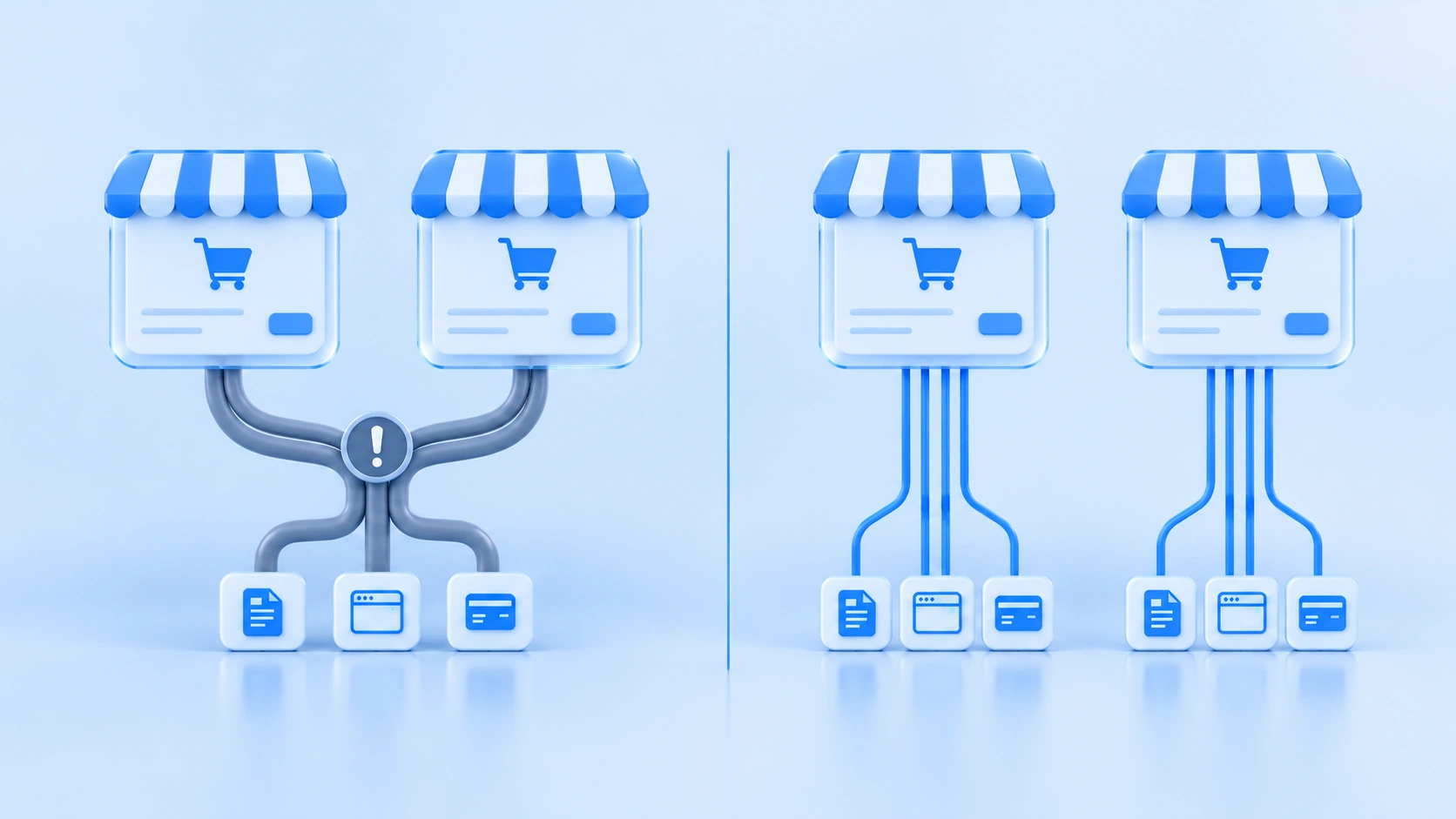
What risk teams watch is spillover. When stores sit on the same account or the same profile set and one of them commits a policy violation (restricted items, copyright infringement, fraudulent orders), the review rarely stops at that one store; cases shared in seller communities mostly trace back to shared signals. Anti-association work targets this path: give every store its own boundary for profiles, devices, and payments, so normal operations never interfere and an incident on one store doesn't amplify across the rest.
Store Profiles: An Isolation Checklist for Signup and Setup
Mixed-up profile data is the first thing reviewers compare. Signup email, legal entity, contact address, and bound domain are all fields the platform can read directly; when two stores overlap heavily on them, reviewers place both stores in the same basket. Work through the checklist below item by item:
- Use a dedicated signup email per store: register each store with its own address, and keep the notification and recovery emails separate too, so one blocked verification email affects only one store.
- Fill in entity and contact details honestly: submit your company, legal representative, address, and phone as they actually are. Holding several stores under one entity is allowed, and honest data holds up better under later KYC checks.
- Buy domains separately: register each store's domain on its own to avoid traces of batch registration, and don't copy store names, themes, or logos between shops.
- Keep apps and staff accounts separate: configure app authorizations, staff accounts, and third-party plugins per store, because one shared plugin account ties both stores' activity logs together.
Separating profiles is not the same as faking them: what gets separated are the accounts and login entry points, while identity data itself is still submitted truthfully. Multiple stores under one entity are perfectly viable; the trouble usually comes from behavior that mixes outside the profiles, which is what the next two lines cover.
Login Environments: One Environment and One Connection per Store
The association signals for login environments hide inside browser parameters. IP address, Canvas fingerprint, User-Agent, time zone, and screen resolution combine into the "device" the platform sees. When two stores regularly sign in from the same fingerprint and the same IP, you are effectively telling the platform they run on one machine.
Environment isolation means each environment keeps its own Cookie store, local storage, and fingerprint configuration; see What Is Environment Isolation for details. For Shopify multi-store work, managing the shops with an anti-detect browser like MostMate looks like this:
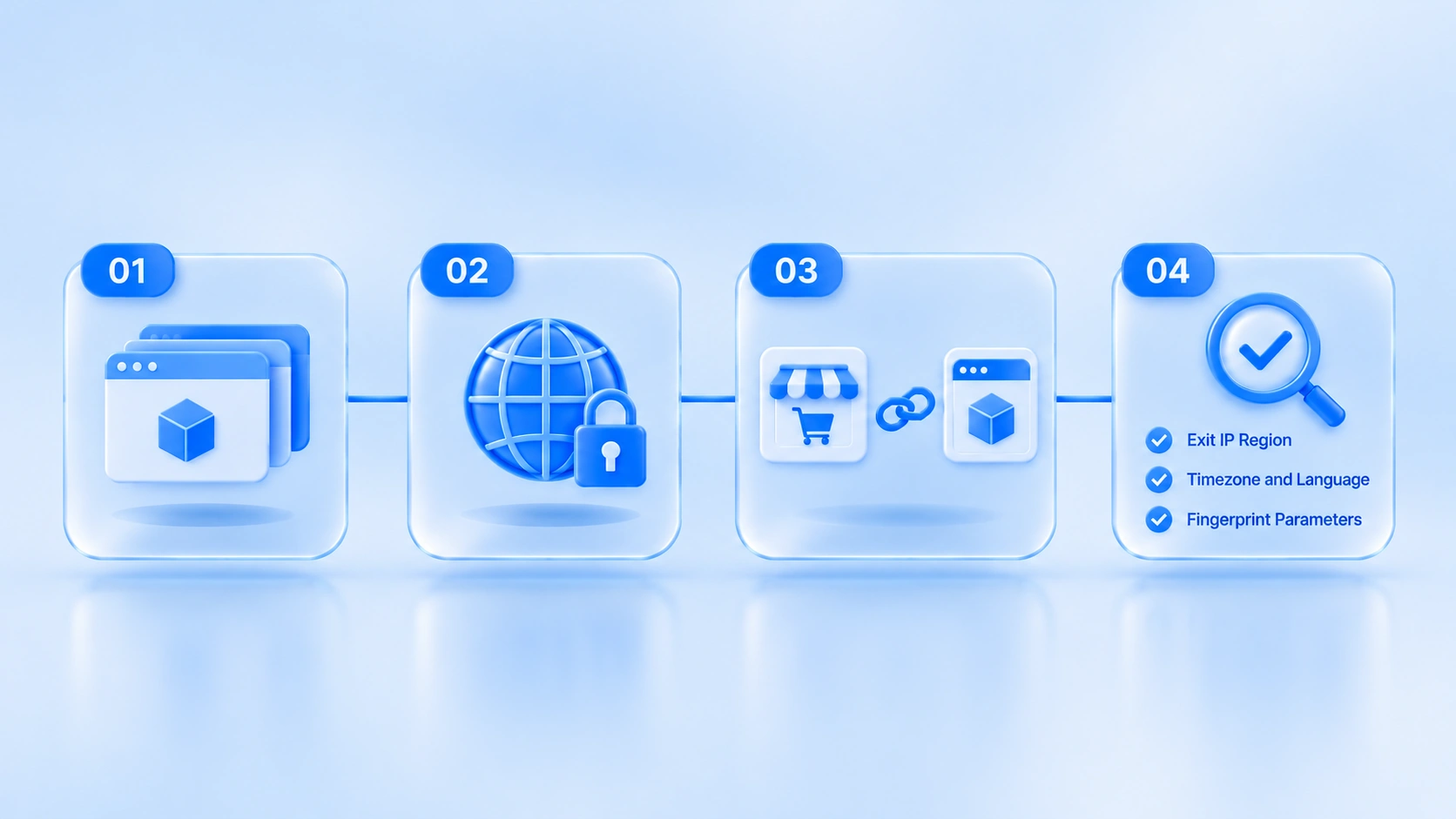
- Create one standalone environment per store, so store A's login state never leaks into store B.
- Attach a fixed proxy to every environment; multi-store setups usually run on residential proxies, and the differences between the two IP types are covered in Residential vs. Datacenter IP. Keep one connection per store instead of rotating lines from day to day.
- Bind each store permanently to its environment: record the mapping in your ledger following the Account and Environment Binding Guide, and never cross-login after binding.
- Check consistency once configured: IP location, time zone, language, and fingerprint parameters should not contradict one another.
Once a binding is in place, keep it as stable as you can. Swapping environments or connections frequently is itself a suspicious signal.
Payment Chains: Check PayPal and Shopify Payments Before Binding
Payments sit where the profile line and the money line meet, and they are the easiest part to overlook. Before you attach a payout account, check these three objects one by one:
| Payment object | What sharing it across stores means | Recommended approach |
|---|---|---|
| PayPal account | Binding happens at the account level, so one account tied to several stores is directly visible to the platform | Bind an independent PayPal account to each store |
| Shopify Payments | The platform requires truthful entity and identity details, as the official documentation states plainly | Submit real entity data instead of disguising it |
| Bank account | Overlapping withdrawal accounts connect the money flows | Keep a separate withdrawal account per store |
Of the three objects, PayPal sharing is the most direct and the cheapest to unwind. Shopify Payments works the other way around: the official documentation is explicit, a disguised entity creates problems during verification, so truthful submission is the steadier choice. Cross-border payouts also involve withdrawal routes, exchange rates, and account types; before binding a card, walk through the sequence with the Cross-Border Payout Binding Guide.
Turning the Three Lines into Daily Practice
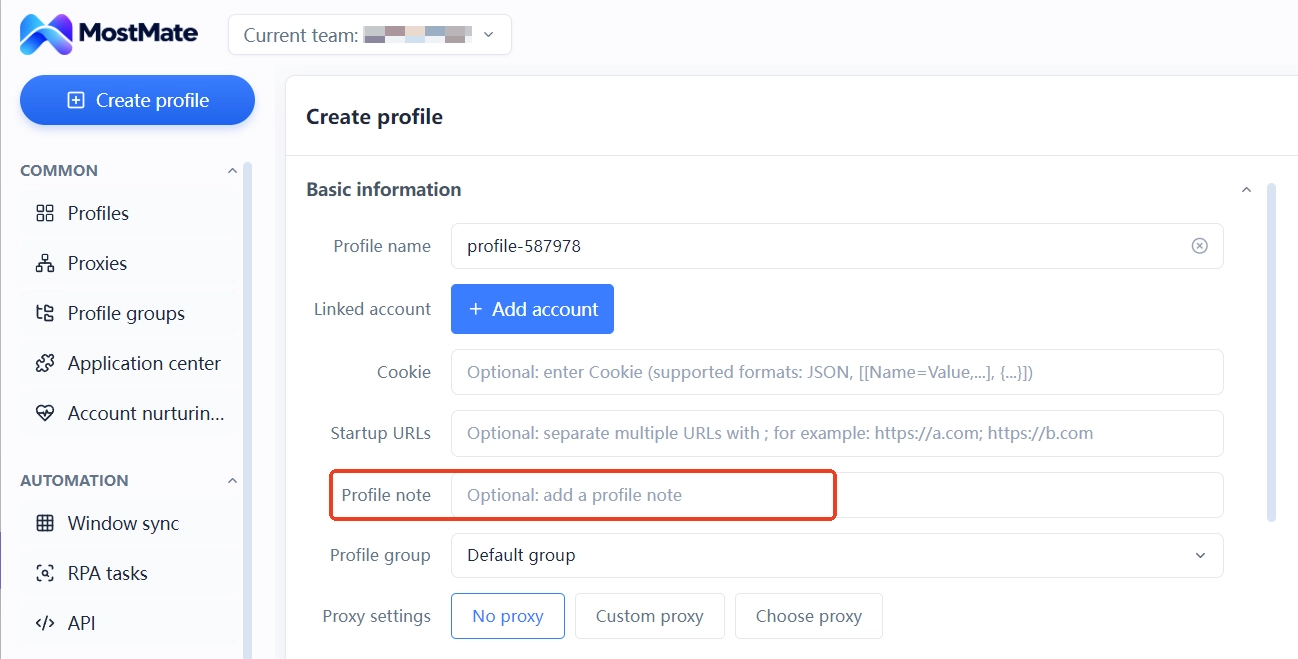
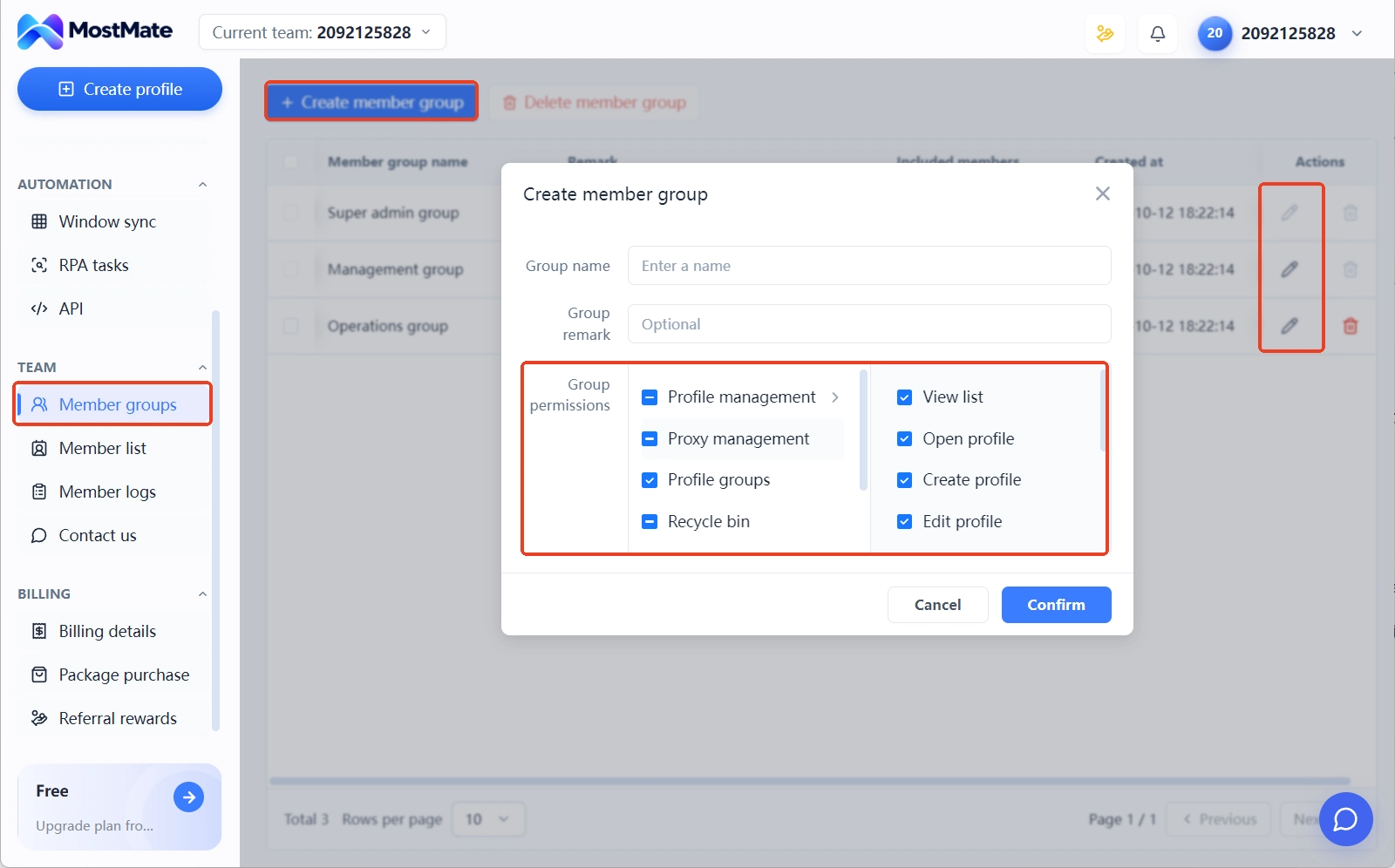
Once the checklists are done, what remains is execution. MostMate slots into this workflow as follows: note the store, entity, and proxy for each environment right in the environment list, which turns environment notes into your most direct profile ledger; assign environments to team members through permissions, so the person running store A never touches store B's login state; and when a periodic self-audit is due, run through the checks in the Multi-Account Association Risk Check once a month.
It helps to be clear about the limits here: an anti-detect browser isolates browser environments and login devices. The truthfulness of your registration data, compliance with platform rules, and the legitimacy of your payment setup all live outside the tool. Stable multi-store operation comes from both sides — isolation inside the boundary done properly, and compliance outside it never skipped.
Frequently Asked Questions
Can one person run multiple Shopify stores?
Yes. The official store switcher and organization features exist precisely for managing several stores, and multi-store itself breaks no rules. What risk teams watch is spillover, so keep profiles, environments, and payments separated.
Can one business license register two Shopify stores?
You can, since one entity may hold multiple stores. Stores under the same entity are inherently linked through their data, and when one of them violates policy, the others may face stricter review. Compliant operations do more to lower this risk than profile isolation alone.
Can one broadband connection manage two stores?
Yes. The broadband line doesn't need to change; what changes is which route and which environment each store uses. Give every store its own proxy and its own environment, and the login layer is already separated.
Does every store need its own PayPal account?
Separating them is recommended. PayPal binds at the account level, so one account attached to several stores is a shared signal the platform can see directly, and it is the easiest association in the payment chain to remove.
Conclusion
Anti-association for multiple Shopify stores comes down to three things: a full set of profiles per store, one environment per store, and payments split by store. None of the checklists is complicated; the hard part is setting this structure up when the stores open, since fixing things afterwards costs more. For stores that are already entangled, start by untangling the two cheapest lines, payments and login environments, then build out the profile ledger step by step. To try environment creation, proxy binding, and team permissions yourself, download MostMate and set up a few environments.

MOSTMATE
Secure Multi-Account Management, Made Simple
Start with your first account and use MostMate to build safer, smarter, and more efficient multi-account operations.
- Independent profiles. Consistent identities.
- AI Automation · Account Health · Team Operations



