
Will Discord Ban Your Other Accounts Too? Four Linking Signals to Sort Out First
Core takeaway: Discord officially allows one person to hold multiple accounts, but its terms also state that enforcement can extend to other accounts judged to belong to the same user — the same phone number, the same IP, or the same device setup will tie accounts together. Separate the environments and the materials, keep the operating pace steady, and multiple accounts will hold up. The guide unfolds in four parts: policy, signals, setup, and day-to-day operations.
Anyone who runs Web3 project communities, game guilds, or customer-service channels knows the routine: juggling several Discord accounts at once is normal. The trouble rarely announces itself. One account gets banned from a server, and a few days later the others start hitting verification walls, or get disabled outright. Only then does the community admin realize the platform had already grouped every one of those accounts under a single user.
MostMate is an anti-detect browser that isolates one browsing environment per account, and every environment carries its own network and device configuration. This article first lays out how Discord actually treats multiple accounts, then breaks down the signals it uses to flag alt accounts, and finishes with a setup procedure you can follow step by step.
Discord's multi-account rules differ from most platforms
Discord does not ban multiple accounts as such; what it bans is using accounts to dodge penalties, farm engagement, or impersonate others. That sets it apart from most platforms. Tinder and Instagram allow one account per phone number, while Discord has no such restriction. According to a widely read breakdown of Discord's Terms of Service, creating several accounts for work, gaming, community management, or bot testing are all legitimate use cases. The official desktop account switcher holds up to five accounts at once, but that is the capacity of the switching tool, not a cap on how many you can own.
Two hard lines deserve a closer look:
- The first is evading a ban, otherwise known as ban evasion. When a banned account is replaced by a fresh alt that jumps back in, that is a separate violation from the original offense, and the penalty gets heavier. Several third-party write-ups also flag a detail that is easy to miss: creating an alt while the original appeal is still open directly affects how that appeal turns out.
- The second is automation. Operating a user account through scripts or third-party programs (in other words, a self-bot) is a red line under the terms without authorization. It has nothing to do with bans; on its own it is grounds for termination.
For anyone operating multiple accounts, the rule to remember is shared enforcement. The official terms state that when one account seriously breaches the rules, penalties can extend to other linked accounts the platform judges to belong to the same user.
Multi-accounting itself is fine. Without separation, one slip takes all.
On the product side, the MostMate product overview covers the basics: start by building the "one account, one environment" framework.
The four signals Discord uses to identify alt accounts
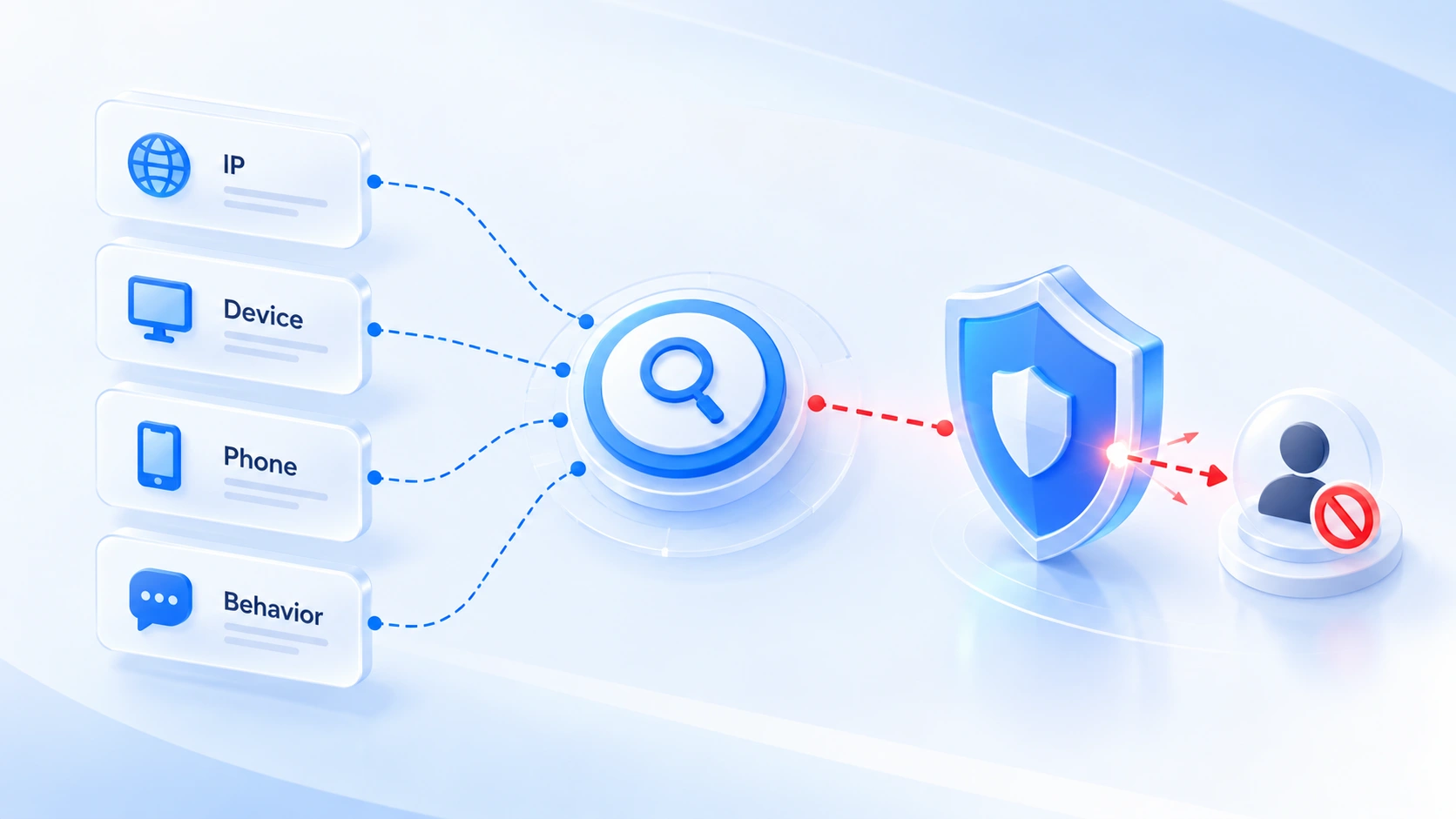
Discord judges alt accounts by cross-checking evidence, never on any single signal. Two of the four signals sit at the environment layer, two at the materials-and-operations layer.
1. The first is IP and network records. Discord logs the IP addresses that access an account. When a new account's registration and login IPs overlap with those of a banned account, that is the most direct evasion signal. Datacenter IPs and free VPN exits sit in a low-reputation range; a new account that starts on them is noticeably more likely to hit verification.
2. The second is device and browser fingerprints. Discord collects device-level information on both web and desktop, browser fingerprints included. Ban one account and create another inside the same device and browser environment, and the fingerprint overlap will be flagged even after an IP change.
3. The third is phone verification, the strongest correlation signal of all. One phone number verifying several accounts lets Discord link them directly, and it is also the platform's main method for spotting ban evasion. On top of that, Discord filters virtual-carrier numbers more strictly than most platforms, and large numbers of VoIP numbers fail verification. Registration materials such as an email address or a phone number serve one account only.
4. The fourth is behavior patterns. Joining the same servers, interacting with the same users, and recycling identical content all become evidence of association. The third-party management bots that server admins rely on also cross-check ban lists and block users who come back on a new account.
Of these four, IP and device fingerprints belong to the environment layer and can be separated with tooling; phone numbers and behavior belong to the materials-and-operations layer and depend on discipline. An account-security site's roundup of how Discord identifies alt accounts confirms the same point: the four signals are always weighed together. The right moment to handle all of this is before registration. When you need to audit browser environments, proxy settings, and account activity item by item, the account association risk self-check guide walks through the steps.
Before you register: separate the environments with MostMate
Most linking signals lock in the moment an account is registered, leaving little room for repairs afterwards. So the setup work belongs before the first account is ever created.
Complete all four steps before creating your first account.
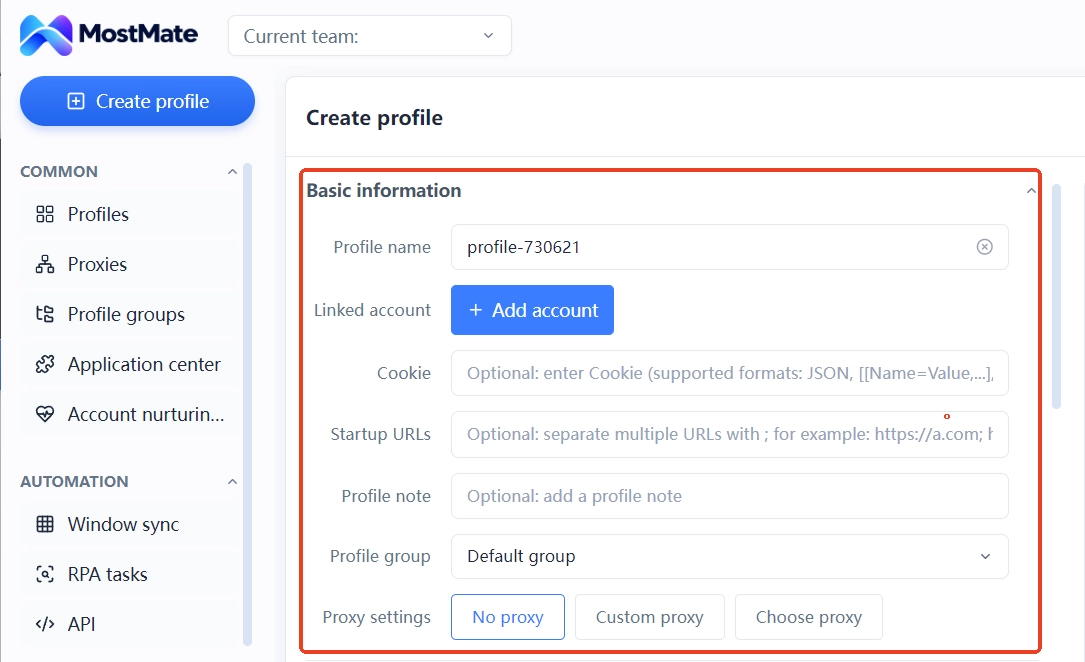
Step 1: Create a separate environment for every account. Open the environment management page (环境管理) and create environments one by one. Name each one by its purpose (by project or by server, for example). Every environment has its own name, bound account, notes, and group fields, so one row in the list is one account's complete identity. Later, when you need to match an account to its configuration, a quick scan of the list does it, no memorizing required.
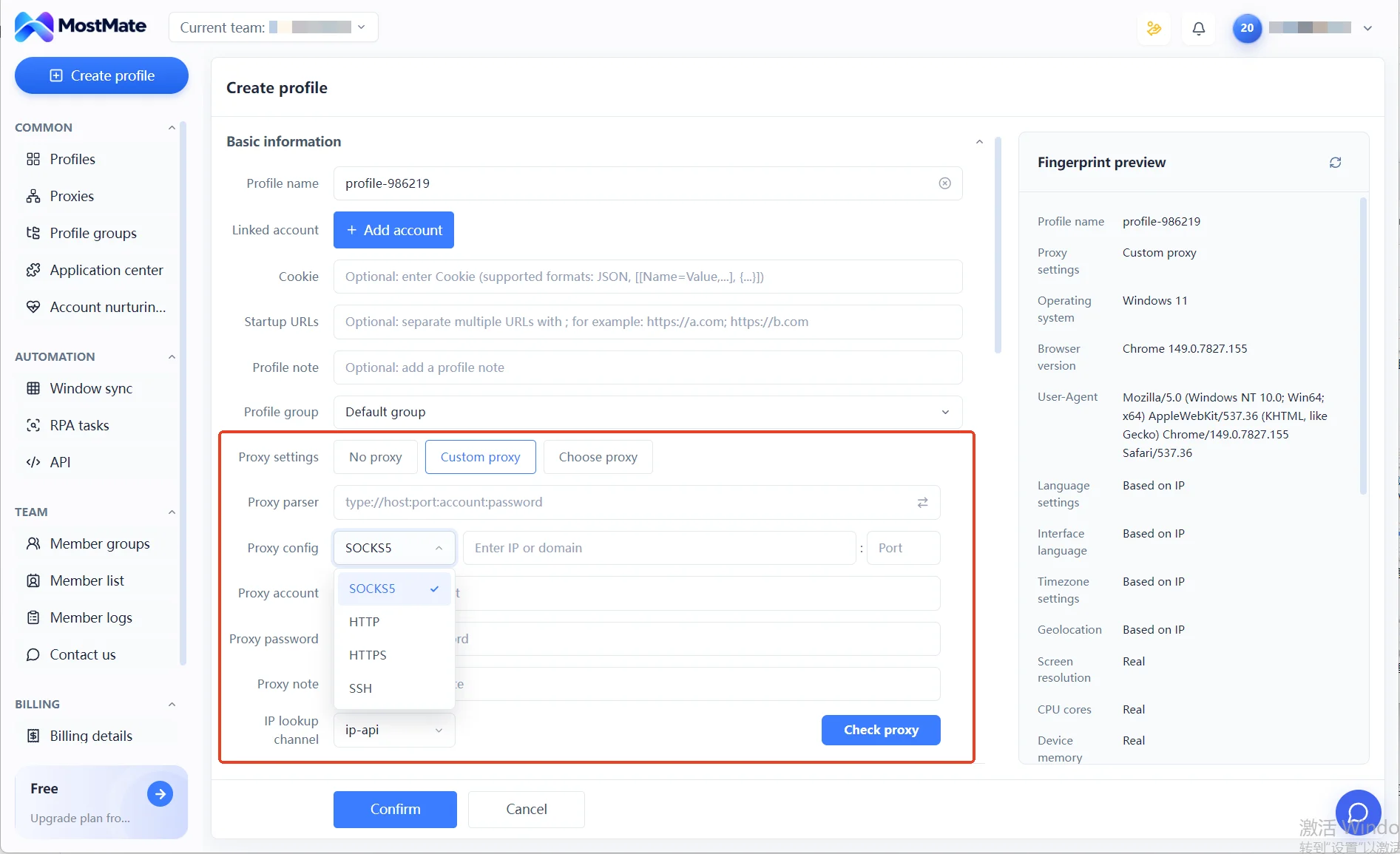
Step 2: Give every environment its own proxy. Proxies are maintained in a dedicated proxy management (代理管理) list and assigned per environment; HTTP, HTTPS, SOCKS5, and SSH are all supported. With each environment bound to its own exit, the network records of different accounts never overlap. When picking a proxy, mind IP reputation (residential exits suit new accounts better than datacenter ones) and keep the location close to where your target community lives. Language, timezone, and geolocation can stay on the default IP-based mode and align automatically.
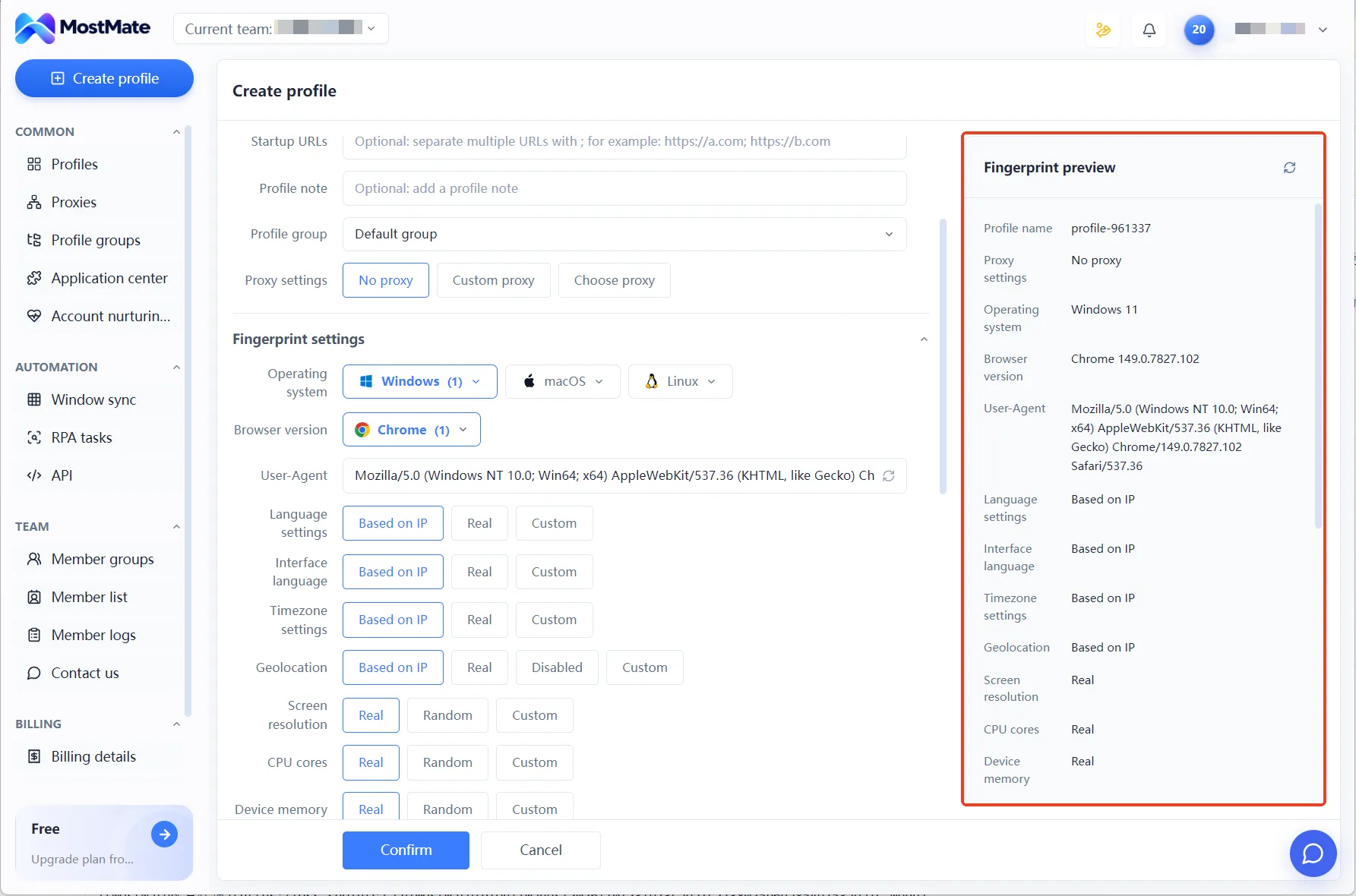
Step 3: Check the fingerprint preview before saving. The right side of the environment form shows a live fingerprint preview: operating system, User-Agent, timezone, screen resolution, all at a glance. Scan it once before saving and make sure the values make sense together, with no contradictory combinations.
Step 4: Keep registration materials one per account. One email address per account. One phone number for one account, never reused. Record which materials belong to which environment in the notes, so a teammate picking things up never has to guess which set went with which account.
The boundaries to hold during daily operations
Separating environments is only step one; whether an account lasts depends even more on the behavioral rhythm after registration. Discord applies far stricter limits to new accounts than to established ones, and four boundaries are worth writing into your team's playbook.
- Take new accounts slow. A freshly registered account that joins servers in bulk and fires off mass DMs is a textbook spam pattern. For the first two weeks, post normally in a handful of servers and let the account build an ordinary usage trail.
- Stay away from automation scripts. Operating a user account with a program is a red line under the terms, no matter how many accounts you run. Batch work of this kind belongs in the product's built-in legitimate features, not scripts hung off an account.
- Keep the exit node stable. Do not swap out a proxy once an environment has one; an account that logs in from the same region over the long run, consistent with its registration details, gives risk control no reason to get suspicious.
- No new accounts during an appeal. Creating an account while the original appeal is still underway directly affects the outcome (mentioned earlier, and worth repeating).
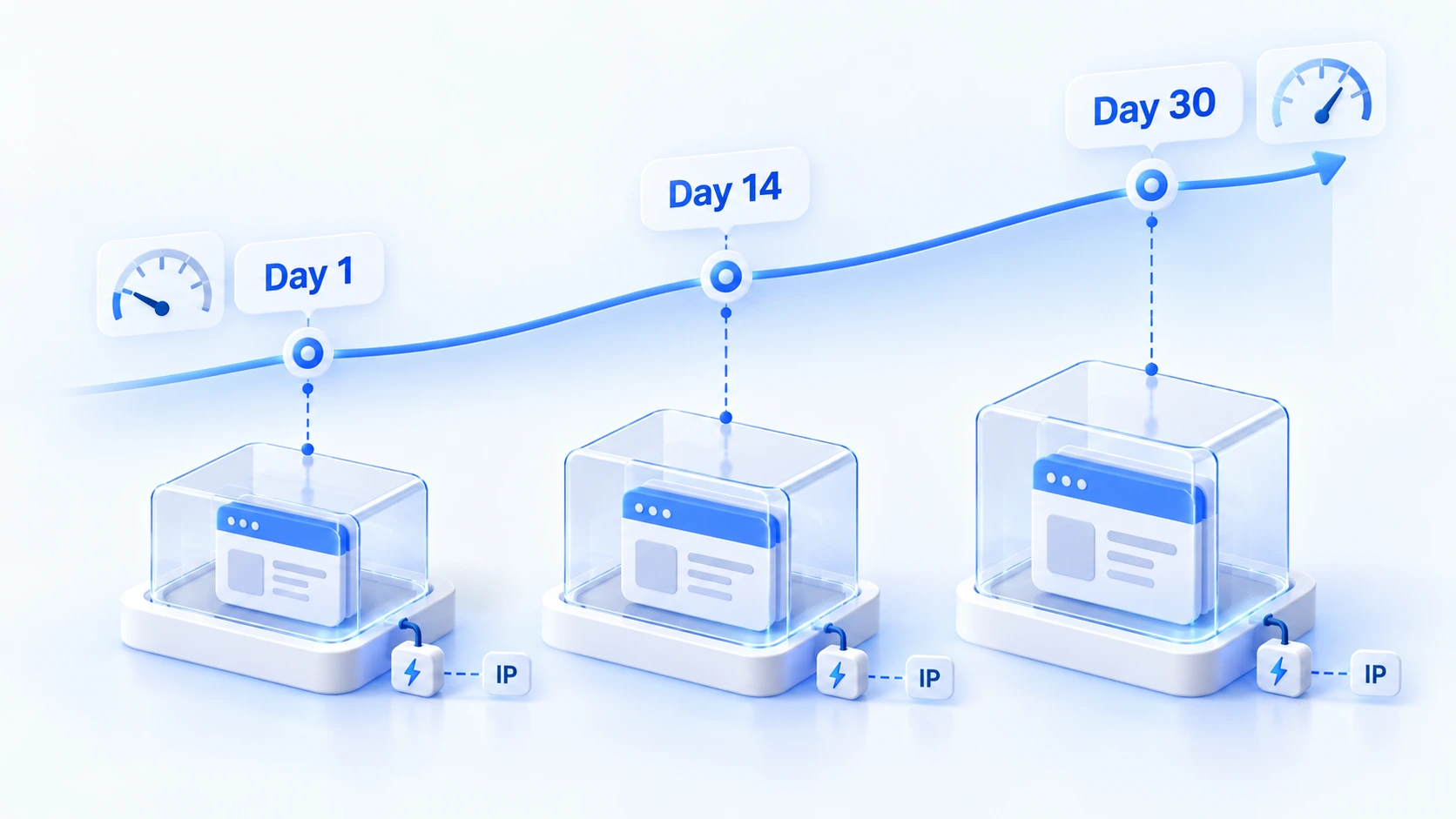
Pacing new accounts is easier with MostMate's account nurturing feature (养号管理): a thirty-day plan moves each account from its initial phase to steady, independent operation. Tick off the daily task list one item at a time. The "not today" section lists the easy ways to trip risk control: continuous heavy interaction, posting promotional content, and mass-copying comments. If verification or a login issue shows up, pause the day's tasks as the page prompts, confirm the environment is fine, then continue.
When you run several platforms in parallel, hand over Discord accounts together with their environments. Move the environment, its proxy, the bound account, and the notes to the person taking over; the handover checklist in the Telegram multi-account management guide gives you a checking order.
If an account does get banned anyway, the first move is damage control, not a replacement account. That day, disable shared authorization on the suspicious environment, then check the login and verification status of the accounts in the same group, and only then consider rebuilding. The containment steps in the multi-account ban containment guide list each action.
Frequently asked questions
How many Discord accounts can one person have?
The terms allow holding multiple accounts with no cap on the number. The official desktop account switcher logs in up to five accounts at once, and that is only the capacity of the switching tool. How many you can run steadily depends on whether each account has its own environment and materials.
What happens if one phone number verifies several Discord accounts?
Discord links those accounts directly: it is one of the platform's main grounds for judging alt accounts. When one account runs into trouble, every account verified with the same number is affected. Give each account its own phone number, and watch the source too: VoIP virtual numbers fail Discord's carrier filtering in large numbers.
Can you rejoin a server on another account after being banned?
No. Server-level bans and platform-level bans alike fall under the ban evasion clause, and the third-party bots admins use cross-check ban lists. Returning on a new account is a separate violation and can escalate the penalty to the platform level.
Will an anti-detect browser keep your Discord accounts from getting banned?
No. An anti-detect browser separates environment-layer signals such as IP and device fingerprints; phone number reuse, spam-like behavior, and automation scripts are materials-and-operations problems that no tool can replace discipline for. Do both well and accounts stand firm.
Closing thoughts
Discord is more relaxed about multiple accounts than most platforms; the real risk is not "how many accounts you opened" but whether those accounts get treated as one person. Hold the two hard lines at the policy level, split environments, proxies, and materials per account before registration, and keep new-account pacing tight during operations, and the odds of shared enforcement drop sharply. None of this preparation requires writing code: start from creating a new environment in MostMate, and you can finish it step by step. Set the framework up before the first account is registered, and every account after that starts from the right place.

MOSTMATE
Secure Multi-Account Management, Made Simple
Start with your first account and use MostMate to build safer, smarter, and more efficient multi-account operations.
- Independent profiles. Consistent identities.
- AI Automation · Account Health · Team Operations



