
WhatsApp Business Multi-Account Management: A Guide for Cross-Border Support and Customer Operations
Key takeaway: running multiple WhatsApp Business accounts is less about opening more instances and more about team roles, isolated login data, and handover records. Linked devices and the Business Platform handle message processing; account ownership, member permissions, and environment setup need to be pinned down by your own management processes. This guide gives practical steps in the order of choosing a solution, building an account register, setting up environments, assigning permissions, and checking risks.
Some background first. WhatsApp Business is a communication tool for businesses; the standard version is a mobile app. There is also the Business Platform, the API solution, for larger scale. Cross-border e-commerce and customer operations teams often run several numbers at once: different markets, different brands, pre-sales and after-sales separated. Once the numbers pile up, records scatter. Who is using which number, whether messages are being followed up, whether access was revoked when someone left. It gets hard to keep track of quickly.
Multiple WhatsApp Business Accounts: Choose the Right Management Approach First
Multiple accounts do not mean multiple devices, and multiple devices do not mean a multi-agent support system. Before choosing a management approach, separate three scenarios:
1. Solo or small-scale operation. One or two people handling two or three numbers are usually fine with the official app plus linked devices. An account can be linked to other devices for use, and the primary device must stay online. This is a capability documented in the WhatsApp Help Center. At this stage, the management focus is number ownership and login records; complex tools are unnecessary.
2. Several numbers, a few agents. With five to ten numbers and two or three agents, linked devices start raising allocation questions. Which agent watches which number's device, who holds the primary device, how to hand over during leave. All of these need answers. At this stage you need an account register and a clear division of labor; memory alone will not hold.
3. Many people handling many conversations at once. When the support team scales up and conversation volume grows, the evaluation changes. Look at the WhatsApp Business Platform (the API solution), a shared inbox, or CRM integration instead of stacking more browser windows. The WhatsApp for Business official FAQ explains how the app and the Platform differ in applicable scope; the two differ in capability and deployment cost, so it is worth comparing them before deciding (official feature boundaries follow the Help Center's current statements; this article was checked in October 2026).
| Option | Best for | Multi-agent collaboration | Automation and cost |
|---|---|---|---|
| Official app + linked devices | Individuals or small teams | Limited, via device allocation | No automation, low cost |
| Business Platform / CRM | Established support teams | Native support | Strong, high integration cost |
| Anti-detect browser environments | Teams running separate numbers | Via environments and permissions | Not a support system, moderate |
One clarification on the last row: environment management tools isolate login data and configurations; they do not route conversations and cannot replace a shared inbox. The three options solve problems at different layers.
When Accounts Multiply, Chaos Follows: Profile Every Account First
A cross-border brand serving Southeast Asia and Europe at the same time, with agents split across pre-sales, orders, and after-sales. When account names, markets, and owners live only in memory, three accidents are common: replying from the wrong account in peak season, missing follow-ups with customers during leave handovers, and departed employees keeping account access. All three trace back to the same root.
Account information exists only in people's heads. The fix is an account register with few fields; what matters is that every account gets registered:
| Field | What to record |
|---|---|
| Account identifier | Business number or internal ID |
| Brand and market | Brand, service region |
| Use case | Pre-sales, orders, after-sales, retention |
| Owner | Primary owner, backup |
| Browser environment | Environment name or ID |
| Status | Active, pending handover, retired |
The register can be a single online spreadsheet. Its real value shows when things change. An owner changes, a number retires, an environment is adjusted; update one row as you go, and six months later every account still has a traceable history. Most chaos in multi-account management traces back to "nobody remembers what that number was for in the first place."
How Browser Environments Map to Accounts
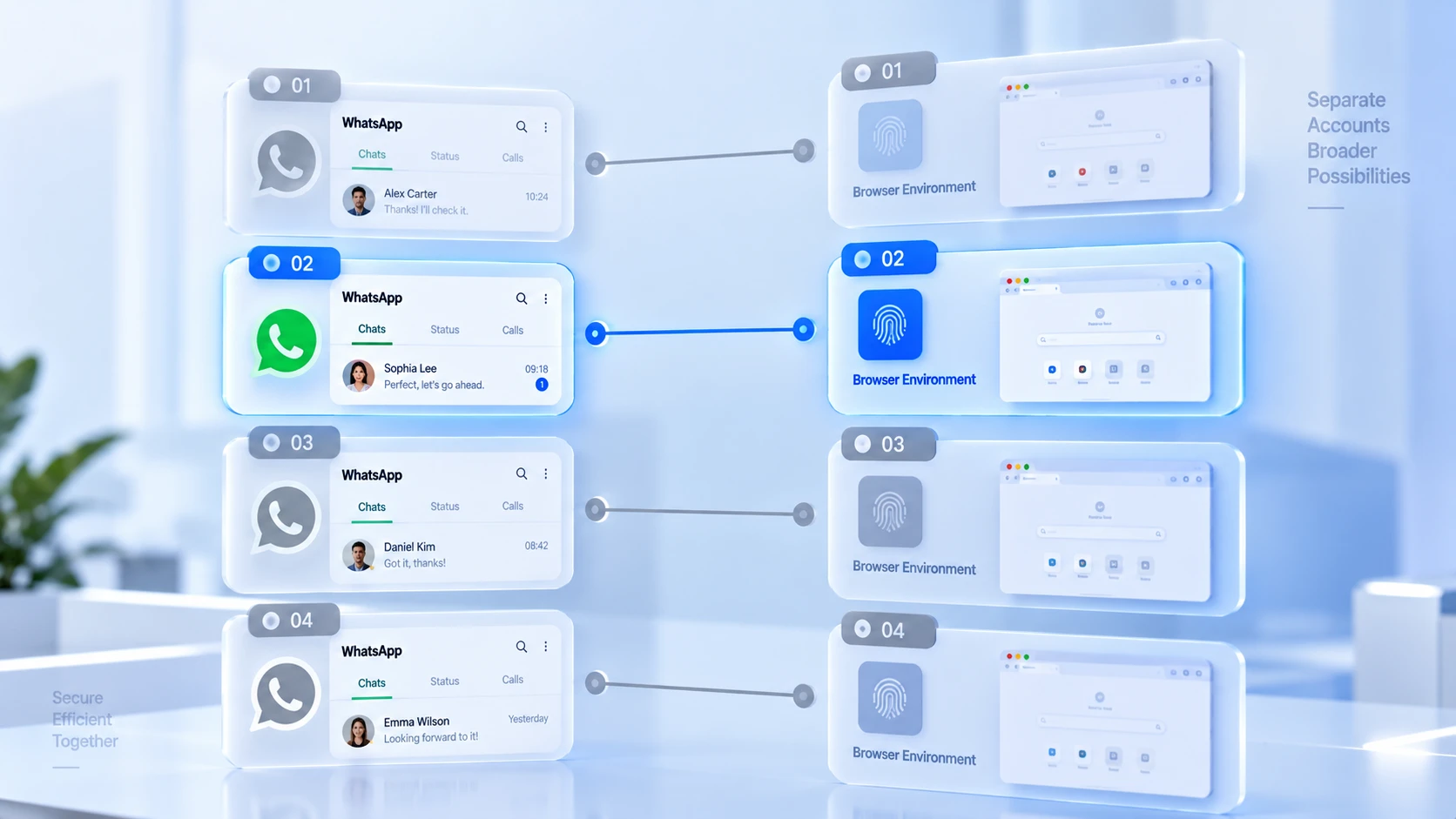
The register fixes the account list; the next step is giving every account that needs independent management its own environment. This layer manages browser data. Cookies, local storage, and login sessions are stored per environment and never mixed. Most cases of login states knocking each other out or sessions crossing between accounts come from multiple people sharing one set of browser data.
MostMate is an anti-detect browser that prepares an isolated browser environment for each account. For WhatsApp Business multi-account setups, the workflow takes three steps. Create one environment per number, naming it directly after the ID in your register. Inside the environment, check the proxy exit, language, timezone, and other settings; numbers serving the European market get European exits, with language and timezone following the market, consistent with the approach in proxy maintenance and exit checks. Day to day, enter accounts only from the matching environment and never log in from a personal browser.
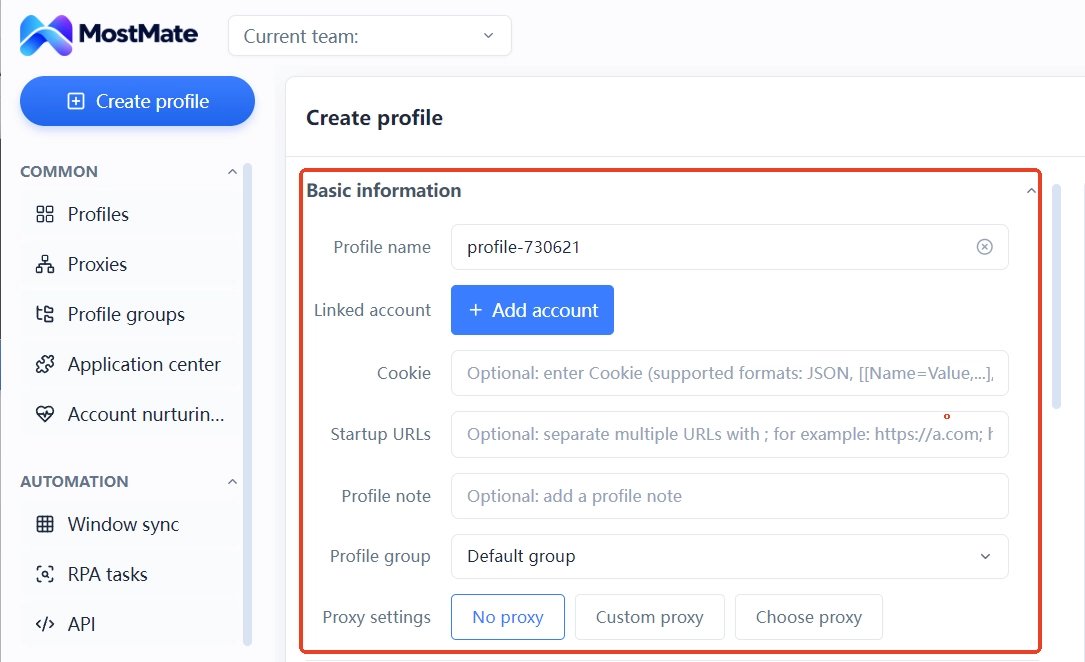
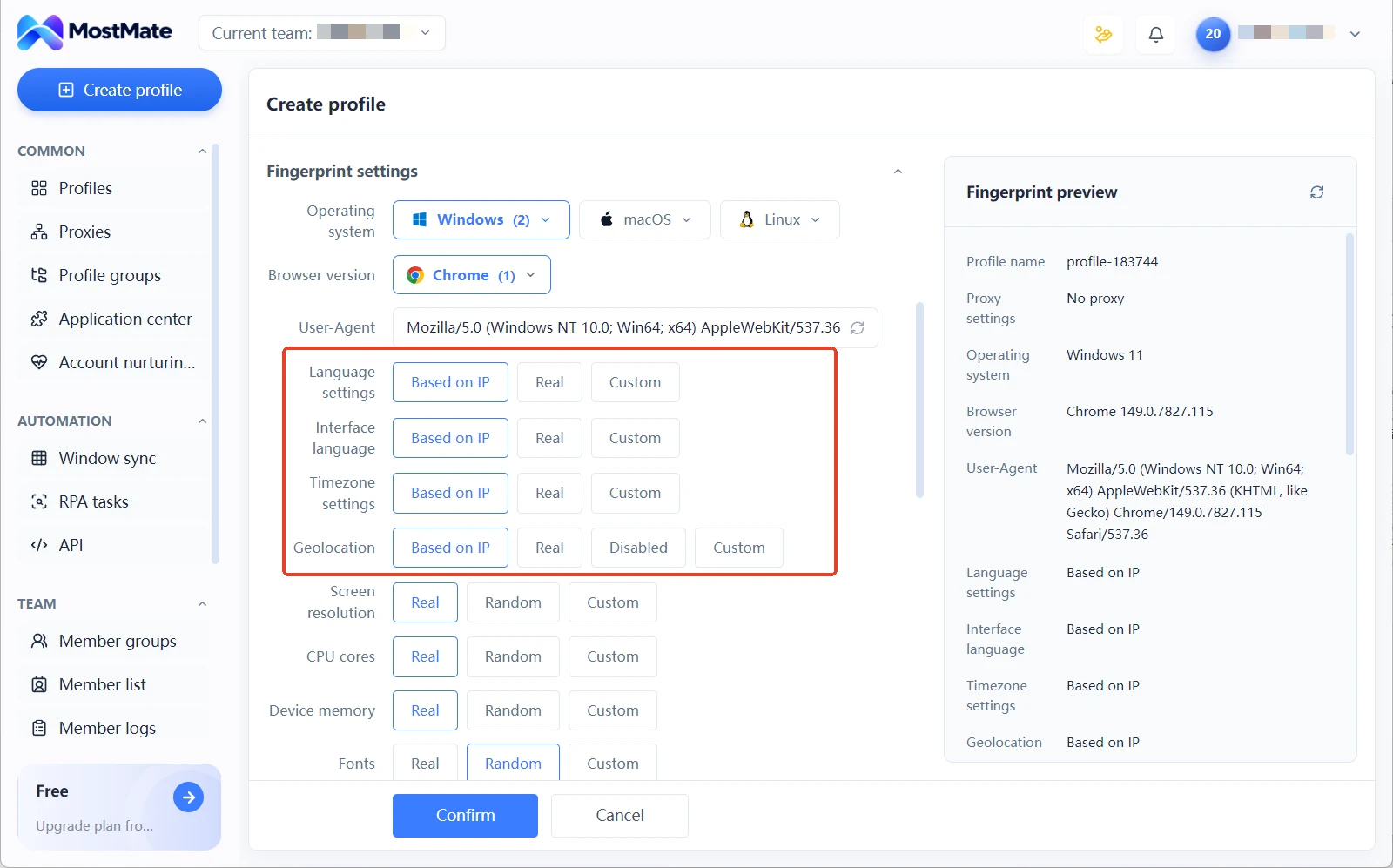
Be clear about the limits of environment isolation. It isolates browser-side data and configuration, keeping login states independent and setups reproducible. It does not mean WhatsApp will treat these accounts as independent of each other. Whether an account gets reviewed by the platform depends on the number's profile, behavior, and platform rules, none of which live inside the browser.
How to Arrange Agent Permissions and Handovers
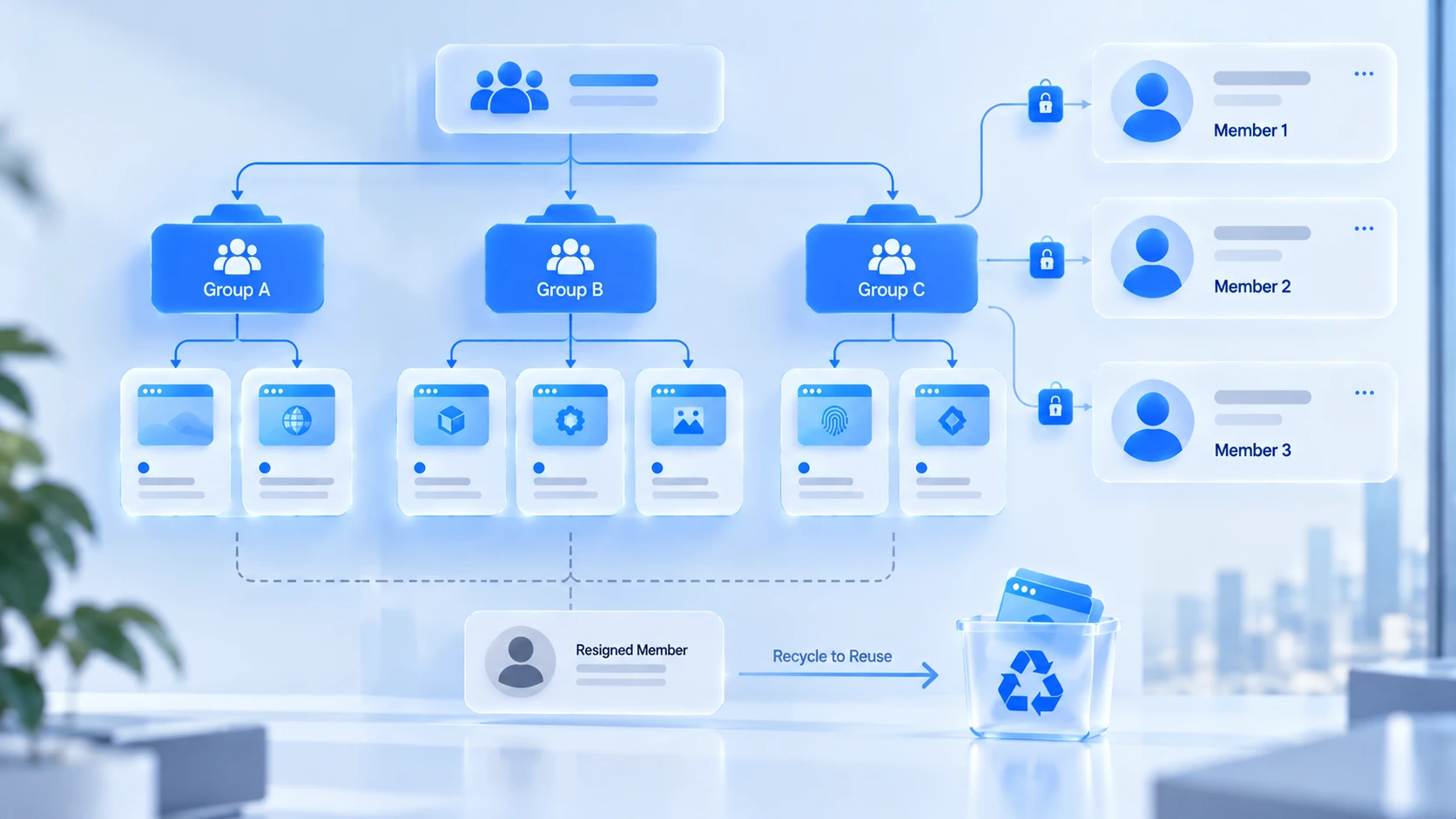
Environment ownership and agent permissions are two different things. The environment is the account's home; permissions decide which homes a person can enter. Get this wrong and agents log into each other's numbers, or an account is still accessible six months after someone leaves.
When running a support team, you can adopt these practices directly:
- Assign access by responsibility: agents only enter the environments their work requires; pre-sales stays away from after-sales numbers.
- Grant member access through proper mechanisms: use the anti-detect browser's member permissions to create an individual account for each person, avoiding shared login credentials across the team.
- Leave a trail for every change: record the time and reason for owner changes, environment adjustments, and proxy swaps, and update the register in step.
- Make offboarding recovery a fixed routine: check the account's linked devices, platform authorizations, environment assignments, and credentials, then revoke item by item.
- Hand conversation routing to the right system: splitting customer conversations, collaborative replies, and service analytics belong to a support system or official platform capabilities.
MostMate's corresponding capabilities at this layer are environment groups, member permissions, and activity logs: group environments by brand or market, open permissions by role, keep operations queryable in logs, and reconcile handovers against the records. These features reflect the actual interface of the current client version; you can verify them item by item under the environment and team related settings in the configuration section.
Which Practices Put Your Accounts at Risk
Most management-level risks are process gaps, not technical problems. Check yourself against this list:
- Running business on numbers or accounts obtained through unauthorized channels.
- Multiple people sharing primary account credentials, making it impossible to trace who did what when problems arise.
- Ignoring customer, market, and account boundaries and sending messages to the wrong audience.
- Frequently switching devices, network exits, or login configurations without keeping any record.
- Marketing actions that do not comply with WhatsApp's messaging policy and user consent requirements.
- Treating browser environment isolation as the entire account safety net while leaving every other link unchecked.
Keep two boundaries in mind at the same time. Phenomena like login verification or feature restrictions cannot on their own prove that accounts are linked; they may be normal platform risk control. Conversely, configuring isolated environments cannot prove an account will escape platform review. The authoritative references for account use and messaging policy are WhatsApp's official Terms of Service and Business Messaging Policy; for specific restrictions defer to official statements rather than unverified "linking probability" claims.
Build the Process Starting from Your First Account
No need to build it all at once; set it up in order:
- Inventory existing numbers, their brands, and business purposes into an account register.
- Choose a solution by team size: app plus linked devices, the Business Platform, or a combination of both.
- Plan browser environments for accounts needing independent management and log their IDs in the register.
- Assign member permissions and check each environment's network and region settings.
- Fix three process points: handover, incident logging, and offboarding recovery.
The first two steps need no new tools; from step three, environment management comes in. This is home ground for MostMate as an anti-detect browser: environment isolation keeps account data from mixing, groups and permissions map people to numbers, and proxy configuration aligns with each market. You can go through the full product picture on the MostMate website, and the multi-account management overview expands the overall framework in more depth.
Frequently Asked Questions
How many WhatsApp Business accounts can be logged in at the same time?
On the app side, one installation corresponds to one primary account, which can be linked to other devices for use per official instructions. When operating multiple numbers, each number usually gets its own login environment. Running multiple instances is not the hard part; dividing roles and keeping records afterwards is.
Are linked devices the same thing as anti-detect browser environments?
No. Linked devices solve one account being used in several places; environment isolation keeps the login data of multiple accounts from mixing. Teams managing several numbers often use both together, but they solve problems at different layers.
Will an anti-detect browser keep my WhatsApp account from being banned?
No, that is not how to think about it. Environment isolation manages browser data and configuration; whether an account gets restricted depends on platform rules, the number's profile, and usage behavior. Sound processes reduce risks caused by management chaos; they are no guarantee against platform review.
Should conversation routing for customer operations also be handled with an anti-detect browser?
Not recommended. Splitting conversations, collaborative replies, response libraries, and service analytics are a support system's job. An anti-detect browser handles the account login environment layer; each tool covers its own segment, and mixing them creates confusion.
Closing Thoughts
The order for managing multiple WhatsApp Business accounts is actually quite fixed. Choose the official solution by team size, put account information on paper with a register, set up an independent environment per number and assign permissions by responsibility, then make handover and recovery fixed routines. Tools cover one segment of it; process covers most of it.
Handing the environment segment to MostMate saves effort: accounts and environments map one to one, member permissions and activity logs stay in the system, and handovers reconcile against the records. Full capabilities are subject to the official website; to try it hands-on, download MostMate and start by building a register and setting up environments for your existing numbers.

MOSTMATE
Secure Multi-Account Management, Made Simple
Start with your first account and use MostMate to build safer, smarter, and more efficient multi-account operations.
- Independent profiles. Consistent identities.
- AI Automation · Account Health · Team Operations



