
How to Run Multiple Pinterest Accounts? Account Planning, Content Matrix, and Environment Management
Core takeaway: in multi-account Pinterest operations, sort out account ownership and content management first, then decide whether separate browser environments are needed. Account planning should consider brands, websites, target audiences, and team roles; content needs a single ledger that records where each item was published and where it links; browser environments should be arranged based on actual needs for login state, data isolation, and network configuration. Tools can help teams manage environments, but they cannot replace content planning.
"Hasn't this image been posted already?" Almost everyone who runs Pinterest accounts for clients has asked this. Three brands and two client accounts crammed into the same browser, assets piling up in the same folder, and figuring out who posted which image means digging through chat logs. As accounts multiply, the trouble is not posting images themselves but keeping track of what went out. Content gets duplicated, Board assignments turn messy, and handovers break down when someone new takes over. This article unfolds in five sections — account planning, content matrix, environment management, workflow, and review — and offers a process you can follow.
MostMate is a fingerprint browser built for multi-account management. It creates separate browser environments for different accounts, managing cookies, login states, and proxy configurations independently. In Pinterest operations, if your team genuinely needs to keep login states and network settings apart for different projects, separate environments are worth considering. How accounts are divided and how content is organized should still be decided based on business needs first, and only then should you pick the tool that fits.
Plan the Account Matrix First: Split by Ownership, Not by Count
More accounts are not always better; the number should follow business ownership. Before opening a new account, run through four questions: which brand it belongs to, which website it points to, what type of content it publishes, and who is responsible. If three of the four answers overlap with an existing account, you probably do not need a new one.
Pinterest offers a ready-made management tool. Business Manager puts multiple business pages, ad accounts, and product catalogs into a single dashboard, giving employees and partners tiered permissions instead of shared passwords, with access revoked by role when staff change (see the Pinterest Business website). Client-service teams should sort out authorization first, then consider arrangements at the browser level.
What does a clear structure look like? Compare three common scenarios:
| Business scenario | Account planning approach | Management focus |
|---|---|---|
| One brand, multiple product lines | Use separate Boards within one account | Unified Board naming, clear categories |
| Several independent brands | Create an account per brand | Fixed mapping between accounts and websites |
| Agency work for multiple clients | Manage by client assets and authorization | Clear permissions, recorded handovers |
The order of judgment is worth repeating. Different brand, different website — only then consider a separate account; a different content theme alone is usually solved by a new Board. Splitting home and beauty into two accounts under the same brand doubles the operating cost while the returns may not add up. Platform moderation details vary; the Reddit article covered platform moderation details for multiple Reddit accounts.
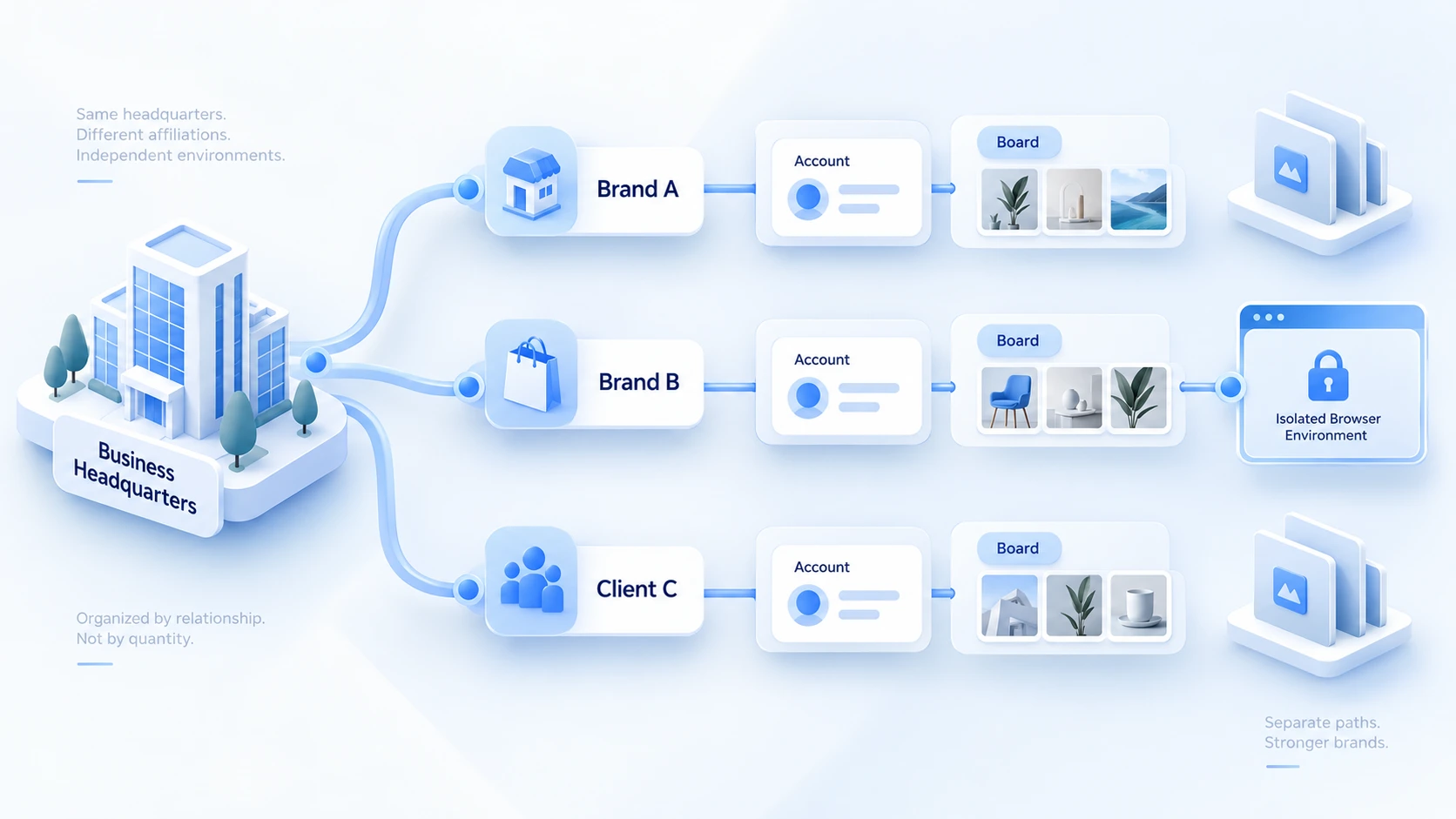
Building a Pinterest Content Matrix: The Ledger Matters More Than Posting Volume
The essence of a content matrix is knowing where each image goes, what it says, and what it links to before it is published. Whether content management works shows in how quickly you can answer three questions: Has this image been posted? On which Board? And which page does a click land on?
Classifying by content theme is the first step. A home decor brand can be split into four categories:
- Product showcase: appearance, feature details, dimensions and materials.
- Scene inspiration: room styling, space arrangement, usage scenarios.
- Tutorial content: buying guides, styling tips, how-to methods.
- Seasonal content: holiday decorating, seasonal trends, gift ideas.
After classification, create one record per asset, with just enough fields for reconciliation:
- Asset ID: prevents name clashes and reuse.
- Original file path: so you can find the source when editing.
- Content theme: one of the four categories above.
- Target account and Board: where it will be published.
- Pin title and description: keywords and content positioning.
- Target URL: confirms clicks land on the right page.
- Publishing status: draft, pending review, published, needs work.
Once the ledger is in place, hold one boundary: reusing an asset is not the same as reposting. The same product can become a detail image, a styling image, and a tutorial image, each Pin carrying its own content value.
Saving the exact same image repeatedly to multiple accounts and Boards is another matter. Pinterest's official merchant help center states it plainly: repeatedly saving identical Pins or uploading content the platform already has may be flagged as spam and lead to a temporary limit on Pin creation. A content matrix grows the number of creative ideas, not the number of copies of one image.
Why Multiple Accounts Need Separate Browser Environments
Once accounts and content are organized, most of the remaining chaos comes from the browser. Switching between several Pinterest accounts in an ordinary browser creates very specific trouble. Login states and cookies get mixed together, and it is easy to click into the wrong business when switching. Caches and browsing traces from different projects interfere with each other. When several people share a device, nobody can tell who did what, and switching computers loses all context.
The common cause of these problems is that a browser treats every account as the same person. Separate browser environments split this apart: each environment has its own cookies, login state, and browser settings, proxies are bound per environment, and names and notes record ownership. The boundary also needs stating. Environment isolation concerns browser data and configuration; it does not mean accounts share no other connection signals. Whether to split environments depends on whether the business needs independent sessions and network exits.
MostMate organizes environment management around this structure. The list shows one environment per row. Proxy, exit IP, bound accounts, group, and notes sit side by side, so account ownership is visible at a glance. In the environment creation form, bound accounts, cookies, proxy settings, and environment notes are filled in on one page. Language, timezone, and location are configured based on IP by default — set the exit first, and these align automatically.
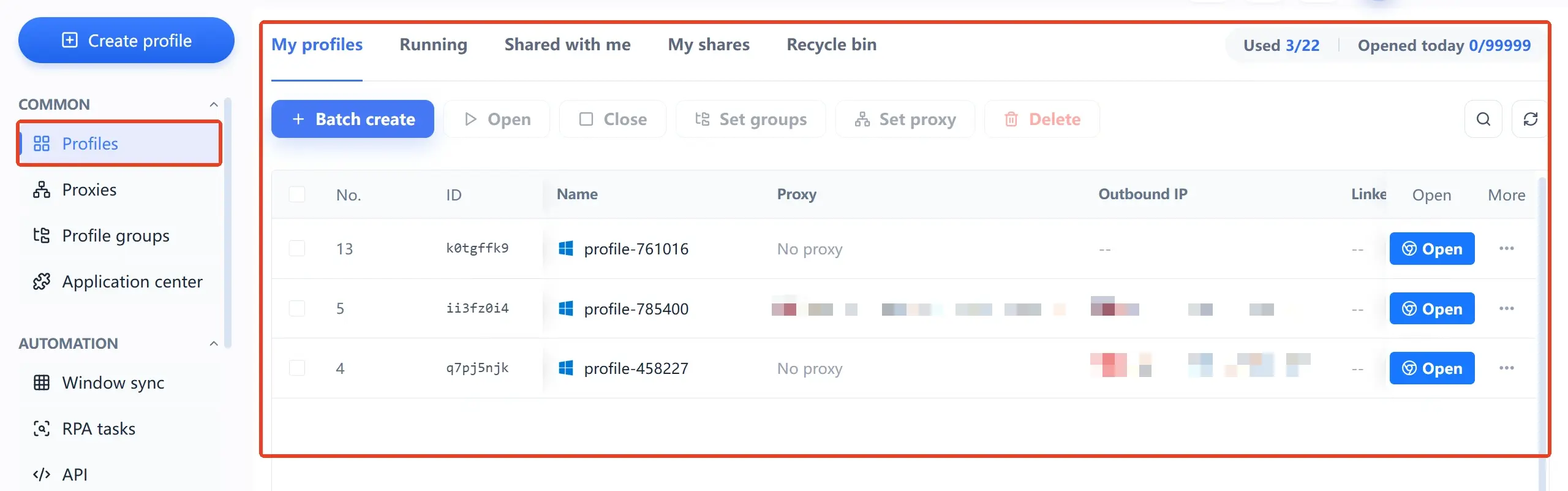
Collaboration has its own entries. Proxies are maintained in a separate proxy management list and then assigned to environments. Environment groups are authorized to the right members, and member logs record operation time, type, and device information, so handovers can be traced. For the specific scope of isolation, see the scope and configuration of browser environment isolation.
Back to the common question: does every account really need its own environment? It depends on the business. Authorized accounts that the official dashboard can manage need no extra environment. Separate environments become valuable when you need independent login states, cookies, and network exits. In agency work, sort out client asset ownership first, and let the number of environments follow the business.
Five Steps to Turn Accounts, Content, and Environments into a Daily Routine
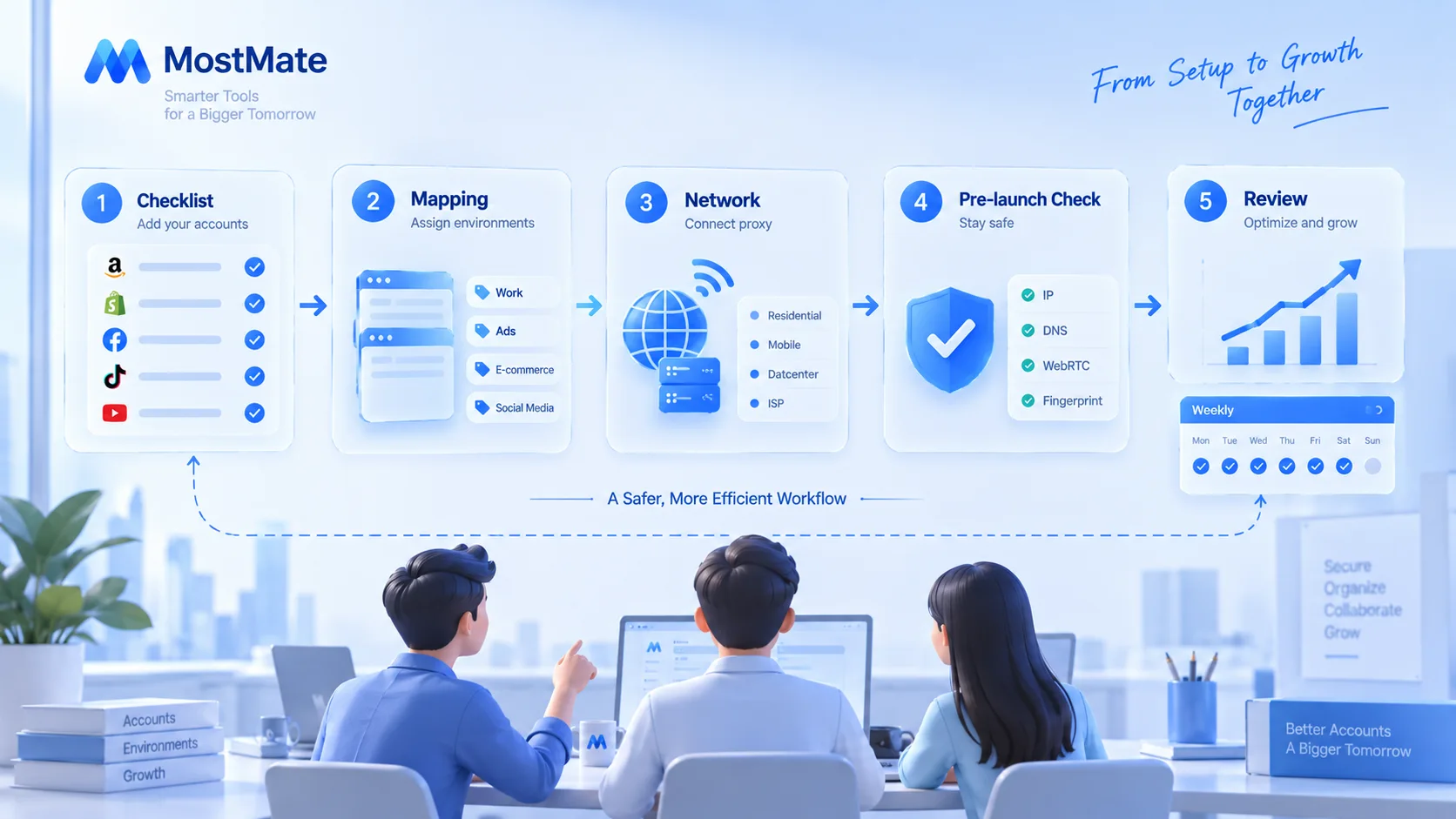
With the structure set, execution can be compressed into five steps for the team to follow:
- Build an account list: record each account's brand ownership, linked website, person in charge, and authorization status.
- Define environment mapping: for accounts needing separate environments, note the purpose clearly, such as brand plus a number.
- Configure and check the network: set up proxies and confirm the actual exit and connection status. Dual-stack networks also need a separate check of the IPv6 exit — see how to detect IPv6 leaks.
- Run a pre-publish check: content passes review, titles and descriptions are filled in, and Board and landing page links are verified before scheduling.
- Review and hand over regularly: reconcile the ledger weekly, logging publishing status, issues, and configuration changes.
For the full steps of creating environments and configuring proxies, the MostMate getting-started guide walks through them in order — useful as a reference for a first setup.
For day-to-day team use, a simple tracking sheet is enough:
| Account / project | Environment name | Current status | Owner |
|---|---|---|---|
| Brand A | Brand-A-01 | Proxy OK, content pending | Content ops |
| Brand B | Brand-B-01 | Proxy OK, content published | Content ops |
| Client C | Client-C-01 | Proxy to check, content in review | Project lead |
This table is a workflow example, not a hard requirement. Teams for whom official permissions suffice can run on Business Manager plus a shared spreadsheet.
How to Review Content Performance: Content, Traffic, and Business Layers
Managing without measuring turns the matrix into a habit of posting for its own sake. Pinterest provides Pin stats and Analytics for business accounts, covering impressions, saves, and clicks. Review performance across three layers.
The content layer shows which image types work. Between two product images, a detail shot and a scene shot can differ several times over in saves. Track each theme separately, and next week's content plan gains a basis.
The traffic layer shows how clicks are received. Which Pins actually bring website visits, and whether outbound links land on the right page. Compare on-platform data with website analytics.
The business layer shows conversion outcomes. Where signups, inquiries, and add-to-carts happen. A Pin that performs well on the first two layers may still bring no business.
A common example. A home decor brand publishes product shots, styling images, and buying tutorials. The review finds tutorial Pins save poorly but attract the most outbound clicks. The sensible adjustment is turning tutorials into a series, not switching environments or proxies. Look for causes at the content layer first; the environment layer only handles environment-layer problems.
Frequently Asked Questions
Can Pinterest manage multiple business accounts?
Yes. Business Manager brings multiple business pages, ad accounts, and product catalogs into one dashboard and assigns tiered permissions to employees and partners, with no shared passwords. Whether you need an extra browser environment depends on account ownership and operating needs.
Do you have to use a fingerprint browser for multiple Pinterest accounts?
Not necessarily. When the official account management and permission features are enough, no extra tool is needed. A fingerprint browser offers an environment-level solution when you genuinely need to keep login states, cookies, browser settings, and network exits apart.
Does a fingerprint browser guarantee you avoid Pinterest account bans?
No guarantee. Pinterest acts on spam, duplicate posting, rule-breaking content, and account security issues. A fingerprint browser manages environments; it cannot replace compliant operations or offset the consequences of violating platform rules.
Can multiple Pinterest accounts publish the same content?
Handle with care. Creating different content ideas from the same product is fine; posting identical Pins in bulk to multiple accounts may trigger spam detection. First make sure every Pin has its own value and an accurate target link.
Conclusion
In multi-account Pinterest operations, account planning determines the structure, the content matrix determines efficiency, and environments determine whether that structure can be executed consistently. Each layer has its own method; mixing them is what creates chaos.
When you need separate environments, MostMate manages environments, proxies, account ownership, and team permissions in one workspace. The free plan includes two environments and two member seats, enough to run this process end to end starting from your first account.
To configure the environment layer more steadily, download MostMate, start with your first environment, and get accounts, content, and environments reconciled.

MOSTMATE
Secure Multi-Account Management, Made Simple
Start with your first account and use MostMate to build safer, smarter, and more efficient multi-account operations.
- Independent profiles. Consistent identities.
- AI Automation · Account Health · Team Operations



