
How to Run Multiple eBay Accounts: Selling Limits, Limit Increase Paths, and Linking Prevention Setup
Core takeaway: eBay caps accounts with two numbers: monthly listing quantity and total sales amount. Limits are re-evaluated automatically every month. Raising the cap comes from performance data, not from opening more accounts. Using new accounts to bypass limits is explicitly prohibited, and if discovered, all accounts involved may be suspended indefinitely. At the same time, eBay supports linking a new account to an established one to raise the cap, and allows applying for multiple accounts under policy. This guide gives the how-to in order: understanding limits, raising them compliantly, the boundary for multiple accounts, and linking prevention setup.
Two months into selling on eBay, the monthly allowance runs out and all you can do is wait for the next calendar month. Plenty of sellers start mulling a second account at this point. Before making a move, do one thing first: read the limits rules through. What they restrict, how they grow, and which moves get you into trouble are all written clearly on the official help page. By the end, you'll see that privately opening a new account is the path called out by name as forbidden. The real ways to scale live inside your account's performance data and in compliant multi-account setups.
In terms of tooling, MostMate is a fingerprint browser. It prepares one non-sharing browser environment per account, with the outbound route, device parameters, and login state all sealed inside the environment. Placed in the eBay context, one environment is the daily login unit for one store. Environments share neither routes nor device characteristics. That is the foundation of the linking prevention setup later in this article.
The Two Numbers Behind Selling Limits
The limits apply to two numbers: items listed per month and total sales amount. The moment either one hits the cap, no new listings can be created for the rest of the month. The entry point is the Monthly limits section on the Overview page in Seller Hub. How much of the current allowance has been used is right there. Five details:
- Both active and sold listings count toward the allowance; a listing nobody buys still takes up a slot.
- After hitting the cap, new listings, price increases, and quantity increases are all blocked until allowance is released or the next calendar month arrives.
- Good 'Til Cancelled long-running listings count too, and won't auto-renew while you're capped.
- Entering a new category brings a category-level limit, mostly lifted automatically once performance stabilizes.
- The 250 free listings per month and the selling limit are two different things; more free listings doesn't mean more listing capacity.

Allowance goes to the account, not to being new.
For the specifics, see eBay's official selling limits help page: account age, identity verification status, registration address, registration site, sales history, and the risk level of your listed categories together decide how much starting allowance an account gets. eBay then re-evaluates and adjusts automatically each month based on sales and buyer feedback. Two freshly registered accounts with different profile completeness or different registration sites can receive quite different allowances. Discussions like "other people's new accounts get higher limits" carry little reference value; the allowance follows the account.
Four Compliant Ways to Raise Your Limits
There are official entry points for raising limits, triggered by performance data rather than waiting time. Four of them, in priority order:
1. Use the allowance, then apply. The Monthly limits section in Seller Hub has a "Request to list more" entry. Submit when you're approaching the cap; during the application, eBay may ask you to add contact or business information.
2. Wait for the monthly review. On-time shipping, complete tracking numbers, and few disputes, and eBay's monthly automatic evaluation will usually lift the limits on its own.
3. Link an established account. If you hold multiple seller accounts, you can link the new account to a more seasoned one when applying for an increase. This path is spelled out in the official help page.
4. Complete your profile. With identity verification, payout information, and registration address all in place, there are more credit items available at evaluation time.
First, a common misconception: a store subscription does not lift limits.
A store subscription only affects fee benefits such as the number of free listings; account-level limits stay exactly as they are. Manual requests can be submitted about once every 30 days. Repeated submissions in a short window won't speed anything up; they just look templated.
Where the Official Boundary for Multiple Accounts Lies
What eBay prohibits is "using new accounts to bypass limits," not multiple accounts themselves. eBay's rules page for cross-border sellers puts it plainly: registering new accounts to get around selling limits is a prohibited practice. All accounts involved in such cases may be suspended indefinitely. At the same time, eBay acknowledges multi-account operation on two paths: linking established accounts to raise limits, and applying for multi-account authorization under platform policy. For sellers who want to scale, the conclusion is one sentence: apply for and operate multiple accounts in ways the platform recognizes, not by privately opening accounts to shore up allowances.
Beyond this boundary, one workaround deserves a warning. "Buying aged accounts to skip new-account limits" is popular, but an aged account's registration information, payout account, and behavioral history all stay in the original owner's hands. If the account runs into trouble, you can't even match the identity needed to file an appeal. After taking over, every login and every operating action rests on an identity that isn't yours; the platform may demand re-verification at any time, and if verification fails, the inventory you stocked and the reviews you built are voided together. The risk is far greater than growing the allowance slowly. Full rules: eBay's selling rules page for cross-border sellers.
How to Prevent Linking Between Compliant Multi-Accounts
Multi-accounts obtained through compliant application still need isolation in operation. Linking judgments don't look at whether an account is compliant, only at whether signals between accounts overlap. MostMate's product page explains this environment mechanism in full. Payout binding carries high weight in eBay's linking judgment; each account must use an independent payout account, a point that has come up repeatedly in general multi-store isolation practice. The device and network layers deserve the same care. Five concrete practices:
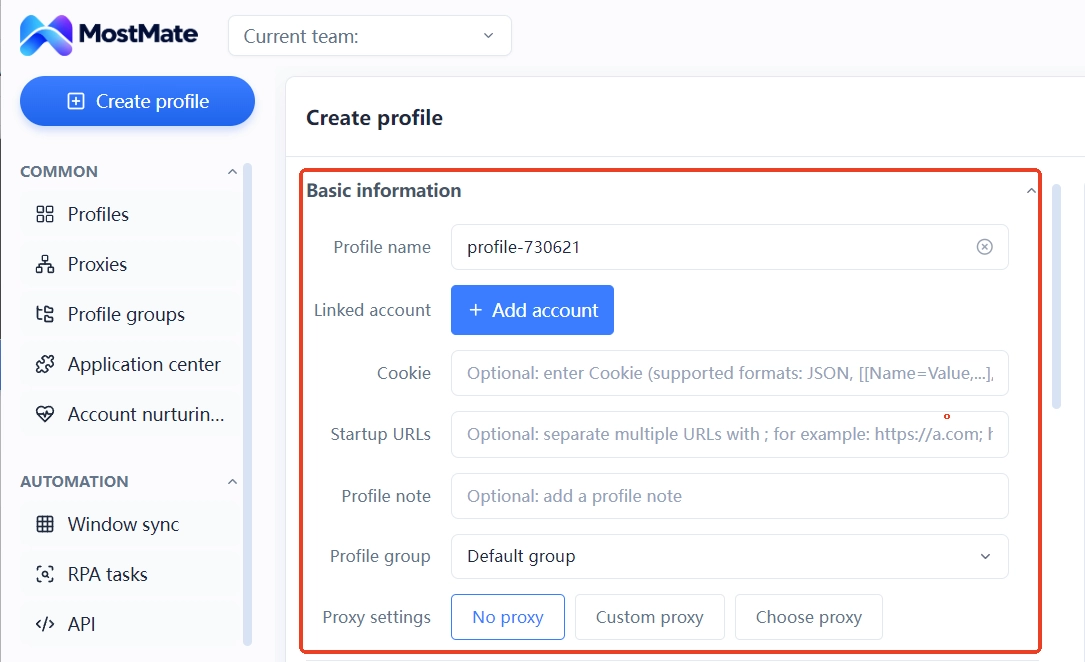
- One store, one environment. Name environments by "platform-site-purpose" in environment management, keeping the bound account, cookies, and notes in the same environment; cookies and local storage never cross between environments.
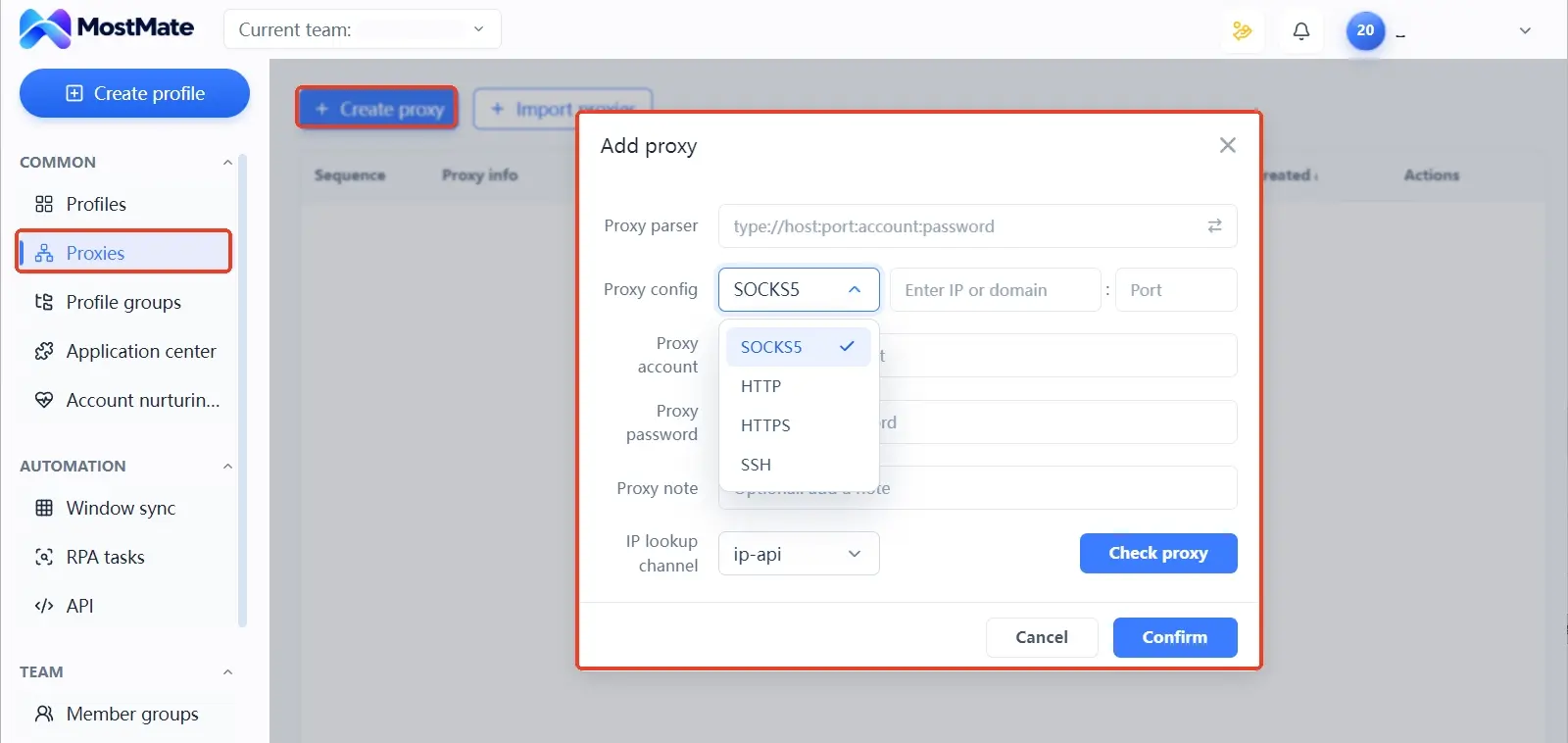
- Maintain and assign proxies one by one. Proxies are maintained separately in proxy management; all four types, SOCKS5, HTTP, HTTPS, and SSH, can be filled in. Run a Check proxy after each entry and connectivity and exit ownership show up on the spot; assign to environments only after the test passes.
- Pick exits by market. eBay's core markets are in Europe and the Americas, so prefer local residential IPs for exits; for selection criteria, see the residential vs. datacenter IP guide.
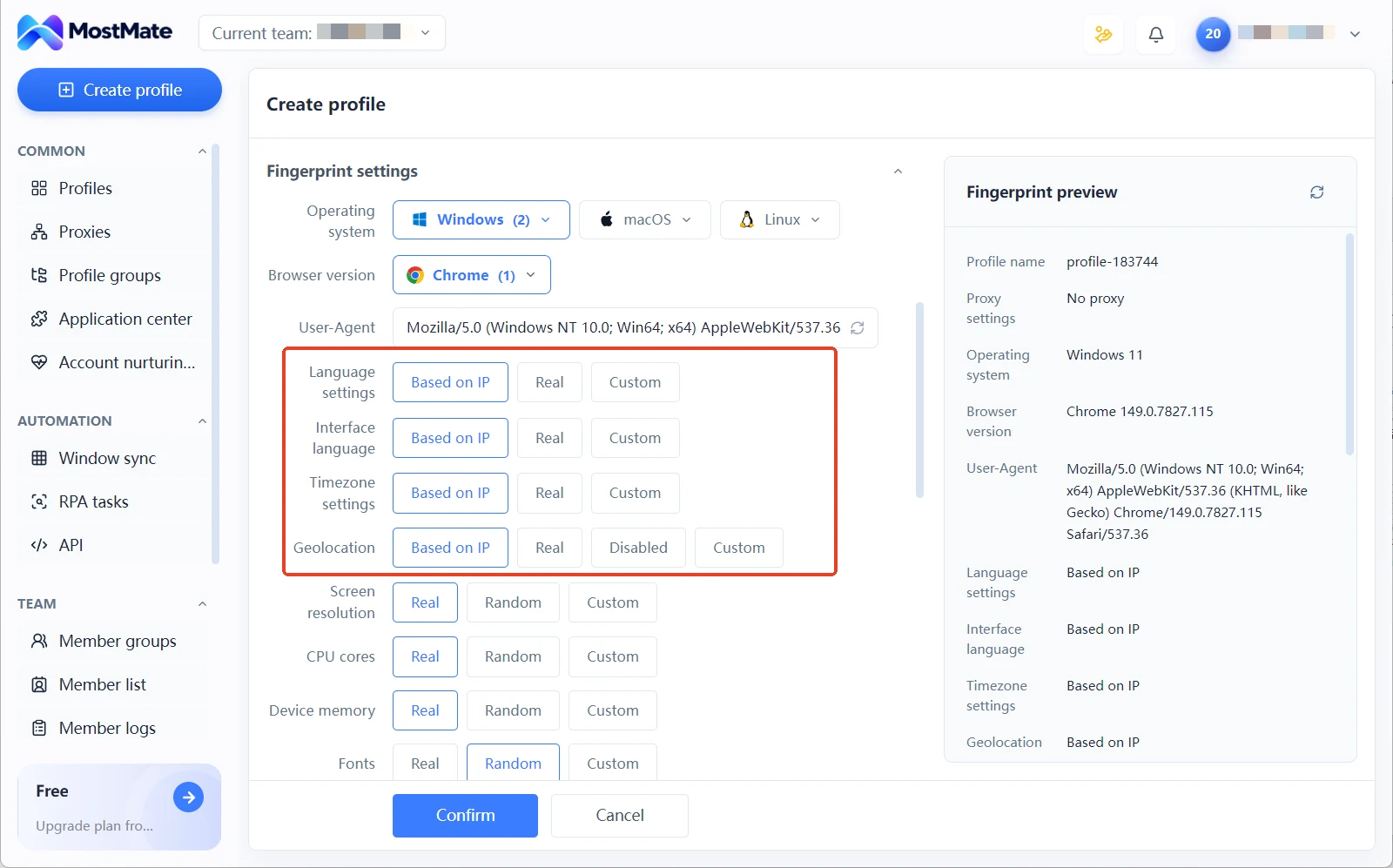
- Fingerprints follow the exit. In the environment creation form, language, interface language, timezone, and location default to "configure based on IP"; once the exit is set, these align automatically with no per-item manual tuning.
- Ledgers and permissions, closed off. Record the account ID, registration email, payout account, and bound proxy in environment notes; when something goes wrong, you can map the linking picture in ten minutes. Assign environment groups to the right members so each manages their own store.
Why isolation has to reach the environment level: this article on environment isolation covers the underlying logic. When multiple accounts share one browser environment long-term, cookies, storage, and device and network signals expose similar characteristics at the same time.

How to Grow the Allowance in a New Account's Early Days
The early focus is keeping performance data clean so the monthly review lifts the allowance naturally. Pick low-risk categories for the first few dozen orders. Ship on time and upload tracking numbers for every order. Respond to buyer messages quickly, and resolve disputes before they escalate into cases. Applying for an increase before using up the allowance rarely gets approved; submitting near the cap works better. Low allowances for new accounts are the platform's growth mechanism. For the first two or three months, sell less rather than ramping up order volume the moment your metrics stabilize.
Stagger the ramp-up rhythm across accounts. Registration dates, listed categories, shipping pace, and pricing strategy should never line up neatly. A batch of accounts registered in the same week, on the same exit route, selling the same goods: any single collision like this adds another layer of suspicion to the linking judgment. When a route needs replacing or maintenance, test on a non-critical environment before switching; for checklist items see the proxy exit maintenance guide. For the overall framework of cross-border multi-store operations, the cross-border e-commerce solutions page on the official site organizes configuration ideas by scenario.
Frequently Asked Questions
What are the typical limits for a new eBay account?
Third-party experience data mostly falls around 10 items or $500 in sales per month. eBay publishes no universal number; allowances are issued per account, so go by what Monthly limits shows in Seller Hub.
Do limits grow on their own?
Yes. eBay re-evaluates automatically every month based on sales and buyer feedback, and accounts with clean records usually don't need to apply manually. Use the manual request entry when the allowance is near the cap for the best results.
Can you bypass limits with a new account?
No. eBay explicitly prohibits registering new accounts to bypass limits; all accounts involved may be suspended indefinitely. If you need more allowance, go through linking an established account or applying for multiple accounts under policy.
What if multiple accounts bind the same payout account?
Payout binding is a high-weight signal in linking judgment. When several accounts' money flows into one account, the link is basically confirmed. Give each account its own payout account; skip that, and no amount of environment isolation will hold.
Closing Thoughts
eBay's limit system actually lays out a clear growth path. Allowances are granted per account and grow with performance; compliant multi-accounts have two official channels, linking for increases and policy-based applications; privately opening accounts is the move that loses everything. Use the limit rules to the full, then do the isolation of environments, proxies, payouts, and registration information between compliant accounts carefully, and scale grows steadily.
Teams about to build a multi-account matrix can download MostMate first, start by creating one isolated environment per store, and get the exits, fingerprints, and ledgers set up in one pass.

MOSTMATE
Secure Multi-Account Management, Made Simple
Start with your first account and use MostMate to build safer, smarter, and more efficient multi-account operations.
- Independent profiles. Consistent identities.
- AI Automation · Account Health · Team Operations



