
How to Schedule a Social Media Matrix: A Practical Guide to Distributing One Piece of Content Across 5 Platforms
The core takeaway: the key to scheduling a social media matrix is turning what to post, where to post it, and who owns it into one weekly execution table. Start by assigning roles to the 5 platforms, adapt the same topic into content that fits each platform, and use a status column to track production, review, publishing, and retrospective. Once you manage many accounts and collaborate with several people, consider separate browser environments to keep login sessions and browser data organized. The schedule manages execution; content performance still needs ongoing tuning against platform data.
"The Instagram post went out on Monday, the TikTok video for Wednesday is still unedited, and nobody can say who was supposed to cut it." When several people run a social media matrix together, this situation shows up almost every week. The cause is usually simple. Content is being produced, but the plan never becomes a table, so everyone syncs progress through memory and chat logs. Missed posts, duplicate posts, and lost asset versions are routine.
These problems need to be handled on two levels. Content scheduling answers who posts what and when, while login sessions and browser data on the account level need their own management approach. MostMate is built for the latter: an anti-detect browser that keeps each account's browser environment separate. This article focuses on scheduling first. Environment management is covered in Section 4.
Before You Schedule: What Each of the 5 Platforms Owns
Scheduling starts with dividing the work. Only when you know what each platform posts, who it targets, and which metric matters does a timetable mean anything. Otherwise the weekly table just copies the same task five times. Choose the platform mix based on your actual business; you do not need every network. This article uses the common combination of TikTok, Instagram, YouTube, Facebook, and X.
Start by pinning down the five roles in one table.
| Platform | Role | Main formats | Metrics to watch |
|---|---|---|---|
| TikTok | Reach new users | Short videos | Completion and shares |
| Brand image and asset library | Image cards and Reels | Saves and profile visits | |
| Community talk and retention | Long posts and events | Comments and shares | |
| YouTube | Full tutorials and search traffic | Long videos | Watch time and subscriptions |
| X | Industry news and quick takes | Short posts and threads | Reposts and quotes |
Once the roles are set, add a one-line description for each platform and pin it next to the schedule. When a new content task comes up, check which platform's scope it falls under; if it fits none, do not force it onto the table. That is what keeps the table from filling up. This table is a starting template, not a fixed rule. Adjust the formats and metrics to match your account positioning, audience feedback, and the data each platform currently provides.
How to Turn One Piece of Content into 5 Versions
The same topic becomes a different version on each platform. Reuse the core message; adapt the format and wording per platform. Take a store setup tutorial as an example: the source material is a long illustrated guide. A reasonable split looks like this.
- YouTube: a full walkthrough that keeps every step and caution.
- TikTok: cut the single most important step into a 15-second video that points to the full version.
- Instagram: turn the steps into three to five image cards, with the first card naming a common mistake.
- Facebook: a discussion post that opens with a question, links the tutorial, and invites people to share their own pitfalls.
- X: distill one core takeaway with a sourced data point or a concrete observation, then add the link following the platform's current link display rules.
Repurposing means rewriting, not copy-pasting. Platforms differ in layout, link rules, and hashtag habits. Check each platform's current format requirements before publishing, then decide whether each post carries a link and how many hashtags. Keep the core takeaway and rewrite the rest for each platform's context, so the same paragraph never appears word for word on five platforms.
For recording the source material itself, the Pinterest asset ledger article already breaks down the fields by asset ID, owner, and status, so this post will not repeat it. The schedule only attaches its status column to show where each task stands.
How to Build a Weekly Schedule: A Template You Can Copy
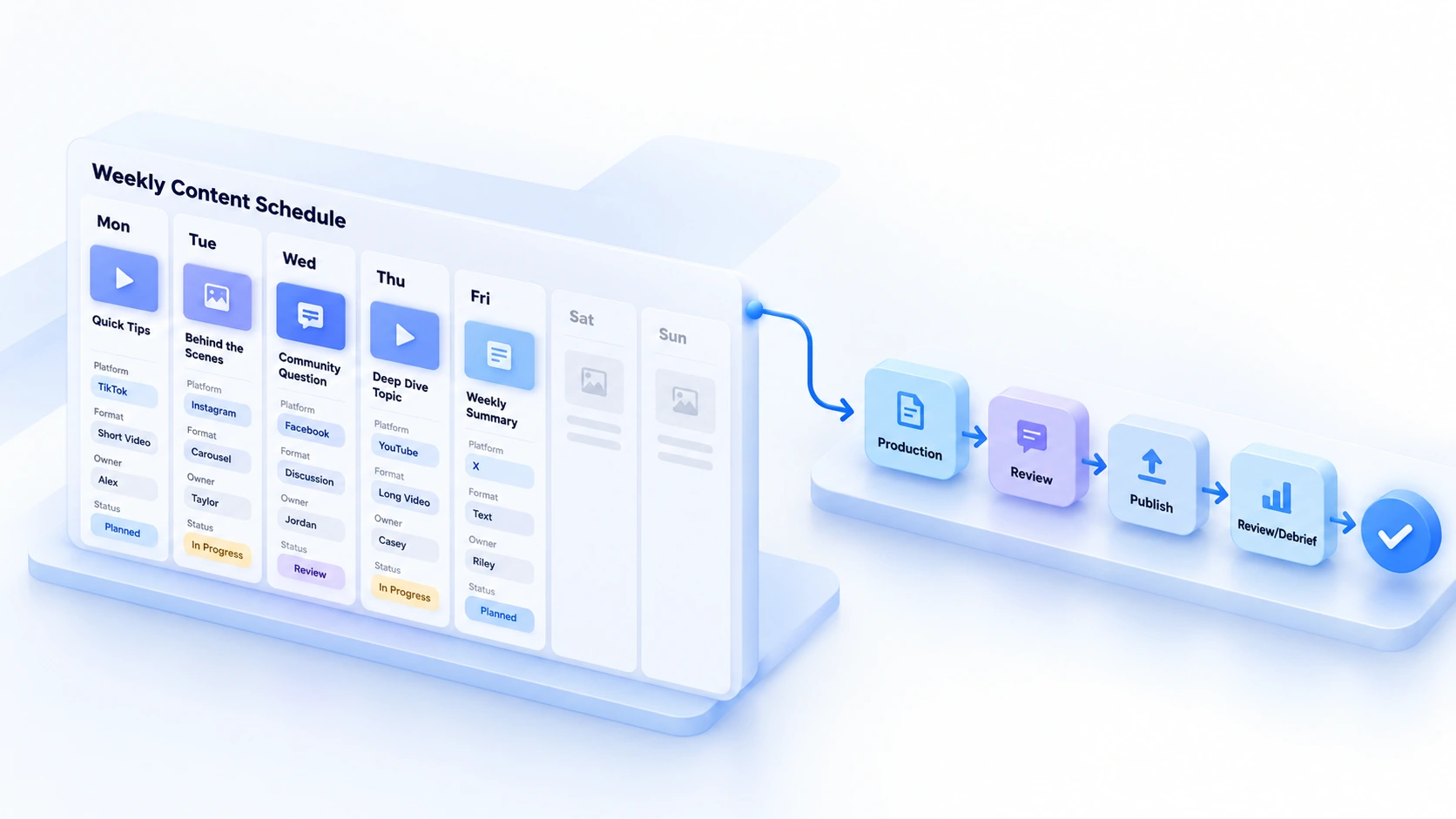
Schedule in weekly cycles. Pick one or two topics each week, then break them into concrete tasks by platform role. The fields do not need to be complicated. Later's content calendar guide groups common fields into platform, format, owner, and status; a weekly table built on that idea is enough.
The sample below uses the store setup tutorial to show one week.
| Day | Platform and format | Content version | Owner and status |
|---|---|---|---|
| Monday | TikTok short video | Step demo cut | Member A, to produce |
| Tuesday | Instagram image cards | Three step cards | Member B, to review |
| Wednesday | Facebook discussion post | Question-based adaptation | Member A, to publish |
| Thursday | YouTube long video | Full tutorial edit | Member C, to review |
| Friday | X short post | Takeaway and data summary | Member B, to publish |
How you use it matters more than the table. Set a few rules first.
- Topic first: set topics at the start of the week and break tasks out of them, so each platform is not improvising alone.
- Status flow: a task is done only after it passes all four states: to produce, to review, published, and reviewed.
- Staggered timing: spread the same topic across platforms with gaps that fit each platform's rhythm; no need to cram it into one day.
- Realistic frequency: start with a lower posting frequency that matches your team's capacity, for example one to three posts per platform per week as a test baseline, then adjust based on production capacity and actual performance.
Keep the template in a shared spreadsheet and let owners update the status column themselves. Weekly meetings only go through unfinished tasks.
More Accounts Means Environment Management Has to Keep Up
The schedule tracks content tasks and owners; browser environment management tracks the login sessions and browser data behind each account. The two tables should map to each other, but they do not need identical naming.
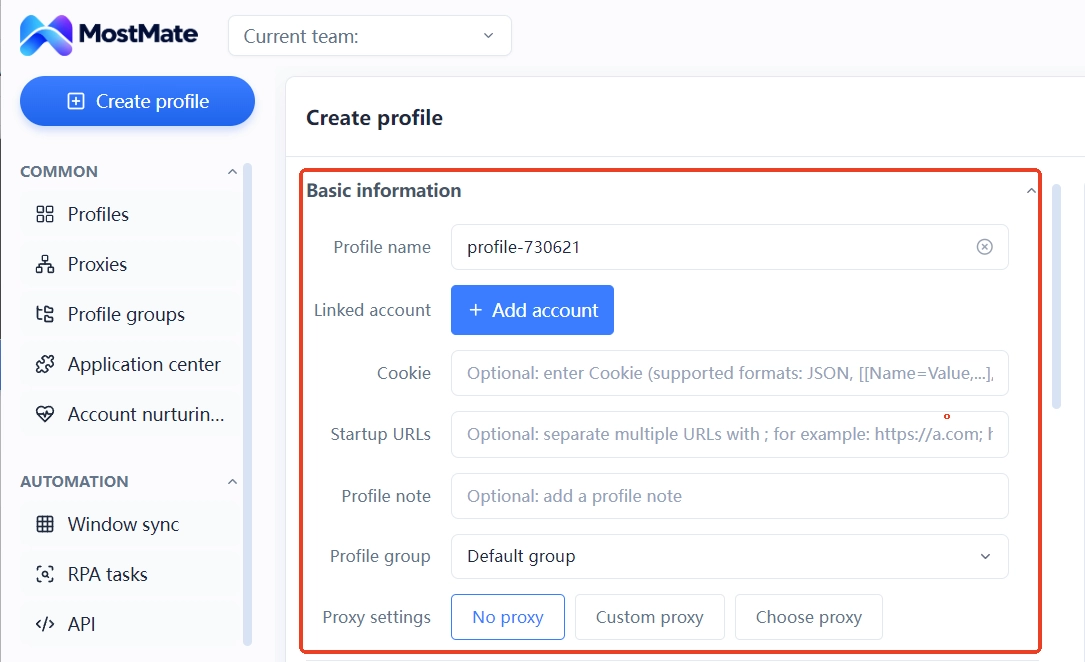
In MostMate, you can organize account environments by environment name, linked accounts, groups, and notes. For example, name each environment after its platform or purpose, group by business line or project, and note ownership details. The schedule keeps the publish time, owner, and status of each piece of content. This way, weekly content tasks can change without the environment assignments being constantly reshuffled.
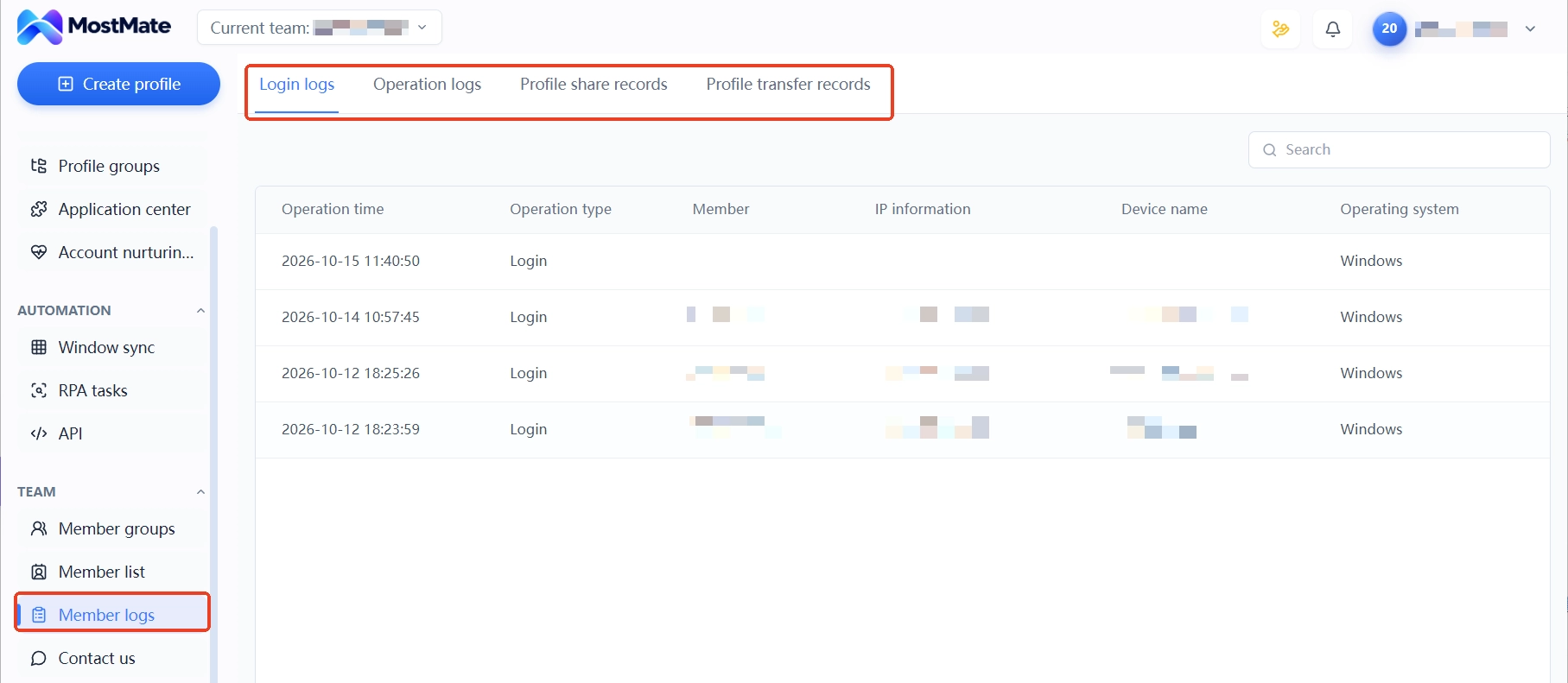
If the team collaborates with several people, use environment sharing and member permissions to make clear who owns which environment; when staff changes happen, check the corresponding environment ownership and operation records. The login and activity logs in member logs show who touched each environment most recently, so handovers leave a paper trail. The multi-account management overview article covers the full framework for ownership, grouping, and handovers. This post only takes the columns directly relevant to scheduling. For what data is isolated between environments, the What Is MostMate page explains it in full. Cookies, local storage, and sessions are all saved per environment.
Environment management solves the ownership of logins and data; content review and platform rule checks stay within team processes. Each platform's content policies and automation tool limits need to be checked against official documentation, and a browser environment does not change how a platform judges the content itself. Do not let one substitute for the other.
After Publishing: Review on Three Levels
Once the schedule has run for a few weeks, hold a retrospective. Look not only at whether the numbers grew but also at how the table itself executed. The review can cover three levels.
- Content level: compare how different versions of the same topic performed and decide which format is worth splitting again.
- Platform level: check engagement and referral data per platform; if a platform stays flat for long, reduce frequency or change the format.
- Team level: find the task states that get stuck most often and tell whether production is slow, review lacks hands, or handoffs break down.
Apply the retrospective directly to next week's table. Add well-performing directions to the topic pool and cut tasks that got no response for several weeks. Buffer's content calendar guide likewise stresses adjusting the rhythm from data, and its review fields work well as a checklist against your own table. Tune the weekly table once a week. That fits reality better than a big quarterly overhaul.
FAQ
Should a social media matrix post identical content on every platform?
Not necessarily. The same topic can take different shapes on different platforms, for example splitting a full tutorial into short videos, step-by-step image cards, and short opinion posts. That makes it easier to fit each platform's content formats and audience habits, and simpler to compare versions later. Whether to adjust copy, formats, and timing should follow platform rules, account positioning, and actual data.
How often should a social media matrix post each week?
There is no single standard. For teams of three to five starting out, one to three posts per platform per week is a common range. The test is whether tasks can move through their states. Rather than filling the weekly table and then missing updates, set frequency by real capacity and leave room for reviews and last-minute inserts.
Do multiple social media accounts need separate browser environments?
It depends on account count and how people collaborate. With few accounts and one person per account, a regular browser's multi-profile setup can keep logins apart. With many accounts, multiple collaborators, or cross-platform management at the same time, separate environments pin down each account's browser data, proxy settings, and login state, and cut down on mixing up accounts when switching. Use the environment-to-task mapping in Section 4 to decide.
Conclusion
At its core, scheduling a social media matrix moves what to post, who posts it, and when out of memory and chat logs and into one table. Platform roles set the content direction, asset adaptation fits each channel, the weekly table tracks execution, and retrospective results feed the next round of planning.
When a team manages multiple social media accounts at once, it also needs to map account ownership, browser environments, and owners to each other. MostMate helps teams organize separate browser environments and their configurations, but it does not replace content review, platform rule checks, or operational retrospectives. If your workflow genuinely calls for managing multiple accounts separately, you can download MostMate first, create two environments, and get next week's schedule running.

MOSTMATE
Secure Multi-Account Management, Made Simple
Start with your first account and use MostMate to build safer, smarter, and more efficient multi-account operations.
- Independent profiles. Consistent identities.
- AI Automation · Account Health · Team Operations



