
How to Manage Multiple Shopee Stores: Environment Isolation with MostMate
Bottom line: the association risk in Shopee multi-store operations sits in three places, namely seller details, device environments and IP. Browser environment isolation only covers the device and local data layer; detail separation and operating discipline have to be arranged on top. The rest of this article moves through business context, the three association points, the limits of isolation, a management workflow and troubleshooting.
"One store on each of three sites, and before the inventory was even sorted out, one of them already sent a login verification notice." Sellers running several Shopee sites know alerts like this well. Multi-site expansion is a growth path the platform itself supports, but as the store count grows, three things get complicated at once: details, devices and people. If any one of them slips, every other store can feel it. Most trouble starts with login habits: multiple accounts sharing one computer and one browser for months blends the local data together, and plenty of later anomalies trace straight back to it.
This article takes the three association points apart and lays out a workflow you can copy directly.
Shopee's Multi-Store Expansion Grows More Than Store Count
Shopee officially supports cross-border sellers opening stores on separate sites, so running multiple stores is standard practice on this platform. Sellers enroll through the Shopee cross-border enrollment portal with a business license and other documents, then open stores site by site. Each site has its own language and market, and some sellers split further by brand or category.
Once the store count climbs, more than the workload gets heavier. Registration details need separate filing. Login devices need to stay apart. Team members need clear roles. Once the team scales up, Shopee's official Sub-account platform (Shopee's official sub-account system) creates roles and assigns store permissions in one place, which makes it the platform-side management tool. The tool handles the division of labor. Isolation is yours to arrange.
One boundary needs stating first. Whether a second store is allowed on the same site differs by each site's policy and enforcement. This article takes no blanket position; follow Shopee's official policy and enrollment review.
The Three Places Association Risk Lives: Details, Devices, Network
When platforms link stores, they cross-check three kinds of signals: details, devices and network. One match on its own usually is not enough to conclude anything. Shopee has never published its full criteria; the three factors below are the ones sellers report running into most often. They mark out the area worth checking, they do not mean that any single overlap guarantees a linkage ruling.
- Registration and account details: legal representative information, phone numbers, email addresses, payout accounts, return addresses. Once registration details are submitted, the room to change them is small. Telling each store's details apart before enrollment beats patching things up later.
- Device and browser environment: when several stores share one computer, Cookie data, login states and cache mingle, and the browser fingerprint points at the same device. A fingerprint is a combination of parameters like Canvas, WebGL and the font list, and sites can read it in real time. Which parameters make up a browser fingerprint has the full list.
- Network and IP: the same exit IP signing into store after store, or an exit region that does not match the market a store sells in. Signals of this kind all fall inside the platform's cross-checking.
Each signal alone looks innocent. Together they are hard to explain.

Which Layer Browser Environment Isolation Actually Covers
Environment isolation deals with devices and local data being shared. It does not fix duplicated details, and it does not make stores unlinkable. Every environment keeps its own Cookie data, local storage, cache and fingerprint parameters. Nothing carries across. The full mechanics are explained in what environment isolation is; here we only draw its boundary in the Shopee setting.
If environment isolation covers the device and data layer, details and operating discipline cover the platform review layer. Even with isolation done, these jobs remain:
- Separate payouts and details: every store binds its own payout account, and registration details are filed store by store.
- Differentiate product content: do not copy identical images and descriptions across stores; redo titles, main images and detail pages per site.
- Separate operating rhythm: when one person runs every store on the same timetable, the behavior trail itself turns suspicious.
All three sit in the platform review layer.
A Store and Environment Workflow You Can Follow as Written
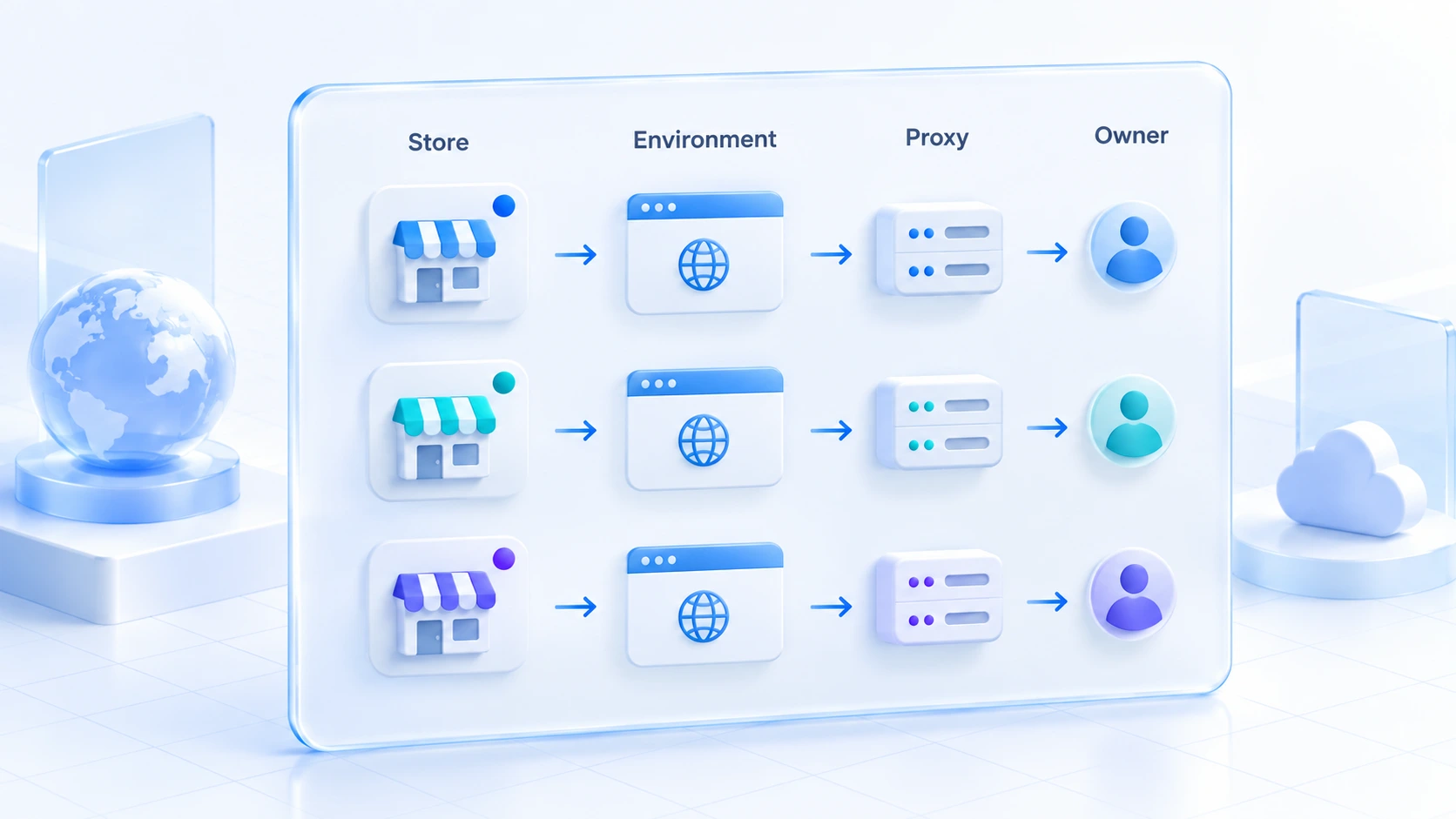
The core of the workflow is a one-to-one pairing of stores, browser environments, proxies and owners, written down somewhere you can check. In hands-on order, five steps:
- Create the environment: one environment per store, and keep the site plus purpose in the environment name; "MY-home-main store" works as a pattern.
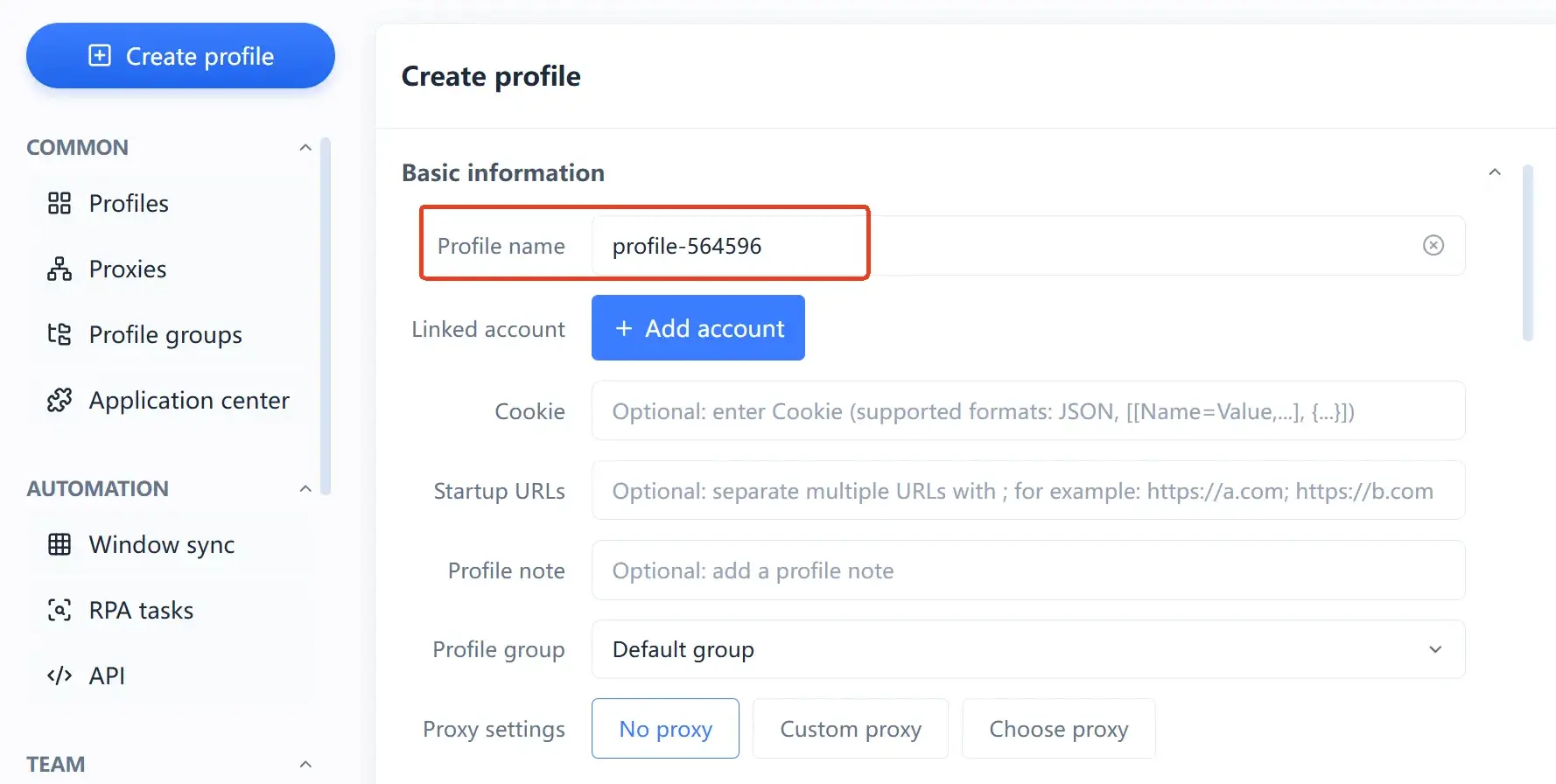
- Attach the proxy: register the proxy on its own in Proxy Management (代理管理) first, then assign it to the matching environment. A new proxy can be tested on a non-critical environment before it carries daily business.
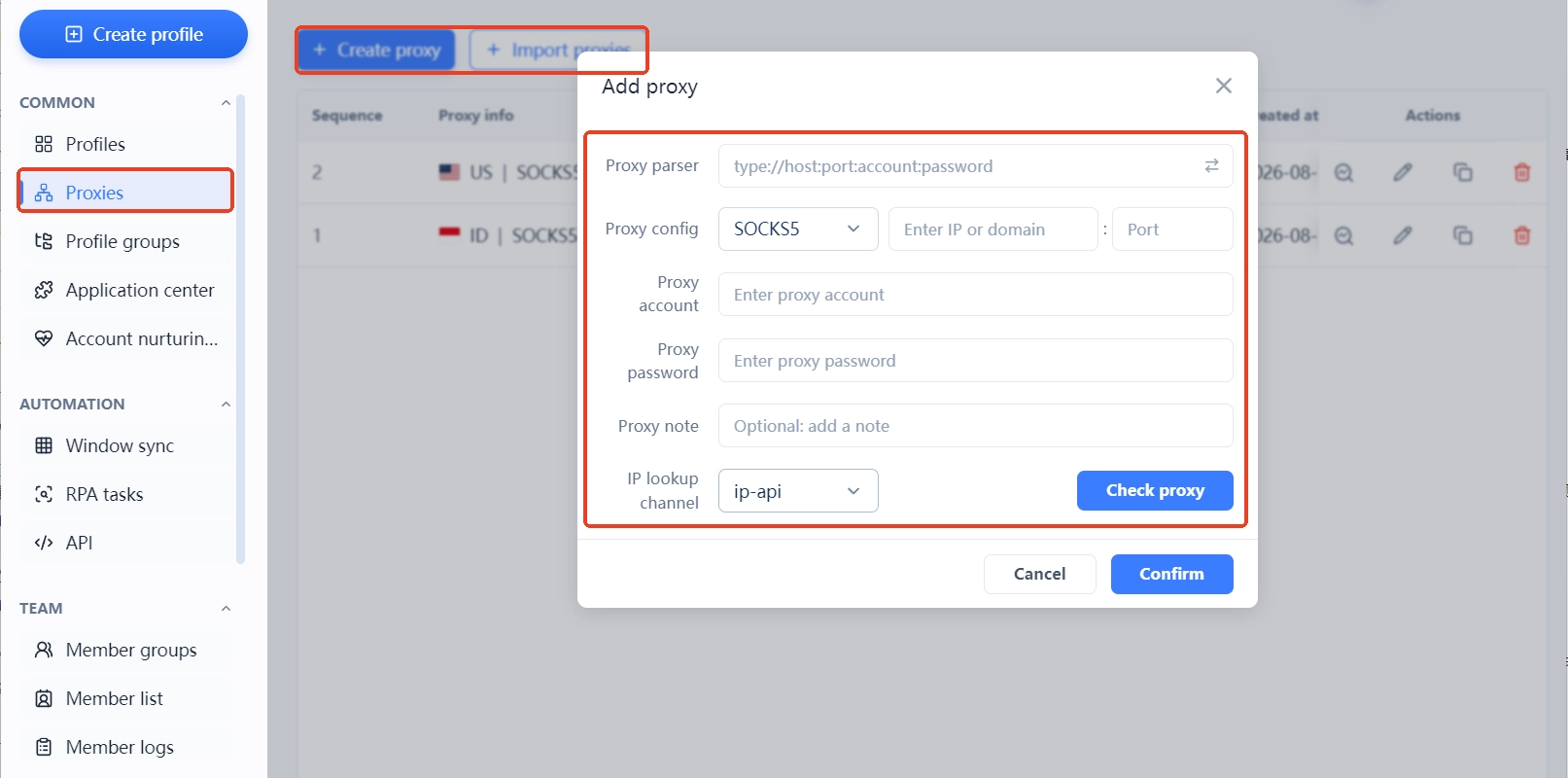
- Record the pairing: use the Bound Accounts (绑定账号) field, environment notes and custom IDs to spell out which store, proxy and owner belong together. Do not trust memory.
- Assign permissions: grant access by Environment Groups (环境分组) so an operator only reaches the environments assigned to them, never the whole list.
- Re-verify on a schedule: after a proxy change, a staff handover or a batch config edit, go back and check the pairing still holds.
Each row of the environment list is one environment's complete identity: proxy, exit IP, bound accounts and notes all live on the same line. One look tells you whether the pairing still stands.
When Something Goes Wrong: Three Common Situations
When an anomaly shows up, confirm the facts before chasing causes. Work from platform notices, account details, network status and operation records. The three situations below call for different checks.
Several Stores Ended Up in the Same Browser Environment
Stop the running session first. Work out which stores have logged in inside that environment. Then move each store back to its own environment and check whether Cookie data or login states slipped in. If needed, have the affected stores run security verification again. After that, backfill the pairing using the workflow from the previous section.
Login Trouble After a Proxy Switch
Switching proxies is a normal move. The trouble usually comes from skipping the check afterwards. First confirm the exit IP's region still matches the store's market. Next make sure follow-on settings such as time zone and language were updated along with it. Finally test the login flow inside the environment. If the platform asks for verification, complete it as prompted. Do not keep retrying.
What to Check When Handing a Store to a Teammate
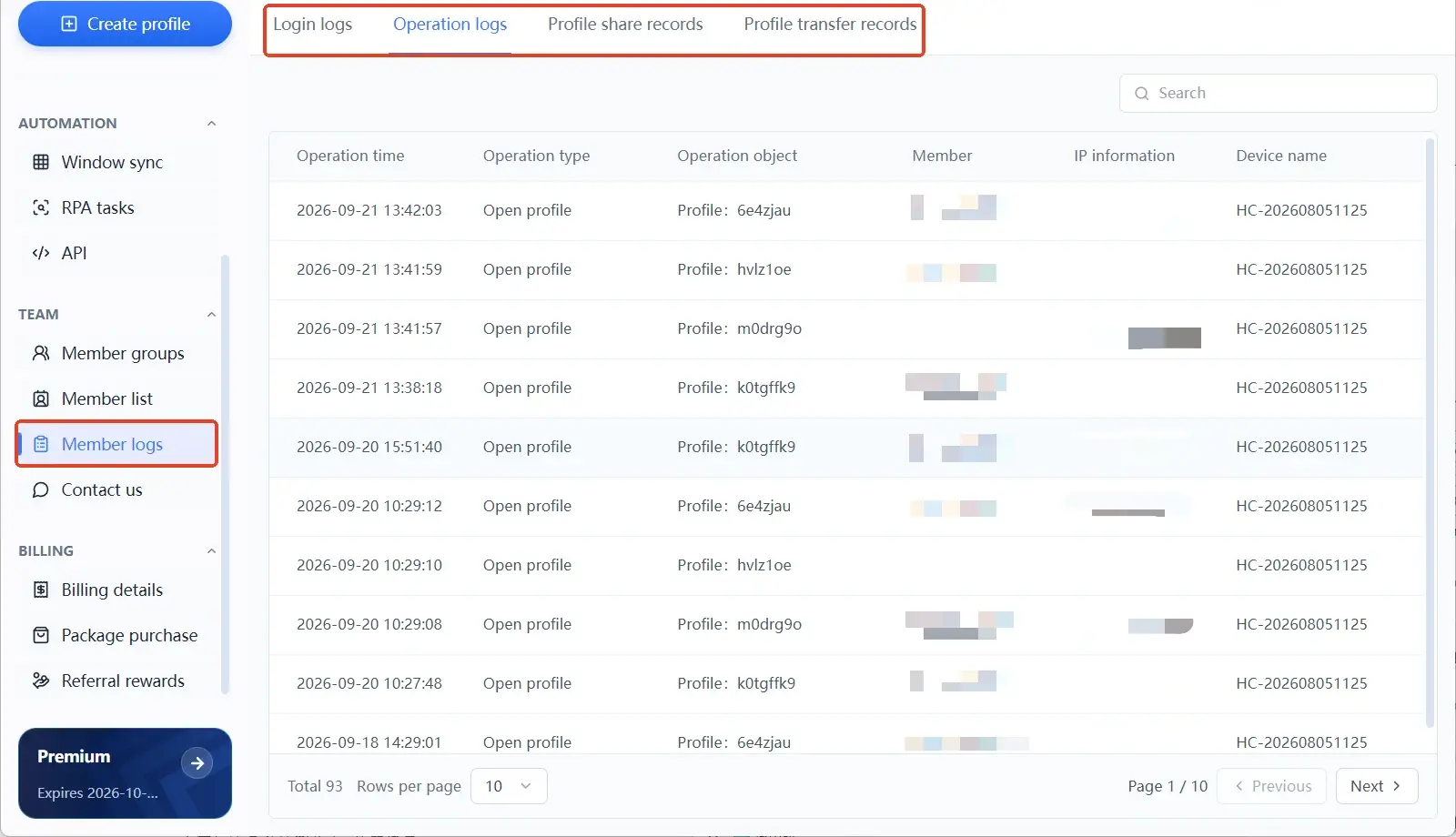
Passwords are one part of it. Environment ownership, proxy settings, bound accounts and operation records all belong in the check. Once the handover is done, use Operation Logs (操作日志) to confirm permissions were pulled in and the former member no longer holds an entry point into that environment.
Where MostMate Fits in This Workflow
MostMate is an anti-detect browser whose site positions it as a beginner-friendly AI anti-detect browser, with the core job of preparing one independent browser environment per account. Inside this workflow, it handles the device and data layer.
Creating an environment completes the name, bound accounts, Cookie data, proxy settings, group and notes on a single form. Language, time zone and geolocation default to the proxy IP's region, which trims the manual alignment work. The use cases section on the site lists multi-account e-commerce operations as one of its scenarios, and running Shopee across several sites is a textbook case. For the product overview, see What is MostMate.
The team features cover the division-of-labor step. Environments are granted to members through groups, member roles split between managing and operating, and member logs keep sign-in and operation records. When a store changes hands, those records are the reference.
What it cannot cover deserves equal billing: enrollment review, detail compliance and platform risk rules all live on the Shopee side. MostMate does not replace those requirements and is not to be used for evading platform penalties.
Frequently Asked Questions
Can You Run Multiple Shopee Stores?
Opening stores on different sites is officially supported, and one set of company documents opening one store per site is a common layout. Whether the same site allows a second store depends on that site's policy. Defer to Shopee's official policy and enrollment review.
Can Several Shopee Stores Share One Computer?
Yes, provided each store's login data is separated with its own environment and its own proxy. Logging in through one shared browser is the riskiest setup. Even after the device layer is separated, payout accounts and registration details still need to stay independent.
Does an Anti-Detect Browser Make Linkage Impossible?
No, and it is worth being precise. An anti-detect browser covers the device and local data layer; duplicated details, crossing payouts and look-alike behavior are outside its reach. The platform's complete criteria are not published either.
Does Every Store Need a Dedicated Proxy?
One fixed exit per store is the usual practice, and two things matter. The exit region should match the store's market, and the exit should hold steady over time. Whether each store needs its own separately purchased proxy comes down to business scale and platform requirements.
Closing
Manageable multi-store operations rest on whether the pairing of stores, environments, proxies and owners stays clear. Environment isolation is only the starting point for a clean device layer. The platform holds the final judgment. Compliant operation and independent details always outrank any tool.
Solo sellers should get the first store's environment management in order, then copy the workflow site by site as they expand. Teams should put permissions and logs to work so handovers and mistakes cause fewer surprises. To put this workflow into practice, download MostMate, build the environments, and check the pairing store by store before going live.

MOSTMATE
Secure Multi-Account Management, Made Simple
Start with your first account and use MostMate to build safer, smarter, and more efficient multi-account operations.
- Independent profiles. Consistent identities.
- AI Automation · Account Health · Team Operations



