
Mobile (4G/LTE) Proxies: Are They Worth It? Use Cases, Costs, and a Setup Guide for Multi-Account Operations
An aged account inside a TikTok matrix had its own device fingerprint and a posting schedule, yet it still got hit with verification after verification within the same week. The audit traced the problem to the exit IP: the whole batch of accounts was sharing addresses from the same datacenter range, the platform flagged the entire range as high risk, and every account in the matrix went down with it. Picking the wrong IP type is the one mistake no device swap or fingerprint tweak can fix — you have to start over at the proxy selection step.
Before moving into product content, I spent several years as an engineer in the risk-control industry, handling plenty of real IP-reputation cases. In this article I'll walk you through what a mobile proxy actually is, why it costs more than a residential proxy, which workloads justify the spend, and how to take a 4G proxy from selection to daily use.
What a mobile proxy is: the exit of a cellular network, not a software buzzword
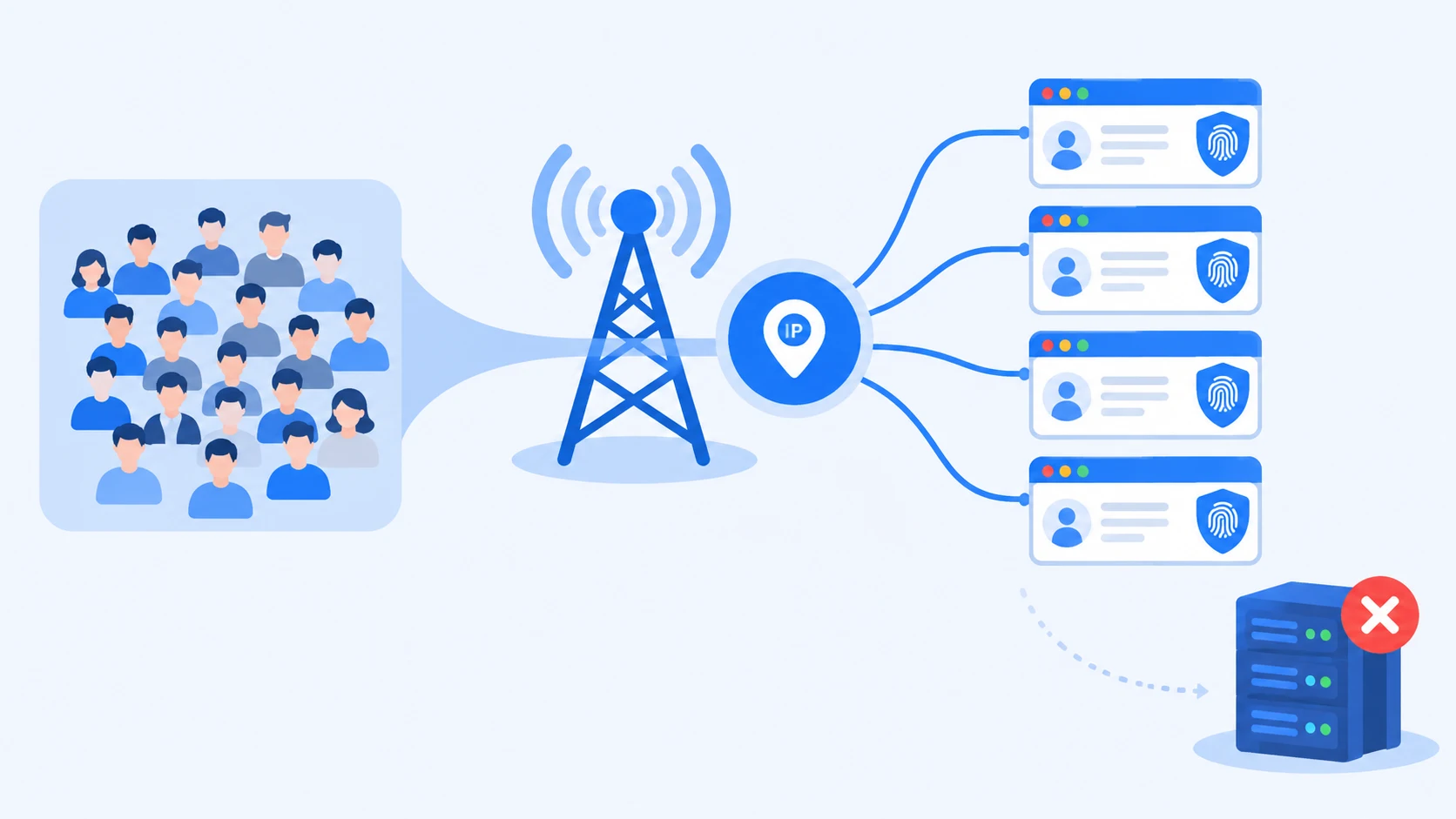
A mobile proxy's exit IP comes from real phones on a cellular network (3G/4G/5G), assigned by a carrier's cell towers rather than sitting on a server in a datacenter. To a platform, an account behind one looks like an ordinary user browsing on mobile data. That's the fundamental difference from a datacenter proxy: a datacenter address visibly belongs to a cloud provider, a cellular address points at an individual mobile user, and the baseline trust of the two is worlds apart.
How many real people stand behind one IP: why platforms hesitate to ban mobile ranges
A mobile IP's trust comes from the carrier's CGNAT setup — a technique where the carrier funnels the traffic of tens of thousands of mobile users out through a small pool of public addresses. The standard behind it is RFC 6333, published by the IETF. In practice, one mobile IP has thousands of genuine users standing behind it: if a platform bans a mobile range, it collateral-damages thousands of real people watching videos and ordering takeout, and that false-positive cost is far higher than banning a datacenter range. That's the structural reason mobile IPs carry high reputation in risk-control databases and trip fewer verifications.
The flip side of a shared exit is that you don't own the history of that address — the behavior of everyone else on the range also gets written into its reputation ledger.
Mobile proxy vs residential proxy: three exit types in one table
For social media accounts, go mobile; for bulk data jobs, residential or datacenter; for long-running static workloads, static residential. All three differences boil down to one question — how much does the platform trust this address range?
| Exit type | Platform trust | Speed | Price | Best for |
|---|---|---|---|---|
| Mobile proxy (4G/LTE) | High (CGNAT sharing makes bans risky for platforms) | Medium, depends on cell-tower load | Billed per GB, pricier than residential | Social account farming, ad verification, localization testing |
| Residential proxy | Medium-high (real broadband, but often resold in bulk) | Medium-high | Per IP or per GB, mid-range | E-commerce operations, price monitoring, everyday multi-account work |
| Datacenter proxy | Low (the range's owner is obvious at a glance) | High | Cheap | Non-sensitive scraping, connectivity checks |
The difference between residential and mobile proxies is really two trust models. A residential address proves "this is a real broadband line"; a mobile address proves "this is a real phone." Platforms cut phone users more slack, because real people switch networks and hop between cell towers all the time — their behavior is naturally irregular, and risk systems don't treat that kind of noise as an anomaly. The key to choosing isn't which one is "better," it's which trust model matches your business.
Why mobile proxies cost more: three reasons
The premium on mobile proxies comes from the cost structure, not marketing.
First, real-device resources are scarce: providers have to deploy physical equipment on actual cellular networks or partner with carriers, so node counts are far lower than in datacenters.
Second, billing is per GB: public industry quotes mostly land between $10 and $35 per GB, and video-heavy jobs can push traffic costs past the proxy's monthly fee in no time.
Third, session type moves the price: a static long session (hours to days on one IP) costs more than per-request rotation — but for account farming it's exactly the mode you need. Whether the price is worth it isn't about the sticker number; it's whether your business can turn that trust into retention.
Which multi-account jobs deserve a mobile proxy: an evaluation checklist
There's only one test: does your business depend on being treated as a real person? Run your own workload list against the four categories worth paying for and the three that aren't.
Four worth paying for: trust converts straight into retention
- Social media matrices: content distribution for TikTok, Instagram, and Facebook account matrices is directly affected by how much the platform trusts your exit IP. Teams running Facebook matrices can check the Facebook multi-account playbook — binding IPs to environments is one of the prerequisites of that approach.
- Ad verification and placement monitoring: advertisers need to confirm in a real mobile network that creatives render and landing-page redirects work; what a datacenter IP sees doesn't match what real users see.
- Localization testing: app store rankings and local search results are heavily geo-dependent; a mobile proxy's ability to target by country, or even by carrier, is something other proxy types can't offer.
- Long-term operation of high-value accounts: when a single account generates serious yearly revenue (a marketplace seller account, for instance), the cost of mobile IPs is a rounding error — what you're buying is certainty.
Three that aren't: buying trust is a waste
Searches like "rotating IP proxy multi-account" often come from treating rotation as a cure-all. The following three jobs are the opposite:
- Mass registration: whether new accounts survive depends on devices, profile quality, and pacing; IP type ranks well below those. Registering on a mobile proxy and then switching back to a cheap exit actually creates IP jumps.
- Large-scale scraping: a collection script doesn't need the platform to treat it as human; it needs speed and low cost. Mobile proxies bill per GB and run at limited speed — the same scrape volume costs far less on residential or datacenter proxies.
- Daily use of a single account: one account needs one static residential or home connection. Paying mobile traffic fees for a single account buys you nothing.
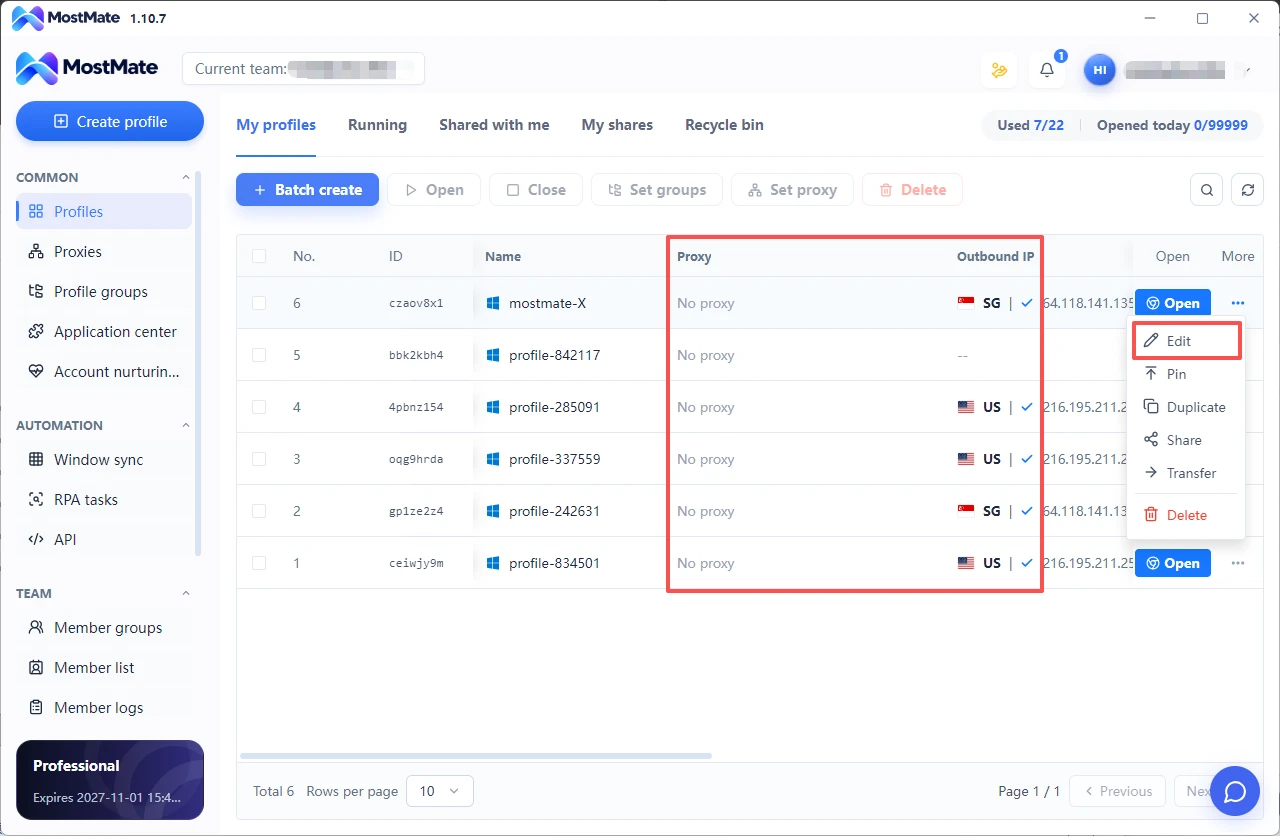
On a day-to-day schedule, the container for all of this is the environment. MostMate's environment management bundles each account, proxy, fingerprint, and timezone into a profile, supports batch creation and grouping by platform, and lets team members pull only the profiles they're authorized to use. Once your matrix grows, a single page shows the proxy status of every profile — and all four worthwhile workloads enter through this one door.
How to set up a 4G proxy: build it yourself or plug into a provider
There are two roads to a working 4G proxy: buy SIMs and build your own exits, or connect to a provider's ready-made endpoints. Neither road is inherently better — it depends on how many exits you need and how much maintenance labor you can commit.
Path one: DIY with 4G SIMs, for teams with ten exits or fewer
- Buy the hardware: a 4G modem setup (a Raspberry Pi with a 4G module, or an industrial 4G router), one device per SIM, one SIM per exit. A full kit comes in under $100.
- Get SIMs and register them: register each SIM under the target country's carrier requirements; when picking a data plan, watch out for "unlimited but throttled" clauses — video-heavy jobs will hit the throttle wall hard.
- Configure the exit: the device dials in and receives a carrier-assigned address, which you expose as a SOCKS5 or HTTP proxy port.
- Track usage and monitor: running out of data cuts the line, so each SIM needs usage monitoring and an auto-restart script.
The real cost of DIY isn't the hardware (a full kit runs under $100); it's maintenance: SIM bans, signal swings, data overages — every one of them needs a human watching. For teams that need ten exits or fewer and have hands to spare, DIY costs less over time than paying per GB; beyond that scale, a provider is the cheaper route.
Path two: plug into a provider — three parameters are enough
Don't compare providers on a wall of spreadsheet rows; three parameters decide the experience.
- Geo-targeting precision: can you pick an exit by country, or even by carrier? Localization testing needs city-level accuracy.
- Session duration: how long can a static session stay locked? Account farming needs tens of minutes to several hours on the same IP — a per-request-rotation-only provider won't fit.
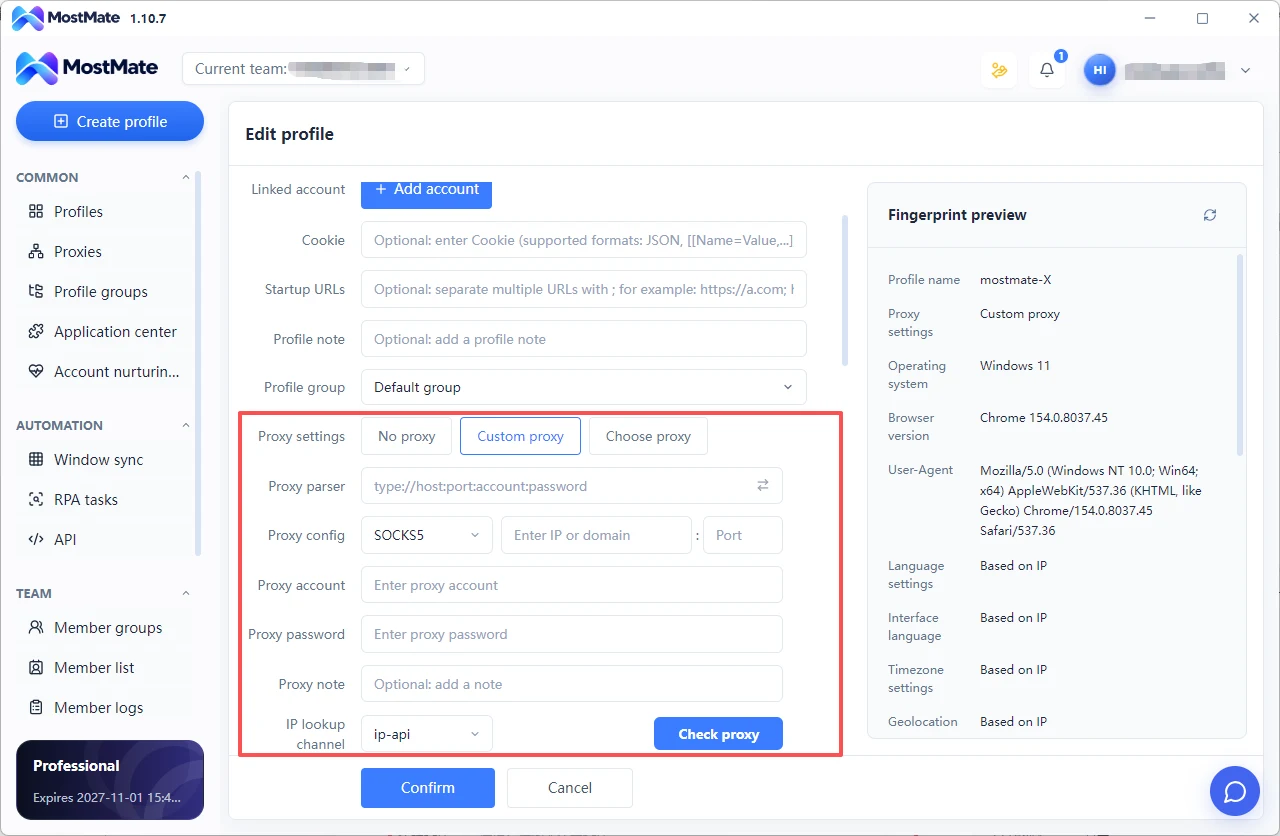
- Protocol support: SOCKS5 is the floor; some environments' proxy binding only accepts specific protocols. Test all three with a small traffic plan before buying — that beats any marketing page. At this stage, wiring a mobile proxy in usually amounts to filling in one address and port; the hard part was all in the selection up front.
Mobile proxy plus antidetect browser: from binding to session pinning
A proxy answers "where am I connected from"; a device fingerprint answers "what device is connected." Stack the two and the platform can assemble one coherent user persona. A mobile IP alone, with dozens of accounts crammed into the same browser environment, still gets them linked; a fingerprint alone with the account logging in from a datacenter address can't be saved no matter how realistic the fingerprint looks.
So the two layers usually live on an antidetect browser for multi accounting. MostMate generates an independent fingerprint for every profile, saves the proxy binding along with it, and gives members access by permission — no hopping between multiple tools.
If the products on the market blur together, MostMate has sorted them by use case in its 2026 best antidetect browser roundup, with plans starting at $6.80 a month!
Five-step integration
- Pick the session mode: in the provider's console, set the target exit to a static session (sticky session) and grab the session ID. Use it without a session and the IP rotates on every request — each login lands on a fresh address.
- Match the geography: choose an exit in the same country the account registered in, and set the profile's language and timezone to match.
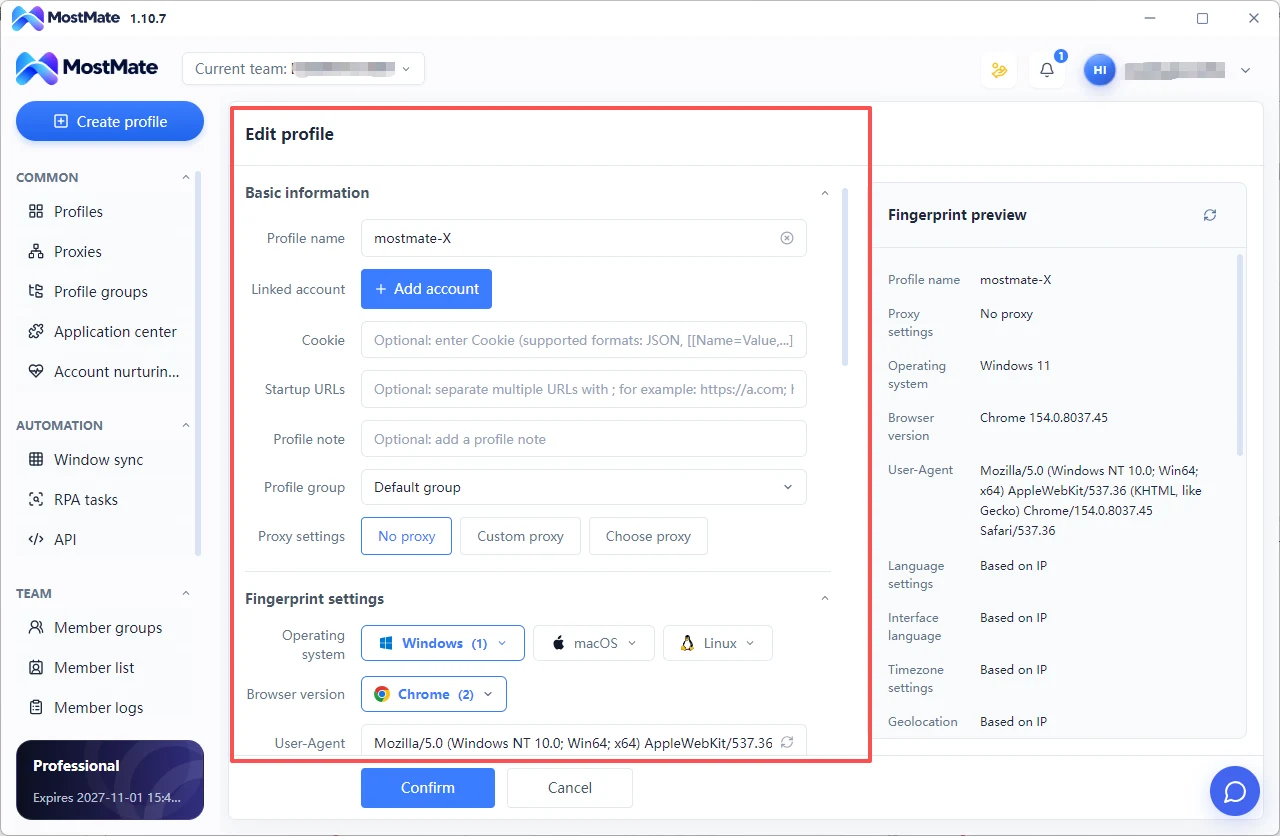
- Bind it to the profile and verify the exit: enter the proxy address and port in the profile settings, save, then open an IP-check page inside the profile to confirm the exit is live.
- Lock the session after login: don't touch the session ID during onboarding (roughly two weeks) and keep the IP stable. Restarting the proxy mid-way and changing the session creates an IP jump the platform will record.
- Revisit rotation after things stabilize: only consider daily IP rotation once the account has run for a month and built up enough behavioral history.
Session rhythm: when to lock static, when to allow rotation
The session strategy for farming IPs follows the account's stage. During onboarding and farming, lock the static session — a young account has little behavioral history, so every IP change is a fresh risk signal. For what a new account should and shouldn't do day by day in its first two weeks, a day-by-day checklist is the safest way to run it.
Once operations stabilize, loosen up: rotate once a day, or change sessions deliberately at clear network-switch points like moving to a different city — regular changes read as normal usage to the platform. Random rotation with no rhythm: never, at any stage.
Is running multiple accounts through mobile proxies legal?
In the United States and most countries, proxy technology itself is a legitimate networking tool — corporate remote work and cross-border access are built on the same kind of infrastructure. The US Computer Fraud and Abuse Act (CFAA) targets unauthorized intrusion into computer systems and related security obligations; it does not prohibit using a proxy or operating multiple accounts. What actually binds you is each platform's terms of service, and their stance on multi-accounting and automation varies. Before you scale a matrix on mobile proxies, read the target platform's terms end to end.
Closing: three judgments, one action
Whether a mobile proxy is worth it comes down to three judgments: does the business depend on being treated as human, has it reached the scale where DIY makes sense, and do the platform's terms allow the approach.
Three yeses, and it's one of the clearest-payoff investments in a multi-account setup; a single no, and residential or datacenter is the more rational choice. You can act this week: pick one high-value account, take the provider route with a static-session mobile exit, bind it to an isolated profile, and run it for a week — then compare verification counts in the logs before and after. The data will answer the worth-it question for you.
FAQ
Mobile or residential proxy for account farming?
If the budget allows, social media farming goes mobile: cellular addresses carry higher reputation in risk-control databases and trip fewer verifications than residential ones. On a tight budget, static residential is the compromise, with a better speed-to-price balance.
How many accounts can run on one mobile proxy IP?
Follow one account per profile, one profile per independent exit: as a rule, one static session per key account is the safe setup. Several sessions can share one cell-tower exit, but don't put a key account on the same exit as secondary accounts.
Why is a mobile proxy more expensive than a residential proxy?
Scarce real-device resources, per-GB billing, and the static session format stack on top of each other. Whether the premium is worth it depends on whether the business depends on the platform treating it as human: if yes, it pays off; if not, pick residential.
Can free mobile proxies be used?
Not for anything real. Free nodes come with traffic sniffing, content tampering, and burned IP reputation. Accounts raised on free exits grow up in a dirty environment, and switching to paid exits later rarely washes the reputation back.
Does running multiple accounts on a mobile proxy break platform rules?
Each platform words it differently: some restrict multiple accounts per entity, some require accounts to stay independent. Using a proxy doesn't change the terms themselves — check the target platform's rules line by line before scaling.
Fixed IP or rotating IP during the farming period?
Lock the static session through onboarding and farming, keeping the IP unchanged; during stable operation, rotate daily or change deliberately at clear switch points. Rhythmless random rotation: never, at any stage.

MOSTMATE
Secure Multi-Account Management, Made Simple
Start with your first account and use MostMate to build safer, smarter, and more efficient multi-account operations.
- Independent profiles. Consistent identities.
- AI Automation · Account Health · Team Operations



