
How to Prevent Amazon Multi-Account Association: A Three-Layer Prevention System from Registration to Operations
Core takeaway: Amazon takes a "conditional yes" stance on multiple accounts: with a legitimate business need and every account under your name in good standing, opening more accounts is compliant; once an association finding stands, suspension of linked accounts is written into the policy, so build the prevention system in three layers, registration data, browser environment, and operating behavior, while your first account is still healthy. These three layers cover different signals at different times, and the sections below walk through the policy, the signals, and the three layers in order.
Amazon's multi-account rules: a conditional yes, with red lines in the code
Amazon does not impose a blanket ban on multiple accounts, but it writes the conditions for a second account into the Seller Code of Conduct. The multi-account policy in the selling policies and Seller Code of Conduct states plainly: you may only maintain one seller platform account per selling region. Opening a second account requires two conditions at once: a legitimate business need for the second account, and all accounts under your name in good standing. The policy also gives examples: maintaining separate businesses for multiple brands, manufacturing goods for two distinct companies, or being invited to an Amazon program that requires separate accounts.
Two boundaries are spelled out just as clearly,
- First, the linked-account clause: if any account under your name falls out of good standing, Amazon may deactivate all of your selling accounts. The bar for recovery is every account returning to good standing. In other words, multiple accounts can be compliant. But when one account runs into trouble, the whole group gets pulled into review.
- Second, the policy names two scenarios that do not count as legitimate needs. A new account used only to offer the original account's products, or only to file complaints against other sellers, both qualify.
Amazon Global Selling's official primer also notes that association is possible between the European and US marketplaces. The platform does not publish the details of how association is determined.
For sellers, the only dependable option is prevention done early. Separate the data before registration, and keep each account on its own operating track day to day.
Association signals cluster in three categories of material
When Amazon decides whether accounts are associated, it cross-references three sets of evidence: registration data, network environment, and operating behavior. No official channel has published the algorithm, but three official materials outline the signal scope.
- The first group is registration and funding material. An official post on the seller forums shared a practical checklist requiring zero overlap between two accounts. Business entity, bank account and credit card, email and phone, business address, staff and managers, domains and warehouses: every item is independent per store. This checklist is the backbone of the data layer. Work through it before registration, and most data overlap is removed before an account is even opened.
- The second group is the network and device environment. The association appeal questionnaire is the third official material. Amazon lists the use of VPN tools, logging in over public WiFi, and accessing accounts from other networks or devices as items that need screening. Network-layer signals, in other words, are routine checks in the official view. Overlapping exit IPs, overlapping device fingerprints, and drifting login environments all feed into the determination.
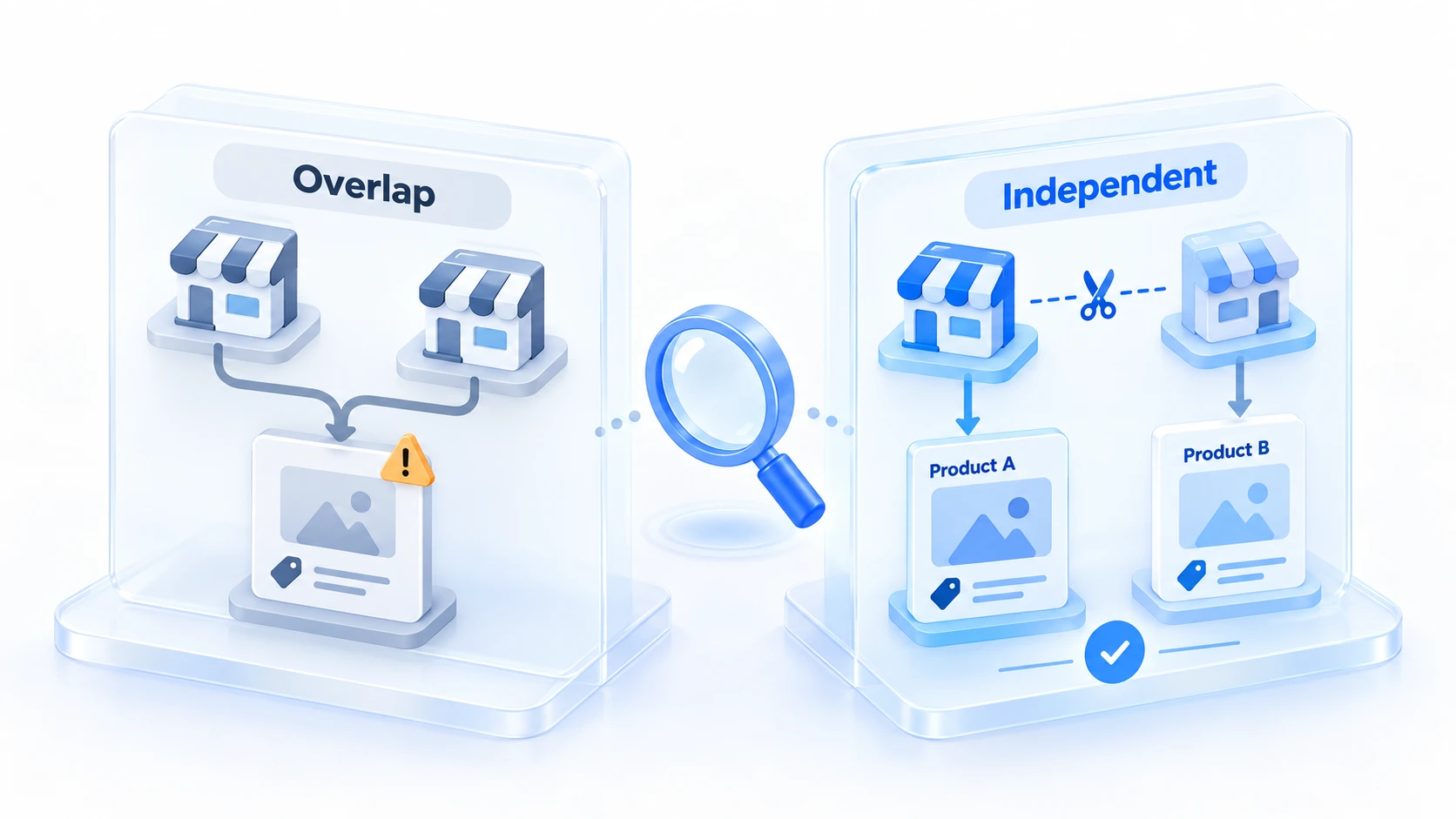
- The third group is operating behavior. The policy's callout of "a new account used only to offer the original account's products" is typical behavioral association. The same batch of listings appearing across stores, highly similar product descriptions, and consistent support scripts all count as operational overlap. However cleanly the data and environment are separated, listing-level overlap pulls the stores back into the same group.
Registration layer: lay out the data matrix before opening accounts
The cost of data overlap climbs sharply after registration. Changing entity information on a live account is itself an action that triggers review, so plan the data before the first account is registered. Following Amazon's checklist, four categories of material need to be separated per store:
1. Entity and funding: each store maps to its own business license or corporate entity. Receiving accounts and payment credit cards are separate per store, and bank statements are not shared.
2. Contact information: one email and one phone number per store, no repeated mailing or business addresses, and no overlap between legal representative and contact details.
3. Business assets: brand ownership is divided by store, domains and standalone sites are hosted separately, and two stores never share a brand registry.
4. People and premises: different people handle daily operations for different stores, and office and warehouse addresses are split where possible. When former employees or relatives help with operations, spell it out in internal processes.

One detail in the data layer is easy to miss. The appeal questionnaire specifically asks "have you changed any information since the account was opened". Swapping in a new email, phone, or payment method mid-stream, where the new information overlaps with another account, amounts to adding the overlap record to the system yourself.
Once the data is separated, keeping it stable is itself part of prevention.
Environment layer: each store looks like a different device in the browser
The data layer answers "who you are"; the environment layer answers "which device you operate from". Amazon's web backend records the browser fingerprint and network exit of the login device. When multiple stores log in from the same computer or the same IP, the environment-layer overlap becomes association evidence even if the data is fully independent.
In MostMate, this isolation is built store by store. MostMate is a fingerprint browser designed for multi-account operations. Each store gets its own browser profile and network exit, and environments never borrow from one another. For how each module divides the work, see the product overview page. It comes down to three steps.
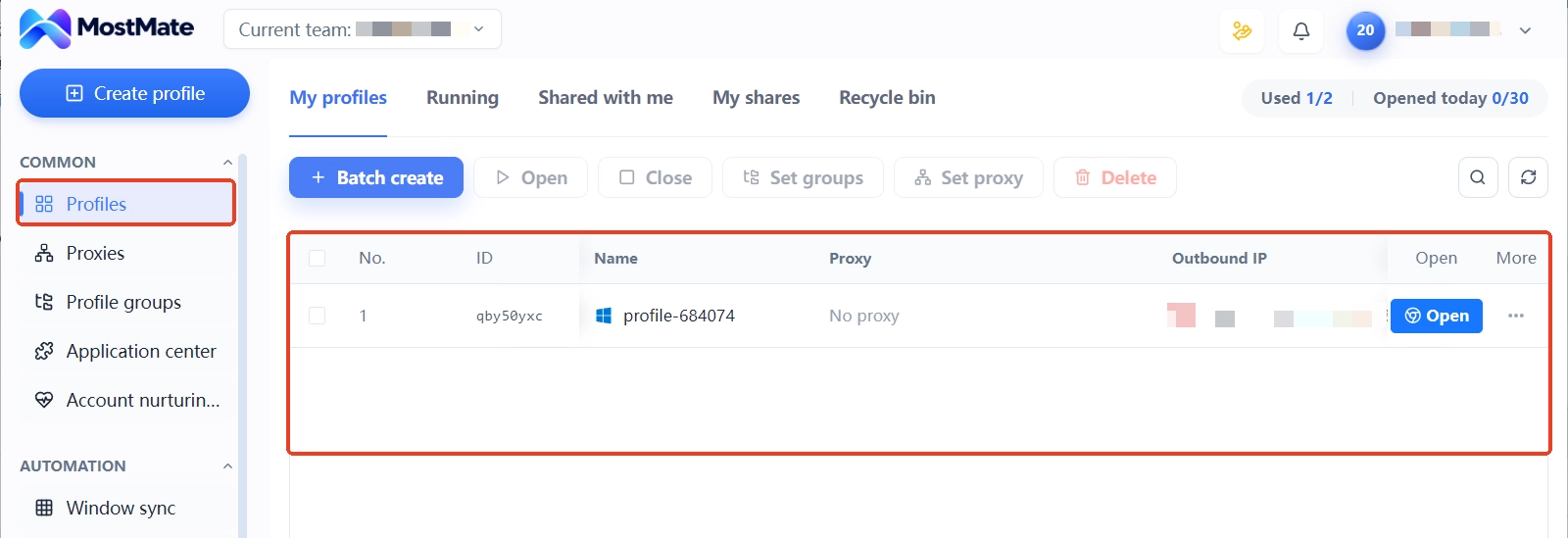
Step 1: create an environment for each store. Create profiles one by one in environment management, named after the store or brand. In the environment list, each row is a complete identity for one store, with separate fields for proxy, bound accounts, groups, and notes. The web app supports the same management actions: sign in to create environments and configure proxies, and assign environments to team members for collaboration.
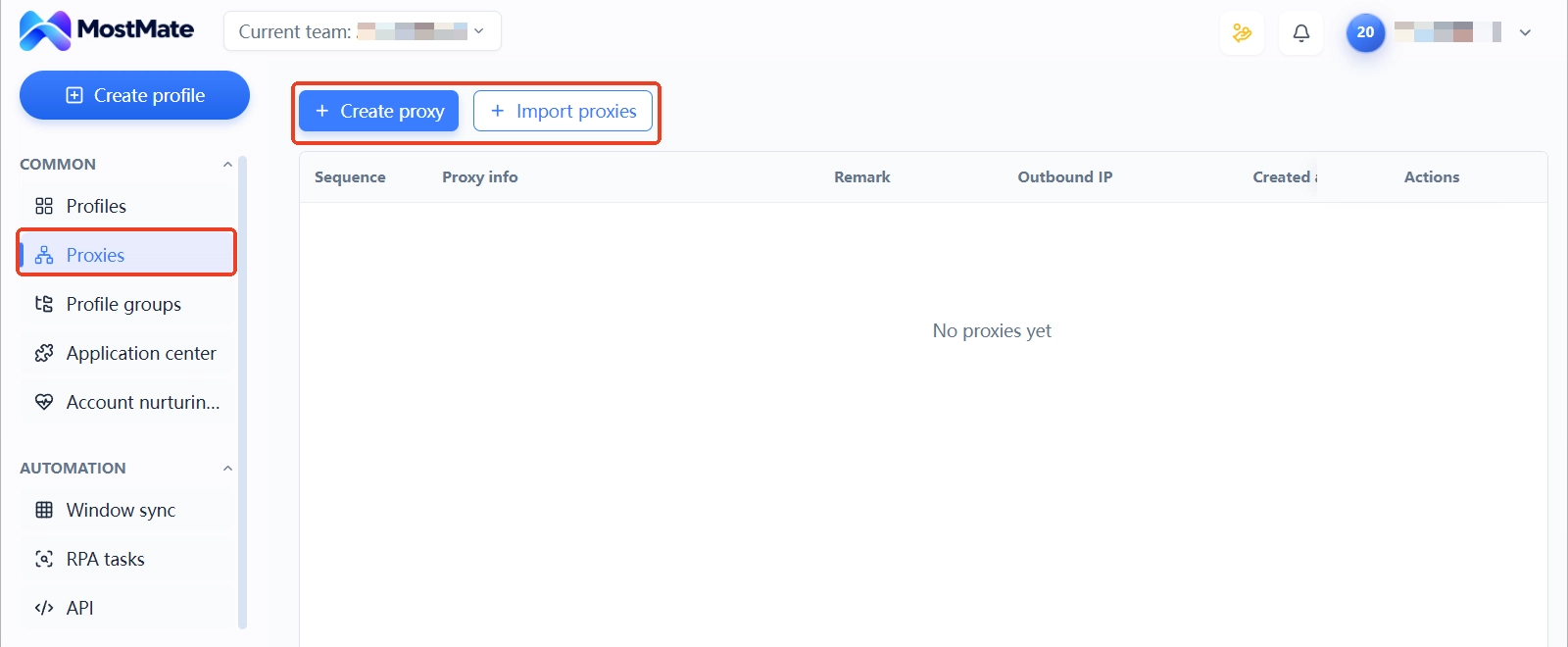
Step 2: bind an independent proxy to each environment. Proxies are entered centrally in proxy management and assigned per environment; after entry, use the proxy check feature to test the connection, and the exit IP and its location show up on the spot. The routing principle for Amazon sellers: fix one residential-type exit per store, keep it consistent with the region of the registration address and the store's marketplace, and leave it unchanged long term. During a new store's early phase, the reputation status of the exit IP matters more than price; a residential-type exit suits the registration stage better than a datacenter range.
Step 3: keep environments stable long term. Once an environment is built, the store and environment stay bound: whichever environment you log into, that is the store, and Cookie data, local storage, and fingerprint configuration all stay inside the environment without drifting. For the companion feature list for Amazon stores, see MostMate's Amazon seller solutions page. When cross-border teams run several marketplaces in parallel, the approach in the Shopee multi-store isolation guide matches Amazon's. The environment layer only handles device identity; differences in how each store is run come from the operations layer.
Operations layer: make each store look like a different operator
With environments separated, how differentiated the operating actions are decides whether both stores read as the same team at the behavior layer. A few practical points:
- Listings and products stay separate. The two stores do not sell the same batch of products, do not offer against each other, and product titles, images, and A+ pages are produced separately, with no copy-pasted description templates.
- Support and response stay separate. Reply cadence and script style for buyer messages differ by store, and promotion schedules are staggered: no identical discounts on the same day.
- Performance is managed per store. The policy states all accounts must stay in good standing, so one store's performance slump drags the whole group into the linked-account zone. Watch metrics like order defect rate store by store, and contain the risk exposure of the troubled store first.
- Operating schedules are staggered. New listings, ad launches, and big-promotion stocking follow per-store schedules; a group of stores executing identical actions on the same day clusters together most easily in behavioral terms.
Once the three layers are in place, what remains is long-term execution. Keep the data layer stable, with no mid-stream overlap. Keep the environment layer bound, with no drift. Keep the operations layer differentiated, with no convergence. If a store still receives an association finding, what you can do that day is isolate the risk exposure first, then appeal. For the item-by-item appeal process, see the steps in the Amazon association POA appeal guide; the prevention checklist in this article also works as a pre-appeal self-review sheet.
Frequently asked questions
Do you have to report multiple Amazon accounts to the platform?
Current policy does not require applying for permission in advance, but both conditions must be met at the same time. One is a legitimate business need, such as running multiple brands separately or manufacturing for two independent companies. The other is that all accounts under your name are in good standing. Adding accounts without meeting those conditions violates the Seller Code of Conduct, regardless of whether you report it.
Can the European and US marketplaces become associated with each other?
The official primer explicitly notes that association is possible between the two marketplaces, and the platform does not publish the details of the determination. The safe approach is to treat the accounts on each marketplace as one group of risk. Configure data, environment, and operations on the basis of "different people running different stores", rather than betting that the marketplaces are isolated from each other.
Is incognito mode or a regular browser with separate logins enough?
No. Incognito mode only isolates Cookie data; the browser fingerprint, time zone, language, and other environment parameters still expose the real device. When multiple stores share one computer, device-layer overlap keeps accumulating. These signals call for environment-level isolation, and a fingerprint browser maintains a full parameter set for each environment.
Can I change the proxy after building an environment?
You can change it, but time the change after low-risk actions, avoid any sensitive operation window the store is in the middle of, and keep the new exit's location consistent with the store's marketplace. Frequent switching has no value in itself; one stable exit held long term fits risk-control expectations better than repeated changes.
Conclusion
The risk structure of multiple Amazon accounts is clear. The policy allows adding accounts with a business reason, but the linked-account clause means a mistake on any one account carries a cost for the whole group. The three categories of signals behind association findings, data, environment, and behavior, can all be managed layer by layer before anything goes wrong.
Lay out the data matrix before registration, use MostMate in the environment layer to give each store its own browser identity, and let each store keep its own operating rhythm in the operations layer. The earlier prevention is in place, the lower the odds of ever needing an appeal. If you have not built an environment system yet, start with the four-step preview under environment management to set up the framework, then download MostMate to lock in each store's environment. Hold the signal layer steady from the very first account.

MOSTMATE
Secure Multi-Account Management, Made Simple
Start with your first account and use MostMate to build safer, smarter, and more efficient multi-account operations.
- Independent profiles. Consistent identities.
- AI Automation · Account Health · Team Operations



