
How to Manage a YouTube Multi-Channel Matrix: Five Keys for the Running Phase
Core takeaway: once a YouTube multi-channel matrix enters its running phase, management shifts from setup to daily routines: tier your channels first, keep login and upload rhythms steady, check three signals in a weekly audit, log status rather than ownership alone, and when something goes wrong, silence the affected channel first. The five points below unpack this, ending with the tool that turns these actions into habits.
Once a team runs five or more channels, the problems it hits usually go beyond association itself and turn into problems of manageability. Nobody noticed that a channel had features restricted last week. A channel's login session was borrowed once and no one can explain it. The person in charge changes, and channels no longer match their environments.
Not an isolation problem. The running-phase routines never caught up.
Tier Channels First, Match Intensity to the Tier
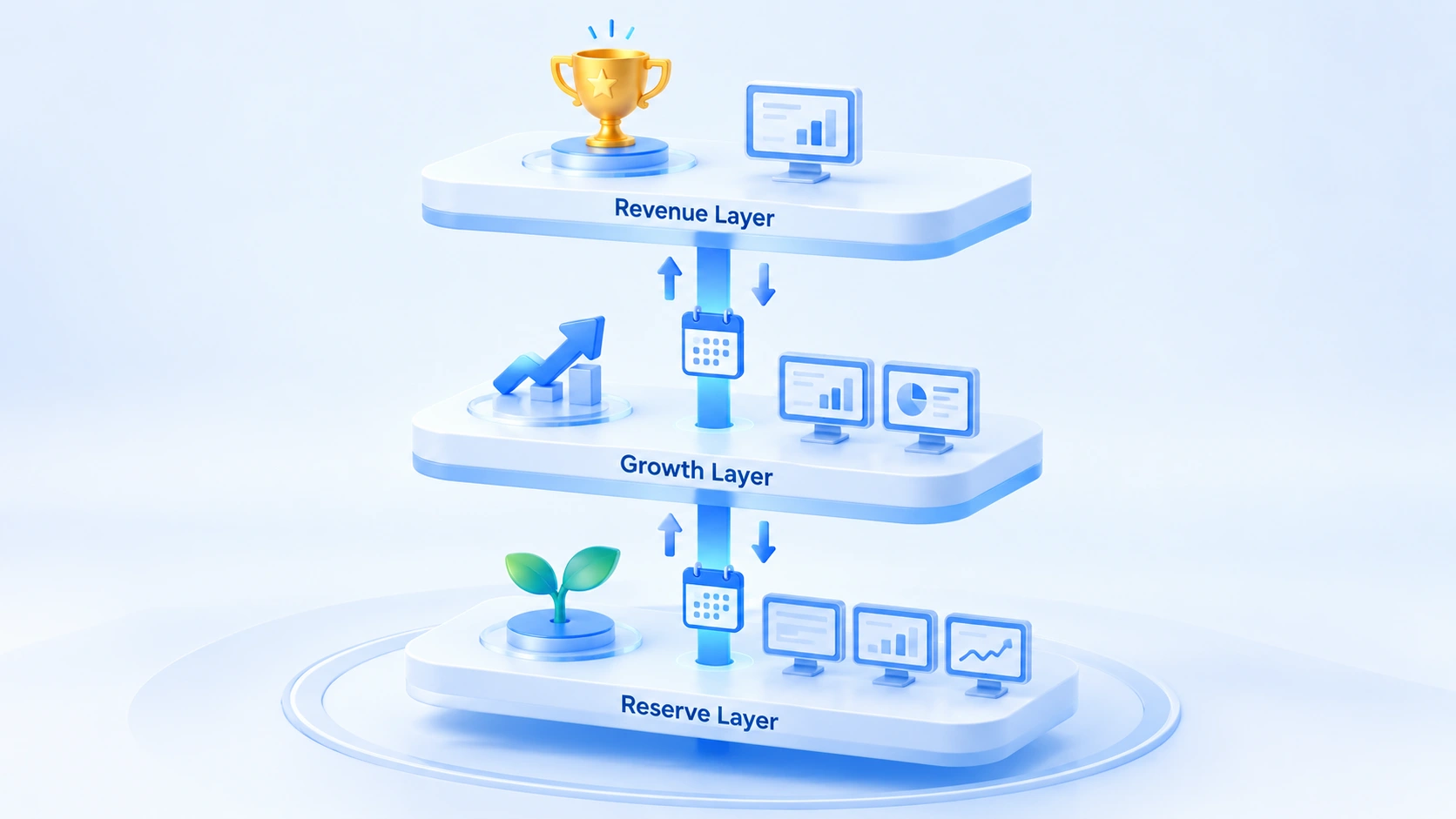
The first step of matrix management is not adding monitoring; it is sorting channels into tiers and treating each one differently. Spread one identical routine across every channel and revenue channels get overworked while reserve channels go unattended. Split channels by business status into three tiers, each with its own login frequency, audit density and change approval.
1. Revenue tier: channels already monetized and updating on a stable schedule. The rule here is minimal intervention. Keep login frequency low, freeze environment configs, and avoid any sensitive operations unless necessary. These channels carry the revenue; stability comes first.
2. Growth tier: channels gaining traction with a high publishing frequency. The primary audit targets, where login and upload rhythm matters most and any anomaly gets handled first.
3. Reserve tier: brand-new channels whose positioning is still unproven. Run them at low cost, with no rush to apply for monetization and no rush to share any assets or habits with growth-tier channels.
The value of tiering is spending limited management effort where it counts. When you create a reserve-tier channel, take an independent path from the very first step of registering the Google account; the complete registration and verification flow is covered in the Gmail account registration and verification guide. Only when the account's origin is independent can the environment behind it be genuinely independent. Tiers are not permanent. A reserve-tier channel that gains traction moves up to the growth tier. Moving up is more than editing a group label: recheck the environment config and proxy status before switching.
Login and Upload: Rhythm Beats Technique
Platform judgments about a channel are not limited to content; logins and sessions are measured too. However good your content is, erratic login behavior still invites review. The running phase has four rhythms to hold.
- First, keep sessions alive. Let a session run naturally after login and avoid repeated log-ins and log-outs within one day. Frequent login actions are themselves a suspicious signal, more conspicuous than long gaps between logins.
- Second, keep upload times regular. Set an upload window for each channel based on its audience market, then keep it fixed. Time zone and IP location should line up with the upload schedule; uploading Chinese-language content through a US or European proxy at midnight makes the readings contradict one another.
- Third, one session, one type of task. No bulk subscribing or commenting during upload windows; no touching backend settings during engagement windows. Mixing actions inside a single session blurs the behavioral profile.
- Fourth, nurture new channels before acting. After a reserve-tier channel is created, let it accumulate a stretch of natural browsing and session history first; do not start uploading on registration day.
Publishing cadence for content and the behavioral rhythm described here are two different things: the former schedules people and tasks, the latter governs accounts and environments. The social media matrix scheduling article explains how to build the content calendar in detail. Keep the two calendars in parallel; do not merge them into one.
Weekly Audit: Check Three Signals
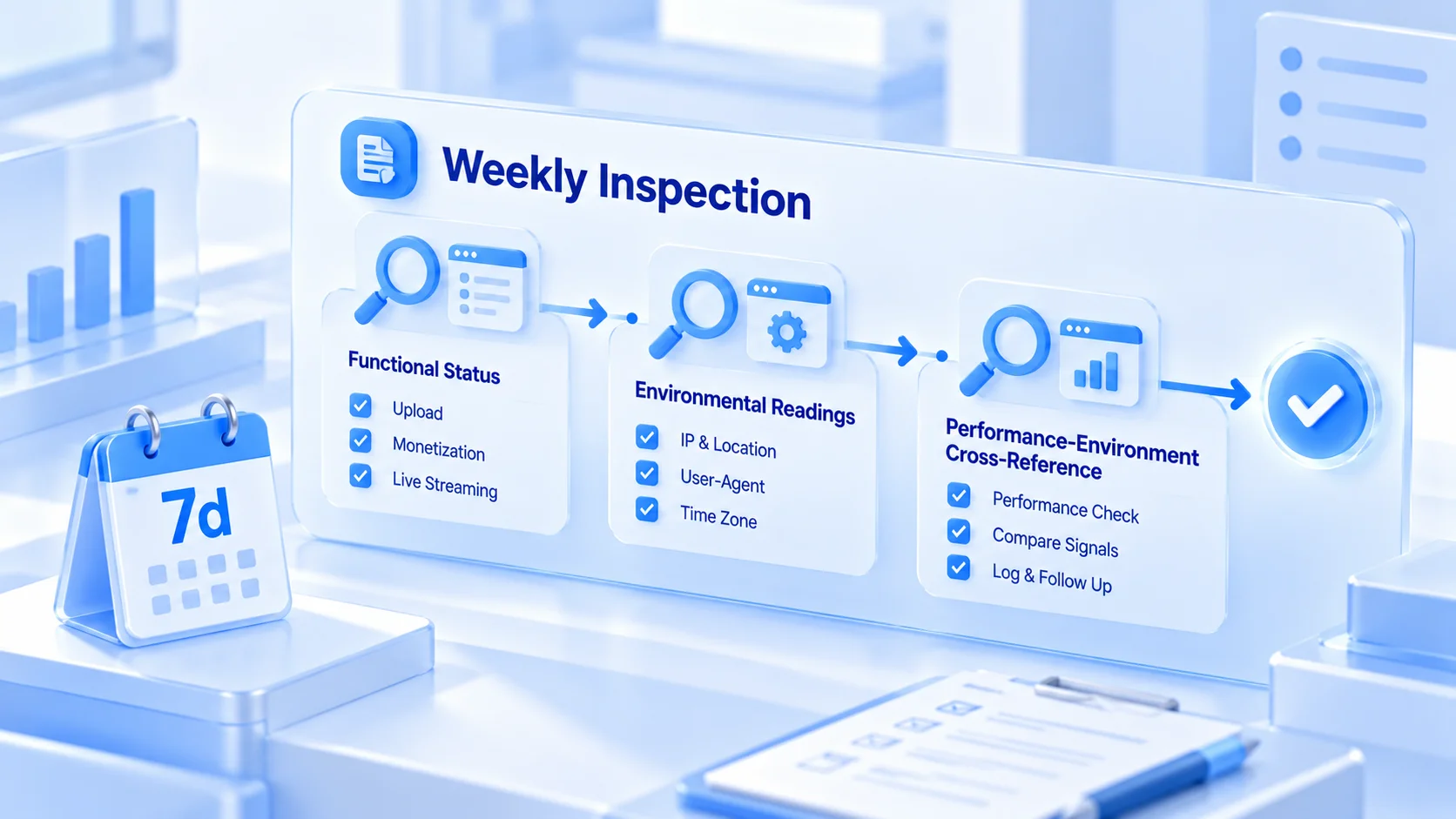
The purpose of an audit is not view counts; it is catching anomalies before they become incidents. Pick a fixed time each week and go through the three signals.
1. Feature status in each channel's backend. The availability of upload, monetization and live streaming entries, plus any in-product notices; watch for newly added restriction labels and log them in the ledger. Eligibility for each feature follows YouTube's official blog and in-product documentation; the audit only tracks status changes and does not draw conclusions on the platform's behalf. A sudden narrowing of feature entries usually surfaces problems earlier than a dip in views.
2. Whether environment readings match the profile. Exit IP, location, User-Agent and time zone: compare each against the expected values recorded in the ledger. Checking them one by one on a detection site like BrowserLeaks is the easiest route; the full sequence for the three groups is in that primer.
3. Cross-checks between channel performance and environment status. If a channel's views plunge while environment readings stay normal, the problem is most likely on the content side, and growth-factor troubleshooting can follow Ahrefs' YouTube SEO guide item by item; if environment readings have changed and channel data turned abnormal along with them, check the environment first.
Log any anomalies you find, and record the outcome after handling.
The value of an audit lies in continuity. A single week shows no trend; four consecutive weeks of records are enough to judge where a channel's health is heading.
Keep a Status Ledger So Handovers Have Evidence
Once channels multiply, the ledger becomes the thing most often skipped and most depended on when trouble hits. Ownership details (which channel, which Google account, which environment) are recorded once when the matrix is built; the status columns update with every weekly audit.
For each channel, keep four ledger columns: current tier (revenue, growth or reserve, with dates for promotions and demotions), audit records (date of the latest audit, anomalies and outcomes), change records (date and reason for every proxy, device and verification change), and owner (current owner and handover records).
The ledger and the tool should corroborate each other. The overall framework for environment ownership, groups and member permissions is covered in the multi-account management overview article; what the ledger adds is precisely the status columns that tools do not express well. In a handover, what changes hands is not just passwords but the whole mapping of "channel, environment, account, status". Environment sharing and transfer features take care of the environments themselves, member activity logs show who touched each environment recently, and the ledger spells out the status. With all three in place, no information is lost in a handover.
After a Restriction Notice, Silence the Single Channel First
Matrix operations will sooner or later hit a restriction notice on one channel. The easiest mistake at that moment is to make sweeping moves across the whole matrix: swapping proxies overnight, changing devices, pausing every other channel. Those moves only amplify association signals. Fix the response order and keep it fixed.
- Stop publishing and engagement on the affected channel and put it into silent observation; take no remedial actions.
- Review the channel's change records for the past two weeks and trace proxy, login and verification changes in the ledger.
- Keep all other channels on their normal rhythm with no batch adjustments. What a matrix fears most is a chain reaction: one channel trips, the whole matrix moves, and the review scope only widens.
- Resume following the handling procedure, keep frequency low during recovery, and return to the original tier's rhythm once things look normal.
For what to do and what not to do in the first hour, the first-hour response to a restricted account article has a complete action checklist, and the same procedure applies to YouTube channels. There is only one principle: contain the incident within the single channel, and never let the response itself become new evidence of association.
Making the Routines Daily Habits in MostMate
All five sets of actions above need a fixed surface to run on. MostMate is an anti-detect browser that gives every account its own dedicated browser environment, and the management actions of a channel matrix fit naturally into its groups and member system.
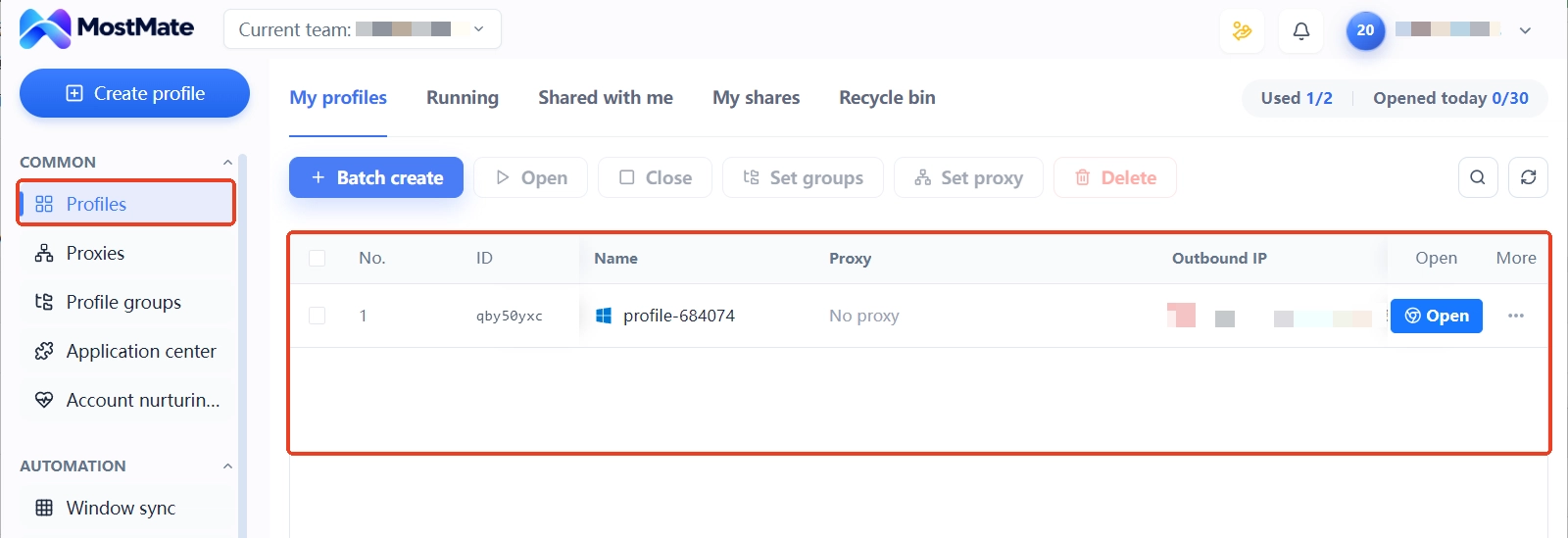
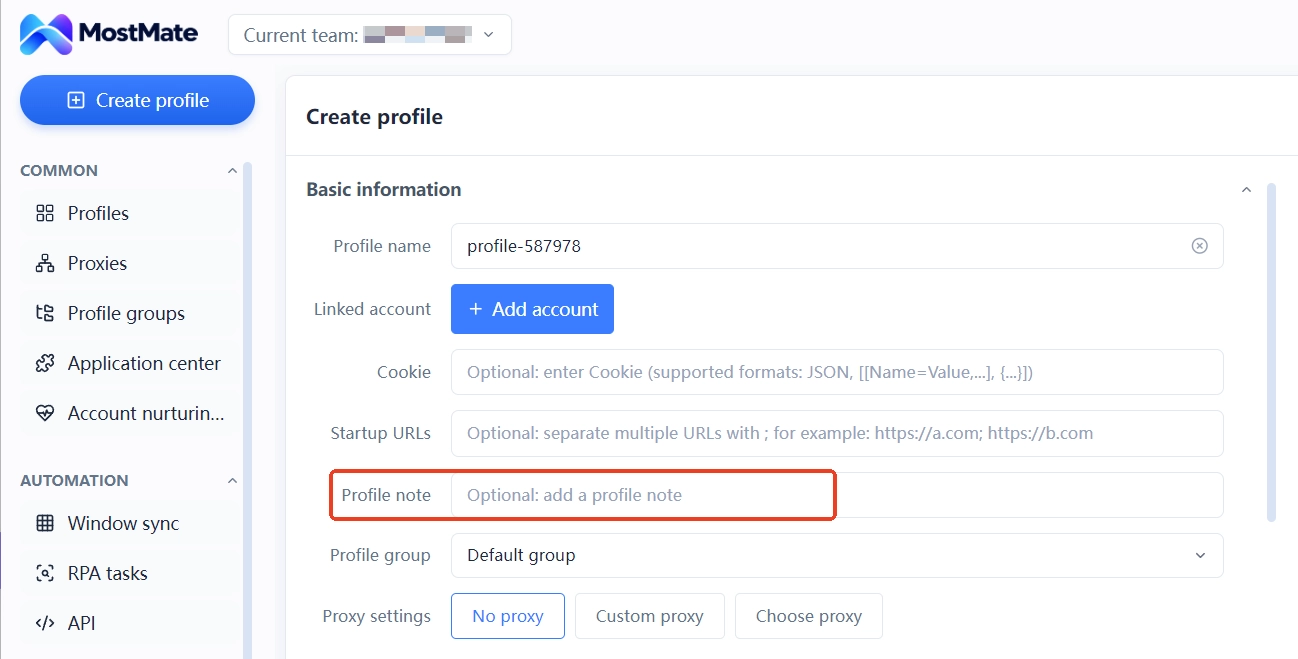
Build environment groups by channel tier, one each for revenue, growth and reserve; the groups map one-to-one onto the ledger's tier column, so audits go group by group with nothing missed or mismarked. Audit dates, anomalies and outcomes go into the environment notes, so the latest status is visible the moment you open the list, no need to dig through the ledger itself.
Permissions are assigned by tier. Revenue-tier environments go only to the owner, growth-tier ones to content and operations members, and reserve-tier ones can be consolidated under one dedicated person; member activity logs leave an operation trail, so handovers and tracebacks have something to stand on. Proxies bind environment by environment and each channel keeps a fixed exit; when something changes, swap the entry in the proxy list and update the ledger at the same time.
For how to build all of this from zero, the MostMate product page has a complete illustrated walkthrough. The value of these management actions is not in the tool itself but in actually running this rhythm every week; when the ledger and the tool match each other, the state of the matrix stays explainable at all times.
FAQ
Do matrix channels need a login every day?
No. Login frequency depends on the channel tier. For revenue-tier channels, the longer a session stays alive the more natural it looks, and logging in repeatedly every day is itself a suspicious signal. Arrange by tier: low-frequency long sessions for revenue, logins that follow the upload rhythm for growth, and basic weekly activity for reserve.
If one channel gets restricted, should the others stop publishing?
No. Keeping the other channels on their normal rhythm is the first choice; matrix-wide moves such as a collective publishing pause or config changes only widen the review scope. The right order is to silence the single channel, review change records, keep the rest running as usual, and reassess after recovery.
How do channel work and content scheduling fit together?
The content calendar governs content; the environment ledger governs accounts; the two run in parallel. The calendar answers "who publishes what, when"; the ledger answers "what state is this channel in right now". The two lines meet at the owner rather than in one merged sheet, so environment details do not churn along with content tasks.
With several people collaborating, how do accounts and permissions split?
Assign by channel tier. Revenue tier tightens down to the owner alone, growth tier opens to fixed operations members, and reserve tier can be delegated to one dedicated person. Control sharing granularity through environments, leave the operation trail to member logs, and when people change, touch only permissions, never environment configs.
Closing
Once a multi-channel matrix is up and running, the management focus shifts from "preventing association" to "staying explainable". What tier is each channel in, any recent anomalies, who is responsible: a matrix that can answer these at any moment can withstand platform reviews and personnel changes. Tiering, rhythm, audits, ledger and silence are five sets of actions, all aimed at keeping the state explainable. If your team is expanding a channel matrix from a couple of channels to many, start by downloading MostMate, set up groups and permissions by tier, then let the weekly audit settle into a fixed rhythm.

MOSTMATE
Secure Multi-Account Management, Made Simple
Start with your first account and use MostMate to build safer, smarter, and more efficient multi-account operations.
- Independent profiles. Consistent identities.
- AI Automation · Account Health · Team Operations



