Four Accounts Locked Out Overnight: What a Fingerprint Browser Actually Fixes
A six-person Meta ads team. A dozen laptops running a dozen Facebook accounts. One morning, four of them could not open Ads Manager, all at the same time. Nobody had changed a password. Nobody had switched devices.
Most of the time, the problem starts with how the accounts were built.
Platforms decide whether two accounts belong to the same person by assembling a set of signals into one answer: browser version, GPU model, screen size, font list, time zone, language, the country the exit IP sits in, even the pixel values Canvas draws. An ordinary computer hands all of this over without hesitation, and every window open on it gives back the same answers.
Incognito mode clears cookies and local storage, and stops there. Hardware and rendering signals stay where they were. Ten incognito windows still look like one machine to the platform. You changed the wrapper, not the machine.
When Accounts Fail, Check These Three Shared Layers First
Three places are worth checking first.
- Browser profile: tabs inside one browser share cookies, local storage, login sessions and cache. Switching tabs separates nothing.
- Device signals: operating system, GPU, screen, fonts and hardware parameters all come from the same machine, so every account reads back identical model numbers.
- Network exit: everyone shares one IP, or every account on that machine leaves through one proxy line.
Any single one of these being shared is enough to give two accounts a line between them. The awkward part is that all three sit below the interface, invisible on a normal day, and when something goes wrong you cannot tell which one moved first. Browser profile isolation exists to cut all three at the same time.
Then there is a rule you cannot design your way around. Meta's Community Standards, in the section on authentic identity, state that Facebook asks people to use the name they go by in everyday life and to keep one account; the list of behaviour that may receive further review includes creating or maintaining multiple Facebook accounts and creating a single account that several people share, with outcomes running from temporary restriction to permanent deactivation. That rule is about how account ownership should be arranged, which is a separate question from what technology can get around. For legitimate work such as media buying, store operations and content networks, the common industry practice is to organize accounts through Business Manager, business asset authorization and Page roles, so that everyone involved signs in under their own real identity. Isolation tools work on the boundary between devices and storage. They do not replace a compliant arrangement of account ownership.
Once the boundary is clear, the next question is what holds it in place.
What MostMate Is: Four Layers, One Account Each
MostMate is an AI fingerprint browser, called a fingerprint browser on its Chinese site and an anti-detect browser in English. Both names point at the same category of tool, and both are used for multi-account management. What it does fits in one sentence: give every account its own browser profile, so that browser data, digital identity, storage and network configuration each stay with their owner.
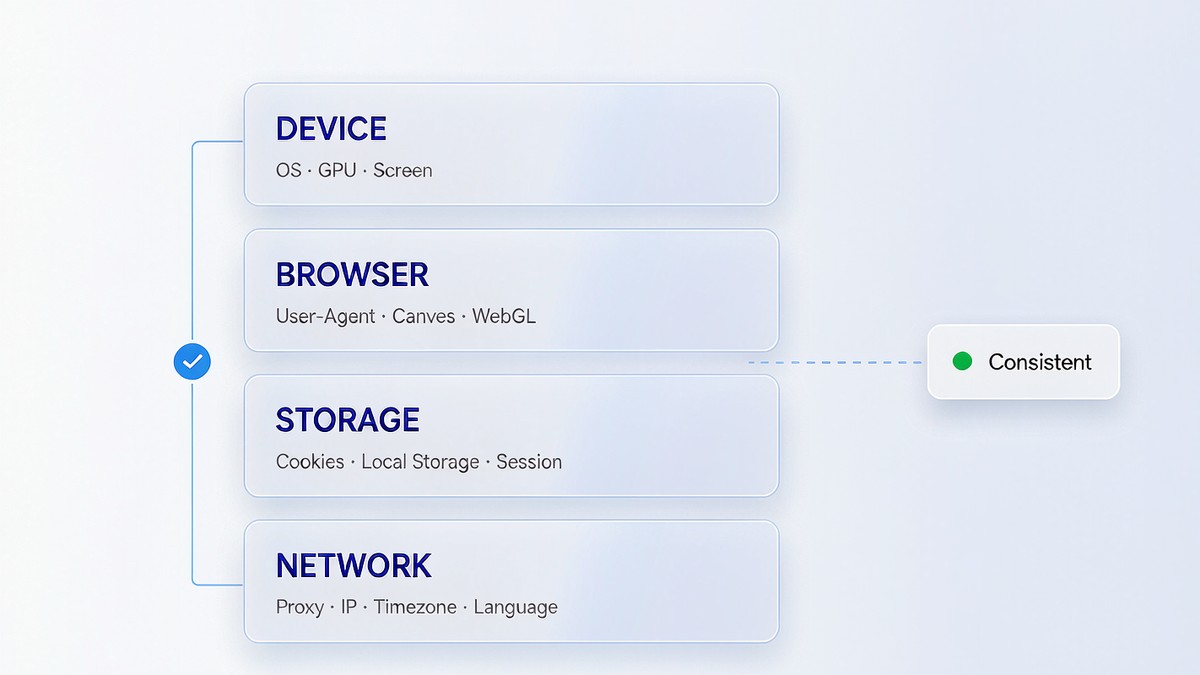
The official site splits one profile into four layers. Device identity covers the operating system, screen parameters, CPU core count, memory, GPU model and hardware-related hints, the layer closest to real hardware and the one that should change least often. Browser identity covers User-Agent, browser version, Canvas, WebGL, WebGPU, audio processing output and the font list. Storage isolation covers cookies, local storage, IndexedDB, sessions and cache, which is where "this account is still signed in" actually lives. Network environment covers the proxy, the exit IP, the addresses WebRTC exposes, time zone, language and geolocation.
Those four are not four dials you can turn independently. The device layer and the browser layer have to make sense to each other, the network layer has to line up with language and time zone, and the storage layer has to belong entirely to one account. Mix any one of them across accounts and the boundary blurs. They only hold up as a set.
Take one concrete combination: a Windows User-Agent on a GPU that only ships in Apple machines, a US IP with an Asia/Shanghai time zone, a 390×844 phone resolution on a 1920×1080 screen. Every value is legal on its own. Assembled, they describe a device that does not exist.
The official site states the principle plainly: isolation is not randomization. Profiles stay independent of each other, and the signals inside one profile stay consistent with one another.
Isolation Is Not Randomization: Two Truths That Get Overlooked
Some products sell a fresh fingerprint on every launch. Judged from the observing side, that trade is not obviously a good one. Real users are remarkably stable: the same laptop for a year, with system version, GPU, fonts and time zone barely moving. A profile that changes identity daily ends up standing out.
The second truth is easier to miss. Isolation between profiles covers browser data and identity settings; the proxy is configured separately. Two profiles pointed at the same proxy still present one public IP to the outside. The official documentation says so without dressing it up. If two accounts are meant to be genuinely separate, they need separate proxies too.
So judging a profile has nothing to do with how unusual its parameters are. The question is whether they describe one device that could actually exist. That question gets skipped more often than any other.
Facebook Account Health: What to Watch Once a Profile Exists
A profile is only the starting point. After an account is signed in, what deserves attention is the change in its status, and that used to be a chore: ad accounts in Ads Manager, Business Manager in its own console, Pages in Page settings, 2FA in Security Center. Checking one account meant four stops.
MostMate's account health gathers six statuses in one place: Profile, ad account, Business Manager, Page, 2FA and account restrictions, with a health score and a suggested next action beside them. The 92/100 shown on the official site is sample data; real numbers depend on the checks run against your own account.
One usage note matters. It reports the most recent available check and carries no promise about what happens next. Treating it as a weekly walkthrough beats digging through records after something breaks.
For someone managing accounts for the first time, the account growth plan is more direct. It lays out what to do in the first month as a dated schedule, showing which day you are on, how far the plan has progressed and the current risk level, with that day's suggested tasks underneath: keep the network stable, review security settings, complete the basic information. Beginners rarely lack configuration options. What they lack is an answer to "what should I do today."

Five Mistakes Beginners Make Most Often
A profile exists. Half the job is done, and the other half is where people slip.
- Assuming a finished profile solves everything. Isolation handles the links between accounts. It does not cover content compliance, payment method compliance, or the standards your ad creative has to meet.
- Chasing the rarest parameters. A rare combination is not an advantage by itself. A coherent, common configuration looks more natural.
- Rotating several accounts from one platform inside a single profile. The storage layers drift toward each other, and this is the most common way a boundary fails.
- Watching the IP while ignoring time zone and language. The exit is in the US, the time zone says Asia, the language is Simplified Chinese. Three signals telling three stories.
- Never checking again after setup. Browser updates, dropped proxies and expired sessions all change what the outside sees. A periodic review costs less than a repair.
Some of these can be avoided before you buy anything. If you are weighing several products, skip the feature counts. Write down the tasks you repeat every week, sort them into individual, team and developer work, then run one fixed task through every candidate. A ranking is somebody else's conclusion; what you measure yourself is yours.
Starting From Your First Profile: An Order You Can Follow
If you are ready to set one up, this order saves a few detours.
- Decide who the profile represents. One account, one profile. Do not compromise here.
- Pick the platform and region. The system suggests a configuration, and you start from that suggestion.
- Set the proxy and confirm it actually connects, with the IP's country matching the time zone and language.
- Before signing in anywhere, run the profile through public testing tools. INRIA's AmIUnique tells you how common each signal is across the population, and the EFF's Cover Your Tracks shows which attributes drive most of the uniqueness. Neither requires an account.
- Record the key parameters, run both tests again a week later and check for drift. Two matching runs is the bar.
- Sign in only once the profile looks stable, then follow the growth plan schedule.
The first pass takes about half an hour, and half of that goes to picking a proxy. There is no shortcut there. A clean profile still fails with the wrong proxy.
To see how MostMate organizes these profiles, the official site offers a setup preview you can walk through without registering. The longer explanation lives in how MostMate organizes browser profiles and multi-account workflows.
One thing to know in advance: installers are not available from the official site yet. The Windows and macOS download pages both say downloads are coming soon. For now, the setup preview is the way to learn how profiles get built.
Frequently Asked Questions
How is MostMate different from a regular browser with a proxy?
A regular browser plus a proxy replaces the network exit and nothing else. Cookies, local storage and login sessions still sit together, and the device and rendering signals still come from one machine. MostMate manages four layers: device, browser, storage and network. The proxy still has to be chosen and configured per profile.
Can two accounts share one profile?
Not recommended. A profile's storage layer belongs to one account as a whole, and two accounts taking turns to sign in let cookies and local storage drift together until the boundary is gone. Accounts on the same platform especially need one profile each.
How do I confirm two profiles are really isolated?
Two steps are enough. Open the testing tools in each profile and compare whether the fingerprint results land on different sets of values. Then confirm the two are not sharing a proxy. Both have to hold. One without the other is not isolation.
With a team sharing access, how are permissions split?
MostMate offers three team roles: administrator, operator and read-only member. Administrators handle profiles and members, operators handle daily work, and read-only members are for review and handover. When people change roles, reclaiming or transferring profiles is easier than tracing who touched what afterwards.
Does using a fingerprint browser mean accounts never have problems?
No, and no tool can promise that. Profile isolation addresses one class of problem, the links between accounts. Content compliance, payment methods, ad creative and general account security habits sit outside its scope. When you see a claim that promises a specific outcome, skip it.